If you’re running a command center with three, four, or even six monitors—plus the arms, mounts, and peripherals to support them—your standing desk isn’t just furniture. It’s infrastructure. A flimsy, underpowered frame will wobble, strain, and eventually fail under the constant load, turning your investment into an expensive regret. Dual-motor systems aren’t a luxury for these setups; they’re the minimum viable foundation for stability, safety, and long-term performance.
But not all dual-motor desks are built for true heavy-duty use. Manufacturers love to splash impressive weight capacities on spec sheets, while hiding critical details about stability at height, motor synchronization, and real-world durability. This guide cuts through the marketing noise and equips you with the engineering-level knowledge to evaluate frames, understand load dynamics, and build a workstation that won’t let you—or your monitors—down.
Top 10 Dual-Motor Standing Desks for Heavy Multi-Monitor Setups
Detailed Product Reviews
1. FLEXISPOT 79x32 Inch Large Dual Motor Electric Standing Desk, Black Walnut - 198 lbs Heavy-Duty Capacity, Ideal for Home Office, Creative Studio, or Multi-Monitor Setup

Overview: The FLEXISPOT 79x32 Inch Standing Desk in Black Walnut delivers executive-level workspace flexibility for serious professionals. This electric standing desk combines a spacious surface with dual-motor mechanics, supporting up to 198 lbs of equipment while maintaining smooth, quiet height transitions from sitting to standing positions.
What Makes It Stand Out: The premium black walnut finish distinguishes this model from standard black standing desks, offering sophisticated aesthetics that complement modern home offices and creative studios. The expansive 79-inch width accommodates triple-monitor setups, drawing tablets, and reference materials simultaneously. Dual motors ensure synchronized, wobble-free adjustment at 1.5 inches per second, while the sturdy steel frame eliminates the instability common in single-motor designs.
Value for Money: At $299.99, this desk undercuts premium competitors like Uplift and Fully by $200-400 while delivering comparable specs. The included large desktop eliminates the need to purchase a separate surface, saving an additional $100-150. For remote workers investing 8+ hours daily, the ergonomic benefits and durability justify the cost within months.
Strengths and Weaknesses: Pros include exceptional stability at maximum height, whisper-quiet operation (under 50 dB), and generous workspace. The black walnut veneer resists scratches better than laminate alternatives. Cons are the 79-inch length requiring substantial room space, and the two-piece desktop design (splice board) may slightly disrupt a seamless aesthetic.
Bottom Line: Ideal for designers, developers, and content creators needing expansive, stable workspace. The black walnut finish adds executive style without the premium price tag.
2. FLEXISPOT 79x32 Inch Large Dual Motor Electric Standing Desk, Black - Computer Desk with Memory Controller, Home Office Desk with Splice Board

Overview: The FLEXISPOT 79x32 Inch Standing Desk in Black offers the same robust functionality as its walnut counterpart but in a sleek, minimalist black finish. This dual-motor electric desk provides seamless height adjustment for demanding work environments, supporting up to 198 lbs across its expansive surface.
What Makes It Stand Out: The all-black aesthetic appeals to gamers, developers, and professionals preferring a unified, modern look. The integrated memory controller allows four programmable height presets, enabling instant transitions between preferred sitting and standing positions. The splice board construction simplifies assembly while maintaining structural integrity, and the powder-coated steel frame resists fingerprints and smudges better than lighter finishes.
Value for Money: Priced identically at $299.99 to the walnut version, the black model offers subjective aesthetic preference rather than functional difference. This positions it competitively against brands like SHW and Vari, offering superior motor quality and desktop size at the same price point. The memory controller adds convenience typically reserved for $400+ desks.
Strengths and Weaknesses: Pros include the versatile black finish matching any decor, reliable dual-motor system, and generous weight capacity. The memory controller enhances daily usability significantly. Cons remain the large footprint requiring dedicated space, and the splice board creates a visible seam some users may dislike. The black surface shows dust more readily than woodgrain.
Bottom Line: Perfect for gaming setups and minimalist offices where black hardware dominates. Choose this over the walnut version purely based on aesthetic preference.
3. FLEXISPOT 71x32 Inch Large Dual Motor Electric Standing Desk, Black - Computer Desk with Memory Controller, Home Office Desk with Splice Board
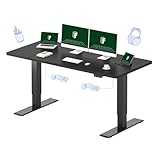
Overview: The FLEXISPOT 71x32 Inch Standing Desk scales down the brand’s proven formula for users needing premium features in a more compact footprint. Retaining the dual-motor system and 198 lbs capacity, this black desk sacrifices only 8 inches of width while delivering identical performance to its larger sibling.
What Makes It Stand Out: The 71-inch length fits comfortably in smaller home offices and apartments where 79 inches would overwhelm the space. Despite the reduction, it still supports dual-monitor setups with room for peripherals. The $259.99 price point represents excellent value, making dual-motor quality accessible to budget-conscious buyers. The memory controller and splice board design carry over from the larger model.
Value for Money: Saving $40 compared to the 79-inch version while losing minimal functional space creates outstanding value. Competitors like Fezibo charge similar prices for single-motor desks with smaller surfaces. For users not requiring extreme width, this model delivers 90% of the utility at 87% of the cost, with faster payback on the ergonomic investment.
Strengths and Weaknesses: Pros include space-efficient design, identical weight capacity and motor performance to larger models, and compelling price point. The black finish remains versatile for various decors. Cons involve the splice board seam and slightly limited workspace for users with three or more monitors. The controller’s button layout feels less premium than high-end alternatives.
Bottom Line: The smart choice for remote workers in compact spaces. Delivers full dual-motor standing desk benefits without the oversized footprint or premium price.
4. ErGear Dual Motor Standing Desk Frame 264 lbs Weight Capacity, 4 Memory Height Settings, Electric Adjustable Legs Compatible Desktop Size 44″-90″, Stand up Desks Frame Workstation, Black Frame Only

Overview: The ErGear Dual Motor Standing Desk Frame targets DIY enthusiasts seeking maximum customization and weight capacity. This frame-only solution supports 264 lbs—66 lbs more than most competitors—while accommodating desktops from 44 to 90 inches wide, offering unparalleled flexibility for unique workspace configurations.
What Makes It Stand Out: The adjustable width and height ranges surpass standard fixed-frame designs, allowing users to repurpose existing tabletops or source custom materials. Integrated cable management includes an under-desk tray and clips, solving a common pain point. Four memory presets and a controller extension cord provide ergonomic convenience. The 1-inch-per-second lift speed and 80,000-cycle motor durability rating ensure long-term reliability.
Value for Money: At $161.48, this frame costs nearly half of complete desk systems. Adding a $50-80 desktop creates a premium standing desk under $250, saving $50-100 versus pre-assembled alternatives. The higher weight capacity and width adjustability add value for users with heavy equipment or unconventional spaces.
Strengths and Weaknesses: Pros include exceptional weight capacity, customizable dimensions, robust cable management, and proven motor durability. The DIY approach allows aesthetic personalization. Cons require purchasing and possibly finishing a separate desktop, adding assembly complexity. The frame-only design lacks the polished look of integrated units, and setup demands more technical skill.
Bottom Line: Best for hands-on users wanting tailored workspace solutions. The frame’s flexibility and capacity justify the DIY effort for serious builders.
5. Mount-It! 48.5" Electric Standing Desk Converter for Dual Monitors, Motorized Sit Stand Electric Desk Riser with USB Port & Device Slot, Keyboard Tray, Adjustable Height Ergonomic Workstation, Black

Overview: The Mount-It! Electric Standing Desk Converter transforms existing desks into ergonomic workstations without requiring furniture replacement. This 48.5-inch motorized riser lifts dual monitors, keyboard, and mouse from 6 to 19.25 inches high, delivering sit-stand flexibility to traditional desk setups.
What Makes It Stand Out: Unlike manual converters, the electric motor enables effortless height adjustment with the push of a button. The integrated USB charging port keeps devices powered without reaching for wall outlets. A dedicated device slot positions tablets or phones at optimal viewing angles. The 35.5-inch keyboard tray accommodates full-size keyboards with mouse space, promoting proper wrist alignment.
Value for Money: At $369.99, this converter costs more than complete standing desks, making it a premium niche solution. However, for office workers unable to replace company furniture, it avoids the cost and hassle of negotiating new equipment. The portability allows use across multiple locations, spreading the investment over years.
Strengths and Weaknesses: Pros include instant setup, electric operation, integrated charging, and no need to discard existing furniture. The compact footprint suits cubicles and shared spaces. Cons feature limited 33 lbs capacity restricting monitor size, smaller workspace than full desks, and premium pricing. The 19.25-inch maximum height may prove insufficient for taller users.
Bottom Line: Ideal for corporate environments where desk replacement isn’t an option. The convenience features justify the cost for cubicle workers prioritizing ergonomics and portability.
6. Huuger Dual Motor Electric Standing Desk Frame, Sit Stand up Desk Leg for 47.2” to 86.6” Desktop, Computer Desk Leg with Cable Tray, 3 Memory Height Presets, 2 Hooks, Black Frame Only

Overview: The Huuger Dual Motor Electric Standing Desk Frame offers a budget-friendly entry point into the standing desk market for DIY enthusiasts. This frame-only solution lets you repurpose an existing desktop or craft a custom one, accommodating lengths from 47.2 to 86.6 inches and widths from 23.6 to 39.4 inches.
What Makes It Stand Out: The dual-motor system operates below 45 dB, ensuring quiet transitions that won’t disrupt your workflow. The intelligent keypad features three memory presets, allowing seamless switching between preferred sitting and standing heights. Laser-engraved markings on the crossbeam simplify precise width adjustments, while the included cable tray and two side hooks demonstrate thoughtful attention to workspace organization.
Value for Money: At $159.99, this frame significantly undercuts most dual-motor competitors while delivering comparable functionality. The DIY approach saves money compared to complete standing desks, and the wide compatibility range means you can use reclaimed wood or affordable countertops. For budget-conscious buyers willing to handle assembly, this represents exceptional value.
Strengths and Weaknesses: Pros: Dual-motor power at a single-motor price; whisper-quiet operation; extensive width compatibility; integrated cable management; memory presets. Cons: Frame-only (desktop not included); brand lacks established reputation; assembly required; maximum height of 46.5" may be short for taller users.
Bottom Line: The Huuger frame is an excellent choice for hands-on users seeking affordable dual-motor performance. If you’re comfortable sourcing your own desktop and tackling assembly, this delivers premium features without the premium price tag.
7. Mount-It! Double Monitor Electric Standing Desk Converter - 2 Screens Stand Up Desk Riser - Height Adjustable Desktop & 2 Mounts for Screens up to 32", Sit-Stand Convertor for Home, Office, School

Overview: The Mount-It! Double Monitor Electric Standing Desk Converter transforms any standard desk into an ergonomic standing workstation without requiring a full furniture replacement. This premium converter features integrated dual monitor mounts supporting screens up to 32 inches, making it ideal for multi-screen power users.
What Makes It Stand Out: Unlike basic converters, this unit includes secure VESA-compatible monitor mounts that tilt 45 degrees for optimal viewing angles. The 28-inch wide base accommodates a laptop or full keyboard and mouse setup, while the dedicated phone/tablet slot keeps devices accessible. The electric height adjustment ensures smooth transitions with minimal effort.
Value for Money: Priced at $399.99, this sits at the higher end for converters but costs far less than a complete electric standing desk with comparable monitor mounting capabilities. For professionals who’ve invested in quality monitors and want to maintain their existing desk, the price is justified by the integrated mounting system and electric convenience.
Strengths and Weaknesses: Pros: Integrated dual monitor mounts; electric adjustment; cable management; 45-degree tilt functionality; sturdy construction. Cons: Premium pricing; limited surface area for non-monitor items; may wobble at maximum height; requires existing desk with adequate depth.
Bottom Line: This converter suits dual-monitor users seeking a turnkey standing solution without replacing their desk. The electric adjustment and integrated mounts justify the investment for serious productivity enthusiasts who prioritize ergonomics and convenience.
8. TOPSKY Dual Motor 3 Stage Electric Adjustable Standing Desk Frame for up to 80”x31.5” Table Tops Heavy Duty 300lb Load Capacity for Home Office (Black Frame Only)
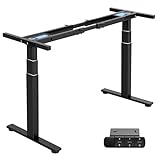
Overview: The TOPSKY Dual Motor Frame targets users needing heavy-duty performance and extensive height adjustability. Supporting up to 300 pounds across a three-stage lifting column, this frame handles elaborate multi-monitor setups, gaming rigs, and professional workstations with ease.
What Makes It Stand Out: The three-stage lift system provides an exceptional height range from 23.6 to 49.2 inches, accommodating users from 5'0" to 6'7". The anti-collision function uses a sensitive gyroscope to prevent damage during height adjustments. TOPSKY’s five-year warranty demonstrates confidence in durability, while the 1.37-inch-per-second adjustment speed keeps pace with premium competitors.
Value for Money: At $254.98, this frame offers professional-grade specifications at a mid-range price point. The 300-pound capacity and three-stage lift typically command $400+ in established brands. For users with substantial equipment loads or height requirements, this delivers significant long-term value.
Strengths and Weaknesses: Pros: Exceptional 300lb weight capacity; impressive height range; fast adjustment speed; anti-collision protection; comprehensive warranty. Cons: Width adjustment limited to 43"-67"; gyroscope sensitivity can trigger error codes if not perfectly level; warranty documentation inconsistencies; guide sleeve issues on shorter tops.
Bottom Line: The TOPSKY frame excels for heavy-duty applications and tall users. If you need maximum load capacity and height range for a substantial workstation, this frame outperforms its price class. Ensure proper installation to avoid sensor errors.
9. VERSADESK PowerPro™ 36 Inch Electric Standing Desk Converter, Height Adjustable Sit to Stand Up Desk Riser, Laptop and Dual Monitor Desktop Workstation with Wide Keyboard Tray and USB Port, Black

Overview: The VERSADESK PowerPro™ 36-inch converter balances spacious design with modern conveniences, supporting up to three monitors while adding a USB charging port. This electric riser transforms existing desks without the commitment of a full standing desk replacement.
What Makes It Stand Out: The integrated USB charging port eliminates outlet hunting for phones and accessories. Three pre-drilled grommet holes facilitate optional monitor arm installation, while the split-level design separates monitor and keyboard zones ergonomically. The 36-inch width provides generous space for dual monitors plus a laptop or documents.
Value for Money: At $400, this converter matches premium pricing but includes unique features like USB charging and triple-monitor support that competitors lack. For users wanting maximum flexibility without buying a new desk, the convenience features justify the cost, though dedicated monitor arms cost extra.
Strengths and Weaknesses: Pros: Built-in USB charging port; supports up to three monitors; spacious 36-inch surface; split-level ergonomic design; integrated grommet holes. Cons: Highest price in its class; monitors and optional arms not included; large footprint may overwhelm smaller desks; USB port adds cable clutter.
Bottom Line: The PowerPro™ suits users prioritizing monitor flexibility and charging convenience. If you need triple-monitor support and value integrated USB charging, this premium converter delivers. For simpler setups, more affordable options suffice.
10. VIVO Electric Height Adjustable 36 inch Standing Desk Converter with Dual Monitor Stand for 13 to 30 inch Screens, Sit Stand Monitor Mount and Desk Riser, Black, DESK-KIT-VE36B2

Overview: The VIVO Electric Converter offers an all-in-one solution for dual-monitor users seeking affordable standing desk conversion. Unlike basic risers, this includes fully adjustable VESA monitor mounts supporting 13- to 30-inch screens, combining desk elevation with ergonomic monitor positioning.
What Makes It Stand Out: The integrated monitor stand provides full motion adjustment: +90° to -90° tilt, 180° swivel, 360° rotation, and additional height adjustment along the center pole. This allows precise ergonomic positioning and portrait/landscape orientation changes. The patented design requires minimal assembly, getting users operational quickly.
Value for Money: At $219.99, this represents exceptional value by bundling electric height adjustment with dual monitor mounts. Purchasing a basic converter plus separate monitor arms would cost $300+. For users with appropriately sized monitors, this delivers professional ergonomics at a budget-friendly price point.
Strengths and Weaknesses: Pros: Includes dual VESA monitor mounts; full motion adjustment; easy assembly; 36-inch surface; electric lift mechanism. Cons: Limited to 16.5 lbs per monitor; maximum 30-inch screen size; desktop weight capacity of 28.6 lbs restricts accessories; grommet mount may not suit all desks.
Bottom Line: This converter is ideal for users wanting integrated monitor mounting without premium pricing. If your monitors fit the size and weight limits, the VIVO delivers unbeatable value and ergonomic flexibility. For larger screens, consider alternatives.
Why Dual-Motor Systems Are Non-Negotiable for Heavy Setups
The Physics of Lifting Heavy Loads
Single-motor desks distribute lift force through a connecting rod between legs, creating torque stress that magnifies with every pound you add. Dual-motor systems place a dedicated motor in each leg, delivering direct, balanced power that maintains levelness under asymmetric loads. For multi-monitor configurations—where weight isn’t just high but unevenly distributed—this prevents the “ski slope” effect where one side lags, stressing motors and destabilizing your screens.
Synchronized Movement and Stability
True dual-motor desks use integrated control boxes with hall sensors that monitor motor position 60+ times per second, adjusting voltage in real-time to keep legs perfectly synchronized. This micro-correction matters when you’re lifting 200+ pounds of gear. Desynchronized movement creates lateral shear forces that loosen bolts over time and introduce micro-vibrations you’ll feel in your monitors at standing height.
Speed and Efficiency Under Load
A quality dual-motor system maintains 1.5-2 inches per second lift speed even at 80% capacity. Cheaper systems slow dramatically under load, taking 45+ seconds to transition—a friction point that discourages regular position changes. Look for continuous duty cycle ratings (typically 10% for 2 minutes on, 18 minutes off) that indicate motors won’t overheat during your daily adjustments.
Understanding Weight Capacity: Beyond the Advertised Number
Static vs. Dynamic Load Ratings
That 300-pound capacity on the spec sheet? It’s often a static load rating—what the frame supports when stationary. Dynamic capacity, the weight it can safely lift, might be 20-30% lower. For heavy monitor setups, dynamic rating is the only number that matters. A desk rated for 350 pounds static might only handle 250-280 pounds in motion, which disappears quickly with monitor arms, docking stations, and a solid wood top.
Calculating Your True Setup Weight
Most buyers drastically underestimate their total load. A single 32-inch monitor weighs 15-18 pounds, but a heavy-duty arm adds 8-12 pounds. Six monitors? That’s potentially 180 pounds before you add the desktop, PC, cables, or speakers. Create a spreadsheet: list every component with its mounted weight, then add 15% for cable bundles and future additions. You’ll likely hit 200-250 pounds for a serious setup.
The 20% Safety Buffer Rule
Never spec a desk at more than 80% of its advertised dynamic capacity. This buffer accounts for motor wear over 5+ years, uneven loading, and the occasional lean or rest. If your calculated load is 240 pounds, target desks rated for 300+ pounds dynamic. Running motors near max capacity reduces lifespan by 40-60% and introduces stability-killing vibrations.
Frame Construction: The Foundation of Stability
Steel Gauge and Build Quality
Leg columns built from 14-gauge steel (0.075 inches thick) provide the rigidity heavy setups demand. Thinner 16-gauge steel flexes visibly at height, especially when you type aggressively. Check if the manufacturer specifies gauge—silence usually means thinner material. Powder-coated finishes should exceed 2 mils thickness to prevent rust at connection points where paint cracks from stress.
Leg Column Stages: 2-Stage vs. 3-Stage
Two-stage legs have two nested tubes; three-stage have three. For heavy loads, 3-stage designs distribute stress over more surface area, reducing wobble at maximum height. They also offer lower minimum heights (often 23-25 inches) and higher maximums (50+ inches), crucial for ergonomic range. The trade-off? Slightly heavier base weight and higher cost—non-issues for serious setups.
Crossbar Support: Yes or No?
Modern heavy-duty frames sometimes omit crossbars for aesthetic “C-frame” leg designs. For multi-monitor setups, a full-width crossbar is stability insurance. It prevents lateral racking—the side-to-side parallelogram effect that amplifies monitor wobble. If you must go crossbar-free, ensure the frame uses extra-wide footplates (at least 28 inches) and reinforced leg brackets.
Desktop Real Estate: Size and Material Matters
Minimum Dimensions for Multi-Monitor Arrays
A triple 27-inch monitor setup in landscape needs at least 70 inches of width. For 32-inch monitors or mixed orientations, plan for 78-80 inches. Depth matters more than you think: 30 inches is the functional minimum to position monitors at proper eye distance while leaving room for bases, speakers, and your keyboard tray. Anything less forces you to mount monitors farther forward, increasing torque on the frame.
Material Density and Weight Distribution
Bamboo tops are eco-friendly but can weigh 60-80 pounds for a 72-inch desk, eating into your capacity budget. Laminate is lighter (40-50 pounds) but less rigid—choose high-pressure laminate (HPL) on 45-pound density particle core for best stiffness. Solid hardwood? Beautiful, but a 72x30-inch maple top weighs 90-100 pounds. Factor this in before falling in love with aesthetics.
Depth: Why 30 Inches Is the New Standard
The old 24-inch depth standard comes from traditional desks designed for single monitors. With monitor arms and deep displays, 30 inches gives you the triangle space needed: monitor at rear edge (12 inches deep), arm mechanism (6 inches), and usable front workspace (12 inches). This depth also positions the load’s center of gravity closer to the frame’s centerline, improving stability.
Ergonomic Precision: Height Range and Control
Finding Your Ideal Sitting and Standing Heights
Your standing desk height should align your elbows at 90-100 degrees with your keyboard at standing height. For someone 5’10”, that’s roughly 44 inches to the desktop surface. The desk’s minimum height must also accommodate comfortable seated posture—typically 25-28 inches for average users. Measure your elbow height sitting and standing, then add 1.5 inches for keyboard thickness.
The Importance of Low Minimum Heights
Frames that descend to 23-25 inches accommodate shorter users and ergonomic keyboard trays. More importantly, a greater total range indicates a more robust 3-stage leg design. Be suspicious of desks that only go down to 28+ inches—they’re usually 2-stage frames with limited lift capacity.
Programmable Memory Controllers
Four-memory presets are table stakes. Look for controllers that show real-time height in inches or centimeters—this precision helps you replicate exact positions and diagnose leveling issues. Premium controllers include collision sensitivity adjustments and child lock features, useful if you have curious hands around your expensive gear.
The Wobble Factor: Stability at Full Extension
Lateral vs. Front-to-Back Wobble
Lateral wobble (side-to-side) is the monitor-killer. It’s caused by leg column flex and connection point slop. Front-to-back wobble feels less severe but still fatiguing. Test stability by placing a full water bottle on your desk and typing aggressively at standing height. If the bottle shows ripples, your monitors are experiencing micro-movements that cause eye strain over time.
Anti-Collision Systems and Sensitivity
Cheap anti-collision systems trigger only on hard resistance. Quality systems detect milliamp current spikes from soft obstructions—like a cable snag—stopping instantly. For heavy setups, adjustable sensitivity is crucial. Too sensitive and it triggers during normal load shifts; too insensitive and you’ll crush a $500 monitor arm. Look for systems with 5+ sensitivity levels.
Cable Management Strategies for Complex Setups
Integrated vs. Aftermarket Solutions
Factory cable trays are often shallow (2-3 inches) and can’t handle the 30-50 cables a multi-monitor setup generates. Measure your cable bundle diameter with everything connected. You’ll likely need 4+ inches of depth. Some heavy-duty frames offer optional deep trays (6+ inches) or modular spine systems that bolt directly to the frame, keeping weight centered.
Accounting for Cable Bundle Weight
A thick cable bundle with power bricks, USB hubs, and video cables can weigh 8-15 pounds. This hanging mass acts as a pendulum, amplifying wobble if not secured properly. Route cables to minimize free-hanging length and use velcro straps (not zip ties) every 6 inches to create a rigid bundle that moves with the frame, not against it.
Assembly, Installation, and Maintenance
Pre-Attached Components vs. Full DIY
Some heavy-duty desks ship with motors and control boxes pre-wired, cutting assembly time from 90 to 30 minutes. For 80+ pound frames, this also reduces the risk of dropping and damaging components. Check assembly videos before buying—if it requires threading wires through legs and crimping connectors, budget an extra hour and a patient helper.
Tools and Technical Skill Requirements
You’ll need at minimum a power drill with hex bits (not just the included Allen wrench) and a torque wrench for leg bolts. Uneven torque creates stress points that fail under dynamic load. Most frames specify 15-18 ft-lbs on leg bolts—tight enough to prevent shifting but not so tight you strip threads. A digital level app on your phone ensures the frame is square before adding the desktop.
Long-Term Maintenance Considerations
Every six months, check leg bolts for torque loss—the cycling load loosens them. Spray dry PTFE lubricant into leg columns to prevent the metal-on-metal squeaking that indicates wear. If your desk starts moving slower on one side, it’s early motor fatigue. Back off the load immediately and contact support; continuing will burn out the control box.
Noise Levels and Motor Quality
Decibel Ratings That Matter
Manufacturers love quoting <50 dB ratings, but that’s often at no load. Under 200+ pounds, cheap motors can hit 60-65 dB—a noticeable office drone. Quality dual-motor systems stay under 55 dB even at capacity, roughly the sound of a quiet conversation. Listen for grinding or whining, which indicates gear wear that will worsen.
Motor Durability and Lifespan
Look for motors rated for 20,000+ cycles (one up/down = one cycle). At 5 adjustments per day, that’s 11 years. Heavy-duty setups should target 30,000+ cycles. Motors with Hall effect sensors last longer than basic brushed motors because they run cooler. Ask manufacturers for MTBF (Mean Time Between Failure) data—reputable ones will share it.
Warranty and Customer Support
What a Good Warranty Actually Covers
A 10-year frame warranty is standard, but read the exclusions. Many void coverage if you exceed weight capacity (which they assume you’ll do). Better warranties cover motors for 5+ years and include free replacement of wear parts like control boxes. Look for “no questions asked” policies that don’t require you to ship back the failed component at your cost.
Support Responsiveness for Heavy Use Cases
Before buying, email support with a specific technical question: “What’s the dynamic load rating at 45 inches height?” If you get a generic copy-paste response, expect the same when a motor fails. Quality manufacturers have technical teams that understand load dynamics and will help you spec the right frame for your exact setup weight.
Budgeting for Your Heavy-Duty Desk
Initial Investment vs. Long-Term Value
A $600 dual-motor desk might handle your 180-pound setup today, but at 90% capacity, you’ll replace motors in 2-3 years. A $900+ heavy-duty frame running at 60% capacity will last a decade. The cost difference is $0.27 per day over 10 years—less than a coffee. Factor in the cost of downtime and replacing monitors damaged by a collapsing desk.
Hidden Costs: Accessories and Upgrades
Your $800 frame needs a $150 deep cable tray, $100 for a proper surge protector mount, and $50 in cable management hardware. If you’re using a solid wood top, add $200-400. Casters for mobility? Another $80-120. Budget 25-30% over the frame cost for a complete solution. Skimping on accessories concentrates stress points and negates the frame’s benefits.
Common Pitfalls to Avoid
Underestimating Future Expansion
You’re buying for today’s three monitors, but next year’s upgrade to 4K 43-inch displays could add 40 pounds. Always buy capacity for your planned evolution, not your current setup. A desk that’s perfect today but at 95% capacity leaves no room for growth without premature wear.
Ignoring Cable and Peripheral Weight
That under-desk PC mount, UPS battery, and headphone amp collection? Easily 30-50 pounds that buyers forget. Use a luggage scale to weigh your actual gear. We’ve seen setups where cables and peripherals added 18% to the total load—enough to push a borderline frame into failure territory.
Making Your Final Decision: A Practical Framework
Prioritizing Your Non-Negotiable Features
Create a weighted scoring matrix: Capacity (30%), Stability (25%), Height Range (15%), Warranty (15%), Noise (10%), Aesthetics (5%). Rate each frame on a 1-5 scale. Any desk scoring under 4.0 on Capacity or Stability is automatically disqualified. This removes emotion from a decision that should be engineering-driven.
Where to Find Trustworthy User Feedback
Amazon reviews are noise for heavy-duty use. Instead, search Reddit for “[frame type] wobble at 45 inches” to find real-world stability reports. YouTube channels that do teardowns and load testing provide invaluable data. Contact users with similar monitor counts and ask specific questions about long-term stability. The standing desk community is vocal about failures—listen to them.
Frequently Asked Questions
1. Can I use monitor arms with a dual-motor desk, or will they cause instability?
Monitor arms are actually more stable than monitor stands because they center the load over the desk’s structural frame. The key is using a heavy-duty arm rated for your monitor’s weight and bolting it through the desktop into a reinforcement plate. Cheap arms introduce flex at their own joints, which feels like desk wobble but is actually arm deflection.
2. How do I know if my floor can handle a fully loaded heavy-duty desk?
Most residential floors support 40-50 pounds per square foot. A 72x30-inch desk covers 15 square feet. At 300 pounds total weight, that’s 20 pounds per square foot—well within limits. However, if you’re on a raised floor or older home with joist issues, distribute load with wide footplates or a 3/4-inch plywood underlayment cut slightly larger than the desk footprint.
3. What’s the maximum monitor size I can safely mount on these desks?
There’s no hard limit on monitor size—only weight and mounting configuration. A 49-inch ultrawide at 35 pounds is fine; four 32-inch monitors at 20 pounds each (80 pounds total) is more stressful on the frame. The critical factor is using a monitor mount that distributes weight across at least 24 inches of the desktop’s width, preventing point loading on a single leg column.
4. Will adding a PC mount under the desk affect stability?
Under-desk PC mounts shift the center of gravity lower, which actually improves stability slightly. The risk is dynamic load: if the PC isn’t rigidly secured, its momentum during height changes creates sway. Use mounts with four-point contact and vibration-dampening pads. Position it centered between the legs, not cantilevered off the back edge.
5. How often should I expect to replace motors in a heavy-use scenario?
With quality dual-motor frames running at 60-70% capacity, motors typically last 7-10 years in home offices. In commercial settings with 20+ adjustments daily, expect 4-5 years. Running at 90%+ capacity cuts lifespan to 2-3 years. Replacement motors cost $80-150 each plus labor, making the initial capacity investment clearly economical.
6. Is a crossbar absolutely necessary for triple-monitor setups?
For setups under 200 pounds with three 27-inch monitors on a single mount, a well-engineered crossbar-free frame can work. For anything heavier or with separate monitor arms, a crossbar reduces lateral wobble by 40-60%. If you go without one, ensure your frame has at least 28-inch wide feet and you position monitors to minimize the moment arm.
7. Can I upgrade the desktop later without voiding the warranty?
Most frame warranties remain valid if you replace the desktop, provided you don’t modify the frame itself. However, switching to a significantly heavier top (e.g., laminate to hardwood) can exceed the frame’s designed load distribution. Check the warranty language for “approved desktop weights” and email support with your planned change to get written confirmation.
8. How do I test stability before committing to a full setup?
After assembly but before adding monitors, raise the desk to your standing height and perform the “push test”: push laterally on one corner with 20 pounds of force. If you see more than 1/4-inch deflection, the frame won’t handle monitors without wobble. Also, place a laser pointer on the desk surface aimed at a wall 10 feet away; any vibration will be visibly amplified.
9. What’s the ideal desk shape for corner multi-monitor arrays?
L-shaped desks distribute weight across two frames, effectively halving the load per motor. For heavy setups, this is often more stable than a single massive rectangle. The key is choosing a model where both sections adjust simultaneously from one controller, ensuring level movement. Avoid L-desks with a static return section—you lose ergonomic benefits.
10. Are there any electrical considerations for dual-motor desks with lots of peripherals?
Dual-motor desks draw 200-300 watts during adjustment, but only for 10-20 seconds. Your circuit load is negligible. The bigger issue is ground loops: multiple monitors and powered arms can create hum or interference. Use a single high-quality surge protector mounted to the frame, and ensure all components share a common ground. Some premium control boxes include EMI filtering to prevent motor interference with sensitive audio gear.