There’s a special kind of regret that only keyboard enthusiasts understand. You unbox your shiny new mechanical keyboard, type your first few sentences, and feel… nothing. Or worse, you feel discomfort, disappointment, and the dawning realization that you’ve just spent $150 on switches that feel like typing on stale pretzels. This isn’t just disappointment—it’s mechanical keyboard buyer’s remorse, and it’s more common than you think. Enter the humble switch tester: your personal insurance policy against costly mistakes and your gateway to truly understanding what your fingers crave before you commit to a full board.
These pocket-sized testing platforms have evolved from simple DIY gadgets into sophisticated decision-making tools. They don’t just let you feel the difference between a Cherry MX Blue and a Brown; they reveal the subtle nuances that spec sheets hide—the way a tactile bump can feel crisp or muddy, how sound profiles change with different keycap materials, and why that “perfect” 45g actuation force might feel completely different under your actual typing style. Whether you’re a programmer logging 10-hour sessions, a writer chasing flow state, or a gamer seeking competitive edge, the right switch tester transforms guesswork into informed choice.
Top 10 Mechanical Switch Testers
Detailed Product Reviews
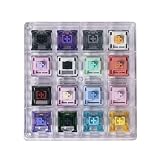
1. Akko 16-Key Switch Tester Mechanical Keyboards Acrylic Testing Tool Mechanical Keyboard Switches with Dust-Proof Cover
Overview:
The Akko 16-Key Switch Tester offers an affordable entry point for mechanical keyboard enthusiasts to sample different switch types before committing to a full keyboard purchase. This compact acrylic testing tool features a dust-proof cover and includes 16 switches from three brands, covering tactile, linear, and clicky variants. Designed for portability and simplicity, it allows users to experience the feel and sound of various switches without the investment in multiple keyboards.
What Makes It Stand Out:
The dust-proof cover is a standout feature rarely found in budget testers, protecting your switches from debris when not in use. The inclusion of multiple brands in one affordable package provides excellent variety for beginners. Its pocket-sized design makes it genuinely portable, while the 60-million keystroke durability rating ensures long-term testing reliability. The MX-style compatibility means you can test with your own keycaps, adding versatility.
Value for Money:
At $12.99, this tester delivers exceptional value for newcomers. You’re getting 16 different switches for less than a dollar each—a fraction of what individual switch packs cost. While premium testers offer more switches, this hits the sweet spot between cost and variety for those just starting their mechanical keyboard journey. It eliminates expensive trial-and-error purchases.
Strengths and Weaknesses:
Strengths include the protective dust cover, true portability, multi-brand variety, and unbeatable price point. The acrylic construction feels sturdy enough for regular use. Weaknesses are the limited 16-switch selection compared to comprehensive testers, lack of acoustic foam for realistic sound testing, and no included switch opener for deeper modification exploration.
Bottom Line:
Perfect for beginners seeking an affordable, portable solution to discover their switch preferences. The Akko 16-Key Tester offers essential variety without overwhelming complexity, making it an ideal first purchase before investing in a custom keyboard build.
2. Keychron Switch Tester 100 Max Edition, Mechanical Keyboard Switch Sampler Cherry Gateron Kailh with Transparent ABS Keycaps, Steel Plate & Foam for Testing Linear/Tactile/Clicky Feel

Overview:
The Keychron Switch Tester 100 Max Edition is the comprehensive testing solution for serious keyboard enthusiasts. Featuring 100 switches from four major brands—Keychron, Cherry, Gateron, and Kailh—this professional-grade tool includes transparent ABS keycaps, a steel plate, acoustic foam, and an adjustable two-stage kickstand. It meticulously replicates the authentic feel and sound of a full mechanical keyboard, making it indispensable for custom build planning.
What Makes It Stand Out:
The sheer scale of 100 switches is unmatched, offering the most extensive comparison platform available. The steel plate and foam construction accurately simulates real keyboard acoustics and typing feel—a critical feature missing from basic testers. The ergonomic kickstand provides three typing angles for comfortable extended testing sessions. The black transparent keycaps allow visual inspection while maintaining a premium aesthetic.
Value for Money:
At $45.99, this represents significant value for enthusiasts who would otherwise spend hundreds buying individual switch packs. You’re paying less than 50 cents per switch while getting a professional testing platform. For serious builders, this eliminates costly mistakes and provides a reference tool for future projects. The build quality justifies the premium over budget options.
Strengths and Weaknesses:
Strengths include the massive switch variety, realistic keyboard feel simulation, ergonomic design, and excellent build quality. The transparent keycaps are practical and stylish. The primary weakness is the higher price point, which may deter casual users. It’s also larger and less portable than compact testers, and the lack of PCB connectivity means you can’t test switch electronics.
Bottom Line:
An essential investment for serious enthusiasts and custom keyboard builders. The Keychron 100 Max Edition’s comprehensive selection and authentic feel simulation make it the ultimate switch testing tool, worth every penny for those committed to finding their perfect switch.
3. GATERON Keyboard Switches Tester, Magnetic Jade Oil King Milky Yellow Pro Oil King Baby Kangaroo Racoon Ink Wall Stem Box Black Pink for MX Mechanical Gaming Keyboard (35pcs)

Overview:
The Gateron 35-Key Switch Tester focuses exclusively on Gateron’s extensive switch lineup, offering 35 variants including their popular Oil King, Baby Kangaroo 2.0, Ink series, and unique magnetic switches. Packaged in a functional acrylic box that doubles as a lubing station, this tester caters to DIY enthusiasts who want to explore Gateron’s premium offerings. The selection covers linear, tactile, and clicky options with varying actuation forces and stem designs.
What Makes It Stand Out:
The inclusion of both mechanical and magnetic switches in one package is unique, though the critical compatibility warning must be heeded. The ability to repurpose the acrylic case as a lubing station adds practical value for modders. Gateron’s wall stem switches and specialized variants like the Clickiez offer testing opportunities unavailable in generic testers. The 5-pin PCB mount design ensures compatibility with most custom builds.
Value for Money:
At $22.88, this tester offers solid value for Gateron fans, working out to about 65 cents per switch. The dual-purpose packaging enhances value for DIY enthusiasts who will use the lubing station feature. However, the single-brand focus limits exploration compared to multi-brand testers at similar price points. It’s ideal if you’re already leaning toward Gateron switches.
Strengths and Weaknesses:
Strengths include the specialized Gateron selection, lubing station functionality, quality 5-pin construction, and clear compatibility with SMD and through-hole LEDs. The lifespan ranges from 50-150 million keystrokes, showing quality variance. The critical weakness is the confusing magnetic switch inclusion with limited compatibility. Single-brand focus restricts broader comparison, and the lack of acoustic dampening materials affects sound testing accuracy.
Bottom Line:
Best suited for Gateron enthusiasts and DIY modders who will utilize the lubing station feature. While the magnetic switch inclusion is questionable, the mechanical switch variety offers excellent insight into Gateron’s lineup. A smart choice if you’re building a Gateron-based keyboard.
4. Griarrac Cherry MX Switch Tester Mechanical Keyboards 9-Key Switch Testing Tool, with Keycap Puller and O Rings

Overview:
The Griarrac Cherry MX Switch Tester is a specialized tool focused exclusively on nine classic Cherry MX switch variants, the original mechanical keyboard switches. Mounted on a crystal-clear acrylic base with translucent keycaps, this tester provides an unadulterated experience of the most widely-used switches in the industry. It includes practical accessories like a keycap puller and O-ring samples for sound dampening experimentation.
What Makes It Stand Out:
The dedicated Cherry MX focus makes this perfect for purists who want to test the original gold standard switches. The included O-ring sampler set is a brilliant addition, letting users test both feel and sound dampening effects—a feature rarely bundled with testers. The completely transparent design showcases switch colors beautifully while allowing visual inspection. The ability to harvest switches for your own keyboard adds practical value.
Value for Money:
Priced at $21.99, this tester is moderately priced for a single-brand, nine-switch tester. While more expensive per-switch than budget options, the Cherry MX authenticity and included O-rings justify the cost. For users specifically seeking Cherry switches, it eliminates the risk of buying clones. The reusable switches effectively reduce the net cost if you incorporate them into a build.
Strengths and Weaknesses:
Strengths include authentic Cherry MX switches, innovative O-ring testing capability, beautiful transparent design, and switch reusability. The keycap puller is a welcome inclusion. Weaknesses are the limited nine-switch variety and single-brand focus, which doesn’t reflect the modern market’s diversity. The lack of acoustic foam means sound testing isn’t fully realistic, and the acrylic base feels less premium than steel-plate testers.
Bottom Line:
Ideal for Cherry MX purists and those who prioritize switch authenticity over variety. The Griarrac tester excels at its narrow focus, making it perfect if you’re committed to Cherry switches. The O-ring testing feature adds unique value for sound-conscious typists.
5. Akko 16-Key Switch Tester Mechanical Keyboards Acrylic Testing Tool Mechanical Keyboard Switches

Overview:
The Akko 16-Key Switch Tester provides an affordable entry point for mechanical keyboard newcomers to explore different switch types. This MonsGeek collaboration features 16 switches from three brands, covering tactile, linear, and clicky options in a compact acrylic housing. Designed for simplicity and portability, it helps users identify their preferred switch characteristics before investing in a full keyboard or custom build.
What Makes It Stand Out:
The multi-brand selection at this price point is impressive, offering genuine variety for beginners. Its pocket-sized portability means you can test switches anywhere, unlike bulkier alternatives. The MX-style structure ensures compatibility with most aftermarket keycaps, allowing personalization. The 60-million keystroke durability rating matches more expensive options, promising longevity for extended testing sessions.
Value for Money:
At $12.99, this tester delivers outstanding value, costing less than a dollar per switch. It eliminates expensive guesswork for first-time buyers who might otherwise purchase the wrong keyboard. While premium testers offer more switches, this provides the essential variety most beginners need. The build quality exceeds expectations for the price point, making it a low-risk introduction to switch testing.
Strengths and Weaknesses:
Strengths include unbeatable affordability, true portability, multi-brand variety, and solid durability claims. The simple design is approachable for non-technical users. Weaknesses include the basic acrylic construction without acoustic foam, limiting sound testing accuracy. The 16-switch selection, while adequate for beginners, may feel limited as your knowledge grows. No included accessories like O-rings or switch openers reduce its long-term utility for advanced users.
Bottom Line:
An excellent starting point for mechanical keyboard newcomers. The Akko 16-Key Tester offers essential switch variety at an irresistible price, making it the perfect low-risk tool for discovering your typing preferences before making a larger investment.
6. GATERON Keyboard Switches Tester, Jade Baby Kangaroo Smoothie Melodic Inside, Fit for Mechanical Magnetic Keyboard (high Profile Mix he switches, 20)

Overview: The GATERON Keyboard Switches Tester offers a comprehensive sampling of 20 magnetic switches, including intriguing variants like Jade, Baby Kangaroo, Smoothie, Melodic, and Inside. Designed for mechanical magnetic keyboards, this high-profile mix allows enthusiasts to explore the nuanced feel and response of Gateron’s latest Hall-effect switch technology before committing to a full set.
What Makes It Stand Out: This tester showcases Gateron’s innovative magnetic switch lineup in a single package, which is rare at this price point. The inclusion of 20 distinct switches provides exceptional variety for comparing actuation points, tactile feedback, and acoustic properties. The “high profile” designation suggests these switches offer a more substantial typing experience, while the whimsical naming convention hints at carefully tuned performance characteristics that cater to different typing preferences.
Value for Money: At $14.88 for 20 switches, this tester delivers remarkable value at approximately $0.74 per switch. Magnetic switches typically command premium pricing, making this sampler an economical way to experience cutting-edge keyboard technology. Compared to purchasing individual switch packs or full keyboards, it offers significant savings while providing comprehensive testing capabilities for enthusiasts exploring the magnetic switch ecosystem.
Strengths and Weaknesses:
- Strengths: Extensive 20-switch variety; affordable entry to magnetic switch technology; high-profile design for premium feel; excellent for switch comparison.
- Weaknesses: Confusing product title lacks clear switch specifications; no mention of acrylic base or keycaps; limited documentation for beginners; magnetic compatibility may not suit all keyboards.
Bottom Line: This Gateron magnetic switch tester is an exceptional value for experienced enthusiasts wanting to explore Hall-effect switches. While the marketing is unclear, the sheer variety and competitive pricing make it a worthwhile investment for those building custom magnetic keyboards.
7. Outemu Switch Tester (4 Keys) – Acrylic Mechanical Switch Testing Tool with Red, Blue, Brown & Black Switches – MX Compatible Sampler Kit

Overview: The Outemu Switch Tester (4 Keys) provides a compact introduction to mechanical keyboard switches with four essential variants: Red, Blue, Brown, and Black. Housed in a transparent acrylic base, this budget-friendly sampler lets newcomers experience the fundamental switch types—linear, clicky tactile, soft tactile, and heavy linear—without investing in a full keyboard.
What Makes It Stand Out: Its simplicity and accessibility make this tester ideal for beginners. The crystal-clear acrylic construction not only looks professional on any desk but also allows users to observe switch mechanisms in action. The plug-and-test design requires no tools, making switch swapping effortless. Additionally, its MX-compatible cross stems ensure compatibility with most keycap sets, allowing for personalized testing with your own caps.
Value for Money: At $4.99, this is one of the most affordable mechanical switch testers available, costing just $1.25 per switch. It provides an unbeatable entry point for those curious about mechanical keyboards. While premium testers offer more variety, this focused four-switch selection covers the essential typing experiences needed to make an informed first keyboard purchase, delivering outstanding value for budget-conscious buyers.
Strengths and Weaknesses:
- Strengths: Extremely affordable; perfect for beginners; transparent acrylic base; tool-free switch removal; portable design; MX-compatible.
- Weaknesses: Only four switch types; limited to Outemu brand; no keycaps included; basic functionality without advanced features.
Bottom Line: For under five dollars, this Outemu tester is an essential tool for keyboard newcomers. It delivers exactly what beginners need—hands-on experience with core switch types—in a simple, well-designed package that punches far above its price point.
8. KPREPUBLIC 24 Switch switches Tester with Acrylic Base Blank keycaps for Mechanical Keyboard kailh Box Heavy pro Purple Orange Yellow Gold (Kailh 24 Switch Tester)

Overview: The KPREPUBLIC 24 Switch switches Tester offers an extensive Kailh Box switch collection featuring Heavy Pro variants in Purple, Orange, Yellow, and Gold. With a vibrant color scheme and premium acrylic base, this comprehensive sampler includes blank keycaps and allows enthusiasts to thoroughly test Kailh’s robust Box switch lineup before committing to a full keyboard build.
What Makes It Stand Out: This tester excels in both quantity and quality, providing 24 detachable switches that showcase Kailh’s durable Box architecture. The Heavy Pro series offers distinct tactile and linear experiences with enhanced dust and water resistance. The elegant color-coded design creates a visually striking display piece, while the blank keycaps maintain a clean aesthetic that doesn’t distract from the switches themselves.
Value for Money: Priced at $15.90 for 24 switches, this tester costs roughly $0.66 per switch—excellent value for a premium brand like Kailh. Box switches typically retail for $0.50-$1.00 each, making this sampler competitively priced while adding the convenience of a dedicated testing platform. It’s an economical way to explore the entire Heavy Pro range without buying multiple switch packs.
Strengths and Weaknesses:
- Strengths: Comprehensive 24-switch selection; premium Kailh Box quality; attractive color scheme; includes blank keycaps; sturdy acrylic base; excellent value per switch.
- Weaknesses: Limited to specific Heavy Pro variants; no printed legends on keycaps; may overwhelm complete beginners; Kailh Box switches aren’t universally preferred.
Bottom Line: This KPREPUBLIC tester is a fantastic investment for Kailh enthusiasts and intermediate builders. It combines extensive variety, build quality, and value, making it the go-to choice for anyone serious about exploring Kailh’s Box Heavy Pro switches.
9. Max keyboard Cherry MX Switch Tester Sampler 12-Key Mechanical Keyboards Testing Tool with Printed PBT Keycaps

Overview: The Max keyboard Cherry MX Switch Tester Sampler 12-Key Mechanical Keyboards Testing Tool delivers an elite sampling of genuine Cherry MX switches, including standard and RGB variants plus specialty types like Silent Red, Speed Silver, Tactile Gray, and Green. Featuring high-quality printed PBT keycaps and a sleek acrylic base, this premium tester represents the gold standard for switch comparison.
What Makes It Stand Out: As an official Cherry MX product, this tester offers authenticity that clones cannot match. The inclusion of both RGB and non-RGB versions allows direct comparison of LED effects, while specialty switches like the ultra-fast Speed Silver and quiet Silent Red cater to specific use cases. The durable PBT keycaps with clear legends enhance the testing experience and long-term durability, making this a professional-grade evaluation tool.
Value for Money: At $34.99, this tester costs about $2.92 per switch—a premium price justified by genuine Cherry MX quality and the included PBT keycaps. While significantly more expensive than clone testers, it eliminates guesswork for Cherry purists. For those building high-end keyboards where only authentic Cherry switches will suffice, this investment prevents costly mistakes and ensures perfect switch selection.
Strengths and Weaknesses:
- Strengths: Genuine Cherry MX switches; premium PBT keycaps; includes rare variants like Silent Red and Speed Silver; professional build quality; clear labeling.
- Weaknesses: Highest price point; limited to 12 switches; primarily benefits Cherry loyalists; RGB switches add cost but may be unnecessary for some users.
Bottom Line: This Cherry MX tester is the definitive choice for purists and professional builders. Despite its premium price, the authentic switches, superior keycaps, and comprehensive selection make it worth every penny for those demanding genuine Cherry quality.
10. Outemu Switch Tester (8 Switches) – Acrylic Mechanical Switch Testing Tool with Red, Blue, Brown Switches – MX Compatible Sampler Kit

Overview: The Outemu Switch Tester (8 Switches) offers a unique approach with nine total switches—three each of Red, Blue, and Brown—allowing for consistent feel testing across multiple keys. This acrylic-based testing tool provides an affordable way to experience Outemu’s popular linear, clicky, and tactile switches before building a custom keyboard or replacing existing switches.
What Makes It Stand Out: The triple-switch configuration for each type is this tester’s defining feature, enabling users to test consistency across multiple keys—crucial for identifying manufacturing variations. This design better simulates actual typing experiences across a keyboard’s main key area. The transparent acrylic base maintains visual appeal while keeping costs low, and the MX-compatible stems allow for easy keycap customization.
Value for Money: At $6.99 for nine switches, this tester costs approximately $0.78 per switch, offering excellent value despite the confusing “8 Switches” title. It provides more testing capacity than the 4-switch version while remaining highly affordable. The ability to test three identical switches helps identify consistency issues before purchasing bulk switches, potentially saving money on returns or replacements.
Strengths and Weaknesses:
- Strengths: Triple-switch testing for consistency verification; very affordable; MX-compatible; tool-free operation; portable design; good switch variety.
- Weaknesses: Product title incorrectly states “8 Switches”; limited to three Outemu types; no keycaps included; fewer switch options than comprehensive testers.
Bottom Line: This Outemu tester is perfect for budget-conscious builders who prioritize switch consistency. The triple-key design offers unique value for testing manufacturing uniformity, making it an intelligent choice despite the misleading product title.
Why Mechanical Switch Testers Are Essential for Smart Buyers
The gap between reading about switches and actually using them is enormous. Manufacturers’ descriptions like “tactile bump” or “linear smoothness” are subjective experiences that defy translation through text alone. A switch tester bridges this experiential divide, giving your fingers the vocabulary to speak directly to your brain without the interference of marketing language.
Beyond the tactile education, these devices serve as acoustic laboratories. The clack, thock, or ping you hear in YouTube sound tests gets filtered through microphones, compression algorithms, and your own speakers—none of which accurately represent what you’ll hear at your desk at 2 AM. Testing switches in person reveals the true sonic signature, including the high-frequency overtones that make a switch sound “cheap” or the dampened acoustics that create that coveted “thock.”
Understanding the Anatomy of a Quality Switch Tester
The Base Plate: Foundation of Authentic Feel
The material and thickness of a tester’s base plate dramatically influence your perception of switch feel. Thin plastic plates flex slightly during keypresses, artificially softening the bottom-out experience and masking the true character of the switch. Premium testers utilize materials like aluminum or brass with thicknesses of 1.5mm or greater, mimicking actual keyboard construction and providing the rigid foundation switches were designed for.
This structural honesty matters because plate material affects sound resonance, switch stability, and even the perceived weight of each keystroke. When you test a switch on a flimsy plate, you’re not testing the switch—you’re testing the plate’s ability to approximate reality.
The PCB: Electronics That Actually Matter
Beneath the plate, the printed circuit board (PCB) quality determines whether your tester is a toy or a tool. Look for PCBs with proper diode implementation, clean soldering pads, and robust microcontroller units. Some advanced testers include USB-C connectivity with proper debouncing algorithms that replicate how a premium keyboard processes each keypress.
The PCB layout also affects switch orientation and spacing. Testers that arrange switches in a traditional staggered layout provide more realistic finger positioning than grid arrangements, helping you evaluate reach and comfort for your actual typing patterns.
Switch Count Matters: Finding Your Sweet Spot
The Minimalist Approach: 4-6 Switch Testers
Compact testers serve a specific purpose: rapid A/B comparison between your top candidates. These pocket-sized tools excel when you’ve already narrowed your options to a handful of switches but need to make the final call. They’re ideal for testing subtle variations—like the difference between Gateron Yellow, Milky Yellow, and Ink Black V2—where minute differences in smoothness or sound profile become decision factors.
The Standard Range: 8-12 Switch Testers
This represents the sweet spot for most buyers, offering enough variety to compare major switch categories without overwhelming decision paralysis. A well-curated 9-switch tester typically includes a linear, tactile, and clicky representative from multiple brands at various actuation forces, giving you a comprehensive overview of the switch landscape.
The Comprehensive Library: 25+ Switch Testers
For the true enthusiast or community builder, large-format testers function as reference libraries. These panels let you compare dozens of switches side-by-side, identifying trends across manufacturers and discovering hidden gems. The investment makes sense if you’re planning multiple keyboard builds or advising others in the hobby, but can be overkill for a single purchase decision.
Build Quality: What Separates Premium from Disposable
Material Grades and Longevity
The difference between a $15 tester and a $75 tester often comes down to materials that survive hundreds of hours of testing. Injection-molded ABS plastic degrades with repeated switch insertions, slowly enlarging the switch cutouts until switches wobble or fail to clip securely. Premium testers use PBT plastic, aluminum, or even acrylic with machined tolerances that maintain structural integrity through countless switch swaps.
Metal testers bring additional benefits beyond durability. Their weight prevents sliding during aggressive typing tests, and their thermal mass affects how switches feel after extended use—just like a real keyboard warms slightly under your hands during long sessions.
Keycap Considerations
The keycaps included with your tester significantly impact your evaluation. Thin, OEM-profile ABS caps produce a higher-pitched, less satisfying sound than thick PBT caps in Cherry or SA profile. Some testers ship with blank caps, forcing you to focus purely on feel rather than being distracted by legends. Others include transparent caps that let you observe stem movement and spring compression—valuable for understanding the mechanical action.
Hot-Swappable vs. Fixed Testers: Which Approach Fits You
The Flexibility of Hot-Swappable Platforms
Hot-swappable testers accept switches without soldering, using Kailh or Gateron hot-swap sockets. This design transforms your tester into an evolving platform that grows with your interests. You can purchase single switches for a dollar or less, testing new releases without buying another complete tester.
The socket quality becomes crucial here. Cheap sockets lose tension after 20-30 insertions, causing switches to sit crooked or lose electrical contact. Premium testers use gold-plated sockets rated for 100+ cycles, ensuring consistent performance as you explore the switch universe.
The Consistency of Fixed Testers
Soldered or factory-fixed testers offer one undeniable advantage: absolute consistency. Every switch is permanently mounted, eliminating variables like socket wobble or inconsistent pin contact. This setup perfectly represents how switches behave in a soldered custom keyboard build, making them ideal for purists who prefer traditional construction methods.
Fixed testers also tend to be more compact and portable since they don’t need the vertical clearance for switch removal. For travelers who attend meetups or want to test switches at the office, this format often proves more practical.
Layout and Ergonomics: The Testing Experience
Finger Positioning and Realism
A tester’s layout should mirror actual keyboard usage patterns. Single-row linear arrangements force unnatural finger movements that don’t replicate real typing. The best testers use staggered columns that approximate QWERTY positioning, letting you test switches with the same fingers that’ll eventually use them daily.
Some innovative designs include a small function row or even a mini spacebar area, allowing you to test stabilized keys. Since stabilized switches feel and sound different due to the wire mechanisms, this feature provides crucial data for buyers who want complete accuracy.
Spacing and Switch Density
Overcrowded switches make it difficult to isolate individual keypresses, while excessive spacing slows down comparative testing. The optimal density allows comfortable keypresses without accidental adjacent switch activation. Look for testers with at least 18mm center-to-center spacing, matching standard keycap dimensions.
Switch Types You Must Test Before Buying
The Linear Spectrum: From Feather-Light to Heavy
Linear switches demand testing across their entire weight range. A 35g switch feels dramatically different from a 67g variant, and the smoothness varies wildly between manufacturers. Testing should include both factory-lubed and dry switches, as many enthusiasts modify their switches, and you need to know the baseline performance.
Tactile Variations: Bump Shape and Location
Not all tactile bumps are created equal. Some arrive early in the keypress, others late. Some feel sharp and pronounced, others gentle and rounded. A quality tester reveals these differences immediately, showing you whether you prefer the immediate feedback of a Holy Panda or the gradual resistance of a Cherry MX Clear.
Clicky Switches: The Acoustic Promise
Click jackets, click bars, and click leaves each produce distinct sounds and feels. Testing reveals whether you love the crisp snap of a Kailh Box White or find the rattle of a Cherry MX Blue annoying. More importantly, it shows you whether the click occurs at the actuation point or somewhere else—a critical detail for touch typists.
The Sound Factor: Acoustic Testing Considerations
Environment and Surface Interaction
Your tester’s sound profile changes dramatically based on what surface it rests on. Testing on a hard desk versus a mouse pad versus a desk mat reveals how switches interact with your actual workspace. Premium testers include rubber feet or dampening layers that isolate the sound, but you should always test in your intended environment.
Microphonic Effects and Vibration
Some switches produce high-frequency resonance that travels through the plate and into the PCB. This microphonic effect creates a “ping” that spec sheets never mention. A solid tester reveals these acoustic flaws, helping you avoid switches that sound fine in isolation but annoying during extended use.
Tactile Feedback: Beyond the Spec Sheet
Force Curves and Real-World Perception
Manufacturers publish force curves showing actuation force throughout the keypress, but these graphs don’t capture the full story. The rate of force increase, pre-travel distance, and post-bump behavior all contribute to perceived quality. Your fingers detect subtleties that graphs obscure, like whether a tactile bump feels “rounded” or “scratchy.”
Wobble and Stem Stability
Press a switch off-center and observe how the stem handles lateral force. Excessive wobble creates inconsistent feel and keycap alignment issues. Testers let you deliberately stress switches from various angles, revealing stability problems that only appear during real typing, not perfect vertical presses.
Keycap Compatibility and Customization Options
Profile and Material Swapping
A versatile tester accommodates multiple keycap profiles and materials. The ability to swap between ABS and PBT, or between OEM and Cherry profile, shows you how switch character changes with different caps. Some switches shine with thick SA caps but feel mediocre with thin OEM caps—critical knowledge for buyers planning custom keycap sets.
Stem Compatibility Adventures
While most mechanical switches use MX-style stems, the ecosystem includes Box switches with slightly different dimensions, optical switches with unique requirements, and boutique options like Alps or Topre. Advanced testers offer adapter plates or multiple PCB sections, letting you explore beyond the MX standard without buying separate testers.
PCB and Electronics: What’s Under the Hood
Diode Implementation and Rollover Testing
Quality PCBs include diodes for each switch, enabling proper NKRO (N-Key Rollover) functionality. While less critical for a tester than a full keyboard, this implementation affects how the microcontroller reads switch states. Testers without diodes might miss subtle chattering issues or fail to register extremely rapid keypresses, giving you incomplete data.
Firmware and Programmability
Some advanced testers feature programmable microcontrollers like the ATmega32U4, allowing you to remap switches or create macro tests. This functionality lets you program a switch to repeat keystrokes automatically, testing consistency across hundreds of presses while you listen for anomalies. It’s overkill for casual buyers but invaluable for reviewers or retailers.
Portability and Storage: Taking Your Tester on the Road
Compact Designs for Travel
If you attend keyboard meetups or want to test switches at retail stores, portability becomes paramount. Slim aluminum testers under 10mm thick slip into laptop bags without adding bulk. Some designs incorporate magnetic switch holders, letting you carry a few extra switches without them bouncing around loose.
Protective Cases and Organization
Premium testers often include custom-fitted cases that protect the plate finish and prevent switch damage. These cases frequently feature foam cutouts for organizing your growing switch collection, transforming the tester into a portable switch library. For home users, vertical stands keep testers accessible while saving desk space.
Price vs. Value: Investing Wisely in Your Decision Tool
The False Economy of Budget Testers
A $10 plastic tester seems like a smart entry point, but its limitations can lead to poor decisions that cost far more. Inconsistent switch seating, flexy plates, and missing switch varieties create blind spots in your evaluation. The money saved on the tester often gets dwarfed by the cost of buying and reselling a keyboard with wrong switches.
When Premium Features Pay Off
Spending $50-100 on a quality tester makes economic sense if you’re considering keyboards in the $200+ range. The tester becomes a reusable tool for future purchases, effectively paying for itself after just one correct decision. Features like hot-swap sockets, metal construction, and comprehensive switch selections future-proof your investment against evolving preferences.
How to Use a Switch Tester Effectively: Methodology
The Blind Testing Protocol
To avoid brand bias, conduct blind tests by having a friend randomize switch positions or by covering switch labels. Type identical passages on each switch, focusing purely on sensation rather than preconceived notions about manufacturers. This methodology reveals genuine preferences that marketing and community hype might otherwise obscure.
Extended Testing Sessions
A five-minute test session captures initial impressions but misses fatigue factors. Spend at least 30 minutes actively typing on your top 3-4 candidates. Repetitive strain patterns emerge only after extended use, showing you whether a switch’s weight becomes tiring or its sound grows annoying over time.
Common Pitfalls When Choosing a Switch Tester
The “More Switches = Better” Fallacy
Testers boasting 50+ switches often include redundant variants that confuse rather than clarify. A tester with five slightly different 45g linear switches from the same manufacturer teaches you less than a curated selection representing diverse switch philosophies. Focus on quality of comparison over quantity of options.
Ignoring the Stabilizer Gap
Most testers omit stabilized keys, yet spacebars, shifts, and enters make up significant typing real estate. The feel difference between a stabilized and unstabilized switch is dramatic. Seek testers that include at least one stabilized key, or purchase separate stabilizer testers to complete your evaluation.
Building Your Own vs. Buying Pre-Assembled
The DIY Advantage: Customization and Learning
Building a tester from scratch teaches you soldering skills and lets you curate an exact switch selection. You can choose specific plate materials, implement custom layouts, and even add features like LED indicators. The process demystifies keyboard construction, making you a more informed buyer when evaluating pre-built keyboards.
Pre-Assembled Benefits: Convenience and Curation
Commercial testers benefit from expert curation—vendors who’ve tested hundreds of switches and know which representatives best showcase each category. They also include warranty protection and often feature more refined construction than first-time DIY projects. For buyers focused on decision-making rather than the building experience, pre-assembled saves time and potential frustration.
The Long-Term Value of Switch Testers
Your tester becomes more than a one-time decision tool—it evolves into a reference platform for lubing experiments, spring swaps, and community sharing. As you modify switches, the tester lets you A/B test changes instantly. When friends express interest in mechanical keyboards, your tester becomes an educational device, spreading knowledge and preventing their own buyer’s remorse.
The hobby’s rapid innovation means new switches release monthly. Rather than buying full keyboards to test each novelty, your tester accepts individual switches, keeping you current without bankrupting you. In this context, the tester transforms from a purchase into a permanent hobby asset.
Frequently Asked Questions
Are mechanical switch testers actually worth the investment, or can I just watch YouTube reviews?
YouTube reviews compress audio, show switches under ideal conditions, and can’t replicate your unique typing force or finger anatomy. A $40 tester prevents a $200 mistake, making it one of the hobby’s highest-value purchases. Your fingers will feel differences that cameras and microphones cannot capture.
How many different switches do I realistically need to test before buying a keyboard?
Test at least one representative from each major category: light linear, heavy linear, light tactile, heavy tactile, and clicky if interested. That’s 5-7 switches minimum. Add variants if you have specific needs—like silent switches for office use or speed switches for gaming. Quality of testing beats quantity every time.
Can I reuse the switches from my tester in an actual keyboard build later?
Absolutely, if you bought a hot-swappable tester. The switches are standard MX-compatible components that work in any keyboard accepting that format. Fixed testers require desoldering, which is possible but risks switch damage. Consider your tester a switch bank you can withdraw from when building future boards.
Do switch testers accurately represent how switches feel in a full-size keyboard?
They replicate 90% of the experience—the switch’s core character remains consistent. The missing 10% includes factors like typing angle, case acoustics, and keycap profile consistency across rows. Use testers for initial screening, then seek full-board reviews of your finalists to understand those final integration details.
What’s the difference between hot-swappable testers and hot-swappable keyboards?
The tester is purely for evaluation—no typing functionality beyond single keypresses. Hot-swappable keyboards are fully functional typing devices where you can change all switches. Testers let you experiment before committing to the switches you’ll install in your eventual hot-swappable board.
How much should I expect to spend on a quality switch tester without overpaying?
The sweet spot is $35-60 for a well-built 9-12 switch tester with metal construction and hot-swap sockets. Below $25, you sacrifice critical features. Above $80, you’re paying for exotic materials or excessive switch counts that don’t aid decision-making. Invest proportionally to your keyboard budget.
Can I build my own switch tester for cheaper than buying one?
Part-for-part, DIY often costs more due to minimum order quantities for PCBs and plates. However, building provides educational value and exact customization. If you already own soldering equipment and plan multiple builds, DIY makes sense. For one-time buyers, pre-assembled delivers better value and reliability.
Do I need separate testers for different switch brands like Cherry, Gateron, and Kailh?
No, all MX-style switches fit the same tester. The exception is proprietary formats like Topre, IBM buckling spring, or some optical switches, which require dedicated testers. For 99% of mechanical keyboards on the market, a single quality MX-compatible tester covers every major brand.
How long should I test each switch before making a final decision?
Minimum five minutes of active typing per switch for initial impressions. Your top three candidates deserve 30+ minute sessions across multiple days. Test at different times—morning fingers are stiffer than evening fingers. A switch that feels perfect at noon might cause fatigue by midnight.
What if I test switches and still can’t decide between two options?
That’s actually a win—it means both switches suit you well. In this case, choose based on secondary factors: price, availability, community support for modifications, or aesthetic preferences. When switches are this close in feel, you’ll be happy with either, and the tester has done its job by eliminating the wrong choices.