Tired of precariously balancing your tower PC on the floor where dust bunnies multiply faster than you can clean them? You’re not alone. The modern workspace demands smarter solutions, and under-desk CPU holders have evolved from simple metal brackets to sophisticated ergonomic tools that protect your investment while reclaiming valuable floor space. Whether you’re optimizing a compact home office or deploying hundreds of workstations in a corporate environment, understanding what separates a mediocre mount from a must-have solution is critical for long-term satisfaction.
Top 10 CPU Holders for Tower PCs Under Desks
Detailed Product Reviews
1. Hovadova Adjustable Mobile CPU Stand, Ventilated Computer Tower Stand with 4 Caster Wheels Fits Most PC Tower, Under Desk CPU Holder PC Floor Cart Computer Riser for Students and Gamers (Black)

Overview: The Hovadova Adjustable Mobile CPU Stand is a floor-based tower cart designed to elevate your PC off vulnerable surfaces. Featuring a ventilated steel and PS panel construction, this stand protects against dust, spills, and carpet fibers while supporting up to 88 lbs. Adjustable width from 7.87" to 11.81" accommodates most tower cases, and four smooth-rolling casters provide mobility.
What Makes It Stand Out: The tool-free assembly sets this apart from many competitors, allowing setup in minutes without hunting for wrenches. The locking caster wheels offer genuine practicality—roll your tower out for cleaning or cable management, then secure it firmly in place. Dual guardrails provide security without blocking port access, and the perforated base delivers meaningful cooling benefits for bottom-ventilated PSUs.
Value for Money: At $16.99, this stand delivers exceptional value. Comparable mobile stands often cost $25-35, making this a budget-friendly choice that doesn’t sacrifice core functionality. The 88 lb weight capacity exceeds many premium options.
Strengths and Weaknesses: Strengths include unbeatable price, genuine mobility, strong ventilation, and effortless assembly. The sturdy steel frame feels substantial despite the low cost. Weaknesses: it consumes floor space, wheels may struggle on thick carpet, and the plastic panel might scratch over time. Guardrails could block access to bottom-mounted ports on some cases.
Bottom Line: For students and gamers seeking affordable mobility and protection, this stand is a no-brainer. It sacrifices neither stability nor functionality despite its budget price, making it ideal for renters or anyone wanting a non-permanent solution.
2. Heavy Duty Under Desk PC Holder – Up to 77 lbs Load Capacity - Adjustable Computer Tower Holder – CPU Holder Under Desk Mount - PC Holder Under Desk – Under Desk Computer Mount (Black)

Overview: This Heavy Duty Under Desk PC Holder is a robust mounting solution that secures your tower beneath your desk, freeing floor space and protecting against dust and spills. Constructed from solid steel with dual support pillars, it handles loads up to 77 lbs and offers extensive adjustability in height, width, and depth for universal compatibility.
What Makes It Stand Out: The dual support pillar design provides exceptional stability that single-bracket mounts can’t match. A drilling template simplifies installation, while numerous protective mats safeguard your case’s finish. Aesthetic ventilation slots maintain airflow without compromising the sleek appearance, making it suitable for professional environments.
Value for Money: At $47.41, this mount sits in the mid-range price category. While pricier than floor stands, it offers superior space savings and security for heavier towers that cheaper under-desk mounts cannot safely support. The build quality justifies the investment for permanent setups.
Strengths and Weaknesses: Strengths include outstanding weight capacity, rock-solid stability, excellent protection mats, and professional aesthetics. The comprehensive adjustability fits nearly any tower. Weaknesses: requires drilling into your desk, making it unsuitable for renters or glass-top desks. Installation is more involved than floor stands, and the price may deter budget buyers.
Bottom Line: Ideal for professionals and gamers with heavy, expensive towers who prioritize space savings and security. The high weight capacity and stability make it worth the installation effort and price premium for permanent workstations.
3. Hovadova Adjustable Mobile CPU Stand, Ventilated Computer Tower Stand with 4 Caster Wheels Fits Most PC Tower, Under Desk CPU Holder PC Floor Cart Computer Riser for Students and Gamers (White)

Overview: Identical to its black counterpart, the white Hovadova Adjustable Mobile CPU Stand offers the same floor-based mobility and protection for your tower. It elevates PCs off hazardous surfaces, supports up to 88 lbs, and adjusts from 7.87" to 11.81" in width. Four locking casters and a ventilated base complete this practical solution.
What Makes It Stand Out: Beyond the crisp white finish that complements modern setups, this stand retains the black version’s best features: tool-free assembly, dual guardrails for security, and enhanced ventilation for bottom-mounted PSUs. The color option allows coordination with white desks and peripherals without sacrificing functionality.
Value for Money: At $17.99, it’s only one dollar more than the black version, maintaining exceptional value. The slight premium for white is reasonable compared to other brands that charge $5-10 more for alternate colors. You get the same robust features and 88 lb capacity at a still-budget price.
Strengths and Weaknesses: Strengths mirror the black model: unbeatable mobility, easy assembly, strong ventilation, and sturdy construction. The white finish resists visible dust better than black. Weaknesses include floor space requirements, potential wheel issues on carpet, and plastic panel durability concerns. The white surface may show scuffs more prominently over time.
Bottom Line: Choose this white version if aesthetics matter for your setup. It delivers identical performance and value to the black model, making it perfect for students, gamers, or professionals wanting a mobile, non-permanent solution that matches their décor.
4. Mount-It! Under Desk PC Mount and Wall Mount, Adjustable CPU Holder with 360° Swivel, Fits Computer Towers 6.1–9.3" Wide, 8.2–10.1" Deep, Heavy Duty Steel 44 lbs Capacity, Anti-Scratch Pads
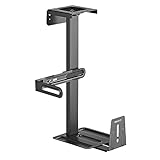
Overview: The Mount-It! CPU Holder offers versatile under-desk or wall mounting with a 360° swivel feature for easy port access. Supporting up to 44 lbs, it fits mid-tower ATX and micro ATX cases (6.1–9.3" wide, 8.2–10.1" deep). Heavy-duty steel construction with protective foam pads ensures stability while safeguarding your case.
What Makes It Stand Out: The dual mounting capability provides flexibility that single-purpose mounts lack. The 360° swivel is genuinely useful for accessing rear cables without crawling under your desk. Open-frame design promotes airflow, and the fixed height of 21.65" positions towers at a convenient level for most desks.
Value for Money: At $39.99, this mount offers competitive value for a swiveling under-desk solution. Comparable swivel mounts typically cost $45-60. The added wall-mount option increases versatility, making it a smart mid-range choice.
Strengths and Weaknesses: Strengths include excellent swivel functionality, dual mounting options, solid ventilation, and protective padding. Installation is straightforward with basic tools. Weaknesses: 44 lb capacity limits compatibility with heavier gaming rigs, fixed height may not suit all desk configurations, and it’s incompatible with full towers or SFF cases. Requires drilling.
Bottom Line: Perfect for users with mid-sized towers who prioritize cable access and space savings. The swivel feature alone justifies the price, making it ideal for IT professionals and gamers who frequently adjust their setup.
5. Mount-It! CPU Under Desk Mount Bracket - Computer Tower Wall and Under Counter Holder, 360 Degree Swivel Adjustable Height and Width Wall-Mountable
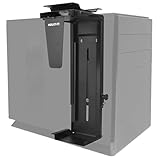
Overview: This Mount-It! bracket provides under-desk or wall mounting with 360° swivel and adjustable height/width for smaller PC towers. Supporting only 22 lbs, it accommodates cases from 11.8–21" tall and 3.5–8" wide. High-strength steel construction with EVA protective pads offers basic security for lightweight systems.
What Makes It Stand Out: The height adjustability is rare in this price class, allowing precise positioning. The swivel mechanism provides convenient port access, and dual mounting options add versatility. It’s one of the few mounts that can handle both horizontal and vertical orientations depending on your case size.
Value for Money: At $37.99, the price seems attractive until you notice the 22 lb weight limit. While affordable for a swivel mount, the limited capacity restricts its usefulness. You’re paying for features you may not be able to use if your PC exceeds the weight limit.
Strengths and Weaknesses: Strengths include swivel access, height adjustability, dual mounting, and included hardware. Installation is relatively simple. The critical weakness is the 22 lb capacity, which excludes most gaming PCs and workstations. The narrow width range also limits compatibility. Protective pads are adequate but thinner than premium options.
Bottom Line: Only suitable for small form factor PCs, mini towers, or lightweight builds. If your tower meets the weight limits, it’s a functional budget option. Otherwise, invest in a higher-capacity mount to avoid catastrophic failure.
6. JOY worker Under Desk PC Mount for Standing Desk, Clamp-On Desk Leg Computer Mount, No Drilling, Adjustable Computer Case CPU Holder Holds Up to 44lbs, Black PC Tower Mount

Overview:
The JOY worker Under Desk PC Mount offers a clever clamp-on solution specifically designed for standing desk users who want to avoid drilling into their furniture. This steel mount attaches directly to desk legs, accommodating cases between 5.9 and 9.8 inches wide while supporting up to 44 pounds. The design prioritizes convenience and protection, elevating your PC away from floor hazards while ensuring cables don’t strain when the desk height adjusts.
What Makes It Stand Out:
The tool-free clamp installation is the star feature here, making it ideal for renters or anyone hesitant to drill. The upgraded silicone gasket addresses previous slipping issues, providing a firm grip that stays put even with repeated desk movements. It’s specifically engineered for standing desk scenarios where traditional under-desk mounts might fail during height transitions. The elevated position naturally improves airflow and reduces dust intake compared to floor placement.
Value for Money:
At $45.99, this mount sits in the mid-range price bracket. While not the cheapest option, the specialized standing desk compatibility and drill-free installation justify the cost. You’re paying for convenience and a problem-specific solution that generic mounts don’t address. For standing desk owners, this eliminates the risk of cable damage and PC collisions during height adjustments.
Strengths and Weaknesses:
Pros include effortless installation, excellent silicone grip improvement, standing desk optimization, and solid steel construction. Cons are the limited width range, incompatibility with round legs, and reliance on specific leg shapes (works best with inverted legs). The clamp design may not fit all desk leg dimensions.
Bottom Line:
This is an excellent choice for standing desk users seeking a secure, drill-free mounting solution. The silicone upgrade shows attention to user feedback, and while compatibility is limited, it excels at its intended purpose.
7. Heavy Duty Under Desk PC Holder – Up to 77 lbs Load Capacity - Adjustable Computer Tower Holder - Under Desk Computer Mount (White)

Overview:
This Heavy Duty Under Desk PC Holder targets users with substantial computer cases, boasting an impressive 77-pound load capacity that outperforms most competitors. The mount requires drilling for installation but rewards users with exceptional stability through its dual support pillar design. It’s highly adjustable across height, width, and depth dimensions, making it suitable for virtually any tower configuration on the market. The white finish offers a clean aesthetic that blends well with modern office furniture.
What Makes It Stand Out:
The extraordinary weight capacity is the primary differentiator—most mounts top out at 44-66 pounds. The extensive customization options ensure a perfect fit for oversized gaming rigs or workstation towers. Protective mats throughout the frame prevent case damage, while strategically placed ventilation slots promote airflow. The included drilling template simplifies what could otherwise be a tricky installation process.
Value for Money:
Priced at $47.41, this mount delivers exceptional value for heavy-duty needs. You’re getting professional-grade weight support and adjustability for roughly the same cost as mid-range alternatives. The 77-pound capacity alone justifies the price tag for users with large PCs who can’t risk a cheaper, weaker mount.
Strengths and Weaknesses:
Strengths include highest-in-class weight capacity, comprehensive adjustability, robust steel construction with dual pillars, and protective padding. Weaknesses are the required drilling (not renter-friendly), white color may clash with some setups, and installation is more involved than clamp-on alternatives. The drilling requirement also reduces flexibility if you relocate.
Bottom Line:
If you own a heavy, full-tower PC and need maximum security, this is your best option. The weight capacity and stability are unmatched in this price range, making it worth the drilling effort for permanent installations.
8. VIVO Heavy Duty Adjustable Under-Desk PC Mount, Home and Office Computer CPU Holder with Secure Locking, Supports up to 66 lbs, Black, MOUNT-PC04B

Overview:
The VIVO MOUNT-PC04B represents the premium tier of under-desk PC mounts, supporting up to 66 pounds with a sophisticated adjustable frame system. This mount requires drilling and specific desk dimensions (minimum 0.75-inch thickness and 8.5-inch clearance from frame to edge), but delivers professional-grade stability. The design features five height settings from 16 to 24 inches and width adjustment from 5 to 10 inches, accommodating most PC cases with precision. The black finish and secure locking mechanism add to its professional appeal.
What Makes It Stand Out:
VIVO’s reputation for quality mounting solutions shows in the details: thick inner padding protects your case from scratches, while the open-frame design maximizes ventilation. The secure locking system ensures your PC stays firmly in place, addressing a common concern with adjustable mounts. The extensive height adjustability is particularly valuable for desks with unusual dimensions or users who want precise positioning.
Value for Money:
At $69.99, this is the most expensive option reviewed, but you’re paying for brand reliability, superior materials, and refined engineering. The build quality and adjustability justify the premium for users who view this as a long-term investment. Compared to cheaper mounts that might need replacement, the VIVO offers durability and peace of mind.
Strengths and Weaknesses:
Pros include excellent brand reputation, precise height/width adjustment, protective padding, secure locking mechanism, and optimal airflow design. Cons are the highest price point, specific desk requirements that may exclude some users, and mandatory drilling installation. The clearance requirement needs careful measurement before purchase.
Bottom Line:
Choose this mount if you prioritize brand quality, extensive adjustability, and long-term durability. The premium price delivers a premium product that’s worth the investment for permanent, professional setups.
9. Hovadova Adjustable Mobile CPU Stand, Ventilated Computer Tower Stand with 4 Caster Wheels Fits Most PC Tower, Under Desk CPU Holder PC Floor Cart Computer Riser for Gamers and Students (Large Black)

Overview:
The Hovadova Adjustable Mobile CPU Stand takes a completely different approach from wall/desk mounts, offering a wheeled floor-based solution that prioritizes mobility. This stand supports an impressive 88 pounds—higher than most mounted options—while allowing you to roll your PC anywhere. The adjustable width from 6.3 to 9.3 inches accommodates most towers, and the perforated metal base improves ventilation by elevating the case off the floor. Locking wheels provide stability when stationary.
What Makes It Stand Out:
Mobility is the defining feature. Four 360-degree rotating wheels let you easily access rear ports, clean around your workspace, or reposition your setup without lifting a heavy tower. The protective railings prevent accidental tipping, while the locking mechanism keeps the stand secure during use. This is ideal for users who frequently need rear access or have cleaning concerns. The high weight capacity and floor-based design make it suitable for heavy cases that might strain mounted solutions.
Value for Money:
At just $24.99, this is the most affordable option while offering the highest weight capacity. The value proposition is exceptional—you’re getting mobility, high load support, and ventilation for less than half the price of premium mounted alternatives. For users without drilling permissions or who prefer floor placement, this is unbeatable.
Strengths and Weaknesses:
Pros include excellent mobility, highest weight capacity (88 lbs), locking wheels, great ventilation, easy assembly, and lowest price. Cons are it occupies floor space (not a true space-saver), wheels may be less stable on thick carpet, and it doesn’t protect against floor-level dust or moisture as effectively as elevated mounts.
Bottom Line:
This mobile stand is perfect for users prioritizing accessibility and flexibility over space-saving. It’s an unbeatable value for heavy PCs and those who need frequent rear access, though it won’t free up floor space like mounted options.
10. FEYRUN Under Desk Slide Out PC Mount with Anti-Scratch Sponge, Adjustable CPU Holder Bracket for Computer Tower (Black (Slide Access))

Overview:
The FEYRUN Under Desk Slide Out PC Mount offers a unique budget-friendly solution with its 9.2-inch sliding track system that lets you pull the PC forward for easy rear access without uninstalling. Supporting up to 44 pounds, this mount uses adjustable anti-skid straps rather than a full frame, making it compatible with various case shapes up to a 57-inch perimeter. The 13.8-inch steel bracket includes anti-scratch sponge padding and installs under your desk with included hardware.
What Makes It Stand Out:
The slide-out mechanism is rare in this price range ($25.99), providing convenience typically found in premium mounts. The strap-based adjustment system accommodates non-standard case shapes that rigid frames might not fit, offering versatility for unique builds. The anti-scratch padding protects your case finish, while the straightforward installation process makes it accessible for DIY beginners.
Value for Money:
This mount delivers exceptional value by combining an innovative slide feature with an ultra-competitive price. At $25.99, it’s only slightly more than basic fixed mounts but adds significant functionality. For users who occasionally need to access rear ports or perform maintenance, this feature alone justifies the minimal cost premium over static alternatives.
Strengths and Weaknesses:
Pros include innovative slide-out design, affordable price, strap compatibility with various case shapes, anti-scratch padding, and easy installation. Cons are lower weight capacity (44 lbs), strap system may feel less secure than full frames, limited width adjustment compared to frame mounts, and the sliding mechanism adds potential failure points over time.
Bottom Line:
This is an excellent budget pick for users who need occasional rear access without breaking the bank. The slide feature and strap versatility make it stand out, though heavier or permanently stationary setups might prefer a more robust frame mount.
Why Your Tower PC Deserves a Home Under Your Desk
Your tower PC represents a significant financial investment, yet many users consign it to the floor where it’s vulnerable to static electricity, accidental kicks, vacuum cleaner collisions, and thermal stress from carpet insulation. Elevating your CPU isn’t just about cleanliness—it’s about extending component lifespan, improving airflow, and creating a more organized, professional workspace. Under-desk mounting positions your computer at an accessible height while keeping it safely suspended away from the hazards of foot traffic and poor ventilation.
Understanding the Different Types of CPU Holders
Before diving into features, you need to understand the fundamental designs available. Each type serves different needs, desk configurations, and user preferences.
Fixed-Mount Holders
Fixed-mount solutions bolt directly to your desk’s underside, creating a permanent home for your tower. These robust brackets typically feature a simple L-shaped design or four-point cradle system. They excel in stability and weight distribution, making them ideal for heavier workstations that rarely need movement. The trade-off? You’ll need to commit to a specific position, as adjustment requires unscrewing and repositioning.
Swivel and Slide Mechanisms
For users who frequently access ports or perform maintenance, swivel and slide mechanisms offer game-changing convenience. These holders attach to a track system, allowing you to pull the CPU out like a drawer or rotate it 180 degrees for complete rear access. This design proves invaluable in tight spaces where you can’t walk behind your desk, eliminating the dreaded “crawl-under-and-flashlight” routine for cable connections.
Strap-Based Suspension Systems
Strap-based systems use heavy-duty nylon or velcro straps to suspend your tower in a hammock-like configuration. Their genius lies in universal compatibility—if your PC fits within the strap dimensions, it works. These solutions typically support impressive weight ranges and install without tools, making them perfect for renters or anyone averse to drilling. However, they offer less rigidity than metal frames, which some users find less confidence-inspiring.
Rail-Mounted Solutions
Rail systems represent the premium tier, featuring aluminum or steel tracks that mount along your desk’s length. Individual CPU cradles then clip onto these rails at any position, offering unmatched flexibility for multi-monitor setups or evolving workspace layouts. While more expensive and complex to install, rail systems future-proof your investment and support multiple devices along the same track.
Weight Capacity: The Non-Negotiable Starting Point
Nothing matters more than weight capacity. Exceeding a holder’s rated limit courts catastrophic failure that could destroy your PC and potentially cause injury. Most quality holders support between 22-66 pounds (10-30 kg), but workstation-class towers can easily surpass 50 pounds. Always weigh your fully-configured PC—don’t estimate based on manufacturer specs, which often list case-only weight. Add GPUs, multiple hard drives, and aftermarket cooling solutions to get your true number, then add a 20% safety margin. Remember that dynamic loads (pulling, swiveling) exert more force than static weight alone.
Adjustability: One Size Fits Most
Tower PCs come in a dizzying array of dimensions, from compact micro-ATX builds to massive full-tower behemoths. Adjustable width and height mechanisms separate versatile holders from limited-use brackets. Look for tool-less adjustment systems with clear markings—turning screws while supporting a heavy PC overhead quickly becomes frustrating. The best designs offer at least 3-6 inches of width adjustment and accommodate towers from 12-24 inches in height. Some premium models feature telescoping vertical supports that adapt to cases with unusual proportions or protruding handles.
Material Matters: Build Quality and Durability
Steel construction provides maximum strength and rigidity, typically powder-coated to resist scratches and corrosion. Aluminum offers lighter weight with respectable strength, making installation easier while still supporting most consumer towers. Plastic components should be limited to non-structural elements like cable clips or protective padding. Examine weld quality on metal joints—cheap holders often feature spotty welds that crack under stress. Padding deserves special attention: closed-cell foam or rubber cushions prevent metal-on-metal contact while dampening vibrations. Avoid cheap open-cell foam that deteriorates and sheds particles into your PC’s ventilation.
Installation Methods: Drilling vs. Drill-Free
Your desk’s construction and your lease agreement heavily influence this decision. Solid wood and most composite desktops handle drilled installations beautifully, creating permanent, rock-solid mounts. Drill-free options include heavy-duty adhesive plates (rated for 50+ pounds), clamp mechanisms that grip desk edges, or strap systems that wrap around the desktop. Adhesive solutions have improved dramatically but require pristine surface preparation and 24-48 hour curing time. Clamp systems work brilliantly on desks with substantial edges but may damage veneer finishes if over-tightened. Always verify your desk’s thickness compatibility—many holders support 0.5 to 2.5 inches, but standing desks often exceed this range.
The Ergonomic Equation: Health and Comfort Benefits
Under-desk CPU holders deliver surprising ergonomic advantages beyond space savings. Positioning your tower at knee-height eliminates the need to bend or kneel when accessing USB ports or power buttons, reducing repetitive strain injuries. For standing desk users, mounted CPUs move with the desk, maintaining consistent cable lengths and preventing port disconnection during height adjustments. This synchronization also protects your investment—repeated cable tugging from independent movement slowly damages connectors and motherboard headers. Additionally, raising your PC off carpeted floors significantly reduces dust inhalation, a boon for allergy sufferers who spend eight hours daily at their workstation.
Cable Management Integration
A holder that ignores cable management misses half its purpose. Premium designs incorporate integrated cable clips, routing channels, or Velcro straps that keep power and data cables organized as they travel from desk to CPU. This prevents the “cable sag” that stresses connectors and creates an unsightly nest of wires. When evaluating options, check whether cable management components are positioned to accommodate your specific port layout—some towers have top-mounted power supplies while others feature bottom-mounted units. The best systems provide adjustable cable anchors that adapt to your unique configuration.
Security Features: Protecting Your Investment
In shared workspaces or public environments, physical security becomes paramount. Look for holders with lockable mounting mechanisms that prevent removal without a key. Some designs feature security screws requiring specialized tools, offering a middle ground between convenience and protection. For high-risk environments, consider holders that completely enclose the CPU in a ventilated cage, preventing opportunistic theft of RAM, GPUs, or storage drives. Even in home offices, these features provide peace of mind during parties or service visits.
Space Optimization Strategies
Under-desk mounting transforms wasted knee-space into valuable real estate. Position your holder toward the back of the desk to maintain leg clearance, or offset it to one side if you prefer stretched-out legroom. Corner desk configurations benefit from diagonal mounting that utilizes dead space where two surfaces meet. For multiple PC setups—like a work machine and personal rig—dual holders mounted on opposite sides distribute weight evenly while keeping systems isolated for thermal management. Remember to account for door swings and drawer operations; a CPU protruding too far can interfere with office mobility.
Accessibility and Maintenance Considerations
Your PC needs regular love—dust filters cleaned, ports inspected, occasional component swaps. A holder that blocks side panels or requires complete removal for basic maintenance quickly becomes a liability. Prioritize designs that allow tool-free rotation or sliding, providing unfettered access to both side panels and the rear I/O. Check clearance for case doors that swing open; some tempered glass panels need several inches of lateral space. For liquid-cooled systems, ensure the holder accommodates bottom-mounted radiators and doesn’t compress cooling hoses when adjusted.
Acoustic Benefits: Noise Reduction Potential
Hard floors and desks can amplify PC fan noise through resonance. Quality holders incorporate vibration-dampening pads that decouple your tower from the desk structure, reducing transmitted noise significantly. Some users report 3-5 dB reductions in perceived noise after mounting, as the suspension absorbs fan and hard drive vibrations. This proves especially valuable for content creators and remote workers who need quiet environments for calls and recording. Strap-based systems naturally excel here, as the flexible mounting inherently absorbs more vibration than rigid metal frames.
Price Points and Value Proposition
CPU holders span from $20 budget straps to $200+ premium rail systems. The sweet spot for most users lies between $45-$85, where you’ll find robust steel construction, smooth adjustment mechanisms, and integrated cable management. Budget options under $30 often skimp on padding, use thinner gauge metal, or lack width adjustment—fine for lightweight PCs but risky for gaming rigs. Professional-grade solutions above $100 justify their cost through exceptional build quality, lifetime warranties, and advanced features like gas-spring assistance for effortless positioning. Consider your PC’s value; protecting a $3,000 workstation with a $25 holder represents false economy.
Compatibility Check: Ensuring a Perfect Fit
Beyond physical dimensions, verify compatibility with your desk type. Standing desks require holders specifically rated for dynamic loads—the constant movement stresses mounts differently than static desks. Glass-top desks demand drill-free solutions, as drilling compromises structural integrity. Check for under-desk obstructions like crossbars, modesty panels, or cable trays that might interfere with mounting. Some holders include offset brackets specifically designed to clear these obstacles. For ultra-wide desks over 30 inches deep, ensure the holder’s reach positions your PC appropriately—some fixed mounts may leave your tower too far forward or back.
Environmental Considerations and Sustainability
Sustainability-conscious buyers should examine material sourcing and manufacturing location. Steel and aluminum are highly recyclable, but production energy varies widely. Some manufacturers now use recycled content and powder-coating processes free of volatile organic compounds (VOCs). Longevity itself represents the ultimate sustainability—buying one quality holder that lasts through three PC upgrades beats replacing cheap units every two years. Look for brands offering replacement parts; a $5 pad replacement kit extends a $80 holder’s life indefinitely, reducing landfill waste.
Frequently Asked Questions
How do I accurately weigh my PC for capacity planning?
Use a bathroom scale: weigh yourself holding the PC, then weigh yourself alone. The difference is your PC’s true weight. For precision, use a luggage scale with a sturdy strap under the PC. Always measure with all components installed and cables connected, as these add meaningful weight.
Will under-desk mounting void my PC’s warranty?
No—physical mounting doesn’t void warranties. However, improper installation causing physical damage (dropped PC, stripped screw holes) isn’t covered. Keep your holder’s weight rating documentation; if failure occurs due to manufacturer defect, you may have recourse through the holder’s warranty rather than your PC maker’s.
Can I install a CPU holder on a standing desk converter (desk-on-desk)?
Generally not recommended. Converters lack the structural rigidity and weight capacity to safely support a tower. The moving mechanism also creates dynamic stress the converter wasn’t designed for. Instead, mount to your primary desk surface or use a floor-standing solution.
What’s the ideal mounting height for ergonomic access?
Position the top of your PC approximately 6-8 inches below your seated knee height. This allows easy port access without hitting your knees when swiveling. For precise measurement, sit at your desk and measure from the floor to the bottom of your thigh—subtract 8-10 inches for optimal placement.
How do I prevent my PC from overheating when mounted?
Mounting actually improves cooling by lifting the PC off insulating carpets and providing unrestricted airflow underneath. Ensure at least 2 inches of clearance on all sides, especially if your case has bottom intake fans. Avoid pushing the PC flush against walls or modesty panels.
Are adhesive mounts really strong enough for heavy gaming PCs?
Modern structural adhesives can support 75+ pounds when properly applied to clean, non-porous surfaces. However, they degrade over time and perform poorly with temperature fluctuations. For permanent setups, mechanical fasteners remain superior. Use adhesive solutions only for PCs under 40 pounds and inspect them quarterly.
Can I mount my PC horizontally (laying on its side)?
Only if your case specifically supports horizontal orientation. Most towers are designed for vertical airflow, and laying them sideways disrupts cooling patterns and can damage PCIe cards. Check your case manual—some workstation cases include optional feet for horizontal use.
How do I manage cables with a sliding/swiveling holder?
Leave a service loop of 6-8 inches of slack in all cables, secured to the moving part of the holder with Velcro straps. Use cables with right-angle connectors where possible to reduce strain. Consider slightly longer cables than you’d use for static mounting to accommodate full extension.
Will a CPU holder work with my Mac Pro or unique form factor?
Standard holders accommodate most towers with parallel sides. For cylindrical Mac Pros, triangular workstation cases, or other exotic shapes, look for strap-based systems or universal cradles with extensive padding. Measure the smallest circumference point and compare to holder specifications.
What’s the lifespan of a quality CPU holder?
A well-built steel holder should last 10-15 years or more—essentially indefinite for desktop use. The adjustment mechanism may develop slight play over time, but this rarely affects functionality. Replace padding every 3-5 years as foam degrades. Premium brands often provide lifetime warranties, reflecting their confidence in durability.