Staring at screens for hours isn’t just a modern habit—it’s practically a lifestyle. Whether you’re grinding through spreadsheets at midnight, editing photos with color-critical precision, or battling opponents in late-night gaming sessions, that harsh glare bouncing off your monitor is silently waging war on your eyes. Traditional desk lamps cast shadows, create hot spots, and reflect directly into your retinas, turning productivity into a literal headache. Enter the monitor light bar: a deceptively simple device that clips above your screen and bathes your workspace in perfectly calibrated illumination without a single photon hitting your display. But not all light bars are created equal, and understanding what separates a premium glare-busting tool from a glorified LED strip can mean the difference between eye strain relief and wasted money.
Top 10 Monitor Light Bars for Screen Glare
Detailed Product Reviews
1. Quntis Computer Monitor Lamp, Screen Monitor Light Bar for Eye Caring, USB Reading LED Task Lamp with Auto-Dimming, Dimmable Light Bar, Touch Control, No Glare Space Saving Home Office Desk Lamps

Overview: The Quntis Computer Monitor Lamp delivers targeted desk illumination while prioritizing eye health for professionals and gamers. This USB-powered light bar mounts securely atop monitors, using asymmetrical optics to eliminate screen glare and create a focused workspace without consuming valuable desk real estate.
What Makes It Stand Out: The exceptional Ra98 color rendering index ensures colors appear vivid and accurate—critical for designers and content creators. Certified to IEC blue light and flicker-free standards, it provides genuine eye protection, not just marketing claims. The intelligent auto-dimming sensor maintains 900 lux based on ambient conditions, while manual controls offer customizable color temperature from 3000K-6500K to match your circadian rhythm.
Value for Money: At $39.95, this occupies the sweet spot between cheap alternatives and premium $60+ options. You’re getting professional-grade color accuracy and certified safety features that rival expensive competitors. The touch control system, while less convenient than a remote, keeps costs reasonable without sacrificing core eye-care functionality.
Strengths and Weaknesses: Pros include superior color rendering, certified eye safety, effective anti-glare optics, intelligent auto-dimming, and genuine space-saving design. The build quality feels substantial. Cons involve touch control’s reachability on large monitors, absence of remote operation, and lack of RGB ambiance features gamers might want. No explicit timer function for break reminders.
Bottom Line: An excellent choice for professionals who prioritize color accuracy and verified eye protection. The high CRI rating and legitimate certifications justify the investment, making it ideal for designers, editors, and office workers spending long hours at their screens.
2. Quntis Monitor Light Bar PRO+ with Remote Control, Fit for Curved/Flat Monitor, Eye-Care USB Computer Lamp Dimmable Screen Light Bar with Auto-Dimming, No Glare Home Office Gaming Desk Lamp

Overview: The PRO+ model elevates Quntis’s lineup with remote control convenience and enhanced monitor compatibility. Engineered for both flat and curved displays up to 2.36 inches thick, this premium light bar delivers 1200 lux brightness while maintaining professional-grade eye protection standards.
What Makes It Stand Out: The sensitive rotary remote enables stepless adjustments without reaching for your monitor—a significant ergonomic advantage for ultrawide setups. The upgraded weighted clip features front and rear double adjustment covers plus a 45° rotation shaft, accommodating virtually any monitor design. The integrated 2-hour rest timer actively promotes healthier screen-time habits, a rare productivity-focused feature.
Value for Money: At $69.99, this commands a premium but justifies it through versatile mounting, remote convenience, and higher brightness. Comparable BenQ models exceed $100 and lack the timer function. The included hex keys for hinge tightening and robust construction suggest long-term durability that amortizes the initial cost.
Strengths and Weaknesses: Pros include exceptional monitor compatibility, intuitive remote operation, superior illumination (1200 lux), productivity-enhancing timer, and stable mounting on curved screens. Cons involve the premium pricing for casual users, remote battery dependency, and potential over-engineering for standard 24-inch monitors. The remote’s learning curve is minimal but present.
Bottom Line: Perfect for power users, designers, and gamers with curved or ultrawide monitors. The remote control and superior adjustability make it worth the premium, especially if you value ergonomic convenience and have a complex, multi-monitor battle station.
3. Quntis Computer Monitor Light Bar with Remote, Eye-Care Monitor Light Backlight Desk Lamp for Home Office Gaming, Stepless Dimming Brightness and Color Temperature, No Screen Glare, Gray

Overview: This model intelligently bridges budget and premium tiers by offering remote control at an accessible price. The dual-protection design combines optical engineering with a textured softening cover and eye-care hood, creating a comfortable illumination envelope for extended screen sessions.
What Makes It Stand Out: The patented sliding weighted clip is genuinely innovative, enabling one-second installation on ultra-thin bezels and curved monitors without damage. Three lighting modes—Work, Immersive, and Design—provide scenario-specific optimization. The smart touch remote features backlit buttons that double the lifespan of mechanical remotes, glowing orange for easy location in dark rooms.
Value for Money: At $38.24, this undercuts most remote-enabled competitors by $20-30 while maintaining Quntis’s eye-care pedigree. You’re sacrificing some brightness and CRI (unspecified but likely below the PRO+’s 95) but gaining wireless convenience and superior mounting flexibility that’s unmatched in this price class.
Strengths and Weaknesses: Pros include the revolutionary sliding clip design, intuitive backlit remote, three practical lighting modes, and exceptional value. The dual light source effectively reduces screen contrast glare. Cons include unspecified brightness levels (likely under 1000 lux), lower color rendering than premium models, and limited adjustability compared to the PRO+ variant. The gray finish may not suit all setups.
Bottom Line: The best value remote-controlled monitor light available. Ideal for home office workers and students wanting wireless convenience without budget strain. The innovative clip alone makes it worthwhile for those with modern, thin-bezel or curved monitors who need reliable, adjustable lighting.
4. Colorpanda Monitor Light Bar, Fit for Curved/Flat Monitor, Eye-Care USB Reading LED Task Lamp with Touch Control, No Screen Glare Dimmable Desk Lamp Computer Monitor Light Bar for Screen Home Office

Overview: Colorpanda enters as a budget-conscious alternative focusing on core functionality. This USB-powered light bar prioritizes essential anti-glare illumination over advanced features, targeting price-sensitive consumers who want to test the monitor-lighting category without significant investment.
What Makes It Stand Out: The aggressive $25.19 pricing makes it one of the most affordable reputable options available. A memory function remembers your last brightness and color temperature setting across three presets (2700K, 4000K, 6500K). The patented clip enables tool-free installation in seconds, accommodating monitors from 0.12" to 2.2" thick.
Value for Money: This is the cheapest viable monitor light from a recognizable brand. While lacking auto-dimming and remote control, you get fundamental anti-glare technology and flicker-free LEDs at half the cost of competitors. It’s perfect for verifying whether the monitor-light format suits your workflow before upgrading.
Strengths and Weaknesses: Pros include unbeatable price, simple three-step operation, reliable memory function, and surprisingly solid build quality. The touch controls are responsive. Cons include no auto-dimming, limited color temperature steps (not stepless), unspecified brightness output, absent eye-care certifications, and likely CRI below 90. Customer support responsiveness is unverified.
Bottom Line: A solid entry-level choice for students or remote workers on tight budgets. It delivers core anti-glare benefits effectively but compromises on advanced features and certified eye protection. Upgrade within a year if you spend over six hours daily at your screen or require color-critical work.
5. Quntis Curved Monitor Light Bar 15 RGB Backlight for 34"+ Screens, Computer Bar Lights Fold Dual Light with Color Temperature Brightness Stepless Dimming, No Glare Desk Lamp for Home Office Gaming

Overview: Purpose-built for ultrawide and curved monitors, this specialized light bar extends to 25.74 inches to evenly illuminate 34"+ displays. The foldable dual-head design provides 1400 lux brightness while integrating customizable RGB backlighting for immersive gaming environments.
What Makes It Stand Out: The 15 RGB backlight modes create dynamic breathing effects that synchronize with gaming setups, while the dual-axis clamp fits monitors up to 3.54" thick—accommodating the bulkiest curved gaming displays. The foldable design permits precise angle adjustment for multi-screen arrays or video conferencing without webcam obstruction, eliminating lighting blind spots.
Value for Money: At $59.99, it competes directly with premium non-RGB models while offering gamer-specific features. Ultrawide compatibility alone justifies the cost over standard 16-inch bars that leave dark zones. Compared to BenQ’s ScreenBar Halo at $149, this represents significant savings for RGB enthusiasts.
Strengths and Weaknesses: Pros include perfect scaling for 34"+ monitors, vibrant RGB effects, ultra-high 98 Ra color rendering, RG0 blue light certification, intelligent auto-dimming, and power-off memory. The foldable mechanism is robust. Cons include unnecessary bulk for standard monitors, RGB’s unprofessional appearance in corporate settings, and premium pricing over basic models. The gaming aesthetic limits versatility.
Bottom Line: The ultimate monitor light for ultrawide gaming setups. If you own a 34-inch or larger curved display, this is purpose-built for your needs. The RGB integration and foldable design make it worth every penny for immersive gaming and content creation environments where ambiance matters as much as functionality.
6. PROSmart Monitor Light Bar, Computer Monitor Lamp, 250LM No Glare Eye-Care LED Screen Bar, Fit for Curved/Flat Monitor, USB Reading Screenbar for Home/Office/Work/Game

Overview: The PROSmart Monitor Light Bar delivers essential eye-care illumination for budget-conscious users. This 250LM LED lamp clips directly onto your monitor, providing asymmetrical lighting that eliminates screen glare while illuminating your workspace. Designed for both flat and curved displays measuring 0.6 to 1.1 inches thick, it’s an accessible entry point into monitor-mounted lighting solutions.
What Makes It Stand Out: Its asymmetrical optical design creates a targeted beam angle that avoids screen reflection while adequately lighting your desk. The USB-powered convenience allows direct connection to computers, power banks, or any USB outlet. The memory function automatically restores your last brightness and hue settings (2700K-6500K), while the stepless dimming from 5% to 100% offers precise control. Installation requires no screws or tape—simply clip it on.
Value for Money: At $29.99, this light bar undercuts most competitors by 40-70% while delivering core functionality. While premium models offer higher brightness or remote controls, the PROSmart provides the essential anti-glare technology and color accuracy (CRI≥95) that define this category. For home offices and students, it represents exceptional value.
Strengths and Weaknesses: Strengths include unbeatable price, simple installation, USB power flexibility, and reliable memory function. The CRI≥95 rating ensures accurate color representation. Weaknesses are limited monitor compatibility (0.6-1.1" only), lower 250LM brightness compared to 900+ lux competitors, and lack of remote control. Build quality reflects the budget price point.
Bottom Line: The PROSmart Monitor Light Bar is an excellent choice for first-time buyers and budget-minded users who need glare reduction and space-saving design without premium frills. It delivers core eye-protection benefits at an accessible price.
7. Quntis Monitor Light Bar with Remote, Eye-Care No Glare, Space Saving Home Office Desk Lamp (White), Stepless Dimming, Easy Setup LED Computer Light Backlight for Curved Gaming Monitors Reading Study

Overview: The Quntis Monitor Light Bar with Remote elevates the standard monitor lamp experience through thoughtful design and convenient control. This white-finished LED light combines front and backlight sources to deliver over 900 lux center illumination while maintaining eye comfort. Designed for modern home offices, it balances aesthetics with performance for professionals who spend long hours at their screens.
What Makes It Stand Out: The innovative dual-lighting approach reduces high-contrast glare by illuminating both your desk and the area behind your monitor. The included wireless remote features intuitive controls with soft orange-glowing buttons for easy adjustments in dark environments. With 84 high-quality LED beads achieving Ra95 color rendering, it restores true screen colors for design work and media consumption. The sliding weighted clip accommodates ultra-thin to curved monitors without screen damage.
Value for Money: At $49.99, this model bridges the gap between budget and premium options. It offers remote operation and dual lighting—features typically found in $100+ models—while maintaining competitive brightness and color accuracy. Compared to the PROSmart at $30, the $20 premium buys convenience and enhanced illumination. Against the $179 BenQ, it delivers 80% of functionality at 28% of the cost.
Strengths and Weaknesses: Strengths include the convenient remote control, powerful 900 lux output, dual-light design for reduced eye strain, and stylish minimalist aesthetic. The Ra95 rating ensures professional-grade color accuracy. Weaknesses include a higher price than basic models and potential overkill for casual users. The remote requires battery management.
Bottom Line: The Quntis Monitor Light Bar with Remote is ideal for home office professionals seeking convenience and performance without premium pricing. The remote control and dual-light design justify the moderate investment.
8. Quntis Monitor Light RGB Backlight, Eye-Care Computer Lights Bar Gaming Office Desk Lamp, 15 Modes Backlight, 3 Color Temperature & Brightness Dimmable Front Light, Ra95 Screen No Glare Monitor Lamp
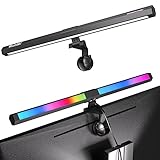
Overview: The Quntis RGB Monitor Light Bar targets gamers and creative users with its dynamic backlighting capabilities. This dual-source LED lamp combines a functional front work light with 15-mode RGB backlighting to transform your gaming setup’s ambiance. At $32.99, it merges productivity and entertainment features in one space-saving package.
What Makes It Stand Out: The 15-mode RGB backlight offers monochrome, dual-color gradient, and dynamic multicolor effects that sync with gaming sessions or movie viewing. The front/back complementary lighting minimizes contrast glare while providing task illumination. With Ra95 color rendering and flicker-free technology, it eliminates blue light hazards. The weighted clip with non-slip rubber ensures secure mounting on monitors 0.39" to 1.18" thick.
Value for Money: This light bar delivers RGB gaming aesthetics typically costing $50+ while including essential eye-care features. The dual-light functionality provides both task lighting and ambient effects, eliminating the need for separate LED strips. Compared to standard bars at similar prices, the RGB capability adds significant value for entertainment-focused users. However, the restriction against curved monitors limits its versatility.
Strengths and Weaknesses: Strengths include versatile RGB backlighting, strong eye protection (flicker-free, blue light elimination), excellent color accuracy, and competitive pricing. The dual-light design enhances both focus and ambiance. Critical weaknesses are incompatibility with curved monitors and laptops, limited to three color temperature steps (3000K-4000K-6500K), and lower brightness than premium models.
Bottom Line: The Quntis RGB Monitor Light Bar is perfect for gamers and content creators using flat monitors who want dynamic lighting without sacrificing eye comfort. Avoid if you have curved displays.
9. ONWAY Curved Monitor Light Bar with Wireless Remote,Monitor Light Bar with Auto-Dimming and Camera Base,Applicable to All Screens. No Screen Glare,for (Basic)
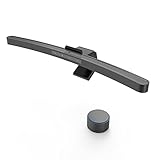
Overview: The ONWAY Curved Monitor Light Bar addresses the specific challenges of curved displays with intelligent features. Priced at $59.00, this premium-oriented light bar combines automatic brightness adjustment with specialized optics designed for immersive monitors. Its innovative camera base design also solves webcam placement issues common with monitor lights.
What Makes It Stand Out: The built-in ambient light sensor enables one-click auto-dimming, adapting illumination to environmental conditions. The world’s first curved screen asymmetric optical design prevents reflection on curved displays while lighting your desktop and keyboard. The enhanced 3-piece base accommodates an exceptionally wide range of monitor thicknesses (0.12" to 2.36"), including irregular displays. The integrated camera base saves desk space while positioning your webcam optimally.
Value for Money: While pricier than basic models, the ONWAY justifies its cost through smart auto-dimming and curved monitor specialization—features absent in sub-$40 options. Compared to the $179 BenQ, it offers intelligent lighting at one-third the price. The universal compatibility and camera base add practical value that competitors lack.
Strengths and Weaknesses: Strengths include intelligent auto-dimming, exceptional monitor compatibility, curved display optimization, IEC62778 anti-blue light certification, and space-saving camera base. The wireless remote offers convenient multi-function control. Weaknesses are the premium price point and potential feature redundancy for flat monitor users. The design may appear bulky on thinner displays.
Bottom Line: The ONWAY Curved Monitor Light Bar is the top choice for curved monitor users seeking intelligent, adaptive lighting. The auto-dimming and camera base make it worth the premium for dedicated workstations.
10. BenQ ScreenBar Halo 2 LED Monitor Light Bar - Wireless Controller, Backlight, Motion Sensor, Adjustable Brightness/Color Temperature, Eye-Care, No Screen Glare, Fits Curved Monitor, Monitor Accessory

Overview: The BenQ ScreenBar Halo 2 represents the pinnacle of monitor lighting technology, commanding a premium $179 price tag. This professional-grade LED light bar combines sophisticated optics with premium materials and intelligent features for discerning users who demand the best in eye care and convenience.
What Makes It Stand Out: The proprietary ASYMLight technology projects front lighting at a precise 18° anti-glare angle, eliminating screen reflection completely. The wireless controller features an integrated display showing exact brightness and color temperature values (2700K-6500K) for precise adjustments. A built-in motion sensor enables automatic on/off functionality, while the wide, adjustable ambient backlight reduces surround contrast. The heavy-duty clamp securely fits monitors from 0.17" to 2.36" thick, including 1000R-1800R curved displays.
Value for Money: While expensive, the Halo 2 justifies its cost through unmatched build quality, precision engineering, and intelligent features absent in cheaper alternatives. The motion sensor, digital controller display, and premium optics deliver a refined experience. For professionals spending 8+ hours daily at their screens, the investment in superior eye protection and convenience pays dividends. It sets the benchmark that competitors approximate.
Strengths and Weaknesses: Strengths include industry-leading optical design, premium wireless controller with display, motion sensor automation, exceptional build quality, and universal monitor compatibility. The stepless adjustments provide infinite customization. The sole weakness is the high price, making it overkill for casual users. No other monitor light matches its refinement.
Bottom Line: The BenQ ScreenBar Halo 2 is the undisputed choice for professionals, creators, and enthusiasts who refuse to compromise. If you want the best monitor light available and cost is secondary, this is your answer.
What Exactly Are Monitor Light Bars?
Monitor light bars are specialized asymmetrical lighting fixtures designed to mount on top of your display, projecting light downward onto your desk surface while maintaining a shadow-free zone directly in front of your screen. Unlike conventional lamps that emit light omnidirectionally, these devices use precision optics to create a sharp cutoff line that prevents any illumination from reaching your monitor’s surface. This fundamental design difference eliminates the primary cause of screen glare: direct light reflection. The best models achieve this through carefully engineered reflectors, proprietary lens arrays, and angle-specific LED positioning that would make an optometrist nod approvingly.
The Science Behind Screen Glare and Eye Strain
Screen glare occurs when ambient light reflects off your monitor’s surface, creating competing brightness levels that force your pupils to constantly adjust. This phenomenon, known as disability glare, reduces contrast and makes your eyes work overtime to maintain focus. Compound this with blue light emission and the fact that most people blink 50% less when using screens, and you’ve got a recipe for digital eye strain syndrome. Monitor light bars combat this through asymmetrical light distribution—think of it as a lighting “cone of silence” that illuminates your keyboard and documents while leaving your screen in peaceful darkness. The physics involves precise beam angles between 30-60 degrees, ensuring light travels downward and forward, never backward toward the display.
Why Your Desk Lamp Is Making Things Worse
That stylish architect lamp on your desk? It’s probably a glare-generating menace. Traditional desk lamps create a direct path for light to bounce off your screen and into your eyes, no matter how you position them. They also cast shadows from your hands while typing, create uneven illumination across your workspace, and often sit at the perfect height to block your view of the screen. The closer you move them to reduce shadows, the worse the glare becomes. Monitor light bars eliminate these compromises by occupying the previously useless space above your monitor, turning dead zone into optimal lighting real estate.
Key Features That Define Premium Monitor Light Bars
Color Temperature Range and Why It Matters
The ability to adjust color temperature from warm amber (around 2700K) to cool daylight (6500K) isn’t just a gimmick—it’s essential for circadian rhythm management. Morning work benefits from cooler, blue-enriched light that boosts alertness, while evening tasks demand warmer tones to prevent melatonin suppression. Premium models offer seamless transition across this spectrum with memory functions that recall your preferences. Look for units with at least 5-7 preset temperatures and smooth dimming curves rather than jarring stepped adjustments.
Brightness Levels and Auto-Dimming Technology
Lux levels matter more than lumens here. Your workspace needs 300-500 lux for comfortable reading, but this must be achieved without overspill. Advanced light bars incorporate ambient light sensors that continuously monitor room brightness and adjust output accordingly, maintaining a constant contrast ratio between your screen and surroundings. This auto-dimming feature prevents your eyes from working harder when clouds pass overhead or when you switch from a bright spreadsheet to a dark-coded IDE.
Beam Angle Precision and Light Distribution
The gold standard is a 45-degree asymmetrical beam with a sharp cutoff at the monitor’s top edge. Cheaper models use simple diffusers that create soft edges and light leakage. High-end versions employ total internal reflection (TIR) optics or micro-prism lenses that achieve a 5:1 contrast ratio between illuminated desk area and screen darkness. This precision ensures your keyboard is evenly lit at 500 lux while your monitor remains below 50 lux, eliminating any perceptible glare.
Build Quality and Design Considerations
Materials That Matter: From Plastic to Aerospace Aluminum
The difference between a $30 and $130 light bar often starts with materials. Budget options use ABS plastic that yellows and becomes brittle over time. Mid-range models feature aluminum alloy housings that double as heat sinks, extending LED lifespan from 25,000 to 50,000+ hours. Premium constructions use anodized 6061-T6 aluminum with CNC-machined details, providing superior durability and thermal management. The finish matters too—matte textures prevent secondary reflections, while glossy surfaces can create their own micro-glare issues.
Weight Distribution and Monitor Compatibility
A poorly balanced light bar can tip forward a thin-bezel monitor or stress the hinge of a laptop screen. Quality designs distribute weight rearward, using counterbalance principles and wide clamping surfaces with silicone pads that grip without marring. The clamp mechanism should accommodate bezels from 0.3mm to 30mm and support curved monitors without slipping. Some advanced models include torque-limiting screws that prevent overtightening—a small detail that saves expensive displays from damage.
Power Options and Connectivity Explained
USB Power: Understanding Voltage Requirements
Most light bars draw 5W-10W via USB-A or USB-C, but power delivery nuances affect performance. USB 3.0 ports (5V/0.9A) provide stable power, while older USB 2.0 ports (5V/0.5A) may cause flickering at maximum brightness. The latest models support USB-C PD (Power Delivery) for faster response times in auto-dimming circuits and enable passthrough charging for laptops. Check your monitor’s USB port specifications—many include a 5V/1.5A port specifically for accessories like this.
Wireless Controls and Smart Integration
Touch-sensitive panels with haptic feedback represent the baseline now. Premium options offer 2.4GHz wireless remotes that remember pairing, RF controls that work through monitor bezels, and even Bluetooth connectivity for smartphone app control. Integration with workflow tools is emerging—some models can sync with your calendar to automatically shift color temperature before scheduled video calls or dim during focus time blocks you’ve set in productivity apps.
The Importance of Color Rendering Index (CRI)
CRI measures how accurately a light source reveals colors compared to natural sunlight. For general desk work, CRI 80+ is acceptable. For designers, photographers, and video editors, CRI 95+ is non-negotiable. High-CRI LEDs use multiple phosphor layers to fill spectral gaps, ensuring your red looks like red, not orange-red. This matters profoundly when reviewing color-critical work under artificial light—low CRI can cause you to oversaturate images or misjudge skin tones. The best monitor light bars achieve CRI 98+ while maintaining R9 (deep red) values above 90, which is rare and commendable.
Anti-Reflective Coatings and Advanced Optics
Beyond the primary beam control, premium light bars apply anti-reflective (AR) coatings to their lenses, reducing surface reflections to less than 0.5%. This prevents the light bar itself from becoming a secondary glare source when viewed from off-angles. Some models incorporate polarization layers that align with LCD screen orientation, further reducing perceived glare. The optical stack might include a diffuser film to eliminate LED hot spots, a prism sheet for beam shaping, and a protective hard coat that resists fingerprints and dust attraction.
Size and Form Factor: Finding Your Perfect Fit
Light bars range from 12 inches for ultrawide monitors to 18 inches for dual-screen setups. The key is proportional sizing—your light bar should extend 1-2 inches beyond each side of your monitor for optimal coverage without becoming visually obtrusive. Thickness matters too; slim profiles under 1.5 inches maintain sightlines and don’t interfere with webcams mounted above the screen. For laptop users, compact 10-inch models with integrated cable wraps and travel cases provide mobile eye strain relief without adding bulk to your bag.
Price vs. Performance: Making Smart Investment Decisions
The monitor light bar market segments into three tiers: budget ($25-$50) offering basic asymmetrical lighting; mid-range ($60-$100) with auto-dimming, good CRI, and solid build; and premium ($120-$200) featuring advanced optics, smart controls, and exceptional materials. The sweet spot for most professionals lies in the $80-$120 range, where you get 90% of premium features without diminishing returns. Consider your usage—8+ hours daily justifies investing in auto-dimming and high CRI, while occasional use makes a quality budget option perfectly adequate.
Installation and Setup Best Practices
Positioning for Optimal Glare Reduction
Mount the light bar as close to the monitor’s top edge as possible, typically within 5mm. The front edge should align with or be slightly behind the screen’s front plane to prevent forward light leakage. Tilt adjustment is crucial—start at 45 degrees, then fine-tune while viewing a dark screen. You should see a sharp line of light across your desk with no illumination on the monitor. For curved monitors, position the center slightly higher than the edges to compensate for the curvature’s light reflection geometry.
Cable Management Strategies
Route the power cable along the monitor arm or stand using the included clips, keeping it separated from video cables to prevent electromagnetic interference that can cause micro-flickering. If your monitor has a powered USB hub, use that rather than routing to your PC—this keeps the light functional when the computer sleeps, providing ambient lighting for note-taking during calls. Some users add inline USB switches for manual control without software, though this defeats auto-dimming benefits.
Maintenance and Longevity Tips
Dust accumulation on the lens can scatter light and reduce beam precision. Clean monthly with a microfiber cloth and isopropyl alcohol—never use ammonia-based cleaners that can damage AR coatings. Check the clamp tension quarterly; temperature changes can affect grip pressure. Update firmware for smart models via manufacturer apps to improve auto-dimming algorithms. LEDs dim gradually over time—if you notice you’re constantly maxing brightness, the diodes have likely degraded to 70% output, signaling replacement time.
Common Mistakes to Avoid When Choosing a Light Bar
Don’t prioritize lumens over beam control—a 300-lumen light with precise optics beats a 600-lumen floodlight. Avoid models without physical off switches; software-only controls fail when drivers crash. Beware of “universal” clamps that use spring tension alone—they slip on curved or thin-bezel monitors. Never choose based on RGB features alone; color accuracy for work lighting is fundamentally more important than novelty lighting effects. Finally, don’t ignore the power source—if your monitor lacks powered USB ports, you’ll need to sacrifice a PC port or add a powered hub.
The Environmental Impact of Your Lighting Choice
Quality monitor light bars consume 80% less power than traditional desk lamps while providing superior illumination. Their targeted lighting reduces overall room lighting needs, cutting energy consumption further. Look for models with RoHS compliance, recyclable aluminum construction, and replaceable LED modules rather than sealed units. Some manufacturers now offer take-back programs for end-of-life recycling. The extended lifespan of premium LEDs (50,000 hours = 17 years at 8 hours/day) significantly reduces e-waste compared to replacing bulbs every 1-2 years.
Future Trends in Monitor Lighting Technology
The next generation incorporates circadian rhythm tracking through integration with wearables, automatically adjusting light spectra based on your actual sleep data. We’re seeing prototypes with Li-Fi (Light Fidelity) capabilities, using the light bar for high-speed data transmission. AI-powered eye-tracking integration can dynamically adjust beam focus to follow your gaze, concentrating illumination where you’re looking while dimming periphery. Modular designs allowing users to swap optics for different beam patterns are entering the market, and sustainable bio-plastic housings derived from algae are being tested by forward-thinking manufacturers.
Frequently Asked Questions
Will a monitor light bar work with my curved ultrawide display?
Yes, but you need a model specifically designed for curved monitors with an adjustable clamp that follows the curvature. Look for light bars with a flexible mounting plate and a beam angle optimized for 1800R-2300R curvature. The light should mount flush against the curve without gaps that cause light leakage.
Can I use a monitor light bar on a laptop?
Absolutely. Compact 10-12 inch models with lightweight clamps (under 8 ounces) work perfectly on laptops 13 inches and larger. Ensure the clamp has rubber padding to prevent screen damage and that the total weight doesn’t stress the laptop hinge. Some models include adhesive mounting options for temporary use.
Does auto-dimming really make a difference?
For sustained daily use exceeding 6 hours, auto-dimming reduces eye fatigue by up to 40% according to occupational health studies. It maintains consistent contrast ratios as ambient light changes, preventing the constant pupil adjustment that causes headaches. Manual adjustment inevitably lags behind environmental changes.
How do I know if a light bar will cause glare on my glossy monitor?
Check the beam angle specification—anything above 50 degrees risks glare on glossy screens. Premium models specify a “glare-free guarantee” for monitors up to 75% reflectance. Test by placing a ruler against your screen’s top edge; if the light bar’s lens sits behind this plane, you’re safe. Matte screen users have more flexibility.
What’s the minimum CRI for photo editing work?
For professional photo and video editing, accept nothing below CRI 95. Even CRI 90 can shift skin tones and fabric colors enough to cause client rejection. Look for published R9 and R13 values specifically, as these deep red and skin tone indices aren’t included in standard CRI calculations but critically affect image assessment.
Will the clamp damage my monitor’s bezel?
Quality clamps use silicone pressure pads distributed over at least 15mm of surface area, preventing damage to even the thinnest bezels. Avoid screw-type clamps without torque limiters on ultra-thin (under 5mm) bezels. For premium displays, consider magnetic mounting options that attach to the monitor’s metal casing without clamping pressure.
Can I sync the light with my smart home system?
Select premium models now offer Matter or Zigbee integration, allowing synchronization with Philips Hue, HomeKit, or Google Home ecosystems. This enables routines like “movie mode” that dims the light bar when your TV turns on, or “focus time” that shifts to cool white during scheduled deep-work blocks.
How long do monitor light bars typically last?
LED lifespan is measured in hours to 70% brightness (L70). Budget models: 25,000 hours (8-10 years). Mid-range: 35,000-40,000 hours (12-14 years). Premium: 50,000+ hours (17+ years). Heat management is the limiting factor—aluminum housings run 15°C cooler than plastic, significantly extending diode life.
Is a wireless remote worth the extra cost?
If your light bar sits behind a monitor or you frequently adjust settings, a wireless remote offers tangible convenience. RF remotes work through obstacles up to 30 feet away, while IR requires line-of-sight. Some remotes include ambient light sensors that override the light bar’s sensor when placed in a better room-position.
Can monitor light bars help with migraines and light sensitivity?
Many users with photophobia report significant relief using warm (2700K-3000K), low-lux settings. The absence of flicker (check for PWM-free dimming below 10% brightness) and the elimination of screen glare reduce migraine triggers. Some models offer “biological night” modes that filter specific wavelengths linked to light-sensitive headaches.