Your home server closet represents more than just a collection of blinking lights and humming fans—it’s the digital backbone of your modern lifestyle. Whether you’re hosting critical services for remote work, managing a media empire for family streaming, or experimenting with virtualization in your homelab, that rack-mounted gear is a significant investment in both money and time. Yet there’s one silent threat that can wipe out your hardware and data faster than any configuration error: unstable power. While surge protectors offer basic defense, they leave your systems vulnerable to brownouts, blackouts, and the subtle voltage fluctuations that degrade components over time. A rack-mount UPS isn’t just an accessory; it’s the insurance policy your setup deserves, designed specifically for the spatial constraints and thermal realities of enclosed server closets.
But here’s where many enthusiasts stumble—grabbing the first UPS that fits their budget without understanding the nuanced requirements of rack-mounted equipment. Unlike tower UPS units that sit beside a desk, rack-mount models must contend with limited vertical space, restricted airflow, and the unique power signatures of server-grade hardware. The wrong choice can introduce new problems: excessive noise that penetrates walls, inadequate runtime that leaves you racing against the clock, or form factors that block access to critical ports. This guide cuts through the marketing jargon to equip you with the technical knowledge needed to evaluate rack-mount UPS units like a data center professional, ensuring your home infrastructure remains resilient through every power event.
Top 10 Rack-Mount UPS Units for Home Server Closets
Detailed Product Reviews
1. Tripp Lite SMART1500LCD 1500VA Rack Mount UPS Battery Backup, 900W, 8 Outlets, PWM Sine Wave, Short Depth 2U Rackmount UPS, AVR, LCD Screen

Overview: The Tripp Lite SMART1500LCD delivers 1500VA/900W of reliable battery backup in a compact 2U rackmount chassis. Designed for small to medium business environments, it protects servers, network equipment, and workstations with eight NEMA 5-15R outlets. The short-depth design maximizes rack space efficiency while providing comprehensive power protection.
What Makes It Stand Out: This UPS distinguishes itself with an exceptional 75V-147V AVR correction range that stabilizes voltage without draining battery power. The large rotatable LCD provides real-time monitoring of critical metrics including load percentage, battery status, and input voltage. User-replaceable batteries extend service life beyond the standard warranty period, while the included $250,000 equipment insurance demonstrates manufacturer confidence. The versatile mounting system converts between rackmount and tower configurations.
Value for Money: At $291.59, this unit significantly undercuts competitors offering similar capacity. The combination of high VA rating, robust AVR, user-serviceable design, and premium warranty coverage delivers outstanding cost-per-outlet value. Comparable pure sine wave models cost 40-60% more, making this an economical choice for equipment tolerant of PWM output.
Strengths and Weaknesses: Strengths include impressive AVR range, short-depth 2U form factor, clear LCD display, strong warranty package, and user-replaceable batteries. The primary weakness is Modified Sine Wave (PWM) output during battery mode, which may cause issues with sensitive active PFC power supplies or high-end audio equipment. Six outlets provide battery backup while two offer surge-only protection.
Bottom Line: Ideal for budget-conscious IT managers needing reliable rackmount protection for standard servers and networking gear. The SMART1500LCD offers professional features without premium pricing, though mission-critical applications with sensitive equipment should consider pure sine wave alternatives.
2. Orion 1000VA/900W Line Interactive UPS, 1U Rackmount, TAA Compliant, 8 Outlets, True Sine Wave, AVR

Overview: The Orion 1000VA/900W Line Interactive UPS packs true sine wave protection into an ultra-compact 1U rackmount profile. Tailored for telecom, VOIP, and network closet applications, this TAA-compliant unit features eight NEMA 5-20R outlets and delivers clean, stable power in space-constrained environments. The included monitoring software enables automated shutdown and restart sequences.
What Makes It Stand Out: True sine wave output in a 1U form factor at this price point is exceptional. TAA compliance makes it ideal for government and educational procurement. The unit includes both RS232 and USB connectivity with free management software, while relay card compatibility enables integration with building management systems. US-based technical support provides accessible expertise for critical deployments.
Value for Money: At $299, this UPS offers remarkable value for applications requiring pure sine wave protection in limited rack space. Comparable true sine wave units typically command 20-30% premiums. The TAA certification, comprehensive software suite, and domestic support add significant value for organizations with compliance requirements.
Strengths and Weaknesses: Strengths include genuine sine wave output, compact 1U design, TAA compliance, generous 7.5-foot power cord, and robust monitoring capabilities. The 1000VA capacity may be limiting for larger server loads. NEMA 5-20R outlets require compatible plugs or adapters, potentially complicating deployment with standard 5-15P equipment.
Bottom Line: Perfect for government agencies, educational institutions, and telecom installations where TAA compliance and clean power are mandatory. The 1U design saves valuable rack space while delivering premium features. Verify your equipment’s plug type before purchasing.
3. APC 1500VA Smart UPS with SmartConnect, SMT1500RM2UC Rack Mount UPS Battery Backup, Sinewave, AVR, 120V, Line Interactive Uninterruptible Power Supply

Overview: The APC SMT1500RM2UC represents enterprise-grade protection with 1500VA/1000W pure sine wave output in a standard 2U rackmount form factor. This line-interactive UPS features APC’s SmartConnect remote monitoring platform and automatic voltage regulation. Six NEMA 5-15R outlets protect critical infrastructure with the reliability synonymous with the APC brand.
What Makes It Stand Out: SmartConnect provides cloud-based remote monitoring with automatic notifications and firmware updates, enabling proactive management across distributed locations. Pure sine wave output ensures compatibility with sensitive server power supplies and networking equipment. The package includes rack mounting rails, eliminating hidden accessory costs. APC’s legendary build quality and extensive service network provide peace of mind for mission-critical deployments.
Value for Money: At $699.99, this premium UPS commands a significant price premium over competitors. However, the investment is justified for organizations requiring absolute reliability, remote management capabilities, and brand-backed support. The included mounting hardware and 6-month SmartConnect trial add value, though ongoing monitoring requires subscription after the trial period.
Strengths and Weaknesses: Strengths include pure sine wave output, sophisticated remote monitoring, robust AVR, comprehensive warranty, and included rack rails. Weaknesses are the high price point, limited six-outlet configuration, and the transition to a subscription-based SmartConnect model for units purchased after August 2023. The 1000W capacity rating is slightly lower than some 1500VA competitors.
Bottom Line: Best suited for enterprise environments and mission-critical applications where uptime is paramount. The premium price delivers premium features and reliability. Small businesses without remote management needs may find better value elsewhere.
4. TRENDnet 6-Outlet Managed PDU, TPI-06, Rackmount Power Distribution Unit, UL Certified, 1 x NEMA 5-15R Bypass Power Outlet, 1 x Gigabit RJ-45 Port, Overload Protection, Surge Protection 2160J, Black
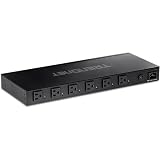
Overview: The TRENDnet TPI-06 is a managed PDU, not a UPS, providing intelligent power distribution rather than battery backup. This 1U rackmount unit features six individually controllable NEMA 5-15R outlets plus one always-on bypass outlet. A Gigabit Ethernet port enables remote power cycling, scheduling, and monitoring for up to 15A total load.
What Makes It Stand Out: Individual outlet control allows remote rebooting of hung devices without dispatching technicians, dramatically reducing downtime. The UL 62368-1 certification ensures safety compliance for enterprise deployments. English-speaking domestic support provides accessible technical assistance. Power scheduling capabilities enable automated on/off cycles for energy savings and maintenance windows. The bypass outlet maintains power to critical devices during PDU firmware updates.
Value for Money: At $250.58, this managed PDU offers strong value for remote and branch office management. Comparable intelligent PDUs typically cost $300+. The feature set—individual outlet control, Gigabit management, UL certification—delivers professional capabilities at a mid-range price point. Note: this supplements, rather than replaces, a UPS.
Strengths and Weaknesses: Strengths include granular outlet control, robust safety certification, responsive domestic support, and flexible power scheduling. The primary weakness is the 15A total capacity, which limits deployment with high-density equipment. With only six managed outlets, larger racks require multiple units. This is NOT a battery backup device—sensitive equipment still requires separate UPS protection.
Bottom Line: Excellent choice for IT administrators managing distributed equipment needing remote power control. Perfect for rebooting security cameras, network gear, or servers. Must be paired with a UPS for battery backup. Verify your total load stays under 15A before purchasing.
5. Navepoint 1U 19-Inch Fixed 4-Post Rack Mount Server Shelf with Adjustable Depth from 18-29 Inch Black

Overview: The Navepoint 1U Fixed Rack Mount Shelf is a simple vented shelf for mounting non-rackable equipment in standard 19-inch server racks. With adjustable depth from 18 to 29 inches and a 110-pound weight capacity, it accommodates various devices like modems, power strips, or small towers in four-post configurations.
What Makes It Stand Out: The depth adjustability provides flexibility across different rack types without requiring separate SKUs. Slotted venting promotes airflow to prevent heat buildup under equipment. The absence of a front lip simplifies installation and removal of devices but requires careful placement. At under $100, it’s one of the most economical professional rack shelving solutions available.
Value for Money: At $95.99, this shelf delivers exceptional value for basic rack organization needs. Comparable shelves from premium brands cost $150-$200. The steel construction and adjustable depth offer versatility typically found in more expensive units. While lacking sliding rails or cable management, the price point makes it accessible for small businesses and home labs.
Strengths and Weaknesses: Strengths include affordable pricing, adjustable depth, vented cooling design, and straightforward installation. Weaknesses are the fixed (non-sliding) design that limits maintenance access, lack of retaining lip that could allow equipment to slide forward, modest 110-pound capacity unsuitable for heavy UPS units, and absence of integrated cable management features.
Bottom Line: Ideal for budget-conscious installations needing to mount lightweight equipment in racks. Perfect for home labs, small offices, and secondary equipment. Do not exceed weight limits or use for mission-critical gear requiring frequent access. Consider sliding shelves for heavier or regularly serviced devices.
6. Tripp Lite Eaton Series SMART1500LCDXNC Cloud-Connected 1500VA Rack Mount UPS Battery Backup, Online Remote Management & Monitoring, 1050W 120V, 10 Outlets, Extended Run, 2U Rackmount, 3-Year Warranty

Overview: The Tripp Lite Eaton SMART1500LCDXNC is a professional-grade 2U rack-mount UPS delivering 1500VA/1050W of clean power protection. This cloud-connected unit targets IT professionals managing remote infrastructure, offering ten NEMA 5-15R outlets with battery backup and surge protection. The automatic voltage regulation stabilizes power without draining the battery, while the extended runtime capability via external battery modules makes it suitable for critical applications requiring prolonged uptime.
What Makes It Stand Out: Cloud connectivity through Eaton’s Brightlayer app transforms traditional UPS management, enabling remote monitoring, text/email alerts, and outlet control from anywhere. The NFC mass configuration feature dramatically reduces deployment time across multiple units—simply scan a QR code and transfer settings from your mobile device. The user-replaceable RBC51 battery cartridges and $250,000 connected equipment insurance demonstrate serious enterprise-grade reliability.
Value for Money: At $645.64, this UPS sits in the premium tier but justifies its cost through features competitors lack. Comparable APC Smart-UPS units with cloud management cost 20-30% more. The three-year warranty and included insurance add substantial value, while the potential for extended runtime prevents costly downtime.
Strengths and Weaknesses: Strengths include advanced remote management, robust warranty coverage, AVR technology, and scalable runtime. Weaknesses are the 2U form factor requiring more rack space than tower alternatives, the external battery module sold separately, and a price point that may exceed small business budgets.
Bottom Line: Ideal for MSPs, data centers, and businesses with distributed IT assets. The cloud management capabilities alone justify the investment for anyone managing multiple locations or requiring guaranteed uptime.
7. JINGCHENGMEI 1U 19inch Server Rack Rails -15-24 inch Adjustable Depth for Universal 4-Post or 2-Post Rack Mount Rails for Network Equipment, Server, UPS Mounting Rail Kit (1URR15-24IN)

Overview: The JINGCHENGMEI 1U Server Rack Rails offer an economical solution for mounting network equipment, servers, and UPS units in standard 19-inch racks. With adjustable depth from 15 to 24 inches, these rails accommodate various cabinet sizes while supporting up to 110 pounds in four-post configurations. The kit includes all necessary M6 screws and cage nuts, providing everything needed for basic rack installations.
What Makes It Stand Out: These rails distinguish themselves through exceptional versatility at an entry-level price point. The ability to function in both four-post and center-weighted two-post racks makes them suitable for diverse environments from server rooms to telecom closets. The included mounting hardware eliminates frustrating last-minute hardware store runs.
Value for Money: At $36.99, these rails represent outstanding value, costing significantly less than name-brand alternatives from Dell or HP that often exceed $100 for similar functionality. While construction is straightforward, the price-to-performance ratio is unbeatable for non-critical installations.
Strengths and Weaknesses: Strengths include affordability, versatile mounting options, complete hardware inclusion, and adequate weight capacity for lighter equipment. Weaknesses involve the limited 15-24 inch depth range, basic powder-coated steel construction that may not match premium durability, and 110-pound capacity that restricts use with heavier servers.
Bottom Line: Perfect for budget-conscious IT departments, home labs, and small businesses mounting lightweight to medium equipment. These rails deliver essential functionality without premium pricing, though mission-critical deployments may require heavier-duty alternatives.
8. Navepoint 1U 19-Inch Fixed 4-Post Rack Mount Server Shelf with Adjustable Depth from 18-34 Inch Black

Overview: The NavePoint 1U Fixed Server Shelf provides a sturdy platform for rack-mounted equipment requiring a solid mounting surface rather than rail support. Measuring 1.75 inches high and 17 inches wide with depth adjustable from 18 to 34 inches, this black steel shelf handles up to 110 pounds. The slotted venting pattern promotes airflow to prevent heat buildup in densely packed racks.
What Makes It Stand Out: Unlike rail kits, this fixed shelf offers a continuous surface ideal for non-rackmountable equipment like modems, power strips, or half-depth servers. The generous 18-34 inch depth range exceeds many competitors, while integrated venting demonstrates thoughtful thermal management design. The absence of a front lip simplifies equipment placement and removal.
Value for Money: Priced at $91.99, this shelf commands a premium over basic rail kits but delivers superior versatility. The vented design and robust construction justify the cost for equipment requiring airflow. Compared to similar vented shelves from StarTech or Tripp Lite, NavePoint offers competitive pricing with comparable build quality.
Strengths and Weaknesses: Strengths include excellent venting for cooling, wide depth adjustment, solid four-post stability, and professional appearance. Weaknesses include higher cost than rail alternatives, fixed shelf design limiting flexibility for some equipment types, and 110-pound capacity that may not support heavy UPS units.
Bottom Line: An excellent choice for mounting heat-generating network gear or non-standard equipment. The venting feature makes it particularly valuable in thermal-sensitive environments where airflow management is critical.
9. JINGCHENGMEI 1U Universal 4-Post Rack Mount Server Shelf Rails for Dell Compaq HP IBM APC - 16-33 Inches Adjustable Depth-110 lbs Capacity (16-33" Rails)

Overview: The JINGCHENGMEI 1U Universal Rack Mount Rails provide flexible server support across an impressive range of rack sizes and depths. Compatible with 19, 23, and 30-inch cabinets, these rails adjust from 16 to 33 inches deep, accommodating most standard server form factors. Constructed from powder-coated cold-rolled steel, they support 110 pounds in four-post configurations and include M6 mounting hardware.
What Makes It Stand Out: Universal compatibility across multiple rack widths sets these rails apart from competitors limited to 19-inch cabinets. The 16-33 inch depth range covers a broader spectrum of equipment than budget alternatives, while the included hardware kit ensures compatibility with Dell, HP, IBM, and APC equipment without proprietary adapters.
Value for Money: At $35.99, these rails offer exceptional versatility per dollar. Competing universal rails typically cost $60-80, making this an attractive option for mixed-vendor environments. The ability to standardize on one rail model across different rack types simplifies inventory management and reduces costs.
Strengths and Weaknesses: Strengths include universal rack compatibility, generous depth adjustment, competitive pricing, and comprehensive hardware inclusion. Weaknesses involve standard 110-pound weight limit, basic steel construction without premium features like cable management, and potential fit inconsistencies with some proprietary server form factors.
Bottom Line: A smart procurement choice for data centers with diverse equipment. These rails deliver maximum compatibility at minimal cost, making them ideal for IT departments managing multiple rack standards or planning future expansion.
10. NavePoint Adjustable Rack Mount Server Shelf Shelves Rail Rails 1U

Overview: The NavePoint Adjustable Rack Mount Shelf offers a straightforward solution for mounting equipment in standard 19-inch racks. This 1U unit features depth adjustable up to 33.25 inches, supporting 110 pounds across a non-vented steel platform. The simple rail-style design without a front lip allows easy equipment sliding, while the black finish matches standard rack aesthetics.
What Makes It Stand Out: NavePoint’s reputation for reliable rack accessories shines through in this no-frills shelf. The tool-less depth adjustment mechanism simplifies installation, while the absence of venting provides a solid surface for equipment with bottom-mounted components or those requiring stable placement.
Value for Money: At $48.79, this shelf occupies a middle ground between budget rails and premium fixed shelves. While more expensive than JINGCHENGMEI alternatives, it offers NavePoint’s quality assurance and slightly smoother adjustment mechanisms. However, the non-vented design limits its appeal for heat-sensitive applications.
Strengths and Weaknesses: Strengths include easy depth adjustment, stable four-post mounting, reputable brand backing, and adequate capacity for most network gear. Weaknesses include lack of venting reducing airflow, higher price than similar rail kits, basic construction without advanced features, and 110-pound limit restricting heavy equipment use.
Bottom Line: A dependable middle-tier option for general-purpose rack mounting. Choose this shelf when brand reliability matters more than absolute cost savings, but consider vented alternatives for equipment requiring active cooling.
Why Your Home Server Closet Demands a Rack-Mount UPS
The Real Cost of Power Instability in Home Labs
Power anomalies aren’t binary events—they exist on a spectrum that includes voltage sags, harmonic distortion, frequency variations, and complete outages. Each of these can inflict cumulative damage on power supplies, corrupt data during write operations, and cause RAID arrays to desynchronize. For home server closets running 24/7, these events happen more frequently than utility companies admit, with estimates suggesting 15-20 minor power events monthly in typical residential areas. A quality rack-mount UPS provides continuous conditioning, not just backup power, filtering these imperfections before they reach your expensive equipment.
Space Efficiency: Making Every Rack Unit Count
Residential server closets often live in converted storage spaces, basements, or spare bedrooms where square footage is precious. Tower UPS units consume floor space and create cable routing nightmares, while rack-mount models integrate seamlessly into your existing rack, using vertical height instead of footprint. This consolidation improves airflow patterns, centralizes power distribution, and maintains the professional aesthetic of your setup. More importantly, it positions your UPS within arm’s reach for monitoring and maintenance without requiring you to crawl behind racks or move equipment.
UPS Topology Fundamentals for Home Servers
Standby UPS: Entry-Level Protection
Standby topology keeps the inverter dormant until power fails, switching over in 4-8 milliseconds. While adequate for basic PCs, this design offers minimal voltage regulation and can trigger audible clicks during minor fluctuations. For server closets, standby UPS units should only be considered for non-critical peripherals like monitors or network switches, never for production servers or storage arrays that demand cleaner power.
Line-Interactive: The Homelab Sweet Spot
Line-interactive UPS units employ an autotransformer to boost or trim voltage without switching to battery, handling brownouts and overvoltages silently while extending battery life. With transfer times under 4 milliseconds and built-in AVR, these represent the optimal balance of protection, efficiency, and cost for most home server applications. They maintain stable output during the frequent voltage sags that plague residential power grids without draining batteries unnecessarily.
Double-Conversion: Maximum Isolation
Double-conversion UPS units continuously convert AC to DC and back to AC, providing complete electrical isolation from utility power. This delivers the purest power quality but at the cost of 5-10% efficiency loss and higher heat generation. Consider this topology only for environments with extremely dirty power or when protecting enterprise-grade storage systems where even microsecond-level anomalies could cause issues.
Decoding Critical Specifications
VA vs. Watts: Matching Capacity to Your Load
The Volt-Ampere (VA) rating represents apparent power, while wattage indicates real power consumption. Modern power supplies with Power Factor Correction (PFC) achieve 0.9-0.95 power factors, but older equipment may run as low as 0.6. Always size your UPS using wattage ratings, not VA, and apply a 20-30% overhead for future expansion. A common mistake is calculating based on nameplate ratings rather than measured draw—use a Kill-A-Watt meter to capture actual consumption during peak loads.
Runtime Requirements: Calculating Real-World Needs
Runtime isn’t about indefinite operation—it’s about graceful shutdown. Calculate your needs by determining how long it takes your systems to safely power down, then add 50% buffer for safety. For NAS devices with extensive write caches, this might mean 10-15 minutes. Virtualized environments need time to migrate VMs or shut down multiple hosts sequentially. Don’t forget to factor in the time required for your UPS management software to trigger and execute shutdown scripts.
Transfer Time: The Millisecond That Matters
Server power supplies can handle 10-20ms of power loss before dropping, but storage arrays and network equipment are more sensitive. Look for transfer times under 4ms for line-interactive models and under 2ms for online UPS units. The specification sheet might list “typical” times—dig deeper for “maximum” transfer times, which represent worst-case scenarios during complex power events.
Battery Technology: The Heart of Your UPS
Sealed Lead-Acid vs. Lithium-Ion
SLA batteries dominate the market due to lower upfront costs and proven reliability, typically lasting 3-5 years. However, they degrade faster in heat above 25°C—a real concern in closet environments. Lithium-ion batteries offer 8-10 year lifespans, operate efficiently at higher temperatures, and provide faster recharge times, but command 2-3x the initial price. For closets without active cooling, lithium-ion’s thermal tolerance often justifies the premium over a 5-year ownership period.
Smart Battery Management Features
Advanced UPS units monitor individual cell health, temperature compensation, and cycle counts. Look for units with battery calibration functions that periodically test capacity under load, not just open-circuit voltage. Predictive failure alerts give you weeks of notice before replacement becomes critical, preventing unexpected failures during actual outages.
Hot-Swappable Designs for Continuous Uptime
Hot-swappable battery modules let you replace batteries without powering down connected equipment. This feature becomes invaluable when your UPS battery fails at an inconvenient time—like during a storm when you need protection most. Verify that hot-swapping truly works without load interruption; some budget models require you to disable outlets or enter a special mode first.
Form Factor and Physical Integration
1U, 2U, and Depth Considerations
1U UPS units maximize vertical space but often sacrifice battery capacity and outlet density. 2U models provide better ventilation and typically support external battery packs. Measure your rack depth carefully—many “short-depth” closets require UPS units under 15 inches deep. Remember to account for rear cable bend radius and any protruding network management cards that add to overall depth.
Weight Distribution in Residential Racks
A fully-equipped 2U UPS can weigh 60-80 pounds, concentrating significant mass in a small footprint. Ensure your rack’s weight capacity and floor loading can handle this, especially for rolling racks. Install heavier UPS units near the bottom of the rack to lower the center of gravity and prevent tipping when the rack is moved. Use rail kits rather than simple shelf mounts for secure support.
Tower-Convertible Options for Flexibility
Some rack-mount UPS units include detachable mounting ears and rubber feet for tower orientation. This flexibility proves valuable if you relocate your equipment or repurpose the UPS for a different setup later. Check whether the display remains readable in both orientations and if the ventilation design works efficiently when standing vertically.
Connectivity and Remote Management
Network Management Cards vs. USB
USB connectivity requires a directly connected PC running management software—impractical for closet installations. Network management cards (NMC) provide web interfaces, SNMP monitoring, and email alerts independent of any host computer. They enable graceful shutdown of multiple servers over the network and integrate with monitoring platforms like Nagios or PRTG. Ensure the NMC supports modern TLS encryption and receives regular firmware updates.
Environmental Monitoring Integration
Premium UPS units accept add-on sensors for temperature, humidity, and door contacts. These sensors trigger alerts and can automatically shut down equipment before thermal damage occurs. For closet deployments, temperature-triggered fan control prevents unnecessary noise while maintaining safe operating conditions. Some units can even trigger smart outlets to activate auxiliary cooling.
API Access and Home Automation
Modern UPS management cards offer RESTful APIs or MQTT support, allowing integration with Home Assistant, Node-RED, or custom scripts. This enables sophisticated responses like dimming lights during outages, announcing status via smart speakers, or triggering cellular notifications when you’re away. The API should support read/write operations for complete automation flexibility.
Acoustic Considerations for Closet Deployments
Fan Noise Profiles and Variable Speed Control
UPS fans typically run at fixed speeds or simple on/off thresholds, creating intrusive noise in quiet homes. Look for models with temperature-proportional fan control that only ramp up under significant load or heat. Review the acoustic specifications—anything above 45dB at idle will be noticeable through walls. Some enterprise units offer “quiet mode” settings that trade efficiency for silence during low-load operation.
Managing Audible Alerts
Default alarm patterns are designed for data centers, not bedrooms above server closets. Ensure you can disable or customize alarms for non-critical events like minor voltage fluctuations. The ability to schedule quiet hours—where only critical alarms sound—prevents 3AM beeping during brief utility blips. Network management cards should allow alarm configuration via software, not just physical buttons.
Output Power Quality
Pure Sine Wave vs. Simulated Sine Wave
Simulated sine wave (stepped approximation) UPS units can cause PFC power supplies to buzz, run hot, or shut down unexpectedly under load. They may also interfere with sensitive audio/video equipment. Pure sine wave output matches utility power quality exactly, ensuring compatibility with all modern hardware. The price difference has narrowed significantly, making pure sine wave the only responsible choice for server closets.
Automatic Voltage Regulation (AVR) Deep Dive
AVR circuits come in two flavors: relay-based (stepped) and transformer-based (continuous). Relay-based AVR makes audible clicks during voltage adjustments and provides coarse correction. Transformer-based AVR offers seamless, silent regulation with finer voltage control. For equipment running 24/7, the smoother operation of transformer-based AVR reduces stress on power supplies and eliminates the distraction of constant clicking.
Surge Protection and EMI/RFI Filtering
Joule ratings tell only part of the story—response time and clamping voltage matter more. Look for surge protection under 400V clamping with nanosecond response times. EMI/RFI filtering should cover a broad frequency range (150kHz to 100MHz) to prevent power line noise from affecting sensitive network equipment. Remember that surge protection components degrade with each event; units with replaceable surge modules extend overall system life.
Planning for Growth and Scalability
External Battery Pack Compatibility
Your power needs will grow. UPS units with external battery connectors let you extend runtime without replacing the entire unit. Verify the maximum number of external packs supported and whether the UPS can charge them within a reasonable timeframe (typically 4-6 hours). Some units require separate charging modules for large battery strings, adding cost and complexity.
Load Segmentation and Outlet Groups
Programmable outlet groups let you prioritize equipment during extended outages. Configure non-critical devices like development servers or LED lighting to shut down early, preserving runtime for essential services like NAS storage and routers. This intelligent load shedding can double effective runtime for critical systems without additional battery investment.
Total Cost of Ownership Analysis
Upfront Costs vs. Battery Replacement Costs
A $300 UPS requiring $150 battery replacements every 3 years costs $750 over 9 years. A $600 lithium-ion UPS lasting 9 years without replacement costs $600 total—20% less despite double the initial price. Factor in your time and shipping costs for battery changes. Some manufacturers offer battery replacement services, but DIY replacement is straightforward for most rack-mount units.
Warranty and Support Value
UPS warranties range from 2 years to lifetime coverage, but read the fine print. Does the warranty cover batteries? Is advanced replacement included? What’s the turnaround time for warranty claims? A 3-year warranty with next-business-day replacement has tangible value compared to a 5-year warranty requiring you to ship the unit for service. Consider the manufacturer’s reputation for honoring claims without requiring proof of “proper use.”
Installation and Operational Best Practices
Proper Load Balancing Across Outlets
Most rack-mount UPS units split outlets across two circuits. Balance your load within 10% between circuits to prevent overloading one side while the other sits idle. Place high-draw devices like servers on separate circuits from transient-load devices like printers or monitors. This balance improves efficiency and prevents nuisance trips during startup surges.
Cable Management and Airflow
Route power cables to avoid blocking ventilation grilles on the UPS. Use Velcro straps, not zip ties, for easy reconfiguration. Keep high-current cables separated from low-voltage signal cables to reduce electromagnetic interference. In shallow closets, use right-angle power cords to minimize rear clearance requirements. Proper cable management improves airflow efficiency by 15-20%, directly impacting UPS longevity.
Electrical Safety and Grounding
Never bypass the UPS ground connection. In older homes without proper grounding, consider installing a dedicated circuit with GFCI protection. The UPS should be the first device after the wall outlet—no power strips or extension cords upstream. Verify that your rack’s grounding stud connects to the UPS chassis ground, creating a single ground plane for all equipment.
Maintenance Strategies for Longevity
Automated Self-Testing
Configure your UPS to perform monthly runtime calibration tests and weekly quick tests. These should occur during low-load periods—typically early morning hours. The UPS should log results and alert you to capacity degradation before it becomes critical. Review these logs quarterly to identify trends. A battery showing 5% capacity loss per month needs immediate replacement, not waiting for the scheduled 3-year cycle.
Firmware Security and Updates
Network-connected UPS units are IoT devices with security vulnerabilities. Check for firmware updates quarterly and subscribe to manufacturer security bulletins. Change default passwords immediately and disable unused services (FTP, Telnet) on the management card. Some units support signed firmware updates, preventing malicious code injection—a critical feature if your UPS is internet-accessible.
Advanced Configurations for Critical Systems
N+1 Redundancy in Home Environments
For truly critical setups, run two smaller UPS units in parallel rather than one large unit. Connect each server with dual power supplies to both UPS units. This N+1 configuration lets you perform maintenance on one UPS while the other carries full load. It also provides protection against UPS failure—a scenario that leaves you completely unprotected with a single unit. The cost premium is typically 30-40% but eliminates single points of failure.
Splitting Loads Across Multiple Units
Separate your infrastructure into “critical path” and “support” loads. Run networking gear, primary NAS, and hypervisor hosts on a high-quality UPS. Place development boxes, backup systems, and peripherals on a secondary unit. This segmentation ensures that a battery failure in one UPS doesn’t bring down your entire environment. It also allows you to size each UPS appropriately for its specific load profile.
Environmental Management
Heat Dissipation in Confined Spaces
UPS units convert 3-10% of input power to heat, which accumulates rapidly in sealed closets. A 1500VA UPS generates roughly 150-300W of continuous heat—equivalent to a small space heater. Calculate your closet’s BTU load and ensure ventilation can remove it. Consider active exhaust fans triggered by UPS temperature sensors. Remember that battery life halves for every 10°C above 25°C ambient temperature.
Dust and Humidity Control
Closets often suffer from poor air quality. Install washable intake filters on rack doors to prevent dust buildup on UPS heat sinks. Maintain humidity between 20-80%—too low risks static discharge, too high accelerates corrosion. Some UPS units display humidity readings when equipped with environmental sensors. In damp basements, a small dehumidifier connected to a switched outlet on the UPS can protect both the UPS and your servers.
Frequently Asked Questions
How do I accurately calculate the UPS capacity I need for my home server closet?
Use a Kill-A-Watt meter to measure actual power draw during peak usage, then add 30% headroom for future expansion. Multiply this wattage by 1.2 to convert to VA rating, ensuring compatibility with power supplies that have lower power factors. Don’t forget to include PoE switches, modems, and any external storage arrays in your calculations.
Will a rack-mount UPS work if my server rack isn’t a standard 19-inch width?
Most rack-mount UPS units are designed exclusively for 19-inch EIA racks. For 23-inch telco racks or 10-inch network cabinets, you’ll need adapter brackets or should consider tower-convertible models. Some manufacturers offer rack kits for non-standard sizes, but these are increasingly rare for consumer-focused units.
How often should I replace UPS batteries in a hot closet environment?
In environments consistently above 30°C, replace SLA batteries every 2-2.5 years instead of the standard 3-5 year cycle. Lithium-ion batteries can typically reach 5-7 years even at elevated temperatures. Perform monthly runtime tests and replace when capacity drops below 80% of original specification, regardless of age.
Can I connect a standard desktop computer to a rack-mount UPS?
Absolutely, but you’ll need the appropriate power cable. Rack-mount UPS units use C13/C14 or C19/C20 connectors, while desktop PCs use NEMA 5-15P plugs. Purchase high-quality C13-to-NEMA adapters or replace the PC’s power cord with a C13-terminated version. Ensure the total load doesn’t exceed the UPS’s capacity.
What’s the difference between “line-interactive” and “online” UPS in practical terms?
Line-interactive UPS units correct voltage fluctuations using an autotransformer without consuming battery power, switching to battery only during outages. Online UPS units constantly regenerate power through their inverters, providing perfect isolation but consuming more power and generating more heat. For home use, line-interactive offers the best protection-to-cost ratio unless you have severe power quality issues.
How loud are rack-mount UPS units during normal operation?
Quality units operate at 35-45dB at idle—comparable to a quiet library. Under load or when charging, fan noise can reach 50-60dB. Units with temperature-controlled variable-speed fans remain quiet during normal operation. Always check the acoustic specifications and look for user reviews mentioning noise, as manufacturers often test in ideal conditions.
Do I need pure sine wave output if my equipment is relatively new?
Yes. Modern power supplies with active PFC circuits can shut down or run inefficiently on simulated sine wave power. The small price premium for pure sine wave output eliminates compatibility issues and reduces power supply stress. Consider it cheap insurance against unexplained reboots or hardware failures.
Can I use a rack-mount UPS in a tower configuration temporarily?
Many models support tower orientation through removable ears and repositionable displays. However, ventilation patterns are optimized for rack mounting. In tower mode, ensure adequate clearance around ventilation grilles—typically 4-6 inches on sides and rear. Some units have dedicated tower stands that orient the unit correctly for vertical airflow.
What network management features are actually useful for home users?
Email/SMS alerts for power events, automated graceful shutdown scripts, and mobile app monitoring provide the most value. API access for integration with home automation platforms is increasingly important. Features like SNMP traps and Syslog forwarding are overkill unless you’re running enterprise monitoring tools.
How do I safely dispose of old UPS batteries?
UPS batteries contain lead and sulfuric acid requiring special handling. Most electronics retailers (Best Buy, Staples) offer free battery recycling. UPS manufacturers often provide prepaid shipping labels for battery returns. Never dispose of batteries in household trash—it’s illegal in many jurisdictions and environmentally hazardous. Keep old batteries in a cool, dry place until you can properly recycle them.