The modern photography landscape has fundamentally shifted. With mirrorless cameras now capturing 45+ megapixel RAW files, 8K video footage, and high-speed burst sequences that generate thousands of images per single shoot, your card reader is no longer just an accessory—it’s the critical bridge between your creative work and your digital darkroom. The transition from SD to CFexpress formats has created a unique challenge: photographers need solutions that handle both legacy cards and cutting-edge storage without creating bottlenecks that kill productivity.
Choosing the right SD card reader with CFexpress support isn’t simply about finding a device with the right slots. It’s about understanding how interface speeds, power delivery, thermal management, and workflow integration impact your daily process. Whether you’re a wedding photographer racing against a next-day gallery deadline or a landscape shooter backing up terabytes in the field, the wrong reader can cost you hours—or worse, compromise your data. Let’s explore what separates exceptional readers from mediocre ones, and how to future-proof your investment.
Top 10 SD Card Readers with CFexpress Support for Photographers
Detailed Product Reviews
1. Lexar Professional CFexpress Type A / SD USB 3.2 Gen 2 Reader, Designed for CFexpress Type A and SD UHS-II Cards, High-Speed USB 10Gbps Transfer Speeds (LRW530U-RNBNG)

Overview: The Lexar Professional LRW530U targets Sony camera owners with its CFexpress Type A and SD UHS-II dual-slot design. This USB 3.2 Gen 2 reader delivers transfer speeds up to 900MB/s for CFexpress Type A cards and 312MB/s for SD cards, making it ideal for professionals handling high-resolution images and 4K/8K video footage.
What Makes It Stand Out: Lexar’s reputation for reliability shines through this reader’s robust build quality and consistent performance. The inclusion of both USB Type-C to Type-A and Type-C to Type-C cables ensures compatibility across modern and legacy systems without additional purchases. Its dedicated Type A support fills a crucial niche for Sony a1, a7S III, and FX3 users who need maximum speed from their proprietary card format.
Value for Money: At $49.49, this reader commands a premium but justifies it through brand trust, comprehensive cable inclusion, and specialized Type A compatibility. While generic alternatives cost less, Lexar’s warranty and proven reliability offer peace of mind for professionals where data integrity is paramount.
Strengths and Weaknesses:
- Strengths: Trusted Lexar brand; Dual-slot Type A + SD UHS-II; Both cables included; Up to 900MB/s real-world speeds; Excellent thermal management
- Weaknesses: Premium pricing; Type A only (not Type B); Overkill for non-Sony users; Limited to 312MB/s on SD slot
Bottom Line: Essential for Sony professionals prioritizing reliability and speed. Others should consider Type B alternatives for better value.
2. CFexpress Type B and SD Dual-Slot Memory Card Reader, 10Gbps USB 3.2 Gen 2 Type B CF Express Adapter Memory Card Reader with USB C to USB C/USB A Cable,Compatible with Windows/Mac/Linux/Android US

Overview: This versatile reader serves CFexpress Type B and SD card users with USB 3.2 Gen 2 speeds up to 1.25GB/s. Designed for photographers and videographers, it supports SDXC, SDHC, and UHS-I cards alongside Type B media. The dual-slot configuration offers workflow flexibility, though slots cannot operate simultaneously.
What Makes It Stand Out: The reader’s broad OS compatibility spans Windows XP through 11, macOS, Linux, Chrome OS, and Android, making it exceptionally versatile across devices. Its plug-and-play functionality eliminates driver hassles, while the included USB-C to C and USB-C to A cables ensure immediate connectivity with modern laptops and legacy systems alike.
Value for Money: Priced at $39.99, this reader sits in the mid-range sweet spot. It undercuts premium brands while delivering comparable speeds and better cable inclusion than budget options. The simultaneous-read limitation is the main trade-off for the attractive price point.
Strengths and Weaknesses:
- Strengths: Affordable Type B support; Extensive OS compatibility; Both cables included; Compact design; Hot-swapping capability
- Weaknesses: Cannot read both cards simultaneously; Generic brand reliability unknown; Speed claims may be optimistic; No UHS-II SD support mentioned
Bottom Line: A solid workhorse for Type B users on a budget who don’t require simultaneous card access.
3. Lexar Professional CFexpress Type B / SD USB 3.2 Gen 2 Reader, Transfer Speeds Up To 10Gbps, Designed for CFexpress Type B and SD Cards (LRW520U-RNBNG)

Overview: Lexar’s LRW520U offers professionals a compact dual-slot reader supporting CFexpress Type B and SD cards with true simultaneous offload capability. Leveraging USB 3.2 Gen 2, it accelerates workflows for high-resolution photography and 8K video production. The palm-sized design suits both studio and location work, making it a versatile tool for creators.
What Makes It Stand Out: Unlike many competitors, this reader allows concurrent data transfer from both slots, dramatically improving efficiency for multi-card camera setups. Lexar’s engineering ensures stable performance during sustained transfers, while the single 2-in-1 cable with adapter reduces clutter without sacrificing connectivity options across USB-C and USB-A ports.
Value for Money: At $43.99, it bridges the gap between budget generics and premium options. The simultaneous read feature and Lexar reliability justify the modest premium over no-name brands, making it a smart investment for working professionals who value time savings.
Strengths and Weaknesses:
- Strengths: Simultaneous dual-slot operation; Trusted Lexar quality; Compact portable design; USB 3.2 Gen 2 speeds; Good thermal performance
- Weaknesses: Single cable system less convenient; No UHS-II speed rating specified; Slightly slower than theoretical maximums; Premium over generics
Bottom Line: Ideal for professionals needing efficient dual-card workflows with brand reliability at a reasonable price.
4. Professional CFexpress Type B and SD Dual-Slot Memory Card Reader with USB 3.2 Gen 2 (10Gbps) Transfer Speed, USB-C&USB-A 2-in-1 CFexpress Type B/SD Card Adapter

Overview: This budget-friendly reader delivers USB 3.2 Gen 2 speeds for CFexpress Type B and SD cards in an ultra-compact “baby-palm” sized form factor. Designed for pro vloggers, influencers, and photographers, it promises 10Gbps transfers without the premium price tag. The integrated USB-C and USB-A connectors eliminate cable management concerns entirely.
What Makes It Stand Out: Its diminutive size and integrated connector design make it exceptionally travel-friendly, slipping easily into pockets or camera bags. The reader works across virtually all operating systems from Windows XP to Android, offering plug-and-play simplicity. The price point makes it accessible to hobbyists and professionals needing a backup device for field use.
Value for Money: At $27.99, this is the most affordable option reviewed. While build quality and long-term durability may not match premium brands, the core functionality and speed capability deliver exceptional value for casual users or as a secondary reader in your kit.
Strengths and Weaknesses:
- Strengths: Most affordable price; Extremely portable; Integrated USB connectors; Broad OS compatibility; Good speed claims
- Weaknesses: Generic brand reliability unknown; Likely plastic construction; Unclear simultaneous reading; No UHS-II mention
Bottom Line: Perfect entry-level reader or backup device for cost-conscious creators prioritizing portability over premium build.
5. CFexpress Type B & SD Card Reader USB-C 3.2 Gen 2 10Gbps – Aluminum Alloy High-Speed Memory Card Reader for Canon, Nikon, Fujifilm Cameras – Compatible with Lexar, SanDisk, ProGrade, Angelbird
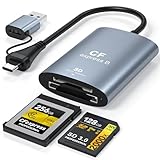
Overview: This aluminum-bodied reader combines premium materials with high-speed performance for CFexpress Type B and SD cards. Supporting transfer rates up to 1,750MB/s, it targets professional photographers using Canon, Nikon, and Fujifilm cameras. The USB 3.2 Gen 2 interface and included USB-A adapter ensure broad device compatibility across modern and legacy systems.
What Makes It Stand Out: The durable aluminum alloy housing provides superior heat dissipation, preventing thermal throttling during extended transfer sessions. Its 1,750MB/s speed claim exceeds most competitors, potentially maximizing top-tier CFexpress cards from Lexar, SanDisk, ProGrade, and Angelbird. The specific camera brand compatibility list inspires confidence for matching your gear.
Value for Money: At $29.99, it delivers premium build quality near budget prices. The aluminum construction alone justifies the cost over plastic alternatives, while the performance claims make it a compelling choice for professionals wanting durability without breaking the bank.
Strengths and Weaknesses:
- Strengths: Premium aluminum build; Highest speed claims; Excellent heat dissipation; Broad card compatibility; Great price for build quality
- Weaknesses: Lesser-known brand; Speed may require ideal conditions; Single cable setup; Limited warranty details
Bottom Line: Outstanding value for professionals seeking durable, high-performance reader without premium brand pricing.
6. 10Gbps CFexpress/XQD/SD Cards Reader 3-in-1 CFexpress Type B Card Readers Adapter XQD/SD Memory Card Reader USB 3.2 Gen 2 Support for Thunderbolt 3/4 Port for Professional Filmmakers Content Creators

Overview: This 3-in-1 card reader consolidates CFexpress Type B, XQD, and SD support into a single hub, delivering 10Gbps speeds for professionals handling 4K/8K content. Its dual-slot design allows simultaneous read/write operations, letting you back up cards directly without a computer intermediary.
What Makes It Stand Out: The simultaneous dual-card operation is a workflow game-changer, enabling direct backups between cards on location. Its rugged aluminum construction handles heat dissipation during sustained transfers, while the included USB-C and USB-A cables ensure compatibility with everything from legacy desktops to Thunderbolt 4 laptops. The 18-month warranty demonstrates manufacturer confidence.
Value for Money: At $45.88, this reader undercuts many competitors while offering superior functionality. Competitors often charge $60+ for similar specs, and the simultaneous operation feature alone justifies the price. For wedding shooters and expedition filmmakers, the time saved during backup makes this a cost-effective investment.
Strengths and Weaknesses: Pros include simultaneous card operation, robust aluminum build, dual cable inclusion, broad card compatibility, and plug-and-play simplicity. Cons are limited XQD compatibility (excludes N/S/H series) and no mention of UHS-II SD support specifically. The shared CFexpress/XQD slot may confuse some users.
Bottom Line: An exceptional value for professionals needing versatile, high-speed transfers. The simultaneous operation capability and rugged design make it ideal for demanding workflows where time and reliability matter.
7. XQD Card Reader with CFexpress Type B & SD Support, USB-C 3.2 Gen 2 (10 Gbps) — 3-in-1 High-Speed Reader with Shared XQD/Type B Slot for Professional Filmmakers & Photographers

Overview: This streamlined 3-in-1 reader targets professionals transitioning between XQD and CFexpress Type B formats, offering a shared slot for both plus a dedicated SD UHS-II slot. With 10Gbps USB-C 3.2 Gen 2 connectivity, it handles large video files and RAW photos efficiently.
What Makes It Stand Out: The aluminum housing’s passive cooling prevents thermal throttling during extended sessions, a critical feature for DITs processing footage on set. Its Linux compatibility broadens appeal beyond typical Windows/macOS users. The precision engineering delivers stable, real-world speeds approaching 1,000 MB/s with premium cards.
Value for Money: Priced at $45.99, it competes directly with Product 6 but trades simultaneous operation for dedicated UHS-II SD support. For users prioritizing SD performance over backup convenience, this offers better value. It’s significantly cheaper than Sony’s proprietary readers while maintaining professional-grade build quality.
Strengths and Weaknesses: Pros include excellent thermal management, Linux support, dedicated UHS-II SD slot, compact travel-friendly design, and dual cable inclusion. The major con is the shared XQD/CFexpress slot preventing simultaneous use, limiting workflow flexibility. No microSD support is another minor drawback.
Bottom Line: A solid choice for professionals who need rock-solid reliability and UHS-II SD performance. If simultaneous operation isn’t critical, this reader’s superior thermal design and Linux compatibility make it a worthy contender.
8. PGYTECH CreateMate USB 3.2 CFexpress A Card Reader 10GBps SD Card Reader for Photographer (CFexpress-A, Black)

Overview: The PGYTECH CreateMate redefines card reader design by integrating high-speed data transfer with comprehensive card storage. Supporting CFexpress Type A/B, SD, and microSD at 10Gbps, it doubles as a protective case for up to 12 cards, making it ideal for organized professionals.
What Makes It Stand Out: This is the only reader here that combines reading and storage functionality. The silicone case and carabiner clip offer expedition-level durability, while the aluminum body ensures heat dissipation. The included microSD to SD adapter enables UHS-II speeds for smaller cards—a thoughtful touch competitors miss.
Value for Money: At $99.95, it’s the premium option, but eliminates the need for separate card cases ($20-40 value). For traveling photographers and expedition filmmakers, consolidating gear justifies the cost. The build quality exceeds cheaper alternatives, likely outlasting budget readers by years.
Strengths and Weaknesses: Pros include innovative 2-in-1 design, superior protection, multiple card format support, included adapters, and excellent portability. Cons are the highest price in this roundup, no simultaneous operation mentioned, and potentially slower SD speeds (312MB/s vs UHS-II’s 624MB/s). The storage capacity may be overkill for casual users.
Bottom Line: Perfect for organized professionals who value gear protection and consolidation. If you travel extensively and hate juggling multiple accessories, this premium reader-case hybrid pays for itself in convenience and durability.
9. CFexpress Type A and SD Dual-Slot Memory Card Reader, 10Gbps USB 3.2 Gen 2 Type A CFexpress Adapter Memory Card Reader with USB C to USB C/USB A Cable,Compatible with Windows/Mac/Linux/Android

Overview: This focused reader specializes in CFexpress Type A and SD cards, delivering 10Gbps speeds for Sony camera users and others adopting the smaller Type A format. Its dual-slot design prioritizes simplicity and broad compatibility across Windows, Mac, Linux, and even Android devices.
What Makes It Stand Out: As the most affordable option at $39.99, it democratizes high-speed Type A card reading without sacrificing performance. The broad OS support, including Chrome OS and Android, makes it uniquely versatile for mobile workflows. Its compact footprint suits minimalist kits and travel photography.
Value for Money: Exceptional value—it’s $6-8 cheaper than competitors while maintaining 10Gbps speeds. For Sony A7S III or FX3 users, this offers identical performance to pricier brand-name readers. The dual-cable inclusion adds value typically reserved for more expensive units, making it a true budget champion.
Strengths and Weaknesses: Pros include unbeatable price, CFexpress Type A specialization, extensive OS compatibility, dual cables, and plug-and-play operation. Major con is no simultaneous card reading, limiting backup efficiency. The design appears less rugged than aluminum alternatives, and XQD support is absent entirely.
Bottom Line: The go-to choice for budget-conscious Sony shooters needing reliable Type A performance. While it lacks premium build features, the price-to-performance ratio is outstanding for creators who don’t require XQD or simultaneous operation.
10. 3-in-1 CFexpress/XQD/SD Card Reader USB C, VELOGK Dual-Slot USB 3.2(10Gbps) CFexpress Type B Card Reader Adapter compatible with Android/Windows/Mac OS/Linux, with Brushed Aluminum Case&Portable Pouch

Overview: VELOGK’s 3-in-1 reader balances versatility and portability, supporting CFexpress Type B, XQD, and SD cards with simultaneous read/write capability. Its brushed aluminum finish and included pouch signal attention to both aesthetics and field-ready practicality for mobile creators.
What Makes It Stand Out: The LED indicator provides clear connection status feedback—a small but valuable feature during hectic shoots. Simultaneous operation matches Product 6’s workflow advantage, while the brushed aluminum design offers premium feel at a mid-range price. The nylon-braided cable adds durability where competitors use standard rubber.
Value for Money: At $47.99, it sits between budget and premium options. The simultaneous operation and superior cable quality justify the slight premium over Product 6. You’re getting near-premium features without the $60+ price tag of brand-name alternatives from Sony or SanDisk.
Strengths and Weaknesses: Pros include simultaneous card operation, attractive brushed aluminum build, LED indicator, protective pouch, durable braided cable, and broad compatibility. Cons include slightly higher price than similar models and no explicit mention of UHS-II SD support or Linux compatibility. The brand is less established than competitors.
Bottom Line: A stylish, capable reader for professionals wanting simultaneous operation with better aesthetics and cable quality. The LED indicator and protective pouch make it slightly more field-friendly than bare-bones alternatives.
Understanding the CFexpress Revolution in Photography
CFexpress cards represent more than just a new storage format—they’re a paradigm shift in how cameras handle data. Built on the NVMe protocol and PCIe interface, these cards deliver speeds that make even the fastest UHS-II SD cards look pedestrian. For photographers, this means clearing buffers faster, recording higher bitrate video, and ultimately, spending less time waiting and more time shooting. But this performance comes with considerations: CFexpress Type A and Type B cards have different physical dimensions and speed capabilities, and your reader needs to support the specific format your camera uses.
Why Dual-Format Readers Are Essential for Modern Workflows
Most professional photographers don’t work with a single card type. You might shoot CFexpress in your primary camera body but still use UHS-II SD cards in backup bodies, drones, or secondary slots. A reader that handles both formats simultaneously eliminates the need for multiple devices cluttering your desk or travel bag. Look for readers that offer dedicated controllers for each slot rather than shared bandwidth, which can throttle speeds when both cards are active. This dual-support future-proofs your setup as you gradually transition your entire kit to CFexpress.
Key Interface Options: USB-C, Thunderbolt, and USB-A Explained
The connection to your computer determines your real-world transfer speeds more than any other factor. USB-C has become the standard, but not all USB-C ports are equal. USB 3.2 Gen 2 (10 Gbps) is the minimum you should consider, while USB 3.2 Gen 2x2 (20 Gbps) unlocks the full potential of high-end CFexpress cards. Thunderbolt 3 and 4 (40 Gbps) offer the highest bandwidth but require compatible computers and cables. USB-A connections, while still common on older machines, max out at 5 Gbps (USB 3.0) and create significant bottlenecks for modern media. Always match your reader’s interface to your computer’s fastest port.
Speed Ratings Decoded: From UHS-I to CFexpress 4.0
Card reader specifications can be misleading. A reader might advertise “up to 1700 MB/s” but only achieve that with specific card types under ideal conditions. Understanding the hierarchy helps: UHS-I caps at 104 MB/s, UHS-II at 312 MB/s, and UHS-III at 624 MB/s (though UHS-III is rare). CFexpress 2.0 Type B can theoretically hit 2000 MB/s, while the emerging CFexpress 4.0 standard doubles that. Your reader should clearly state which standards it supports natively, not through fallback compatibility. Pay attention to sustained write speeds, not just peak read speeds, which is what matters when ingesting large video files.
Build Quality Considerations for Field and Studio Use
A card reader’s construction directly impacts its lifespan and reliability. Aluminum housings dissipate heat better than plastic, crucial during long transfer sessions. For field use, look for rubberized grips and reinforced cable connections that withstand repeated plugging and unplugging. Ingress protection (IP) ratings matter if you shoot in harsh weather—sand and moisture can destroy a reader’s internal components. Studio photographers should prioritize weighted bases and non-slip pads that keep the reader stationary during use. The tactile feel of card insertion matters too; quality readers provide positive feedback that cards are properly seated.
Portability vs. Performance: Finding Your Balance
The smallest readers often sacrifice speed and features for size, while desktop docks offer maximum performance at the cost of portability. Cable-free dongle-style readers are perfect for travel but can block adjacent ports and may overheat during intensive use. Larger hubs with multiple slots and active cooling excel in studio environments but become dead weight in your camera bag. Consider your primary use case: a hybrid shooter might need two readers—one compact for location scouting and one high-performance for studio work—rather than compromising on a single mediocre solution.
Power Delivery and Bus-Powered Solutions
High-speed transfers demand power. Bus-powered readers draw electricity from your computer’s USB port, which is convenient but can be inconsistent—some laptops throttle USB power to conserve battery. Self-powered readers with dedicated AC adapters maintain peak performance regardless of your computer’s power state but add bulk. The sweet spot? Readers that support USB Power Delivery (PD) passthrough, allowing you to charge your laptop while transferring files. This is particularly valuable for MacBook users with limited ports.
Multi-Slot Configurations: Beyond Basic Reading
Advanced readers offer more than just CFexpress and SD slots. Some include microSD, CompactFlash (for legacy support), or even multiple CFexpress slots for simultaneous backups. The configuration matters: vertically stacked slots save desk space but can be fiddly to access. Horizontal layouts are more ergonomic but require more surface area. Some readers offer write-protect switches for individual slots—a valuable feature when handing cards to assistants or clients. Consider whether you need a reader that can function as a hub, adding USB-A or additional USB-C ports to your setup.
Heat Management in High-Speed Transfers
Thermal throttling is the silent killer of transfer performance. CFexpress cards and the controllers that read them generate significant heat during sustained operations. Quality readers incorporate thermal pads, heat sinks, or even active cooling fans. Passive cooling through vented aluminum bodies works well for intermittent use, but marathon sessions benefit from active solutions. Some readers intelligently throttle speeds to manage temperature, which is preferable to sudden disconnects but still impacts workflow. Check user reviews for real-world thermal performance, especially if you regularly transfer 100GB+ shoots.
Software and Driver Support Across Operating Systems
Plug-and-play compatibility is the goal, but reality varies. macOS typically handles card readers seamlessly, while Windows may require specific drivers for optimal performance. Linux support is hit-or-miss unless the reader uses standard mass storage protocols. Some manufacturers provide utility software that enables features like card health monitoring, write-speed testing, and firmware updates. Consider the longevity of software support—a reader from an established brand is more likely to receive updates for future operating systems. Avoid readers that require proprietary software for basic functionality.
Cable Matters: Understanding Supplied vs. Third-Party Options
The included cable can make or break your experience. Many readers ship with short, stiff cables that limit placement options. High-quality readers provide braided, flexible cables in multiple lengths. Cable quality affects not just durability but performance—poorly shielded cables can introduce errors at high speeds. Thunderbolt cables must be certified to guarantee full bandwidth; cheap alternatives often fall back to USB 2.0 speeds. Some readers feature captive cables that can’t be lost but can’t be replaced if damaged. Detachable cables offer flexibility but add another point of failure.
Future-Proofing Your Investment
Storage technology evolves rapidly. A reader that supports CFexpress 2.0 today might struggle with CFexpress 4.0 cards tomorrow. Look for readers with firmware-upgradable controllers and a history of manufacturer updates. USB4 compatibility ensures your reader will work with next-generation computers. Some readers include empty slots or modular designs that allow for future card format additions. Consider the warranty—professional-grade readers often come with 2-3 year warranties, indicating manufacturer confidence. Investing 20% more today can prevent a complete replacement in 18 months.
Price-to-Performance Ratio: What Should You Expect?
Budget readers ($30-60) typically support only one format well, with the other slot running at reduced speeds. Mid-range options ($80-150) offer true dual-format performance with good build quality. Professional readers ($180-300) provide maximum speed, robust construction, and advanced features like simultaneous multi-card ingestion. The price jump from mid-range to professional often reflects better thermal management and longer warranties rather than raw speed. For most photographers, the sweet spot lies in the $100-150 range, where you get 90% of professional performance without the premium cost.
Professional Workflow Integration Tips
Your card reader should slot seamlessly into your existing process. If you use photo management software like Lightroom or Capture One, look for readers that trigger auto-import upon card insertion. Some professionals mount readers to their desk or monitor arms for ergonomic access. Consider readers with LED activity indicators that are visible from your working position—subtle lights prevent you from ejecting cards mid-transfer. For studio teams, readers with Kensington lock slots prevent theft. Think about your backup strategy: a reader that can clone one card to another without computer intervention is invaluable for mission-critical shoots.
Troubleshooting Common Card Reader Issues
Even premium readers encounter problems. Connection drops often stem from insufficient power—try a different port or use a powered hub. Slow speeds frequently result from using the wrong cable or port; verify you’re connected to a 10 Gbps or faster interface. Cards that aren’t recognized might need formatting in-camera first, especially CFexpress cards. If your reader runs hot, improve airflow or transfer in smaller batches. For intermittent issues, check for firmware updates and clean the card contacts with isopropyl alcohol. Always eject cards through your OS before physical removal to prevent corruption.
Frequently Asked Questions
What’s the real-world speed difference between a budget and premium CFexpress reader?
In practice, a budget reader might transfer a 64GB card in 8-10 minutes, while a premium reader can do it in 3-4 minutes. The gap widens with larger files—premium readers maintain consistent speeds during 200GB+ transfers where budget models throttle due to heat or power limitations.
Can I use my CFexpress reader with SD cards simultaneously without speed loss?
Only if the reader has independent controllers for each slot. Most mid-range and professional readers support this, but budget models share bandwidth, cutting CFexpress speeds by 30-50% when both slots are active. Check specifications for “dual-lane” or “independent controllers.”
Do I need Thunderbolt, or is USB-C enough for photography work?
For most photographers, USB 3.2 Gen 2 (10 Gbps) is sufficient, delivering 600-800 MB/s real-world speeds. Thunderbolt benefits those shooting 8K RAW video or transferring multiple high-capacity cards simultaneously. If your computer lacks Thunderbolt, don’t pay the premium for a Thunderbolt reader.
Why does my CFexpress card get hot during transfers, and should I worry?
Heat is normal—NVMe drives generate significant thermal output. Quality readers dissipate this heat effectively. If the card becomes too hot to touch, pause transfers and let it cool. Consistent overheating can degrade card lifespan. Consider a reader with active cooling if you shoot in hot climates.
Will a CFexpress reader work with my older USB-A computer?
Yes, with a USB-C to USB-A adapter, but speeds will be limited to USB 3.0’s 5 Gbps maximum. This creates a severe bottleneck, reducing CFexpress speeds to slower than UHS-II SD. For full performance, use a computer with native USB-C or Thunderbolt ports.
How do I know if my reader supports CFexpress Type A or Type B?
Most readers support Type B, the larger format used by Canon, Nikon, and most video cameras. Type A is used primarily by Sony. Readers rarely support both types natively due to size differences. Verify which format your camera uses before purchasing, as adapters between types don’t exist.
What’s the benefit of a reader with a write-protect switch?
Write-protect switches prevent accidental deletion or modification of original files. This is crucial when handing cards to assistants for ingestion or when archiving irreplaceable images. It adds a physical layer of security beyond software read-only settings.
Can I daisy-chain card readers through a USB hub?
You can, but performance suffers. Each hub splits bandwidth among connected devices. For best speeds, connect your reader directly to your computer’s fastest port. If you must use a hub, choose a powered Thunderbolt hub with dedicated bandwidth for each downstream port.
How often should I update my card reader’s firmware?
Check for firmware updates quarterly or when you experience issues. Manufacturers release updates to improve compatibility with new card models and operating systems. Sign up for notifications from your reader’s manufacturer to stay informed about critical updates.
Is it worth buying a reader with a built-in card cloning feature?
For wedding, event, or any shooter where data loss isn’t an option, absolutely. Cloning without a computer provides immediate backup in the field and peace of mind. For casual shooters, it’s an unnecessary premium. The feature pays for itself the first time it saves a corrupted shoot.