Transforming a cramped corner into a productive workspace feels like solving a three-dimensional puzzle where every inch matters. When your desk barely accommodates a monitor, let alone a full keyboard and mouse setup, traditional ergonomic solutions often create more problems than they solve. Under-desk keyboard trays emerge as the unsung heroes of micro-offices, floating your input devices just below the surface to reclaim precious desktop real estate while positioning your wrists and shoulders in a biomechanically sound alignment.
But not all keyboard trays understand the unique demands of tiny workspaces. A bulky, poorly-engineered tray can rob you of legroom, scrape your knees, or fail to retract flush against the desk underside—defeating its entire purpose. The difference between a clunky add-on and a seamless extension of your workspace lies in understanding the nuanced features that matter most when square footage is non-negotiable.
Top 10 Under-Desk Keyboard Trays for Tiny Workspaces
Detailed Product Reviews
1. suptek Small Keyboard Tray Under Desk Pull Out with C Clamp Mount, Computer Keyboard & Mouse Tray, 20 (24.2 Including Clamps) x 11.8 inch Slide-Out Platform Computer Drawer for Typing, Black, DSF1S

Overview: The suptek DSF1S offers a straightforward clamp-on solution to reclaim desk space and improve typing posture. Measuring 20 inches wide (24.2 inches including clamps) by 11.8 inches deep, this black steel platform supports keyboard and mouse setups up to 11 pounds. The tray slides smoothly beneath your desk when not in use, ideal for compact workstations.
What Makes It Stand Out: This tray distinguishes itself with its updated slide system ensuring exceptionally smooth operation. The integrated edge stopper prevents keyboard slippage when retracting—a crucial detail many competitors overlook. Dual steel C-clamps with non-slip pads provide secure, scratch-free mounting without drilling.
Value for Money: At $39.99, this sits in the mid-range for clamp-on trays. The price is justified by sturdy steel construction and thoughtful design elements. However, the restrictive 1.57-inch desk thickness limitation excludes many modern desks, diminishing its overall value.
Strengths and Weaknesses: Strengths include tool-free installation, smooth sliding mechanism, protective pads, and the safety edge stopper. The sturdy steel frame inspires confidence. Weaknesses are significant: the 1.57-inch thickness limit, no height or tilt adjustment, and the 20-inch width may feel cramped for larger keyboards.
Bottom Line: The suptek DSF1S is a solid choice for traditional office desks under 1.57 inches thick. Its smooth operation and protective features make it reliable, but verify compatibility first. For those with suitable desks, it delivers good functionality at a fair price.
2. Small Keyboard Tray Under Desk, Pull Out Keyboard & Mouse Tray with Adjustable C-clamp, 20(25.9 Including Clamps) x 11.8 Inch Slide Out Computer Keyboard Drawer Mouse Tray for Typing, Black

Overview: This generic-branded keyboard tray delivers essential under-desk storage for compact workstations. With a 20-inch by 11.8-inch surface (25.9 inches including clamps), it accommodates standard keyboard and mouse configurations. The manufacturer emphasizes compatibility verification, explicitly warning against curved edges, beveled surfaces, and crossbars that could interfere with the C-clamp mounting system.
What Makes It Stand Out: The unusually detailed compatibility warnings demonstrate refreshing transparency, potentially saving customers from costly returns. The adjustable C-clamps accommodate desks up to 2.76 inches thick—significantly more versatile than many competitors. A built-in back baffle prevents keyboard slippage, while the smooth glide rail extends up to 7.8 inches for comfortable positioning.
Value for Money: Priced at $34.99, this represents excellent value for users with compatible desks. The generous clamp adjustment range alone justifies the cost, as it works with both thin and substantial desktop thicknesses. The smooth sliding mechanism and ergonomic benefits rival more expensive options, making this a budget-friendly winner—provided your desk meets the strict requirements.
Strengths and Weaknesses: Strengths include the wide clamp range (up to 2.76"), competitive pricing, smooth silent operation, and proactive compatibility guidance. The back baffle adds safety. Weaknesses revolve around its narrow installation requirements: absolutely flat, unobstructed undersides are mandatory, and the 20-inch platform may feel limiting for users with full-sized keyboards or gaming setups.
Bottom Line: This tray excels for price-conscious buyers with standard, obstruction-free desks. Its clamp versatility is impressive, but the strict compatibility requirements demand careful measurement. If your desk qualifies, it’s among the best value options available. Otherwise, look elsewhere.
3. VEVOR Under-Desk Keyboard Tray, Adjustable for Height and Tilt, Slide-Out Design, Spacious 25x9.8 Inch Surface, Ideal for Home and Office Use

Overview: The VEVOR keyboard tray targets ergonomic purists with its comprehensive adjustability features. Spanning 25 x 9.8 inches, it provides ample room for full-sized keyboards, mice, and accessories. Unlike fixed-position alternatives, this tray offers 7.5 inches of height adjustment, 38 degrees of vertical tilt, and 180 degrees of horizontal swivel, allowing precise customization for optimal typing posture and comfort.
What Makes It Stand Out: The tool-free adjustment system sets this apart—simply turn knobs to modify height or angle without reaching for wrenches. The integrated wrist rest provides continuous support during extended typing sessions while preventing keyboard slippage when tilted. This combination of adjustability and user-friendly operation makes it exceptionally versatile for both office and gaming environments.
Value for Money: At $41.90, this commands a premium over basic clamp-on trays, but delivers legitimate ergonomic benefits that justify the cost. The multi-axis adjustability essentially provides a custom-fit typing experience, potentially reducing repetitive strain injuries. For users spending 6+ hours daily at their computer, this investment in comfort pays dividends.
Strengths and Weaknesses: Strengths include exceptional adjustability, generous surface area, smooth sliding action, and the supportive wrist rest. The tool-free adjustment is genuinely convenient. Weaknesses include incompatibility with desks featuring support beams, a more complex installation process, and a price point that may exceed casual users’ budgets.
Bottom Line: The VEVOR tray is ideal for ergonomic-focused users willing to invest in customizable comfort. Its adjustability features are outstanding, but ensure your desk lacks underside obstructions. For serious typists and professionals, this is worth the premium.
4. Zontera Ergonomic Mouse & Keyboard Tray Under Desk, Pull Out with Adjustable C-clamp, 20 (25.9 Including Clamps) x 11.8 Inch Slide Out Computer Keyboard Drawer Mouse Tray for Typing, Black

Overview: Zontera’s under-desk tray mirrors the design of Product 2, offering a 20 x 11.8-inch platform (25.9 inches including clamps) for keyboard and mouse storage. The black steel construction supports standard peripherals while clearing valuable desk surface area. With clamps accommodating desks up to 2.76 inches thick, it targets a broad range of office and home desk configurations.
What Makes It Stand Out: The manufacturer claims a five-minute installation time, emphasizing simplicity for non-technical users. The upgraded slide mechanism promises smooth, stable extension up to 7.8 inches, while thick non-slip pads protect desk surfaces. Like its competitors, a back baffle prevents keyboard migration during retraction, addressing a common user frustration.
Value for Money: At $33.99, this is the most affordable clamp-on tray in this comparison. The price undercuts most rivals while maintaining essential features like adjustable clamps and smooth operation. For budget-minded shoppers with compatible desks, this offers compelling value, though the basic feature set lacks the adjustability of premium alternatives.
Strengths and Weaknesses: Strengths include the lowest price point, generous clamp range, quick installation claim, and protective pads. The smooth glide and back baffle enhance usability. Weaknesses mirror similar products: strict compatibility requirements (flat underside, no crossbars), no height or tilt adjustment, and a surface size that may constrain larger keyboard layouts.
Bottom Line: Zontera delivers the best price for a functional, no-frills keyboard tray. It’s perfect for straightforward installations on compatible desks. While lacking advanced features, its affordability and ease of installation make it an excellent entry-level ergonomic upgrade. Verify your desk’s underside before ordering.
5. FERSGO Under Desk Keyboard Tray Track Elevation Kit for 30" x 24" Desk - Easily Install Undermount Tray for Maximum Comfort and Better Posture Even with Desk Underside Bars
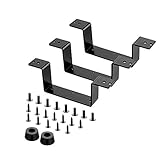
Overview: The FERSGO Track Elevation Kit serves a hyper-specific purpose: enabling FERSGO keyboard tray installation on desks with obstructive underside bars or shelves. This isn’t a standalone tray but rather a bracket set that creates additional clearance for the track mechanism. Designed exclusively for FERSGO products, it solves a problem that prevents many users from achieving proper ergonomic setup.
What Makes It Stand Out: This accessory’s strategic design keeps the elevation hardware completely hidden when installed, maintaining a clean aesthetic. The 5-year satisfaction warranty demonstrates manufacturer confidence rare for such niche products. It transforms previously incompatible desks into viable candidates for under-tray mounting, effectively expanding the FERSGO ecosystem’s versatility.
Value for Money: At $25.99, this seems expensive for simple brackets, but its value becomes clear when considering the alternative: replacing your entire desk or abandoning ergonomic improvements. For FERSGO tray owners facing installation obstacles, this is invaluable. However, its brand-exclusive design offers zero utility for other tray systems, limiting its audience significantly.
Strengths and Weaknesses: Strengths include solving a genuine installation problem, hidden design preserving aesthetics, and an exceptional warranty. It’s straightforward to install with included 1-inch screws. Weaknesses are its single-brand compatibility, additional cost on top of an already-purchased tray, and requirement for specific desk thickness to accommodate the screws.
Bottom Line: Only purchase this if you own a FERSGO keyboard tray and your desk has underside obstructions. For that specific scenario, it’s essential and well-designed. For all other users, it’s completely irrelevant. Verify screw length compatibility with your desk thickness before buying.
6. VIVO Large Keyboard Tray Under Desk Pull Out with Extra Sturdy C Clamp Mount System, 27 (33 Including Clamps) x 11 Inch Slide-Out Platform Computer Drawer for Typing, Black, MOUNT-KB05E

Overview: The VIVO MOUNT-KB05E is a robust under-desk keyboard tray designed to reclaim valuable desktop real estate. Measuring 26.8 inches wide (32.5 inches including clamps) by 11 inches deep, this patent-pending platform accommodates full-size keyboards and mice while supporting up to 11 pounds. The tray extends 8.5 inches from your desk edge and clamps securely to surfaces up to 1.25 inches thick.
What Makes It Stand Out: This tray distinguishes itself with its extra-sturdy C-clamp mounting system that eliminates drilling and prevents desk damage. The smooth slide-out mechanism offers ergonomic typing angles that reduce wrist and shoulder strain during extended work sessions. Installation is remarkably straightforward—all hardware and clear instructions are included, making it accessible even for non-technical users.
Value for Money: At $49.99, this VIVO tray sits in the mid-range price bracket, offering excellent value for users needing a spacious platform. It undercuts premium adjustable models while providing superior stability compared to budget alternatives. The patent-pending design and sturdy construction justify the investment for professionals seeking a reliable, long-term space-saving solution.
Strengths and Weaknesses: Strengths include its generous surface area, damage-free C-clamp installation, and smooth gliding action. The 11-pound weight capacity handles most keyboard setups confidently. However, the 1.25-inch thickness limitation excludes many modern desks, and it’s incompatible with beveled edges. The 32.5-inch total clamp width may also challenge compact workstations.
Bottom Line: The VIVO MOUNT-KB05E is an excellent choice for standard desks needing a spacious, reliable keyboard tray. Its tool-free installation and sturdy build make it ideal for office and home use, provided your desk meets the strict compatibility requirements.
7. VIVO Small Keyboard Tray, Under Desk Pull Out with Extra Sturdy C Clamp Mount System, 20 Inches (26 Inches Including The Clamps) x 11 Inches Slide-Out Platform Computer Drawer for Typing, Black,

Overview: The compact VIVO Small Keyboard Tray delivers space-saving ergonomics for constrained workstations. At 20 inches wide (26 inches including clamps) by 11 inches deep, this streamlined platform supports up to 11 pounds while fitting desks up to 2.2 inches thick. The tray extends a generous 9.5 inches from your desk edge, providing comfortable typing access without overwhelming smaller desk footprints.
What Makes It Stand Out: This tray excels in compatibility, accommodating thicker desktops that many competitors cannot. Its space-conscious design is perfect for dorm rooms, small offices, or minimalist setups. The smooth sliding mechanism glides effortlessly, while the sturdy C-clamps adjust easily without tools, ensuring a secure, wobble-free experience that protects your desk surface.
Value for Money: Priced at $45.99, this model offers solid savings over its larger VIVO sibling while retaining core quality features. You’re trading surface area for enhanced compatibility and a lower price point. For users with compact keyboards and limited space, this represents smart spending—delivering essential ergonomic benefits without paying for unnecessary platform real estate.
Strengths and Weaknesses: Strengths include its ability to mount on thicker desks (2.2 inches), smooth 9.5-inch extension, and compact footprint. The C-clamp system remains secure and adjustment-friendly. However, the 20-inch platform may feel cramped with full-size keyboards and separate numeric keypads. The limited width also restricts mouse movement for users preferring low DPI settings.
Bottom Line: This VIVO small tray is perfect for compact desks and minimal setups. If your workspace is tight and you use a tenkeyless keyboard, this offers exceptional value and performance. Verify your desk’s underside clearance before purchasing.
8. BONTEC KMT01 Under Desk Keyboard Tray, Pull-Out Keyboard & Mouse Platform with C-Clamp, 25.6 x 11.8 in Space-Saving Ergonomic Slide-Out Drawer, Black

Overview: The BONTEC KMT01 positions itself as an affordable, no-fuss keyboard tray for standard workstations. Measuring 25.6 by 11.8 inches, this platform supports 11 pounds and attaches via sturdy C-clamps to desks up to 1.57 inches thick. The drill-free installation promises quick setup, while protective pads prevent surface damage.
What Makes It Stand Out: At its aggressive price point, this tray emphasizes simplicity and broad compatibility for standard equipment. The protective clamp pads are a thoughtful touch, preventing scratches on expensive desk finishes. Its spacious surface accommodates most keyboard and mouse combinations, while the smooth slide-out action keeps your workspace tidy and ergonomic.
Value for Money: This is the budget champion at $39.99, undercutting most competitors by $10 or more. For straightforward installations on compatible desks, it delivers essential functionality without premium frills. However, the savings come with significant compatibility restrictions that may require desk modifications or outright disqualify some users.
Strengths and Weaknesses: Strengths include its low price, no-drill installation, protective pads, and smooth operation. The 25.6-inch width is generous for the price. Major weaknesses are its strict compatibility requirements: it won’t work with curved, beveled, or rounded edges, desks with crossbars, or desks lacking 31.3 inches of width clearance. It’s also unsuitable for vertical mice or split ergonomic keyboards due to height limitations.
Bottom Line: The BONTEC KMT01 is a steal for users with simple, compatible desks. If your workstation meets all dimensional and structural requirements, this offers unbeatable value. Otherwise, the compatibility limitations make it a risky purchase.
9. HUANUO Keyboard Tray Under Desk, 360 Adjustable Ergonomic Sliding Keyboard & Mouse Tray, Under Desk Keyboard Tray Slide Out, Keyboard Holder Under Desk for Typing in Home, Office Work, 25"W x 9.84"D

Overview: The HUANUO keyboard tray is the premium ergonomic solution for users demanding maximum adjustability. This 25 by 9.84-inch platform features 360-degree swivel, 6-degree upward and 22-degree downward tilt, and 6.3 inches of height adjustment. The included wrist rest enhances comfort, while the 10-pound weight capacity handles most peripherals.
What Makes It Stand Out: No other tray in this comparison offers such comprehensive adjustability. The ability to swivel, tilt, and raise/lower your typing position allows precise ergonomic customization for sitting or standing desk configurations. This transforms any fixed desk into a dynamic, posture-friendly workstation, potentially reducing repetitive strain injuries.
Value for Money: At $69.99, this is the most expensive option, but the premium is justified for ergonomics-focused users. Comparable medical-grade solutions cost significantly more. If you suffer from wrist pain or use a sit-stand desk, the investment pays dividends in comfort and health. For static desk users, the features may be underutilized.
Strengths and Weaknesses: Strengths include unparalleled adjustability, included wrist rest, and robust build quality. The installation instructions are clear. However, the 9.84-inch depth is shallower than competitors, potentially limiting mouse space. Installation requires extensive clearance measurements (14.17 inches from edge to crossbar, 25-35.4 inches width depending on rotation needs), and the complex mechanism has more potential failure points.
Bottom Line: The HUANUO tray is ideal for ergonomic enthusiasts and sit-stand desk users who need flexible positioning. Its adjustability justifies the premium price. Ensure your desk meets the stringent installation requirements before purchasing.
10. Mount-It! Keyboard Tray Under Desk with Adjustable Mouse Platform – Easy-Glide Sliding Drawer Under Desk Slide Out – Ergonomic Under Key Board Shelf for Office, Gaming, and Workstations
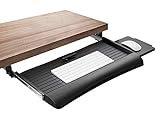
Overview: The Mount-It! keyboard tray balances functionality and affordability in a 21-inch wide platform. Featuring steel ball-bearing glide tracks, this tray offers three height adjustment levels up to 1.25 inches and includes an ambidextrous mouse platform that mounts left or right. The design targets office workers and gamers seeking smooth operation without premium pricing.
What Makes It Stand Out: The ball-bearing glide system delivers exceptionally smooth in-out movement that surpasses standard friction slides. The adjustable mouse platform is a standout feature, allowing left-handed users to customize their setup while letting right-handers position it optimally. When not needed, the mouse tray stows away neatly, maximizing space efficiency.
Value for Money: At $49.99, this tray competes directly with the VIVO large model while offering unique features. The ball-bearing mechanism and adjustable mouse platform provide tangible benefits over similarly priced alternatives. For users prioritizing smooth operation and mouse flexibility, this represents strong value, though the narrower width limits keyboard options.
Strengths and Weaknesses: Strengths include silky-smooth ball-bearing slides, ambidextrous mouse platform, three height settings, and ergonomic design. The 21-inch width is compact yet functional. Weaknesses include limited height adjustment compared to premium models, no tilt or swivel functionality, and the narrow platform may feel cramped with full-size keyboards and gaming mice that require wide sweeping motions.
Bottom Line: The Mount-It! tray is perfect for users wanting smooth, reliable operation and flexible mouse positioning. It’s particularly well-suited for gaming setups where mouse precision matters. Ensure your keyboard fits within the 21-inch width before committing.
Why Tiny Workspaces Demand Specialized Keyboard Tray Solutions
The Ergonomic Cost of Space Constraints
When you’re working with a 24-inch deep desk instead of the standard 30-inch, every ergonomic compromise amplifies. Your elbows drift away from your body, shoulders hunch forward, and wrists extend at awkward angles just to fit everything on the surface. Traditional desk setups assume you have room to position your keyboard and mouse at the correct distance from your body—typically 1-2 inches above your thighs with elbows at a 90-degree angle. In tiny workspaces, this fundamental principle gets sacrificed first, leading to cumulative strain injuries that develop silently over months of micro-adjustments.
How Under-Desk Trays Reclaim Valuable Real Estate
A well-designed under-desk keyboard tray does more than just hide your keyboard when not in use—it fundamentally redefines your workspace geometry. By shifting your input devices into the negative space beneath your desk, you free up 120-200 square inches of surface area. This reclaimed zone can accommodate notebooks, reference materials, or simply provide visual breathing room that reduces cognitive clutter. More importantly, it allows you to position your monitor at the proper eye-level distance without pushing your keyboard into your lap.
Understanding the Ergonomics of Under-Desk Keyboard Trays
Neutral Positioning: The Gold Standard
The primary ergonomic benefit of any keyboard tray is its ability to establish a neutral typing posture. This means your wrists remain straight, forearms parallel to the floor, and shoulders relaxed. For tiny workspaces, achieving this neutral position requires a tray that can mount exceptionally close to the desk underside—typically within 2-3 inches—to maintain adequate leg clearance. The tray must also offer negative tilt adjustment, allowing you to angle the keyboard away from you so your wrists stay flat rather than extended upward.
The 90-Degree Rule and Compact Setups
In confined spaces, the 90-degree elbow angle becomes harder to maintain because there’s nowhere for your arms to go. A keyboard tray with adequate height adjustment range (minimum 4-6 inches) lets you lower the typing surface below desk height, creating the necessary clearance for your forearms to rest comfortably. This vertical adjustment is crucial when your desk is too high for your chair arms to slide underneath, a common scenario with fixed-height desks in small apartments or dorm rooms.
Key Features to Prioritize in Compact Keyboard Trays
Low-Profile Design
The profile height—the distance from the desk underside to the bottom of the tray when retracted—determines whether you’ll bang your knees every time you cross your legs. Premium compact trays achieve profiles as slim as 2.5 inches, while bulkier models can protrude 5-6 inches. For spaces where you’ll sit within 18 inches of the desk edge, anything over 3.5 inches creates a persistent annoyance. Look for trays with integrated mounting brackets that recess into the track mechanism rather than bolting beneath it.
Retractable vs. Fixed Platforms
Fixed-position trays save money but sacrifice flexibility, extending permanently into your leg space. For tiny workspaces, retractable systems with full extension slides are non-negotiable. The best designs offer 12-14 inches of glide travel, allowing you to push the tray completely out of the way when you need the desk for non-computer tasks. Some advanced models feature “stow-away” mechanisms that tilt the entire platform vertically against the desk front, reducing the profile to under 2 inches when not in use.
Integrated vs. Separate Mouse Areas
Mouse platform design dramatically impacts space efficiency. Integrated platforms that extend from the keyboard tray save width but can force awkward reaching. Separate mouse platforms that slide or pivot independently allow you to position the mouse directly beside your keyboard, but they add complexity. For tiny setups, consider over-the-keyboard mouse shelves that hover above the number pad area—though these require careful height adjustment to avoid contact with keycaps.
Mounting Mechanisms: Finding the Right Fit for Your Desk
Clamp-On Systems for Renters
Clamp mounts grip the desk edge without permanent modification, making them ideal for rental situations or glass-top desks where drilling is impossible. The most robust clamp systems distribute weight across a 6-8 inch contact pad and include secondary stabilization screws that press against the desk underside. However, clamps require a minimum edge clearance of 2 inches and work best with desks 0.75-1.5 inches thick. For ultra-thin tabletops under 0.75 inches, clamp pressure can cause warping or cracking over time.
Screw-Mount Options for Permanent Solutions
Direct screw mounting provides superior stability and weight capacity, crucial if you use a mechanical keyboard and weighted mouse. The key is identifying your desk’s material composition. Particle board desks require coarse-thread screws and often benefit from threaded inserts to prevent stripping. Solid wood allows for standard wood screws, while metal desks need pilot holes and machine screws. Always verify the mounting area is free of internal support brackets or cable routing channels that could interfere.
Adhesive Solutions: The New Frontier
Recent advances in structural adhesives have enabled mounting systems that use industrial-strength VHB (very high bond) tape. These solutions support up to 30 pounds when properly applied to clean, non-porous surfaces. They’re perfect for glass, metal, or laminate desks where drilling isn’t an option. The trade-off is permanence—removing these mounts typically damages the adhesive pad and may leave residue. Temperature fluctuations can also degrade bond strength over time.
Space-Saving Design Innovations
Fold-Away Platforms
Innovative trays now incorporate folding mechanisms that allow the platform to collapse like a laptop screen against the desk front. This design reduces the stowed profile to under 2 inches and completely clears the leg area. The hinge mechanism must be robust enough to withstand thousands of folding cycles without developing play or sag. Look for models with locking positions at both 90 degrees (for storage) and 180 degrees (for use).
Vertical Retraction Systems
Rather than sliding horizontally, some compact trays lift vertically on gas-spring assisted arms, tucking the keyboard directly against the desk underside. This approach excels in extremely narrow spaces where even a retracted tray would interfere with leg movement. The vertical travel typically ranges 6-8 inches, and the best systems include dampened descent to prevent the tray from crashing down.
Corner-Friendly Configurations
L-shaped desks in tiny offices present unique challenges. Curved or angled track mounts allow trays to retract diagonally, following the desk contour. These specialized brackets offset the track at a 30-45 degree angle, enabling the tray to stow completely within the corner void. Some designs even incorporate rotating platforms that pivot 90 degrees, letting you store the keyboard parallel to one desk edge while typing from the other.
Material Matters: Durability vs. Weight
Steel Frames and Aluminum Platforms
The chassis material directly impacts both durability and overall weight. Powder-coated steel frames offer maximum rigidity and can support 30+ pounds, but they add 8-12 pounds to your desk. Aluminum alloys provide comparable strength at 40% less weight, making them ideal for lighter desks or sit-stand converters. The platform surface should be medium-density fiberboard (MDF) with a durable laminate—avoid raw wood that warps with humidity changes.
High-Grade Plastics: Modern Alternatives
Reinforced nylon and glass-filled polycarbonate components appear in premium compact trays, offering corrosion resistance and lighter weight. These materials excel in the slide mechanisms and adjustment levers, where metal-on-metal contact can create noise and wear. However, plastic structural members should be avoided in weight-bearing applications unless they’re over-engineered with internal ribbing.
Finish Quality and Scratch Resistance
The platform’s surface finish affects both aesthetics and functional grip. Textured black laminate hides scratches and provides subtle friction to keep keyboards from sliding. Matte finishes reduce glare from overhead lighting, while smooth surfaces make cleaning easier but show wear faster. For tiny workspaces where you’ll frequently stow and deploy the tray, look for finishes with a minimum 3H pencil hardness rating.
The Track System: Glide vs. Articulating vs. Fixed
Ball-Bearing Glides for Smooth Operation
Full-extension ball-bearing slides offer the smoothest operation and longest lifespan, typically rated for 50,000+ cycles. The slide thickness—usually 0.75-1 inch per side—becomes critical in tight spaces. Some compact models use partial extension slides to save space, but these only extend 75% of their length, limiting tray reach. For tiny desks where you sit close, partial extension may suffice and reduces the overall track length needed.
Articulating Arms for Maximum Flexibility
Articulating arm mounts provide unparalleled positioning freedom, with multiple pivot points that let you swing the keyboard completely aside or adjust depth on the fly. These systems shine in multi-user environments or hybrid sitting/standing setups. The downside is complexity—each joint introduces potential failure points and the arms themselves consume 4-6 inches of vertical space. In truly tiny workspaces, the arm’s sweep radius may collide with walls or other furniture.
Fixed Position Trays for Ultra-Tight Spaces
When even a sliding mechanism consumes too much space, fixed-position trays mounted at the exact ergonomic height offer a minimalist solution. These platforms bolt directly to the desk front and provide a stable, permanent typing surface. While you lose stow-away capability, you gain a rock-solid platform that doesn’t shift or develop play over time. This approach works best for dedicated computer stations where the desk serves no other purpose.
Height and Tilt Adjustability: Non-Negotiable Features
Negative Tilt: Why It Matters
Negative tilt—angling the keyboard away from you—keeps wrists in a neutral handshake position rather than extended upward. For compact trays, look for at least 15 degrees of negative tilt adjustment. Some premium models offer up to 30 degrees, which benefits users with existing wrist issues. The adjustment mechanism should lock securely; friction-based systems tend to slip under heavy typing loads.
Height Range for Various Desk Thicknesses
The usable height range depends on your desk thickness and chair height. Most trays offer 4-6 inches of vertical adjustment, but the absolute height from floor to keyboard platform matters more. Measure from your seated elbow height to the desk underside—this tells you how much drop you need. For fixed-height desks at 29-30 inches, you’ll typically need 6-8 inches of drop to achieve proper ergonomics for average-height users.
Single-Lever vs. Dual-Lever Adjustments
Single-lever systems adjust height and tilt simultaneously, simplifying setup but limiting fine-tuning. Dual-lever controls allow independent adjustment, crucial for dialing in perfect ergonomics. In tiny workspaces where you’ll likely set it once and leave it, single-lever systems suffice and reduce mechanical complexity. However, if multiple users share the space, dual-lever adjustments accommodate different body dimensions without compromise.
Mouse Platform Considerations for Limited Space
Switchable Left/Right Mounting
Ambidextrous mouse platforms that attach to either side of the keyboard tray maximize flexibility. The mounting bracket should be tool-free, using a robust cam-lock system that prevents wobble. For right-handed users in tight spaces, a left-side mount can actually improve ergonomics by centering the alphanumeric keys directly in front of you, with the mouse positioned where your elbow naturally rests.
Over-the-Keyboard Mouse Shelves
Space-saving designs that position the mouse pad above the number pad area reduce overall width by 6-8 inches. These floating shelves typically mount on a separate slide mechanism, allowing you to adjust their fore-aft position independently. The critical specification is vertical clearance—ensure at least 2 inches between the shelf and keycaps to prevent interference during vigorous typing.
Detachable Mouse Platforms
Magnetic or quick-release mouse platforms let you completely remove the mouse area when doing keyboard-intensive tasks, freeing up even more space. This modular approach shines in truly tiny setups where every square inch counts. The attachment system must be strong enough to support aggressive mouse movements without detaching accidentally—look for rated magnetic forces of at least 15 pounds or positive-locking mechanical fasteners.
Installation Realities for Small Spaces
Measuring Your Desk Underside
Before purchasing any tray, map your desk’s underside topography. Use a piece of cardboard cut to the tray’s dimensions and slide it along the underside to identify obstacles. Pay special attention to cross-support beams, which often run 12-18 inches from the front edge—exactly where tray tracks typically mount. Depth is equally critical; measure from the front edge to the first obstruction. You need at least 18 inches of clear depth for a standard tray, though compact models can work with as little as 14 inches.
Obstacle Navigation: Drawers, Supports, and Cables
Integrated drawers are the nemesis of keyboard trays. If your desk has a center drawer, you’ll likely need to remove it entirely or choose a tray that mounts off-center. Cable management trays and power strips mounted underneath can often be relocated, but structural support beams cannot. Some creative solutions include mounting the tray track vertically on the desk front face rather than underneath, though this requires a track system specifically designed for face-mounting.
Tools You’ll Need for Hassle-Free Setup
Most installations require a drill with 1/8-inch and 3/16-inch bits, a Phillips head screwdriver, and an adjustable wrench. A stud finder helps locate internal desk supports to avoid. For clamp-on systems, you’ll need a tape measure and level to ensure even pressure distribution. Adhesive mounts demand isopropyl alcohol for surface prep and a roller to ensure full contact. Pro tip: have a vacuum handy to clean metal shavings from drilling, which can scratch floors or embedded cables.
Weight Capacity and Stability Concerns
Dynamic vs. Static Load Ratings
Manufacturers list two weight capacities: static (stationary load) and dynamic (while moving). A tray might support 30 pounds static but only 15 pounds when extending. For compact setups with lightweight laptops and peripherals, 15-20 pound dynamic capacity suffices. However, if you use a mechanical keyboard (3-5 pounds), large mousepad, and rest your palms while typing, you’ll exceed 10 pounds quickly. Always calculate your total load with a 20% safety margin.
Keyboard and Mouse Combo Weights
Modern mechanical keyboards range from 2.5 pounds (compact 60% models) to 5+ pounds (full-size with metal cases). Add a mouse (0.25 pounds), mousepad (0.5 pounds), and the dynamic force of typing (equivalent to adding 50% static load), and you’re looking at 5-8 pounds total. Palm rests add another pound. Never exceed 75% of the rated dynamic capacity to ensure smooth operation and prevent premature slide wear.
Stability When Fully Extended
The moment arm created by a fully extended tray multiplies the effective load on the mounting points. Test stability by pressing down on the front edge of any extended tray—it should deflect less than 0.5 inches. Excessive flex indicates inadequate slide thickness or weak mounting brackets. In tiny workspaces where you might lean on the tray while reaching for items, prioritize models with dual parallel slides rather than a single center slide, as they resist twisting forces significantly better.
Cable Management in Cramped Quarters
Integrated Cable Clips
Look for trays with molded cable management features that route keyboard and mouse cables along the track system. The best designs include flexible silicone clips that grip cables without crushing them, positioned every 6-8 inches along the slide path. Avoid metal spring clips that can damage cable insulation over time. For wireless charging mouse pads, ensure the tray includes a cable pass-through hole with a grommet to prevent chafing.
Under-Track Routing Solutions
The space between the track and desk underside creates a natural cable channel. Some advanced trays include a detachable cable tray that snaps beneath the track, hiding power cords and USB cables completely. This is particularly valuable in tiny spaces where visible cables create visual clutter. The tray should be removable without tools for when you need to add or remove cables.
Wireless Considerations
If you’ve gone fully wireless, cable management becomes less critical, but you still need to consider charging access. Trays with front-edge USB pass-through ports let you charge devices without reaching behind the desk. Alternatively, choose a tray that retracts far enough to expose your desk’s existing USB ports. Remember that wireless devices perform best when the receiver has line-of-sight; mounting it on the tray rather than behind the computer can improve connectivity in congested 2.4GHz environments.
Budget Considerations and Value Proposition
Entry-Level vs. Premium Features
Budget trays ($30-60) typically use partial extension slides, limited tilt adjustment, and all-plastic construction. They work adequately for light use but rarely retract flush enough for tiny spaces. Mid-range options ($70-120) introduce full-extension ball-bearing slides, independent mouse platforms, and tool-free adjustments. Premium trays ($150+) offer articulating arms, gas-spring height adjustment, and sub-2-inch stowed profiles. For daily use in a tiny workspace, the mid-range sweet spot provides 80% of premium functionality at half the cost.
Warranty and Return Policies
A tray’s warranty reveals its expected lifespan. One-year warranties are standard for budget models, while premium trays offer 5-10 year coverage on mechanical components. Pay attention to weight-related exclusions—some warranties void if you exceed 50% of rated capacity. Return policies matter more for keyboard trays than most desk accessories because fit is so specific. Retailers offering 60-day returns give you time to test the installation and ergonomics thoroughly.
The Hidden Cost of Poor Ergonomics
A $50 tray that positions your wrists incorrectly costs far more than a $150 ergonomic model when you factor in potential medical expenses. Carpal tunnel surgery averages $7,000-10,000, while physical therapy for repetitive strain runs $100-200 per session. Investing in proper ergonomics isn’t just about comfort—it’s about preventing measurable financial loss. In tiny workspaces where compromises are inevitable, the keyboard tray is one area where cutting corners proves most expensive long-term.
Common Mistakes to Avoid When Choosing a Tray
Ignoring Desk Material Compatibility
Mounting a heavy-duty steel tray to a hollow-core door desk is a recipe for disaster. The screws will pull through, and the clamp will crush the veneer. Always match tray weight and mounting style to your desk’s construction. For honeycomb-core desks, use wide-diameter washers to distribute load. For glass tops, only consider adhesive mounts specifically rated for glass—never clamps, as they create point pressure that can cause shattering.
Overlooking Retraction Depth
A tray that doesn’t retract fully enough to clear your leg space is worse than no tray at all. Measure from your seated knee position to the desk front edge. The tray must retract at least 2 inches behind this point. Many users buy trays based on overall dimensions without considering that the track extends 4-6 inches beyond the tray platform itself, reducing effective retraction depth.
Choosing Style Over Function
Sleek, minimalist trays with hidden adjustment mechanisms look great in product photos but often sacrifice ease of use. In tiny workspaces where you’ll adjust position frequently, visible, accessible levers and knobs are features, not bugs. Avoid trays that require tools for everyday adjustments—they’ll end up stuck in one position forever. Prioritize function: smooth slides, positive locks, and intuitive controls over aesthetic minimalism.
Maintenance and Longevity Tips
Cleaning Without Disassembly
Dust and debris accumulate in slide mechanisms, causing gritty operation. Use compressed air with a straw nozzle to blow out tracks monthly. For sticky spots, apply a dry Teflon-based lubricant—never oil, which attracts more dust. Wipe the platform surface with a microfiber cloth dampened with isopropyl alcohol; avoid harsh cleaners that can degrade laminate finishes. If you eat at your desk, a silicone keyboard cover prevents crumbs from falling into the tray mechanism.
Lubrication Points for Smooth Operation
Ball-bearing slides have sealed bearings that shouldn’t need lubrication, but the rail surfaces benefit from a light coating of dry lubricant every six months. Adjustment levers and pivot points require a single drop of light machine oil annually. Articulating arm joints need grease at their internal bearings—this usually requires partial disassembly and is best done every 2-3 years for heavy users. Always check the manufacturer’s maintenance manual; over-lubrication can void warranties.
When to Tighten and When to Replace
Check mounting screws quarterly, as the constant motion of extending and retracting can loosen them. If you notice wobbling that tightening doesn’t fix, the slide mechanism itself may be worn. Slides develop lateral play after 3-5 years of heavy use; this can’t be adjusted out and indicates replacement time. Cracked platforms or bent adjustment levers are also non-repairable. Keep the original packaging for warranty claims—many manufacturers require it.
Frequently Asked Questions
1. Can I install a keyboard tray on a desk with a drawer?
It depends on the drawer’s position and depth. Center drawers must usually be removed completely. Side drawers can often stay if they don’t interfere with the track mounting area. Measure the distance from the desk front edge to the drawer’s rear wall—if it’s less than 12 inches, you’ll need an ultra-compact tray or drawer removal.
2. How much clearance do I need between my knees and the tray?
Aim for a minimum of 3 inches of clearance between your highest knee position (when crossing legs) and the tray’s bottom edge when retracted. Sit in your chair and measure upward from your knee to the desk underside. If this distance is under 6 inches total, you’ll need a tray with a sub-3-inch profile.
3. Will a keyboard tray work with a standing desk converter?
Yes, but with caveats. The converter adds height, so you’ll need a tray with exceptional drop range—typically 8+ inches. Also, the converter’s weight plus the tray’s weight may exceed the desk’s capacity. Clamp mounts are generally incompatible with converter edges. Consider a converter with a built-in keyboard tray instead.
4. What’s the ideal keyboard tray depth for tiny workspaces?
For compact keyboards (60-75% size), a 9-10 inch deep platform suffices. Full-size keyboards need 11-12 inches. Any deeper wastes space and increases the likelihood of knee interference. The platform width should match your keyboard width plus 2 inches for wiggle room—typically 20-24 inches total.
5. Can I mount a tray to a glass desktop?
Only use adhesive mounting systems specifically rated for glass. Avoid any solution that creates point pressure, including clamps. Clean the glass thoroughly with alcohol before applying adhesive mounts, and allow 24 hours for curing before loading. Check temperature ratings, as glass expands and contracts more than wood.
6. How do I prevent my keyboard from sliding on the tray?
Most quality trays have a textured surface providing sufficient grip. For extra security, use museum gel dots (clear adhesive pads) at the keyboard’s corners. Avoid rubber feet that add height and can interfere with tray retraction. If you prefer a slick surface, a thin silicone keyboard mat provides grip without bulk.
7. Is a separate mouse platform really necessary?
For ergonomic correctness, yes. A mouse on the same plane as your keyboard forces shoulder abduction. However, in ultra-tight spaces, an over-keyboard mouse shelf or a compact integrated platform 6 inches wide can work if you keep your elbow tucked. The key is maintaining the mouse at the same level as your keyboard, not necessarily on a separate plane.
8. How long do keyboard trays typically last?
With daily use, a mid-range tray lasts 5-7 years before slide mechanisms show significant wear. Premium models with sealed bearings can exceed 10 years. Budget trays may develop issues in 2-3 years. Heavy users (8+ hours daily) should expect to replace slides every 4-5 years, though the platform itself often lasts indefinitely.
9. Can I retrofit my existing desk with a keyboard tray if it’s not designed for one?
Almost any desk with a flat, unobstructed underside can accommodate a tray. The main limitations are material strength and available depth. Hollow-core doors, fragile veneers, and glass tops require special mounting considerations. If your desk has a modesty panel (front privacy panel), you’ll need a face-mount track system rather than an under-desk mount.
10. What’s the difference between a keyboard tray and a keyboard drawer?
A keyboard tray slides out and typically offers height and tilt adjustment for ergonomics. A drawer pulls out like a filing cabinet and usually sits at a fixed height, prioritizing storage over ergonomics. Drawers are cheaper but rarely position keyboards correctly for extended typing. In tiny workspaces, trays are superior because they retract flush and offer proper ergonomic adjustment.