Remember when backing up your data meant plugging in a dusty external hard drive and hoping the USB connection didn’t fail mid-transfer? Those days feel like ancient history now that network-attached storage has evolved from a niche tech toy into an essential backbone for digital life. Whether you’re safeguarding family photos, protecting critical business documents, or managing terabytes of creative projects, the right NAS device doesn’t just store your data—it transforms how you think about data protection entirely.
The modern NAS landscape offers capabilities that would have seemed like science fiction a decade ago: automated backups that run while you sleep, snapshot-based protection against ransomware, seamless cloud integration, and performance that rivals direct-attached storage. But navigating this world requires more than just comparing spec sheets. It demands understanding the ecosystem of features, networking requirements, and security protocols that separate a simple file server from a true backup powerhouse.
Top 10 Network-Attached Storage Devices for Backup
Detailed Product Reviews
1. BUFFALO LinkStation 210 4TB 1-Bay NAS Network Attached Storage with HDD Hard Drives Included NAS Storage That Works as Home Cloud or Network Storage Device for Home

Overview: The BUFFALO LinkStation 210 4TB offers a straightforward entry into network-attached storage for home users seeking centralized data management without technical complexity. This 1-bay enclosure comes pre-installed with a 4TB hard drive, making it ready to deploy out of the box. Designed as a plug-and-play solution, it connects directly to your router and provides instant shared storage for Windows and macOS devices, positioning itself as a cost-effective alternative to subscription cloud services.
What Makes It Stand Out: This NAS distinguishes itself with included US-based 24/7 support for installation assistance—a rarity in this price tier. Its closed-system architecture intentionally limits third-party applications, reducing security vulnerabilities for non-technical users. The subscription-free personal cloud model eliminates ongoing costs, while SSL encryption ensures secure file transfers. Buffalo’s NAS Navigator software simplifies automated backups across multiple computers, and the device works seamlessly with Time Machine for Mac users on supported versions.
Value for Money: At $174.99 with a 4TB drive included, the LinkStation delivers solid value at approximately $43.75 per terabyte. This undercuts most DIY builds when factoring in drive costs and software licensing. Compared to cloud subscriptions averaging $10-15 monthly for 4TB, the device pays for itself within 12-18 months. However, performance lags behind modern alternatives, and the single-bay design limits true RAID redundancy, making it best suited for backup rather than mission-critical storage.
Strengths and Weaknesses: Strengths: All-in-one ready-to-use solution; exceptional US-based customer support; no monthly fees; simplified security model; included backup software; cross-platform compatibility (Windows/macOS pre-Sequoia).
Weaknesses: Single-bay prevents RAID1 redundancy; limited macOS support (only works with macOS 15 and earlier); closed system restricts advanced applications; slower transfer speeds than contemporary NAS; no upgrade path beyond replacing the single drive.
Bottom Line: The LinkStation 210 4TB serves budget-conscious families needing simple, secure centralized storage. It’s ideal for users prioritizing ease-of-use over performance, though Mac users on newer systems should consider alternatives. For basic backup and media sharing, it delivers reliable value despite its limitations.
2. BUFFALO LinkStation 210 2TB 1-Bay NAS Network Attached Storage with HDD Hard Drives Included NAS Storage That Works as Home Cloud or Network Storage Device for Home
Overview: The BUFFALO LinkStation 210 2TB provides an accessible entry point into network storage for users with modest capacity needs. This compact 1-bay NAS arrives pre-populated with a 2TB hard drive, eliminating the complexity of separate drive selection and installation. Targeted at home users wanting to escape cloud subscription fees, it delivers fundamental NAS functionality through a simplified interface that emphasizes plug-and-play operation over advanced configuration options.
What Makes It Stand Out: Like its higher-capacity siblings, this model shines with Buffalo’s commitment to customer support—offering 24/7 US-based assistance for setup and troubleshooting. The pre-configured closed system enhances security by minimizing attack vectors, while SSL encryption protects data in transit. Its subscription-free architecture means no recurring charges, and the included NAS Navigator software enables automated backups for both Windows PCs and Macs running compatible operating systems, making it a set-and-forget solution for non-technical households.
Value for Money: Priced at $139.99 with a 2TB drive, the cost per terabyte rises to approximately $70—less economical than the 4TB and 6TB variants in the series. However, it remains financially attractive compared to cloud storage, breaking even in under a year for users currently paying $10-12 monthly for 2TB plans. The all-inclusive pricing removes guesswork, though budget shoppers should note that the minimal capacity limits its long-term scalability without a complete drive replacement.
Strengths and Weaknesses: Strengths: Lowest-cost entry into Buffalo ecosystem; complete out-of-box solution; robust customer support; secure closed-system design; straightforward backup automation; no ongoing subscription costs.
Weaknesses: Highest cost-per-TB in the LinkStation lineup; single drive provides no redundancy; insufficient storage for modern media libraries; incompatible with macOS Sequoia and later; performance bottlenecks with multiple users; limited feature expansion potential.
Bottom Line: The 2TB LinkStation suits individuals or small households with basic storage requirements and minimal technical expertise. While its small capacity and lack of redundancy limit its appeal for growing families or media enthusiasts, it excels as an affordable, supported introduction to personal cloud storage for users who prioritize simplicity above all else.
3. BUFFALO LinkStation 210 6TB 1-Bay NAS Network Attached Storage with HDD Hard Drives Included NAS Storage That Works as Home Cloud or Network Storage Device for Home
Overview: The BUFFALO LinkStation 210 6TB represents the capacity flagship of the entry-level LinkStation series, offering substantial storage in a simple 1-bay enclosure. Pre-loaded with a 6TB hard drive, it targets home users with large media collections seeking centralized access without the learning curve of advanced NAS systems. This model maintains Buffalo’s philosophy of delivering turnkey network storage that prioritizes security and support over cutting-edge features, making it a practical choice for families wanting to consolidate years of photos, videos, and documents.
What Makes It Stand Out: This highest-capacity variant retains the series’ hallmark features: 24/7 US-based technical support, a hardened closed-system OS that reduces malware risks, and zero subscription fees. The included NAS Navigator utility streamlines automated backups across Windows and legacy macOS systems, while SSL encryption secures remote access. Its 6TB capacity accommodates extensive libraries without immediate upgrade concerns, and the plug-and-play design ensures deployment within minutes of unboxing, appealing to users intimidated by complex storage solutions.
Value for Money: At $209.99 with a 6TB drive, this model offers the best value in the LinkStation line at roughly $35 per terabyte. It undercuts competing turnkey solutions and delivers significant savings versus cloud storage—recovering its cost in 14-20 months compared to 6TB subscription plans. While diskless NAS offers more flexibility, the included drive and professional support justify the premium for beginners. Performance remains modest, but for sequential media streaming and backup tasks, it provides cost-effective capacity without hidden fees.
Strengths and Weaknesses: Strengths: Highest capacity in entry series; excellent price-per-TB ratio; complete ready-to-run package; superior US customer support; secure closed architecture; no monthly charges; straightforward backup automation.
Weaknesses: Single-bay design prevents RAID protection; not compatible with macOS Sequoia or newer; slower processor limits multi-user performance; closed ecosystem blocks advanced apps; drive failure means total data loss without separate backup; no path for incremental expansion.
Bottom Line: The LinkStation 210 6TB is the smart choice within Buffalo’s lineup for households with substantial storage needs and limited technical ambition. It delivers excellent capacity value and peace of mind through included support, though users must accept the single-drive risk. For large media libraries and basic backup, it’s a competent, cost-effective solution—provided you don’t need modern macOS compatibility or redundancy.
4. UGREEN NAS DH4300 Plus 4-Bay Desktop NASync, Support Capacity 120TB, Remote Access, AI Photo Album, Beginner Friendly System, 8GB LPDDR4X RAM, 2.5GbE, 4K HDMI, Network Attached Storage(Diskless)

Overview: The UGREEN NAS DH4300 Plus positions itself as a modern, feature-rich 4-bay NAS for tech-savvy home users demanding scalability and intelligent data management. Unlike traditional entry-level models, this diskless enclosure supports up to 120TB across four drives, delivering enterprise-grade capacity in a consumer-friendly package. With 2.5GbE networking, 8GB RAM, AI-powered photo organization, and Docker support, it bridges the gap between basic storage appliances and professional NAS systems while maintaining accessibility for first-time buyers transitioning from cloud services.
What Makes It Stand Out: This NAS excels with its AI Album Recognition, which automatically tags faces, objects, pets, and locations for instant semantic search—transforming chaotic photo libraries into organized collections. The 2.5GbE port delivers 250MB/s transfers, doubling typical gigabit speeds, while HDMI 4K output enables direct media playback. NFC quick-connect simplifies mobile setup, and Docker support expands functionality beyond basic storage. The beginner-friendly interface guides users through RAID configuration, remote access, and backup policies, making advanced features approachable without sacrificing depth.
Value for Money: At $429.99 diskless, the DH4300 Plus requires a $400-800 drive investment for full deployment, pushing total cost to $830-1,230. However, UGREEN’s math proves compelling: versus a $59.99/month 12TB cloud plan, the NAS saves $6,568 over ten years. The 2.5GbE and AI features typically command $600+ in competing brands, making this remarkably cost-effective for its capabilities. While initial outlay exceeds budget NAS, the performance, capacity headroom, and intelligent features justify the premium for serious home archivists.
Strengths and Weaknesses: Strengths: Massive 120TB scalability; intelligent AI photo management; 2.5GbE networking; 8GB RAM handles multitasking; Docker container support; HDMI direct playback; NFC mobile setup; substantial long-term cloud savings; intuitive beginner interface.
Weaknesses: Diskless design adds hidden cost; no virtual machine support; brand less established than Synology/QNAP; LPDDR4X RAM is soldered/non-upgradable; advanced features may overwhelm absolute beginners; mobile app polish lags behind competitors.
Bottom Line: The DH4300 Plus is a standout choice for home users wanting future-proof storage with modern conveniences. Its AI organization and 2.5GbE performance punch well above its price class, making it ideal for media enthusiasts and growing families. The upfront investment pays dividends in capacity and capability, easily justifying its cost over cloud alternatives for those comfortable managing their own drives.
5. UGREEN NASync DH2300 2-Bay Desktop NAS, Support Capacity 60TB (Diskless), Remote Access, AI Photo Album, Beginner Friendly System, 4GB LPDDR4X RAM,1GbE, 4K HDMI, Network Attached Storage(Diskless)

Overview: The UGREEN NASync DH2300 redefines entry-level NAS with intelligent features typically reserved for premium devices, offering a 2-bay diskless enclosure that prioritizes simplicity and AI-driven organization. Designed as an ideal first NAS, it supports up to 60TB while delivering automated photo tagging, semantic search, and cross-platform backup in a user-friendly package. This model strips away complexity without sacrificing core functionality, making it perfect for individuals and families seeking private cloud storage without the steep learning curve of enterprise systems.
What Makes It Stand Out: The DH2300’s AI photo management automatically recognizes faces, locations, text, and objects, enabling natural language searches like “beach sunset 2023” to instantly surface memories. It eliminates duplicates and organizes live photos seamlessly. The system achieves 125MB/s transfers over its 1GbE connection—sufficient for 4K streaming and rapid backups. Setup takes minutes via mobile or web interface, and the 4K HDMI output allows direct TV connection for media playback. UGREEN’s cost calculator dramatically illustrates savings versus cloud subscriptions, making the value proposition immediately tangible.
Value for Money: Priced at $188.99 diskless, the DH2300 requires roughly $200-400 in drives for a complete 12-24TB setup, totaling $389-589. Compared to the claimed $719.88 annual cost for 12TB cloud storage, it breaks even in 6-10 months and saves $6,738 over a decade. While lacking the 2.5GbE and Docker support of its bigger sibling, it captures the essential AI and backup features at less than half the price, delivering exceptional value for users who don’t need extreme scalability or advanced virtualization.
Strengths and Weaknesses: Strengths: Affordable entry point with premium AI features; intuitive setup for beginners; excellent long-term cost savings; 4K HDMI direct playback; efficient 125MB/s performance; cross-platform compatibility; automatic duplicate removal; compact desktop design.
Weaknesses: Diskless (drives not included); single 1GbE port limits future speed; no Docker or VM support; 4GB RAM is fixed; 2-bay design offers limited RAID options; brand ecosystem less mature than leaders; no hardware transcoding engine.
Bottom Line: The DH2300 is arguably the best value starter NAS for photo-focused families and individuals. It democratizes AI-powered organization previously found in $500+ devices while maintaining genuine ease of use. For those wanting smart, subscription-free storage without complexity, this hits the sweet spot of price, performance, and intelligence—just budget for drives and enjoy the savings.
6. SSK 4TB Personal Cloud Network Attached Storage Support Wireless Remote Access, Home Office NAS Storage with 4T Hard Drive Included for Phone, Tablet, Laptop Auto-Backup, Wired Ethernet Only,No WiFi

Overview: The SSK 4TB Personal Cloud NAS delivers affordable network storage with a pre-installed drive for users comfortable with wired connectivity. This Ethernet-only device creates a private cloud accessible from anywhere via proprietary clients for iOS, Android, Windows, and Mac, eliminating monthly subscription costs while providing 4TB of centralized storage for home office needs.
What Makes It Stand Out: Its dual-mode flexibility distinguishes it—functioning as either a NAS over Gigabit Ethernet or a DAS via USB 3.0 for local transfers. P2P confidential transmission ensures data security without relying on third-party servers. The device automatically switches between work and sleep states to reduce power consumption, while supporting Samba and DLNA protocols for seamless streaming to smart TVs and other devices.
Value for Money: At $159.99 including a 4TB drive, this unit offers exceptional value, undercutting Synology alternatives by over $70. The absence of recurring fees means break-even within 18 months compared to cloud subscriptions. While lacking RAID protection and WiFi, the price justifies compromises for budget-focused users prioritizing raw capacity and remote access capabilities.
Strengths and Weaknesses: Strengths: Included 4TB drive; dual NAS/DAS modes; P2P encryption; cross-platform support; no subscription fees; auto-sleep feature.
Weaknesses: Ethernet-only limits placement; no RAID redundancy; browser compatibility issues (IE/Safari only); unproven long-term software support; modest 10-30MB/s network speeds.
Bottom Line: A compelling budget personal cloud for wired setups. The SSK 4TB NAS sacrifices wireless convenience and brand recognition for affordability and core functionality, making it ideal for cost-conscious home office users.
7. Synology BeeStation 4TB Personal Cloud Storage Device (BST150-4T)

Overview: The Synology BeeStation 4TB simplifies personal cloud storage with a scan-and-setup approach requiring no technical expertise. This compact device centralizes files from computers, mobile devices, and external drives, offering 4TB of storage with seamless web and app access. It’s designed for users who value convenience and brand reliability over DIY configuration.
What Makes It Stand Out: One-click QR code setup eliminates traditional NAS complexity. It uniquely consolidates data from Google Drive, OneDrive, Dropbox, and external drives into one searchable location. The multi-user support gives family members personalized storage spaces, while desktop file editing with automatic sync ensures version consistency across devices—features rarely bundled at this price tier.
Value for Money: At $232.94, the BeeStation commands a $70+ premium over budget alternatives but delivers Synology’s renowned software stability and support. For non-technical users, the time saved and frustration avoided justifies the cost. It competes favorably with cloud subscriptions while providing permanent storage and privacy benefits.
Strengths and Weaknesses: Strengths: Effortless QR setup; reputable brand; multi-cloud backup integration; family sharing; polished cross-platform apps; desktop sync.
Weaknesses: Single-bay design limits expansion; no RAID protection; premium pricing; fewer advanced features than Synology’s NAS lineup; requires internet for initial setup.
Bottom Line: The BeeStation 4TB is the perfect “set it and forget it” personal cloud for families and non-technical users. Its premium price buys unparalleled simplicity and trusted brand reliability.
8. Synology BeeStation Plus 8TB Personal Cloud Storage Device (BST170-8T)

Overview: The Synology BeeStation Plus 8TB doubles the storage of its sibling while adding AI-powered search capabilities. This premium personal cloud device targets users with massive photo libraries and documents needing instant retrieval. It maintains the same beginner-friendly setup while offering triple the warranty coverage and advanced content discovery features.
What Makes It Stand Out: Local AI photo analysis automatically tags people, objects, and scenes, enabling lightning-fast searches without cloud processing. The generous 3-year warranty reflects Synology’s confidence. It consolidates data from unlimited sources—computers, phones, external drives, and cloud services—into one 8TB vault with individualized spaces for family or team members.
Value for Money: At $409.99, this represents significant investment but costs less than many 8TB NAS setups requiring separate drives and configuration. The AI search functionality and extended warranty add $100+ in value compared to assembling components yourself. For users with large media collections, the time savings and intelligent organization justify the premium.
Strengths and Weaknesses: Strengths: Massive 8TB capacity; local AI photo search; 3-year warranty; effortless setup; multi-user private spaces; robust data consolidation.
Weaknesses: Premium pricing exceeds budget alternatives; single-bay design prevents RAID expansion; AI features require processing time; overkill for basic needs; limited upgrade path.
Bottom Line: The BeeStation Plus 8TB is the ultimate hassle-free personal cloud for media-heavy households. Its AI search and massive capacity justify the premium for users prioritizing convenience and intelligent organization.
9. SSK 2TB Portable NAS External Wireless Hard Drive with Own Wi-Fi Hotspot, Personal Cloud Smart Storage Support Auto-Backup, Phone/Tablet PC/Laptop Wireless Remote Access

Overview: The SSK 2TB Portable NAS combines wireless freedom with pocket-sized convenience, creating a personal cloud that travels anywhere. Unlike its wired sibling, this model generates its own WiFi hotspot, enabling cable-free access for phones, tablets, and laptops. It’s designed for mobile professionals and travelers needing untethered storage on the go.
What Makes It Stand Out: Integrated 300Mbps WiFi hotspot eliminates router dependency, allowing access in cars, meetings, or remote locations. The USB Host port expands capacity by connecting flash drives or card readers. Despite its compact size, it supports multi-user sharing, private/public area partitioning, and Samba/DLNA streaming—features typically found in full-sized NAS units.
Value for Money: At $125.99 with 2TB included, this portable solution costs less than many wireless SSDs while offering superior functionality. The ability to function as a standalone wireless server justifies the premium over traditional external drives. For mobile users, the convenience outweighs the lower capacity compared to desktop alternatives.
Strengths and Weaknesses: Strengths: Integrated WiFi hotspot; highly portable design; USB Host expansion; affordable wireless NAS; multi-platform support; private/public partitioning.
Weaknesses: Limited 2TB capacity; wireless speeds fluctuate; no Ethernet option; lesser-known brand; no RAID protection.
Bottom Line: The SSK 2TB Portable NAS is ideal for mobile users prioritizing wireless convenience over raw capacity. Its hotspot functionality makes it perfect for travelers, photographers, and remote workers needing instant access anywhere.
10. QNAP TR-004 4 Bay USB Type-C Direct Attached Storage (DAS) with hardware RAID (Diskless)
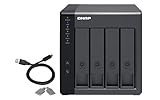
Overview: The QNAP TR-004 is a professional-grade 4-bay DAS enclosure featuring hardware RAID capabilities via USB Type-C. Unlike all-in-one personal clouds, this diskless unit targets users wanting customizable storage with data protection. It serves as direct-attached storage for PCs or backup expansion for existing QNAP NAS systems.
What Makes It Stand Out: Hardware RAID 0, 1, 5, JBOD, and individual disk modes provide enterprise-level data protection without CPU overhead. The USB Type-C interface ensures broad compatibility with Windows, macOS, and Linux. Its unique ability to function as both standalone DAS and NAS expansion unit offers versatility unmatched by single-purpose enclosures.
Value for Money: At $219 diskless, the TR-004 is competitively priced for a hardware RAID enclosure. While requiring separate drive purchases, it avoids the “NAS tax” of integrated software. For users with spare drives or specific capacity needs, it’s cheaper than pre-configured solutions. The hardware RAID justifies the cost over software alternatives.
Strengths and Weaknesses: Strengths: True hardware RAID; 4-bay expandability; USB Type-C connectivity; QNAP brand reliability; versatile DAS/NAS expansion modes.
Weaknesses: Drives not included; no network connectivity; steeper learning curve; lacks wireless access; USB interface limits speed.
Bottom Line: The TR-004 excels for tech-savvy users wanting hardware RAID flexibility and expansion. It’s perfect for augmenting existing QNAP NAS or creating protected direct-attached archives, but unsuitable for beginners seeking simple plug-and-play solutions.
Why Network-Attached Storage is Your Backup Game-Changer
Network-attached storage represents a fundamental shift from reactive to proactive data protection. Unlike traditional backup methods that require manual intervention and physical proximity, NAS creates a centralized, always-available repository that serves your entire network ecosystem. This transformation extends beyond mere convenience; it introduces automated workflows, versioning capabilities, and redundancy that multi-layered backup strategies demand.
The real magic happens when you realize your NAS isn’t just a destination for backups—it’s an active participant in your data protection strategy. Modern systems can orchestrate complex backup topologies, replicate data offsite, and even serve as a recovery platform when disaster strikes. This evolution from passive storage to intelligent backup hub is what makes today’s NAS devices genuinely transformative.
Understanding NAS: More Than Just a Hard Drive
At its core, a NAS device is a specialized computer designed from the ground up for storage operations. It runs a dedicated operating system optimized for file services, network protocols, and data management tasks. But what makes it revolutionary for backup purposes is its ability to operate independently while integrating seamlessly with every device on your network.
Think of it as having a dedicated IT professional whose sole job is managing your backups—except this one works 24/7, never takes vacation, and executes complex retention policies with machine precision. The hardware architecture typically includes multiple drive bays for redundancy, specialized network interfaces for high-throughput data transfer, and hardware acceleration for encryption and compression tasks that would cripple a standard PC.
The Backup Revolution: From USB Sticks to Network-Wide Protection
The progression from manual backups to NAS-based protection mirrors the evolution from horse-drawn carriages to autonomous vehicles. Early USB drives offered a single point of failure and required human discipline to maintain. Cloud storage solved accessibility but introduced bandwidth limitations and ongoing subscription costs. NAS bridges these gaps by providing local-speed performance with cloud-like accessibility and automation.
This network-wide approach means your laptop backs up when you close the lid, your phone syncs photos while charging overnight, and your security cameras archive footage without filling their SD cards. The backup becomes invisible yet omnipresent—a background process so reliable you forget it’s there until you desperately need it.
Key Features That Define a True Backup Powerhouse
Not all NAS devices deserve a place in your backup strategy. The difference between a basic file server and a backup game-changer lies in a specific set of features that directly impact data protection capabilities. Understanding these elements helps you cut through marketing noise and focus on what genuinely matters for safeguarding your digital assets.
Capacity Planning: How Much Storage Do You Really Need?
Capacity planning for backup NAS requires a radically different mindset than primary storage. You’re not just accounting for current data—you’re planning for versioning, snapshots, and future growth. A good rule of thumb is to provision 3-4 times your primary data size for comprehensive backup coverage.
Consider this: a 1TB laptop doesn’t need just 1TB of backup space. It needs space for daily incremental backups, weekly full backups, monthly archives, and snapshot retention. Factor in compression ratios (typically 1.5:1 to 2:1 for mixed data) and the overhead of RAID protection, and suddenly that 1TB source data demands 4-6TB of NAS capacity. For businesses, this multiplier effect scales dramatically when protecting multiple endpoints and servers.
RAID Configurations Explained: Balancing Safety and Space
RAID isn’t backup—it’s availability—but the right RAID level dramatically impacts your backup strategy’s reliability. RAID 1 mirrors data across drives, offering simplicity but wasting 50% of capacity. RAID 5 stripes data with distributed parity, providing single-drive fault tolerance with better space efficiency. RAID 6 adds a second parity block, surviving two simultaneous drive failures—a critical feature when rebuilding large arrays.
For backup NAS, RAID 10 often emerges as the sweet spot, combining mirroring and striping for both performance and redundancy. However, the rise of RAID-Z and BTRFS-based systems introduces copy-on-write technology that enables efficient snapshots and self-healing capabilities. The key is matching your RAID choice to your recovery time objectives and acceptable risk tolerance.
Processor and RAM: The Brains Behind Your Backup Operations
The CPU in your NAS handles more than file transfers—it compresses data, encrypts volumes, manages snapshot deduplication, and runs backup applications. An underpowered processor turns backup windows into day-long ordeals and makes snapshot operations feel sluggish. ARM-based processors work for basic file serving, but backup-heavy workloads demand x86 architecture with hardware acceleration for AES-NI encryption and QuickSync video transcoding.
RAM directly impacts how many snapshots you can maintain, the size of your deduplication tables, and the performance of your file system cache. For every 1TB of storage, budget at least 1GB of RAM for basic operations, doubling that if you plan to use deduplication or run multiple backup services simultaneously. Enterprise environments managing hundreds of terabytes often provision 64GB or more to maintain responsive performance during parallel backup streams.
Network Considerations for Seamless Backup Performance
Your NAS is only as fast as its network connection, and backup operations are notoriously bandwidth-hungry. A gigabit Ethernet connection theoretically maxes out at 125MB/s, but real-world throughput with protocol overhead and multiple simultaneous connections typically hovers around 80-100MB/s. For a 1TB backup, that’s nearly three hours of continuous transfer—assuming nothing else competes for bandwidth.
Ethernet vs. Wi-Fi: Why Wired Wins for Backup Tasks
Wi-Fi 6 might promise gigabit speeds, but the shared medium nature of wireless means your backup will fight for airtime with Netflix streams, video calls, and smart home devices. The result is unpredictable performance and failed backup jobs when the signal drops. Ethernet provides dedicated bandwidth, full-duplex communication, and predictable latency that backup software relies on for consistent operation.
Consider link aggregation (LAG) for critical backup NAS deployments. Combining multiple Gigabit Ethernet ports creates a fatter pipe and provides redundancy if one cable fails. For larger environments, 2.5GbE or 5GbE connections over Cat5e or Cat6 cabling offer a cost-effective middle ground before making the leap to 10GbE infrastructure.
10GbE and Beyond: Future-Proofing Your Backup Infrastructure
10 Gigabit Ethernet transforms NAS backup from a nightly batch job to a nearly real-time operation. With effective throughput exceeding 1GB/s, even multi-terabyte backups complete in minutes rather than hours. This speed enables aggressive snapshot schedules—imagine taking a full system image every hour without impacting user productivity.
The ecosystem around 10GbE has matured significantly. Multi-gig switches are now affordable, and many NAS devices include 10GbE ports standard or as affordable upgrades. For creative professionals working with 4K/8K video or businesses running virtual machine backups, this bandwidth isn’t luxury—it’s necessity. Forward-thinking buyers should at minimum choose NAS with PCIe expansion slots to add 10GbE cards later.
Software Ecosystem: The Unsung Hero of NAS Backup
Hardware specs tell only half the story. The operating system and backup applications define your daily experience and determine whether your backup strategy succeeds or fails. A powerful NAS running clunky software creates more problems than it solves, while modest hardware with brilliant backup orchestration can outperform expensive enterprise gear.
Native Backup Applications vs. Third-Party Solutions
Most NAS platforms include built-in backup tools that handle basic tasks competently. These native apps typically offer scheduled folder sync, rsync support, and cloud backup integration. They excel at simplicity and tight OS integration but often lack advanced features like application-aware backups, granular Exchange or SQL Server protection, and sophisticated retention policies.
Third-party solutions like Veeam, Acronis, or Nakivo bring enterprise-grade capabilities to NAS platforms. They understand virtual machine quiescing, support incremental forever backups, and provide centralized management dashboards. The trade-off is complexity and cost—both financial and in terms of system resources. Your choice depends on whether you need consumer-friendly simplicity or IT-grade control.
Snapshot Technology: Your Secret Weapon Against Ransomware
Snapshots are the single most powerful feature in modern NAS backup strategies. Unlike traditional backups that copy files, snapshots capture the entire state of your file system at a specific moment. Creating a snapshot takes seconds and consumes minimal space initially, as only changed blocks are stored separately. This means you can take hourly snapshots and retain them for months without drowning in duplicate data.
When ransomware encrypts your files, snapshots let you roll back to a clean state in minutes. The key is configuring snapshot immutability—making snapshots read-only and undeletable even by admin accounts. Combine this with snapshot replication to a secondary NAS, and you have a time machine that malware can’t touch. Look for systems supporting thousands of snapshots with flexible scheduling and retention policies that automatically thin older snapshots.
Security Features That Keep Your Data Fortress Impenetrable
A backup NAS containing all your critical data is the ultimate target for attackers. Security isn’t an add-on feature—it’s a fundamental requirement that must be baked into every layer, from physical drive encryption to network access controls. The days of trusting a simple password-protected share are long gone.
Encryption Standards: Protecting Data at Rest and in Transit
AES-256 encryption for data at rest is non-negotiable for backup NAS. This protects your data if drives are stolen or improperly decommissioned. Hardware acceleration is critical—software-based encryption can slash write performance by 50% or more. Modern processors include AES-NI instructions that make encryption nearly free from a performance perspective.
For data in transit, insist on TLS 1.3 for all management interfaces and SMB 3.0 encryption for file shares. VPN capabilities built into the NAS allow secure remote backup without exposing services to the internet. Some advanced systems offer client-side encryption, where data is encrypted before leaving the source device, ensuring even the NAS administrator can’t access your files.
Multi-Factor Authentication and Access Controls
Every admin account on your backup NAS must require multi-factor authentication. SMS-based 2FA is better than nothing, but authenticator apps or hardware keys provide superior security. Role-based access controls ensure that backup operators can run jobs without having full admin rights, while separate accounts for different backup tasks limit the blast radius if credentials are compromised.
IP allowlisting adds another layer, restricting management access to specific network segments. For businesses, integration with Active Directory or LDAP centralizes authentication and enforces corporate password policies. Audit logging of all backup operations and administrative actions creates a forensic trail that’s invaluable during incident response.
Scalability: Growing Your Storage as Your Needs Evolve
The backup NAS you buy today must handle tomorrow’s data explosion. With 4K video, high-resolution photography, and ever-growing application datasets, storage needs rarely shrink. Scalability isn’t just about adding drives—it’s about maintaining performance and manageability as capacity scales into hundreds of terabytes.
Expansion Units vs. Cloud Tiering: Two Paths to More Space
Direct-attached expansion units offer seamless capacity growth, typically connecting via high-speed SAS or eSATA links. They appear as additional volumes within the same management interface, preserving your backup policies and snapshots. The downside is cost and physical footprint—expansion units aren’t cheap, and they require rack space and power.
Cloud tiering provides a more flexible alternative, automatically moving older backup data to object storage like S3 or Azure Blob. This creates an effectively infinite capacity pool while keeping recent backups on fast local storage. The trade-off is recurring costs and restore speed—retrieving terabytes from cloud storage takes time and incurs egress fees. Hybrid approaches that keep metadata local while offloading cold data often provide the best balance.
Use Cases: Tailoring Your NAS to Your Backup Strategy
The perfect NAS for a photographer archiving RAW files differs dramatically from what a law firm needs to protect client data. Understanding your specific backup requirements prevents overpaying for unnecessary features or buying a system that can’t handle your workload. The key is mapping your data protection needs to NAS capabilities.
Personal Digital Life Protection
For home users, backup NAS priorities center around simplicity, media streaming capabilities, and protecting irreplaceable memories. Automated photo uploads from mobile devices, continuous backup of personal documents, and versioning for family videos take precedence. Single-drive failure protection is adequate, but snapshot support is crucial for recovering from accidental deletions or ransomware.
Look for consumer-friendly features like one-click backup from cloud services (Google Photos, iCloud), DLNA streaming for backed-up media, and mobile apps for remote access. Power efficiency matters when the device runs 24/7 in a home environment. A two-bay system with 4-8TB drives often suffices, but planning for 4K home video and growing photo libraries suggests starting with a four-bay unit.
Small Business Continuity Planning
Small businesses face unique backup challenges: limited IT staff, regulatory compliance requirements, and the need for rapid recovery. NAS for this environment must support bare-metal restore of employee workstations, application-aware backups of line-of-business software, and cross-site replication to a secondary location or cloud provider.
Recovery time objectives measured in hours, not days, dictate using SSD caching to accelerate database restores and VM booting from backup. Integration with business tools like Office 365 for email backup and support for versioning file shares accessed by multiple employees becomes critical. A five-bay NAS with hot-swappable drives, redundant power supplies, and 10GbE connectivity provides the foundation for robust business continuity.
Creative Professional Workflows
Photographers, videographers, and designers generate massive files that require both backup and collaborative access. Their NAS must serve dual roles: high-speed working storage and comprehensive backup repository. This demands 10GbE connectivity, NVMe SSD caching for active project files, and the ability to handle millions of small files efficiently.
Versioning takes on new importance when client feedback generates dozens of file iterations. Snapshot integration with creative applications like Adobe Lightroom or DaVinci Resolve allows rolling back to specific edit states. For video teams, the NAS must sustain multi-stream 4K/8K playback while simultaneously running background backup jobs—a task that requires serious processing power and carefully tuned quality of service settings.
Advanced Features That Separate Good from Great
Once you’ve covered the basics, certain advanced capabilities elevate a NAS from functional to transformative. These features often go unnoticed during initial purchase decisions but become invaluable as your backup strategy matures. They’re the difference between a device that stores backups and one that actively protects your data.
Docker and Virtualization Support
Running backup applications in Docker containers isolates them from the host OS, improving security and simplifying updates. It also lets you deploy specialized tools without cluttering the main system. Virtualization support goes further, allowing you to run a complete backup management VM directly on the NAS. This is particularly powerful for businesses that want to consolidate infrastructure or test recovery procedures without dedicated hardware.
Some NAS platforms support running lightweight virtual machines for critical applications, effectively turning your backup device into a disaster recovery platform. Imagine your primary server failing and being able to boot its VM directly from the NAS backup—restoring service in minutes while you repair the original hardware. This capability blurs the line between backup and business continuity.
Automated Backup Orchestration
True backup transformation comes from automation that goes beyond simple scheduling. Modern NAS systems can trigger backups based on events: when a laptop connects to the corporate VPN, when a file server reaches a certain change threshold, or when a security alert indicates potential compromise. They can chain backup jobs, replicating data to offsite locations only after local verification completes.
Machine learning algorithms can predict optimal backup windows based on network usage patterns and even identify files that change abnormally frequently—potentially signaling ransomware activity. Integration with IT service management tools allows automatic ticket creation when backups fail, ensuring issues don’t go unnoticed. This level of orchestration transforms backup from a scheduled task into an intelligent, adaptive system.
Total Cost of Ownership: Beyond the Sticker Price
The purchase price of a NAS is just the entry fee. True cost analysis must account for drives, expansion options, power consumption, and your time managing the system. A $300 NAS that requires weekly troubleshooting and lacks critical features ultimately costs more than a $1000 unit that runs flawlessly for years.
Drives typically cost 2-3 times the NAS chassis, and enterprise-grade drives with rotational vibration sensors justify their premium in multi-bay environments. Power consumption adds up—an 8-bay NAS running 24/7 can consume $200-400 annually in electricity depending on your rates. Factor in cloud storage fees for offsite replication and potential software licenses for advanced backup features.
The hidden cost is often your time. A NAS with excellent documentation, active community support, and intuitive management interfaces saves countless hours compared to a cheaper but frustrating alternative. When calculating ROI, consider the cost of data loss: if a $1500 NAS setup prevents a single catastrophic data loss event, it has already paid for itself many times over.
Frequently Asked Questions
How is NAS different from cloud backup?
NAS provides local control with immediate access speeds and no recurring fees, while cloud backup offers offsite protection and infinite scalability. The best strategies combine both: NAS for fast local recovery and cloud for disaster resilience. NAS gives you physical possession of your data and works during internet outages, but you’re responsible for hardware maintenance and offsite replication.
What’s the minimum storage capacity I should consider?
For personal use, start with at least 4TB of usable capacity after RAID overhead. This accommodates current needs plus 2-3 years of growth. Small businesses should begin with 16-24TB usable, planning for 5:1 data growth. Remember to factor in snapshot and versioning overhead—budget 30-40% extra space beyond your raw data size for comprehensive backup retention.
Do I need technical expertise to set up a NAS?
Modern NAS platforms have become remarkably user-friendly, with wizard-based setups that get basic backup running in under an hour. However, optimizing performance, configuring security, and implementing advanced features like snapshot replication benefit from networking and storage knowledge. Most users can handle personal NAS setup, but business deployments warrant consulting with a storage specialist.
Can I access my NAS backups remotely?
Yes, through VPN connections, secure web portals, or dedicated mobile apps. The best practice is VPN access, which encrypts all traffic and doesn’t expose your NAS directly to the internet. Many systems offer site-to-site VPN for automatic backup replication between locations. Avoid opening management ports to the internet—use a VPN or zero-trust network access solution instead.
How often should I run backup jobs?
Critical documents and active projects benefit from continuous or hourly backups. System images and full machine backups typically run nightly. Archival data might back up weekly. The key is matching frequency to data change rates and acceptable loss windows. Modern incremental-forever technologies make frequent backups storage-efficient, so when in doubt, back up more often.
Is RAID a replacement for backup?
Absolutely not. RAID protects against drive failure but does nothing for accidental deletion, ransomware, theft, or natural disasters. A proper backup strategy requires versioning, snapshots, and offsite copies. Think of RAID as the foundation that keeps your backup storage running; backup is the insurance policy that actually protects your data.
What’s the lifespan of a NAS device?
Expect 5-7 years of reliable service from a quality NAS, though many run longer. Drive failure rates increase significantly after 4 years, so plan replacement cycles accordingly. The chassis and electronics often outlast the drives. Software support typically continues for 3-5 years after purchase, after which security updates may cease—a critical consideration for internet-connected devices.
Can I upgrade my NAS storage later?
Most NAS support hot-swapping drives for larger capacity units, allowing gradual upgrades. However, expanding RAID arrays often requires rebuilding, which takes days on large volumes and impacts performance. Some modern file systems allow online capacity expansion without downtime. Planning for growth upfront by buying a NAS with empty bays is more cost-effective than replacing drives later.
How do I protect my NAS from ransomware?
Implement snapshot immutability to create read-only recovery points. Use separate admin accounts for backup operations versus general management. Enable multi-factor authentication and IP restrictions. Keep the NAS firmware updated and disable unnecessary services. Network segmentation isolates the NAS from infected workstations. Most importantly, maintain offline or offsite backups that ransomware can’t reach.
What’s the difference between consumer and enterprise NAS?
Enterprise NAS offers redundant components (power supplies, fans, network ports), higher-performance processors, more RAM, and advanced features like Fibre Channel support or dual-controller architectures. They include enterprise-grade drive compatibility, predictive failure analysis, and premium support contracts. Consumer NAS prioritizes ease of use, media features, and affordability. For business backup, enterprise features like out-of-band management and proactive monitoring justify the premium.