Your home is getting smarter, but what about the humble power strip lurking behind your entertainment center? While smart bulbs and thermostats get all the glory, voice-controlled power strips represent one of the most practical upgrades you can make to your connected home. These intelligent devices don’t just multiply your outlets—they transform how you interact with everything plugged into them.
Whether you’re looking to eliminate vampire power drain, create custom lighting scenes, or simply turn off your coffee maker without leaving the couch, Alexa and Google Assistant-compatible power strips offer unprecedented control over your electrical devices. But not all smart strips are created equal, and navigating the sea of specifications, protocols, and features can feel overwhelming. Let’s demystify what makes these devices tick and how to choose the perfect one for your smart home ecosystem.
Top 10 Smart Power Strips with Alexa Control
Detailed Product Reviews
1. Kasa Smart Plug Power Strip KP303, Surge Protector with 3 Individually Controlled Smart Outlets and 2 USB Ports, Works with Alexa & Google Home, No Hub Required , White

Overview: The Kasa KP303 is TP-Link’s entry-level smart power strip, delivering three independently controllable outlets and two always-on USB ports for $23.38. This compact surge protector targets users seeking reliable smart home integration without the premium cost of larger models. It leverages the polished Kasa ecosystem for seamless remote control and scheduling through a well-designed mobile app, making it an accessible starting point for home automation.
What Makes It Stand Out: Unlike generic budget options, the KP303 maintains TP-Link’s reputation for reliability with ETL-certified surge protection. Each of the three outlets can be individually named and voice-controlled via Alexa or Google Assistant, while the two USB ports provide convenient always-on charging. The Kasa app’s scheduling interface allows complex timer setups that rival premium alternatives, and the “Away Mode” can randomly activate lights for security—a feature uncommon at this price.
Value for Money: At $23.38, this strip costs 40% less than its HS300 sibling while retaining core smart functionality. For users automating three or fewer devices, it eliminates the need for separate $10-15 smart plugs while adding surge protection and USB charging. The three-year TP-Link warranty and proven app stability provide long-term value that cheaper no-name brands can’t match, making it economical for cautious first-time buyers.
Strengths and Weaknesses: Strengths include trusted brand reliability, excellent app experience, genuine surge protection, and granular outlet control. The always-on USB ports are practical for charging phones and tablets. Weaknesses are the limited three smart outlets, lack of energy monitoring, no USB-C ports, and 2.4GHz WiFi limitation. Users with more devices will quickly outgrow its capacity.
Bottom Line: The Kasa KP303 is the ideal smart power strip for beginners or modest setups. It delivers core automation features, robust safety, and proven reliability at an accessible price, making it perfect for bedrooms, home offices, or entertainment centers requiring minimal smart control without unnecessary complexity.
2. Kasa Smart Plug Power Strip HS300, Surge Protector with 6 Individually Controlled Smart Outlets and 3 USB Ports, Works with Alexa & Google Home, No Hub Required , White

Overview: The Kasa HS300 is TP-Link’s premium smart power strip, offering six individually controlled outlets, three USB ports, and comprehensive energy monitoring for $39.98. This ETL-certified surge protector serves as a centralized hub for electronics-heavy areas like entertainment centers or workstations. It builds on the KP303’s foundation with expanded capacity and power consumption tracking, targeting users who want granular control and efficiency insights.
What Makes It Stand Out: Energy monitoring is the HS300’s defining feature, displaying real-time wattage and historical consumption for each outlet in the Kasa app. This helps identify energy vampires and optimize electricity bills. Six smart outlets provide independent control over more devices than most competitors, while support for Alexa, Google Assistant, and Cortana ensures broad voice integration. The robust surge protection shields expensive electronics during storms, and the app’s usage reporting can automatically calculate costs.
Value for Money: While nearly double the KP303’s price, the $39.98 tag is justified for users with numerous devices or energy-conscious households. Compared to buying six individual Kasa smart plugs, this strip saves money and outlet space. The energy monitoring alone can recoup costs by identifying inefficient appliances, making it a practical long-term investment for tech-heavy environments.
Strengths and Weaknesses: Strengths include detailed energy monitoring, six independent outlets, multi-platform voice support, strong surge protection, and TP-Link’s reliable app ecosystem. The USB ports add charging convenience. Weaknesses are the lack of USB-C, bulkier design requiring more space, higher price that may exceed casual users’ needs, and potential overkill for simple setups.
Bottom Line: The Kasa HS300 is the best choice for energy-conscious users or those managing multiple devices. Its monitoring capabilities and robust feature set justify the premium, making it perfect for home offices, entertainment systems, or small businesses where power insights and extensive control are priorities.
3. Amazon Basics Smart Plug Power Strip with 6 Individually Controlled Outlets and 3 USB Ports (2 USB-A and 1 USB-C), Works with Alexa Only, 2.4 GHz Wi-Fi, No Hub Required, White

Overview: Amazon’s Basics Smart Power Strip delivers six individually controlled outlets and three USB ports—including USB-C—for $39.99, positioning itself as an Alexa-exclusive alternative to established brands. Designed for seamless integration with Amazon’s ecosystem, this device eliminates third-party apps by operating entirely through the Alexa app. It targets Prime members wanting frictionless setup and modern connectivity without hubs or complex configurations.
What Makes It Stand Out: The USB-C port future-proofs this strip for modern devices, a feature absent from both Kasa models. Native Alexa integration enables automatic discovery and setup within seconds of plugging in. Users can create sophisticated routines combining outlets with other Alexa devices—like triggering lights when a security camera detects motion. The six outlets support individual or grouped control, and the Alexa app’s routine builder allows more complex automation than many dedicated smart home apps.
Value for Money: Matching the Kasa HS300’s price while adding USB-C makes this compelling for Alexa households. The elimination of a separate app reduces potential connectivity issues and simplifies the user experience. For Prime members already invested in Amazon’s ecosystem, the familiar interface and seamless integration provide excellent value, though Google Home users must look elsewhere.
Strengths and Weaknesses: Strengths include USB-C charging, effortless Alexa setup, six independent outlets, and hub-free operation. The design integrates naturally with existing Alexa routines and supports location-based triggers. Weaknesses are Alexa-only compatibility (no Google/Cortana), lack of energy monitoring, Amazon Basics’ shorter track record, and less granular scheduling than dedicated smart home apps.
Bottom Line: This power strip is perfect for Alexa-centric households wanting USB-C connectivity. It trades cross-platform support and energy monitoring for ecosystem simplicity, making it ideal for users prioritizing convenience and deep Alexa integration over advanced power management features.
4. GHome Smart Power Strip Surge Protector 10A, Smart Plug That Works with Alexa & Google Home, 6 in 1 WiFi Outlets with APP Control, White Extension Cord 2.4G WiFi Only, ETL FCC Listed, No Hub Needed
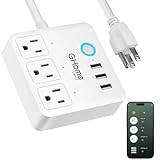
Overview: The GHome Smart Power Strip offers three smart outlets and three USB 3.0 ports for $26.99, targeting budget-conscious buyers seeking basic voice control and remote access. This ETL and FCC-certified surge protector provides essential smart functionality without premium pricing, making it accessible for first-time adopters or secondary rooms. The compact white design blends into home environments while delivering core automation features.
What Makes It Stand Out: The GHome app includes advanced timer functions with cycle and random modes, enabling occupancy simulation when traveling. Individual and group control allows managing each socket separately or operating all three simultaneously via voice or app. USB 3.0 ports deliver faster charging than standard USB, while comprehensive safety certifications ensure reliable operation. The “6 in 1” designation refers to three outlets plus three USB ports, providing decent connectivity for the price.
Value for Money: At $26.99, this strip significantly undercuts Kasa and Amazon alternatives while retaining core features. It costs less than a single premium smart plug per outlet while adding surge protection and USB charging. For price-sensitive shoppers automating a few devices, the value proposition is strong. The feature set rivals more expensive options, delivering solid bang-for-buck for modest smart home needs.
Strengths and Weaknesses: Strengths include aggressive pricing, advanced scheduling options, safety certifications, USB 3.0 ports, and dual-platform voice support. The compact design fits tight spaces. Weaknesses are the limited three smart outlets, lesser-known brand reputation, 2.4GHz WiFi limitation, potentially less polished app experience, and lack of energy monitoring and USB-C.
Bottom Line: The GHome 6-in-1 is an excellent budget entry point for smart home automation. It sacrifices outlet quantity and brand recognition for affordability while retaining core features. Ideal for bedrooms, guest rooms, or as a secondary smart strip where cost matters more than maximum capacity, though power users will want more outlets.
5. GHome Smart Plug Outlet Extender, Surge Protector with 3 Individually Controlled Smart Power Strips and 3 USB Ports, Works with Alexa & Google Home, 15A/1800W, White

Overview: The GHome Smart Plug Outlet Extender reimagines power distribution with a unique nine-in-one design featuring three smart outlets, three smart USB ports, and three always-on standard outlets for $26.99. Its wall-mountable form factor saves valuable space while providing flexible power management for mixed-use scenarios where some devices require constant power. The 15A/1800W rating handles high-power appliances, making it versatile for kitchens or workstations.
What Makes It Stand Out: The hybrid design solves a common smart home dilemma: routers and security systems need uninterrupted power while lamps and coffee makers benefit from automation. Wall-mount capability transforms any outlet into a centralized hub without surface clutter. The three smart USB ports can be independently controlled—a rare feature at this price—allowing users to stop trickle charging or schedule device charging cycles. Comprehensive safety protections include surge, short-circuit, and temperature monitoring.
Value for Money: This $26.99 strip delivers more versatility than competitors at the same price. The combination of always-on and smart outlets eliminates separate power strips, while wall-mounting saves furniture space. Compared to buying individual components, this integrated solution offers significant savings and cleaner cable management. The high power rating adds value for appliance-heavy users.
Strengths and Weaknesses: Strengths include innovative hybrid design, wall-mountability, high power rating, comprehensive safety protections, and independent USB control. The space-saving design suits small apartments. Weaknesses are the limited three smart outlets (despite nine total sockets), 2.4GHz-only WiFi, GHome’s smaller brand footprint, lack of energy monitoring, and no USB-C ports.
Bottom Line: This GHome extender excels in space-constrained environments needing both constant and smart power. Its unique layout and mounting options make it perfect for entryway consoles, behind TVs, or kitchen counters. For users prioritizing versatility and space efficiency over maximum smart outlets, this delivers exceptional utility at a budget price.
6. GHome Smart Plug Outlet Extender, Smart Power Strip Surge Protector with 3 Individually Controlled WiFi Outlets and 3 USB Ports, Smart Plugs That Works with Alexa Google Home, 15A/1800W, Black

Overview: The GHome Smart Plug Outlet Extender offers a versatile 9-in-1 power solution for budget-conscious smart home builders. This surge protector combines three individually controlled WiFi outlets with three smart USB ports and three always-on AC outlets, providing flexible control while ensuring critical devices stay powered. Designed for wall mounting, it helps eliminate cable clutter in home offices and entertainment centers.
What Makes It Stand Out: The hybrid outlet configuration is genuinely practical—most competitors offer either all-smart or all-standard outlets. The three always-on outlets are perfect for routers, security systems, or other devices that shouldn’t lose power accidentally. The wall-mountable design saves valuable desk space, while the FCC certification and multi-layer safety protections (surge, short-circuit, over-current) provide peace of mind.
Value for Money: At $26.99, this delivers exceptional value. You’re getting nine total ports with smart capabilities on six of them, plus surge protection. Competing strips with similar port counts often cost $35-40, and the added safety certifications make this a smart investment for the price.
Strengths and Weaknesses: Strengths include the unique outlet mix, space-saving wall-mount design, robust safety features, and competitive pricing. Weaknesses are the limitation to 2.4GHz WiFi only (no 5GHz support), modest USB power output shared across ports, and the fact that only three of six AC outlets are smart-controlled.
Bottom Line: This GHome strip is an excellent choice for users needing both smart control and uninterrupted power. It’s particularly well-suited for home offices and entertainment setups where some devices must remain always-on while others benefit from scheduling.
7. Tapo Smart Wi-Fi Power Strip- 6 Individually Controlled Smart Outlets and 3 USB Ports with Surge Protection, Matter, Works w/Alexa, Google Home, Siri, & Bixby, No Hub Needed, Tapo P316M

Overview: The Tapo P316M represents the next generation of smart power strips with Matter certification, ensuring universal compatibility across all major smart home ecosystems. It features six individually controlled AC outlets and three always-on USB ports, plus comprehensive energy monitoring capabilities. The slim design with a flush-fitting plug makes it ideal for tight installations behind furniture.
What Makes It Stand Out: Matter certification is the headline feature—this future-proofs your investment and guarantees seamless integration with Alexa, Google Home, Apple HomeKit, and Samsung SmartThings. The per-outlet energy monitoring provides granular insights into power consumption, helping identify energy hogs. Overcharge prevention automatically cuts power when devices reach full battery, extending their lifespan.
Value for Money: At $49.99, this commands a premium but justifies it with Matter support and energy tracking. While basic smart strips cost half as much, none offer the same platform-agnostic compatibility or detailed consumption data. For serious smart home enthusiasts, this is worth the investment.
Strengths and Weaknesses: Strengths include Matter certification, six smart outlets, energy monitoring, overcharge protection, and space-saving design. Weaknesses are the higher price point, limited to three USB ports (non-smart), and the 3-foot cord may be short for some setups. The Matter advantage is only relevant if you have or plan to adopt multiple smart platforms.
Bottom Line: The Tapo P316M is the best choice for users invested in multi-platform smart homes. Its Matter certification and energy monitoring make it a premium, future-ready solution worth the extra cost for tech-forward households.
8. GHome Smart Plug Power Strip Works with Alexa & Google Home - 3 Individually Controlled Smart Outlets Switches 3 USB Ports, 4FT Extension Cord, WiFi Power Strip, Multi-Plug Extender for Home Offices

Overview: This GHome Smart Plug Power Strip balances portability with smart functionality, featuring a 4-foot extension cord and compact design perfect for travel or flexible home office placement. It offers three individually controlled WiFi outlets alongside three USB ports, making it a 6-in-1 solution for modern device management. The voice and app control work with Alexa and Google Assistant for convenient hands-free operation.
What Makes It Stand Out: The travel-friendly form factor distinguishes this from bulkier alternatives. The 4-foot cord provides placement flexibility without the permanent commitment of wall mounting. The timer scheduling function helps automate daily routines and reduce electricity bills by powering down idle devices. Multiple safety protections including shockproof design and current overload shield offer comprehensive protection.
Value for Money: Priced at $26.99, this matches its wall-mount sibling while offering corded versatility. It’s an excellent value for users needing portable smart control without sacrificing safety features. Comparable travel-friendly smart strips often cost $30-35, making this competitively priced.
Strengths and Weaknesses: Strengths include portability, 4-foot cord, competitive price, robust safety features, and timer functions. Weaknesses are the limitation to three smart outlets (not six), 2.4GHz WiFi only, and USB ports that share 3.1A total output. The compact size may make it prone to tipping with heavy plugs.
Bottom Line: This GHome strip is ideal for travelers, renters, or anyone needing flexible smart control without permanent installation. Its portability and safety features make it a versatile choice for home offices and temporary setups.
9. Smart Power Strip, TESSAN WiFi Flat Plug Strip with 3 Smart Outlets and 3 USB Ports, 6 Feet Extension Cord, Only 2.4 GHz Wi-Fi, Compatible with Alexa and Google Home, White

Overview: The TESSAN WiFi Flat Plug Strip solves a common installation challenge with its low-profile flat plug design, perfect for tight spaces behind furniture. This 9-in-1 power strip combines three smart outlets with three always-on outlets and three USB ports, controlled via Alexa and Google Home. The six-foot extension cord and wall-mountable design offer versatile placement options.
What Makes It Stand Out: The flat plug is the star feature, allowing placement in previously impossible locations like behind wall-mounted TVs or heavy furniture. The 6-foot cord provides generous reach, while the wall-mount keyholes enable under-counter or workbench installation. The Smart Life app integration offers reliable scheduling and timer functions for automating aquarium lights, humidifiers, and other appliances.
Value for Money: At $27.99, this is reasonably priced for a flat-plug smart strip with nine total ports. Flat-plug designs typically command a $5-10 premium, and the added smart functionality makes this a solid value. The fireproof PC+ABS material and surge protection enhance its worth.
Strengths and Weaknesses: Strengths include the space-saving flat plug, 6-foot cord, wall-mount capability, good outlet mix, and safety certifications. Weaknesses are that only three outlets are smart, USB ports are always-on (not smart), 2.4GHz WiFi limitation, and the USB charging speed is modest at 2.4A max per port.
Bottom Line: The TESSAN strip excels in space-constrained installations where a flat plug is essential. It’s perfect for behind-TV setups, dorm rooms, or any tight space where traditional plugs won’t fit, offering smart control without compromising placement flexibility.
10. BN LINK Smart Plug Power Strip,Surge Protector with 6 Individually Controlled Smart Outlets, 4 USBs (incl. 20W USB-C), Compatible with Alexa and Google Home

Overview: The BN LINK Smart Plug Power Strip delivers modern charging capabilities with its inclusion of a 20W USB-C PD port alongside six individually controlled smart outlets and four total USB ports. This surge protector combines fast charging with comprehensive smart home automation, supporting Alexa and Google Assistant voice control. The ETL certification and 1200 Joules surge protection ensure device safety.
What Makes It Stand Out: The 20W USB-C fast charging port sets this apart from most competitors still using legacy USB-A only. Six smart outlets provide more controllable ports than typical 3-outlet strips. The BN-LINK Smart app enables individual or grouped device control with customizable schedules. Indicator lights for safety, grounding, and WiFi status provide at-a-glance system monitoring.
Value for Money: At $39.99, this sits in the mid-range but offers premium features. The USB-C PD port alone justifies the price premium over $27 alternatives. With six smart outlets and four USB ports, the per-port cost is competitive, especially considering the fast charging capability and robust surge protection.
Strengths and Weaknesses: Strengths include USB-C fast charging, six smart outlets, good USB port count, strong surge protection, ETL certification, and 24/7 support. Weaknesses are the 2.4GHz WiFi limitation (no 5GHz), higher price than basic models, and the USB-A ports share 3A total output. The USB-C port may be underutilized if you lack compatible devices.
Bottom Line: This BN LINK strip is the best choice for users with modern USB-C devices needing both fast charging and smart control. Its six smart outlets and robust safety features make it a premium, future-ready solution for tech-heavy households.
What Makes a Power Strip “Smart”?
A smart power strip transcends the basic functionality of traditional surge protectors by embedding Wi-Fi connectivity, microprocessors, and firmware that enable remote management and automation. Unlike conventional strips that simply distribute electricity, these intelligent devices create a communication bridge between your appliances and your voice assistant ecosystem. The “smart” designation comes from their ability to receive commands, report status, and execute programmed logic without physical interaction.
At its core, a smart power strip contains relay switches for each outlet that can be toggled on or off via digital signals. This means you can cut power to your TV while leaving your streaming device active, or shut down an entire entertainment system with a single voice command. Many models also integrate energy monitoring chips that measure real-time power consumption, amperage draw, and even calculate estimated operating costs. The intelligence layer extends to scheduling engines, scene management, and conditional triggers that respond to time, location, or other smart device states.
Why Choose Voice-Controlled Power Strips Over Traditional Ones?
The leap from manual to voice-controlled power management delivers tangible benefits that extend far beyond novelty. First, consider the phantom load problem—devices in standby mode collectively consume 5-10% of residential electricity. Smart strips let you eliminate this waste by completely cutting power to idle electronics through simple commands like “Alexa, turn off the office equipment.”
Voice control also introduces accessibility advantages that physical switches can’t match. When your hands are full while cooking, or when mobility limitations make reaching behind furniture challenging, verbal commands provide effortless control. The integration with Alexa and Google Assistant means your power strips become part of broader automation routines—imagine saying “Goodnight” and having every non-essential device in your home power down simultaneously.
From a safety perspective, voice control allows you to de-energize devices without physically interacting with potentially overloaded strips or navigating dark rooms. For parents, it offers a way to manage children’s device access remotely, while frequent travelers can create occupancy simulations by scheduling lights and electronics to cycle on and off. The data insights from energy monitoring models help identify inefficient appliances, potentially saving hundreds annually on utility bills.
Understanding Alexa and Google Assistant Integration
Voice assistant compatibility functions through cloud-to-cloud communication protocols. When you issue a command like “Hey Google, turn on the desk lamp,” the assistant processes your voice, sends an encrypted instruction to the smart strip manufacturer’s cloud servers, which then relay the signal to your device via its persistent Wi-Fi connection. This architecture enables control from anywhere with internet access, not just when you’re home.
Alexa and Google Assistant handle smart power strips slightly differently. Alexa’s Smart Home API supports more granular device types, allowing developers to expose individual outlets as separate controllable entities. This means you can name each outlet independently—“living room TV,” “living room soundbar”—and control them individually or as a group. Google Assistant uses a similar structure but historically grouped outlets more aggressively, though recent updates have improved individual control.
Both platforms support power state queries (“Is the printer on?”), but Alexa typically offers deeper integration with Routines, allowing power strips to trigger other actions. Google Assistant excels at contextual commands and leverages its AI to understand more natural phrasing. Understanding these nuances helps set realistic expectations for how your chosen strip will behave within each ecosystem.
Key Features to Look for in Smart Power Strips
Individual Outlet Control
The most critical feature distinguishing premium smart strips from basic models is per-outlet switching capability. Some budget options only control the entire strip as a single unit, defeating the purpose for most users. True individual control means each receptacle operates independently, allowing you to keep your router powered while cycling your modem, or maintain DVR recording while shutting down the TV.
Look for strips that expose each outlet as a separate device in your voice assistant app. This enables naming conventions that make voice commands intuitive and allows complex automation where different devices follow different schedules. The hardware implementation matters too—quality strips use discrete relays for each outlet rather than shared circuits, ensuring true electrical isolation and preventing cross-interference.
Energy Monitoring Capabilities
Advanced models incorporate current transformers or hall-effect sensors to measure power draw with ±1-2% accuracy. This data streams to companion apps that visualize consumption patterns, calculate kWh usage, and estimate monthly costs. For voice assistants, you can ask “Alexa, what’s the office power consumption?” and receive real-time feedback.
The real value lies in historical data analysis. Identify which devices are energy vampires, track how usage changes seasonally, and receive alerts when appliances draw abnormal power—potentially indicating failure. Some strips can automatically cut power when consumption drops below a threshold, perfect for turning off phone chargers when devices reach full battery. When evaluating monitoring features, check if data exports to platforms like Google Sheets or integrates with home energy management systems.
USB Charging Ports
Integrated USB ports add convenience but require scrutiny. Standard 5V/2.4A ports suffice for phones and tablets, but Quick Charge 3.0 or USB-C PD (Power Delivery) ports delivering 18W+ significantly reduce charging times for modern devices. Smart USB ports take this further by allowing voice control over charging—“Hey Google, turn off USB port 2” stops charging your device remotely.
Consider whether USB ports are independently controllable or always-on. Some strips treat USB ports as a single bank, while premium models control each port individually. The total USB power budget matters too—a strip might advertise four ports but only provide 6A total, meaning simultaneous fast charging degrades performance. For smart home hubs or always-on devices, always-on USB ports prevent connectivity issues.
Surge Protection Ratings
Smart functionality shouldn’t compromise core protection. Look for joule ratings of 2000+ for sensitive electronics, with 3000+ joules recommended for home theater equipment. The clamping voltage—when the surge protector activates—should be 400V or lower for optimal protection. Response time under 1 nanosecond ensures rapid suppression of voltage spikes.
Pay attention to protection status indicators. Quality strips include LED notifications when surge protection expires (MOVs degrade over time) and cut power if protection becomes compromised. Some smart models send app notifications when protection deteriorates, preventing you from unknowingly operating unprotected equipment. UL 1449 certification is non-negotiable—this standard ensures the device meets rigorous safety testing for surge suppression.
Technical Specifications That Matter
Wi-Fi vs. Hub-Based Connectivity
Wi-Fi direct connectivity offers simplicity—connect to your 2.4GHz network and you’re operational. However, each device consumes IP addresses and contributes to network congestion. In contrast, hub-based systems using Zigbee or Z-Wave create mesh networks that reduce Wi-Fi load and typically respond faster to commands. The trade-off is additional hardware cost and setup complexity.
For Alexa ecosystems, Zigbee-enabled strips can connect directly to Echo Plus or Echo Show models with built-in hubs, eliminating standalone hub requirements. Google Assistant primarily favors Wi-Fi devices, though it supports Zigbee through third-party hubs like SmartThings. Consider your existing smart home architecture—if you already run a hub-based system, adding compatible strips integrates more elegantly. For apartment dwellers or minimalists, Wi-Fi models provide the path of least resistance.
Power Rating and Amperage Limits
Most residential smart strips max out at 15A (1800W at 120V), matching standard wall circuit capacity. However, the combined load across all outlets matters—overloading trips internal breakers or creates fire hazards. High-power appliances like space heaters, air conditioners, or power tools often exceed safe operating limits for multi-outlet strips.
Check continuous vs. peak power ratings. Some strips handle brief startup surges (like refrigerator compressors) better than others. The internal relay contacts’ amperage rating indicates durability—10A relays wear faster than 15A-rated components. For workshop or garage applications, consider strips with 20A capacity and appropriate NEMA 5-20 plugs, though these require dedicated 20A circuits.
Setting Up Your Smart Power Strip with Voice Assistants
Begin by downloading the manufacturer’s companion app before physically plugging in the strip. This app handles initial Wi-Fi configuration, firmware updates, and outlet naming. Most strips enter pairing mode automatically when first powered—watch for rapidly blinking status LEDs indicating setup mode. Connect your phone to the strip’s temporary Wi-Fi network, then use the app to transfer your home network credentials.
Once the strip appears in the manufacturer app, assign descriptive names to each outlet using consistent conventions. “Bedroom lamp” works better than “Outlet 1.” Test local control through the app before linking to voice assistants. For Alexa, enable the manufacturer’s skill in the Alexa app, discover devices, then organize outlets into rooms and groups. Google Assistant users link accounts through the Google Home app, assign devices to rooms, and create custom nicknames for natural voice commands.
Pro tip: Create virtual “rooms” for logical groupings even if devices physically share a power strip. This lets you say “turn off the entertainment center” to control multiple outlets simultaneously while retaining individual control. Set up routines immediately—schedule office equipment to power down at 6 PM daily, or create a “good morning” routine that activates coffee maker and radio outlets.
Safety Certifications and Standards
Beyond basic UL 1449 for surge protection, smart strips should carry UL or ETL listings for the entire device (UL 1363 for relocatable power taps). These certifications verify the strip meets fire, shock, and construction safety standards. FCC certification ensures electromagnetic interference won’t disrupt Wi-Fi or other wireless devices.
For international travelers or importers, check for IEC 60950-1 compliance and country-specific approvals like CE (Europe) or PSE (Japan). The presence of a resettable circuit breaker rather than a simple fuse indicates better overload protection—look for 15A breakers with manual reset buttons. Grounding is critical; never use three-to-two-prong adapters as this eliminates surge protection and creates shock hazards.
Smart strips with energy monitoring should meet ANSI C12.20 standards for accuracy if you plan to use data for serious cost analysis. For outdoor applications (rare but emerging), IP weather resistance ratings and GFCI protection become essential. Always verify certifications through the official databases—some manufacturers display fake marks on unlisted products.
Advanced Automation Features
Beyond simple on/off control, premium strips offer conditional logic that transforms them into automation powerhouses. Sunrise/sunset scheduling adjusts to your location and season automatically. “Away mode” randomizes outlet cycling to simulate occupancy, enhancing security. Power-on behavior settings determine whether outlets default to on, off, or last-state after power outages—critical for network equipment that must restart automatically.
Look for integration with IFTTT or direct webhook support for custom automation. A strip could monitor your TV’s power consumption and automatically dim smart lights when a movie starts. Some models include ambient light sensors to control outlets based on room brightness, or temperature sensors that cut power to overheating equipment. The most advanced strips support local API access, enabling hub systems like Home Assistant to control them without cloud dependency—ensuring functionality during internet outages.
Common Use Cases and Applications
Home theater setups benefit immensely—power down HDMI switches, streaming boxes, and game consoles while keeping the TV’s USB port active for firmware updates. Office environments use smart strips to enforce energy policies, automatically shutting down monitors and peripherals after hours. Kitchen applications include controlling small appliances like coffee makers, slow cookers, or air fryers with voice commands, enabling remote start or safety shutoffs.
Holiday lighting becomes effortless when paired with smart strips—schedule elaborate displays, control them via voice, and monitor energy consumption of thousands of LEDs. Workshop users can power down all tools except battery chargers, creating safer environments. Parents manage children’s screen time by scheduling gaming console availability. Aquarium enthusiasts control lighting, filters, and heaters independently, creating natural day/night cycles while maintaining critical life support equipment.
Troubleshooting Connectivity Issues
When a strip becomes unresponsive, first check if it’s connected to a 2.4GHz network—most don’t support 5GHz. If your router uses the same SSID for both bands, create a separate 2.4GHz network temporarily during setup. Weak Wi-Fi signals cause intermittent control; use Wi-Fi analyzer apps to confirm signal strength above -70 dBm at the strip’s location. Mesh Wi-Fi systems sometimes cause issues—try connecting the strip to the main router temporarily.
If voice commands fail but app control works, unlink and relink the manufacturer skill/account. Alexa users should check for device naming conflicts—avoid reserved words like “light” or “fan” in outlet names. Factory reset procedures vary but typically involve holding the power button for 10-15 seconds until LEDs flash rapidly. Firmware updates sometimes brick devices—never interrupt power during updates. For persistent issues, assign static IP addresses in your router to prevent DHCP conflicts that cause devices to disappear from the network.
Cost vs. Value Analysis
Entry-level smart strips without energy monitoring start around $25-35, offering basic voice control but limited individual outlet management. Mid-range models ($40-60) add per-outlet control, USB ports, and basic scheduling. Premium strips ($70-100+) include accurate energy monitoring, advanced automation, and superior surge protection. The price premium over traditional strips ($15-25) pays for itself through energy savings—typically 5-15% reduction in phantom loads translates to $50-150 annually for most households.
Consider total cost of ownership. Wi-Fi models consume minimal power (1-2W standby) but add to network infrastructure load. Hub-based systems require initial hub investment ($50-100) but enable cheaper per-device costs. Energy monitoring strips provide ROI data that helps optimize usage patterns. Factor in replacement costs too—MOVs in surge protectors degrade, and most manufacturers recommend replacement every 3-5 years. Some premium brands offer pro-rated warranty replacements, effectively reducing long-term costs.
Privacy and Security Considerations
Smart strips represent potential network vulnerabilities. Prioritize devices with AES-128 encryption or higher for cloud communications. Check if the manufacturer offers bug bounty programs—this indicates active security posture. Some strips support local-only control, preventing data from leaving your network entirely. Review privacy policies to understand what usage data is collected; some manufacturers sell anonymized energy data to utilities.
Network segmentation dramatically improves security. Create a separate IoT VLAN that can access internet but not your primary devices. Change default passwords immediately, and disable any unused features like Telnet or UPnP. Regular firmware updates patch vulnerabilities—enable auto-updates if available. Be wary of strips requiring excessive permissions in their apps; a power strip shouldn’t need access to your contacts or location. For maximum privacy, consider open-source firmware compatible models that allow full control over data transmission.
Future Trends in Smart Power Management
The Matter standard promises to revolutionize smart power strips by enabling seamless cross-platform compatibility. Soon, a single strip will work natively with Alexa, Google Assistant, Apple HomeKit, and Samsung SmartThings without separate integrations. This will drive adoption and spur innovation in energy management features. Expect AI-driven power optimization that learns your usage patterns and automatically suggests schedules to minimize costs based on time-of-use electricity rates.
Emerging models incorporate circuit-level monitoring that can identify specific appliances by their electrical signatures, eliminating the need for smart plugs on every device. Battery backup integration will keep strips controllable during outages while providing graceful shutdown capabilities for computers. We’re also seeing early adoption of Thread protocol, which creates robust mesh networks with lower latency than Wi-Fi. As utilities roll out demand response programs, smart strips will automatically shed load during peak periods in exchange for bill credits, transforming them from passive controllers into active grid participants.
Frequently Asked Questions
Can I control each outlet individually with voice commands?
Yes, but only if the smart power strip supports per-outlet control. During setup, you’ll name each outlet separately (e.g., “bedroom lamp,” “bedroom fan”), then control them individually (“Alexa, turn off bedroom lamp”) or as a group (“Hey Google, turn off bedroom”). Strips without this feature control all outlets simultaneously as a single device.
What happens to my schedules and voice control if my internet goes down?
Most cloud-dependent strips lose remote access but retain locally-stored schedules that continue running. However, voice commands won’t work until internet returns. Premium models with local API support or hub-based connectivity (Zigbee/Z-Wave) maintain full functionality offline when paired with compatible hubs. Always check the manufacturer’s specifications for offline capabilities.
Are smart power strips safe to use with high-power appliances like space heaters?
Generally no. Most strips are rated for 15A total across all outlets, and high-draw appliances should plug directly into wall outlets. Using a smart strip for a 1500W heater leaves minimal capacity for other devices and risks overloading the circuit. Some heavy-duty 20A strips exist for workshop applications, but these require dedicated 20A circuits and appropriate wiring.
How accurate is the energy monitoring feature?
Accuracy typically ranges from ±1% to ±3% for quality models, sufficient for identifying usage patterns and estimating costs. However, this isn’t utility-grade metering. Factors like power factor, harmonics, and calibration drift affect precision. For billing disputes or solar net metering, always rely on your utility’s meter. Use smart strip data for trend analysis and optimization, not precise accounting.
Can I connect a smart power strip to another smart plug or power strip?
Daisy-chaining is strongly discouraged and violates most electrical codes. It creates fire hazards through cumulative resistance and can exceed safe load limits. Additionally, the downstream strip’s smart features may malfunction due to voltage drop or interference. Plug smart strips directly into wall outlets, never into other power distribution devices.
Do these devices work on 5GHz Wi-Fi networks?
Virtually all smart power strips operate exclusively on 2.4GHz due to its superior range and wall penetration. While this can be frustrating for mesh network users, it’s intentional—2.4GHz provides more reliable connections for stationary IoT devices. During setup, temporarily disable your phone’s 5GHz connection or create a separate 2.4GHz SSID to ensure successful pairing.
Will smart power strips increase my electricity bill?
The strips themselves consume minimal standby power—typically 1-2 watts, costing $1-3 annually. This is offset by eliminating phantom loads from connected devices, which usually saves 5-15% on your total bill. The net effect is almost always positive, with payback periods of 6-18 months depending on your usage patterns and local electricity rates.
Can guests control my smart power strips without access to my entire smart home?
Yes, through several methods. Alexa’s Guest Connect lets visitors issue commands from their phones on your network without account linking. Google Assistant offers Guest Mode for temporary voice recognition. The most secure approach is creating dedicated guest accounts in the manufacturer app with limited outlet permissions, or using physical buttons on the strip itself for manual control.
What’s the difference between a smart power strip and a smart plug multiplier?
Smart power strips include built-in surge protection, multiple outlets, and often USB ports—essentially traditional power strips with added intelligence. Smart plug multipliers (or smart outlet extenders) simply add smart control to existing wall outlets without surge protection. Choose strips for equipment protection and USB charging; use plug multipliers where surge protection isn’t needed or for temporary installations.
How long do smart power strips typically last before needing replacement?
Electrical components last decades, but surge protection degrades with each hit. Most manufacturers recommend replacement every 3-5 years in typical use, or immediately after a major surge event. Smart features may become obsolete sooner—Wi-Fi standards evolve, and cloud servers get discontinued. Buy from established brands with long-term firmware support commitments, and avoid strips with non-replaceable surge modules if longevity is a priority.