Your cable box, gaming console, and coffee maker are quietly bleeding money. While you sleep, while you work, while you’re simply not in the room, these “energy vampires” could be adding 5-10% to your annual electricity bill. Smart power strips represent one of the simplest yet most effective weapons in the fight against phantom load waste, with studies showing that strategic implementation can reduce household energy consumption by up to 20% in electronics-heavy environments. Unlike traditional surge protectors that merely guard against voltage spikes, intelligent power strips actively monitor usage patterns and cut power to idle devices automatically—transforming a passive accessory into an active money-saving tool.
The technology has evolved dramatically from basic timer-based models to sophisticated systems that learn your routines and integrate with smart home ecosystems. But not all smart strips are created equal, and understanding the nuances between current-sensing, master-controlled, and motion-activated designs can mean the difference between modest savings and that coveted 20% reduction. This comprehensive guide walks you through the essential technologies, features, and strategies to maximize your energy savings without sacrificing convenience or safety.
Top 10 Smart Power Strips for Energy Efficiency
Detailed Product Reviews
1. Smart Strip ECG-7MVR Energy Saving Surge Protector with Autoswitching Technology, 7 Outlet

Overview: The Smart Strip ECG-7MVR takes a different approach to “smart” power management, focusing on automatic energy savings rather than app-based control. This surge protector features a master-controlled design where one control outlet dictates power to four switched outlets, while two remain always-on. It’s an intelligent solution for eliminating phantom power draw from electronics in entertainment centers or office setups without requiring Wi-Fi or smartphone apps.
What Makes It Stand Out: The autoswitching technology is the star here—when you turn off your TV or computer (plugged into the control outlet), the strip automatically cuts power to peripherals like speakers, printers, or gaming consoles. The user-adjustable sensitivity screw ensures compatibility across various devices, preventing false triggers. The right-angle flat plug and 4-foot cord make it exceptionally practical for hard-to-reach outlets behind furniture.
Value for Money: At $21.99, this strip occupies a sweet spot between basic surge protectors and full smart strips. You’re paying primarily for the autoswitching capability rather than Wi-Fi connectivity. For users focused solely on energy savings without needing remote access, this offers better ROI than pricier app-controlled alternatives that require constant connectivity and setup time.
Strengths and Weaknesses: Strengths include genuine energy savings without complexity, adjustable sensitivity, space-saving design, and reliable surge protection. Weaknesses are the lack of remote/voice control, no scheduling capabilities, and the dated autoswitching concept that may not suit modern smart home setups. The technology feels somewhat limited in today’s connected world but remains effective for its core purpose.
Bottom Line: Ideal for budget-conscious buyers wanting automated energy savings without smart home complexity. If you don’t need app control, this delivers tangible utility bill reductions. However, smart home enthusiasts should look elsewhere for remote management features.
2. Kasa Smart Plug Power Strip HS300, Surge Protector with 6 Individually Controlled Smart Outlets and 3 USB Ports, Works with Alexa & Google Home, No Hub Required , White

Overview: TP-Link’s Kasa HS300 represents the gold standard for smart power strips, offering comprehensive control over six individual AC outlets plus three USB ports. This ETL-certified surge protector integrates seamlessly into modern smart homes through Wi-Fi connectivity, eliminating the need for a separate hub. The Kasa Smart app provides full remote access, while energy monitoring capabilities give users unprecedented insight into their power consumption patterns and device usage.
What Makes It Stand Out: Individual outlet control sets this apart from basic smart strips—each of the six outlets can be scheduled, controlled, and monitored independently. The built-in energy monitoring is particularly valuable, allowing you to identify power-hungry devices and optimize usage. Voice control through Alexa, Google Assistant, and Cortana works flawlessly, and the robust Kasa ecosystem ensures reliable performance and regular firmware updates.
Value for Money: At $39.98, the HS300 isn’t the cheapest option, but it justifies every penny with professional-grade features. Comparable smart strips with energy monitoring typically cost $45-60. You’re investing in TP-Link’s proven reliability, comprehensive app functionality, and true independent control rather than grouped switching that cheaper alternatives often provide.
Strengths and Weaknesses: Strengths include individual outlet control, detailed energy monitoring, excellent app interface, broad voice assistant support, and strong surge protection. Weaknesses are the limited three USB ports (non-smart) and a price point that may exceed casual users’ budgets. The 3-prong plug is standard but lacks a flat design for tight spaces behind furniture.
Bottom Line: The HS300 is the smart strip to beat for serious smart home users. If you want granular control and energy insights, this is worth the premium. For simpler needs, consider its smaller sibling, the KP303.
3. Kasa Smart Plug Power Strip KP303, Surge Protector with 3 Individually Controlled Smart Outlets and 2 USB Ports, Works with Alexa & Google Home, No Hub Required , White

Overview: The Kasa KP303 distills TP-Link’s smart power expertise into a compact, budget-friendly package. With three individually controlled smart outlets and two always-on USB ports, this strip targets users with modest smart home needs. It maintains the core Kasa experience—reliable app control, voice assistant integration, and scheduling—without the premium price tag of its larger sibling, making it an accessible entry point into home automation.
What Makes It Stand Out: This strip excels as an entry point into the Kasa ecosystem. You get the same robust app experience and voice control as the HS300, but in a form factor perfect for nightstands, small offices, or single-device entertainment setups. The scheduling and timer functions are particularly well-implemented, allowing precise automation that can meaningfully reduce energy waste without overwhelming users with unnecessary complexity.
Value for Money: At $23.38, the KP303 is exceptionally competitive. It undercuts most smart strips while delivering genuine individual outlet control. For users needing only 2-3 smart outlets, it eliminates paying for unnecessary capacity. The value proposition strengthens if you already use Kasa devices, as it integrates seamlessly into existing routines and scenes without requiring additional hubs or subscriptions.
Strengths and Weaknesses: Strengths include affordable pricing, reliable TP-Link quality, excellent app interface, and effective scheduling. Weaknesses are the limited three smart outlets, lack of energy monitoring, and only two USB ports. The shorter feature list may disappoint power users, but matches the price point appropriately and keeps the device straightforward to use.
Bottom Line: Perfect for smart home newcomers or those with limited needs. If you want quality smart control without overspending, the KP303 delivers. Power users with more devices should upgrade to the HS300 for expanded capacity and monitoring.
4. Tapo Smart Wi-Fi Power Strip- 6 Individually Controlled Smart Outlets and 3 USB Ports with Surge Protection, Matter, Works w/Alexa, Google Home, Siri, & Bixby, No Hub Needed, Tapo P316M

Overview: Tapo’s P316M positions itself as the future-proof smart power strip, boasting Matter certification for universal smart home compatibility. With six individually controlled outlets, three USB ports, and advanced features like overcharge prevention, it targets tech-forward users wanting maximum flexibility. The strip works across all major platforms including Alexa, Google Home, Apple HomeKit, and Samsung SmartThings without ecosystem lock-in.
What Makes It Stand Out: Matter certification is the headline feature—this ensures the strip will remain compatible as smart home standards evolve over the next decade. The overcharge prevention technology automatically cuts power when devices reach full battery, extending device longevity and preventing energy waste. Its slim design with flush-fitting plug solves a common pain point, allowing discreet placement behind furniture without sacrificing functionality or creating gaps.
Value for Money: At $49.99, this is the priciest option, but Matter certification justifies the premium. Early Matter adopters typically pay 20-30% more for future-ready devices. For users invested in multiple smart ecosystems or planning long-term smart home expansion, this represents smart insurance against obsolescence that cheaper, proprietary alternatives cannot match.
Strengths and Weaknesses: Strengths include Matter certification, universal platform support, overcharge protection, energy monitoring, and space-saving design. Weaknesses are the highest price point, shorter 3-foot cord, and Tapo’s less mature ecosystem compared to Kasa. Setup may be slightly more complex for Matter pairing, though this is a one-time process.
Bottom Line: Buy this if you’re building a future-proof smart home or need multi-platform support. For single-ecosystem users, cheaper alternatives suffice. The premium pays for long-term compatibility and advanced charging protection that will serve you for years.
5. Smart Power Strip, Yozisital Surge Protector with 6 Smart Outlets and 4 USB Ports, 5FT Flat Plug Extension Cord for Home Office

Overview: Yozisital’s offering packs impressive connectivity into a competitive package, featuring six smart outlets, two always-on outlets, and four USB ports (two USB-A and two USB-C). This 12-in-1 solution targets modern home offices and entertainment centers with diverse charging needs. The Smart Life app provides standard scheduling and remote control capabilities, while the 5-foot flat plug cord enhances placement flexibility behind desks and media consoles.
What Makes It Stand Out: The USB-C ports are a standout feature rarely found in this price range, future-proofing your charging setup for newer devices. The inclusion of two always-on outlets alongside six smart ones offers welcome flexibility for devices requiring constant power like routers or DVRs. The flat plug design is genuinely practical, and the 5-foot cord length hits the sweet spot for most installations without creating excess cable clutter.
Value for Money: At $43.99, Yozisital undercuts premium brands while offering more ports and USB-C connectivity. You’re getting 12 total devices supported versus 9 on the Tapo, with modern charging standards included. However, the lesser-known brand name requires some trust compared to established players like TP-Link, and the absence of energy monitoring is noticeable at this price point.
Strengths and Weaknesses: Strengths include USB-C ports, high device capacity, flat plug, competitive pricing, and flexible outlet configuration. Weaknesses are 2.4GHz WiFi limitation (no 5GHz), no mentioned energy monitoring, brand recognition concerns, and potentially less polished app experience. The setup instructions appear overly complex in the product description, which may intimidate non-technical users.
Bottom Line: Excellent value for USB-C equipped households needing many ports. If brand reputation and energy monitoring aren’t priorities, this delivers maximum connectivity per dollar. For reliability-focused buyers, stick with established brands like Kasa or Tapo.
6. Amazon Basics Smart Plug Power Strip with 6 Individually Controlled Outlets and 3 USB Ports (2 USB-A and 1 USB-C), Works with Alexa Only, 2.4 GHz Wi-Fi, No Hub Required, White

Overview: The Amazon Basics Smart Plug Power Strip delivers straightforward smart home control for devoted Alexa users. With six individually manageable AC outlets and three USB ports—including a modern USB-C option—this white power strip transforms any space into a voice-controlled environment. Setup takes minutes through the Alexa app, requiring no additional hub.
What Makes It Stand Out: Its deep Alexa integration stands out, allowing you to control outlets individually or group them for room-based commands. The inclusion of a USB-C port alongside two USB-A ports future-proofs your charging needs. The scheduling feature automates appliances to match your daily routines, while remote access lets you manage devices from anywhere.
Value for Money: At $39.99, this strip offers solid value for Alexa-centric households. The individual outlet control typically commands premium pricing, and the USB-C addition is a nice touch at this price point. However, the Alexa-only limitation means you’re locked into Amazon’s ecosystem, making it less versatile than cross-platform alternatives.
Strengths and Weaknesses: Strengths:
- Six independently controlled outlets maximize flexibility
- USB-C port included for newer devices
- Seamless Alexa app integration, no hub required
- Easy scheduling and grouping capabilities
Weaknesses:
- Alexa-only compatibility excludes Google Home and Apple HomeKit users
- 2.4 GHz Wi-Fi limitation may cause connectivity issues
- Lacks energy monitoring features
Bottom Line: An excellent choice for dedicated Alexa users seeking affordable, granular control over multiple devices.
7. Eve Energy Strip - Smart Triple Outlet & Power Meter for Apple Home, Built-in Schedules & Switches, Surge Protection, overcurrent Protection, overvoltage Protection, Energy metering

Overview: The Eve Energy Strip caters exclusively to Apple HomeKit enthusiasts seeking premium build quality and advanced protection. This sleek power strip features three generously spaced outlets with independent control via Siri, the Eve app, or onboard buttons. Built-in energy metering and comprehensive electrical protection justify its higher price point.
What Makes It Stand Out: Unlike competitors, Eve prioritizes data privacy with local HomeKit integration and no cloud dependency. The detailed energy consumption tracking shows real-time usage and projected costs, helping identify power-wasting appliances. Three-stage protection—surge, overcurrent, and overvoltage—safeguards expensive Apple devices and other electronics.
Value for Money: At $74.99, this is a premium investment. The robust protection circuitry and energy monitoring features rival professional-grade equipment. For Apple users already invested in the ecosystem, the seamless integration and privacy-first approach add significant value. However, the limited three outlets and HomeKit exclusivity narrow its appeal.
Strengths and Weaknesses: Strengths:
- Superior electrical protection for valuable devices
- Detailed energy monitoring with cost projections
- Privacy-focused local HomeKit control
- Generous outlet spacing for bulky adapters
Weaknesses:
- Apple HomeKit exclusive—no Alexa or Google support
- Only three outlets limits device capacity
- Requires iPhone/iPad for setup and control
- Premium pricing may deter budget-conscious buyers
Bottom Line: Ideal for Apple devotees prioritizing protection, privacy, and energy awareness over outlet quantity.
8. meross Smart Plug Power Strip, WiFi Flat Outlet 15A Compatible with Apple HomeKit, Siri, Alexa, Google Assistant & SmartThings, with 4 AC Outlets & 4 USB Ports, 6 Feet Surge Protector Extender

Overview: The meross Smart Plug Power Strip emerges as a versatile cross-platform champion, supporting Apple HomeKit, Alexa, Google Assistant, and SmartThings. With four AC outlets and four USB ports on a six-foot cord, this flat-plug extender delivers flexible smart control for diverse smart home setups without breaking the bank.
What Makes It Stand Out: Its universal compatibility is the headline feature—rarely do you find HomeKit support at this price. The 15A maximum load handles power-hungry appliances safely, while the four USB ports charge multiple devices simultaneously. Individual outlet control through the meross app or voice commands provides granular management.
Value for Money: At $31.79, this strip offers exceptional value. Multi-platform support typically commands $50+ pricing, making this a budget-friendly option for mixed-ecosystem households. The 15A capacity and ETL/FCC certifications ensure safety without the premium cost. Note that HomeKit remote control requires an Apple TV or iPad as a hub.
Strengths and Weaknesses: Strengths:
- Broad compatibility across all major platforms
- 15A high-load capacity for demanding appliances
- Four individually controlled outlets
- Excellent price-to-feature ratio
Weaknesses:
- USB ports are group-controlled only, not individual
- HomeKit remote functionality needs additional Apple hardware
- App interface less polished than native platform apps
- 2.4 GHz Wi-Fi only
Bottom Line: A fantastic value for users wanting maximum platform flexibility without sacrificing performance.
9. GHome Smart Power Strip Surge Protector 10A, Smart Plug That Works with Alexa & Google Home, 6 in 1 WiFi Outlets with APP Control, White Extension Cord 2.4G WiFi Only, ETL FCC Listed, No Hub Needed
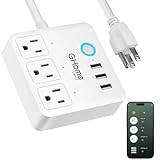
Overview: The GHome Smart Power Strip Surge Protector positions itself as an entry-level smart home solution for Alexa and Google Home users. This compact strip features three smart outlets and three USB 3.0 ports, offering basic scheduling and remote control at an attractive price point. ETL and FCC certifications provide peace of mind for safety-conscious buyers.
What Makes It Stand Out: Its affordability combined with independent outlet control makes smart home technology accessible to beginners. The timer and countdown functions include cycle and random modes—perfect for simulating occupancy while away. The 1200W/120V rating covers most small appliances and electronics safely.
Value for Money: At $26.99, this is one of the most budget-friendly smart strips available. While it lacks advanced features like energy monitoring or USB-C, the core smart functionality works reliably. For users wanting to dip their toes into smart home automation without complexity or significant investment, this delivers essential features at a fraction of competitor prices.
Strengths and Weaknesses: Strengths:
- Extremely affordable entry point to smart home tech
- Independent control of three outlets
- Occupancy simulation with random mode
- Comprehensive safety certifications
Weaknesses:
- Only three smart outlets (three USB ports are always-on)
- 10A/1200W rating limits high-power device usage
- No energy monitoring capabilities
- Basic app interface and limited platform support
Bottom Line: Perfect for budget-minded beginners seeking simple, reliable smart control for small-scale setups.
10. GHome Smart Power Strip 15A, 2.4G WiFi Smart plugs that work with Alexa & Google Home, Surge Protector Flat Plug with 6 APP Control WiFi outlets, FCC Listed, 7.18 ft flat extension cord, No Hub Needed

Overview: The GHome Smart Power Strip 15A upgrades the brand’s offering with six smart outlets, three USB ports including USB-C, and built-in energy monitoring. This flat-plug surge protector supports Alexa and Google Home through the GHome app, featuring a generous 7.18-foot cord for flexible placement in homes and offices.
What Makes It Stand Out: The integrated energy monitor tracks total consumption across all devices, helping identify waste and reduce monthly utility bills. Six individually controlled outlets provide extensive automation possibilities, while the 30W fast-charging USB ports handle modern devices efficiently. The extended cord length solves placement challenges in larger rooms and behind furniture.
Value for Money: At $39.99, this strip competes directly with Amazon’s offering while adding energy monitoring and USB-C fast charging. The 15A capacity and six outlets deliver more utility than similarly priced alternatives. For Alexa/Google users wanting consumption insights without buying a separate meter, this presents strong value.
Strengths and Weaknesses: Strengths:
- Six individually controlled outlets maximize flexibility
- Built-in energy monitoring for consumption awareness
- 30W fast charging with USB-C port
- Extra-long 7.18-foot cord
Weaknesses:
- Energy monitor shows only total usage, not per-outlet
- No Apple HomeKit support
- GHome app required (cannot use native Alexa/Google apps)
- 2.4 GHz Wi-Fi only may limit connectivity
Bottom Line: A feature-packed option for Alexa/Google users wanting monitoring capabilities and ample outlets.
What Are Smart Power Strips and How Do They Work?
Smart power strips are advanced surge protectors equipped with circuitry that detects when devices enter standby mode and automatically interrupts their power supply. While conventional power strips maintain constant electricity flow regardless of device activity, their intelligent counterparts create an active management system that eliminates wasted energy without requiring you to unplug devices manually.
The Phantom Load Problem: Why Your Electronics Are Stealing Power
Phantom load, also called standby power or vampire draw, occurs when electronics consume electricity despite being turned “off.” Your television might appear dark, but its internal components remain energized to receive remote control signals. Cable boxes, game consoles, printers, and chargers continuously pull 1-5 watts each—seemingly negligible until you multiply by 24 hours and dozens of devices. The average American home contains 40+ products constantly drawing standby power, translating to roughly $100-200 wasted annually. Smart power strips attack this invisible waste stream at its source.
How Smart Power Strips Detect and Eliminate Waste
These devices employ microprocessors that monitor electrical current flowing through each outlet. When sensors detect power consumption dropping below a programmable threshold for a specified duration—typically 30 seconds to 1 hour—the strip cuts electricity to designated “controlled” outlets while maintaining power to “always-on” outlets for essential equipment like routers or DVRs. Advanced models use infrared remote learning to understand when you’ve powered down your TV, automatically shutting down associated entertainment components while preserving settings and reducing wear from constant standby states.
Key Energy-Saving Technologies Explained
Understanding the core technologies helps you select a strip that matches your specific usage patterns and device ecosystem. The market offers several distinct approaches to intelligent power management, each with unique advantages.
Master-Controlled vs. Masterless Designs
Master-controlled strips designate one outlet as the “master” that controls several “slave” outlets. When the master device (typically a TV or computer) powers down or enters sleep mode, the strip automatically cuts power to peripherals like speakers, monitors, or printers. This design excels in home theater and office setups where devices operate as cohesive systems. Masterless strips, conversely, operate independently on each outlet, using current-sensing technology to make individual decisions. These work better for kitchen counters or workshops where appliances function autonomously.
Timer-Based Functionality
Some smart strips incorporate programmable timers that cut power during predetermined hours. You might schedule your entertainment center to disconnect from midnight to 6 AM when nobody’s watching, or your home office equipment to shut down after business hours. While less sophisticated than sensor-based models, timer strips offer simplicity and reliability for predictable routines. Look for models with battery backup that preserve timer settings during power outages.
Motion and Occupancy Sensing
Advanced units integrate passive infrared (PIR) sensors that detect human presence. When no motion occurs for a set period—typically 15-30 minutes—the strip powers down controlled outlets. This technology shines in home offices, workshops, or craft rooms where you might forget to switch off equipment. The best implementations include adjustable sensitivity and time delays to prevent nuisance shutdowns during periods of low activity like reading or focused computer work.
Current-Sensing Technology
The most precise energy-saving mechanism uses hall effect sensors to measure actual current draw in real-time. These microprocessors learn the baseline power consumption of each device and respond to meaningful changes rather than arbitrary thresholds. Premium models allow you to calibrate sensitivity for each outlet, preventing false triggers from devices with variable power consumption like modern game consoles that download updates in low-power states.
Essential Features to Look For
Beyond energy-saving intelligence, several features determine whether a smart strip will serve you reliably for years or become a source of frustration. Prioritize these specifications during your selection process.
Surge Protection Ratings
Energy savings mean nothing if a lightning strike fries your expensive electronics. Look for a minimum joule rating of 2000J for basic protection, with 3000J+ recommended for home theater or office setups. Pay attention to clamping voltage—the level at which protection activates. Lower is better: 330V offers superior protection compared to 400V or 500V models. UL 1449 certification ensures the device meets rigorous safety standards.
Number and Spacing of Outlets
Calculate your actual needs before purchasing. Most households require 6-8 outlets minimum, but consider future expansion. Critically examine outlet spacing—transformer bricks often block adjacent outlets on poorly designed strips. Look for models with 2-3 inches between outlets or rotating outlets that accommodate bulky adapters. “Always-on” outlets should remain separate from controlled outlets for maximum flexibility.
USB Charging Ports
Integrated USB ports eliminate the need for wall warts and provide convenient device charging. Evaluate both port quantity and amperage. Standard 1A ports suffice for overnight phone charging, but tablets and modern smartphones charge faster with 2.4A+ ports. The latest models feature USB-C Power Delivery (PD) ports delivering up to 100W for laptops. Ensure USB ports are independently controlled or have manual on/off switches to prevent phantom draw from idle chargers.
Wi-Fi Connectivity and App Control
Smart strips with Wi-Fi connectivity transform energy management from reactive to proactive. Companion apps provide real-time energy monitoring, remote outlet control, and detailed usage analytics that reveal your biggest energy wasters. Look for apps offering historical data, customizable automation rules, and integration with broader smart home platforms. Consider your privacy preferences—some models store data locally while others require cloud accounts.
Voice Assistant Integration
Alexa, Google Assistant, and Siri compatibility enable hands-free control and sophisticated automation routines. You can create voice commands like “Alexa, turn off the entertainment center” or integrate outlets into broader scenes like “Goodnight” that secures your entire home. Verify that voice control extends to individual outlets, not just master on/off functions, and that the strip responds reliably on your home network.
Understanding the 20% Energy Savings Claim
The promise of 20% energy reduction captures attention, but achieving this level of savings requires strategic implementation. This figure represents potential savings in specific scenarios rather than a universal guarantee.
Real-World Factors That Affect Your Savings
Your actual savings depend on your device inventory, usage patterns, and current energy habits. Homes with multiple entertainment centers, gaming setups, and home offices typically see 15-20% reductions because these environments contain numerous high-standby devices. Conversely, households that already unplug chargers and use manual power strips might achieve only 5-8% savings. Geographic location matters too—areas with higher electricity rates ($0.20+/kWh) see faster payback periods than regions with cheaper power.
Calculating Your Potential ROI
Start by auditing your phantom load using a Kill-A-Watt meter or your smart strip’s monitoring features. Measure standby consumption for each device zone, then multiply by hours of inactivity daily. A typical entertainment center drawing 50W in standby for 20 idle hours daily wastes 1 kWh per day—about $50-100 annually depending on your rates. A $40 smart strip pays for itself in under a year. Factor in surge protection value and extended device lifespan from reduced heat and electrical stress, and the financial case becomes compelling.
Installation and Placement Strategies
Optimal placement and configuration dramatically impact both convenience and energy savings. A poorly positioned strip might save power but create daily frustration, leading you to bypass its features.
Ideal Locations in Your Home
Target electronics clusters where devices operate as systems: entertainment centers (TV, soundbar, streaming box, game console), home offices (computer, monitor, printer, speakers), and kitchen counters (coffee maker, toaster oven, phone chargers). Avoid using smart strips for refrigerators, routers, or alarm systems that require continuous power. Bedrooms benefit from motion-sensing models that control lamps and chargers without requiring you to remember switches.
Setup Best Practices
Position the strip where its sensor can detect activity without obstruction. For master-controlled models, place the master device on the designated outlet and verify it controls slaves appropriately. Configure time delays based on your patience—too short and you’ll experience annoying shutdowns; too long and you’ll waste energy. Test the setup for a week, monitoring for unintended consequences like lost DVR recordings or disrupted downloads, then fine-tune sensitivity settings.
Safety Considerations and Certifications
Energy savings should never compromise electrical safety. Cheap, uncertified smart strips can pose fire hazards or fail when you need surge protection most.
UL Certification and What It Means
Underwriters Laboratories (UL) certification indicates comprehensive safety testing. Look specifically for UL 1363 (relocationable power taps) and UL 1449 (surge protective devices) marks. Be wary of vague “UL listed” claims without specific standards referenced. For international models, ETL or CE certifications offer comparable assurance. Avoid any strip lacking recognized third-party certification, regardless of price or features.
Fire Safety Features to Demand
Quality strips include thermal fuses that disconnect power if internal temperatures exceed safe limits, preventing overheating fires. Some models feature ceramic MOVs (Metal Oxide Varistors) that withstand surge degradation better than standard components. Automatic shutdown features should activate during sustained overload conditions. Check for fire-retardant casing materials rated UL94 V-0, which self-extinguish rather than fuel flames.
Troubleshooting Common Issues
Even premium smart strips occasionally misbehave. Understanding common problems saves you from unnecessary returns and frustration.
If devices won’t power on, verify the master device is drawing sufficient current to trigger activation—some energy-efficient electronics fall below default thresholds. Adjust sensitivity settings or use a different master outlet. For nuisance shutdowns, increase the time delay or disable motion sensing in high-traffic areas. Wi-Fi connectivity issues often resolve by moving the strip closer to your router or switching from 5GHz to 2.4GHz bands, which offer better range through walls. When USB ports stop charging, check if they’ve entered a low-power state—manually cycle the strip or adjust auto-shutdown timers.
Frequently Asked Questions
How much can I realistically save on my electric bill with smart power strips?
Most households save between 5-15% on their total electric bill, with electronics-heavy homes reaching 20%. Your savings depend on your current phantom load, electricity rates, and how many devices you connect. A typical family might save $75-150 annually.
Do smart power strips work with all electronics?
They work with most modern electronics but aren’t suitable for devices requiring continuous power like routers, modems, security systems, or medical equipment. Some smart home hubs and DVRs may lose settings if completely powered down.
Will constantly cutting power damage my electronics?
No, smart strips cut power at the outlet level, which is no different than unplugging the device. In fact, reducing standby time can extend component lifespan by minimizing heat buildup and electrical stress during idle periods.
What’s the difference between a smart power strip and a smart plug?
Smart plugs control single devices and offer individual energy monitoring. Smart power strips manage multiple devices simultaneously with surge protection and often more sophisticated automation. Strips are more cost-effective for electronics clusters.
How do I choose between master-controlled and masterless models?
Choose master-controlled for home theaters or offices where devices operate together. Choose masterless for kitchen counters, workshops, or areas where appliances function independently and have varying standby behaviors.
Can smart power strips integrate with my existing smart home system?
Most Wi-Fi enabled models work with major platforms like SmartThings, Hubitat, or Home Assistant through native integrations or IFTTT. Check compatibility before purchasing, especially for Apple HomeKit users, as support is less common.
What happens during a power outage?
Quality strips include non-volatile memory that preserves settings. When power returns, outlets typically remain off until manually activated, preventing dangerous power surges to sensitive electronics. Some models restore previous states automatically.
Are there any fire risks with smart power strips?
Certified models from reputable manufacturers pose minimal risk. The greater danger comes from overloading strips beyond their rated amperage (typically 15A) or daisy-chaining multiple strips together. Always follow manufacturer load specifications.
How long do smart power strips typically last?
The surge protection components degrade over time, typically after 3-5 years of normal use or following a major surge event. The smart features often continue working longer, but replace the unit when the protection indicator light dims or expires.
Can I use smart power strips with power tools or high-wattage appliances?
Most strips max out at 1800 watts (15 amps). While suitable for most electronics, they’re not designed for space heaters, air conditioners, or large power tools that exceed these ratings. Always check both the strip’s rating and your device’s power requirements.