So you’ve finally upgraded to that glorious 48-inch ultrawide monitor—the productivity powerhouse that promises to transform your workflow. But there’s a catch: your existing standing desk converter suddenly looks like a flimsy TV tray trying to support a cinema screen. You’re not alone in this frustration. The market is flooded with converters claiming “large monitor compatibility,” but most are designed for dual 27-inch setups, not the sprawling real estate of a 48-inch display. The wrong choice doesn’t just mean a wobbly workspace; it risks damaging your expensive investment and ruining your ergonomic setup.
Finding a standing desk converter that genuinely accommodates a 48-inch monitor requires more than checking a spec sheet. It demands understanding weight distribution, VESA patterns, stability dynamics, and the subtle difference between “technically fits” and “actually works.” This comprehensive guide cuts through marketing fluff and delivers the expert insights you need to make a confident, informed decision—whether you’re a remote worker, creative professional, or serious gamer who refuses to compromise.
Top 10 Standing Desk Converters for 48-Inch Monitors
Detailed Product Reviews
1. VIVO 48 inch Desk Converter, K Series, Height Adjustable Sit to Stand Riser, Dual Monitor and Laptop Workstation with Wide Keyboard Tray, Black, DESK-V048KB

Overview: The VIVO 48-inch K Series Desk Converter delivers an affordable entry into the standing desk world for users seeking a spacious dual-monitor workstation. This black steel-framed riser transforms any standard desk into an ergonomic sit-stand solution without requiring a complete furniture overhaul. With its generous 47.6" x 15.7" surface and synchronized keyboard tray, it targets home office workers and professionals wanting to combat sedentary work habits. The unit supports up to 33 pounds on the desktop and offers a height adjustment range from 4.5 to 20 inches, accommodating users from 5'3" to 6'1".
What Makes It Stand Out: VIVO’s patented straight-upward lift mechanism sets this converter apart from forward-arc designs that encroach on your space. The full-width keyboard tray (47.6" x 11.8") provides uninterrupted room for ergonomic keyboards, mice, and accessories—most competitors offer narrower trays. The near-zero assembly requirement means you’ll transition from box to standing in under 10 minutes. The steel frame construction delivers commercial-grade stability at a consumer price point, resisting wobble even at maximum height.
Value for Money: At $219.99, this converter undercuts premium brands like Varidesk by $80-150 while matching their weight capacity. You’re getting a proven lift mechanism, spacious surface, and sturdy build without paying for unnecessary frills. The three-year warranty and included cable management clips add tangible value. For budget-conscious buyers, this represents the sweet spot between cheap, unstable alternatives and overengineered models.
Strengths and Weaknesses: Strengths: Exceptional stability; full-width keyboard tray; smooth height adjustment; minimal assembly; space-efficient vertical lift; competitive pricing.
Weaknesses: Keyboard tray narrows to 10.2" in center (limits mouse space); no built-in monitor mounts; basic black finish may not suit all decor; 15.7" depth can feel shallow for large monitors.
Bottom Line: The VIVO K Series is an excellent choice for users wanting a reliable, no-fuss standing solution for dual monitors. It sacrifices some aesthetic polish and integrated monitor arms for core functionality and affordability. If you prioritize stability, workspace width, and value over premium features, this converter deserves your consideration.
2. VIVO 48 inch Height Adjustable Large Stand Up Desk Converter, V Series, Quick Sit to Stand Tabletop Dual Monitor Riser Workstation, Black, DESK-V048V

Overview: The VIVO V Series 48-inch converter represents a premium step-up with its enhanced depth and pneumatic lift system. This model features a deeper 47.3" x 22" surface that provides substantially more room for monitor stands, documents, and office accessories compared to the slimmer K Series. The dual pneumatic springs enable effortless height transitions from 6.5 to 17 inches, targeting users who prioritize smooth operation and a more substantial desktop presence. With the same 33-pound weight capacity, it’s built for professionals needing extra surface depth without moving to a full electric desk.
What Makes It Stand Out: The 22-inch depth is the standout feature—6.3 inches deeper than the K Series—allowing proper ergonomic monitor distance and space for task lighting or notebooks. The pneumatic spring system provides buttery-smooth adjustments with lighter touch controls, a noticeable upgrade from mechanical lifts. The V Series also includes adjustable feet for leveling on uneven surfaces, a detail often missing in this price tier. Its sleeker profile and refined edge finishing give it a more professional aesthetic suitable for executive environments.
Value for Money: Priced at $279.99, you’re paying a $60 premium over the K Series for added depth and pneumatic assistance. This is justified if you need the extra workspace or have heavier monitor setups requiring smoother lifting. Compared to Fully’s Cooper converter at $400+, the V Series offers 90% of the functionality at 70% of the cost. However, budget buyers may find the K Series sufficient.
Strengths and Weaknesses: Strengths: Generous 22" depth; ultra-smooth pneumatic adjustment; adjustable leveling feet; premium build quality; synchronized keyboard tray movement.
Weaknesses: Higher price point; reduced maximum height (17" vs 20"); narrower keyboard tray (30" vs 47.6"); 6.5" minimum height may be too tall for some users.
Bottom Line: The V Series is ideal for users needing extra desktop depth and premium adjustment feel. The additional $60 investment pays dividends in workspace flexibility and ergonomic positioning. Choose this over the K Series if you frequently reference physical documents or use deep monitor stands. For compact spaces or budget priorities, stick with the K Series.
3. VIVO Height Adjustable 48 inch Standing Desk Converter with Dual 13 to 30 inch Monitor Stand, Sit Stand Monitor Mount and Desk Riser, Black, DESK-V048KB-M2

Overview: This hybrid solution merges VIVO’s popular 48-inch K Series riser with a fully integrated dual monitor mount, creating an all-in-one ergonomic command center. The package includes the standard 47.6" x 15.7" desktop and full-width keyboard tray, plus two articulating arms supporting 13-30" monitors up to 17.6 pounds each. With VESA 75x75mm and 100x100mm compatibility, it accommodates nearly any modern display. The height-adjustable desktop (4.5" to 20") works independently of the monitor arms, allowing precise screen positioning while maintaining optimal keyboard height.
What Makes It Stand Out: The integrated monitor mount eliminates the need for separate stands, freeing up valuable desktop real estate. The arms offer exceptional articulation: +/-45° tilt, 180° swivel, 360° rotation, and vertical pole adjustment—far exceeding basic converter setups. This flexibility enables portrait/landscape mixing and perfect eye-level alignment. The grommet mount design maintains stability better than clamp-style alternatives. You’re essentially getting a $120 monitor mount included for only $30 more than the base K Series, representing smart bundling.
Value for Money: At $249.99, this kit costs just $30 more than the standalone K Series converter. Comparable dual-monitor arm setups alone retail for $80-150, making this an exceptional value. The unified design ensures compatibility and clean cable management. For users planning to add monitor arms anyway, this saves money and eliminates guesswork. The only trade-off is reduced surface flexibility since the mount occupies center space.
Strengths and Weaknesses: Strengths: Integrated monitor arms included; exceptional articulation; frees desktop space; maintains K Series stability; excellent bundling value; grommet mount security.
Weaknesses: Monitor mount reduces usable surface area; fixed mount position limits layout options; assembly more complex than base model; may be overkill for laptop users.
Bottom Line: This converter-monitor combo is a no-brainer for dual-display users wanting maximum ergonomics and desk space. The minimal price premium delivers significant functional upgrades. Skip this only if you need an uncluttered desktop for non-computer work or prefer separate monitor stands for layout flexibility. For dedicated computer workstations, it’s the best value in VIVO’s lineup.
4. VIVO 48 inch Desk Converter, K Series, Height Adjustable Sit to Stand Riser, Dual Monitor and Laptop Workstation with Wide Keyboard Tray, Rustic Vintage Brown Top, Black Frame, DESK-V048KN

Overview: The VIVO K Series Rustic Vintage Brown edition offers identical functionality to the standard K Series black model, but with a warm, woodgrain-finish top that complements modern farmhouse and traditional office aesthetics. This variant targets style-conscious buyers unwilling to sacrifice the K Series’ proven performance. The 47.6" x 15.7" surface, full-width keyboard tray, and 4.5" to 20" height range remain unchanged, as does the 33-pound weight capacity and straight-upward lift mechanism. It’s the same reliable converter dressed for design-conscious environments.
What Makes It Stand Out: The rustic vintage brown finish is the sole differentiator, but it’s a meaningful one for users tired of sterile black office equipment. The woodgrain veneer is applied to particle board with surprising realism, resisting scratches better than many laminate alternatives. This aesthetic upgrade doesn’t compromise the steel frame’s integrity or the patented lift mechanism’s smooth operation. For home offices visible on video calls or multi-use living spaces, this model blends seamlessly where black metal would clash.
Value for Money: At $239.99, you’re paying a $20 premium over the black K Series purely for aesthetics. This is reasonable compared to buying a separate converter and applying custom vinyl wrap or purchasing a designer model costing $300+. The finish quality justifies the modest upcharge, though functionally it’s identical to its $219.99 counterpart. Value depends entirely on your design priorities—if the black version is hidden in a cubicle, save the $20.
Strengths and Weaknesses: Strengths: Attractive rustic finish; same proven K Series mechanics; maintains full-width keyboard tray; scratch-resistant surface; ideal for home offices; minimal assembly.
Weaknesses: $20 aesthetic premium; limited color options (only one alternative); same shallow 15.7" depth as base model; veneer may chip with heavy use; no functional improvements over black version.
Bottom Line: Choose the Rustic Vintage Brown edition if your workspace demands style alongside function. The $20 upcharge is fair for the aesthetic upgrade without performance compromise. For corporate environments or hidden setups, the standard black model offers better value. This is a lifestyle choice, not a functional upgrade—beautifully executed for those who prioritize both.
5. VIVO Height Adjustable 48 inch Standing Desk Converter with Triple 21.5 to 27 inch Monitor Mount, Extra Large Desk Riser, Black, DESK-KIT-48KB3C

Overview: VIVO’s triple-monitor beast combines their robust 48-inch riser with a specialized three-display mount, targeting traders, developers, and data analysts requiring expansive screen real estate. The system supports three 21.5" to 27" monitors (15.4 lbs each) on a centralized pole with sliding VESA plates for perfect alignment. The 47.6" x 15.7" upper platform and 47.6" x 11.8" lower keyboard tray provide dual-level organization. With 4.5" to 20" height adjustment, it accommodates intensive computing setups where multiple displays are non-negotiable.
What Makes It Stand Out: The triple-monitor configuration is rare in converter kits, typically requiring expensive custom solutions. The sliding VESA plates ensure screens sit flush without overhanging the riser edge—a critical detail for clean aesthetics. The mount’s +30° to -90° tilt range supports extreme viewing angles for standing users. Despite adding three monitors, the sturdy steel frame maintains stability through VIVO’s grommet mounting system. The dual-platform design lets you stash peripherals and documents on the lower tier while keeping displays elevated.
Value for Money: At $259.99, this kit is only $40 more than the base K Series, yet includes a triple monitor mount worth $150+ separately. For users needing three displays, this eliminates compatibility headaches and ensures a unified aesthetic. The price is $10 less than the dual-monitor version (Product 3), making it the lineup’s value champion if your monitors fit the size constraints. The 27" maximum screen size limitation is the primary value constraint.
Strengths and Weaknesses: Strengths: Triple-monitor ready; exceptional price for three-display setup; sliding plate alignment system; maintains full keyboard tray; grommet mount stability; dual-platform organization.
Weaknesses: Limited to 27" monitors; lower per-monitor weight capacity (15.4 lbs); complex assembly with three arms; consumes significant vertical space; overkill for dual-monitor users.
Bottom Line: This is the definitive choice for triple-monitor users seeking a sit-stand solution. The minimal price premium over dual-monitor alternatives makes it a strategic purchase even if you currently use two displays, leaving room for expansion. Only avoid if your monitors exceed 27" or you prefer a cleaner desk without a central pole. For the target audience, it’s unmatched in value and functionality.
6. Mount-It! Standing Desk Converter, 48" Wide Sit Stand Desk Riser with Dual Gas Spring Handles, Height Adjustable from 6"–19.25", Extra Large Tabletop for 2 Monitors, Keyboard Tray & Device Slot, Black

Overview:
The Mount-It! 48" Standing Desk Converter transforms any standard desk into an ergonomic sit-stand workstation without requiring a full furniture replacement. This manual riser uses dual gas spring handles to lift a spacious 48-inch surface supporting dual monitors, while an integrated keyboard tray and device slot keep accessories organized. With height adjustment from 6 to 19.25 inches, it accommodates users of various statures and promotes healthier movement throughout the workday.
What Makes It Stand Out:
The dual gas spring mechanism provides exceptionally smooth, fingertip-controlled height transitions that rival electric models for speed and ease. Unlike single-spring designs, the dual system distributes weight evenly, preventing the wobble common in larger converters. The expansive surface fits two 27-inch monitors with room to spare, while the dedicated device slot keeps tablets or phones visible and accessible. The reinforced steel frame ensures stability even at maximum extension, making it ideal for active typists.
Value for Money:
At $279.99, this converter sits in the sweet spot between budget manual risers and premium electric models. You get electric-like smoothness without the motor maintenance or price premium. The robust steel construction and reliable gas springs offer longevity that justifies the investment over cheaper alternatives. For professionals seeking a spacious, stable workstation without paying $350+ for motorized convenience, this delivers exceptional ROI through improved ergonomics and productivity.
Strengths and Weaknesses:
Strengths: Dual gas springs enable effortless adjustment; 48-inch width supports true dual-monitor setups; integrated device slot reduces clutter; reinforced steel eliminates wobble; generous height range suits most users.
Weaknesses: Manual operation requires physical effort (though minimal); no built-in USB charging; limited to black color option; 33 lb weight capacity may restrict monitor arm additions.
Bottom Line:
This Mount-It! converter is ideal for professionals wanting premium manual performance and maximum workspace. It’s perfect for home offices or corporate environments where reliability and surface area trump electric convenience. If you prioritize smooth operation and stability over push-button adjustment, this is your best value option.
7. VIVO 47 inch Electric Motor Desk Converter, Height Adjustable Riser, Sit to Stand Dual Monitor and Laptop Workstation with Wide Keyboard Tray, Black, DESK-VE48B

Overview:
The VIVO DESK-VE48B brings motorized convenience to sit-stand conversions with its quiet electric lift system. This 47.3-inch wide riser transforms static desks into dynamic workstations at the push of a button, supporting up to 50 lbs. The minimalist black design integrates seamlessly into modern offices, while the synchronized keyboard tray ensures ergonomic alignment whether sitting or standing. With height ranging from 5.7 to 19.5 inches, it serves a broad spectrum of users seeking effortless transitions.
What Makes It Stand Out:
The powerful 50 lbs electric motor sets this apart from typical 33 lb capacity converters, handling heavier dual-monitor setups or all-in-one PCs with ease. The patented lift design moves straight upward, saving space and maintaining stability. Operation is whisper-quiet—ideal for shared offices. The 12-inch deep keyboard tray is notably spacious, accommodating full-size keyboards and mouse pads comfortably. Minimal assembly means you’ll be working healthier within minutes of unboxing.
Value for Money:
Priced at $249.99, this electric converter undercuts many manual models while delivering push-button convenience. The 50 lb capacity alone justifies the cost for users with heavier equipment. Compared to gas-spring alternatives at similar prices, the electric motor eliminates physical effort and provides precise height settings. It’s a budget-friendly entry into electric sit-stand desks without sacrificing build quality or weight capacity, offering professional-grade features at a mid-range price.
Strengths and Weaknesses:
Strengths: Electric motor enables effortless adjustment; impressive 50 lb weight capacity; space-saving vertical lift; whisper-quiet operation; deep, spacious keyboard tray; minimal assembly required.
Weaknesses: Surface depth (15.7") is shallower than some competitors; no device slot or USB ports; black-only color option; motor adds slight weight for relocation.
Bottom Line:
The VIVO DESK-VE48B is the top choice for users wanting electric convenience without premium pricing. It’s perfect for heavy dual-monitor setups or anyone who values push-button precision. If you’re transitioning to standing desks and want maximum ease of use under $300, this delivers unbeatable motorized value.
8. Mount-It! 48.5" Electric Standing Desk Converter for Dual Monitors, Motorized Sit Stand Electric Desk Riser with USB Port & Device Slot, Keyboard Tray, Adjustable Height Ergonomic Workstation, Black

Overview:
The Mount-It! 48.5" Electric Converter represents the premium tier of sit-stand workstations, combining motorized adjustment with thoughtful connectivity features. Its smooth electric lift system adjusts from 6 to 19.25 inches at the touch of a button, while the expansive surface accommodates dual 27-inch monitors plus accessories. The integrated USB charging port and device slot modernize the workspace, and the 35.5-inch keyboard tray promotes proper wrist ergonomics. Built with sturdy steel, it supports 33 lbs while maintaining stability.
What Makes It Stand Out:
This converter’s built-in USB port is a game-changer, keeping devices charged without cable clutter. The extra 0.5-inch width over competitors provides just enough space for monitor arms or additional peripherals. The full-width keyboard tray allows natural mouse placement beside the keyboard—rare in converters this size. Motor operation is exceptionally smooth, preventing the jarring stops common in budget electric models. The device slot’s front placement keeps phones visible for notifications without disrupting workflow.
Value for Money:
At $369.99, this commands a premium but delivers proportional value. The USB port alone saves $20-30 on separate chargers and reduces desk clutter. Electric convenience combined with superior ergonomics (full keyboard tray, device integration) justifies the cost over basic electric models. For professionals spending 8+ hours daily at their desk, the investment pays dividends in comfort and productivity. It’s priced competitively against other premium electric converters while offering better cable management features.
Strengths and Weaknesses:
Strengths: Integrated USB charging port; extra-wide 48.5" surface; full-width ergonomic keyboard tray; front device slot; smooth, quiet motor; stable steel construction.
Weaknesses: 33 lb capacity trails some competitors; premium price may deter budget buyers; black-only finish; slightly heavier than manual alternatives.
Bottom Line:
This Mount-It! electric converter suits tech-savvy professionals prioritizing connectivity and ergonomics. It’s worth the premium if you value USB charging and a full keyboard tray. For high-end home offices or executive setups where convenience and clean aesthetics matter, this is the definitive choice.
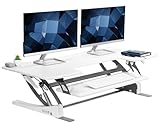
9. VIVO 48 inch Height Adjustable Large Stand Up Desk Converter, V Series, Quick Sit to Stand Tabletop Dual Monitor Riser Workstation, White, DESK-V048VW
Overview:
The VIVO DESK-V048VW offers a bright white alternative in the 48-inch converter category, using dual pneumatic springs for smooth height adjustment from 6.5 to 17 inches. The generous 47.3" x 22" surface provides ample depth for dual monitors or laptops, while the 30-inch keyboard tray synchronizes with the main surface. The scratch-resistant steel frame supports 33 lbs, and the simple-touch locking mechanism ensures secure positioning. This model targets users wanting spacious ergonomics with minimal assembly.
What Makes It Stand Out:
The crisp white finish differentiates it from the sea of black converters, brightening home offices and matching modern decor. The 22-inch depth provides substantial workspace—deeper than most competitors—for documents, notebooks, or peripherals alongside monitors. The simple-touch height lock is more intuitive than paddle-style levers, requiring just a light press to adjust. The V Series’ patented lift mechanism uses dual pneumatic springs for consistent resistance throughout the range, eliminating the “drop” feeling at lower heights common in gas-spring models.
Value for Money:
Priced at $289.99, it competes directly with premium manual models while offering superior surface depth and aesthetic choice. The white finish often commands a $20-30 premium, justified for design-conscious buyers. Compared to electric models at this price, you sacrifice push-button convenience but gain reliability—no motors to fail. The generous dimensions provide workstation flexibility that cheaper 32-inch converters cannot match, making it a smart mid-range investment for permanent setups.
Strengths and Weaknesses:
Strengths: Attractive white finish; exceptional 22-inch depth; intuitive simple-touch lock; dual pneumatic springs for smooth operation; spacious keyboard tray; minimal assembly.
Weaknesses: Manual operation requires user effort; 17-inch max height is lower than some; no USB or device slot; 33 lb capacity limits heavy setups.
Bottom Line:
The VIVO V048VW is perfect for design-focused users needing deep workspace and preferring white aesthetics. It’s ideal for dual-monitor setups where surface depth matters more than maximum height. Choose this if you want premium manual performance with a fresh, modern look.
10. VIVO 48 inch Desk Converter, K Series, Height Adjustable Sit to Stand Riser, Dual Monitor and Laptop Workstation with Wide Keyboard Tray, White, DESK-V048KW

Overview:
The VIVO DESK-V048KW K Series delivers budget-friendly sit-stand functionality in a clean white finish. This manual converter features a 47.6" x 15.7" surface supporting dual monitors, with an impressively wide keyboard tray that moves in sync. The lift assist mechanism adjusts from 4.5 to 20 inches—one of the widest ranges available—using a simple touch lock. Supporting 33 lbs with a durable steel frame, it requires minimal assembly and suits users seeking essential features at an accessible price point.
What Makes It Stand Out:
The remarkable 4.5-inch minimum height allows lower keyboard positioning than competitors, benefiting shorter users or those preferring dramatic sitting height differences. The 20-inch maximum reach exceeds most converters, accommodating taller individuals. The keyboard tray spans nearly the full 47.6-inch width, providing unmatched mouse maneuvering space. At just $239.99, it’s one of the few white converters under $250, making modern aesthetics accessible to budget-conscious buyers. The straightforward lift design prioritizes reliability over complex features.
Value for Money:
This is arguably the best value in the 48-inch category. For $239.99, you get dual-monitor capacity, wide keyboard tray, and exceptional height range—features often found in $300+ models. The manual mechanism keeps costs low while delivering smooth operation. While lacking electric convenience or USB ports, it covers core ergonomic needs exceptionally well. It’s perfect for first-time standing desk users not wanting to overcommit financially, offering professional-grade size and stability at a entry-level price.
Strengths and Weaknesses:
Strengths: Unbeatable price for 48-inch size; exceptional 4.5"-20" height range; full-width keyboard tray; clean white finish; stable steel frame; minimal assembly.
Weaknesses: Basic manual operation; no device slot or USB; 15.7" depth is shallower than premium models; 33 lb capacity; white may show wear over time.
Bottom Line:
The VIVO K Series is the smart choice for budget-minded buyers wanting maximum adjustability and surface width. It’s ideal for students, remote workers, or anyone testing the sit-stand lifestyle without financial risk. If you need core functionality done well at the lowest possible price, this is your winner.
Understanding the Challenge: Why 48-Inch Monitors Are Different
Forty-eight-inch monitors occupy a unique space in the display ecosystem. They’re not quite television-sized, but they’re far beyond typical desktop monitor dimensions. Their sheer width—often exceeding 42 inches—creates leverage issues that smaller displays don’t encounter. The center of gravity sits higher and further forward, amplifying any instability in your converter’s base. Additionally, these monitors typically weigh between 30-50 pounds without their stands, pushing the limits of what many converters can safely support. The VESA mounting patterns also vary widely, with some 48-inch models using non-standard configurations that complicate monitor arm compatibility. Understanding these fundamental differences is your first step toward avoiding a costly mismatch.
Measuring Your Workspace: The Foundation of a Good Fit
Before browsing any specifications, grab your tape measure. Your desk’s depth is critical—most converters require at least 24 inches of depth to maintain stability with a large monitor, but 30 inches is ideal. Measure the distance from where the converter’s base will sit to your eyes in both sitting and standing positions. This determines your required depth adjustment range. Don’t forget vertical clearance: with a 48-inch monitor, you’ll need at least 20 inches of space above your desk surface to prevent the screen from hitting shelves, cabinets, or light fixtures when raised. Document these measurements and keep them handy—they’re your non-negotiable parameters.
Weight Capacity: The Hidden Deal-Breaker
Manufacturers love to advertise impressive weight capacities, but the devil lives in the details. A converter rated for 50 pounds might technically support your 48-inch monitor, but that rating often assumes perfect weight distribution and minimal dynamic load. In reality, typing on your keyboard creates micro-movements that multiply the effective weight through momentum. Look for converters with a static weight capacity at least 20% higher than your monitor’s actual weight. If your display weighs 40 pounds, target converters rated for 50 pounds or more. Also investigate whether that capacity includes the keyboard tray and any accessories you plan to add—a detail many manufacturers obscure in fine print.
Desktop Surface Area: Beyond Just the Monitor
Your 48-inch monitor needs more than just a wide top platform—it needs depth to prevent tipping and space for essential accessories. The platform should extend at least 10 inches from front to back to provide stable footing for monitor feet or a mounting arm. Consider your workflow: do you need space for speakers, a webcam, or reference materials? A platform that’s exactly 48 inches wide leaves zero room for anything else. Ideally, look for surfaces 50-55 inches wide with 12-15 inches of depth. This extra real estate prevents your setup from feeling cramped and gives you flexibility for future adjustments.
Height Adjustment Range: Finding Your Ergonomic Sweet Spot
The ergonomic rule remains constant: your eye level should align with the top third of your screen. With a 48-inch monitor’s increased height, this demands precise adjustment capability. Most converters offer 15-20 inches of vertical travel, but the critical factor is the lowest and highest positions relative to your desk height. If you’re tall—say, 6'2" or above—you’ll need a converter that reaches at least 20 inches above your desk surface. Shorter users need to ensure the keyboard tray can drop low enough to maintain a 90-degree elbow angle. Test this by measuring from your standing elbow height to the floor, then subtract your desk height to find your required keyboard tray elevation.
Build Quality and Stability: Wobble-Free Productivity
Nothing destroys focus like a monitor that shudders with every keystroke. Stability with a 48-inch monitor depends on three factors: base weight, frame construction, and cross-bracing. Heavier bases (30+ pounds) counterbalance the monitor’s leverage. Steel frames outperform aluminum for rigidity, though premium aluminum alloys with strategic reinforcement can work. Cross-bracing—particularly diagonal supports near the lifting mechanism—dramatically reduces lateral wobble. When evaluating options, look for underside photos that reveal the frame structure. Avoid converters with minimal base weight or those that rely solely on vertical columns without horizontal reinforcement.
Monitor Mount Compatibility: VESA Standards and Beyond
Most 48-inch monitors use VESA patterns of 200x200, 300x300, or 400x400 mm, but some gaming-oriented models feature proprietary mounting solutions. Check your monitor’s specifications before shopping. If you plan to use the converter’s built-in monitor arm, verify it supports your VESA pattern and can handle the weight. Many users prefer mounting the monitor directly to the converter’s surface using the original stand—if so, ensure the platform is drillable or has pre-drilled holes for cable management. For maximum flexibility, consider converters with universal monitor arm compatibility that accept third-party heavy-duty arms rated for ultrawide displays.
Keyboard Tray Ergonomics: The Forgotten Factor
The keyboard tray determines your typing posture and, ultimately, your comfort. With a large monitor, there’s a tendency to push the keyboard tray further away, straining your shoulders. Look for trays that are both width-adjustable and tilt-adjustable—tilt helps maintain neutral wrist position. The tray should support negative tilt (angled away from you) for optimal ergonomics. Depth matters too: a shallow tray forces you to reach forward, while an overly deep one pushes the monitor too far back. The sweet spot is 10-12 inches of usable depth with rounded front edges that won’t dig into your forearms.
Transition Mechanism: Gas Spring vs. Electric vs. Manual
Your converter’s lifting mechanism affects daily usability more than you might expect. Gas spring systems offer smooth, counterbalanced adjustment with minimal effort—ideal for frequent transitions. They’re reliable but can lose tension over years of supporting heavy loads. Electric converters provide push-button convenience and programmable height presets, but motors add weight and potential failure points. Manual crank systems are the most robust for extreme weights but sacrifice speed and convenience. For a 48-inch monitor, dual gas springs or a high-torque electric motor are your best bets. Avoid single-gas-spring models, as they’ll struggle with the load and wear prematurely.
Cable Management: Keeping Chaos at Bay
A 48-inch monitor typically requires multiple cables: power, DisplayPort or HDMI, USB hubs, and possibly audio. When you raise and lower your converter, these cables move and can snag, disconnect, or create visual clutter. Effective cable management isn’t an afterthought—it’s essential. Look for converters with integrated cable channels or trays that move with the platform. The best designs include flexible cable sleeves that accommodate vertical travel without pulling. Ensure there’s sufficient space to route thick display cables without sharp bends, which can degrade signal quality. Plan for at least 12 inches of slack in all cables to accommodate full height adjustment.
Assembly and Installation: What to Expect
Installing a converter for a 48-inch monitor is more involved than smaller models. The base alone may weigh 40+ pounds, requiring two people for safe placement. Most quality converters ship in two or three large boxes and need 30-60 minutes for assembly. You’ll need basic tools: Phillips head screwdriver, adjustable wrench, and possibly a drill for monitor arm installation. Pay special attention to leveling—an uneven converter transfers stress to the lifting mechanism and amplifies wobble. Some manufacturers offer white-glove assembly services for heavy-duty models, which is worth considering if you’re not mechanically inclined or lack assistance.
Price vs. Value: Investing Wisely
Standing desk converters for 48-inch monitors range from $300 to over $1,000. Budget models cut corners on base weight and frame thickness, which you’ll pay for in instability. Mid-range options ($500-$700) typically offer the best balance of capacity, features, and durability. Premium converters justify their cost through superior materials, longer warranties, and advanced features like electric adjustment and memory presets. Consider this: a $200 price difference spread over five years of daily use equals about 11 cents per day. That’s a small premium for a wobble-free, reliable experience that protects your $1,000+ monitor investment.
Warranty and Support: The Long-Term Perspective
A converter’s warranty reveals the manufacturer’s confidence in their product. Look for at least a 5-year warranty on the frame and lifting mechanism—some premium brands offer 10-15 years. Read the fine print: many warranties exclude damage from exceeding weight limits or improper assembly, both relevant concerns with large monitors. Investigate the company’s support reputation. Can you reach a human by phone? Do they stock replacement parts? A converter is a long-term investment, and strong support means you’re not left with an expensive paperweight if something fails. Check user forums and Reddit communities for real-world warranty claim experiences before committing.
Real User Considerations: What Reviews Won’t Tell You
Online reviews rarely test converters with actual 48-inch monitors for extended periods. Here are the unspoken truths: First, even stable converters develop slight wobble over time as bolts loosen—plan to check and tighten all hardware every six months. Second, the keyboard tray’s weight affects balance; loading it with heavy items can make the entire unit tip forward when lowered. Third, monitor arms rated for “up to 49 inches” often struggle with the specific weight distribution of your model—always check user-submitted photos with similar monitors. Finally, consider your floor surface. Carpeted floors amplify wobble compared to hard surfaces, and you may need a stiffening board underneath the converter’s base.
Making Your Final Decision: A Buying Checklist
Before clicking purchase, run through this checklist: ✅ Measured workspace depth, height clearance, and viewing distances ✅ Confirmed converter weight capacity exceeds monitor weight by 20% ✅ Verified VESA compatibility or surface-mounting feasibility ✅ Evaluated base weight and frame construction for stability ✅ Confirmed height range matches your ergonomic needs ✅ Assessed keyboard tray ergonomics and adjustability ✅ Chosen appropriate transition mechanism for your usage pattern ✅ Reviewed cable management solutions ✅ Researched assembly requirements and considered professional help ✅ Compared warranty terms and support reputation ✅ Calculated long-term value, not just upfront cost ✅ Searched for real-world usage with 48-inch monitors
If you can check every box, you’ve found a converter that won’t just technically fit—it’ll transform your workspace into the ergonomic command center you envisioned.
Frequently Asked Questions
Will any standing desk converter rated for “large monitors” work with my 48-inch display?
Not necessarily. “Large monitor” ratings often refer to dual-monitor setups, not single ultrawide displays. The weight distribution and leverage of a 48-inch monitor create different stresses. Always verify the specific weight capacity and width compatibility, and look for user testimonials with similar-sized monitors.
How much weight capacity do I really need for a 48-inch monitor?
Add your monitor’s weight (typically 30-50 pounds), monitor arm (5-10 pounds), and any accessories (5 pounds), then add a 20% safety margin. For most 48-inch monitors, target a converter rated for at least 50-60 pounds of static weight capacity to handle dynamic loads safely.
Is it better to use the monitor’s original stand or a VESA mount with a converter?
It depends on your converter’s design. Original stands often provide wider, more stable bases but consume more surface area. VESA mounts free up desk space and offer better adjustability but require a converter with a robust mounting system. For maximum stability with large monitors, a heavy-duty VESA arm mounted to a reinforced platform typically outperforms most original stands.
Will my 48-inch monitor wobble on a standing desk converter?
Some wobble is inevitable, especially at standing height, but quality converters minimize it to imperceptible levels. Wobble increases with monitor height, typing intensity, and an improperly tensioned lifting mechanism. Choose a converter with a heavy base (30+ pounds), steel construction, and cross-bracing. User-submitted video reviews are the best way to assess real-world stability.
Can I use a dual-monitor standing desk converter for my single 48-inch display?
Often yes, but with caveats. Many dual-monitor converters have sufficient weight capacity and width. However, they’re designed with two mounting points spaced apart, which may not align with your monitor’s VESA pattern. You’ll likely need to mount the monitor using its original stand on the converter’s surface rather than using the built-in arms.
How deep should my desk be for a 48-inch monitor on a converter?
Aim for a desk at least 30 inches deep. This provides adequate space for the converter’s base (typically 24-28 inches deep) while leaving room for proper viewing distance. With a 48-inch monitor, your eyes should be 28-36 inches from the screen—shallower desks force you too close, causing eye strain and neck rotation.
Are electric standing desk converters worth the extra cost for large monitors?
For 48-inch monitors, electric converters offer significant advantages: precise height adjustment, memory presets for multiple users, and consistent lifting power that doesn’t degrade over time. The premium is justified if you share your workspace or transition between sitting and standing frequently. However, high-quality dual gas spring models provide similar performance at lower cost if you’re the sole user.
What VESA pattern do most 48-inch monitors use?
Most use 200x200mm, 300x300mm, or 400x400mm patterns, but gaming models sometimes use 100x100mm or proprietary designs. Always check your monitor’s specifications in the manual or manufacturer’s website. Don’t assume based on screen size alone—VESA patterns correlate more with monitor weight and internal component layout than dimensions.
How difficult is it to assemble a heavy-duty converter for a large monitor?
Expect 30-60 minutes of assembly requiring two people. The base alone can weigh 40+ pounds, making solo installation risky. You’ll need basic tools and should follow the manual precisely—improper assembly is the leading cause of instability and premature wear. Some manufacturers offer video tutorials; watch these before starting. Consider professional assembly if your converter costs $700+.
Will adding a converter to my existing desk damage it?
Most converters distribute weight across a large footprint, but concentrated loads can damage delicate surfaces like glass or thin particleboard. Place a protective mat underneath if your desk has a fragile finish. Check your desk’s weight rating; a fully loaded converter with a 48-inch monitor can exceed 100 pounds, which may stress budget desks. Solid wood or reinforced laminate desks handle this best.