Hybrid meetings have become the default operating system for modern businesses, yet they remain riddled with friction. Remote participants squint at a static conference room view, struggling to identify who just spoke. In-office attendees awkwardly huddle within a fixed camera frame while others sit invisible off-screen. The result? Disengaged remote workers, repeated “we can’t see you” interruptions, and a persistent sense that hybrid collaboration is a compromise rather than a superpower. This is precisely where auto-framing webcams are rewriting the rules—transforming passive video feeds into dynamic, intelligent visual experiences that make distance irrelevant.
Auto-framing technology doesn’t just adjust your shot; it fundamentally reimagines how cameras serve hybrid teams. By leveraging artificial intelligence and computer vision, these devices automatically detect, track, and frame participants with cinematographic precision. Whether you’re a solo presenter pacing during a brainstorm or a eight-person team scattered around a huddle room, the camera becomes an invisible director—ensuring everyone remains visible, engaged, and equally represented. The impact extends beyond mere convenience; it directly influences meeting equity, participant engagement, and the professional quality of your organization’s virtual presence.
Top 10 Webcams with Auto-Framing for Hybrid Meetings
Detailed Product Reviews
1. WYRESTORM 4K Webcam with AI Tracking, 120° FOV Wide Angle, Auto Framing, 90fps, 8X Digital Zoom, Dual AI Noise-canceling Mics, Video Conference Room Camera, Zoom Certified, Works for Microsoft Teams

Overview: The WYRESTORM FOCUS 210 positions itself as a sophisticated conference room solution, delivering real 4K resolution at 30fps with intelligent AI-powered features. Designed for hybrid work environments, this webcam combines a 120° ultra-wide field of view with advanced tracking capabilities to ensure seamless collaboration.
What Makes It Stand Out: The AI framing and presenter tracking technology automatically adjusts to keep speakers centered, while dual AI noise-canceling microphones filter environmental sounds up to 16 feet away. The 8x digital zoom and 90fps capability (at lower resolutions) provide flexibility for dynamic presentations. Zoom certification and a comprehensive 2-year warranty with 24/7 global support demonstrate serious enterprise commitment.
Value for Money: At $149.99, this webcam undercuts premium competitors while offering 4K resolution and AI features typically found in higher-priced models. It presents strong value against the Logitech Brio 505, trading brand recognition for superior resolution and tracking capabilities.
Strengths and Weaknesses: Strengths include genuine 4K clarity, intelligent AI tracking, expansive 120° FOV, robust noise cancellation, and exceptional warranty coverage. Weaknesses involve digital zoom degradation, limited 4K frame rate to 30fps, and a lesser-known brand that may give some buyers pause.
Bottom Line: The WYRESTORM FOCUS 210 excels for conference rooms demanding intelligent automation and 4K quality. Its AI features genuinely enhance meeting flow, making it a compelling choice for forward-thinking businesses prioritizing functionality over brand prestige.
2. Logitech Brio 505 Full HD Webcam with auto Light Correction, auto-framing, Show Mode, Dual Noise Reduction mics, Privacy Shutter - Works with Microsoft Teams, Google Meet, Zoom, TAA Compliant

Overview: The Logitech Brio 505 represents the brand’s mid-tier business offering, emphasizing reliability and certified compatibility over cutting-edge resolution. This Full HD webcam targets enterprise deployments with plug-and-play simplicity and robust security features that integrate seamlessly into corporate environments worldwide.
What Makes It Stand Out: Show Mode enables seamless presentation of physical documents by tilting the camera, a unique productivity feature. The integrated privacy shutter provides physical security, while TAA compliance satisfies government procurement requirements. Auto light correction and auto-framing ensure professional appearance without manual adjustments, maintaining focus on collaboration.
Value for Money: Priced at $129.99, the Brio 505 sits in the competitive business webcam segment. While limited to 1080p, its certifications, brand reliability, and enterprise-focused features justify the moderate cost for organizations standardizing on Logitech ecosystems and requiring procurement compliance.
Strengths and Weaknesses: Strengths include trusted brand reputation, multi-platform certification, Show Mode versatility, effective auto-light correction, and physical privacy protection. Weaknesses are the absence of 4K resolution, limited digital zoom capabilities, and premium pricing for 1080p-only capture when 4K alternatives exist at similar prices.
Bottom Line: The Brio 505 is ideal for IT departments seeking standardized, certified solutions for mass deployment. Its enterprise credentials and reliable performance outweigh resolution limitations for business video conferencing, making it a safe, predictable choice for organizations of any size.
3. Logitech Brio 101 Full HD 1080p Webcam for Meetings, Streaming, Desktop, Laptop, PC - Built-in Mic, Shutter, Works with Zoom, Microsoft Teams, Nintendo Switch 2’s New GameChat Mode, USB-A,-Black

Overview: The Logitech Brio 101 delivers essential 1080p video performance at an accessible price point, targeting budget-conscious consumers and Nintendo Switch 2 early adopters. This entry-level webcam prioritizes simplicity and broad compatibility over advanced features, making it an ideal starter option for basic home offices.
What Makes It Stand Out: Its headline feature is compatibility with Nintendo Switch 2’s GameChat mode, addressing a niche but growing market. RightLight technology boosts brightness by 50% compared to previous generations, while the integrated privacy shutter provides security typically absent in budget webcams. The simple plug-and-play USB-A connection ensures immediate usability across multiple platforms.
Value for Money: At $24.99, this represents exceptional value from a premium brand. It significantly undercuts most competitors while maintaining Logitech’s reliability standards, making it an easy recommendation for students, remote workers, and casual streamers who need functional video without premium costs.
Strengths and Weaknesses: Strengths include unbeatable price, trusted brand quality, Switch 2 compatibility, effective light correction, and plug-and-play simplicity. Weaknesses involve basic feature set, lower-grade sensor performance in challenging lighting, lack of AI features, no optical zoom capability, and limited microphone quality for group settings.
Bottom Line: The Brio 101 is perfect for users prioritizing affordability and reliability above all else. While it won’t match premium webcams, it delivers competent 1080p performance where it matters most, particularly for Nintendo Switch 2 owners needing dedicated GameChat functionality.
4. NEARITY C45 2K Video Conference Webcam with Microphone and Speaker, All-in-One Camera with 4 Noise Cancelling Microphone, 5X Zoom FHD Webcam AI Auto-Framing Plug-and-Play for Zoom/Teams/Google Meet

Overview: The NEARITY C45 redefines conference room equipment as a comprehensive all-in-one solution, integrating camera, speaker, and microphone array into a single device. Designed for corporate environments, it eliminates the complexity of managing separate audio and video components while delivering professional-grade performance for team collaboration.
What Makes It Stand Out: This system combines a 120° ultra-wide camera with four AI noise-canceling microphones and a premium full-duplex speaker, supporting up to 15 participants within 16 feet. AI auto-framing with face recognition automatically adjusts composition as people join, while 5x zoom enables detail focus. Enterprise privacy controls include remote camera/mute functions and status light indicators that provide clear visual feedback.
Value for Money: At $249.99, the C45 commands a premium but eliminates separate speakerphone and webcam purchases. For dedicated conference rooms, this consolidated approach strongly justifies the investment compared to buying discrete components of similar quality, reducing cable clutter and IT management overhead.
Strengths and Weaknesses: Strengths include integrated audio-video design, four-microphone array with superior noise cancellation, premium speaker quality, intelligent AI framing, and robust privacy controls. Weaknesses involve the highest price point in this comparison, 2K resolution instead of 4K, and potential overkill for smaller huddle rooms or individual personal use cases.
Bottom Line: The NEARITY C45 excels in dedicated conference spaces requiring professional-grade audio and video integration. Its all-in-one design simplifies deployment while delivering enterprise performance, making it the top choice for organizations prioritizing meeting room efficiency and superior audio quality.
5. AVerMedia PW515 4K Ultra HD Business Webcam with Microphone for PC/Desktop/Laptop/Mac, with AI Auto Framing for Streaming, Meeting, Video Calls, Sony Sensor, Works with Teams, Zoom, Google Meet, OBS

Overview: The AVerMedia PW515 specifically targets content creators and professionals seeking 4K clarity without enterprise webcam pricing. Featuring a Sony sensor and AI auto-framing, it bridges the gap between consumer webcams and professional streaming equipment, offering exceptional versatility for modern hybrid workflows.
What Makes It Stand Out: Hand gesture control allows touch-free operation, a rare feature in this webcam category. The low-light optimized Sony sensor maintains quality in challenging conditions, while 4K resolution at Ultra-HD ensures crisp detail for both meetings and content creation. Broad compatibility with OBS and streaming platforms broadens its appeal beyond traditional video conferencing into live production.
Value for Money: At $219.99, it competes directly with premium business webcams while offering streaming-centric features. The Sony sensor and 4K capability fully justify the moderate price for creators who need both meeting functionality and content production quality in a single device, eliminating separate equipment needs.
Strengths and Weaknesses: Strengths include 4K Sony sensor excellence, innovative gesture controls, low-light performance, streaming software compatibility, and dual noise-reduction microphones. Weaknesses include a narrower 100° field of view compared to conference-room alternatives, limited 3-meter microphone range, and lack of integrated speaker functionality for group settings.
Bottom Line: The PW515 is ideal for hybrid professionals who stream and conduct business meetings regularly. Its 4K Sony sensor delivers superior image quality, while streaming features add valuable versatility. Choose this for individual creators and small team leaders rather than large conference rooms requiring wide-angle coverage.
6. NexiGo Zoom Certified, N970P 4K Webcam, Onboard Flash Memory, Al-Powered Auto-Framing, Adjutable Field of View, Sony Sensor, Dual AI Noise-Cancelling Mics, Works with Teams/Zoom/Webex/Google
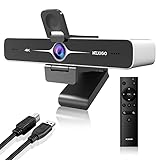
Overview: The NexiGo N970P is a premium 4K webcam engineered for professional environments, featuring a Sony CMOS sensor and advanced AI capabilities. It targets corporate users who demand exceptional video quality, security, and flexible control during video conferences.
What Makes It Stand Out: Unique onboard flash memory stores settings directly on the device, enabling instant recall across different computers—perfect for corporate hot-desking. The included remote with 10x digital zoom offers unprecedented call control, while AI-powered auto-framing intelligently adjusts composition based on participant count. Edge computing ensures local processing for maximum data security.
Value for Money: At $179.99, this premium webcam justifies its cost through enterprise-grade features. Competitors rarely offer remote zoom or onboard memory at this price point, making it a smart investment for IT-managed environments prioritizing security and versatility.
Strengths and Weaknesses:
- Strengths: Outstanding 4K Sony sensor quality; settings memory enhances corporate flexibility; remote zoom aids presentations; intelligent AI framing; effective dual noise-canceling mics; robust privacy via edge computing.
- Weaknesses: Digital zoom degrades at maximum levels; requires disabling auto-framing to zoom; premium price excludes casual users; complex features may overwhelm non-technical users.
Bottom Line: The N970P excels for professionals and organizations needing top-tier video quality with enterprise security. While overkill for basic users, it’s a compelling choice for corporate deployments and serious remote workers who value control and privacy.
7. Logitech MX Brio 705 for Business 4K Webcam with Auto Light Correction, Ultra HD, Auto-Framing, Show Mode, USB-C, Works with Microsoft Teams, Zoom, Google Meet - Graphite

Overview: Logitech’s MX Brio 705 for Business represents the company’s flagship enterprise webcam, combining 4K Ultra HD video with sophisticated management tools. Designed for IT departments, it emphasizes security, sustainability, and seamless platform integration.
What Makes It Stand Out: The Logitech Sync remote management capability allows IT administrators to update and monitor webcams across entire organizations from a central dashboard. Its secure boot design prevents unauthorized modifications, while face-based AI enhancement delivers natural skin tones in challenging lighting. The sustainability focus features 82% post-consumer recycled plastic and low-carbon aluminum construction.
Value for Money: Priced at $175, it competes directly with premium webcams while offering unique business features. The remote management capabilities alone can justify the cost for large deployments, reducing IT support overhead significantly compared to unmanaged devices.
Strengths and Weaknesses:
- Strengths: Exceptional 4K video quality; Logitech Sync enables enterprise-wide management; robust security with secure boot; certified for major platforms; sustainable materials; reliable auto light correction.
- Weaknesses: Lacks physical remote control; no onboard memory for settings; premium price for individual buyers; software-dependent for advanced features; limited zoom capability compared to competitors.
Bottom Line: The MX Brio 705 is ideal for organizations with dedicated IT management seeking secure, sustainable, and centrally controlled video solutions. Individual users may find better value elsewhere, but for enterprise deployments, it’s a top-tier choice that streamlines administration.
8. AVerMedia PW315 TAA/NDAA Compliant 1080p 60fps Webcam – Wide-Angle USB Camera with Dual Mics & AI Auto Framing, Fixed Focus HD Webcam for PC/Mac, Zoom, Teams, Google Meet, Streaming, Content Creation
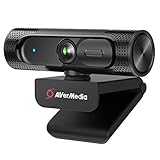
Overview: The AVerMedia PW315 targets a specific niche: government agencies and contractors requiring TAA/NDAA compliance. This 1080p webcam delivers smooth 60fps video with a wide 95° field of view, balancing regulatory adherence with modern AI features.
What Makes It Stand Out: TAA/NDAA compliance is the headline feature, making it one of few webcams legally usable in federal contracts and sensitive installations. The 60fps refresh rate ensures exceptionally smooth motion, while AI-powered auto-framing intelligently tracks speakers. The ultra-wide 95° field of view captures more participants without requiring camera adjustments.
Value for Money: At $99.99, it offers remarkable value for compliance-required environments. Standard webcams cannot substitute for its certified status, making it essentially priceless for government users. For general consumers, it’s a solid mid-range option with professional-grade frame rates.
Strengths and Weaknesses:
- Strengths: TAA/NDAA compliance for federal use; smooth 60fps video; wide 95° field of view; effective AI auto-framing; dual stereo mics with noise reduction; competitive pricing.
- Weaknesses: Limited to 1080p (no 4K); fixed focus may restrict versatility; less premium build quality; brand recognition lags behind Logitech; limited advanced controls.
Bottom Line: The PW315 is a must-have for government contractors and agencies requiring compliance certification. For general users, it’s a capable 60fps webcam at a fair price, though 4K seekers should look elsewhere. Its regulatory status is its defining advantage.
9. COOLPO Desk Mate - Hybrid HDR Streaming Webcam with AutoFocus & Tracking, HD 1080p Noise Reduction, Software Control for Google Gemini

Overview: The COOLPO Desk Mate occupies a unique hybrid category, functioning as both a standard webcam and a document camera. This versatile device targets educators, creators, and professionals who frequently need to share physical materials during video calls and live streams.
What Makes It Stand Out: The dual-mode design allows instant switching between webcam and downward-facing document camera orientations, capturing desk objects in up to 2K resolution. The impressive 120° field of view accommodates multiple participants or wide desk areas. AI-powered autofocus, auto white balance, and face exposure ensure optimal image quality, while the USB-only design prevents wireless security breaches. The microphone includes AI noise and echo cancellation with 5-meter pickup range.
Value for Money: At $109, it offers excellent value for users needing document camera functionality without purchasing separate equipment. Traditional document cameras cost $200+, making this hybrid approach cost-effective for teachers, tutors, and product demonstrators who need both capabilities.
Strengths and Weaknesses:
- Strengths: Unique hybrid webcam/document camera design; wide 120° field of view; AI-powered image optimization; physical privacy shutter; USB-only for security; competitive price for dual functionality.
- Weaknesses: 2K resolution falls short of 4K; lesser-known brand; software required for advanced features; build quality may not match premium brands; niche appeal limits broad adoption.
Bottom Line: The Desk Mate is an innovative solution for educators, content creators, and professionals regularly sharing physical materials. While not a pure 4K webcam competitor, its hybrid functionality justifies the investment for specific use cases. General users should consider standard webcams instead.
10. NexiGo N960E 1080P 60FPS Webcam with Light, Software Included, Fast AutoFocus, Built-in Privacy Cover, USB Web Camera, Dual Stereo Microphone, for Zoom Meeting Skype Teams Twitch

Overview: The NexiGo N960E delivers impressive performance at a budget-friendly price point, packing 1080p 60fps video, a built-in ring light, and autofocus into an affordable package. It targets streamers, students, and remote workers seeking quality without premium cost.
What Makes It Stand Out: The three-level adjustable ring light with touch controls provides superior illumination compared to competitors at this price. The stepless brightness adjustment allows fine-tuning for any environment. Combined with 60fps recording and fast autofocus, it delivers smooth, well-lit video typically found in more expensive models. The built-in privacy cover adds security usually omitted in budget webcams.
Value for Money: At $69.99, the N960E represents exceptional value. Competing webcams with integrated lighting and 60fps capability often cost $100+. The feature set rivals mid-range options while maintaining an entry-level price, making it accessible to students and casual users.
Strengths and Weaknesses:
- Strengths: Built-in ring light with adjustable brightness; smooth 60fps video; fast autofocus; integrated privacy cover; dual noise-canceling mics; plug-and-play simplicity; excellent price-to-performance ratio.
- Weaknesses: 1080p resolution limits detail; no 4K option; basic build quality; limited advanced features; software is functional but not as polished as premium brands; digital zoom only.
Bottom Line: The N960E is the best budget webcam for users prioritizing lighting and smooth frame rates. Streamers, students, and remote workers will appreciate its integrated light and 60fps performance. While it won’t match 4K quality, it delivers professional-looking video at an unbeatable price point.
What Is Auto-Framing and Why Does It Matter for Hybrid Meetings?
Auto-framing is an intelligent camera feature that uses AI-driven algorithms to automatically adjust the field of view, zoom level, and pan position to keep meeting participants optimally framed without manual intervention. Unlike traditional webcams that capture a static, predetermined area, auto-framing webcams continuously analyze the video feed to identify human faces, bodies, or movement patterns, then dynamically recompose the shot in real-time.
The Evolution from Static to Smart Cameras
The journey from fixed-position webcams to AI-powered framing represents a paradigm shift in video conferencing philosophy. Early webcams treated video as a passive medium—point and shoot. Today’s auto-framing devices treat video as an active collaboration tool that must adapt to human behavior. This evolution mirrors the broader shift in workplace design from assigned seating to activity-based working; just as office layouts now flex to accommodate different work modes, cameras must flex to capture them effectively.
Core Benefits for Distributed Teams
The primary advantage lies in meeting equity. Remote participants gain the same visual context as in-room attendees, seeing facial expressions, body language, and spontaneous reactions that static cameras miss. For facilitators, auto-framing eliminates the cognitive load of manually adjusting cameras mid-meeting, allowing focus on content and conversation rather than technology management. Organizations report measurable improvements in remote employee engagement scores after deploying auto-framing solutions, as distributed team members feel more physically present in the conversation.
How Auto-Framing Technology Actually Works
Understanding the mechanics behind auto-framing helps buyers distinguish between marketing hype and genuine capability. The technology stack typically combines hardware sensors, dedicated processing chips, and sophisticated software algorithms working in concert.
AI and Machine Learning Algorithms
Modern auto-framing relies on convolutional neural networks trained on millions of human images to recognize faces, upper bodies, and movement signatures. These models run locally on the webcam’s processor, analyzing each frame at speeds up to 60 times per second. The AI doesn’t just locate people—it predicts behavior, anticipating when someone will stand or gesture to pre-adjust the frame smoothly. Premium implementations use proprietary datasets that reduce false positives from background movement like passing colleagues or swaying plants.
Hardware vs. Software Processing
This distinction critically impacts performance and privacy. Hardware-based processing occurs on an embedded chip within the webcam, operating independently of your computer’s CPU. This approach delivers near-instantaneous response times and ensures consistent performance across different host devices. Software-dependent solutions rely on your computer’s processing power, potentially slowing during resource-intensive tasks and creating compatibility issues across operating systems. For enterprise deployments, hardware-based processing typically offers better security and reliability.
The Role of Depth Sensing and Computer Vision
Advanced auto-framing webcams incorporate depth sensors—either infrared time-of-flight sensors or stereoscopic cameras—to create three-dimensional maps of the space. This depth data prevents the “flat image” problem where traditional 2D analysis struggles to differentiate between a person sitting close to the camera and one farther away. Depth sensing enables true volumetric tracking, allowing the camera to maintain consistent framing even as people move toward or away from the lens.
Key Features to Prioritize in Auto-Framing Webcams
When evaluating options, certain capabilities separate entry-level auto-framing from truly transformative solutions. Focus on these technical specifications and feature sets to match technology to your specific use cases.
Intelligent Subject Tracking Capabilities
Not all tracking is created equal. Basic systems use simple motion detection, which can be triggered by irrelevant movement. Sophisticated implementations employ facial recognition combined with body tracking to maintain lock on individuals even when they briefly turn away or move behind obstacles. Look for systems that offer “sticky tracking”—the ability to remember and reacquire subjects who temporarily leave the frame—essential for presenters who reference whiteboards or step out to grab materials.
Field of View: Finding Your Sweet Spot
Auto-framing webcams typically offer fields of view ranging from 90 to 140 degrees. A 90-degree FOV works well for individual desks and small huddle spaces, capturing approximately 6-8 feet of width at typical conference table distances. For larger meeting rooms, 120+ degrees provides adequate coverage while giving the AI more canvas to work with. Critically, check whether the specified FOV is diagonal or horizontal; manufacturers sometimes use diagonal measurements to inflate numbers. The auto-framing algorithm’s effectiveness depends on having sufficient peripheral data to work with, so wider isn’t always better if it sacrifices edge clarity.
Resolution Beyond 4K: What Matters
While 4K resolution provides ample pixels for cropping and zooming without quality loss, resolution alone doesn’t guarantee sharp auto-framed images. Sensor size and pixel quality matter more than raw pixel count. A 4K sensor with poor low-light performance will produce grainy, unusable crops when zoomed. Conversely, a high-quality 1080p sensor with excellent dynamic range can deliver superior real-world results. For auto-framing specifically, examine the “effective resolution after zoom”—how many usable pixels remain when the camera frames a single person from a wide group shot.
Low-Light and HDR Performance
Auto-framing algorithms require clean image data to function accurately. In dim conditions, sensor noise can confuse AI models, causing erratic framing or failure to detect participants. High Dynamic Range (HDR) technology proves equally important when participants sit against bright windows or under mixed lighting. Premium webcams employ multi-frame HDR that captures several exposures simultaneously, ensuring faces remain visible even in challenging lighting. Test cameras under your actual meeting room conditions, not just ideal showroom lighting.
Integrated Audio: Microphones and Speakers
The camera’s visual intelligence should coordinate with its audio capabilities. Beamforming microphone arrays that directionally track voices complement auto-framing by ensuring audio focus matches visual focus. Some systems automatically adjust microphone pickup patterns based on who the camera is currently framing, reducing ambient noise and cross-talk. For all-in-one solutions, examine whether the speaker placement creates feedback issues when both camera and audio actively track participants.
Advanced Capabilities That Set Premium Models Apart
Beyond core auto-framing, next-generation features distinguish enterprise-grade solutions from consumer alternatives. These capabilities often justify higher price points for organizations serious about hybrid collaboration.
Multi-Person Framing and Speaker Detection
Entry-level auto-framing typically defaults to a wide shot when multiple people are present. Advanced systems continuously reframe to emphasize the active speaker while keeping others visible in a dynamic composition—similar to a multi-camera broadcast. This “director’s cut” approach uses audio triangulation and lip movement analysis to predict who will speak next, creating seamless transitions that human operators would struggle to match manually.
Gesture Recognition and Control
Some high-end webcams recognize hand gestures to trigger specific framing modes. A raised hand might switch to a close-up of that participant; a two-handed “frame out” gesture could return to a wide room view. While seemingly gimmicky, gesture control provides hygienic, touch-free operation in shared spaces and empowers presenters to control their visual narrative without touching a laptop.
Customizable Framing Zones
Enterprise solutions allow IT administrators to define “zones of interest” within the camera’s view. The auto-framing algorithm then prioritizes these areas, ignoring movement outside them. This proves invaluable in glass-walled conference rooms where hallway traffic might otherwise trigger false framing adjustments. Zone customization also enables “presenter mode” that keeps a standing presenter framed while seated participants remain secondary elements in the composition.
Compatibility: Will It Work With Your Tech Stack?
Technical superiority means nothing if the webcam doesn’t integrate seamlessly with your existing infrastructure. Compatibility issues remain the leading cause of enterprise video conferencing failures.
Video Conferencing Platform Integration
Auto-framing features must be supported by your video conferencing platform to function during calls. Some platforms natively recognize and enable advanced camera controls; others treat all webcams as generic USB devices, disabling proprietary features. Investigate whether the camera’s auto-framing works universally or requires specific platform certification. For Microsoft Teams, Zoom, or Google Meet environments, look for official certification badges that guarantee feature parity and ongoing compatibility as platforms update.
Operating System Support
While most auto-framing webcams work plug-and-play with Windows and macOS, Linux support varies dramatically. ChromeOS compatibility is emerging but often limited. Mobile device support (iPadOS, Android) typically requires specific apps and may not support full auto-framing capabilities. For BYOD environments, verify that the camera maintains consistent behavior across the devices your employees actually use, not just corporate-issued laptops.
BYOD and Hot-Desking Considerations
In flexible workspaces, employees connect personal devices to shared cameras. Auto-framing webcams with onboard memory can store individual user preferences—framing style, default zoom level, privacy settings—that activate when someone logs into a shared PC. Without this feature, each user must recalibrate the camera, creating friction that discourages adoption. USB-C connectivity with power delivery simplifies cable management in hot-desking scenarios, eliminating separate power adapters.
Installation and Positioning for Optimal Performance
Even the most sophisticated auto-framing webcam underperforms if installed incorrectly. Proper placement and environmental optimization ensure the AI receives clean, actionable data.
Mounting Options and Ergonomics
Position the camera at eye level whenever possible. Overhead mounting creates unflattering angles and confuses AI trained on frontal face data. For rooms with varying participant heights, consider adjustable mounts that maintain 42-48 inch height from the floor. Wall mounting above displays works well if the camera tilts downward slightly, but ensure the angle doesn’t exceed 15 degrees to maintain recognition accuracy. Check whether the webcam includes standard tripod threads (¼-20 UNC) for flexible mounting solutions.
Lighting Setup for Consistent Framing
Auto-framing algorithms struggle with backlighting and extreme contrast. Position cameras away from windows or invest in automated shades. For artificial lighting, aim for even, diffused illumination at 400-500 lux on participants’ faces. Avoid mixing color temperatures—combine daylight (5600K) and warm (3200K) sources only if the camera’s white balance can be locked. Some premium webcams include built-in LED fill lights that automatically adjust based on framing, providing subtle illumination for close-ups without washing out the entire scene.
Room Layout and Background Considerations
Busy backgrounds with moving elements—fans, active screens, foot traffic—tax the AI’s processing capacity and increase false triggers. Solid, neutral backgrounds in matte finishes provide optimal contrast for human detection. If redesigning conference rooms, consider a 10-foot depth minimum between the camera and first row of participants; this gives auto-framing algorithms sufficient spatial data to differentiate individuals and enables smooth zoom transitions.
Privacy and Security in AI-Powered Cameras
AI cameras analyzing human movement raise legitimate privacy concerns, particularly in regions with stringent data protection regulations.
On-Device vs. Cloud Processing
This represents the most critical security differentiator. On-device processing ensures no video data leaves the webcam, with the AI model running entirely on local hardware. Cloud-assisted processing streams video to external servers for analysis, introducing latency and potential data exposure. For GDPR, CCPA, or HIPAA compliance, insist on cameras with offline-capable AI that includes cryptographic verification of firmware integrity. Request a data flow diagram from vendors showing exactly what information, if any, transmits beyond the device.
Physical Privacy Shutters
While software-based privacy modes exist, physical shutters provide absolute assurance that the camera cannot capture video. The best implementations mechanically disconnect the lens from the sensor when closed, rather than simply covering it. In enterprise deployments, look for shutters that report their status to device management platforms, allowing IT to verify compliance with privacy policies remotely.
Enterprise Security Certifications
Seek cameras certified to ISO 27001 for information security management and Common Criteria EAL4+ for product security. For government or healthcare use, FIPS 140-2 Level 3 certification ensures cryptographic modules meet federal standards. Vendors should provide a Software Bill of Materials (SBOM) detailing all third-party components, enabling security teams to assess supply chain risks.
Budget Considerations and ROI Analysis
Auto-framing webcams span three distinct price tiers, each with meaningful capability gaps. Understanding total cost of ownership prevents budget misallocation.
Entry-Level vs. Professional Tiers
Sub-$200 auto-framing webcams typically use basic motion detection rather than true AI, resulting in jerky movements and frequent misframing. They work adequately for individual use but fail in multi-person scenarios. The $200-$500 range introduces genuine AI processing, reliable multi-person tracking, and better low-light performance. Above $500, enterprise models offer robust management software, advanced analytics, and build quality designed for 24/7 operation in shared spaces.
Total Cost of Ownership
Factor in software licensing fees, which can add $50-100 annually per device for advanced features. Enterprise cameras with replaceable lenses and modular components may cost more upfront but last 5-7 years versus 2-3 years for sealed consumer units. Installation costs vary dramatically; USB-powered devices avoid electrician fees, while PoE (Power over Ethernet) cameras require network infrastructure investment but enable centralized management.
When to Invest in Enterprise Solutions
Organizations with more than 20 meeting rooms should invest in enterprise-grade auto-framing cameras with centralized management platforms. The IT time saved through remote configuration, firmware updates, and usage analytics typically justifies the 40% price premium within 18 months. For smaller deployments, professional-tier cameras with local management software offer the best value, providing 80% of enterprise features at half the cost.
Troubleshooting and Performance Optimization
Even premium auto-framing webcams encounter issues. Proactive optimization and rapid troubleshooting minimize meeting disruptions.
Common Framing Errors and Fixes
If the camera habitually frames too tightly, reducing the “framing margin” setting in management software typically solves the issue. For cameras that lose track of participants who stand still, increasing the “idle timeout” parameter prevents premature wide-angle resets. When auto-framing fails to activate, verify that the camera receives adequate power; USB hubs often deliver insufficient amperage for AI processing. Direct connection to a USB 3.0 port providing 900mA resolves most power-related performance issues.
Software Updates and Firmware Management
Auto-framing algorithms improve through machine learning model updates delivered via firmware. Subscribe to vendor security bulletins and update quarterly, but test updates in a single room before enterprise-wide deployment. Some manufacturers offer beta firmware channels for early access to improved AI models, though these may introduce instability. Maintain a firmware version history to enable rollback if updates degrade performance in your specific environment.
Environmental Factors That Impact Performance
Reflective surfaces like glass whiteboards and polished tables create phantom movement that confuses AI. Applying matte film or repositioning the camera 15-30 degrees off-axis from reflective surfaces eliminates these issues. Acoustic considerations matter too; echoey rooms with hard surfaces degrade the audio cues that advanced auto-framing uses to predict speaker changes. Installing acoustic panels not only improves audio but also enhances visual tracking accuracy by reducing ambiguous sound reflections.
Future-Proofing Your Investment
Auto-framing technology evolves rapidly. Strategic purchasing decisions ensure your hardware remains relevant as AI capabilities advance.
Emerging AI Features on the Horizon
Next-generation auto-framing will incorporate emotion recognition to automatically frame participants showing confusion or disagreement, giving facilitators visual cues to check in. Multi-camera synchronization will enable seamless handoffs between room cameras, creating a broadcast-quality experience. Some prototypes already use predictive framing based on calendar data—automatically zooming to the expected presenter before they speak. When evaluating purchases, inquire about the camera’s neural processing unit (NPU) capacity; devices with headroom for firmware-upgradable AI models will support these features longer.
Scalability for Growing Teams
Choose cameras that integrate with room booking systems and occupancy sensors. As hybrid policies evolve, data from auto-framing cameras can inform real estate decisions by revealing actual room utilization patterns. Open API access allows custom integrations with workplace management platforms, turning cameras from passive devices into active IoT sensors that optimize office space allocation. This data layer transforms a simple webcam into a strategic facility planning tool, multiplying its ROI beyond meeting quality improvements.
Frequently Asked Questions
1. Will auto-framing work if participants wear masks or face away from the camera?
Most AI models trained during the pandemic handle face masks effectively, relying on upper body geometry and movement patterns. However, performance degrades if masks obscure distinctive facial features combined with poor lighting. For participants who frequently reference whiteboards, choose cameras with body-tracking fallback modes that maintain framing based on torso position when faces aren’t visible.
2. Can auto-framing cameras distinguish between actual participants and people visible through glass walls?
Premium models with depth sensing can differentiate spatial planes, ignoring individuals beyond the glass. However, strong reflections may still trigger false positives. Configure exclusion zones through management software to mask window areas, or apply privacy film to glass surfaces to reduce transparency and improve AI accuracy.
3. How much internet bandwidth does auto-framing require compared to standard webcams?
The auto-framing process itself consumes zero bandwidth—it occurs locally before video compression. However, the final output may use more bandwidth because well-framed shots with moving subjects compress less efficiently than static wide angles. Budget an additional 200-300 Kbps for the same resolution compared to fixed framing, though this is negligible on modern networks.
4. Do auto-framing cameras work better with certain room colors or clothing?
AI models perform best with moderate contrast. Extremely dark rooms with black-clothed participants challenge detection algorithms, as do all-white spaces with bright lighting. Optimal environments feature neutral wall colors (light gray, beige) and avoid having all participants wear identical dark colors. Patterns and textures actually help AI distinguish individuals.
5. Can multiple auto-framing cameras in the same room interfere with each other?
They don’t electronically interfere, but their AI algorithms may react to each other’s status LEDs or compete to frame the same participants. In multi-camera setups, designate primary and secondary roles through software to prevent both cameras from zooming simultaneously. Synchronized systems share tracking data, creating coordinated framing strategies.
6. How do I clean an auto-framing camera without affecting its sensors?
Use microfiber cloths and isopropyl alcohol on the lens only. Avoid cleaning solutions on the sensor window for depth or IR sensors—dry dusting suffices. Chemical residues can create iridescent patterns that AI misinterprets as movement. Power down the device before cleaning to prevent the mechanism from attempting to track your hand.
7. Are auto-framing cameras compatible with virtual backgrounds and blur effects?
Most platforms apply virtual backgrounds after receiving the camera feed, so auto-framing works normally. However, the AI may struggle if virtual backgrounds create false depth cues. Some integrated solutions apply background effects at the camera level before auto-framing, improving accuracy. Test your specific platform-camera combination, as performance varies.
8. What’s the ideal distance between participants and an auto-framing camera?
For rooms up to 10x10 feet, position the camera 6-8 feet from the nearest participant. Larger spaces require proportionally greater distances. The camera’s depth sensor needs at least 3 feet to differentiate individuals reliably. Closer distances force the AI to rely solely on facial recognition, reducing accuracy when participants turn away.
9. Can auto-framing cameras be used for recording meetings or only live streaming?
They excel at both. Most include local recording capabilities that preserve auto-framed output directly to USB drives or network storage, offloading processing from host devices. For compliance recording, ensure the camera timestamps frames accurately and supports encryption at rest. Some enterprise models automatically generate chapter markers when framing changes, simplifying post-meeting review.
10. How long does it take to calibrate an auto-framing camera for a new room?
Initial calibration typically requires 2-3 minutes of participants moving naturally in the space while the camera maps the environment. However, the AI continues learning over the first 10-20 hours of use, refining its understanding of typical movement patterns. For permanent installations, schedule a “training session” where team members conduct a mock meeting to accelerate learning. Temporary setups in hoteling spaces should use cameras with quick-start modes that rely on pre-trained generic room models.