Imagine staring at your screen during a critical afternoon meeting, your lower back tightening with every passing minute. You know you should stand up, but that flimsy desk you bought last year wobbles violently when adjusted, making typing impossible. For budget-conscious professionals, the dream of an ergonomic workspace often collides with sticker shock and cheap, unreliable products. You need a solution that doesn’t sacrifice stability for affordability, one that seamlessly integrates into your daily workflow without breaking the bank or your concentration.
The manual standing desk market is flooded with options, but navigating it requires knowing exactly what separates a worthy investment from a frustrating paperweight. Forget the hype around electric models; for many, a well-chosen manual desk offers the perfect balance of functionality, durability, and cost-effectiveness. This guide cuts through the noise, focusing solely on the essential features and considerations that matter most when you’re seeking a reliable, manual height-adjustable desk solution without draining your savings. Let’s equip you with the knowledge to find your ideal ergonomic foundation.
Top 10 Manual Standing Desks
Detailed Product Reviews
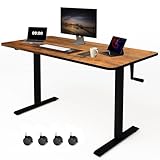
1. Whole Piece Manual Standing Desk Adjustable Height with Lockable Casters- Hand Crank Stand up Desk with Wheels, Mobile Sit to Stand Workstation with Handle
Overview:
This manual standing desk by iWkstation offers a cable-free sit-stand solution with a seamless single-piece desktop (28.3"–46" height range). Designed for flexibility, it replaces stationary feet with lockable casters for effortless mobility, ideal for treadmill setups or balcony workspaces. The 176-lb capacity steel frame prioritizes stability during transitions.
What Makes It Stand Out:
Its truly standout features include the uninterrupted one-piece tabletop (eliminating gap noise from spliced boards), included lockable casters for room-to-room movement, and foldable hand crank requiring no electrical outlets. The headphone hooks add clever utility, while industrial-grade steel ensures wobble-free use even at maximum height—rare in manual desks under $200.
Value for Money:
Priced competitively against motorized alternatives, it delivers exceptional value for users prioritizing portability and simplicity. While electric desks cost 30–50% more, this model sacrifices only speed for cable-free operation, easier assembly, and full mobility. The durable build justifies the cost for home offices needing frequent reconfiguration.
Strengths and Weaknesses:
Strengths: Effortless mobility with lockable wheels; spacious seamless desktop minimizes assembly hassles; exceptional 176-lb weight capacity; silent operation; straightforward tool-included setup.
Weaknesses: Manual cranking slows transitions versus electric models; casters slightly reduce stability on uneven floors; limited color options.
Bottom Line:
A superb manual desk for mobile professionals seeking flexibility without electrical constraints. Its robust build, smooth surface, and thoughtful extras like headphone hooks make it a top budget-friendly choice for dynamic workspaces—highly recommended for non-urgent height adjustments.
2. VIVO Manual Height Adjustable 60 x 24 inch Stand Up Desk, Rustic Vintage Brown Solid One-Piece Table Top, Black Frame, Standing Workstation with Foldable Handle, DESK-KIT-MB6N

Overview:
VIVO’s manual workstation features a spacious 59" x 23.6" rustic-brown particle board top and all-steel frame, enabling sit-stand transitions via hand crank (28.6"–46.8" range). Targeted at productivity-focused users, it emphasizes a scratch-resistant surface and ergonomic adaptability without electrical dependencies.
What Makes It Stand Out:
The generous, seamless tabletop provides expansive workspace rarely seen at this price point, while the vintage brown finish adds aesthetic appeal to home offices. Its 110-lb capacity steel frame ensures stability for dual-monitor setups, and the telescopic legs deliver notably smooth cranking action compared to budget competitors.
Value for Money:
Positioned as a mid-tier manual desk, it balances cost and quality effectively. Though pricier than basic models, the premium surface finish and robust construction justify the investment for users wanting durability and style. It undercuts electric desks by $100+ while avoiding the flimsiness of sub-$150 alternatives.
Strengths and Weaknesses:
Strengths: Ample scratch-resistant surface area; smooth telescopic height adjustment; sturdy frame for monitors; attractive rustic design; simple assembly.
Weaknesses: Lower 110-lb weight limit restricts heavy equipment; no mobility features (fixed legs); particle board may dent over time; limited height precision.
Bottom Line:
An excellent pick for style-conscious users needing a large, stable workspace without electrical clutter. While lacking portability, its thoughtful design and durability make it a worthwhile investment for stationary home offices—recommended for those prioritizing aesthetics and surface space.
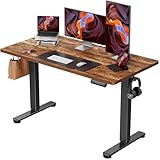
3. ErGear Height Adjustable Electric Standing Desk, 48 x 24 Inches Sit Stand up Desk, Memory Computer Home Office Desk, Vintage Brown
Overview:
ErGear’s electric desk merges automation with eco-conscious design, featuring a vintage brown top (48" x 24") and memory-presets for effortless height adjustments (28.35"–46.77"). Built for health-focused professionals, it emphasizes stability through aerospace-grade components and certified low-VOC materials.
What Makes It Stand Out:
The triple-memory presets and whisper-quiet motor enable seamless transitions, while rigorous 100,031-cycle stability testing ensures steadfast performance at full height. Its standout eco-credentials—meeting strict US air-quality standards—cater to health-conscious buyers, a rarity in this category.
Value for Money:
Though premium-priced, it delivers long-term value with commercial-grade durability (50,031+ motor cycles tested) and health-focused materials. It costs less than high-end brands like Uplift but matches their stability, making it a savvy buy for users wanting reliable automation without overspending.
Strengths and Weaknesses:
Strengths: Ultra-stable aerospace-grade frame; convenient memory presets; eco-friendly low-VOC construction; quiet motor operation; strong 50k+ cycle rating.
Weaknesses: Smaller surface area than manual competitors; higher price excludes budget buyers; requires nearby power outlet; no mobility features.
Bottom Line:
A top-tier electric desk for users prioritizing health, convenience, and longevity. Its exceptional stability and eco-design justify the investment for dedicated home offices—highly recommended for frequent sit-stand switchers needing speed and reliability.
4. Whole Piece Manual Standing Desk Adjustable Height with Lockable Casters- Hand Crank Stand up Desk with Wheels, Mobile Sit to Stand Workstation with Handle

Overview:
Identical to Product #1, this iWkstation desk features a cable-free hand crank system (28.3"–46" range), seamless single-piece desktop, and lockable casters for mobility. Its industrial steel frame supports 176 lbs, targeting users needing flexible, stable workspace reconfiguration without electrical constraints.
What Makes It Stand Out:
The uninterrupted tabletop eliminates assembly complexity and gap noise from spliced alternatives, while included casters enable effortless movement between rooms or treadmills. Foldable crank storage and headphone hooks enhance usability, and the heavy-duty frame maintains stability during height changes—uncommon in manual desks.
Value for Money:
Offering exceptional versatility at a mid-range price, it outperforms stationary manual desks with its mobility focus. Though electric models cost more, this sacrifices only speed for portability and cable-free operation, making it ideal for budget-conscious buyers needing dynamic setups.
Strengths and Weaknesses:
Strengths: Full room-to-room mobility via lockable wheels; spacious wobble-free surface; high 176-lb capacity; tool-included assembly; versatile headphone storage.
Weaknesses: Manual operation slows transitions; casters slightly compromise floor-level stability; limited aesthetic customization.
Bottom Line:
A highly practical mobile workstation for agile workstyles. Its robust build and thoughtful mobility features make it a standout value—strongly recommended for home gyms, shared spaces, or anyone prioritizing flexibility over automated height adjustment.
5. Whole Piece Manual Standing Desk Adjustable Height with Lockable Casters- Hand Crank Stand up Desk with Wheels, Mobile Sit to Stand Workstation with Handle

Overview:
This third iteration of iWkstation’s manual desk replicates Product #1 and #4, featuring a crank-adjustable height range (28.3"–46"), seamless single-piece top, and lockable casters. Engineered for portability, it supports 176 lbs and includes tools/hooks for immediate setup in diverse environments.
What Makes It Stand Out:
The true one-piece desktop provides a smooth, gap-free surface that simplifies cleaning and reduces noise versus multi-board competitors. Four lockable wheels allow instant relocation to treadmills or patios, while the industrial frame ensures steadfast stability—a rare combo in manual mobile desks under $200.
Value for Money:
Priced accessibly, it maximizes utility through mobility and durability. Users gain portability unattainable with stationary desks while avoiding electric models’ premium costs. The included accessories (crank, wheels, hooks) deliver complete functionality without hidden expenses.
Strengths and Weaknesses:
Strengths: Effortless relocation with secure casters; noise-minimizing seamless top; exceptional weight capacity; straightforward assembly; useful storage hooks.
Weaknesses: Hand-cranking lacks electric convenience; minor wobble on uneven surfaces; no height presets.
Bottom Line:
An unreservedly recommended solution for mobile work needs. Its blend of stability, space, and adaptability makes it the go-to manual desk for dynamic workspaces—perfect for those valuing flexibility over automated operation.
6. VIVO Black Manual Height Adjustable Stand Up Desk Frame with Hand Crank System, Ergonomic Standing 2 Leg Workstation, DESK-V101M

Overview: The VIVO DESK-V101M is a manual height-adjustable desk frame designed for ergonomic flexibility. Built for DIY tabletop integration, it targets budget-conscious users seeking a reliable sit-stand solution without electric components. Its straightforward design prioritizes functionality over frills.
What Makes It Stand Out: The hand crank system delivers smooth, quiet height transitions (27.8"–46.5") with minimal effort, avoiding power-cord clutter. Its all-steel construction supports 132 lbs securely, while compatibility with diverse tabletop sizes (34"–72" length) offers customization freedom rare in manual frames.
Value for Money: Priced competitively under $150 (frame only), it outperforms cheaper wobbly alternatives and undercuts electric desks. Though requiring a separate tabletop, the sturdy build and broad compatibility justify the cost for users prioritizing longevity over plug-and-play convenience.
Strengths and Weaknesses: Strengths: Effortless crank operation; exceptional weight capacity; tool-free assembly; adaptable to custom tops. Weaknesses: Requires sourcing your own tabletop; limited width support (max 43"); no cable management features.
Bottom Line: A robust, no-nonsense foundation for a personalized standing desk. Ideal for tinkerers seeking durability and flexibility, though less convenient for those wanting an all-in-one solution. Highly recommended for budget-focused ergonomic setups.
7. UNICOO Crank Adjustable Height Standing Desk, Adjustable Sit to Stand-up Home Office Desk, Computer Table, Portable Writing Desk (White Top/White Frame - NTCSET-01-WW)

Overview: This UNICOO all-in-one standing desk combines a white MDF tabletop (48"x24") with a manual crank frame. Targeting home offices, it promises clutter-free height adjustment and health benefits without electricity, appealing to minimalist or eco-conscious users.
What Makes It Stand Out: The integrated 150-lb capacity design eliminates tabletop hassles, while its non-electric crank ensures zero power dependency. The spacious surface comfortably fits dual monitors, and UNICOO explicitly links usage to reduced pain and boosted focus—backed by tangible health claims.
Value for Money: At $200–$250, it’s pricier than bare frames but includes a premium tabletop and industrial steel frame. It undercuts electric desks by $100+ while matching their stability, making it a strong value for ready-to-use setups prioritizing simplicity.
Strengths and Weaknesses: Strengths: Ready-to-assemble package; ample workspace; silent operation; strong weight support; clear health positioning. Weaknesses: Crank mechanism feels slightly stiffer than competitors; limited height range (details unspecified); MDF top may lack premium durability.
Bottom Line: A polished, health-focused entry for users wanting a complete, cord-free standing desk. Minor crank resistance aside, its balance of space, stability, and value makes it a top pick for home offices.
8. Stand Steady Tranzendesk | 55 Inch Dual Level Standing Desk with Shelf | Easy Crank Height Adjustable Sit to Stand Desk | Stand Up Workstation with Monitor Riser for Home & Office (55in / Black)

Overview: The Tranzendesk revolutionizes manual standing desks with its dual-tier 55" design, integrating a monitor shelf directly into the desktop. Tailored for multi-monitor setups, it aims to solve ergonomic pain points like neck strain through smart spatial engineering.
What Makes It Stand Out: The built-in monitor shelf (holding up to three screens) is a game-changer, eliminating separate risers and freeing primary desk space. Combined with side-mountable/removable crank and a scratch-resistant steel frame, it delivers specialized ergonomics unmatched by flat-top competitors.
Value for Money: Priced around $300, it’s a premium manual option. However, the integrated shelf saves $50+ on accessories, and the expansive 55" width justifies the cost for power users. It outvalues basic desks when factoring in eliminated add-ons.
Strengths and Weaknesses: Strengths: Ingenious dual-level design; expansive workspace; crank flexibility (left/right mounting); robust steel build; reduces neck strain inherently. Weaknesses: Bulkier footprint may not suit small rooms; assembly slightly complex; no cable management.
Bottom Line: A standout for multi-monitor professionals prioritizing posture. The shelf integration alone makes it worth the premium—highly recommended for tech-heavy workspaces needing ergonomic precision.
9. UNICOO Manual Standing Desk - Adjustable Height Heavy Duty Game Desk, Crank Computer Desk With Headphone Hook, 48 x 24 Inches (SYK01-White)

Overview: UNICOO’s gaming-focused desk merges manual height adjustment with gamer-specific touches like a headphone hook. Featuring a compact 48"x24" white MDF top and steel frame, it targets streamers and gamers wanting dynamic posture shifts during long sessions.
What Makes It Stand Out: The dedicated headphone hook is a thoughtful gamer perk, while the non-electric crank ensures no power interruptions during critical gameplay. Its “heavy duty” 150-lb capacity confidently supports gaming rigs, and the minimalist white aesthetic suits modern setups.
Value for Money: At $220–$260, it’s competitively priced against generic standing desks. The gaming-specific features add niche value without significant markup, though hardcore gamers might prefer specialized RGB desks at higher price points.
Strengths and Weaknesses: Strengths: Practical headphone storage; sturdy frame for peripherals; quiet, reliable crank; clean aesthetic; easy assembly. Weaknesses: Limited width for triple-monitor setups; no cable grommets; minimal height range details provided.
Bottom Line: A solid, ergonomic choice for gamers seeking posture flexibility. While not overflowing with gaming extras, its thoughtful hook and stability make it a smart buy for health-conscious players on a budget.
10. S STAND UP DESK STORE Crank Adjustable 2-Tier Standing Desk with Heavy Duty Steel Frame (Silver Frame/Black Top, 60 inch Wide)

Overview: This 60" wide desk from S STAND UP DESK STORE features a two-tier design with BIFMA certification, targeting professionals needing serious space and certified durability. Its hand crank, lockable casters, and cable management aim to blend mobility with workstation efficiency.
What Makes It Stand Out: The expansive 60" width accommodates sprawling setups, while BIFMA certification guarantees tested safety—a rarity in manual desks. Lockable casters add unexpected mobility, and integrated cable management tackles cord chaos, differentiating it from basic competitors.
Value for Money: Priced near $400, it’s a premium manual desk. However, the 154-lb capacity, lifetime warranty, casters, and BIFMA backing justify the cost versus uncertified alternatives, offering enterprise-grade reliability for home offices.
Strengths and Weaknesses: Strengths: Industry-leading width; BIFMA-certified stability; mobile casters; excellent cable management; lifetime warranty. Weaknesses: Heavier assembly due to size; crank placement less flexible than removable alternatives; premium price.
Bottom Line: The gold standard for large, mobile manual standing desks. Ideal for collaborative spaces or users needing certified durability—the extra cost pays off in longevity and functionality. Unreservedly recommended for serious workspaces.
Understanding Manual Standing Desks: The Budget-Friendly Choice
Why Manual Desks Offer Exceptional Value
Manual standing desks provide core ergonomic functionality—adjusting your work surface height—without the complex motors and electronics of electric models. This inherent simplicity translates directly to lower manufacturing costs, making them significantly more affordable upfront. You avoid paying for features you might not need, like programmable presets or ultra-smooth transitions, focusing your budget purely on the essential mechanism and sturdy construction. For professionals prioritizing core functionality over bells and whistles, this represents substantial savings.
Core Mechanics: Crank vs. Lever Systems
The two primary manual adjustment mechanisms are crank handles and lever-lift systems. Crank desks use a simple hand-turned handle connected via gears or cables to raise and lower the desktop. They offer precise height control but require continuous turning, which can feel slow. Lever-lift desks utilize a gas spring mechanism activated by a lever; lifting involves pushing the desktop up slightly to disengage the spring, then guiding it to the desired height. They are generally faster to adjust but require a bit more upper body engagement initially. Understanding which mechanism suits your preference for speed versus control is crucial.
Long-Term Reliability and Maintenance
One significant advantage of manual desks is their inherent durability. With far fewer moving parts than electric desks—no motors, wiring, or control panels—there are fewer components that can malfunction over time. Properly constructed manual desks, especially those using robust gas springs or well-engineered crank systems, can last for many years with minimal maintenance, often just requiring occasional tightening of bolts. This longevity enhances their value proposition, ensuring your initial investment pays off through sustained performance.
Critical Features to Evaluate for Stability and Usability
Frame Construction and Material Quality
The frame is the backbone of any standing desk. Prioritize desks constructed from sturdy steel, ideally with a reinforced crossbar design. Thicker gauge steel (lower gauge number) indicates greater strength and resistance to flexing. Avoid flimsy, thin tubing that bends under load. The frame design should distribute weight evenly; look for wider bases or dual-motor equivalent frame structures (even if manual) which inherently provide better stability than narrow, single-column designs, especially at maximum height.
Desktop Thickness and Weight Capacity
Don’t underestimate the importance of the desktop. A minimum thickness of 0.75 inches (19mm) is recommended for adequate rigidity; 1 inch (25mm) is even better, especially for larger surfaces. Thinner desktops can flex and amplify wobble. Equally critical is the weight capacity. Ensure the desk supports the total weight of your monitor(s), computer, and peripherals, plus a safety margin. Budget desks often skimp here—verify the actual capacity, not just the maximum potential. Overloading a desk designed for light use is a primary cause of instability and premature wear.
Height Range Versatility for Diverse Users
A suitable height range is non-negotiable for true ergonomic benefit. The minimum height should comfortably accommodate seated work for shorter users (aim for at least 22-24 inches from the floor), while the maximum height must allow taller individuals to stand with proper elbow alignment (ideally 45-48 inches or higher). Measure your own seated and standing elbow height relative to your current desk to determine your specific needs. A range that’s too limited forces compromise on posture, defeating the purpose of the desk.
Assessing Stability: The Make-or-Break Factor
The Reality of Wobble at Standing Height
All standing desks exhibit some degree of movement; the key is minimizing it to a level that doesn’t disrupt work. Wobble becomes most noticeable when typing with monitors mounted directly on the desk surface. Budget manual desks are more prone to this, but it’s not inevitable. Understand that stability is heavily influenced by frame design, desktop thickness, and proper assembly. Don’t accept excessive shaking as a given—know what level is manageable versus problematic.
Techniques to Test Stability Before Purchase
Since you often can’t test a desk in person, scrutinize product details and reviews. Look for specific mentions of stability in user feedback, especially regarding typing and monitor use. Check if the manufacturer provides stability guarantees or specific engineering features (like reinforced joints or crossbars). Videos demonstrating stability tests (gently shaking the desk) are invaluable. Pay attention to weight capacity claims relative to the frame size; a desk rated for heavy loads with a small base is a red flag for wobble.
Mitigation Strategies for Existing Wobble
If you already own a desk or find one with minor wobble, several fixes can help. Ensure it’s assembled perfectly according to instructions, with all bolts fully tightened (check periodically). Place the desk on a level surface; use shims if necessary. Adding weight to the base (like books in a sturdy under-desk shelf) lowers the center of gravity. Mounting monitors on a separate, stable arm significantly reduces vibration transferred to the screen. Sometimes, a thicker desktop mat can slightly dampen surface vibrations.
Space and Workspace Integration Considerations
Measuring Your Footprint Accurately
Before selecting any desk, meticulously measure your available space. Account for not just the desk surface dimensions, but also the required clearance around it for chairs, movement, and cable management. Remember that manual desks often have wider bases than fixed-height desks for stability. Measure doorways and hallways if delivery is a concern. A desk that fits perfectly on paper might feel cramped in reality, hindering your ability to move comfortably between sitting and standing.
Cable Management Solutions for a Clean Setup
Cluttered cables are more than unsightly; they can snag during height adjustments and create safety hazards. Look for desks incorporating built-in cable management channels, grommets, or trays. Budget models might offer simpler solutions like adhesive clips or basic under-desk trays. Plan your cable routing in advance—using velcro ties and dedicated cable sleeves keeps everything organized, protects wires, and ensures a smooth transition when raising or lowering the desk. A clean cable setup is essential for daily usability.
Compatibility with Existing Furniture and Accessories
Consider how the new desk will interact with your current setup. Will your favorite chair fit comfortably underneath at the lowest height? Does the desk height range align with your monitor arm’s adjustability? Ensure adequate legroom depth, especially if you have longer legs. Think about where you’ll place peripherals like printers or scanners relative to the standing desk zone. Seamless integration prevents workflow disruptions and ensures the ergonomic benefits are fully realized without needing to replace other key furniture pieces immediately.
Budgeting Smartly: Maximizing Value Within Constraints
Defining Your True Budget Range
Start by establishing a realistic maximum spend, but also identify your absolute minimum functional requirement. Research thoroughly to understand the typical price points for desks meeting your core stability and height needs. Be wary of prices that seem too good to be true; extreme budget options often use dangerously thin materials or flimsy mechanisms that fail quickly, costing more in the long run. Focus on the “value sweet spot” where construction quality meets essential features within your means.
Identifying Worthwhile Investments vs. Unnecessary Extras
Within your budget, prioritize spending on the elements that directly impact core functionality and longevity: robust frame construction, adequate desktop thickness, and a reliable adjustment mechanism (quality gas spring or smooth crank). Sacrifice non-essentials: elaborate finishes, excessive desktop sizes beyond your space, or integrated power outlets (which add cost and complexity). A simpler, well-built desk in a basic color often delivers far better long-term value than a feature-laden model with compromised structural integrity.
Timing Purchases and Leveraging Sales Strategies
Standing desks, like many furniture items, often see seasonal sales around major holidays (New Year, Back-to-School, Black Friday/Cyber Monday). Subscribe to newsletters from reputable retailers (not just the big brands) to catch targeted promotions. Consider buying floor models or refurbished units from authorized sellers for significant discounts, ensuring they come with a warranty. Be patient; waiting for a well-timed sale can sometimes bump you into a higher quality tier without exceeding your budget.
Assembly, Setup, and Long-Term Use Tips
Reading Instructions Meticulously Before Starting
Assembly is where many budget desks face their first real test. Thoroughly read all instructions before touching a single bolt. Identify all parts and tools included. Pay special attention to torque specifications for bolts—overtightening can strip threads, while undertightening leads to instability. Ensure you have a clean, spacious work area and consider enlisting help for heavier components, especially when lifting the desktop onto the frame. Rushing assembly is the fastest route to frustration and potential instability.
Achieving Perfect Levelness for Optimal Stability
An unlevel desk is inherently less stable and can put uneven stress on the mechanism. Use a reliable spirit level on the desktop surface after assembly but before adding equipment. Adjust the desk’s leveling feet (if equipped) on each corner until perfectly level. If the floor itself is uneven, use shims under the desk feet before adjusting the leveling feet. This foundational step significantly reduces wobble and ensures smooth operation of the height adjustment mechanism.
Establishing a Healthy Sit-Stand Routine
The desk is just the tool; your usage pattern determines the health benefits. Start gradually—aim for 15-20 minutes of standing per hour, building up to a 1:1 or 2:1 sit-stand ratio over weeks. Use a simple timer or app reminder. Listen to your body; standing all day isn’t the goal. Ensure proper posture: elbows bent at 90 degrees, screen at eye level (use monitor stands if needed), and wear supportive footwear. The desk enables the routine, but consistency and correct ergonomics unlock the real value.
Frequently Asked Questions
Can a manual standing desk really be stable enough for typing?
Yes, absolutely. Stability depends primarily on frame construction (thick steel, wide base, crossbar), desktop thickness (minimum 0.75"), and proper assembly. Well-designed manual desks, especially those with dual-frame structures and quality gas springs, minimize wobble to a level where typing is comfortable and distraction-free. Always check specific user reviews focusing on stability.
How much should I realistically spend on a budget manual standing desk?
A reliable, stable manual desk typically starts around $250-$350 for a basic 48-60" model with adequate build quality. Desks significantly below $200 often compromise severely on materials, leading to instability and short lifespans. Investing within the $250-$400 range usually offers the best balance of affordability and durability for professionals.
Is a crank handle or lever-lift mechanism better for ease of use?
It depends on personal preference. Crank handles offer very precise height adjustment but require continuous turning, which some find slow. Lever-lift systems (gas spring) are generally faster to adjust—lift, set height, release—but require a bit more initial upper body effort to disengage the spring. Consider your mobility and how frequently you plan to adjust; lever-lift is often preferred for quick transitions.
Will the height adjustment become difficult over time?
A well-constructed manual desk with quality components (like a good gas spring or smooth crank mechanism) should maintain smooth operation for years with minimal maintenance. Avoid forcing the mechanism. If a gas spring loses tension over many years, replacement is usually possible and affordable. Crank mechanisms rarely fail but may need occasional lubrication if they feel stiff.
Can I use my existing desktop with a manual standing desk frame?
Sometimes, but it’s often not recommended. Manual frames are engineered for specific weight distributions and mounting points. Using a different desktop can void warranties, cause instability, or damage the frame. If you must, ensure the desktop thickness (1" ideal) and weight are within the frame’s specified limits, and that you have the correct hardware for secure attachment. Pre-drilled holes rarely match up perfectly.
How do I prevent my monitors from shaking when I type?
Excessive monitor shake is usually caused by desk wobble amplified through the screen. Prioritize desk stability first (frame, desktop thickness). Mounting monitors on a separate, wall-mounted or clamp-mounted arm is the single most effective solution, as it isolates the screens from the desk’s movement. Using a weighted monitor base can also help dampen vibrations slightly.
Are manual desks suitable for very tall or very short users?
Yes, but verifying the height range is critical. Ensure the minimum height (typically 22-24") accommodates your seated elbow height comfortably, and the maximum height (ideally 46-48"+) allows you to stand with elbows at 90 degrees. Measure your specific requirements before purchasing, as standard ranges might not suit extreme heights. Some models offer extended height ranges.
Do manual standing desks require much maintenance?
Very little. The primary maintenance is periodically checking and tightening all bolts, especially after the first few weeks as components settle. Gas spring mechanisms are generally sealed and maintenance-free but can lose tension over many years (5-10+). Crank mechanisms might benefit from occasional light lubrication on moving parts if they become stiff. Keep the area under the desk clean to prevent debris interfering with movement.
Can I assemble a manual standing desk by myself?
Assembly difficulty varies. Smaller desks (48-55") can often be assembled solo with careful maneuvering, though it’s challenging when attaching the heavy desktop to the frame. Larger desks (60"+) or those with heavier desktops are significantly easier and safer with two people. Always follow instructions precisely and use the recommended tools. Don’t risk injury trying to lift too much alone.
Will using a standing desk save me money compared to an electric model in the long run?
Generally, yes, on multiple fronts. The upfront cost is significantly lower. Manual desks have far fewer components to fail (no motors, wiring, control panels), leading to potentially much lower repair costs or need for replacement over a decade or more. They also consume zero electricity. While electric desks offer convenience, the manual option provides core functionality with superior long-term cost efficiency for budget-conscious users.