Tangled cables snaking across your desk, precious USB ports swallowed by a charging brick, or that sinking feeling when your headset disconnects mid-raid—these are the modern gamer’s frustrations. For serious players, a reliable USB hub isn’t just a convenience; it’s the unsung hero holding your entire battle station together. As peripherals multiply—high-polling-rate mice, mechanical keyboards with RGB, capture cards, VR headsets—the demand on your console or PC’s limited ports becomes critical. Choosing the wrong hub means lag spikes, dropped connections, and the agony of constant unplugging during crucial moments. It’s not merely about adding ports; it’s about maintaining the seamless, high-stakes experience your setup demands.
Imagine the scenario: you’re deep into a competitive match, your controller’s battery warning flashes, and you scramble to plug in a charger only to realize the only free port is powering your streaming mic. Suddenly, audio cuts out, costing you the round. This is where a strategically chosen USB hub transforms chaos into control. Gamers operate in a high-bandwidth, low-latency world, and standard hubs designed for office printers simply won’t cut it. The ideal solution must handle simultaneous data streams, deliver robust power without throttling, and integrate invisibly into your workflow—never becoming the bottleneck in your performance chain. Understanding the specific technical demands of gaming is the first step to cutting through the marketing noise.
Top 10 USB Hubs for Gamers
Detailed Product Reviews
1. ZIUMIER USB 3.0 Hub,7 Ports USB Expander with RGB LED Strip,USB Hub for Laptop,Individual LED On/Off Switches for Mac, PC, Desktop, Flash Drive, Mobile HDD

Overview:
This 7-port USB 3.0 hub expands a single laptop port into seven versatile connections, targeting users needing extra peripherals without sacrificing speed. Its plug-and-play design supports Windows, Mac, and Linux, eliminating driver hassles while offering a 3.3ft cable for flexible placement. Ideal for home or office setups overwhelmed by device clutter.
What Makes It Stand Out:
The RGB LED strip adds customizable ambiance for gamers or streamers, while individual port switches with status LEDs let users disable unused devices to conserve power. Its 5Gbps transfer speed handles HD file transfers efficiently, and the unpowered design avoids extra cables—though it may struggle with high-drain devices like external HDDs without supplemental power.
Value for Money:
Priced mid-range, it outperforms basic unpowered hubs with its aesthetic flair and functional switches. However, the lack of a power adapter limits HDD compatibility, making it less versatile than powered alternatives. Best for casual users connecting low-power devices like mice or flash drives.
Strengths and Weaknesses:
Strengths: Sleek RGB customization; individual port control; broad OS compatibility; no drivers needed. Weaknesses: Unpowered design risks instability with HDDs; RGB adds cost without utility for professionals; plastic build feels less durable.
Bottom Line:
A visually appealing, budget-friendly hub for light-duty use, but avoid for heavy data transfers. Recommended only if RGB lighting matters and peripherals are low-power.
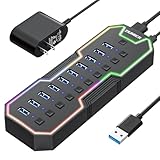
2. ZIUMIER Powered USB Hub, 10 Ports USB 3.0 Hub with RGB LED Strip and 12V/2A Power Adapter USB Extension,Individual LED On/Off Switches for Mac, PC, Desktop, Flash Drive, Mobile HDD
Overview:
This 10-port powered hub solves connectivity shortages with robust 5Gbps speeds and a dedicated 12V/2A power adapter. Designed for demanding setups, it supports simultaneous connections for keyboards, HDDs, and printers across Windows, Mac, and Linux systems—though notably excludes fast charging.
What Makes It Stand Out:
The standout feature is 10 ports with individual RGB-lit switches, enabling precise device control and ambiance customization. The included power adapter ensures stable HDD operation, while the long 3.3ft cable reduces desk clutter. RGB functionality doubles as a status indicator for active ports.
Value for Money:
Justifying its premium price, the hub delivers exceptional port density and reliability for power-intensive workflows. It’s cheaper than splitting costs between a basic hub and separate power solution. However, the “fast charging not supported” caveat disappoints for mobile users.
Strengths and Weaknesses:
Strengths: Ample powered ports for HDDs; customizable RGB; stable data transfers; broad compatibility. Weaknesses: No fast charging; RGB may feel gimmicky for professionals; bulkier than unpowered hubs.
Bottom Line:
A powerhouse for creators needing multiple HDDs or peripherals. Ideal for workstations—skip only if fast charging is essential.
3. Anker USB Hub 4 Ports, Multiple USB 3.0 Hub, USB Splitter for Laptop, Extender for A Port Laptop, PC, Desktop and More [Charging Not Supported](2ft USB-A)
](https://m.media-amazon.com/images/I/41rsnBx1KLL._SL160_.jpg)
3. Anker USB Hub 4 Ports, Multiple USB 3.0 Hub, USB Splitter for Laptop, Extender for A Port Laptop, PC, Desktop and More [Charging Not Supported](2ft USB-A)
Overview:
Anker’s minimalist 4-port hub prioritizes reliability over flair, targeting professionals seeking seamless plug-and-play expansion. With a focus on durability and speed, it’s engineered for daily use in offices or travel scenarios but explicitly excludes charging functionality.
What Makes It Stand Out:
Anker’s reputation for quality shines via its heat-resistant build and 18-month warranty. The ultra-slim design and 2ft cable enhance portability, while 5Gbps transfers handle HD files effortlessly. Its no-nonsense approach appeals to users frustrated by flimsy alternatives.
Value for Money:
Slightly pricier than generic hubs, but Anker’s durability and trusted support justify the cost. The lack of charging isn’t a drawback here—it’s marketed purely for data transfer. Best for budget-conscious professionals needing dependable performance.
Strengths and Weaknesses:
Strengths: Rugged, compact build; consistent 5Gbps speeds; excellent warranty; portable. Weaknesses: Only 4 ports; no power delivery; charging explicitly unsupported.
Bottom Line:
A top-tier choice for reliable, on-the-go data expansion. Perfect for travelers or office workers—avoid if you need to charge devices.
4. Powered USB Hub, atolla 7-Port USB 3.0 hub (6 Superspeed Transfer Ports+ 1 Fast Charging Port) with Swappable Illuminated Icon Switch and 12V/3A Power Adapter for Windows, MacOS, ChromeOS, Linux

Overview:
This innovative 7-port hub merges functionality with customization, featuring swappable icon switches and a dedicated 18W fast-charging port. Powered by a robust 12V/3A adapter, it caters to streamers and professionals managing complex peripheral setups.
What Makes It Stand Out:
The game-changer is the illuminated, swappable icon switches (included spares for mics, mics, etc.), allowing personalized device labeling. Six high-speed data ports handle HDDs smoothly, while the fast-charging port revives phones independently—unlike competitors that omit charging.
Value for Money:
Priced competitively for its niche features, it outvalues generic hubs by solving real pain points: peripheral confusion and slow charging. The 3A power adapter supports even power-hungry devices, making it cost-effective for multi-device users.
Strengths and Weaknesses:
Strengths: Customizable icon switches; fast-charging port; superior 3A power; cross-OS compatibility. Weaknesses: Swappable icons may feel redundant for non-streamers; RGB lighting is less prominent than rivals.
Bottom Line:
A must-have for streamers or hybrid workers needing intuitive control and charging. Unbeatable for organized, high-demand setups.
5. Acer USB Hub 4 Ports, Multiple USB 3.0 Hub, USBA Splitter for Laptop with Type C Power Port, Extender for A Port Laptop, PC, Desktop and More (2ft)

Overview:
Acer’s 4-port hub combines portability with intelligent power management, featuring a Type-C auxiliary port for stable HDD transfers. Its slim design and broad OS compatibility target mobile professionals seeking reliability without bulk.
What Makes It Stand Out:
The standout is the 5V Type-C power port—essential for preventing data corruption during HDD transfers. The GL3510 chip ensures thermal safety, while the 2ft cable and LED status indicator enhance usability. Works flawlessly across Windows, macOS, and gaming consoles.
Value for Money:
Offers premium features (like Type-C power passthrough) at a mid-tier price. Though it has fewer ports than competitors, its focus on data integrity justifies cost for users frequently handling external drives. Beats Anker in HDD compatibility.
Strengths and Weaknesses:
Strengths: Type-C power for HDD stability; excellent heat management; console-compatible; ultra-portable. Weaknesses: Only 4 ports; Type-C cable sold separately; no RGB or flashy extras.
Bottom Line:
The best budget-friendly hub for frequent HDD users. Essential for creatives on the move—prioritize if data safety trumps port count.
6. PowerA 4-Port USB 5Gbps Hub for Xbox Series X|S, USB 3.2, AC Powered, Weighted Base, Officially Licensed

Overview:
This officially licensed Xbox accessory expands connectivity for Series X|S consoles, adding four USB 3.2 ports via a single USB-A connection. Designed specifically for Xbox ecosystems, it addresses the limited native ports while ensuring compatibility with controllers and accessories.
What Makes It Stand Out:
The hub’s 5Gbps transfer speeds (USB 3.2 Gen 1) enable rapid data syncing for external storage, while the AC-powered design (with 900mA per port) reliably supports power-hungry devices like wired controllers. The weighted base with rubber feet eliminates slippage during intense gaming sessions, and dual LED indicators provide instant power/console status feedback.
Value for Money:
Priced competitively against generic hubs, its official licensing guarantees seamless Xbox integration—unlike uncertified alternatives that risk firmware conflicts. The inclusion of an 8.2 ft. AC adapter and robust build justifies the premium over basic USB 2.0 options, especially for multi-controller setups.
Strengths and Weaknesses:
Strengths: Reliable AC power delivery; sturdy weighted design; fast 5Gbps data transfer; Xbox-optimized compatibility. Weaknesses: Shorter cable than Switch counterpart (Product 7); no port labeling; USB-A only (no modern Type-C support).
Bottom Line:
A must-have for Xbox multiplayer enthusiasts needing stable, high-speed expansion—ideal for tournaments or family gaming. Avoid if seeking future-proof Type-C ports.
7. PowerA 4-Port Hi-Speed USB Hub for Nintendo Switch™, USB 2.0, 6 ft. USB Cable, Weighted Base, Officially Licensed

Overview:
Crafted exclusively for Nintendo Switch docks, this hub adds four USB 2.0 ports to connect wired controllers, keyboards, or accessories. Its 6 ft. cable and Switch licensing make it a tailored solution for tabletop or docked-mode gaming.
What Makes It Stand Out:
The extended 6 ft. cable offers unmatched placement flexibility—positioning the hub near players instead of the dock. The weighted base prevents accidental disconnections during play, while official Nintendo licensing ensures zero compatibility issues. A single LED indicator simplifies status checks.
Value for Money:
Though limited to USB 2.0 speeds (480Mbps), it’s perfectly optimized for Switch accessories (e.g., controllers don’t require USB 3.0 bandwidth). The price is fair for licensed reliability, but budget users might consider unbranded hubs if cable length isn’t critical.
Strengths and Weaknesses:
Strengths: Excellent cable length; stable weighted base; plug-and-play Nintendo certification; compact footprint. Weaknesses: Slower USB 2.0 speeds; no individual port LEDs; AC adapter sold separately (unlike Product 6).
Bottom Line:
The definitive choice for Switch multiplayer setups needing cable reach and rock-solid stability—skip only if you prioritize raw data speed over convenience.
8. Anker Powered USB Hub for Laptop, 7 Ports USB 3.0 Data Hub, with 36W Power Adapter and BC 1.2 Charging Port for iPhone 7/6s Plus, iPad Air 2, Galaxy S Series, Note Series, Mac, PC, USB-Flash Drives

Overview:
Anker’s palm-sized 7-port USB 3.0 hub targets laptop users needing extensive connectivity. It delivers 5Gbps data transfers alongside smart charging, backed by Anker’s reputation for durability and included 36W power adapter.
What Makes It Stand Out:
The seventh port supports BC 1.2 fast charging (2.1A) for phones/tablets, while six standard ports handle peripherals. Anker’s chipset ensures stable power distribution (5.1A total), and its tool-free plug-and-play works across Windows, Mac, and Linux without drivers. The 18-month warranty adds peace of mind.
Value for Money:
At a mid-range price, it outperforms cheaper hubs with consistent power delivery and seven ports—critical for workstations. The bundled 36W adapter and cable justify cost versus unpowered alternatives, though mobile users might prefer ultra-compact 4-port models.
Strengths and Weaknesses:
Strengths: Versatile 7-port layout; BC 1.2 fast charging; exceptional cross-OS compatibility; Anker reliability. Weaknesses: Bulkier than 4-port hubs; no individual port switches; charging port limited to one port.
Bottom Line:
A powerhouse for desktop replacements or professionals—opt for this if you need maximum ports and charging versatility in a trusted package.
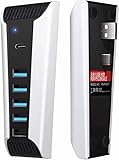
9. AQIDAP 5 Port USB Hub for PS5,USB High-Speed Expansion Hub Charger USB Extender Compatible with PlayStation 5 Game Consolewith 4 USB + 1 USB Charging Port + 1 Type C Port
Overview:
This PS5-specific hub adds five ports (four USB 2.0, one USB 3.0, one Type-C) to the console, designed to fit the PS5’s contours. It targets users needing extra controller or accessory connections without modifying the console.
What Makes It Stand Out:
Its seamless fit with PS5 Digital/Ultra HD editions and plug-and-play simplicity stand out. The mix of USB 2.0/3.0 and Type-C ports accommodates diverse devices, while the note about fast charging (black port only) clarifies functionality upfront.
Value for Money:
Affordably priced, it solves PS5’s port scarcity, but USB 2.0 speeds limit data-heavy uses. Cheaper than Sony’s options, yet the lack of AC power (drawing from PS5) risks overloading the console with multiple devices—reducing value for heavy setups.
Strengths and Weaknesses:
Strengths: Perfect PS5 physical fit; no drivers needed; Type-C inclusion; clear fast-charging indicator. Weaknesses: No external power (strains PS5); incompatible with PSVR/external drives; mostly USB 2.0 speeds.
Bottom Line:
Worthwhile for casual PS5 users needing basic expansion—avoid if using PSVR or power-intensive peripherals due to its unpowered design.
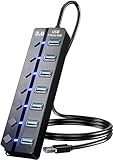
10. Eanetf USB 3.0 Hub, 7-Port with Individual On/Off Switches & LED Indicators, 5Gbps High-Speed Data Hub for Laptop, PC, MacBook, Surface Pro, PS5, HDD, Flash Drive (4ft Cable)
Overview:
A versatile 7-port USB 3.0 hub featuring individual power switches and status LEDs, compatible with laptops, PS5, and desktops. Its 4 ft. cable and tool-free setup target users managing multiple peripherals.
What Makes It Stand Out:
Per-port on/off switches let you disable idle devices (saving power/preventing conflicts), while bright LEDs show real-time activity. The 4 ft. cable enables flexible placement, and universal 5Gbps compatibility covers everything from HDDs to controllers without drivers.
Value for Money:
Mid-priced but exceptional for organized workspaces—switches eliminate port clutter better than unswitched hubs. Outperforms Anker (Product 8) in control, though Anker wins for dedicated charging. Essential if you frequently toggle devices.
Strengths and Weaknesses:
Strengths: Individual port control; clear activity LEDs; long 4 ft. cable; broad OS/peripheral support. Weaknesses: No dedicated fast-charging port; switches add slight bulk; power adapter not specified (likely bus-powered).
Bottom Line:
The top pick for tech-savvy users needing granular device management—ideal for desks cluttered with peripherals demanding precise control.
Why Gamers Need Specialized USB Hubs
Beyond Basic Port Expansion
Standard hubs fall short when handling the unique cocktail of devices gamers connect. It’s not just about having more ports; it’s about ensuring each port can consistently deliver the speed and power required by high-performance peripherals without interference. Gaming involves constant, rapid data bursts—mouse movements, keyboard inputs, audio streams—that demand reliable bandwidth allocation. A hub not engineered for this environment can cause micro-stutters, input lag, or even device disconnections when multiple peripherals draw power simultaneously, turning a potential victory into a frustrating defeat.
The Latency Factor in Competitive Play
Input lag is the silent killer in competitive gaming. While often associated with displays or network connections, a poorly designed hub can introduce critical milliseconds of delay between pressing a button and the action registering. This happens when hubs lack sufficient internal bandwidth or use outdated controllers that bottleneck data flow. For titles where split-second reactions determine rank, even minor latency introduced by a subpar hub can be the difference between clutching a round or watching the “Defeat” screen. Prioritizing hubs with proven low-latency chipsets is non-negotiable for serious players.
Power Demands of Modern Gaming Setups
Today’s gaming peripherals are power-hungry. High-RGB keyboards, fast-charging controllers, external SSDs for game storage, and dedicated audio interfaces all draw significant current. Standard hubs often skimp on power delivery per port, leading to devices operating below their potential (dimmer RGB, slower charging) or failing to function entirely when multiple high-draw devices connect. Gamers need hubs with robust total power budgets (measured in Amps or Watts) and intelligent power distribution to ensure every device gets the juice it needs, especially during intense sessions.
Critical Features to Evaluate
Bandwidth Requirements Explained
Understanding USB specifications is crucial. USB 3.2 Gen 1 (5Gbps) is the absolute baseline for avoiding data bottlenecks with multiple peripherals. However, gamers using external SSDs for rapid game loading or high-resolution capture cards should prioritize USB 3.2 Gen 2 (10Gbps) or even Gen 2x2 (20Gbps) hubs. Crucially, check if the total bandwidth is shared across ports or if specific ports offer dedicated speeds. A hub advertising “10Gbps” might only deliver that speed on a single port while others share a slower bus—a critical detail often buried in specs.
Power Delivery (PD) Capabilities
Look for hubs featuring a dedicated Power Delivery (PD) port capable of at least 30W, ideally 60W or higher. This serves two vital purposes: it allows you to power your laptop or console directly through the hub (freeing up its native ports), and it ensures the hub itself has ample power to distribute to connected devices without drawing down from your main system. Total system power (e.g., 85W, 100W) indicates the hub’s overall capacity to keep multiple high-draw peripherals running smoothly during marathon sessions.
Port Configuration and Physical Layout
Don’t overlook ergonomics. A hub crammed with ports too close together makes it impossible to plug in larger adapters (like USB-C chargers) without blocking adjacent ports. Prioritize models with staggered port layouts, angled ports, or sufficient spacing. Also, consider the mix: multiple standard-A ports for legacy peripherals, USB-C ports for modern devices and PD input, and potentially dedicated ports for specific needs like SD card readers for content creators. Cable length and whether the hub is bus-powered or requires its own power adapter significantly impact desk clutter.
Understanding Hub Technologies
The Role of Controller Chips
The internal controller chip is the hub’s brain, dictating performance, stability, and compatibility. Reputable brands often use chips from companies like Texas Instruments, Fresco Logic, or VIA Labs. Researching the specific chipset (if disclosed) can reveal potential issues like known latency problems or driver conflicts. Hubs using older or generic controllers are more prone to glitches under heavy load—a gamble no competitive gamer should take.
Bus-Powered vs. Self-Powered Hubs
Bus-powered hubs draw all their energy from your computer’s port. While convenient for portability, they severely limit the total power available for peripherals, often causing devices like external hard drives to malfunction. Self-powered hubs (with their own AC adapter) provide independent, robust power, essential for connecting multiple high-draw devices like controllers, headsets, and storage without straining your system. For a permanent battle station, self-powered is almost always the superior, more reliable choice.
Compatibility Across Systems
Ensure the hub explicitly supports your primary gaming platform—whether it’s Windows PC, macOS, PlayStation, or Xbox. While USB standards are universal, console compatibility can be finicky, especially regarding charging protocols or specific peripheral recognition. Check manufacturer documentation for certified compatibility lists. Also, verify driver requirements; most modern hubs are plug-and-play (no drivers needed), but some advanced features might require software, adding unnecessary complexity.
Optimizing Your Gaming Setup
Strategic Placement for Performance
Where you position your hub matters. Avoid daisy-chaining multiple hubs, as this compounds latency and bandwidth limitations. Place the hub as close as possible to your console or PC to minimize signal degradation over long cable runs. If using a laptop, connecting the hub directly to a port on the machine (not through another dock) provides the cleanest signal path. For desktops, rear ports often offer more stable power than front-panel ones.
Managing Cable Clutter Effectively
A hub solves port scarcity but can worsen cable mess if not managed. Choose a hub with a compact, low-profile design that fits neatly under monitors or mounts. Use cable ties, sleeves, or adhesive clips to bundle hub cables together. Models with integrated cable management channels or mounting points (like VESA compatibility) help keep your desk battlefield tidy and reduce accidental unplugs during intense moments.
Future-Proofing Your Investment
Gaming tech evolves rapidly. Invest in a hub with at least one USB4 or Thunderbolt 4 port if your system supports it, even if you don’t need it immediately. These offer massive bandwidth headroom for future peripherals like 8K capture cards or ultra-fast storage. Also, consider hubs with modular designs or expansion ports, allowing you to add functionality later without replacing the entire unit. Paying slightly more now avoids obsolescence within a year.
Troubleshooting Common Issues
Diagnosing Intermittent Disconnections
If devices randomly disconnect, first check if the hub is self-powered—insufficient power is the prime culprit. Try connecting high-draw devices (headsets, controllers) directly to the hub’s PD port if available. Update your system’s USB drivers and chipset drivers. Test peripherals on different hub ports; a faulty port might be the issue. If problems persist, the hub’s controller may be incompatible with your system’s USB implementation, requiring replacement.
Minimizing Input Lag Suspicions
If you suspect lag from the hub, isolate the problem: test the peripheral directly connected to your PC/console. If lag disappears, the hub is likely the cause. Prioritize hubs known for low-latency performance in gaming communities. Disable USB selective suspend in your OS power settings (Windows) or reduce RGB effects on peripherals, as these can sometimes cause micro-stutters. Firmware updates for the hub itself might also resolve timing issues.
Handling Overheating Concerns
Hubs under heavy load (multiple high-power devices) can get warm—some heat is normal. However, excessive heat (too hot to touch) indicates poor design or overload. Ensure the hub has adequate ventilation; don’t bury it under papers or inside a closed cabinet. Reduce the load by unplugging non-essential devices. Persistent overheating often means the hub lacks proper thermal management or is being pushed beyond its power limits, signaling it’s time for an upgrade.
Frequently Asked Questions
Frequently Asked Questions
Does using a USB hub add noticeable input lag for gaming mice and keyboards? No, a high-quality hub designed for performance gaming with a modern controller chip (USB 3.2 Gen 1 or higher) introduces negligible latency—typically well under 1ms, imperceptible even in competitive play. Cheap or outdated hubs are more likely to cause issues.
Can a USB hub charge my controller and headset simultaneously without slowing down? Yes, but only if the hub has sufficient total power delivery (e.g., 60W+) and robust per-port amperage. A self-powered hub is essential for this; bus-powered hubs often lack the capacity for multiple simultaneous charges during active use.
Is USB-C better than USB-A for gaming hubs? USB-C offers advantages like higher potential bandwidth (USB4/Thunderbolt), reversible plugs, and standardized Power Delivery. However, the specification (e.g., USB 3.2 Gen 2) matters more than the port shape. A high-speed USB-A hub can still outperform a slow USB-C hub.
Will a USB hub work with my PlayStation or Xbox console? Many modern self-powered hubs work with consoles, but verify explicit compatibility. Consoles can be picky about power draw and hub chipsets. Avoid hubs requiring drivers, as consoles typically don’t support them. Check recent user reports for your specific console model.
Do I need a hub with an Ethernet port for online gaming? Not necessarily for the hub itself, but a wired connection is always preferable for stability. Some gaming hubs integrate a Gigabit Ethernet port, eliminating the need for a separate adapter and providing a clean solution for laptops lacking Ethernet.
Can a USB hub cause my external SSD to run slower? Yes, if the hub’s total bandwidth is saturated or if the SSD is connected to a slower port on a multi-speed hub. Always plug high-speed devices like SSDs into ports labeled for the highest speed (e.g., 10Gbps) and ensure the hub’s total bandwidth exceeds the SSD’s needs.
How many ports do I realistically need on a gaming hub? Most gamers benefit from 4-7 ports: 2 for core peripherals (mouse/keyboard), 1-2 for charging (controller/headset), 1 for storage/audio, and 1 spare. Prioritize quality over quantity—fewer robust ports beat many weak ones.
Are expensive gaming hubs worth the price over cheap generic ones? Generally, yes. Premium hubs use superior controller chips for lower latency, deliver consistent power, offer better build quality for desk durability, and provide reliable compatibility—critical factors where generic hubs often fail under gaming loads.
Can a USB hub power my entire gaming laptop? Only if the hub has a high-wattage PD port (e.g., 100W) and your laptop supports PD charging and the hub itself is connected to a capable power adapter. Most standard hubs lack the wattage needed for full laptop power delivery during gaming.
What’s the biggest mistake gamers make when choosing a USB hub? Prioritizing port count over power delivery and bandwidth specs. A 10-port hub with only 2.5A total power is useless for gaming—it will throttle devices. Always check the total power budget (Watts/Amps) and per-port capabilities first.