Ever tried plugging in a lamp only to realize your nightstand is conspiring against you? Or wrestled with a tangle of cords beneath a desk that swallows outlets whole? In compact living spaces—from studio apartments to dorm rooms and minimalist home offices—every inch counts, and electrical outlets often vanish behind furniture or get buried under essential electronics. This frustrating reality makes outlet extenders not just convenient, but essential tools for reclaiming your space and power. Forget cramming furniture awkwardly away from the wall or tripping over bulky power strips; the right extender transforms dead zones into functional hubs, keeping your setup clean, safe, and effortlessly accessible.
Choosing the perfect extender, however, isn’t as simple as grabbing the first slim model you see. The market buzzes with options promising sleek designs and extra ports, but without understanding the nuances of safety standards, spatial requirements, and feature trade-offs, you might end up wasting money or compromising safety. This guide cuts through the noise, focusing purely on what matters when selecting an extender for tight quarters. We’ll explore critical considerations like depth clearance, safety certifications, port configurations, and installation tricks—empowering you to make a confident, informed decision tailored to your unique spatial constraints. No fluff, no brand bias—just practical, actionable insights to electrify your small space intelligently.
Top 10 Outlet Extenders
Detailed Product Reviews
1. Wall Charger, Surge Protector, QINLIANF 5 Outlet Extender with 4 USB Charging Ports, 3-Sided 1680J Power Strip Multi Plug Adapter Spaced for Home Travel Office
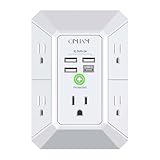
Overview:
This wall-mounted outlet extender transforms a single duplex outlet into a versatile power hub with 5 spaced AC outlets and 4 USB ports (including USB-C). Designed to screw securely into standard duplex outlets, it prevents accidental dislodging and features ETL certification and a 12-month warranty. Ideal for travel, home, or office use where space is limited.
What Makes It Stand Out:
The 3-sided design offers exceptional outlet spacing (2.1 inches), accommodating bulky plugs without blocking adjacent ports. Its 1680J surge protection—using a 3-layer circuit (TVS, MOV, GDT)—outperforms basic MOV-only competitors. The USB-C port (5V/3A) and smart-charging USB-A ports (5V/2.4A each) auto-detect devices for optimal speed. The rear groove ensures a flush wall fit, minimizing protrusion.
Value for Money:
Priced competitively, it delivers robust surge protection and generous spacing often missing in cheaper models. While alternatives may offer lower prices, the 1680J rating, secure mounting, and thoughtful spacing justify the cost for safety-conscious users. Avoid if your outlets aren’t standard duplex types.
Strengths and Weaknesses:
Strengths: Secure wall mounting; wide 2.1-inch outlet spacing; reliable multi-layer surge protection; efficient smart USB charging; ETL certified with strong warranty.
Weaknesses: USB-C lacks QC3.0/fast charging (max 5V only); incompatible with GFCI or non-duplex outlets; spacing limitations for multi-socket outlets.
Bottom Line:
A top pick for duplex outlets needing secure, spaced charging and solid surge protection. Avoid for GFCI setups or fast-charging USB-C devices, but excellent for standard home/office use where reliability matters.
2. Surge Protector Outlet Extender - with Rotating Plug, 6 AC Multi Plug Outlet with 4 USB Ports (2 USB C), 1800J Wall Charger, 3-Sided Power Strip with Spaced Outlet Splitter for Home, Office, Travel

Overview:
This compact extender features a 180-degree rotating plug, 6 widely spaced AC outlets, 4 USB ports (including 2 USB-C), and 1800J surge protection. ETL-certified with multi-safety features, it’s designed for tight spaces in homes, offices, or travel. The swivel plug adapts to vertical/horizontal sockets, while a grounded indicator light confirms safety.
What Makes It Stand Out:
The rotating plug eliminates socket orientation issues, a rarity in competitors. Its 1800J surge protection uses a rapid-response 3-circuit system (TVS/MOV/GDT), and USB-C ports support 5V/3A. The 1.9-inch outlet spacing prevents plug interference, and the fire-resistant ABS shell withstands extreme heat (1382°F).
Value for Money:
Slightly pricier than basic models, but the rotating plug, superior 1800J protection, and dual USB-C ports offer tangible upgrades. Competitors often skimp on spacing or surge tech—this balances port density, safety, and adaptability, making it worthwhile for frequent travelers or cluttered setups.
Strengths and Weaknesses:
Strengths: Swivel plug for versatile installation; excellent 1800J surge protection; dual USB-C ports; fire-resistant housing; compact and travel-friendly.
Weaknesses: USB-C still limited to 5V (no higher voltages); max 1875W load requires careful device management; rotating mechanism may loosen over time.
Bottom Line:
Highly recommended for its unmatched flexibility and robust safety features. Ideal for travelers or desks with awkward outlets, though monitor total wattage to avoid overloads.
3. GE 3-Outlet Extender Wall Tap, Grounded Adapter Plug, Indoor Rated, 3-Prong, Perfect for Travel, UL Listed, White, 52203

Overview:
This minimalist adapter converts one grounded outlet into three horizontally aligned ports. Rated for 15A/125V/1875W and UL-listed, it’s designed for indoor use with lamps, chargers, or small electronics. GE’s reputation for reliability anchors this no-frills solution for basic outlet expansion.
What Makes It Stand Out:
Its ultra-slim horizontal design sits flush against walls, reducing clutter—unlike bulky power strips. The trusted GE branding ensures build quality, and the grounded 3-prong design safely handles standard household devices. Ideal for tight spaces where even small extenders obstruct furniture.
Value for Money:
Very affordable, but lacks modern features like USB ports or surge protection. Competitors offer more functionality at similar prices, yet GE’s durability and space-saving profile justify it for users needing only basic outlet multiplication without frills.
Strengths and Weaknesses:
Strengths: Extremely compact and wall-hugging; simple, reliable build; UL-listed safety; lightweight for travel; trusted GE brand.
Weaknesses: No surge protection or USB ports; limited to 3 outlets; prone to blocking adjacent sockets if plugs are large; minimal spacing between ports.
Bottom Line:
A solid buy for basic, space-constrained outlet expansion where surge protection isn’t critical. Avoid for sensitive electronics or USB charging needs—opt for GE’s simplicity only if you prioritize minimalism over features.
4. 6 Ft Surge Protector Power Strip - 8 Widely Outlets with 4 USB Ports, 3 Side Outlet Extender with 6 Feet Extension Cord, Flat Plug, Wall Mount, Desk USB Charging Station, ETL,White

Overview:
This 6-foot power strip merges an extension cord with a 3-sided outlet extender, featuring 8 widely spaced AC outlets, 4 USB ports (including USB-C), and 600J surge protection. ETL-certified with overload safeguards, it includes wall-mounting holes and a flat 45° plug for tight spaces.
What Makes It Stand Out:
The 6-foot cord offers unmatched flexibility for desks or rooms with distant outlets. Its 1.8-inch AC spacing and 3-sided layout prevent plug blockage, while the flat plug slides neatly behind furniture. Multi-layer safety (overload/overheat/short-circuit protection) adds peace of mind.
Value for Money:
Competitively priced for the cord length and port count (12 total). However, the 600J surge rating is notably lower than rivals (1600J+), reducing value for electronics protection. Best for low-risk devices like lamps or printers, not high-value gear.
Strengths and Weaknesses:
Strengths: 6-foot cord for versatile placement; flat plug and wall-mount options; 8 spacious AC outlets; comprehensive safety cutoffs; USB-C compatibility.
Weaknesses: Underwhelming 600J surge protection; USB-C limited to 5V; cord adds bulk for travel; spacing still tight for oversized adapters.
Bottom Line:
Worth considering for cord-dependent setups needing port density, but skip for critical electronics due to weak surge defense. Ideal for dorms or offices where cable reach trumps maximum protection.
5. Outlet Spacers for Electrical Box, RonJea 48 PCS Switch and Receptacle Spacers for Loose Outlet Plug Fix, Electrical Extender Outlet Shims Light Switch Spacer
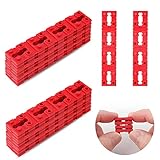
Overview:
This 48-piece kit includes stackable plastic shims to secure loose electrical outlets or switches within wall boxes. Designed for DIY fixes, they prevent sinking or wobbling by filling gaps behind faceplates. No tools are needed beyond a screwdriver, making installation quick and accessible.
What Makes It Stand Out:
The twist-apart, stackable design allows custom thickness adjustments (0.15" per shim) for perfect alignment. Made from compressible plastic, they adapt to irregular gaps without tools. The 48-count pack covers multiple outlets, and the eco-friendly design avoids metal waste from traditional spacers.
Value for Money:
Exceptional value—48 spacers cost less than most outlet replacements. While not a “product” in the traditional sense, it solves a common, frustrating issue affordably. Cheaper than hiring an electrician for minor fixes, and far more versatile than single-use shims.
Strengths and Weaknesses:
Strengths: Huge quantity for whole-home use; tool-free separation and compression; prevents outlet sinking long-term; eco-friendly plastic; easy DIY installation.
Weaknesses: Only fixes mechanical looseness (no electrical/safety upgrades); ineffective for severely damaged boxes; minimal thickness per shim requires stacking for deep gaps.
Bottom Line:
A must-have for homeowners tackling loose outlets. Inexpensive, effective, and universally applicable—prioritize this over costly repairs for minor alignment issues. Not a substitute for professional help with electrical faults.
6. EZ Outlet Electrical Outlet Extender. Access Hard-to-Reach Outlets! Features USB-A, USB-C, and 2 AC Outlets, Extends 22"-34", Rotates 180°. Use Behind Couches, Nightstands, Desks, and More.
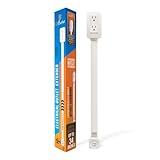
Overview: The EZ Outlet solves the common problem of inaccessible wall outlets behind furniture. This tool-free extender plugs directly into existing outlets, extending reach by 22"-34" while rotating 180° for flexible positioning. It features two AC outlets, USB-A, USB-C ports (5V/2.4A total), and a phone ledge.
What Makes It Stand Out: Its standout feature is the fully adjustable arm that navigates tight spaces behind couches or desks without installation. The included damage-free Velcro strips allow secure wall mounting, and the built-in phone ledge offers convenient charging placement—uncommon in competitors.
Value for Money: Priced mid-range, it delivers exceptional utility for cluttered spaces. While lacking surge protection, the focus on physical accessibility and no-tools setup justifies the cost for users prioritizing reach over electrical safety features, outperforming basic fixed extenders.
Strengths and Weaknesses: Strengths: Effortless installation, versatile rotation/extension, phone ledge, damage-free mounting. Weaknesses: No surge protection, limited USB amperage (2.4A shared), only two AC outlets restricts multi-device use compared to competitors.
Bottom Line: Ideal for furniture-blocked outlets where adjustability is paramount, but skip if surge protection or multiple AC outlets are essential. A niche solution that excels in specific scenarios despite electrical limitations.
7. Addtam Surge Protector Outlet Extender, 6-Outlet Splitter with 4 USB Wall Charger(2 USB-C Ports), Multi Plug Wall Outlet 1800J Power Strip for Home Office Dorm Room Essentials

Overview: The Addtam extender transforms a standard duplex outlet into a robust 10-device charging hub. It offers six widely spaced AC outlets (2.2" between slots), four USB ports (including dual USB-C), and advanced 1800J surge protection, secured via mounting screws for stability.
What Makes It Stand Out: Its triple-layer surge protection (TVS, MOV, GDT) exceeds competitors’ basic MOV circuits, offering superior device safety. The wide AC outlet spacing accommodates bulky adapters, while dual USB-C ports (5V/3A max) cater to modern devices—though lacking higher-voltage QC3.0.
Value for Money: At a competitive price, it delivers exceptional value with high joule rating, ample outlets, and ETL certification. The 1800J protection and 10-device capacity justify a slight premium over basic models, especially for home offices or dorms needing reliability.
Strengths and Weaknesses: Strengths: Industry-leading surge protection, wide AC spacing, 10-device capacity, dual USB-C ports, secure mounting. Weaknesses: USB-C lacks QC3.0 (max 5V), no rotational adjustability, plastic prongs may loosen over time.
Bottom Line: A top pick for surge-sensitive environments like offices or dorms. Prioritize this if electrical safety and multi-device charging outweigh the need for outlet adjustability or fast-charging USB-C.
8. POWRUI Multi Plug 6 Outlet Surge Protector Extender with 3 USB Ports (1 USB C) and Night Light, 3-Sided Power Strip with Adapter Spaced Outlets, ETL Listed, White

Overview: POWRUI’s 3D-designed extender replaces standard outlets with six AC ports, three USB ports (including one USB-C), and a smart night light. Its 1680J surge protection, dusk-to-dawn sensor, and adjustable-brightness light target bedroom or nursery use.
What Makes It Stand Out: The integrated night light is its unique differentiator—automatically activating in low light with touch-controlled brightness. The 3-sided “cube” design maximizes space efficiency, while 2.1" AC spacing fits oversized plugs without blocking adjacent ports.
Value for Money: Slightly pricier due to the night light feature, but justified for bedside or hallway use. The 1680J surge protection and ETL certification match competitors, making it worthwhile if ambient lighting is a priority, though USB-C is limited to 5V.
Strengths and Weaknesses: Strengths: Practical night light with smart sensor, excellent outlet spacing, compact 3D design, reliable surge circuit. Weaknesses: USB-C lacks fast charging (max 5V), night light may be unnecessary in some rooms, only one USB-C port.
Bottom Line: Highly recommended for bedrooms or hallways where night lighting adds tangible value. Choose this over rivals if the night light utility offsets the modest USB-C limitations.
9. Olcorife Outlet Extender Stick, Power Strip with 6 Outlets & 4 USB Ports, Extends 22"-34", Rotates 180°(90° per Side), Home Dorm Essential for Nightstand, Couch and Desk

Overview: Olcorife merges adjustable reach with high-capacity charging. This extender stick extends 22"-34", rotates 180° (90° per side), and provides six AC outlets plus four USB ports (dual USB-A/C), backed by 2000J surge protection for versatile placement.
What Makes It Stand Out: Combines physical adjustability (like Product 6) with the multi-outlet capacity of Products 7-8. The 2000J surge rating is among the highest here, and dual mounting options (screws + 3M adhesive) ensure stability behind furniture.
Value for Money: Excellent value for users needing both reach and capacity. It bridges the gap between basic extenders and fixed power strips, justifying its price with unique adjustability and robust surge protection—ideal for dynamic spaces like dorms.
Strengths and Weaknesses: Strengths: Adjustable length/rotation, high surge rating (2000J), 10-device capacity, dual-mount security. Weaknesses: USB-C specs unspecified (likely 5V only), no night light or phone ledge, rotation may feel stiff initially.
Bottom Line: The best hybrid for those requiring furniture-clearing flexibility and multiple outlets. Opt for this if Products 6 (too few outlets) and 7-8 (fixed position) don’t fully meet your spatial needs.
10. Philips 3-Outlet Extender, Surge Protector, Charging Station, Grounded Wall Tap, 3-Prong, Space Saving Design, Gray, SPP3002GR/37

Overview: Philips offers a minimalist, grounded cube extender with three AC outlets, 245J surge protection, and a compact design. It focuses on accessibility for bulky plugs in tight spaces without USB ports or advanced features.
What Makes It Stand Out: Its ultra-compact cube form factor maximizes accessibility behind furniture where space is extremely limited. The rubberized non-slip base and adapter-spaced outlets prevent wobble and accommodate large transformers—a rarity in small extenders.
Value for Money: Budget-friendly for basic needs, but the low 245J surge rating feels outdated. It’s cost-effective only if you strictly need AC outlet access (no USB charging) and prioritize size over protection—outclassed by rivals for multi-device setups.
Strengths and Weaknesses: Strengths: Extremely space-efficient, stable non-slip base, simple plug-and-play, ETL listed. Weaknesses: Very low surge protection (245J), no USB ports, only three outlets, limited modern utility.
Bottom Line: A niche solution for cramped spaces needing only AC access, but avoid if surge safety or USB charging matters. Choose only when size constraints override all other considerations.
Understanding Outlet Extenders: Beyond Basic Power Strips
Outlet extenders serve a distinct purpose compared to traditional power strips. While power strips add multiple ports and often include surge protection, extenders specifically address the physical gap between your outlet and furniture. They slide directly into the wall socket, projecting the receptacles forward by inches—just enough to clear a bookshelf, desk, or entertainment unit. This subtle shift eliminates the need to pull heavy furniture away from walls, reduces cord strain, and maintains a tidy aesthetic. Crucially, extenders prioritize minimal depth over port quantity, making them the unsung heroes of space-constrained environments.
How Outlet Extenders Differ from Power Strips and Surge Protectors
The key distinction lies in function and form. Power strips are designed to multiply outlets and typically sit several inches away from the wall, often requiring floor or desk space. Surge protectors add voltage regulation but share this bulkier profile. Outlet extenders, however, are engineered for near-wall mounting. They protrude minimally—often less than 1.5 inches—while providing one or two usable receptacles directly in line with the original outlet. They generally lack built-in surge protection (unless specified), focusing purely on spatial accessibility. Confusing the two can lead to buying a device that creates clutter instead of solving it.
Why Standard Solutions Fail in Tight Spaces
Standard power strips become liabilities in cramped areas. Their depth forces furniture to sit awkwardly far from walls, creating unsightly gaps and tripping hazards from stretched cords. Under-desk setups often see strips crammed into corners, leading to overheating risks as vents get blocked. In kitchens or bathrooms, bulky strips near sinks violate safety clearances. More critically, forcing furniture against a protruding strip can damage both the device and the wall outlet over time, potentially causing loose connections or arcing. The spatial inefficiency of standard solutions directly undermines safety and functionality where space is precious.
The Core Benefit: Maximizing Usable Wall Real Estate
The true value of a well-chosen extender is spatial liberation. By reclaiming the inches lost behind furniture, you maintain clean sightlines, keep rooms feeling open, and avoid the “pushed-out” look of furniture battling electrical needs. This is vital in micro-apartments, RVs, or home offices where every square foot impacts livability. A slim extender allows your nightstand to sit flush against the wall while still accommodating a lamp and phone charger. It lets your entertainment center hug the wall without sacrificing connections for streaming devices. Ultimately, it transforms an electrical limitation into an invisible, seamless part of your space.
Critical Features to Evaluate for Small Space Success
Selecting an extender isn’t about finding the “thinnest” option blindly—it’s about matching specific features to your spatial and power needs. Prioritizing the wrong attribute can lead to poor performance or safety compromises. Depth, safety certifications, and port functionality are non-negotiable starting points. Ignoring these in favor of aesthetics alone risks fire hazards, frequent disconnections, or devices that simply don’t fit your tight gap. This section breaks down the must-check elements before purchase.
Measuring Your Clearance: The Non-Negotiable First Step
Before browsing products, grab a ruler. Measure the exact gap between your outlet cover plate and the back of your furniture (desk, cabinet, nightstand). Account for any baseboards, molding, or uneven walls. Most extenders add 0.75 to 1.5 inches of projection—your gap must accommodate this plus the plug depth of your devices. If your nightstand sits 1 inch from the wall, an extender projecting 1.25 inches will cause the furniture to tilt or bind. Under-measuring leads to frustration; over-measuring wastes precious clearance. Always measure twice, especially in corners or behind built-ins where space is irregular.
Safety Certifications: Why UL/ETL Listing is Non-Negotiable
Never compromise on safety certifications. Look explicitly for UL (Underwriters Laboratories) or ETL (Intertek) marks—these indicate independent testing for fire and electrical hazards. Avoid extenders with only “CE” marks (often self-declared and unverified) or no certification at all. In small spaces where devices may be hidden or enclosed, certified extenders incorporate critical safeguards like temperature cutoffs, robust internal wiring, and flame-retardant materials. A non-certified extender in a confined space significantly increases fire risk due to inadequate heat dissipation. This isn’t optional—it’s fundamental protection for your home.
Port Configuration: Balancing Needs and Profile
Most extenders offer one or two receptacles. While two ports seem ideal, they often add width or depth. In ultra-slim gaps (under 1 inch), a single-port model might be the only viable option. Consider your actual plug types: do you need space for two bulky transformer plugs (like laptop chargers), or will one standard plug and one USB port suffice? Some extenders feature rotated or offset ports to prevent “plug blocking,” where one large adapter covers the adjacent outlet. For tight spots, prioritize port orientation over quantity—a well-spaced single port beats two unusable ones jammed together.
Types of Outlet Extenders for Different Spatial Challenges
Not all small spaces present the same obstacles. A narrow gap behind a floating desk demands a different solution than an outlet buried under a deep entertainment console. Understanding the distinct extender types—vertical, horizontal, and ultra-slim—allows you to match the tool to the specific spatial headache. Choosing the wrong type can turn a potential fix into a frustrating eyesore or safety hazard.
Vertical Extenders: Solving the “Furniture Gap” Problem
Vertical extenders (also called “forward-throw” or “protruding” types) are the most common solution for standard furniture gaps. They mount directly over the outlet, directing receptacles straight out from the wall, adding depth without widening the footprint. Ideal for desks, nightstands, and cabinets sitting 1-2 inches from the wall. Look for low-profile models under 1.25 inches thick. Some include a small kickstand or angled design to further minimize the protrusion. Avoid models with bulky switches or indicator lights that add unnecessary depth in tight squeezes.
Horizontal Extenders: Tackling Width Constraints
When side-to-side space is tighter than front-to-back clearance—like behind a narrow bookshelf or between appliances—horizontal extenders shine. These slide the receptacles sideways from the outlet, often using a low-profile L-shaped design. They’re perfect for situations where furniture butts against the wall but leaves a narrow vertical gap beside it. However, they require adjacent wall space and might interfere with outlet covers or neighboring switches. Measure the available horizontal space carefully; some models need 3+ inches of clear wall beside the outlet.
Ultra-Slim and Low-Profile Models: For Extreme Tight Spots
When clearance drops below 0.75 inches—think built-in shelves, corner desks, or RV cabinets—ultra-slim extenders become essential. These often resemble flat adapters more than traditional boxes, adding mere millimeters of projection. They typically support only one plug and lack USB ports, prioritizing minimalism over features. Some use flexible “pigtail” cords to route the outlet forward without rigid bulk. Crucially, verify compatibility with your plug types; ultra-slim models can struggle with large, dual-prong adapters. They’re niche but invaluable where every millimeter counts.
Installation and Usage Best Practices for Safety and Longevity
Even the best extender fails if installed incorrectly. Proper setup ensures safety, prevents damage, and maximizes the device’s lifespan—especially critical in confined spaces where heat buildup or physical stress is more likely. Skipping these steps risks fire hazards, voided warranties, or a poorly functioning setup that defeats the purpose of using an extender.
Proper Mounting: Avoiding Strain and Damage
Never force an extender into an outlet. If resistance occurs, check for debris or a misaligned plug. Once inserted, the extender should sit flush against the wall plate without wobbling. Avoid placing undue pressure on it by pushing furniture against it; the extender should enable furniture to sit flush, not bear its weight. For vertical models, ensure the top edge doesn’t press against furniture molding. If the extender feels hot during use or vibrates, unplug immediately—it’s likely overloaded or faulty.
Managing Heat Buildup in Confined Areas
Enclosed spaces trap heat, a major fire risk with electrical devices. Never install an extender inside a fully enclosed cabinet, drawer, or behind solid panels with no airflow. Maintain at least 0.5 inches of clearance around the sides and top of the extender. Avoid covering it with cloth, paper, or insulation. In tight spots like under desks, position it near an edge where air can circulate. If using near heat sources (like radiators or ovens), choose an extender rated for higher temperatures and increase clearance. Feel the extender periodically during initial use—if it’s uncomfortably warm, reduce the load or improve ventilation.
Cord Management Integration: Keeping the Space Tidy
The extender solves the outlet gap, but messy cords ruin the clean look. Integrate cord management from the start. Use adhesive cable clips on furniture legs or the extender itself (if designed for it) to route cords neatly downward or sideways. Consider extenders with built-in cord retention grooves. For multiple devices, pair the extender with a slim, low-profile power strip placed in front of furniture (not behind it) to centralize plugs. Velcro straps or woven sleeves can bundle excess cord length without adding bulk. A tidy cord path prevents tripping and maintains the spatial efficiency the extender provides.
Common Pitfalls to Avoid with Small Space Extenders
Even informed buyers fall into traps that undermine safety or functionality. These mistakes are easily preventable with awareness but can lead to dangerous situations or wasted money. Recognizing these pitfalls ensures your extender solution enhances, rather than complicates, your small space living.
Overloading: The Silent Danger in Compact Setups
Small spaces often concentrate multiple high-wattage devices (laptops, monitors, lamps) near a single outlet. Extenders share the circuit’s capacity—they don’t increase it. Plugging a space heater, coffee maker, and gaming console into one extender is a fire hazard, regardless of its slim profile. Always calculate the total wattage of connected devices (check labels: Watts = Volts x Amps) and ensure it stays below 80% of the circuit’s rating (typically 15A x 120V = 1800W; max 1440W load). Spread high-draw appliances across different circuits. If breakers trip frequently, you’re overloading—not the extender’s fault, but a critical warning sign.
Daisy-Chaining: A Recipe for Disaster
Never plug one extender into another, or plug an extender into a power strip. This “daisy-chaining” multiplies fire risks by overloading connections, increasing resistance, and creating heat traps—especially dangerous in enclosed small spaces. It also voids safety certifications. If you need more ports, replace the extender with a single, appropriately rated device that meets your needs (e.g., a two-port extender instead of chaining two singles). Your home’s wiring isn’t designed for cascaded extensions; keep the path from wall outlet to device as direct as possible.
Ignoring Environmental Factors: Bathrooms, Kitchens, and Outdoors
Standard indoor extenders aren’t built for moisture, grease, or temperature extremes. Using one near a sink, in a steamy bathroom, or on a damp patio risks electrocution or short circuits. For wet locations, you must use a GFCI-protected outlet (test monthly!) and an extender specifically rated for damp/wet locations (look for “UL Listed for Wet Locations”). Kitchen extenders should avoid areas directly above stoves or near splatter zones. Never use indoor-rated extenders outdoors—they lack weatherproofing and can fail catastrophically when wet.
Advanced Considerations for Specific Small Space Scenarios
Beyond basic gaps and clearances, unique living situations demand tailored approaches. Whether you’re in a vintage building with shallow boxes, a modern home with USB needs, or a rental with strict rules, these nuanced factors determine whether your extender solution succeeds or fails. Overlooking them leads to incompatible purchases and repeated frustration.
Older Homes with Shallow Electrical Boxes
Pre-1980s construction often features shallow outlet boxes recessed deep into walls, creating gaps larger than standard extenders can bridge. Standard models might not reach far enough, leaving plugs dangling. Seek extenders with longer “throw” (2+ inches) or models designed specifically for deep-set outlets. Alternatively, consider an extender paired with a short, flexible extension cord rated for in-wall use (check local codes)—but never splice cords yourself. Consult an electrician if the gap exceeds 3 inches; box extenders installed behind the wall plate might be a safer, more permanent fix.
Integrating USB Charging Without Adding Bulk
Modern devices demand USB power, but adding a separate USB adapter eats precious clearance. Opt for extenders with built-in USB-A or USB-C ports. Prioritize models where USB ports are alongside the AC receptacles, not stacked on top (which increases depth). Verify USB output specs—5V/2.4A per port is standard for basic charging; 18W+ PD (Power Delivery) is needed for fast-charging laptops. Avoid models where USB ports share the AC circuit’s total wattage limit; dedicated USB controllers are safer for high-demand devices.
Rental Restrictions and Reversible Solutions
Renters often face prohibitions against permanent modifications. Standard wall-mounted extenders are usually acceptable as they’re easily removable and leave no damage. Avoid adhesive-backed or screw-in models unless explicitly permitted. Choose extenders that don’t require tools for installation—simple plug-in types are ideal. Document the outlet’s condition before and after installation with photos to avoid deposit disputes. If the landlord mandates original outlets remain visible, select an extender that sits entirely within the outlet’s depth profile (ultra-slim models).
Future-Proofing Your Small Space Electrical Setup
Technology evolves, and your small space electrical needs will too. Choosing an extender with forward-looking features prevents frequent replacements and ensures compatibility with emerging devices. This isn’t about chasing trends—it’s practical planning for the inevitable shift toward USB-C and higher power demands in compact living.
Planning for USB-C and Higher Power Demands
USB-C is rapidly replacing older ports, supporting everything from earbuds to laptops. Ensure any USB-equipped extender offers USB-C with Power Delivery (PD), ideally 30W or higher for future laptop charging. Check if AC receptacles support 20A circuits (T-shaped neutral slot)—common in kitchens but increasingly useful elsewhere for high-wattage devices. While not always necessary now, 20A compatibility provides headroom if you upgrade appliances later. Avoid extenders with outdated USB-A-only ports if you own newer devices.
Modular and Upgradable Designs
Some extenders feature modular ports—swap USB modules for higher-wattage versions later, or replace a damaged AC socket without discarding the whole unit. While less common, this design reduces e-waste and long-term costs. Look for models where the faceplate or internal components are replaceable. Even without modularity, choosing a reputable brand with consistent design standards means future replacements will likely match your existing setup spatially and functionally.
Frequently Asked Questions
Frequently Asked Questions
Can I use an outlet extender with a GFCI outlet?
Yes, absolutely. In fact, it’s recommended for areas near water (kitchens, bathrooms, garages). Ensure the extender itself doesn’t block the GFCI’s test/reset buttons. Test the GFCI monthly as usual—extenders don’t interfere with its function.
How do I know if an extender is safe for my child’s room?
Prioritize models with tamper-resistant (TR) receptacles—these have internal shutters that only open when equal pressure is applied to both slots (like a plug). This prevents children from inserting objects. Also, choose a low-profile design that won’t protrude where it could snag clothing.
Will an outlet extender reduce my available power?
No. An extender simply provides physical access to the outlet; it doesn’t alter voltage or amperage. However, it shares the circuit’s total capacity—don’t plug in more high-wattage devices than the circuit supports.
Can I paint an outlet extender to match my wall?
Generally not recommended. Paint can clog vents, interfere with plug insertion, or create a fire hazard if it insulates heat-generating parts. Choose an extender in a neutral color (white, beige) instead. Never paint over safety labels or certification marks.
Do outlet extenders work with smart plugs?
Yes, but measure carefully. Smart plugs are often bulkier than standard plugs. Ensure your extender has enough side-to-side or front-to-back clearance to accommodate the smart plug’s size without straining the connection.
Is it safe to leave an outlet extender plugged in permanently?
Yes, if it’s UL/ETL listed and properly installed. Certified extenders are designed for continuous use. However, periodically check for heat, discoloration, or loose connections—especially in enclosed spaces.
Can I use an extender behind a TV or entertainment center?
Yes, but prioritize ventilation. Ensure at least 1 inch of clearance around the extender. Avoid stacking it under heavy components. Use a model with sideways-facing ports to prevent the TV stand from blocking plugs. Never enclose it within a solid cabinet.
Why does my extender feel warm during use?
Mild warmth is normal under load. However, if it’s too hot to touch comfortably, unplug immediately—it’s likely overloaded or faulty. Reduce the number of devices or check for damaged plugs/cords. Persistent heat warrants replacement.
Are there extenders specifically for behind-the-cabinet kitchen outlets?
Yes. Look for low-profile, horizontal, or angled models designed for tight spaces. Ensure it’s rated for the environment (avoid near stovetops/sinks unless GFCI-protected and damp-location rated). Some have magnetic backs for easy repositioning.
Can I use an extender with a space heater?
Strongly discouraged. Space heaters draw high wattage (often 1500W) and should plug directly into a wall outlet. Using any adapter, including extenders, creates a fire risk due to overheating at the connection point. Always follow the heater manufacturer’s instructions.