The digital handshake has replaced the physical one, and your video feed is now your professional calling card. For remote workers, a shaky, pixelated, or poorly lit image isn’t just inconvenient—it can undermine credibility, hinder collaboration, and make virtual meetings feel like a chore rather than a connection. As we move deeper into 2026, the expectations for professional video communication have skyrocketed far beyond the basic laptop cam. High-definition isn’t just a buzzword anymore; it’s the baseline requirement for being taken seriously in the virtual boardroom, client call, or team sync. Investing in the right visual tool is no longer optional; it’s fundamental to your remote work success and professional presence.
Gone are the days when simply being “on camera” was enough. Today’s hybrid and remote environments demand clarity, reliability, and features that actively enhance communication, not distract from it. Think about the last time you struggled with a blurry background during a critical presentation, fumbled with awkward lighting, or had audio cut out mid-sentence. These aren’t minor annoyances—they erode trust and efficiency. Choosing the right HD webcam involves understanding the nuanced technology that transforms a simple video stream into a powerful tool for engagement, productivity, and projecting competence. It’s about finding a device that works seamlessly for you, adapting to your environment and workflow, so you can focus entirely on the conversation, not the tech.
Top 10 HD Webcams for Remote Work
Detailed Product Reviews
1. Logitech Brio 101 Full HD 1080p Webcam for Meetings, Streaming, Desktop, Laptop, PC - Built-in Mic, Shutter, Works with Zoom, Microsoft Teams, Nintendo Switch 2’s new GameChat Mode, USB-A,-Black

Overview:
The Logitech Brio 101 is an entry-level HD webcam targeting remote workers and casual streamers. It delivers reliable 1080p/30fps video with essential features like a privacy shutter and built-in microphone, optimized for mainstream platforms including Zoom, Teams, and Nintendo Switch 2’s GameChat.
What Makes It Stand Out:
Its standout feature is seamless compatibility with Nintendo Switch 2’s GameChat, a niche advantage for gamers. Auto-Light Balance (RightLight) intelligently boosts brightness by up to 50% to reduce shadows, while the physical privacy shutter offers instant security. Plug-and-play simplicity across Windows, macOS, and ChromeOS ensures broad accessibility without software hassles.
Value for Money:
Priced affordably, it undercuts premium Logitech models while covering core needs. Though it lacks 60fps streaming, its Switch 2 integration and robust lighting correction justify the cost for non-professional users compared to cheaper no-name webcams with inferior mics or no privacy cover.
Strengths and Weaknesses:
Strengths: Reliable plug-and-play setup; effective privacy shutter; strong low-light performance; Nintendo Switch 2 compatibility; compact design. Weaknesses: Microphone clarity lags behind dedicated headsets; limited to 30fps (no 60fps option); build quality feels less premium than higher-end Logi models.
Bottom Line:
Ideal for casual users and Switch 2 gamers needing a dependable, privacy-focused webcam. Skip if you require 60fps streaming or studio-grade audio, but excellent value for everyday calls and basic streaming.
2. Angetube Streaming Webcam with Microphone: 1080P 60FPS USB Web Cam with Ring Light and Remote Control - HD Web Camera with 5X Digital Zoom Built in Privacy Cover,for PC|Computer|Laptop|Mac|Desktop

Overview:
The Angetube 862Pro is a feature-packed streaming webcam targeting content creators. It combines 1080p/60fps video, an adjustable ring light, and a remote control into a versatile plug-and-play package compatible with major OSes and streaming software like OBS.
What Makes It Stand Out:
The integrated multi-color ring light with stepless brightness adjustment is a game-changer for streamers in variable lighting, eliminating external light setups. The RF remote enables 360° control over zoom, mute, and settings from afar, while dual noise-canceling mics and 5X digital zoom enhance flexibility during live sessions.
Value for Money:
Despite a mid-range price, it bundles premium extras (ring light, remote) that cost extra with competitors like Logitech. The 60fps capability and Xbox One compatibility add significant value for gamers and streamers versus basic 30fps webcams, though long-term durability is unproven.
Strengths and Weaknesses:
Strengths: Excellent ring light customization; true 60fps smoothness; remote control convenience; strong cross-platform support; USB-C/A versatility. Weaknesses: Ring light may feel gimmicky for professional meetings; plastic build lacks premium feel; digital zoom reduces quality noticeably.
Bottom Line:
A compelling all-in-one solution for streamers and gamers prioritizing lighting control and remote operation. Avoid for corporate settings where subtlety matters, but unmatched for budget-conscious creators needing integrated tools.
3. Logitech C920S HD Pro Webcam, Full HD 1080p/30fps Video Calling, Clear Stereo Audio, Light Correction, Privacy Shutter, Works with Skype, Zoom, FaceTime, Hangouts, PC/Mac/Laptop/Tablet/Xbox

Overview:
A veteran in the webcam space, the Logitech C920S remains a benchmark for reliability. It offers Full HD 1080p/30fps video, stereo audio, and light correction, catering to professionals and frequent remote workers across Windows, Mac, and Xbox.
What Makes It Stand Out:
Its enduring appeal lies in consistent, no-frills performance: the glass lens captures vibrant colors in recordings, HD autofocus adapts swiftly to movement, and stereo mics deliver natural sound clarity. The snug privacy shutter provides physical security absent in many modern rivals.
Value for Money:
As a proven workhorse, it justifies its price through longevity and universal compatibility. While newer models offer 60fps, the C920S outperforms cheaper webcams in low-light handling and audio fidelity, making it a smart investment for users prioritizing reliability over cutting-edge specs.
Strengths and Weaknesses:
Strengths: Exceptional image clarity for 30fps; robust stereo audio; effective light correction; durable privacy shutter; plug-and-play simplicity. Weaknesses: No 60fps option; bulkier design; mic quality falters in noisy environments; dated aesthetic.
Bottom Line:
A gold-standard choice for professionals needing dependable, high-quality video without bells and whistles. Choose this over trendier models if consistent performance and privacy are non-negotiable.
4. Logitech C920e HD 1080p Mic-Enabled Webcam, Certified for Zoom, Microsoft Teams Compatible, TAA Compliant

Overview:
The Logitech C920e is a business-focused iteration of the C920 series, engineered for enterprise environments. It features TAA compliance, Zoom/Teams certification, and optimized audio for professional video conferencing on PCs and laptops.
What Makes It Stand Out:
Its 78° field of view frames individuals perfectly while allowing space for shared documents—a subtle but crucial upgrade for collaborative meetings. Dual mics capture clear audio up to 1m away, and workplace-centric certifications (TAA, Zoom) ensure seamless IT integration and security compliance.
Value for Money:
Priced slightly above the C920S, the C920e earns its premium with enterprise validation and tailored ergonomics. For businesses requiring certified hardware, it’s more cost-effective than ad-hoc solutions, though overkill for personal use where the C920S suffices.
Strengths and Weaknesses:
Strengths: Ideal FOV for work presentations; certified compatibility reduces IT headaches; crisp autofocus; reliable privacy shutter; strong mic range. Weaknesses: No significant upgrades over C920S for consumers; still limited to 30fps; minimal aesthetic differentiation.
Bottom Line:
The top pick for corporate deployments needing certified, hassle-free conferencing. Individuals should opt for the C920S instead, but businesses gain tangible value through compliance and optimized meeting ergonomics.
5. Lenovo HD 1080p Webcam (300 FHD) - Monitor Camera with 95° Wide Angle, 360° Rotation Pan & Tilt, Dual Microphones – Attachable Desktop Cam with Privacy Shutter for Remote Work, Streaming & Gaming
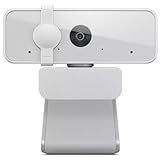
Overview:
Lenovo’s 300 FHD Webcam targets versatile use cases with a 95° wide-angle lens and 360° rotation. It delivers plug-and-play 1080p/30fps video with dual mics, designed for collaborative remote work, streaming, and gaming setups.
What Makes It Stand Out:
The ultra-wide 95° field of view accommodates group meetings or larger workspaces effortlessly, while the friction-based 360° pan/tilt mechanism allows infinite angle adjustments without software. Dual mics provide balanced audio pickup in open environments.
Value for Money:
Competitively priced, it offers unique flexibility at its tier. The wide-angle lens and physical adjustability surpass similarly priced models (like the C920S), though it lacks 60fps. Ideal for users needing dynamic framing who’d otherwise buy a separate mount.
Strengths and Weaknesses:
Strengths: Exceptional wide-angle coverage; smooth, tool-free rotation; clear dual-mic audio; sturdy clip; universal USB 2.0 compatibility. Weaknesses: Average low-light performance; plastic build feels lightweight; no advanced software features.
Bottom Line:
A standout for group calls or multi-purpose desks where framing flexibility is key. Not for low-light streamers, but essential for teams, educators, or users craving effortless angle adjustments without extra hardware.
6. Logitech Brio 4K Webcam, Video Calling, Noise-Cancelling mic, HD Auto Light Correction, Wide Field of View, Windows Hello Works with Microsoft Teams, Zoom, Google Meet, PC/Mac/Laptop/MacBook/Tablet

Overview: The Logitech Brio 4K Webcam is a premium business-grade solution designed for professional video conferencing. It delivers exceptional video clarity with 4K resolution at 30 fps, advanced light correction, and integrated noise-canceling audio, catering to remote workers and hybrid meeting environments across major platforms like Teams and Zoom.
What Makes It Stand Out: Its standout features include RightLight 3 technology for dynamic lighting adjustment in challenging conditions, three adjustable diagonal fields of view (65°, 78°, 90°), and dual omnidirectional mics that isolate voice up to 1.2 meters away. The Logi Options+ app enables granular control over zoom, focus, and color settings, while Windows Hello facial recognition adds secure, touchless login.
Value for Money: Priced at a premium, it justifies cost through superior optics, consistent 4K output, and enterprise-ready reliability unmatched by sub-$100 alternatives. Though cheaper webcams exist, the Brio’s professional features, durability, and seamless ecosystem integration offer long-term value for frequent users.
Strengths and Weaknesses: Strengths: Outstanding 4K clarity, exceptional low-light performance, versatile FOV options, robust build quality, and reliable noise cancellation. Weaknesses: High price point, 4K requires significant bandwidth, and the privacy shutter is sold separately.
Bottom Line: Ideal for professionals prioritizing broadcast-quality video and audio in critical meetings; a top-tier investment for remote work despite its cost, especially for Windows Hello users needing security and convenience.
7. Logitech Brio 105 Full HD 1080p Business Webcam with Auto-Light Balance, USB-A, Privacy Shutter, Easy Set-Up, Compatible with Windows, macOS, ChromeOS

Overview: The Logitech Brio 105 is a budget-friendly Full HD webcam targeting businesses seeking reliable, no-fuss video quality. It delivers 1080p resolution with auto-light balancing, a physical privacy shutter, and plug-and-play simplicity, certified for Google Meet and compatible with major OS platforms including ChromeOS.
What Makes It Stand Out: Its integrated privacy shutter provides instant peace of mind for remote workers, while RightLight 2 technology intelligently optimizes exposure in dim or backlit settings. Certified compatibility with Google Meet and Logitech Sync for centralized IT management makes it ideal for enterprise deployment, especially on Chromebooks.
Value for Money: Excelling in affordability, it offers essential business features at a fraction of the Brio 4K’s cost. For teams needing dependable 1080p clarity without 4K overhead, it outperforms similarly priced consumer models with its privacy shutter and professional tuning.
Strengths and Weaknesses: Strengths: Affordable pricing, physical privacy cover, effortless setup, strong low-light correction, and Google Meet certification. Weaknesses: Limited to 1080p (no 4K), narrower FOV (78°), and basic audio without advanced noise suppression.
Bottom Line: A superb value for cost-conscious businesses or home offices requiring secure, plug-and-play HD video—perfect for standard meetings where 4K isn’t essential, though audio clarity lags behind premium models.
8. Angetube 4K Webcam with AI Tracking,Remote Control 4K Web Camera/10X Digital Zoom 1080P 60fps Web cam with USB 3.0 HDR/Dual Noise Cancelling Microphones for Video Calls/Meetings/Streaming/Skype/Zoom

Overview: The Angetube 913 AI King targets streamers and presenters with AI-driven features like motion tracking and 10x digital zoom. It promises 4K/30fps and 1080p/60fps video, HDR, dual noise-canceling mics, and a wireless remote, aiming to elevate dynamic video content creation.
What Makes It Stand Out: AI tracking automatically frames multiple speakers or follows movement—a rarity at this price—while the 18-key RF remote enables 360° control for zoom and settings. USB 3.0 ensures rapid data transfer, and HDR balances lighting for consistent skin tones near windows.
Value for Money: Aggressively priced for its feature set, it undercuts Logitech while offering unique AI tools. However, 4K output may feel soft in practice, and AI reliability varies. Best for streamers needing zoom flexibility, but overkill for standard calls.
Strengths and Weaknesses: Strengths: Innovative AI framing, versatile remote control, solid HDR performance, and strong mic noise cancellation. Weaknesses: AI tracking can be erratic, 4K quality inconsistent, and build feels less premium than Logitech.
Bottom Line: A feature-packed choice for budget-conscious streamers or presenters valuing creative framing tools, but professionals should prioritize reliability—opt for Logitech unless AI tracking is non-negotiable.
9. EMEET NOVA 4K Dual-Camera 4K Webcam for PC, Wide-Angle and Telephoto Cameras, Max 11X Hybrid Zoom, PDAF Focus, Remote Control, RGB Lights, Webcam with Microphone for Business or Personal Online Calls
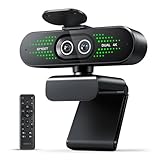
Overview: The EMEET NOVA 4K Dual-Camera Webcam innovates with two lenses sharing a single 4K sensor—a wide-angle for room views and a telephoto for speaker close-ups. It supports hybrid zoom, PDAF autofocus, and remote control, targeting presenters needing dynamic framing in meetings or training sessions.
What Makes It Stand Out: The dual-camera system enables seamless switching between room-wide and tight shots without repositioning, while 11x hybrid zoom and phase-detection autofocus ensure sharp close-ups. RGB status lighting doubles as a professional indicator, and EMEET STUDIO software offers real-time adjustments.
Value for Money: Priced mid-range, it justifies cost with unique dual-lens versatility absent in competitors. Though 4K/60fps isn’t supported during zoom, the flexibility for presentations or collaborative sessions offers tangible ROI for trainers.
Strengths and Weaknesses: Strengths: Revolutionary dual-camera framing, smooth zoom/focus, intuitive remote control, and useful status lighting. Weaknesses: RGB lighting may feel gimmicky for corporate use, and software dependency for advanced features.
Bottom Line: A game-changer for educators or presenters requiring dynamic camera angles; highly recommended if you frequently switch between group shots and individual focus, though the RGB lights might not suit conservative workplaces.
10. Galyimage 4K Webcam with Ring Light Web Cam 4K Autofocus with TOF Computer Camera 1080P 60FPS Web Camera Built-in Privacy Cover and Microphone Streaming Webcams for Zoom/Skype/Google Meet

Overview: The Galyimage 4K Webcam integrates a versatile ring light with TOF autofocus, targeting users in variable lighting. It offers 4K/30fps video, a sliding privacy cover, dual noise-canceling mics, and adjustable color temperatures, ideal for streamers or remote workers needing consistent illumination.
What Makes It Stand Out: Its built-in ring light features three color temperatures (white/natural/warm) with infinite dimming via touch sensor—unlike fixed-brightness competitors. TOF (Time-of-Flight) autofocus locks onto subjects faster than standard systems, and the physical privacy shutter ensures security.
Value for Money: Excellent for its niche, bundling a professional ring light at a modest premium over basic webcams. The lighting flexibility eliminates extra purchases, though pure video quality trails Logitech. Best for content creators prioritizing lighting control.
Strengths and Weaknesses: Strengths: Practical integrated ring light, reliable TOF focus, physical privacy cover, and broad OS compatibility. Weaknesses: Ring light can create unnatural shadows if mispositioned, and audio quality is merely adequate.
Bottom Line: A smart pick for streamers or WFH users struggling with poor lighting—its ring light versatility and privacy shutter outweigh minor video/audio compromises, but skip if you already own quality lighting gear.
Understanding Modern HD Webcam Capabilities
Beyond the Megapixel Myth
While resolution numbers like 1080p or 4K are prominently featured, they don’t tell the whole story. A higher megapixel count alone doesn’t guarantee a better image, especially in varying lighting conditions. The quality of the image sensor, the lens construction, and the processing power within the webcam are equally, if not more, critical. A well-balanced 1080p sensor with a good lens and strong processing can often outperform a poorly implemented 4K model in real-world remote work scenarios, delivering sharper details and smoother motion without excessive file sizes that strain bandwidth.
The Critical Role of the Image Sensor
The sensor is the heart of the webcam, converting light into the digital image you see. Larger sensor sizes generally capture more light, leading to significantly better performance in lower-light situations common in home offices. Look for specifications mentioning sensor size (e.g., 1/2.8", 1/2.5") rather than just megapixels. Sensors with larger individual pixels (measured in microns, µm) also gather more light per pixel, reducing noise and graininess, which is essential for maintaining a professional appearance even when natural light fades.
Frame Rate Matters for Fluid Motion
Resolution gets the spotlight, but frame rate (measured in frames per second, fps) is crucial for natural movement. While 30fps is standard and acceptable for most meetings, 60fps provides noticeably smoother video, especially when you’re gesturing, sharing presentations with motion, or participating in dynamic discussions. Higher frame rates minimize motion blur and judder, making the video feel more lifelike and reducing viewer fatigue during longer sessions. Ensure your chosen webcam supports higher frame rates at your desired resolution.
Optimizing for Real-World Lighting Conditions
Built-In Low-Light Enhancement Technologies
Poor lighting is the arch-nemesis of professional video. Modern webcams combat this with sophisticated low-light technologies. Look for features like advanced noise reduction algorithms that clean up graininess without smudging details, and dynamic exposure adjustment that brightens dim areas while preventing blown-out highlights from windows or lamps. Some models employ specialized sensor modes or processing to maximize light capture, turning murky home office corners into clear, presentable spaces without requiring a full lighting rig.
Auto White Balance Accuracy
Ever noticed how your skin tone looks unnaturally yellow under indoor lights or blue near a window? Accurate auto white balance (AWB) is vital for ensuring colors, especially skin tones, appear natural and consistent regardless of the light source (incandescent, LED, daylight). A high-quality webcam continuously analyzes the scene and adjusts color temperature to prevent these distracting shifts, maintaining a professional and authentic appearance throughout the day as lighting conditions change.
Exposure Compensation Control
Sometimes the automatic settings need a nudge. Exposure compensation allows you to manually fine-tune how bright or dark the image appears, overriding the camera’s default settings. This is invaluable if you have a bright window behind you (preventing you from becoming a silhouette) or if the auto-exposure consistently over-brightens your face under specific lamps. The ability to make small, precise adjustments ensures optimal visibility in your unique environment.
Integrated Audio Quality Considerations
Dual or Multi-Microphone Arrays
Clear audio is non-negotiable, and relying on your laptop’s often mediocre mic is risky. Many modern HD webcams incorporate high-quality dual or multi-microphone arrays. These aren’t just for volume; they use beamforming technology to focus on sound coming from your direction while actively suppressing background noise like typing, pets, or household sounds. This directional focus ensures your voice comes through clearly and consistently, even in less-than-quiet spaces.
Noise Cancellation Sophistication
Basic noise cancellation might cut out constant hums, but advanced systems use AI-powered algorithms to distinguish between human speech and a wide range of disruptive background noises (keyboard clatter, barking dogs, traffic). The best implementations learn and adapt to your specific environment, providing remarkably clear audio without making your voice sound robotic or muffled. This feature is essential for maintaining professionalism and ensuring you’re understood without constant repetition.
Audio Sync Reliability
Lip-sync issues – where the video and audio are out of alignment – are incredibly distracting and unprofessional. High-quality webcams prioritize precise audio-video synchronization. This requires robust internal processing and stable connectivity. Ensure the webcam you choose has a reputation for maintaining perfect sync, especially over extended meeting durations, to avoid the jarring disconnect that ruins communication flow.
Privacy and Security Features You Can’t Ignore
Physical Lens Shutters
In an era of heightened privacy concerns, a physical lens shutter is no longer a luxury; it’s a necessity. This simple mechanical cover provides absolute peace of mind when the camera is not in use, guaranteeing no software vulnerability or remote access can activate the lens. Look for shutters that are easy to slide open and closed with a fingertip, offering a tangible, reliable barrier against unauthorized access, far superior to software-only indicators.
Privacy Indicator Lights
Complementing the physical shutter, a clear, visible LED indicator light that illuminates whenever the camera is active provides an essential secondary layer of security. This immediate visual cue alerts you if an application unexpectedly accesses the camera, allowing you to investigate or disable it promptly. Ensure the light is bright enough to be noticeable even in well-lit rooms and positioned for easy viewing.
Secure Firmware Updates
Webcams are networked devices, making them potential security targets. Manufacturers committed to user safety provide regular, straightforward firmware updates delivered securely to patch vulnerabilities. Check if the brand has a clear update policy, a reliable update mechanism (often via companion software), and a history of prompt responses to security issues. Avoid devices from companies with a poor track record in this area.
Ease of Use and Setup for Busy Professionals
Plug-and-Play Simplicity
Time is precious for remote workers. The ideal webcam should offer true plug-and-play functionality, especially via USB-C, working seamlessly with major operating systems (Windows, macOS, ChromeOS) and popular video conferencing platforms (Zoom, Teams, Google Meet) without requiring complex driver installations or configuration. A smooth, hassle-free setup means you can be camera-ready in seconds, not minutes.
Intuitive Companion Software
While plug-and-play is essential, robust companion software adds significant value for fine-tuning. Look for applications that are clean, intuitive, and offer useful controls beyond basic settings: saving custom profiles for different meeting types, adjusting field of view, fine-tuning exposure and white balance, managing background effects, and checking for firmware updates. Avoid software that’s bloated, confusing, or riddled with unnecessary advertisements.
Universal Mounting Flexibility
Your webcam needs to go where you work, not just sit on a laptop screen. A versatile mounting system is crucial. Ensure compatibility with standard tripods (1/4"-20 thread), robust clip mechanisms that securely attach to monitors of various thicknesses (including ultrawide and curved screens), and potentially magnetic bases for flexible placement on metal surfaces. This adaptability allows you to position the camera at eye level for the most natural and engaging perspective, regardless of your desk setup.
Future-Proofing Your Investment
USB-C Connectivity Standard
USB-C is the undisputed standard for modern peripherals, offering faster data transfer, universal compatibility across the latest laptops and devices, and often power delivery. Choosing a webcam with a USB-C connection ensures compatibility with current and future hardware, eliminating the need for dongles or adapters. It’s a simple specification that significantly enhances longevity and ease of use.
Compatibility with Emerging Platforms
Video conferencing technology continues to evolve rapidly. Consider a webcam from a manufacturer known for strong developer relations and timely updates. This increases the likelihood that your device will seamlessly integrate with new features in upcoming versions of major platforms (like advanced virtual backgrounds, eye contact correction, or spatial audio) without requiring a hardware replacement. Check forums or reviews for the manufacturer’s track record.
Sustainable Design and Longevity
As environmental awareness grows, look for signs of sustainable design: use of recycled materials in construction, energy-efficient components that minimize power draw, and packaging that reduces waste. More importantly, prioritize build quality and a manufacturer known for durability and long-term software support. A well-built webcam that receives updates for several years represents a smarter, more sustainable investment than a cheaper model that fails or becomes obsolete quickly.
Frequently Asked Questions
How important is 4K resolution for typical remote work video calls?
For most standard video conferencing, high-quality 1080p is perfectly sufficient and places less strain on your internet bandwidth and computer resources. 4K offers benefits for very large shared screens or significant digital zoom, but its advantages are often negligible in standard meeting grids and may require more processing power.
Can a good webcam significantly improve audio quality compared to my laptop?
Absolutely. Dedicated webcams often feature superior multi-microphone arrays with advanced noise cancellation and beamforming technology specifically designed to isolate your voice and suppress background noise, typically outperforming the basic microphones found in most laptops.
Is a physical privacy shutter really necessary, or is a software indicator enough?
A physical shutter is strongly recommended. Software indicators can be disabled or bypassed by malware, whereas a mechanical shutter provides a guaranteed, tangible barrier when closed, offering the highest level of privacy assurance against unauthorized camera access.
What’s the single most important factor for good video in a home office with variable lighting?
A webcam with a high-quality image sensor (larger size preferred) combined with sophisticated low-light processing and accurate auto white balance is crucial. These features work together to adapt to changing light, reduce noise, and maintain natural skin tones without requiring manual adjustments or perfect lighting setup.
Do I need special software to use advanced webcam features like background blur?
Many modern operating systems (Windows, macOS) and major video conferencing platforms now have built-in background blur/virtual background features that work with standard UVC (USB Video Class) webcams. However, companion software from the webcam manufacturer often provides more refined control, better edge detection, and additional customization options.
How does field of view (FOV) impact my video meetings?
A wider FOV (e.g., 90 degrees) allows more of your surroundings or multiple people in a room to be captured without moving the camera, useful for collaborative spaces. A narrower FOV (e.g., 78 degrees) provides a tighter, more focused shot on the individual, often preferred for standard one-on-one or small group meetings as it feels more intimate and less distorted.
Are webcams with built-in ring lights worthwhile?
Built-in ring lights offer convenient, consistent frontal lighting, which is ideal for video. However, they are often lower-powered and less adjustable than standalone ring lights. They are a good solution for quick, adequate lighting but may not match the quality and flexibility of a dedicated, higher-end external light for optimal professional results.
What causes lag or choppy video during calls, and how can my webcam choice help?
Lag is usually caused by insufficient bandwidth, a slow computer processor, or poor webcam encoding. Choosing a webcam with efficient hardware encoding (like H.264 or H.265) reduces the processing burden on your computer, leading to smoother video, especially on less powerful machines or with limited internet speed.
How often should I expect to replace a quality HD webcam?
With proper care, a well-built HD webcam from a reputable manufacturer should last 3-5 years or more. Factors affecting lifespan include build quality, usage frequency, handling, and whether the manufacturer continues to provide firmware updates for compatibility with new software and security patches.
Can a better webcam help reduce “Zoom fatigue”?
Indirectly, yes. A high-quality webcam that delivers clear, stable, natural-looking video with good audio reduces cognitive load for participants. Straining to see blurry details, interpret muffled audio, or adjust to poor lighting contributes significantly to video call fatigue. A reliable, high-fidelity experience makes communication smoother and less draining.