The way we present ourselves on video calls has evolved from a simple technical requirement into a critical component of professional credibility. In 2026, hybrid and remote work aren’t just trends—they’re the established norm, making your on-screen appearance a direct reflection of your competence and attention to detail. Gone are the days when a shaky laptop camera sufficed; today’s professionals need reliable, high-quality video that conveys clarity, confidence, and engagement, whether pitching to a client from a home office or collaborating globally across time zones. The right webcam isn’t a luxury—it’s non-negotiable infrastructure for modern business communication.
This shift demands more than just a basic plug-and-play device. We’re navigating an era where AI-powered enhancements, sophisticated lighting adaptation, and seamless integration with diverse meeting platforms define the standard. Choosing poorly can lead to frustrating glitches, unflattering visuals that undermine your message, or constant technical hiccups that erode trust. Conversely, investing wisely in the right video technology ensures you’re consistently seen and heard at your best, projecting professionalism without demanding constant troubleshooting. Understanding the features that deliver this reliability—not specific brand names—is the foundation of making a smart, future-proof decision for your career toolkit.
Top 10 Video Conferencing Webcams
Detailed Product Reviews
1. Logitech C920x HD Pro PC Webcam, Full HD 1080p/30fps Video, Clear Audio, HD Light Correction, Works with Microsoft Teams, Google Meet, Zoom, Nintendo Switch 2’s new GameChat Mode, Mac/Tablet- Black

Overview: The Logitech C920x remains a benchmark in reliable HD webcams, targeting professionals, streamers, and gamers needing consistent video quality for calls, streaming, or Nintendo Switch 2’s GameChat mode. Its enduring popularity stems from robust build and universal compatibility. What Makes It Stand Out: Unique Nintendo Switch 2 GameChat compatibility sets it apart for gamers. Advanced HD light correction ensures sharp, vibrant images in low light, while dual mics deliver clear stereo audio. Autofocus and plug-and-play simplicity across Windows, Mac, Chrome OS, and tablets make it exceptionally versatile. Value for Money: Priced mid-range, it offers exceptional longevity and performance. While newer models exist, the C920x’s proven reliability, broad software support (Zoom, Teams, Meet), and lack of subscription fees justify its cost better than cheaper, less durable alternatives. Strengths and Weaknesses: Strengths: Reliable low-light performance, crisp 1080p/30fps, excellent mic clarity, wide OS compatibility, sturdy build. Weaknesses: No 4K, fixed field of view (78°), privacy cover sold separately, no firmware updates for newer platforms. Bottom Line: An outstanding, future-proof choice for professionals and Switch 2 users seeking dependable HD quality. Its versatility and durability make it a top recommendation despite lacking ultra-premium features.
2. NexiGo N60 1080P Webcam with Microphone, Software Control & Privacy Cover, USB HD Computer Web Camera, Plug and Play, for Zoom/Skype/Teams, Conferencing and Video Calling

Overview: The NexiGo N60 is a feature-packed, budget-friendly 1080p webcam designed for everyday users prioritizing privacy, ease of use, and solid performance in home offices or online classrooms. What Makes It Stand Out: The integrated physical privacy cover is a major security advantage, rarely included at this price. Its glass lens (3.6mm) optimizes clarity between 1.5–13 feet, and the noise-canceling mic effectively minimizes background chatter during calls on Zoom or Teams. Value for Money: Exceptional for its price point. It matches the C920x’s core 1080p specs while adding a privacy shutter and broader device compatibility (including Android tablets), undercutting rivals without sacrificing essential quality for most users. Strengths and Weaknesses: Strengths: Physical privacy cover, strong noise-canceling mic, true plug-and-play, wide OS/device support, glass lens clarity. Weaknesses: Fixed focus (less flexible than autofocus), potential audio delays (may require firmware update), no low-light boost software. Bottom Line: The best budget pick for privacy-conscious users needing reliable HD video. Its thoughtful extras and ease of use deliver outstanding value for remote work or learning.
3. SZGIARUY 1080P HD Webcam for PC with Auto Focus & Noise Cancelling Mic - Plug and Play Computer Camera for Video Conferencing, Online Classes, Live Streaming - Ideal for Remote Workers/Students/Gamers

Overview: This no-frills SZGIARUY webcam targets students and remote workers seeking basic, affordable HD video calling with essential features like noise cancellation and auto light adjustment. What Makes It Stand Out: Emphasis on effortless setup—truly plug-and-play with no drivers and a generous 5ft USB cable. Automatic light correction adapts well to changing room brightness, and the noise-canceling mic ensures clear audio during online classes without complexity. Value for Money: Highly cost-effective for entry-level needs. It delivers core 1080p functionality at a lower price than established brands, making it ideal for temporary setups or users on tight budgets who don’t need advanced streaming features. Strengths and Weaknesses: Strengths: Ultra-simple plug-and-play, effective noise-canceling mic, solid auto light correction, long cable, very affordable. Weaknesses: Basic plastic build, limited low-light performance, no privacy cover, no software customization, fixed focal range less versatile. Bottom Line: A solid, economical choice for students or casual users needing straightforward HD video. Prioritizes simplicity over premium features, offering reliable performance where budget is key.
4. AOC 4k Webcam for PC with Microphone, Computer Camera with Noise Cancellation, Privacy Cover, 99° FOV, Plug & Play USB Webcam for Streaming, Conferencing, Zoom, Skype, Facetime, Laptop, PC, Skype

Overview: The AOC 4K webcam targets professionals and streamers demanding ultra-high resolution, expansive framing, and robust privacy controls for premium video presentations or content creation. What Makes It Stand Out: True 4K resolution and a 99° wide field of view are rare in consumer webcams, capturing stunning detail and group shots effortlessly. The physical sliding privacy cover, 360° swivel mount, and auto light correction elevate it beyond standard HD models. Value for Money: Justifiable for creators needing 4K, but overkill for typical Zoom calls. It competes with higher-end models, offering superior optics and flexibility at a mid-premium price. The lack of autofocus is a notable trade-off for the resolution. Strengths and Weaknesses: Strengths: Exceptional 4K clarity, wide 99° FOV, physical privacy shutter, versatile 360° mounting, strong auto light correction. Weaknesses: 4K may strain bandwidth/systems, no autofocus (fixed focus), mic quality lags behind dedicated audio gear, bulkier design. Bottom Line: The top pick for streamers or professionals requiring cinematic 4K quality and wide framing. Its premium features justify the cost if you truly need the resolution boost.
5. EMEET 1080P Webcam with Microphone, C960 Web Camera, 2 Mics Streaming Webcam, 90°FOV Computer Camera, Plug and Play USB Web Cam for Online Calling/Conferencing, Zoom/Teams/Facetime/YouTube, Laptop/PC

Overview: The EMEET C960 is a versatile 1080p streaming webcam optimized for clear audio, wide viewing angles, and adaptability in varied lighting—ideal for hybrid workers, educators, and content creators. What Makes It Stand Out: Dual noise-reduction mics deliver broadcast-quality audio clarity, a standout feature. Its 90° FOV fits more people, low-light boost excels near windows, and the removable privacy cover adds security—all in a compact, foldable design. Value for Money: Excellent for streamers prioritizing audio. It rivals Logitech on core specs while offering superior mic performance and light handling at a competitive price, though 4K alternatives exist for higher budgets. Strengths and Weaknesses: Strengths: Outstanding dual-mic noise cancellation, superb low-light adaptation, 90° wide FOV, removable privacy cover, plug-and-play ease. Weaknesses: Fixed focus limits flexibility, incompatible with Windows Hello, plastic build feels less durable than C920x. Bottom Line: The definitive choice for vocal clarity in calls or streams. If audio quality is your priority, the C960’s mic performance and reliability make it highly recommended.
6. Logitech BCC950 Desktop Conferencing Solution, Full HD 1080p B23 Calling, Hi-Definition Webcam, Speakerphone with Noise-Reducing Mic, for Skype, WebEx, Zoom PC/Mac/Laptop/MacBook - Black
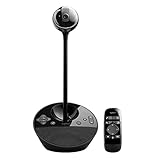
Overview: The Logitech BCC950 is an all-in-one desktop conferencing solution designed for small meeting rooms or dedicated home offices, integrating a 1080p HD webcam with a high-fidelity speakerphone system. It targets professionals needing a streamlined setup for frequent video calls. What Makes It Stand Out: Its standout feature is the seamless integration of Carl Zeiss optics for sharp 1080p video and a powerful noise-cancelling speakerphone effective up to 8 feet away. Certified for major platforms like Skype for Business and WebEx, it includes a remote control for pan/tilt/zoom and one-touch call management, eliminating the need for separate audio hardware. Value for Money: Priced moderately higher than basic webcams, it offers exceptional value by replacing multiple components (webcam, speaker, mic) with a single certified business-grade unit. This reduces desk clutter and setup complexity compared to piecing together compatible peripherals. Strengths and Weaknesses: Strengths: Business-grade audio/video clarity; robust compatibility; intuitive remote control; effective echo cancellation. Weaknesses: Bulky design unsuitable for laptops; fixed 1080p resolution lags behind newer 4K models; remote can be misplaced. Bottom Line: Ideal for small会议室 or executives prioritizing integrated, reliable conferencing without multiple devices; a smart investment for professional environments despite its size and resolution limitations.
7. Logitech Brio 4K Webcam, Video Calling, Noise-Cancelling mic, HD Auto Light Correction, Wide Field of View, Windows Hello Works with Microsoft Teams, Zoom, Google Meet, PC/Mac/Laptop/MacBook/Tablet

Overview: The Logitech Brio is a premium 4K webcam targeting professionals and content creators who demand exceptional video quality for video calls, streaming, or recordings across diverse lighting conditions. What Makes It Stand Out: It boasts true 4K resolution at 30fps, RightLight 3 auto-light correction for optimal exposure in any environment, and a unique adjustable field of view (65°–90°). The Logi Options+ app enables granular control over zoom, focus, and color settings, while dual noise-cancelling mics ensure clear audio. Value for Money: Positioned at a premium price, it justifies cost through future-proof 4K capability, superior low-light performance, and versatile framing options. It outperforms most 1080p competitors and rivals more expensive studio setups for professional remote work. Strengths and Weaknesses: Strengths: Outstanding 4K/1080p video; excellent auto-light correction; flexible FOV presets; robust app customization; clean audio. Weaknesses: Premium cost; 4K requires significant bandwidth/storage; app dependency for full features. Bottom Line: Highly recommended for professionals seeking top-tier video quality and customization; worth the investment for frequent presenters, streamers, or those in variable lighting, despite the higher price tag.
8. j5create 360 Degree All Around Meeting Webcam - 1080P HD Video Conference Camera with High Fidelity Microphone, USB-C | for Video Conferencing, Online Classes, and Collaboration (JVCU360)

Overview: The j5create JVCU360 is a unique 1080p webcam featuring a rotating 360° lens and omnidirectional mic, designed for collaborative spaces where participants move around a table or room during meetings. What Makes It Stand Out: Its revolutionary rotating camera allows panoramic views without physical relocation, offering six preset display modes to frame the entire room or focus on specific zones. The USB-C plug-and-play simplicity and broad app compatibility (Zoom, Teams, etc.) cater to dynamic group settings. Value for Money: Competitively priced for its niche capability, it offers strong value for small teams or classrooms needing flexible room coverage without expensive PTZ camera systems. However, it lacks advanced features like 4K or sophisticated light correction found in pricier models. Strengths and Weaknesses: Strengths: Truly innovative 360° coverage; easy setup; good for group collaboration; compact design. Weaknesses: 1080p resolution only; limited low-light performance; touch bar requires precise interaction; firmware updates occasionally needed. Bottom Line: A specialized tool perfect for round-table meetings or classrooms where movement is frequent; less ideal for solo users but invaluable for collaborative environments seeking affordable room-wide coverage.
9. Logitech C920S HD Pro Webcam, Full HD 1080p/30fps Video Calling, Clear Stereo Audio, Light Correction, Privacy Shutter, Works with Skype, Zoom, FaceTime, Hangouts, PC/Mac/Laptop/Tablet/Xbox

Overview: The Logitech C920S is a versatile, privacy-focused 1080p webcam built for everyday professionals and remote workers prioritizing security, reliability, and broad compatibility across home and office setups. What Makes It Stand Out: Its integrated physical privacy shutter provides instant lens coverage, a rarity in its class. Combined with reliable 1080p autofocus, RightLight 2 for decent low-light correction, and crisp stereo audio, it delivers consistent performance for calls and recordings without fuss. Value for Money: An excellent mid-range option, it balances affordability with essential pro features like the privacy shutter and universal app support. It significantly outperforms budget webcams while costing far less than 4K models, making it a practical daily driver. Strengths and Weaknesses: Strengths: Physical privacy shutter; solid 1080p/video; wide software compatibility; plug-and-play ease; durable build. Weaknesses: Basic low-light handling; no zoom or FOV adjustment; shutter mechanism can feel flimsy over time. Bottom Line: A top recommendation for security-conscious users needing dependable HD quality; ideal for general remote work where simplicity, privacy, and reliability outweigh cutting-edge specs.
10. iContact Camera Pro - HD 4K Webcam with Eye Contact, Noise Cancelling Mic, Plug and Play USB for Mac and PC, Zoom Webcam for Conferencing and Video Calling (Pro Camera)

Overview: The iContact Camera Pro is a 4K webcam engineered to solve the “eye contact problem” in video calls, featuring a retractable arm that positions the lens at eye level for more natural, engaging conversations. What Makes It Stand Out: The flip-down arm uniquely elevates the camera to eye level, fostering genuine eye contact—a major differentiator. Backed by a 12MP 4K sensor, automatic light/white balance adjustment, and dual noise-cancelling mics, it promises immersive, professional-quality calls out of the box. Value for Money: Priced competitively against other 4K webcams, its eye-contact innovation adds significant perceived value for frequent communicators. The plug-and-play simplicity and Zoom certification justify the cost for professionals where connection quality impacts credibility. Strengths and Weaknesses: Strengths: Revolutionary eye-contact design; excellent 4K clarity; smart auto-adjustments; clean audio; ultra-easy setup. Weaknesses: Arm mechanism may feel less sturdy; 78° FOV narrower than some competitors; 4K demands strong internet. Bottom Line: Highly recommended for presenters, sales teams, and remote leaders prioritizing engagement; the eye-contact feature transforms call dynamics, making it a standout investment for communication-focused professionals.
Key Image Quality Considerations for Professional Video
Understanding Resolution Beyond the Hype
While 4K resolution is increasingly common, true professional value lies in how consistently a webcam delivers crisp, detailed footage at standard meeting resolutions like 1080p or 1440p. Prioritize sensors that excel in real-world conditions—low light performance and dynamic range often matter far more than the maximum pixel count for everyday business calls. A camera that renders clear facial expressions and subtle gestures without excessive noise or blurring is paramount.
The Critical Role of Sensor Size and Quality
Larger image sensors generally capture more light and detail, leading to significantly better image quality, especially in less-than-ideal lighting. Don’t be swayed solely by megapixel numbers; investigate the actual sensor technology (e.g., CMOS types) and size. A mid-range webcam with a superior sensor can outperform a higher-megapixel model with a tiny, low-quality sensor, providing the smooth, natural-looking video essential for maintaining viewer engagement.
Frame Rate Stability for Fluid Communication
A consistent high frame rate (30fps is standard, 60fps is ideal for smoother motion) prevents choppiness during gestures or when sharing content. Look for webcams that maintain their advertised frame rate reliably under various lighting conditions and processing loads. Unstable frame rates disrupt the natural flow of conversation and can cause viewer fatigue, undermining the connection you’re trying to build.
Mastering Lighting Performance in Any Environment
Built-in Adaptive Lighting Technology
Professional webcams in 2026 increasingly feature intelligent lighting correction. This goes beyond simple brightness boosts; it involves sophisticated algorithms that analyze the scene, balance highlights and shadows in real-time, and reduce harsh contrasts—crucial for home offices with uneven windows or overhead lights. This ensures your face remains visible and natural-looking, regardless of your background lighting setup.
Low-Light Capability Without Grain
The ability to produce a clean, usable image in dimly lit rooms is no longer a premium perk but a baseline requirement. Evaluate specifications related to low-light performance (often measured in lux) and seek real-world test results. A camera that introduces excessive digital noise or turns you into a grainy silhouette during evening calls severely impacts perceived professionalism and message clarity.
Compatibility with Ambient Light Sensors
Some advanced setups integrate with room ambient light sensors (either built into the webcam or via your computer). This allows the camera to dynamically adjust exposure settings as natural light changes throughout the day, preventing you from constantly appearing too dark in the morning or washed out by afternoon sun, ensuring consistent appearance across all your meetings.
Audio Clarity: Why Integrated Mics Matter More Than You Think
Noise Cancellation Precision
Integrated microphones with advanced AI-powered noise suppression are vital. They should effectively isolate your voice from common background distractions like keyboard clatter, HVAC noise, barking dogs, or distant traffic. The best systems use multiple mic arrays and machine learning to distinguish speech from noise far more accurately than basic echo cancellation, preventing constant “Can you hear me now?” interruptions.
Directional Microphone Arrays
Look for webcams featuring beamforming microphone technology. These arrays focus on sound coming from directly in front of the camera (where you are seated), minimizing pickup from the sides and rear. This directional focus significantly improves voice clarity on the receiving end, making your contributions easier to understand, especially in open-plan or noisy home environments.
Audio Quality vs. External Mic Trade-offs
While dedicated external microphones offer superior fidelity, the convenience and consistent positioning of a high-quality integrated array often provide the best practical solution for most professionals. The seamless plug-and-play nature and guaranteed alignment between your video frame and audio source eliminate common setup headaches and ensure your voice always matches your on-screen presence.
Seamless Integration and User Experience Essentials
Universal Compatibility Across Platforms
Ensure the webcam works flawlessly with all major video conferencing applications (Zoom, Teams, Google Meet, Webex, etc.) and operating systems (Windows, macOS, Linux). Avoid models requiring proprietary software that might conflict with security policies or IT management systems. True plug-and-play USB or USB-C compatibility is non-negotiable for hassle-free adoption across diverse work environments.
Intuitive Physical Controls and Presets
Physical buttons or dials on the webcam itself for instant mute (video and audio), zoom, or switching between pre-configured settings (e.g., “Meeting Mode” vs. “Presentation Mode”) enhance control without fumbling through software menus mid-call. This immediacy is crucial for maintaining professionalism during critical interactions.
Simplified Mounting and Positioning Flexibility
A versatile mounting system—compatible with monitors, laptops, tripods, and even certain desk lamps—is essential. The ability to easily adjust height, angle, and distance ensures you can achieve the flattering, eye-level camera position that fosters genuine connection, rather than the unflattering up-angle from a laptop screen.
Privacy and Security Features You Can’t Overlook
Physical Lens Shutters as Standard
A simple, reliable physical cover that slides or flips to completely block the lens when not in use is no longer optional; it’s a fundamental security and privacy expectation. Software-only indicators are insufficient and potentially vulnerable. Verify the shutter mechanism is sturdy and easy to operate with one hand.
Hardware-Based Indicators
Complementing the physical shutter, a clear, always-on LED indicator (preferably hardwired to the camera sensor) provides visual confirmation when the camera is active. This prevents accidental activation and offers peace of mind, addressing legitimate concerns about unauthorized access that persist in 2026.
Secure Firmware and Update Policies
Research the manufacturer’s commitment to security. Regular, easy-to-install firmware updates are critical for patching potential vulnerabilities. Prioritize brands with a transparent security track record and a clear, long-term update policy for their devices, protecting your device from emerging threats over its lifespan.
Future-Proofing Your Investment
AI-Powered Enhancements Beyond Basic Filters
Look for cameras leveraging on-device AI for intelligent features like automatic framing (keeping you centered as you move), real-time background replacement without a green screen (using depth sensing), and even subtle gaze correction. These features, increasingly standard, reduce cognitive load and enhance presence without requiring manual adjustment during calls.
Scalability for Emerging Technologies
Consider how the webcam integrates with the evolving tech landscape. Does it support potential future standards like higher bandwidth USB4 for uncompressed video? Is it compatible with spatial audio setups or emerging VR/AR collaboration tools? Choosing a device with robust specifications and modern connectivity offers a longer useful life as meeting technologies advance.
Sustainability and Longevity Focus
With growing corporate ESG commitments, evaluate the manufacturer’s approach to repairability, recyclability, and product lifespan. Webcams built with durable materials, replaceable components (like lens covers), and long-term driver support represent a more responsible and cost-effective investment over time, reducing e-waste and the need for frequent replacements.
Balancing Budget with Professional Impact
Defining Your Essential vs. Nice-to-Have Features
Honestly assess your primary use cases. If you conduct high-stakes client presentations daily, investing in top-tier low-light performance and AI features is justified. For internal team check-ins, core reliability and decent 1080p might suffice. Avoid overspending on features you won’t utilize, but never compromise on fundamental image stability, audio clarity, and privacy basics.
Total Cost of Ownership Perspective
Factor in more than just the purchase price. Consider potential costs from downtime due to failures, the time spent troubleshooting flaky devices, or the reputational cost of poor video quality during critical moments. A slightly higher initial investment in a robust, reliable webcam often delivers superior value by ensuring consistent, professional performance when it matters most.
Enterprise-Grade Support for Business Users
If purchasing for an organization, prioritize vendors offering business-focused support: dedicated enterprise channels, volume licensing, centralized management tools for IT deployment, and longer warranty periods. Reliable, responsive technical assistance minimizes disruption and ensures smooth integration across your entire team.
## Frequently Asked Questions
What resolution is truly necessary for professional video conferencing in 2026?
1080p Full HD remains the essential standard for clear, professional video in most business contexts. While 4K is available, its benefits are often negligible for standard video calls due to platform compression and screen sizes. Prioritize excellent 1080p performance, especially in varying lighting, over a higher resolution that may not be fully utilized.
How important is a dedicated webcam compared to a laptop’s built-in camera?
Dedicated webcams consistently outperform most built-in laptop cameras, offering significantly better image sensors, superior low-light handling, more flexible positioning, and often better microphones. For anyone regularly participating in professional video calls, a dedicated webcam is a worthwhile investment for improved clarity and presentation.
Can software fixes replace the need for a good hardware webcam?
While software enhancements (like virtual backgrounds or noise suppression) are valuable, they cannot compensate for fundamentally poor hardware. A weak sensor or microphone will still produce subpar base video and audio that software can only marginally improve. Good hardware is the essential foundation; software adds polish.
What’s the single most critical feature for avoiding bad video calls?
Reliable performance in your actual working environment’s lighting is paramount. A webcam that consistently delivers a clear, well-exposed image in your typical home office or workspace—without constant manual adjustment—is more crucial than ultra-high resolution or fancy AI features for preventing the most common video call pitfalls.
Are expensive webcams worth it for most professionals?
It depends on your specific needs and call frequency. For occasional internal meetings, a solid mid-range model often suffices. However, for professionals regularly engaging in client-facing presentations, sales pitches, or global collaboration where image quality directly impacts perception, investing in higher-end models with superior sensors, lighting adaptation, and audio justifies the cost through consistent, polished performance.
How do I test a webcam’s low-light performance before buying?
Look for detailed, independent review videos shot in realistic home office lighting scenarios (not just studio tests). Pay attention to how much digital noise (grain) appears, whether facial features remain distinct, and if the image becomes unnaturally dark or overly bright in dim conditions. Manufacturer specs on minimum lux levels can offer a clue but real-world tests are more reliable.
Why is microphone quality on the webcam itself important if I use headphones?
Integrated webcam mics provide a consistent audio source directly aligned with your video frame, eliminating potential sync issues or positioning problems with separate headsets. They also allow for natural interaction when you’re not wearing headphones (e.g., during quick stand-ups). High-quality integrated mics offer crucial flexibility and reliability.
What privacy feature is absolutely non-negotiable?
A physical lens shutter that completely blocks the camera when not in use is essential. Software indicators can be hacked or malfunction; a physical barrier provides the only guaranteed visual and functional privacy assurance, addressing fundamental security concerns that software alone cannot solve.
How do I ensure my webcam works perfectly with my company’s video conferencing setup?
Prioritize webcams with universal USB plug-and-play compatibility and confirm they work with your specific meeting platforms (Zoom, Teams, etc.) through reviews or manufacturer specs. Avoid models requiring proprietary drivers or software that might conflict with corporate IT security policies. Simplicity and broad compatibility are key.
What’s the best way to position my webcam for professional video calls?
Position the camera at or slightly above eye level, centered with your screen. This creates a natural, engaging angle where you appear to be making direct eye contact with participants. Avoid placing it too low (causing unflattering up-angles) or too high. A dedicated webcam mount offers far more flexibility to achieve this than a laptop screen.