Imagine this: you’re rushing between meeting rooms in a bustling co-working space, laptop under one arm, coffee in the other, trying to catch a quick audio clip before your next stand-up. Your current headphones? Either a bulky pair weighing you down or flimsy earbuds that keep slipping out as you navigate the maze of hot desks. For the modern professional juggling multiple workspaces daily, the right audio companion isn’t a luxury—it’s mission-critical for focus, communication, and sanity. The constant shift from open-plan chaos to quiet corners demands gear that adapts as fast as your schedule changes.
Enter the often-overlooked hero: the on-ear headphone. Forget the assumptions of yesteryear; 2026 has ushered in a renaissance for this category, specifically tuned for the nomadic worker. They strike that elusive sweet spot between the immersive isolation of over-ears and the portability of earbuds, offering serious sound without sacrificing situational awareness or pocket real estate. As hot desking evolves from a pandemic stopgap to a core workplace strategy, understanding what makes a truly effective on-ear model for this dynamic environment is no longer just helpful—it’s essential for maintaining productivity and professional presence wherever your desk happens to be today.
Top 10 On-Ear Headphones for Work
Detailed Product Reviews
1. Sony WH-CH520 Wireless Headphones Bluetooth On-Ear Headset with Microphone and up to 50 Hours Battery Life with Quick Charging, Black

Overview:
The Sony WH-CH520 delivers reliable Bluetooth audio for daily use, targeting commuters and casual listeners with its extended battery life and streamlined design. It emphasizes accessibility and consistent performance for everyday scenarios.
What Makes It Stand Out:
Its standout feature is the exceptional 50-hour battery life, ideal for extended travel or multi-day events without recharging. The lightweight, adjustable fit ensures comfort during prolonged wear, while multipoint connectivity allows seamless switching between two devices. The Sony Headphones Connect app further enhances value with customizable EQ settings.
Value for Money:
Priced mid-range, it offers strong value by balancing premium Sony audio quality with practical features like quick charging and durable construction. It undercuts competitors with similar battery life while avoiding the bloat of high-end noise cancellation, making it a sensible choice for budget-conscious users prioritizing longevity.
Strengths and Weaknesses:
Strengths: Outstanding battery life; lightweight, comfortable fit; intuitive multipoint pairing; app-based sound customization; reliable microphone for calls.
Weaknesses: Basic on-ear design lacks immersive noise isolation; sound profile leans neutral (less bass impact); no active noise cancellation.
Bottom Line:
A dependable, comfortable headset for users needing marathon battery life and fuss-free connectivity. Ideal for travelers and daily commuters, though audiophiles seeking deep noise suppression may look elsewhere.
2. TECKNET Wireless Headset, Bluetooth Headset with Noise Cancelling Microphone - Rechargeable Bluetooth V5.2 Headphones, 50H Playtime & Mic Mute, On Ear Headphones for Trucker/Remote Work/Call Center

Overview:
The TECKNET wireless headset is engineered for professionals in noisy environments, like call centers or truckers, featuring robust noise-canceling tech and extended uptime for demanding workdays.
What Makes It Stand Out:
Its 96% environmental noise suppression via the boom mic and dedicated mute button excel in chaotic settings. The 50-hour playtime, 36-month warranty, and 270° rotatable mic offer exceptional reliability. Bluetooth 5.2 ensures stable dual-device pairing within a 15m range, critical for multitasking.
Value for Money:
At a competitive price, it justifies cost with specialized work features: enterprise-grade mic clarity, industry-leading warranty, and cross-platform compatibility (Windows, macOS, iOS, Android). It outperforms similarly priced headsets in durability and noise handling, ideal for remote workers needing all-day comfort.
Strengths and Weaknesses:
Strengths: Exceptional noise-canceling mic; 50-hour battery; 36-month warranty; comfortable for long sessions; mute button for privacy.
Weaknesses: Bulky on-ear design may cause fatigue; sound quality adequate but not premium; app-free customization limits audio tuning.
Bottom Line:
A top pick for professionals in loud settings needing crystal-clear calls and rugged reliability. The warranty and noise control make it a smart investment for remote work, despite average music performance.
3. Logitech H390 Wired Headset for PC/Laptop, Stereo Headphones with Noise Cancelling Microphone, USB-A, in-Line Controls, Works with Chromebook - Rose

Overview:
The Logitech H390 is a straightforward wired headset designed for office or educational use, prioritizing plug-and-play simplicity and clear communication over advanced features.
What Makes It Stand Out:
Its rotating noise-canceling boom mic effectively minimizes background chatter, while the USB-A plug ensures universal compatibility with PCs, Macs, and Chromebooks—no drivers needed. The discreet rose finish and tuck-away mic offer subtle style and convenience for shared workspaces.
Value for Money:
As an entry-level option, it delivers remarkable value through reliability and zero-latency audio. At a fraction of wireless models’ cost, it avoids battery anxiety and connection issues, making it perfect for budget-focused schools or call centers needing durable, no-fuss headsets.
Strengths and Weaknesses:
Strengths: True plug-and-play setup; effective noise-canceling mic; comfortable padded earcups; affordable; works with all major OSes.
Weaknesses: Wired design limits mobility; sound quality functional but flat for music; mic rotation mechanism feels less sturdy.
Bottom Line:
An excellent basic headset for clear voice calls in offices or classrooms. Choose it for hassle-free reliability and value, but skip if you need wireless freedom or rich audio.
4. JLab Go Work Pop On-Ear Wireless Headset, Black, 50+ Hours Playtime, Bluetooth Multipoint, Rotating Boom Mic, Noise Canceling MEMS Microphone, Light-Weight, Portable, PC/Mac| Mobile (1 Pack)

Overview:
JLab’s Go Work Pop targets hybrid workers with a wireless on-ear design focused on call clarity, all-day battery life, and seamless device switching between computers and phones.
What Makes It Stand Out:
The dual EQ modes (Work for voice emphasis, Music for bass) and rotating boom mic with MEMS noise cancellation optimize it for both meetings and entertainment. Bluetooth multipoint and 50+ hour battery enable uninterrupted productivity, while Cloud Foam earcups ensure lightweight comfort during marathon sessions.
Value for Money:
It punches above its price tier by combining work-specific features (like the boom mic) with consumer-friendly extras (color options, portability). It undercuts premium brands like Jabra while matching their battery life and multipoint tech, ideal for cost-aware remote teams.
Strengths and Weaknesses:
Strengths: Versatile EQ modes; excellent 50+ hour battery; comfortable for all-day wear; precise mic noise cancellation; multipoint pairing.
Weaknesses: On-ear design leaks sound in loud spaces; build quality feels budget; no app for deeper customization.
Bottom Line:
A versatile, affordable work headset excelling in call quality and battery life. Highly recommended for remote professionals, though not ideal for noisy open offices.
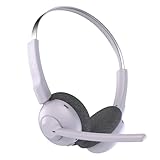
5. JLab Go Work Pop On-Ear Wireless Headset, Lilac, 50+ Hours Playtime, Bluetooth Multipoint, Rotating Boom Mic, Noise Canceling MEMS Microphone, Light-Weight and Portable, for PC/Mac or Mobile
Overview:
Identical to the black variant but in lilac, this JLab Go Work Pop headset serves remote workers seeking reliable wireless performance with a pop of color, emphasizing call clarity and endurance.
What Makes It Stand Out:
The rotating boom mic with MEMS noise cancellation and dual EQ modes (Work/Music) ensure adaptability across tasks. Its 50+ hour battery and Bluetooth multipoint let users switch effortlessly between laptop and phone, while the lilac hue offers style without compromising portability.
Value for Money:
Priced accessibly, it delivers exceptional value for hybrid workers needing both professional call quality and casual music use. The color option personalizes without inflating cost, outperforming similarly priced headsets in battery life and mic functionality.
Strengths and Weaknesses:
Strengths: Long 50+ hour battery; comfortable lightweight build; effective noise-canceling mic; intuitive EQ switching; vibrant lilac design.
Weaknesses: On-ear fit lacks passive noise isolation; plasticky build; no companion app for settings.
Bottom Line:
A stylish, functional headset that nails essentials for remote work. Choose the lilac for personality without sacrificing performance—best for home offices, not bustling cafes.
6. Mopchnic Bluetooth Headset, Wireless Headphone with AI Noise-Canceling Microphone On Ear Wireless Headset with USB Dongle for Computer Office

Overview:
The Mopchnic Bluetooth Headset targets professionals needing reliable connectivity for calls, remote work, or online classes. It combines Bluetooth 5.0 wireless versatility with a USB dongle for non-Bluetooth devices, ensuring broad compatibility across phones, laptops, and PCs. Its AI noise-canceling microphone and 35-hour battery life position it as a practical office solution.
What Makes It Stand Out:
The inclusion of a USB dongle is exceptional, bridging compatibility gaps for older computers—a rarity in budget headsets. The AI noise-canceling mic effectively isolates speech in noisy environments like call centers, while the 35-hour talk time and quick 1.5-hour charging outpace many rivals. Siri support and intuitive mute functionality enhance usability during calls.
Value for Money:
Priced mid-range, it justifies cost through versatility: the dongle eliminates Bluetooth limitations, and longevity reduces replacement needs. While premium models offer better audio, Mopchnic delivers robust core features for office use at a fraction of high-end prices, making it ideal for budget-conscious teams.
Strengths and Weaknesses:
Strengths: Universal compatibility via dongle, strong noise cancellation, exceptional battery life, comfortable fit. Weaknesses: Audio quality lacks depth for music enthusiasts, mute function only works during calls, and Bluetooth pairing can occasionally lag.
Bottom Line:
A dependable, versatile headset for office professionals prioritizing call clarity and device flexibility. Its dongle support and battery life make it a top value pick for remote work, despite modest audio fidelity. Highly recommended for call centers and daily Zoom meetings.
7. JIAMQISHI USB Headset with Microphone for PC, On-Ear Computer Laptop Headphones with Noise Cancelling Microphone in-line Control for Home Office Online Class Skype Zoom (USB+3.5mm, Black)

Overview:
This wired USB/3.5mm headset from JIAMQISHI focuses on essential office functionality with noise-canceling audio for calls, classes, and conferencing. Designed for comfort during extended wear, it features a flexible boom mic and dual connectivity, targeting remote workers and students seeking plug-and-play simplicity without wireless complications.
What Makes It Stand Out:
The 270° rotatable unidirectional boom mic excels at isolating voice while blocking background noise—a standout for bustling households. ROHS-certified breathable earpads and an adjustable headband ensure all-day comfort for diverse head sizes, including children. The dual USB/3.5mm cable (5+4 ft) offers unmatched flexibility across devices.
Value for Money:
At an entry-level price, it delivers exceptional comfort and noise rejection. While lacking wireless convenience, its durable wired design avoids battery anxiety and Bluetooth issues. The 24-month warranty and broad OS compatibility (Windows, Mac, iOS, Android) cement its worth for budget-focused buyers.
Strengths and Weaknesses:
Strengths: Superb noise-canceling mic, exceptional comfort for long sessions, versatile dual connectivity, kid-friendly fit. Weaknesses: Wired limitations restrict mobility, audio quality is functional but not immersive, and inline controls can feel flimsy.
Bottom Line:
An outstanding wired option for clarity-focused tasks like Zoom calls or online classes. Its comfort, mic quality, and affordability make it ideal for stationary setups, though wireless seekers should look elsewhere. A no-nonsense winner for home offices.
8. JLab Go Work Pop On-Ear Wireless Headset, Teal, 50+ Hours Playtime, Bluetooth Multipoint, Rotating Boom Mic, Noise Canceling MEMS Microphone, Light-Weight and Portable, for PC/Mac or Mobile

Overview:
JLab’s Go Work Pop merges portability with productivity, targeting mobile professionals needing seamless transitions between devices. Its Bluetooth multipoint, 50+ hour battery, and rotating boom mic cater to hybrid workers juggling laptops and phones, all wrapped in a lightweight, travel-friendly design.
What Makes It Stand Out:
Bluetooth multipoint stands out, letting users switch instantly between two devices—critical for multitaskers. The dual EQ modes (Work for voice clarity, Music for bass) and 50+ hour battery are rare at this price. The rotating MEMS mic and Cloud Foam earcups balance noise cancellation with all-day comfort.
Value for Money:
Mid-priced but punches above its weight with multipoint connectivity and class-leading battery life. While audiophiles may crave richer sound, its focus on call quality and versatility offers strong ROI for remote workers tired of charging daily. Beats similarly priced single-device headsets.
Strengths and Weaknesses:
Strengths: Industry-leading battery life, seamless multipoint switching, effective rotating mic, dual EQ modes, ultra-portable. Weaknesses: On-ear design may fatigue during marathon sessions, bass lacks depth in music mode, and no USB dongle for older PCs.
Bottom Line:
A top-tier wireless headset for professionals tethered to multiple devices. Its battery life and multipoint tech solve real pain points, making it a stellar investment for road warriors. Choose this over single-device rivals if flexibility is non-negotiable.
9. TECKNET Wireless Headset with USB Dongle, Bluetooth Headset with Noise Cancelling Mic - Rechargeable Bluetooth V5.2, 50H Playtime & Mic Mute, On Ear Headphones for Trucker/Remote Work/Call Center

Overview:
TECKNET’s headset targets rugged use cases like trucking or call centers with Bluetooth 5.2, a 50-hour battery, and aggressive noise suppression. It promises clear communication in chaotic environments while supporting dual-device pairing and a generous warranty, appealing to mobile professionals needing durability.
What Makes It Stand Out:
The 36-month warranty (with registration) is a massive differentiator, signaling exceptional confidence in longevity. Bluetooth 5.2 ensures wider range (49 ft) and stable dual connections, while the 96% noise suppression chip tackles extreme backgrounds like truck cabins. The 720-hour standby time is unmatched.
Value for Money:
Priced competitively, it delivers premium features: trucker-friendly durability, extended warranty, and reliable Bluetooth 5.2. The USB dongle (for non-Bluetooth PCs) and 50-hour playtime justify the cost versus cheaper models that skimp on range or support.
Strengths and Weaknesses:
Strengths: Industry-leading warranty, exceptional noise cancellation, dual-device pairing, USB dongle included, robust battery. Weaknesses: On-ear comfort lags behind over-ear rivals, mute button only works during calls, and controls lack tactile feedback.
Bottom Line:
A resilient, feature-packed headset for high-noise environments. The warranty and noise suppression make it ideal for truckers or call centers, though comfort seekers might prefer padded alternatives. An easy recommendation for reliability-focused buyers.
Why On-Ear Headphones Excel in Hot Desk Environments
Hot desking throws unique audio challenges into sharp relief. Unlike a fixed desk setup, you’re constantly moving through varying acoustic landscapes—from hushed library zones to vibrant collaboration hubs. This demands headphones that offer flexibility, awareness, and ease of use that other form factors often miss.
Balancing Noise Isolation and Environmental Awareness
Complete sound blocking is a liability when you need to hear a colleague approaching your temporary desk or an important office announcement. On-ear designs inherently provide a middle ground; they reduce ambient distractions enough for concentration without creating total sensory isolation. This passive noise management keeps you connected to your immediate workspace, preventing those awkward moments of missing someone trying to get your attention.
The Critical Advantage of Situational Portability
Over-ear headphones, while comfortable for long sessions, are often too large and cumbersome for rapid transitions between desks or meeting rooms. Earbuds, though tiny, can feel insecure during movement and lack the consistent audio quality needed for critical listening or calls. On-ear models collapse neatly into compact cases that fit effortlessly into laptop sleeves or small bags, making them the undisputed champions of “grab-and-go” readiness for the hot desk professional.
Reducing the “Gamer Headset” Stigma in Professional Settings
Many high-performance over-ear options lean heavily into gaming aesthetics with aggressive RGB lighting and angular designs. On-ear headphones in 2026 have largely embraced sleek, minimalist profiles that look perfectly at home in a client meeting or executive presentation. Their lower profile avoids drawing unnecessary attention, projecting professionalism rather than playtime, which matters immensely when your workspace is shared and visible.
Essential Features for the Modern Hot Desk Warrior
Choosing headphones for a dynamic work environment requires prioritizing different attributes than for home studio use or commuting. It’s about optimizing for the specific friction points encountered when your “office” changes hourly.
Ultra-Lightweight Construction for All-Day Wear
Weight is the enemy of comfort during marathon work sessions across multiple locations. Look for frames utilizing advanced magnesium alloys or reinforced polymers that shave critical grams without sacrificing durability. Aim for models consistently under 180 grams; anything heavier becomes noticeable fatigue after several hours of back-to-back video calls and focused work blocks, especially when worn over eyeglasses.
Optimized Clamp Force and Earcup Design
Too tight, and you get the dreaded “headphone headache” by mid-afternoon. Too loose, and sound leaks out (and in), compromising both your focus and colleagues’ peace. The ideal clamp force provides secure placement during movement while distributing pressure evenly. Oval-shaped earcups often accommodate a wider range of ear sizes comfortably compared to perfectly round designs, a crucial factor for diverse workforces.
Advanced Multi-Point Bluetooth Connectivity
Switching seamlessly between your laptop for a Teams call and your phone for a quick personal check-in should be effortless. True multi-point Bluetooth 5.3+ is non-negotiable, allowing simultaneous connections to two primary devices. Bonus points for near-instantaneous switching triggered by audio source activation—no more fumbling through Bluetooth menus mid-conversation as you rush to another desk.
Sound Quality Nuances Beyond the Hype
Don’t get seduced solely by decibel ratings or frequency range claims. Real-world hot desk performance hinges on intelligibility and adaptability, not just raw power.
Prioritizing Vocal Clarity Over Bass Boom
While deep bass feels impressive in a store demo, it’s often counterproductive for work. Overemphasized low frequencies can muddy speech during conference calls and obscure subtle audio cues in presentations. Seek a balanced or slightly vocal-forward tuning profile. This ensures every word from a remote participant is crisp and clear, reducing listening fatigue during extended meetings—a far more valuable trait than thumping bass for professional use.
Adaptive Audio Profiles for Shifting Environments
Static sound profiles fail in dynamic offices. The best 2026 models feature context-aware audio processing. Sensors detect your movement (walking vs. stationary) and ambient noise levels, subtly adjusting the equalization and noise compensation in real-time. Walking through a noisy atrium? It might slightly boost mid-range vocals. Settling at a quiet desk? It shifts to a more natural, detailed profile. This automation removes manual tweaking, keeping you focused on work, not settings.
Microphone Array Sophistication for Call Quality
Your headphones are now your primary office phone. A single, basic mic won’t cut it. Look for beamforming microphone arrays with multiple pickups (at least three) combined with advanced AI noise suppression. This technology isolates your voice from keyboard clatter, distant conversations, and HVAC noise, ensuring you sound clear and professional even in moderately busy hot desk zones. Test mic quality with actual voice memos in noisy environments before committing.
Comfort Considerations for the Mobile Professional
Discomfort isn’t just annoying; it actively derails productivity. When you’re wearing headphones for 6+ hours across different locations, ergonomics become paramount.
Glasses-Friendly Padding Solutions
For the significant portion of the workforce wearing prescription glasses, standard earcup padding can cause painful pressure points and sound leakage. Seek memory foam cushions with deep, ergonomic cutouts specifically designed to accommodate temple arms. Rotating or swiveling earcups also help achieve a perfect seal without excessive clamp force, preventing that telltale “headband headache” behind the ears.
Breathable Materials for Extended Sessions
Sweaty ears are a focus killer, especially during back-to-back video conferences. Prioritize earcups lined with breathable protein leather or specialized moisture-wicking fabrics instead of traditional pleather. Similarly, headbands should use perforated materials or soft mesh that minimizes heat buildup on the scalp, a subtle but significant factor in all-day comfort during warmer months or in crowded spaces.
One-Handed Adjustability on the Move
Fiddling with precise headband sliders while balancing your coffee is a recipe for frustration. Opt for headphones with intuitive, tactile adjustment mechanisms—think ratcheted sliders with clear feedback or flexible, self-adjusting headbands. The ability to quickly fine-tune the fit with one hand, even while walking, ensures consistent comfort and sound quality regardless of your hair volume or hat usage that day.
Battery Life and Charging Realities
Battery anxiety is real when you lack consistent access to your personal charger. Hot deskers need power solutions built for unpredictability.
Real-World Usage Metrics Over Lab Claims
Manufacturer battery claims often assume ideal conditions (low volume, no active noise cancellation). Scrutinize independent reviews focusing on mixed-use scenarios: 50% volume, ANC on, with regular call usage. Aim for a minimum of 25-30 hours to comfortably cover a full workweek, including potential travel days, without hunting for outlets. Anything less risks critical mid-day powerouts during crucial meetings.
Rapid Charging as a Non-Negotiable
When you do find a spare five minutes near a USB-C port, rapid charging is invaluable. Prioritize models offering substantial runtime from ultra-short top-ups—think 3 hours of playback from a 10-minute charge. This transforms brief coffee breaks or waiting periods between meetings into meaningful power boosts, eliminating the stress of a dying battery when you need it most.
Wireless Charging Convenience
While not essential, Qi wireless charging compatibility adds significant convenience in modern offices increasingly equipped with charging pads on desks or in meeting rooms. Dropping your headphones on a pad while you work provides effortless top-ups without fumbling for cables, a small luxury that pays off in daily workflow smoothness.
Durability and Build for the Nomadic Lifestyle
Hot desk headphones endure more physical stress than stationary counterparts—constant packing, unpacking, and travel through crowded spaces demand resilience.
Folding Mechanisms That Withstand Daily Abuse
Folding hinges are common points of failure. Seek robust mechanisms with metal components and smooth, positive locking in both open and closed positions. Test them in-store if possible; a flimsy hinge will inevitably loosen or break with daily use. Reliable folding ensures compact storage without introducing creaks or compromising structural integrity over time.
Cable Port Protection and Strain Relief
Even wireless headphones often include a 3.5mm cable for emergencies or airplane mode. Ensure the port has substantial rubber grommets and internal strain relief to prevent the common failure point of a frayed cable connection after repeated insertions. A reinforced port significantly extends the headphone’s usable lifespan through years of mobile use.
Material Choices for Scratch and Impact Resistance
Matte finishes hide minor scuffs far better than glossy ones. Reinforced headband sliders and earcup yokes made from metal (even if coated) instead of pure plastic add crucial longevity. Consider how the headphones feel in hand—substantial without being heavy often indicates better internal component protection against the inevitable bumps and drops of mobile life.
Future-Proofing Your Investment
Technology evolves rapidly. Choosing headphones with an eye on 2026 and beyond ensures your investment stays relevant longer.
Firmware Update Longevity and Support
Check manufacturer track records. Do they consistently provide firmware updates years after launch, adding features or improving performance? Brands committed to long-term software support significantly extend the functional life of your hardware, potentially adding new spatial audio features or connectivity improvements well after purchase.
Modular Design Potential
While still emerging, some forward-thinking brands are exploring modular elements—replaceable earcup cushions, swappable headbands, or even upgradable internal components. While not mainstream yet, considering repairability and component longevity hints at a more sustainable and cost-effective long-term ownership model, reducing e-waste and future replacement costs.
Compatibility with Emerging Work Tech
Consider how well the headphones integrate with the broader ecosystem. Seamless pairing with popular video conferencing platforms, potential for integration with workplace productivity suites, or compatibility with emerging spatial audio standards for virtual collaboration spaces can make a model feel current for years, not just months. Future-proofing is less about one specific feature and more about adaptable connectivity.
Making the Right Choice for Your Workflow
Selecting the perfect pair requires honest self-assessment of your specific hot desk patterns and pain points.
Auditioning in Realistic Conditions
Never buy solely online based on specs. Visit stores and use the headphones: walk around the shop, simulate typing, make a test call. Pay attention to how they feel after 15 minutes, not just the initial impression. Bring your own music and podcast clips that challenge vocal clarity. Real-world testing in a semi-busy environment is the only way to gauge true comfort and performance fit.
Prioritizing Your Personal Dealbreakers
Be ruthless about your non-negotiables. Is absolute microphone clarity for client calls your top priority, even if it means slightly heavier weight? Or is featherlight comfort for 10-hour days the absolute must-have, even with shorter battery life? Define your top 2-3 critical needs before comparing models; everything else is secondary optimization. There’s no universal “best,” only the best for your specific hot desk reality.
Frequently Asked Questions
How do on-ear headphones compare to noise-cancelling earbuds for office use?
On-ear models generally offer superior passive noise reduction and more consistent microphone quality for calls than most earbuds, while still allowing essential environmental awareness. They avoid the common earbud issues of fit instability and ear fatigue during long wear, providing a more reliable audio foundation for mixed office environments.
Can I comfortably wear on-ear headphones all day with prescription glasses?
Yes, but only with models specifically designed for it. Look for deep, oval-shaped memory foam earcups with dedicated temple arm cutouts and adjustable, low-clamp-force headbands. Avoid shallow, perfectly round pads and overly tight designs, which almost guarantee discomfort for glasses wearers during extended use.
What’s the ideal battery life target for hot desk professionals?
Aim for a minimum of 25-30 hours of mixed-use battery life (50% volume, ANC on, regular calls). This comfortably covers a standard workweek, including potential travel days, without daily charging anxiety. Rapid charging (e.g., 3 hours from a 10-minute top-up) is equally crucial for unexpected power needs.
Are on-ear headphones suitable for conference calls in noisy co-working spaces?
Absolutely, provided they feature a high-quality multi-microphone array with advanced AI noise suppression. Look for beamforming tech that isolates your voice from background chatter and keyboard noise. Test the mic quality with voice memos in a simulated noisy environment to ensure clarity before purchasing.
Do on-ear headphones cause overheating or sweaty ears during long sessions?
They can, but breathable materials prevent this. Prioritize models with perforated headbands and earcups lined with moisture-wicking fabrics or breathable protein leather instead of standard pleather. Proper fit (not overly tight) also significantly reduces heat buildup and discomfort over time.
How important is multi-point Bluetooth connectivity for hot desk work?
It’s essential. True multi-point Bluetooth (simultaneous connection to two devices like laptop and phone) enables seamless switching between work and personal audio sources without manual disconnection. This eliminates disruptive fumbling during back-to-back tasks and is a baseline requirement for modern mobile professionals.
What should I prioritize: sound quality or microphone quality?
For most hot desk professionals, microphone quality is non-negotiable and should trump pure sound fidelity. You spend significant time in calls; a poor mic makes you sound unprofessional and frustrates colleagues. Prioritize models with proven vocal clarity and noise rejection, then optimize for balanced sound quality within that constraint.
Are folding on-ear headphones less durable than fixed designs?
Not inherently. Durability depends on hinge quality. Look for folding models with metal-reinforced hinges, positive locking mechanisms, and robust construction. Many premium folding designs withstand daily use far better than flimsy fixed-headband alternatives. Check user reviews specifically mentioning hinge longevity.
Can I use on-ear headphones effectively for focused work in moderately noisy areas?
Yes, their passive noise isolation (blocking ambient sound physically) is often sufficient for open-plan offices without needing power-hungry active noise cancellation. This provides good focus while maintaining awareness of important surroundings, making them ideal for dynamic workspaces where total silence isn’t necessary or desirable.
What’s the biggest comfort mistake hot desk workers make with on-ear headphones?
Choosing based on initial “new headphone” comfort without testing for long-duration wear. The real test is how they feel after 3-4 hours – do pressure points develop? Does clamp force become painful? Always simulate a full work session during your try-on to avoid investing in gear that causes headaches by lunchtime.