Staring at your keyboard for eight hours a day shouldn’t feel like a slow-motion assault on your wrists and forearms. Yet, for countless professionals, that familiar ache radiating from the wrist up the arm is an unwelcome daily companion, a silent tax paid for modern productivity. Traditional flat keyboards force our hands into an unnatural, pronated position – palms-down, like flipping a pancake – which twists the forearm bones and strains tendons over extended periods. This isn’t just discomfort; it’s a setup for repetitive strain injuries that can derail careers. The solution isn’t just taking more breaks (though that helps!), it’s fundamentally rethinking how we interact with our most used tool.
Enter the vertical ergonomic keyboard, a design philosophy shifting from “how do we fit hands to this flat slab?” to “how do we design a tool that fits the natural, relaxed posture of the human hand?” By rotating the key columns upright, these keyboards encourage a handshake position – thumbs up, palms facing each other – which aligns the forearm bones neutrally and drastically reduces internal muscle strain. While not a magic cure-all, the potential for transforming long work sessions from endurance tests into sustainable, pain-free experiences makes understanding this technology crucial for anyone spending serious hours at a desk. It’s less about chasing the latest gadget and more about investing in your long-term physical well-being at work.
Top 10 Vertical Ergonomic Keyboards
Detailed Product Reviews
1. Logitech Wave Keys & Lift Vertical Mouse - Ergonomic Wireless Keyboard and Mouse Combo - with Cushioned Palm Rest, Easy-Switch, Bluetooth, for Multi-OS, Windows/Mac - Graphite

Overview:
This premium wireless combo targets chronic desk discomfort with scientifically designed ergonomics. The Wave Keys keyboard features a contoured layout and memory foam palm rest, while the Lift mouse adopts a 57° vertical angle to align the forearm naturally. Compatible with Windows, Mac, and mobile OS via Bluetooth or USB receiver, it prioritizes posture correction for long work sessions.
What Makes It Stand Out:
Logitech’s research-backed 57° mouse angle significantly reduces wrist strain, a rarity in mainstream ergonomic gear. The keyboard’s plunger switches deliver quiet, tactile feedback without sacrificing speed, and the cushioned palm rest offers superior comfort over basic foam. Multi-device Easy-Switch and robust cross-platform support enhance versatility beyond competitors.
Value for Money:
Priced higher than budget options, it justifies cost through durable build quality, medical-grade ergonomics, and Logitech’s reliability. Cheaper alternatives often compromise on switch feel or palm support, making this a sound investment for professionals seeking pain prevention.
Strengths and Weaknesses:
Strengths: Exceptional wrist support; quiet, responsive typing; seamless multi-OS switching; premium materials. Weaknesses: Mouse suits only small/medium hands; no rechargeable mouse battery; limited key customization.
Bottom Line:
Ideal for ergonomics-focused professionals willing to invest in long-term comfort. Its scientifically refined design outperforms entry-level combos, though hand-size limitations warrant consideration before purchase.
2. MEETION Ergonomic Keyboard and Mouse, Wireless Keyboard with Vertical Mouse, Split Curved Keyboard with Wrist Rest, Natural Typing USB Receiver Rechargeable Full Size, Windows/Mac/PC/Laptop, Large

Overview:
MEETION’s combo features a split, curved keyboard with a dedicated pillowed wrist rest and a vertical mouse sharing a single USB-A receiver. Designed for extended use, it emphasizes natural hand alignment through its concave key layout and 57° mouse angle, targeting users with repetitive strain concerns.
What Makes It Stand Out:
The Director-C split keyboard uniquely minimizes wrist twisting, while the large, non-slip palm rest provides exceptional stability. Both devices boast dual rechargeable 500mAh batteries (lasting 1-2 months), and the mouse offers adjustable DPI up to 2400 with silent clicks—features uncommon in this price bracket.
Value for Money:
Competitively priced, it delivers premium ergonomics without Logitech’s markup. The rechargeable batteries eliminate constant AA replacements, and the full-size layout suits touch typists better than compact alternatives, offering tangible savings over time.
Strengths and Weaknesses:
Strengths: Excellent split-key comfort; long battery life; adjustable mouse DPI; sturdy wrist rest. Weaknesses: USB-C port is merely an adapter (requires USB-A receiver); initial charging mandatory; bulkier than ultra-thin models.
Bottom Line:
A compelling mid-range choice for those prioritizing split-key ergonomics and battery longevity. Despite minor connectivity quirks, its comfort-focused design provides outstanding value for home offices and productivity-focused users.
3. 2.4GHz Wireless Vertical Ergonomic Mouse and Keyboard Combo Ultra-Thin Portable Size for PC Desktop Computer Laptop Mac Tablet
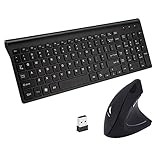
Overview:
This ultra-portable combo merges ergonomics with travel-friendly thinness. The keyboard’s subtle slope and vertical mouse encourage neutral wrist positioning, while 2.4GHz wireless connectivity (with shared nano receiver) ensures broad compatibility across Windows, macOS, and Linux systems.
What Makes It Stand Out:
Its featherlight, slim profile (1.57" thick keyboard) makes it ideal for on-the-go professionals, a rarity among ergonomic sets. Scissor-switch keys deliver quiet, responsive typing, and the mouse’s 3 adjustable DPI settings (up to 1600) cater to precision tasks without sacrificing portability.
Value for Money:
Budget-friendly yet functional, it outperforms similarly priced non-ergonomic kits. The inclusion of a full 101-key layout and quiet operation justifies the cost for travelers or casual users, though premium build quality is sacrificed for affordability.
Strengths and Weaknesses:
Strengths: Highly portable; quiet keys/buttons; wide OS support; simple plug-and-play setup. Weaknesses: Hotkeys Windows-only; no rechargeable batteries; limited iOS compatibility; basic vertical mouse lacks advanced ergonomics.
Bottom Line:
Best for mobile users needing basic ergonomic relief without bulk. While not as medically refined as higher-end models, its portability and low noise make it a practical entry point for ergonomic beginners.
4. Arteck Split Ergonomic Keyboard with Cushioned Wrist and Palm Rest, 2.4G USB Wireless Comfortable Natural Ergonomic Split Keyboard, for Windows Computer Desktop Laptop

Overview:
Arteck’s focused solution features a wirelessly connected split keyboard with a plush, integrated wrist rest. Designed purely for desktop ergonomics, it promotes natural arm alignment and reduces ulnar deviation, targeting Windows users seeking straightforward strain relief.
What Makes It Stand Out:
The standout feature is its remarkable 6-month battery life (based on 2hrs/day usage)—exceptional for wireless ergonomic keyboards. The soft, cushioned rest provides immediate comfort, and the plug-and-play nano receiver (stored onboard) ensures hassle-free setup without software.
Value for Money:
Mid-priced with a strong emphasis on longevity, it offers better value than pricier brands for minimalists. The included 24-month warranty and USB-C charging add reliability, though the lack of mouse inclusion may disappoint some buyers.
Strengths and Weaknesses:
Strengths: Industry-leading battery life; supremely comfortable wrist support; lightweight and quiet; excellent warranty. Weaknesses: Mouse sold separately; Windows-only optimization; no rechargeable battery indicator; basic key feel.
Bottom Line:
A top pick for keyboard-centric ergonomics with unmatched battery efficiency. Ideal for office workers prioritizing wrist comfort and low maintenance, though those needing a full combo should look elsewhere.
5. Perixx Periduo-605, Wireless Ergonomic Split Keyboard and Vertical Mouse Combo, Adjustable Palm Rest and Membrane Low Profile Keys, Black, US English Layout (11633)

Overview:
Perixx delivers a no-frills ergonomic combo centered around a split-key keyboard and vertical mouse. The membrane-key keyboard reduces finger strain, while the mouse offers adjustable DPI. Targeted at Windows users, it includes an armrest and height-adjustment magnet for personalized setup.
What Makes It Stand Out:
The adjustable palm rest—using a movable magnet for height customization—is unique at this price point. The split keyboard’s simplicity (no complex curves) makes it accessible for ergonomic newcomers, and the 1000-2000 DPI mouse caters to varied surface needs without bloat.
Value for Money:
Budget-priced with thoughtful extras like the adjustable armrest, it’s ideal for cost-conscious buyers. While membrane keys lack tactile feedback of mechanical switches, the included warranty and tool-free setup provide solid entry-level value.
Strengths and Weaknesses:
Strengths: Customizable palm rest height; plug-and-play ease; compact footprint; includes armrest. Weaknesses: Membrane keys feel less premium; limited to Windows 7-10; mouse DPI range lower than competitors; basic build quality.
Bottom Line:
A functional starter kit for ergonomic computing, especially for Windows users needing adjustable support on a budget. Best suited for light daily use where advanced features are less critical than affordability.
6. Ascent Accessory for Freestyle2 Ergonomic Keyboard

Overview: The Ascent accessory is a dedicated tenting solution designed exclusively for the Kinesis Freestyle2 split keyboard. It enables precise adjustment of the keyboard’s tenting angle from 20 to 90 degrees in 10-degree increments, aiming to alleviate forearm strain during typing. Sold separately from the keyboard itself, it targets users seeking vertical typing alignment. What Makes It Stand Out: Its standout feature is the exceptional range of micro-adjustable tenting angles (20°–90°), far exceeding typical ergonomic accessories. The solid metal construction, proudly made in the USA, ensures durability and stable positioning, while its sole focus on optimizing vertical alignment addresses a specific ergonomic need often underserved. Value for Money: Priced as a specialized add-on, it offers strong value only for existing Freestyle2 owners committed to advanced ergonomic customization. While costly as a standalone accessory, its precision engineering and metal build justify the investment for serious typists needing vertical typing, compared to flimsier or less adjustable alternatives. Strengths and Weaknesses: Strengths: Unmatched tenting range, robust metal construction, USA-made quality, significantly reduces forearm pronation. Weaknesses: Requires separate Freestyle2 purchase (no keyboard included), limited compatibility (only fits Freestyle2), lacks integrated palm support, premium price for a single-function accessory. Bottom Line: An exceptional, niche upgrade for Freestyle2 users prioritizing vertical typing posture, but irrelevant to others. Its precision and build quality make it worthwhile for targeted ergonomic needs, provided you already own the compatible keyboard.
7. KINESIS Freestyle2 USB-A Ergonomic Keyboard w/ VIP3 Lifters for PC (9" Separation) (KB820PB-US)

Overview: This award-winning split keyboard combines Kinesis’s renowned adjustable design with the pre-installed VIP3 tenting accessory. It offers independent rotation and separation of key modules (up to 9 inches) and fixed tenting angles (5°, 10°, 15°) via the integrated VIP3, promoting natural hand alignment for PC users. What Makes It Stand Out: The pre-assembled VIP3 tenting with cushioned palm supports is the key differentiator, offering immediate ergonomic optimization out of the box. Combined with the ultra-flexible split design, low-force membrane switches, and standard Windows layout with full functionality, it delivers a comprehensive, plug-and-play ergonomic solution without software. Value for Money: Positioned as a premium ergonomic keyboard, its value is high due to the included VIP3 accessory (sold separately for other models) and robust construction. It surpasses cheaper split keyboards in adjustability and build quality, justifying the cost for professionals needing long-term comfort and productivity. Strengths and Weaknesses: Strengths: Fully integrated VIP3 tenting/palm support, exceptional split/rotation adjustability, low-fatigue keys, no drivers needed, pre-assembled convenience. Weaknesses: Membrane switches lack mechanical feedback, USB-A only (no Bluetooth), palm support angle fixed by VIP3, higher price than basic ergo keyboards. Bottom Line: A top-tier, ready-to-use ergonomic solution for PC users. The included VIP3 makes it the most convenient Freestyle2 variant, offering exceptional adjustability and comfort for the price, ideal for those prioritizing immediate, optimized typing posture.
8. Logitech Wave Keys & Lift Vertical Mouse - Ergonomic Wireless Keyboard and Mouse Combo - with Cushioned Palm Rest, Easy-Switch, Bluetooth, for Multi-OS, Windows/Mac - Off-White
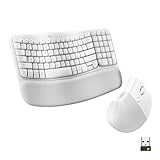
Overview: Logitech’s Wave Keys keyboard and Lift mouse combo delivers a cohesive ergonomic experience. The keyboard features a distinctive wavy keyframe and memory foam palm rest, paired with the 57° vertical Lift mouse designed for small-to-medium hands, offering wireless connectivity for multi-OS setups. What Makes It Stand Out: The seamless pairing of the uniquely contoured Wave keyboard (promoting natural hand alignment) with the scientifically angled Lift mouse (57° vertical) creates a holistic comfort solution. Key highlights include the plush memory foam palm rest, textured vertical mouse grip, and multi-device Easy-Switch functionality across OS platforms. Value for Money: Excellent value as a complete ergonomic bundle. The inclusion of both a highly comfortable keyboard and a purpose-built vertical mouse at a mid-range price point undercuts buying comparable ergonomic peripherals separately, making premium comfort accessible without extreme cost. Strengths and Weaknesses: Strengths: Comfortable wavy design + memory foam rest, excellent vertical mouse ergonomics (57°), multi-OS compatibility, compact size, Easy-Switch convenience. Weaknesses: Wave Keys may feel unusual initially, mouse unsuitable for large hands, plunger keys lack deep tactile feedback, no included Logi Bolt receiver (USB-A only via Bluetooth). Bottom Line: A highly recommended, user-friendly ergonomic starter kit. The proven comfort of the Wave design combined with the Lift mouse offers significant strain reduction for daily use, delivering exceptional bundle value for multi-OS users seeking immediate relief.
9. Logitech Wave Keys Wireless Ergonomic Keyboard with Cushioned Palm Rest, Comfortable Natural Typing, Easy-Switch, Bluetooth, Logi Bolt Receiver, for Multi-OS, Windows/Mac - Graphite

Overview: This standalone Wave Keys ergonomic keyboard features Logitech’s signature wavy design, a cushioned memory foam palm rest, and dual connectivity (Bluetooth + Logi Bolt USB receiver). Designed for natural hand positioning, it supports multi-OS use (Windows/Mac) and compact desktop setups. What Makes It Stand Out: The integrated memory foam palm rest and distinct wave contour are its core ergonomic strengths, promoting neutral wrist alignment. The inclusion of both Bluetooth and the Logi Bolt receiver ensures reliable wireless connectivity across devices, while compact sizing encourages better mouse placement and shoulder posture. Value for Money: Offers strong value as a dedicated ergonomic keyboard. The premium memory foam rest, dual connectivity options (unlike some competitors), compact footprint, and multi-OS support provide a polished experience at a reasonable price, outperforming basic membrane keyboards in comfort-focused utility. Strengths and Weaknesses: Strengths: Excellent palm/wrist support, compact size improves posture, dual connectivity (Bluetooth + Bolt), quiet plunger keys, Logi Options+ customization potential. Weaknesses: Wave design has a learning curve, palm rest is fixed (not removable), plunger keys lack audible/tactile confirmation for some, no numeric keypad (may hinder some users). Bottom Line: A superb choice for those seeking dedicated keyboard comfort. The Wave Keys delivers tangible ergonomic benefits with reliable connectivity and thoughtful design, making it a worthwhile investment for home or office users prioritizing long-term typing comfort and flexibility.
10. Logitech Ergo K860 Wireless Ergonomic Keyboard - Split Keyboard, Wrist Rest, Natural Typing, Stain-Resistant Fabric, Bluetooth and USB Connectivity, Compatible with Windows/Mac, Black

Overview: The Ergo K860 is Logitech’s premium split ergonomic keyboard, featuring a curved keyframe, integrated curved wrist rest, and adjustable palm lift. It combines wireless connectivity (Bluetooth/USB), stain-resistant fabric, and a focus on natural typing posture for Windows and Mac users. What Makes It Stand Out: Its unique curved split design (vs. straight splits) combined with the pillowed, memory foam wrist rest provides exceptional, certified wrist support (54% more than standard). The adjustable palm lift (0°, -4°, -7°) and “Perfect Stroke” scooped keys tailor comfort precisely, backed by US Ergonomics certification. Value for Money: Positioned at a premium price, its value is justified by the comprehensive ergonomic engineering, durable stain-resistant fabric, certified comfort benefits, and dual connectivity. It competes strongly against high-end splits, offering a more refined, posture-focused experience than many alternatives. Strengths and Weaknesses: Strengths: Superior curved split design, exceptional certified wrist support, adjustable palm lift, quiet/satisfying keys, stain-resistant fabric, dual connectivity. Weaknesses: Bulky footprint, non-removable wrist rest, learning curve for split typing, no integrated pointing device, premium price point. Bottom Line: A top-tier ergonomic keyboard for serious users. The K860’s scientifically backed design and adjustability deliver significant comfort and posture improvements, making its price worthwhile for professionals needing sustained, pain-free typing sessions. Highly recommended for dedicated ergonomic enhancement.
Understanding Vertical Keyboard Design Principles
The Core Anatomy of a Vertical Layout
Unlike conventional keyboards where keys lie flat in a single plane, vertical ergonomic keyboards split the key clusters and rotate them significantly, often between 50 to 90 degrees. This rotation is the defining feature, physically moving the hands out of the pronated (palms-down) position and into a more neutral, handshake-like orientation. The split design further allows each hand to operate independently, aligning with the natural shoulder-width stance rather than forcing hands together unnaturally. This core structural shift is what addresses the root biomechanical issue of traditional typing.
Neutral Posture vs. Pronation: The Biomechanical Shift
Pronation – the palms-down position required by flat keyboards – creates significant internal rotation stress on the forearm. This forces muscles and tendons to work harder just to hold the hand steady, leading to fatigue and potential injury over time. A vertical keyboard promotes a neutral forearm posture, where the radius and ulna (forearm bones) run parallel, minimizing internal rotation. This neutral alignment drastically reduces the muscular effort required to type, distributing the workload more evenly and decreasing strain on vulnerable nerves and tendons like the median nerve (associated with carpal tunnel syndrome).
The Importance of Split Design Synergy
While the vertical tilt is the star, the split design is its essential supporting actor. A fixed, non-split vertical keyboard would force your hands uncomfortably close together, creating shoulder and upper back tension. The split allows you to position each half at your natural shoulder width, enabling your elbows to rest comfortably at your sides, close to your body, without winging out. This combination – vertical tilt plus split – creates a holistic ergonomic solution that supports the entire kinetic chain from fingertips to shoulders.
Key Health Benefits for Extended Typing
Alleviating Forearm and Wrist Strain
The most immediate and often reported benefit users experience is a significant reduction in forearm fatigue and wrist discomfort. By eliminating the unnatural twisting motion inherent in flat keyboard use, the muscles and tendons in the forearm no longer bear the constant load of maintaining pronation. This allows for longer typing sessions before discomfort sets in, making sustained focus on complex tasks more achievable without constant pain distractions.
Reducing Risk of Repetitive Strain Injuries (RSIs)
Conditions like carpal tunnel syndrome, tendonitis, and cubital tunnel syndrome are frequently linked to prolonged, unnatural postures during computer use. The neutral position fostered by vertical keyboards directly addresses a primary contributing factor: sustained forearm pronation. While not a guaranteed prevention method (individual factors matter greatly), adopting this posture significantly lowers the biomechanical stress that can lead to the development or aggravation of these painful and potentially debilitating conditions over time.
Enhancing Circulation and Reducing Numbness
Pronation can compress nerves and blood vessels running through the wrist and forearm. Maintaining a neutral, handshake position helps keep these pathways open, improving blood flow to the hands and fingers. Many users transitioning to vertical keyboards report a noticeable decrease in tingling, numbness, or that “falling asleep” sensation in their hands during or after long work sessions, a direct result of better nerve and vascular health.
Essential Features to Evaluate Before Buying
Adjustability: Finding Your Personal Sweet Spot
Not all bodies are built the same, and neither are optimal typing postures. Look for keyboards offering critical adjustability:
- Tent Angle: The degree of vertical rotation (e.g., 50°, 70°, 90°). Starting lower (50°-60°) is often recommended for beginners, with the option to increase as you adapt.
- Splay Angle: The outward angle of each half relative to the center. Some allow independent adjustment per side.
- Height/Tilt: Adjustable feet or stands to fine-tune the angle relative to your desk and chair height. This customization is vital for matching the keyboard precisely to your unique anatomy and existing workstation setup.
Switch Types and Tactile Feedback
The typing experience is deeply personal. Vertical keyboards utilize the same core switch technologies as traditional ones:
- Mechanical Switches: Offer distinct tactile bumps (Cherry MX Brown, Blue) or smooth linear action (Cherry MX Red, Silent Red). Tactile feedback can reduce typing force and errors.
- Scissor-Switch Membrane: Often quieter and with a shorter key travel, mimicking laptop keyboards but usually less durable than mechanical. Consider your typing force, noise sensitivity (especially in shared spaces), and preference for feedback. The vertical orientation changes muscle engagement, so a switch that felt perfect flat might feel different upright – prioritize comfort over sheer speed initially.
Connectivity and Compatibility Considerations
Ensure the keyboard seamlessly integrates with your existing tech ecosystem:
- Wired vs. Wireless: Wired offers zero lag and no battery concerns. Wireless (Bluetooth, 2.4GHz dongle) provides desk clutter reduction and flexibility but requires battery management. Multi-device pairing is a valuable bonus for hybrid setups.
- OS Compatibility: Verify robust support for your primary operating system (Windows, macOS, Linux, ChromeOS). Some advanced features might require specific drivers or have quirks on certain OSes.
- Layout Compatibility: Standard ANSI or ISO layouts? Consider if you need a dedicated number pad (often sold separately for verticals) or specific function keys.
Optimizing Your Setup for Maximum Benefit
Perfecting Monitor and Chair Alignment
A vertical keyboard is only one piece of the ergonomic puzzle. Its benefits are maximized only when your entire workstation supports neutral posture:
- Monitor Height: The top of your screen should be at or slightly below eye level, preventing neck strain from looking down or up.
- Chair Position: Feet flat on the floor (or footrest), knees at or slightly below hip level, lower back supported. Adjust height so elbows rest comfortably at 90-110 degrees when hands are on the keyboard.
- Desk Height: Must accommodate the chair height without forcing elbows above shoulder level. Adjustable standing desks are ideal partners for vertical keyboards.
The Critical Role of Mouse Placement
Placing your mouse too far away or on the wrong side forces reaching and twisting, negating the keyboard’s benefits. Position your mouse:
- Close: Within easy, relaxed reach without extending your arm fully.
- At the Same Height: On the same level as the keyboard (use a mouse platform if needed).
- Consider an Ergonomic Mouse: A vertical mouse or trackball further promotes neutral wrist posture, complementing the keyboard perfectly. Avoid using the mouse on the opposite side of a split keyboard without proper support.
Implementing Effective Movement Breaks
Even the best ergonomic setup isn’t permission to become static. Combine your vertical keyboard with proactive movement:
- Microbreaks: Take 20-30 seconds every 20-30 minutes to stretch fingers, wrists, shoulders, and neck. Simple wrist circles or finger extensions work wonders.
- Task Variation: Alternate between typing, phone calls, reading, or walking meetings to avoid sustained muscle contraction in any single position.
- Stretching Routine: Incorporate specific forearm, wrist, and shoulder stretches into your daily routine, especially before and after long sessions.
Navigating the Adjustment Period Successfully
Typical Timeline and Realistic Expectations
Don’t expect to swap keyboards on Monday and be a 100 WPM pro by Friday. The adjustment period is real and varies significantly:
- Initial Discomfort (Days 1-7): Expect slower typing, possible mild muscle ache in unfamiliar forearm areas (as neutral muscles engage), and frequent errors. This is normal as your body adapts.
- Building Proficiency (Weeks 2-4): Speed gradually increases, errors decrease, and the initial ache subsides as muscles strengthen in their new, more efficient role.
- Full Adaptation (1-3 Months): Typing becomes fluid and natural. The neutral position feels intuitive, and the health benefits become apparent during long sessions. Patience and consistent use are key.
Strategies to Accelerate and Ease the Transition
Make the switch smoother and less frustrating:
- Start Gradually: Use the vertical keyboard only for specific tasks initially (e.g., writing emails, not coding under deadline), gradually increasing usage time each day.
- Leverage Typing Tutors: Use online typing tutor software that provides visual key guides – invaluable for relearning finger placement on the unfamiliar layout.
- Focus on Form, Not Speed: Prioritize maintaining the neutral hand position and using correct finger technique over raw typing speed during the initial weeks. Speed will return naturally.
- Be Kind to Yourself: Accept that errors will happen. Don’t switch back permanently at the first sign of frustration; push through the initial hump.
Long-Term Value Beyond Immediate Comfort
Sustainability for Career Longevity
For knowledge workers, the ability to type comfortably for decades is non-negotiable. Chronic pain isn’t just unpleasant; it can force career changes or early retirement. Investing in a setup that minimizes cumulative strain is an investment in your professional future. A well-chosen vertical keyboard, used correctly within a holistic ergonomic system, can be a cornerstone of maintaining productivity and physical capability throughout a long career.
Potential Impact on Focus and Productivity
Constant physical discomfort is a massive cognitive drain. When you’re not distracted by wrist or forearm pain, your mental energy can be fully directed towards the task at hand. Many users report improved concentration and sustained focus during complex projects after adapting to a vertical keyboard, as the physical barrier to deep work is significantly lowered. Reduced fatigue at the end of the day also contributes to better overall work-life balance.
Considering Total Cost of Ownership
While the upfront cost is higher than a basic membrane keyboard, evaluate the long-term value:
- Durability: High-quality mechanical vertical keyboards often far outlast cheap membrane models.
- Health Cost Avoidance: Potential savings on medical bills, physical therapy, or lost wages due to RSI-related time off work is significant, though hard to quantify upfront.
- Productivity Gains: Even modest improvements in sustained focus and reduced fatigue can translate to tangible output over months and years. View it as a tool for sustained performance, not just a peripheral.
Frequently Asked Questions
How long does it typically take to get used to a vertical ergonomic keyboard?
Most users experience a noticeable improvement in comfort within the first few days, but achieving proficient typing speed usually takes 2-6 weeks of consistent daily use. Initial muscle adaptation might cause minor soreness in new areas, which typically subsides within the first 1-2 weeks as your forearm muscles adjust to the neutral position.
Will a vertical keyboard definitely cure my carpal tunnel syndrome?
No keyboard can cure carpal tunnel syndrome (CTS) or other diagnosed medical conditions. However, by promoting a neutral wrist and forearm posture, vertical keyboards significantly reduce a major contributing factor – sustained pronation – which can alleviate symptoms and prevent worsening. Always consult a doctor or physical therapist for diagnosis and treatment of CTS; an ergonomic keyboard is a supportive tool, not a replacement for medical care.
Are vertical ergonomic keyboards louder than regular keyboards?
Noise level depends entirely on the switch mechanism, not the vertical design itself. Mechanical switches (like tactile or clicky types) will be louder than scissor-switch membrane keyboards, regardless of orientation. Many vertical mechanical keyboards use quieter linear switches (like Cherry MX Silent Reds) or offer sound-dampening foam mods. Wireless membrane vertical options are generally the quietest choice.
Can I use a vertical keyboard with a laptop?
Absolutely. Most modern vertical keyboards offer Bluetooth connectivity, making them easy to pair with laptops. Wired USB options also work seamlessly. Ensure your laptop has the necessary ports or Bluetooth capability. Positioning the keyboard correctly relative to your laptop screen is crucial – you may need a laptop stand to raise the screen to eye level while the keyboard sits at desk height.
Do I need a special mouse to use with a vertical keyboard?
While not strictly mandatory, using an ergonomic mouse (like a vertical mouse or trackball) is highly recommended. Placing a standard mouse too far to the side of a split vertical keyboard can cause reaching and twisting, negating the keyboard’s benefits. An ergonomic mouse promotes neutral wrist posture, complementing the keyboard for a truly holistic setup.
Are vertical keyboards suitable for gaming?
They can be, but with caveats. The vertical orientation changes muscle engagement and key reach, which can impact complex, fast-paced gaming requiring rapid, simultaneous keypresses (like WASD plus modifiers). Some gamers adapt successfully, especially in turn-based or less frantic genres. Look for models with responsive mechanical switches, programmable keys, and potentially lower tent angles. It’s generally less ideal for competitive FPS gaming than a traditional layout.
How do I clean a vertical ergonomic keyboard?
Cleaning methods depend on the type:
- Mechanical Keyboards: Remove keycaps with a puller, clean caps separately, use compressed air between switches, gently wipe the plate with isopropyl alcohol on a cotton swab.
- Membrane Keyboards: Avoid removing keycaps (they’re often not designed to be). Use compressed air to dislodge debris, wipe the surface with a slightly damp microfiber cloth (never spray liquid directly), and use cotton swabs for crevices. Always unplug or power down first.
Is the split design necessary, or can I get a single-piece vertical keyboard?
True single-piece vertical keyboards are extremely rare and generally not recommended. The split design is integral to allowing your hands to rest at a natural shoulder width. A single vertical slab would force your hands uncomfortably close together, causing significant shoulder and upper back strain, negating the core forearm benefits. Always choose a split vertical design.
Will using a vertical keyboard make me type slower forever?
Initially, yes, your typing speed will decrease significantly as you adapt. However, with consistent practice over several weeks, most users regain and often exceed their previous typing speed. The neutral posture can actually lead to more efficient finger movement and reduced fatigue, potentially supporting higher sustainable speeds during long sessions once fully adapted.
What’s the biggest mistake people make when switching to a vertical keyboard?
The most common critical error is improper workstation setup. Placing the keyboard too high, too low, too far forward, or using it with a monitor that’s too low (forcing you to hunch) completely undermines the ergonomic benefits. Equally common is giving up too early during the normal 2-6 week adjustment period due to initial slowness or minor muscle adaptation aches. Patience and holistic setup are paramount.