Transforming your workspace with a standing desk is only the first step toward a healthier, more dynamic workday. While the desk itself gets most of the attention, the accessories you choose will ultimately determine whether your setup becomes a productivity powerhouse or a source of discomfort and fatigue. The right ergonomic additions can mean the difference between energized focus and aching feet, between seamless workflow and constant fidgeting.
This comprehensive guide dives deep into the world of ergonomic desk accessories specifically designed for standing workstations. We’ll explore the science behind each accessory category, what features truly matter, and how to build a cohesive system that adapts to your body—not the other way around. Whether you’re a standing desk veteran looking to optimize your setup or a newcomer navigating the accessory marketplace, this guide will equip you with the knowledge to make informed, strategic decisions.
Top 10 Ergonomic Desk Accessories for Standing Workstations
Detailed Product Reviews
1. Topo Comfort Mat by Ergodriven | The Original Not-Flat Anti-Fatigue Standing Desk Mat with Calculated Terrain | Accessories | Obsidian Black

Overview: The Topo Comfort Mat revolutionized the standing desk accessory market by introducing the first non-flat anti-fatigue mat with calculated terrain. Designed specifically for standing desk users, this innovative mat encourages subtle movement and foot positioning changes throughout the workday. The Obsidian Black finish provides a professional aesthetic suitable for any office environment, while the premium materials offer a perfect balance of cushioning and support.
What Makes It Stand Out: Unlike traditional flat kitchen mats, Topo’s patented 3D terrain features calculated ridges, mounds, and valleys that subconsciously prompt users to stretch, shift weight, and activate different muscle groups. This “calculated terrain” design is scientifically engineered to reduce fatigue and promote healthy micro-movements without distracting from work tasks. The high-density core material maintains its supportive properties even after years of daily use.
Value for Money: At $109, the Topo sits at the premium end of standing mats, but its specialized design justifies the cost for serious standers. Generic anti-fatigue mats ($30-50) lack the ergonomic benefits, while cheaper alternatives compress quickly and lose support. For users spending 6+ hours standing daily, the investment pays dividends in reduced joint pain and increased energy.
Strengths and Weaknesses: Pros: Innovative terrain design promotes movement, premium durable materials, excellent edge support, stays firmly in place. Cons: Higher price point, may have adjustment period, larger footprint might not suit compact spaces, limited color options.
Bottom Line: The Topo Comfort Mat is the gold standard for dedicated standing desk users. Its unique terrain design delivers measurable ergonomic benefits that flat mats simply cannot match, making it worth every penny for those committed to a healthier standing routine.
2. Topo Mini Comfort Mat by Ergodriven | The Smaller Not-Flat Anti-Fatigue Standing Desk Mat with Calculated Terrain | Accessories | Obsidian Black

Overview: The Topo Mini delivers the same innovative non-flat terrain technology as its larger sibling in a more compact footprint. Designed for smaller workspaces or users with limited floor area, this scaled-down version maintains the calculated ridges and contours that made the original famous. The Obsidian Black colorway ensures it blends seamlessly into professional environments while providing targeted anti-fatigue support.
What Makes It Stand Out: The Mini retains the groundbreaking 3D terrain design that encourages subconscious movement and foot repositioning, but in a 25% smaller size that’s ideal for compact offices or shared workspaces. Despite its reduced dimensions, it doesn’t compromise on the high-density core material or ergonomic benefits. The smaller size actually makes it more maneuverable and easier to reposition when switching between sitting and standing.
Value for Money: Priced at $79, the Topo Mini offers the same premium technology as the full-size version at a $30 discount. For users under 5'7" or those with space constraints, it provides identical benefits without paying for unused surface area. Compared to generic flat mats in the $30-50 range, the Mini’s terrain features deliver superior long-term ergonomic value.
Strengths and Weaknesses: Pros: Compact footprint fits small spaces, same terrain technology as original, portable design, lower price point, premium materials. Cons: May feel cramped for taller users, less room for varied foot positions, still pricier than basic mats, limited color selection.
Bottom Line: The Topo Mini is perfect for smaller users or tight workspaces who want the proven benefits of calculated terrain without the full-size investment. It delivers 90% of the original’s ergonomic advantages at 70% of the cost.
3. FITUEYES Height Adjustable Standing Desk 32” Wide Sit to Stand Converter Stand Up Desk Tabletop Workstation for Dual Monitor Riser FSD308001WB

Overview: The FITUEYES standing desk converter transforms any standard desk into an ergonomic sit-stand workstation without requiring full furniture replacement. This 32-inch wide unit features a spacious surface accommodating dual monitors or laptop-monitor setups. With smooth dual gas spring adjustment and a height range of 4.3 to 19.8 inches, it caters to users of various heights while promoting dynamic movement throughout the workday.
What Makes It Stand Out: The FITUEYES converter arrives fully assembled, allowing immediate use right out of the box—a significant advantage over competitors requiring complex assembly. Its innovative simple-touch height locking mechanism provides effortless transitions between sitting and standing positions. The sturdy base supports up to 33 lbs while maintaining stability at full extension, and the sleek design integrates seamlessly into modern office aesthetics.
Value for Money: At $112, this converter offers exceptional value, priced competitively against entry-level models while delivering premium features like dual gas springs and full assembly. Similar converters from established brands often cost $150-200 and require 30+ minutes of setup. The included warranty and robust construction ensure long-term reliability that budget alternatives lack.
Strengths and Weaknesses: Pros: Fully assembled, smooth gas spring adjustment, spacious 32" surface, sturdy 33-lb capacity, wide height range. Cons: Keyboard tray not included, base may be bulky for small desks, limited color options, some users report slight wobble at maximum height.
Bottom Line: For those seeking an affordable, ready-to-use sit-stand solution, the FITUEYES converter delivers impressive functionality and value. Its plug-and-play design makes it ideal for office workers wanting immediate ergonomic benefits without the hassle of assembly.
4. Ergohead Anti Fatigue Kitchen Floor Mat Comfort Standing Mat, Portable Office Standing Desk Mat, Multi-Purpose Kitchen Rug, Built-in Handle with Massage Points Comfort Floor Mat (Black, 17" x 22")

Overview: The Ergohead Anti-Fatigue Mat offers an affordable entry point into ergonomic standing support with its portable, lightweight design. Measuring 17" x 22", this versatile mat features built-in massage points to stimulate circulation and reduce fatigue during prolonged standing sessions. The integrated handle enhances portability, making it ideal for multi-location use across kitchen, office, or workshop environments.
What Makes It Stand Out: The Ergohead’s unique selling proposition is its combination of massage-point texture and exceptional portability at a budget price point. Unlike static office mats, the ergonomic handle allows easy hanging storage and transport between locations. The non-slip bottom provides superior traction compared to similarly priced competitors, while the compact size fits virtually anywhere without dominating floor space.
Value for Money: At $24, this mat represents outstanding value for casual standers or those testing standing desk benefits. While premium mats cost $80-110, the Ergohead delivers essential anti-fatigue cushioning and circulation benefits for a fraction of the price. It’s an economical way to reduce discomfort during moderate standing periods without committing to expensive ergonomic equipment.
Strengths and Weaknesses: Pros: Extremely affordable, portable with built-in handle, massage points stimulate feet, non-slip bottom, multi-purpose use. Cons: Smaller surface limits movement, thinner cushioning than premium mats, may compress over time, flat design lacks terrain benefits, not ideal for all-day standing.
Bottom Line: The Ergohead mat is a smart budget choice for occasional standers or multi-location workers. While it won’t replace premium options for heavy daily use, its portability and massage features make it an excellent value for those seeking basic anti-fatigue relief.
5. FLEXISPOT 36-inch Standing Desk Converter Height Adjustable Sit to Stand Up Workstation, Dual Monitor and Laptop Riser with Wide Keyboard Tray, Black

Overview: The FLEXISPOT 36-inch converter provides a spacious sit-stand workstation solution with its extra-wide surface and integrated keyboard tray. Designed for ergonomic comfort, this unit features smooth height adjustment from 4.7 to 16.6 inches, accommodating various user heights and preferences. The robust X-frame structure supports up to 33 lbs on the desktop and 6.6 lbs on the keyboard tray, making it suitable for dual-monitor setups and complete workstation configurations.
What Makes It Stand Out: The FLEXISPOT distinguishes itself with its U-shaped upper deck design that maximizes usable space while allowing laptop placement directly on the keyboard tray. The quick-assembly design requires only keyboard tray attachment, saving valuable setup time. Ergonomic streamlined edges reduce wrist strain, while the stable X-frame maintains steadiness throughout the height range. The 36-inch width provides 12% more surface area than standard 32-inch converters.
Value for Money: At $114, this converter offers premium features at a mid-range price. Competitors with similar width and keyboard trays typically cost $140-180. The sturdy construction and included tray add significant value, while the brand’s reputation for reliability ensures long-term satisfaction. The minimal assembly requirement further enhances its overall value proposition.
Strengths and Weaknesses: Pros: Extra-wide 36" surface, included keyboard tray, sturdy X-frame design, quick assembly, ergonomic edge design, good height range. Cons: Slightly lower maximum height than some competitors, keyboard tray may feel small for some, base footprint requires adequate desk depth, limited color options.
Bottom Line: The FLEXISPOT 36-inch converter excels for users needing maximum workspace and seamless assembly. Its combination of width, stability, and included accessories makes it a top choice for creating a comprehensive sit-stand workstation without breaking the budget.
6. VIVO Economy Single Top Height Adjustable 29 inch Standing Desk Converter, Sit Stand Tabletop Monitor and Laptop Riser Platform Workstation, DESK-V000U

Overview: The VIVO Economy Standing Desk Converter offers an affordable entry into ergonomic sit-stand workstyles. This 29-inch platform supports up to 22 lbs and transitions from 1.8" to 16.2" height, allowing users to alternate between sitting and standing throughout the day. The unit arrives fully assembled, making it immediately ready for deployment in home offices or corporate environments.
What Makes It Stand Out: VIVO’s patented simple-touch height locking mechanism enables smooth vertical elevation without forward shifting or wobbling—a common issue with budget converters. The zero-assembly design is genuinely rare in this category, eliminating the frustration of complicated setups. Its low-profile aesthetic blends discreetly into any workspace, while the space-efficient 29.3" x 17.8" surface accommodates full-sized keyboards and dual monitor setups without dominating your desk.
Value for Money: At $99.99, this converter costs significantly less than full standing desks or premium converters ($200+). It delivers core ergonomic benefits—posture improvement and movement encouragement—without expensive motorized mechanisms. For budget-conscious buyers or remote workers seeking immediate solutions, it provides exceptional ROI compared to static desks or pricier alternatives with similar weight capacities.
Strengths and Weaknesses: Strengths include effortless setup, stable vertical lifting motion, compact footprint, and solid build quality for the price. The 22 lbs capacity handles most monitor-laptop combinations. Weaknesses: the 16.2" maximum height may be insufficient for taller users (over 6'2"), and the single-surface design lacks a separate keyboard tray, potentially creating wrist strain at certain heights. The adjustment range is also narrower than premium models.
Bottom Line: Ideal for average-height users wanting a hassle-free, budget-friendly introduction to standing desks. The VIVO converter excels in simplicity and value, though tall users or those needing extensive height customization should consider alternatives. For under $100, it’s a reliable ergonomic upgrade.
7. Claiks 24-Inch Sit-Stand Workstation,Innovative Space-Saving Height-Adjustable Ergonomic Desk Converter with Wide Keyboard Tray,Dual Fixation and Flexible Rotation Function, Black
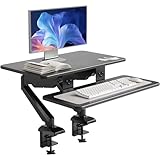
Overview: The Claiks 24-Inch Sit-Stand Workstation targets professionals seeking intelligent workspace optimization. This dual-platform converter features separate surfaces for monitors and keyboards, with pneumatic height adjustment ranging from 13.2" to 19.7" on the upper deck and 9.3" to 15.9" on the lower tray. The 180° rotating lower platform adds flexibility for collaborative environments.
What Makes It Stand Out: Precision engineering distinguishes this unit—its independent keyboard tray maintains ergonomic alignment throughout the height range, preventing the wrist strain common with single-surface designs. The advanced gas spring mechanism delivers whisper-quiet, one-touch adjustments without manual cranks. The 47% desktop footprint reduction is remarkable, maximizing space efficiency while preserving full functionality. A 5-year structural warranty demonstrates manufacturer confidence rare in this price tier.
Value for Money: Priced at $106.99, it commands a slight premium over basic converters but justifies the cost through dual-platform ergonomics and premium materials. The scratch-resistant composite surface and certified workplace compliance add professional-grade durability. Compared to $300+ pneumatic competitors, it delivers 90% of the functionality at one-third the cost, making it a smart investment for serious home office setups.
Strengths and Weaknesses: Strengths include superior ergonomic design, smooth pneumatic lift, space-saving footprint, robust warranty, and tool-free assembly. The rotating keyboard tray enhances collaboration. Weaknesses: the 24" width may feel cramped for ultrawide monitor users, and the $7 premium over the VIVO model might deter absolute budget seekers. The learning curve for optimal height pairing exists.
Bottom Line: Perfect for professionals prioritizing ergonomic correctness and space efficiency. The Claiks workstation justifies its modest price premium through intelligent dual-platform design and long-term warranty support. Highly recommended for dedicated home offices.
8. Decoholic Single 24 inch Scissors Lift Keyboard and Mouse Riser, Height Adjustable Standing Desk Converter for Ergonomic Sit Stand Workstations,suitable to hold large/small items (24inch, Black)

Overview: The Decoholic Scissors Lift Riser provides minimalist sit-stand functionality at an aggressive price point. This 24-inch converter uses a mechanical scissor mechanism with six preset height gears, supporting keyboards and mice on its 23.6" x 13.4" surface. Designed for plug-and-play simplicity, it targets budget-conscious users wanting basic height adjustability without complex features.
What Makes It Stand Out: The six-gear mechanical system offers distinct height positions with a safety lock preventing accidental collapse—a thoughtful touch for security-conscious users. Its near-zero installation requirement appeals to technically averse buyers. The scissor structure provides surprising stability despite the low price, while the waterproof, wear-resistant surface ensures durability in high-use environments. The design accommodates both large and small items flexibly.
Value for Money: At $59.99, this is among the most affordable sit-stand solutions available. It undercuts competitors by 40-60% while delivering fundamental ergonomic benefits. For users satisfied with preset heights rather than infinite adjustment, it represents outstanding value. The cost savings versus premium pneumatic models ($150+) could fund additional ergonomic accessories like monitor arms or footrests.
Strengths and Weaknesses: Strengths: unbeatable price, stable scissor mechanism, safety lock, waterproof surface, and true out-of-box readiness. The compact size fits virtually any desk. Weaknesses: limited to six fixed heights versus infinite adjustment, manual lifting requires more effort than gas springs, and the 13.4" depth may position screens too close for some users. Aesthetic appeal is basic, lacking the premium finish of pricier models.
Bottom Line: An excellent entry-level choice for first-time standing desk users or tight budgets. While it sacrifices smooth adjustment and height precision, the Decoholic riser delivers core functionality reliably. Recommended for students, casual users, or secondary workstations where cost trumps refinement.
9. FLEXISPOT Under Desk Drawer, Steel Drawer for Desk Slide-out, Under table Mounted Drawer, Standing Workstation Storage Attachment for Office Home - 17.7” Width, Black

Overview: The FLEXISPOT Under Desk Drawer addresses workspace clutter by adding stealth storage to standing desks. This 17.7-inch wide steel drawer mounts beneath desktops, providing hidden organization for accessories while maintaining legroom. With 11 lbs capacity and smooth bearing slides, it integrates seamlessly with height-adjustable desks, moving with the surface during sit-stand transitions.
What Makes It Stand Out: Designed specifically for standing desks, the drawer’s slim 2.8-inch profile preserves precious knee space—critical for taller users. Its bearing-slide mechanism ensures smooth operation even when the desk is in motion, unlike standard drawers that might bind. The steel construction offers durability surpassing plastic alternatives, while the pre-assembled design simplifies installation. Compatibility with most FLEXISPOT desks (and others with 9.4"+ depth) provides broad applicability.
Value for Money: At $69.99, it’s priced competitively with quality desk accessories. While not cheap, it solves a specific problem—keeping items within reach during height transitions—that generic under-desk organizers cannot. The steel build justifies the cost over $20-30 plastic alternatives, and the integrated bearing system adds functional value. For standing desk owners, it’s a targeted investment in workflow continuity.
Strengths and Weaknesses: Strengths: robust steel construction, smooth bearing slides, slim profile preserves legroom, pre-assembled for easy installation, and perfect integration with height-adjustable desks. The 11 lbs capacity handles typical office supplies. Weaknesses: requires drilling for installation (drill not included), limited to items under 2" tall due to shallow depth, and the price may seem high for a single accessory. Not suitable for 24" deep desks.
Bottom Line: A must-have accessory for FLEXISPOT standing desk owners seeking clutter-free surfaces. The drawer’s thoughtful design solves real workflow issues during height adjustments. Worth the investment for organized professionals, though drill-required installation demands basic DIY comfort.
10. Nulaxy Telescopic 360 Rotating Laptop Stand for Desk Adjustable Height Swivel Pull Out Design Ergonomic Laptop Riser Standing Desk Converter Fits All 10-17" Laptops Computer MacBook, Gray

Overview: The Nulaxy Telescopic Laptop Stand transforms any surface into an adjustable workstation for 10-17" laptops. Featuring 360° rotation, 20-inch height adjustment, and tilt angle customization, this gray aluminum riser supports up to 22 lbs. Its foldable design and solid base make it versatile for office, podium, or home use, promoting ergonomic posture through elevated screen positioning.
What Makes It Stand Out: The rotating base enables seamless screen sharing for collaborative work—a unique feature in laptop stands under $60. The telescopic height adjustment reaches 20 inches, accommodating both sitting and standing positions without a full converter. The strong bearing force (22 lbs capacity) stabilizes heavy laptops during typing, while the foldable design allows compact storage when not in use. Wide compatibility covers virtually all laptop brands and sizes.
Value for Money: At $53.99, it significantly undercuts full standing desk converters while delivering sit-stand capability for laptop-centric workflows. Users save $40-60 compared to basic risers, gaining rotation and tilt functions typically found in $100+ stands. For laptop-first users without external monitors, it provides 80% of ergonomic benefits at a fraction of converter costs, making it an economical primary or secondary solution.
Strengths and Weaknesses: Strengths: 360° rotation for collaboration, impressive height range, sturdy 22 lbs support, foldable portability, and broad laptop compatibility. The tilt function enhances viewing angles. Weaknesses: requires external keyboard/mouse for optimal ergonomics (as acknowledged by manufacturer), base occupies desk surface unlike clamp-mounted arms, and the telescopic mechanism may develop wobble over time with heavy use. Not suitable for desktop computers.
Bottom Line: An exceptional value for mobile professionals and laptop-dominant users. The Nulaxy stand’s rotation and height range outperform competitors at this price. Highly recommended for collaborative workspaces, though desktop setups need separate solutions. A versatile ergonomic tool that punches above its weight class.
Understanding the Ergonomic Accessory Ecosystem
Standing workstations create unique biomechanical demands that traditional seated setups simply don’t address. Your body engages different muscle groups, shifts weight dynamically, and requires support in entirely new ways. Ergonomic accessories aren’t mere add-ons; they’re essential components that bridge the gap between a flat surface and a truly supportive work environment. Think of them as the suspension system in a car—the vehicle moves, but these components determine the quality of the ride.
Anti-Fatigue Mats: Your Foundation for Comfort
The Science Behind Anti-Fatigue Technology
Anti-fatigue mats operate on a simple principle: micro-movements. When you stand on a rigid surface, your muscles lock into static positions, reducing blood flow and creating pressure points. Quality mats feature engineered cushioning that encourages subtle, unconscious movements in your leg and calf muscles. This constant micro-adjustment promotes circulation, reduces spinal compression, and prevents the venous pooling that leads to fatigue and discomfort.
Key Material Considerations
Not all cushioning is created equal. Polyurethane mats offer durability and resilience, maintaining their supportive properties for years. Gel-infused options provide exceptional pressure distribution but may feel too soft for some users. Foam mats, while budget-friendly, tend to compress permanently over time. Look for materials with a density rating between 0.5 and 0.7 g/cm³ for optimal support without bottoming out.
Thickness and Bevel Design
The sweet spot for thickness ranges from 3/4 inch to 1 inch. Thinner mats won’t provide adequate cushioning, while thicker ones can create instability. Pay close attention to beveled edges—these gradual slopes prevent tripping hazards and allow office chairs to roll over them smoothly when you switch to seated work. A 20-degree bevel angle represents the industry standard for safety.
Monitor Arms and Stands: Achieving Perfect Viewing Angles
Dynamic Height Adjustment Range
Your monitor position must change as you transition between sitting and standing. A monitor arm with at least 13 inches of vertical adjustment ensures you can maintain the critical eye-level alignment in both positions. The top of your screen should sit at or slightly below eye level, with the screen tilted back 10-20 degrees to accommodate your natural downward gaze.
Weight Capacity and Stability
Consider not just your monitor’s current weight, but potential future upgrades. Quality arms support 15-30 pounds, but check the weight range rather than just the maximum. Arms rated for heavier loads often provide smoother adjustment and less drift over time. Stability becomes paramount at standing height—look for models with tension adjustment mechanisms that let you fine-tune the resistance.
Mounting Options and Desk Compatibility
Clamp mounts preserve desktop real estate but require a desk edge thickness between 0.5 and 3.5 inches. Grommet mounts offer more positioning flexibility but demand a pre-drilled hole. For standing desks, consider the dynamic forces at play—a grommet mount positioned near the desk’s center often provides superior stability during height adjustments.
Keyboard and Mouse Positioning Essentials
The Neutral Wrist Principle
When standing, your wrists naturally want to rest at a slightly different angle than when seated. The ideal position maintains a neutral wrist alignment—straight forearms with wrists neither flexed up nor down. This typically requires your keyboard to sit 1-2 inches lower than your elbows, creating a negative tilt where the keyboard’s front edge is higher than the back.
Horizontal Reach Zones
Divide your desk into primary and secondary reach zones. Your keyboard and mouse belong in the primary zone—within comfortable reach without shoulder protraction. When standing, this zone shifts closer to your body. Accessories that allow you to position input devices within 8-12 inches of your torso prevent the shoulder rolling that leads to upper back tension.
The Importance of Adjustable Keyboard Trays
Track Length and Retraction
A keyboard tray’s track length determines how far you can push the keyboard away when not in use. For standing workstations, look for tracks extending at least 17 inches. This allows complete retraction to free up desk surface, but more importantly, it lets you position the keyboard at the perfect distance from your body regardless of your stance.
Tilt Mechanism Quality
The tilt adjustment mechanism separates premium trays from basic models. Infinite tilt adjustment with a locking lever offers more precision than preset notches. When evaluating trays, test the tilt mechanism under load—cheaper models may slip when you rest your palms on them. A quality mechanism should maintain its angle even with aggressive typing.
Build Quality and Weight Distribution
Standing work involves more body movement, which translates to more force on your keyboard tray. Look for models with metal construction and reinforced mounting points. The weight distribution should feel balanced—a front-heavy tray will stress the mechanism and create a seesaw effect. Check the weight rating, but also physically test the stability if possible.
Footrests: Supporting Your Lower Body
Height Adjustability for Dynamic Posture
A footrest isn’t just for short users—it’s a dynamic posture tool for everyone. When standing for extended periods, resting one foot on a raised surface reduces lower back strain by 31% according to occupational health studies. Choose a footrest with height adjustment from 3 to 7 inches, allowing you to alternate leg positions throughout the day.
Surface Texture and Angle Adjustment
Textured surfaces provide sensory feedback that keeps your feet engaged, but avoid overly aggressive textures that become uncomfortable. Angle adjustment from 0 to 30 degrees lets you stretch your calves and vary your ankle position. Some models offer rocking capability, which adds beneficial micro-movements to your standing routine.
Weighted vs. Portable Designs
Weighted footrests stay put when you shift your weight, essential for active standing work. However, if you frequently reconfigure your space, a lighter model with non-slip feet offers more flexibility. Consider your work style—if you’re a “set it and forget it” user, weight provides stability. If you experiment with different standing positions, portability wins.
Cable Management Solutions for Dynamic Workspaces
Vertical Cable Travel Accommodation
Your cables must accommodate the full range of your desk’s motion—typically 25-30 inches of vertical travel. Simple zip ties will fail quickly. Look for cable spine systems or retractable cable managers that coil and uncoil smoothly. The key is maintaining a service loop—excess cable length stored in a way that doesn’t create drag or stress on connections.
Weight Distribution and Desk Balance
Poor cable management adds hidden weight to one side of your desk, causing uneven lifting and potential motor strain in electric models. Map your cable runs to distribute weight evenly. Use cable trays mounted under the desk to consolidate runs and anchor them near the center of the desk’s underside. This prevents the “tail” effect where cables pull on one side during adjustment.
Quick-Release Mechanisms
When troubleshooting or reconfiguring, you don’t want to dismantle your entire cable system. Quick-release clips and modular cable chains let you add or remove cables without starting over. This becomes increasingly valuable as you refine your accessory layout over time.
Task Lighting: Illuminating Your Standing Setup
Adjustable Positioning for Changing Heights
Your lighting needs shift dramatically between sitting and standing. A desk lamp with a 24-inch adjustable arm ensures you can reposition light as your eye level changes. The light source should maintain a 30-degree angle from your line of sight to prevent glare while providing adequate illumination.
Color Temperature and Circadian Rhythms
Standing desks often promote more active, alert work. Support this with lighting that offers adjustable color temperature from 2700K (warm) to 6500K (cool). Cooler temperatures (5000K+) enhance focus during morning and midday work, while warmer tones reduce eye strain in the evening. Some advanced models automatically adjust based on time of day.
Glare Reduction at Elevated Heights
When your monitor sits higher in standing position, ambient light from windows creates new reflection angles. Position lights to the side of your workspace, never behind or directly in front of your screen. Consider matte screen protectors and anti-glare filters as complementary accessories that address the unique lighting challenges of standing work.
Phone and Tablet Holders for Standing Work
Clamp Strength and Surface Compatibility
Device holders clamped to desk edges face unique stresses in standing setups. The constant micro-movements of active standing transfer vibration to the mount. Look for clamps with at least 2 inches of grip depth and rubberized pads that conform to your desk’s edge profile. Test the clamp with your actual device weight—specs can be misleading.
Articulation and Viewing Angle
Your device viewing angle should maintain the same ergonomic principles as your monitor—eye level or slightly below. Choose holders with at least 180 degrees of tilt and 360 degrees of rotation. This flexibility lets you switch between portrait and landscape modes and adjust for sitting vs. standing postures.
Weighted Base Alternatives
If clamping isn’t an option, weighted bases must be substantial—minimum 3 pounds for tablets, 5 pounds for phones with cases. The base should have a low center of gravity and non-slip material that grips even when the desk surface vibrates during height adjustment.
Document Holders and Reading Stands
Inline vs. Side Positioning
Traditional document holders sit beside your monitor, but standing work benefits from inline positioning—directly between you and your screen. This minimizes head rotation and keeps reference materials in your primary visual field. Look for stands with height adjustment from 4 to 10 inches, allowing you to align documents with your monitor’s centerline.
Page Stability and Angle Adjustment
Standing creates air currents and vibrations that can flutter loose pages. Quality holders feature weighted bases (minimum 2 pounds) and adjustable page clamps. The viewing angle should adjust from 15 to 60 degrees, with a friction hinge that maintains position when you turn pages.
Dual-Purpose Designs
Some document holders transform into tablet stands or writing surfaces. For minimalist standing setups, these hybrid designs reduce clutter. Ensure the transformation mechanism feels robust—plastic pivot points wear quickly under daily use. Metal-on-metal hinges with locking pins offer superior longevity.
Seat Stools and Leaning Chairs for Hybrid Standing
Perch Height and Active Sitting
Hybrid seating for standing desks isn’t about replacing your chair—it’s about providing transitional support. The ideal perch height places your hips at 135 degrees relative to your torso, reducing spinal compression. Look for stools with height ranges from 25 to 35 inches, accommodating users from 5'2" to 6'4".
Base Stability and Floor Protection
The base should have a diameter at least 1.5 times the seat width to prevent tipping. For standing desks on hard floors, rubberized bases prevent scratching and provide grip. Carpet users need bases with smooth, wide surfaces that don’t sink into the fibers and create instability.
Dynamic Movement Features
The best leaning chairs offer 10-15 degrees of pivot in all directions, engaging your core and encouraging micro-adjustments. This movement should feel controlled, not loose—quality models use tension-adjustable mechanisms. Avoid models with fixed positions; the goal is active support, not static leaning.
Wrist Rests and Palm Supports
Material Density and Recovery
Wrist rests for standing desks face more pressure than seated setups due to the natural weight distribution changes. Look for materials with slow recovery foam—indentations should disappear within 3-5 seconds. Gel inserts provide cooling, but ensure they’re encapsulated in a firm outer layer to prevent bottoming out.
Width and Taper Design
Your wrists naturally splay outward when standing. Wrist rests should be at least 3 inches wide with a gentle taper toward the front edge. This supports the entire palm, not just the wrists, and accommodates different hand positions. The front edge should be rounded with a radius of at least 0.5 inches to prevent pressure points.
Secure Attachment Methods
Adhesive strips fail quickly on surfaces that flex during height adjustments. Look for wrist rests with magnetic attachment or weighted designs that stay put. Some premium models feature clamp systems that attach to the keyboard tray itself, ensuring they move with your input devices.
Monitor Risers and Laptop Stands
Stackable Modularity
For users who prefer fixed-height monitor solutions, stackable risers offer flexibility. Each unit should add exactly 2 inches of height, allowing precise customization. The interlocking mechanism must be secure—test for wobble by gently pushing the monitor corner. Any movement transfers to your display and causes eye strain.
Ventilation and Heat Dissipation
Laptops running closed-lid mode with external monitors generate significant heat when elevated. Stands should provide at least 1 inch of clearance beneath the device and feature ventilation slots aligned with your laptop’s fan exhaust. Metal construction offers superior heat dissipation compared to wood or plastic.
Dual-Monitor Synchronization
When using two monitors at standing height, even minor height differences become glaringly obvious. Look for riser systems with integrated leveling mechanisms—fine-adjustment screws on each corner let you achieve perfect alignment. The platform should support at least 50 pounds to handle dual-monitor mounts without sagging.
Balance Boards and Active Standing Tools
Rocker vs. Wobble Mechanisms
Rocker boards (side-to-side motion) suit users seeking gentle calf activation, while wobble boards (360-degree motion) engage core muscles more comprehensively. For office use, a 15-degree tilt angle provides enough movement to be beneficial without becoming distracting. The mechanism should include a centering feature that returns the board to neutral when you step off.
Surface Grip and Safety
The standing surface needs a textured pattern that grips shoes without damaging them. Look for materials like thermoplastic elastomer (TPE) that provide friction even when slightly dusty. The base should have a non-slip rim that contacts the floor across its entire circumference, preventing unexpected sliding on hard surfaces.
Progressive Difficulty Options
Some advanced boards offer interchangeable bases—start with a stable rocker base, then progress to a wobble base as your strength improves. This adaptability extends the product’s useful life and lets you match the difficulty to your energy levels throughout the day.
Acoustic Panels and Desk Privacy Solutions
Sound Absorption at Standing Height
Standing desks place your ears further from the desk surface, reducing the natural sound dampening that occurs at seated height. Acoustic panels mounted under the desk can absorb keyboard and mouse noise before it reflects off the floor. Look for panels with a Noise Reduction Coefficient (NRC) of 0.75 or higher.
Mounting Systems for Adjustable Desks
Panels must attach securely to surfaces that move up and down. Magnetic mounting systems or heavy-duty Velcro allow for repositioning without damaging the desk. Avoid adhesive-only solutions—they fail under the constant flexing and temperature changes that occur with electric desk motors.
Visual Privacy Considerations
Standing makes you more visible in open offices. Desktop privacy panels should be at least 18 inches tall and made of translucent material that diffuses light without creating a visual barrier. The mounting hardware must accommodate desk thickness variations from 0.75 to 2 inches.
Storage Solutions for Standing Workstations
Vertical File Organizers
Traditional desk drawers become less accessible when standing. Vertical file organizers mounted on the desk edge keep documents within arm’s reach. Look for models with at least 4 inches of depth and adjustable dividers. The mounting clamp should support 10 pounds to handle a full load without sagging.
Under-Desk Accessory Trays
These trays store peripherals like graphics tablets or notepads when not in use. For standing desks, choose trays with a sliding mechanism that extends fully—this prevents reaching and bending. The slide action should be smooth with a soft-close feature to avoid slamming when the desk is in motion.
Weight Impact on Desk Motors
Every pound added to a standing desk reduces motor lifespan and adjustment speed. Consolidate storage to one side of the desk to maintain balance. For electric desks, keep the total added weight under 50 pounds to prevent overloading the lift capacity.
Creating Your Complete Ergonomic Ecosystem
The 90-90-90 Rule Reimagined for Standing
Traditional ergonomics teaches 90-degree angles for sitting, but standing requires a more dynamic approach. Think in terms of “neutral zones” rather than fixed angles. Your elbows should float between 90-120 degrees, your wrists remain neutral, and your spine maintains its natural S-curve. Accessories should support these ranges without forcing static positions.
Progressive Implementation Strategy
Don’t buy everything at once. Start with the foundation—mat and monitor solution—then add accessories based on discomfort points that emerge. This methodical approach saves money and helps you understand which adjustments provide the most benefit. Keep a journal for the first two weeks, noting any aches or inefficiencies.
Measuring Your Success
Track metrics beyond comfort. Measure your typing speed, error rate, and task completion times in both sitting and standing positions. A successful ergonomic setup maintains or improves performance metrics while reducing reported discomfort. If performance drops, an accessory likely needs adjustment rather than replacement.
Frequently Asked Questions
How long should I stand at my desk each day?
Start with 20-30 minute standing intervals and gradually increase to 2-4 hours total per day. Research suggests alternating every 30-60 minutes provides optimal benefits without fatigue. Listen to your body—discomfort signals it’s time to sit, not push through.
Do I really need an anti-fatigue mat?
Yes, if you stand for more than 30 minutes at a time. Hard surfaces increase spinal compression and reduce circulation. A quality mat reduces lower back pain by up to 50% and foot discomfort by 60%. Consider it as essential as the desk itself.
What’s the ideal monitor height for a standing desk?
The top of your screen should be at or slightly below eye level, with the screen 20-28 inches from your eyes. When standing, most people need to raise their monitor 4-8 inches higher than their seated position. Your eyes should look slightly downward at a 10-20 degree angle.
Can I use my regular office chair with a standing desk?
Standard chairs are too short for standing desks, which typically adjust 25-50 inches high. You’ll need a stool or leaning chair designed for standing desk heights, or a traditional office chair if your desk lowers to standard 29-inch seated height.
How do I know if my keyboard position is ergonomic?
Your elbows should form a 90-120 degree angle with your forearms parallel to the floor. Your wrists should remain straight, not bent up or down. If you feel tension in your shoulders or wrists within 15 minutes of typing, your position needs adjustment.
Are balance boards worth the investment?
For active users, yes. Balance boards increase caloric burn by 15-20% and engage core muscles. However, they require a learning period and may reduce typing accuracy initially. Start with a rocker board before progressing to wobble boards.
How do I manage cables with a height-adjustable desk?
Use a cable management spine or retractable system that provides a service loop—extra cable length that coils and uncoils smoothly. Secure cables under the desk center to maintain balance. Avoid tight zip ties that stress connections during movement.
What’s the difference between a monitor arm and a monitor stand?
Arms clamp or grommet-mount to your desk, offering extensive adjustment and freeing up surface space. Stands sit on your desk, providing simpler height adjustment but occupying more real estate. Arms are generally superior for standing desks due to their range of motion.
Should my feet be flat on the floor when standing?
Not necessarily. Alternating between flat-footed and raised positions (using a footrest) reduces fatigue. The key is avoiding static positions. Shift your weight every few minutes and use a footrest to vary your stance and engage different muscle groups.
How much should I budget for ergonomic accessories?
Plan to spend 25-40% of your desk’s cost on accessories. A quality anti-fatigue mat ($50-150), monitor arm ($100-300), and keyboard tray ($150-400) form a solid foundation. Build your collection gradually, prioritizing items that address your specific discomfort points first.