If you’ve ever recorded a podcast hunched over a desk mic stand, knocking it mid-sentence, or struggling to position your microphone just right without capturing keyboard clicks and mouse movements, you already understand the frustration. A boom arm isn’t just another piece of studio gear—it’s the foundation of professional podcasting ergonomics and audio quality. The right microphone suspension system transforms your recording space from a cluttered desk into a streamlined broadcast environment where your voice takes center stage and unwanted noise disappears.
But here’s the challenge: not all boom arms are created equal. The market is flooded with options ranging from flimsy budget models that sag under the weight of a quality microphone to over-engineered broadcast arms that cost more than your audio interface. Understanding the nuanced differences between spring mechanisms, mounting systems, and build materials can mean the difference between a seamless recording experience and a constant battle with drooping mics and creaking joints. This comprehensive guide cuts through the marketing jargon to equip you with the knowledge to choose the perfect boom arm for your specific podcasting setup, workflow, and long-term goals.
Top 10 Boom Arms for Podcast Mics
Detailed Product Reviews
1. FIFINE Microphone Boom Arm, Low Profile Adjustable Stick Microphone Arm Stand with Desk Mount Clamp, Screw Adapter, Cable Management, for Podcast Streaming Gaming Studio-BM88

Overview: The FIFINE BM88 is a robust all-metal boom arm designed for content creators who demand stability and clean aesthetics. Priced at $39.89, this low-profile stand extends 29 inches and positions your microphone beneath your monitor, maximizing desk space during intense gaming or recording sessions. The integrated cable management system keeps wires hidden, while the included C-clamp ensures secure attachment to flat surfaces without desktop damage.
What Makes It Stand Out: The BM88’s signature low-profile design solves a common streaming problem by eliminating visual obstruction from your screen. Unlike traditional boom arms that arc overhead, this model discreetly positions microphones below eye level. The comprehensive adapter set (1/4’’, 3/8’’, 5/8’’) eliminates compatibility guesswork, supporting everything from lightweight condensers to heavier dynamic mics. The 220° vertical and 360° horizontal adjustment range provides exceptional positioning flexibility, though the section nearest the clamp remains fixed vertically.
Value for Money: At $39.89, the BM88 sits in the sweet spot between flimsy budget arms and overpriced premium options. The all-metal construction and thoughtful cable routing justify the cost compared to plastic alternatives that wobble and degrade. While similar arms from competitors like Rode or Blue cost $60+, FIFINE delivers comparable stability and features at a 30% discount, making it a smart investment for serious hobbyists.
Strengths and Weaknesses: Strengths: Exceptional stability with metal build; innovative low-profile design; hidden cable management; universal adapter compatibility; secure C-clamp mounting. Weaknesses: Vertical adjustment limitation near clamp; over-engineered for casual users; microphone not included despite product imagery.
Bottom Line: The FIFINE BM88 is an excellent choice for gamers and podcasters seeking professional-grade stability without premium pricing. Its space-saving design and sturdy construction make it a worthwhile upgrade from entry-level arms.
2. InnoGear Boom Arm Microphone Mic Stand for Blue Yeti HyperX QuadCast SoloCast Snowball Fifine Shure SM7B and Other Mic, Black

Overview: InnoGear’s $19.99 boom arm delivers surprising value for budget-conscious creators. This black steel stand supports up to 3.3 pounds—50% more than typical entry-level arms—making it compatible with popular mics like the Blue Yeti, Shure SM7B, and HyperX QuadCast series. The 360° rotating base and multi-axis joints allow precise positioning, while the foldable design enables compact storage when not in use.
What Makes It Stand Out: The standout feature is InnoGear’s upgraded spring mechanism that prevents deformation common in budget arms. By relocating the adjustment knob away from the spring tension point, the design significantly extends lifespan and maintains consistent positioning. The impressive 3.3lb capacity at this price point is unmatched, accommodating heavy broadcast mics without sagging. The included 5/8" to 3/8" adapter and standard mic clip provide out-of-the-box compatibility with most dynamic and condenser microphones.
Value for Money: This arm redefines budget expectations. Competing arms with similar weight capacity typically cost $35-50, making InnoGear’s sub-$20 price exceptional. The steel construction and thoughtful engineering provide 80% of premium arm performance at 40% of the cost. For streamers upgrading from desktop stands, this represents minimal financial risk with substantial ergonomic benefits.
Strengths and Weaknesses: Strengths: Unbeatable price-to-performance ratio; high 3.3lb weight capacity; innovative spring protection design; broad mic compatibility; space-saving foldable structure. Weaknesses: Clamp only fits flat edges up to 2" thick; paint finish may chip over time; lacks integrated cable management; some joints require periodic retightening.
Bottom Line: InnoGear’s boom arm is the definitive budget champion. If your desk has a compatible flat edge and your mic weighs under 3.3lbs, this arm delivers professional functionality that belies its affordable price tag.
3. FIFINE Boom Arm Mic Stand, Low Profile Microphone Arm Stand, Podcast Mic Boom Arm with Desk Mount, Cable Channels Management, Metal Boom Arm White for Recording/Streaming/Gaming/Home Office-BM88W

Overview: The BM88W is FIFINE’s white variant of their popular low-profile boom arm, retailing at $41.29. Functionally identical to the black BM88, this model targets creators with bright or minimalist aesthetics. The 29-inch reach and 220° vertical adjustment provide flexible positioning beneath monitors, while the all-metal construction ensures stability for mics up to approximately 3 pounds. Integrated cable channels maintain the clean visual appeal that white-setup enthusiasts demand.
What Makes It Stand Out: The pristine white powder-coated finish distinguishes this arm in a market dominated by black hardware, perfectly complementing white desks, keyboards, and monitors. The concealed cable management system is particularly valuable here, preventing colored wires from disrupting the monochromatic aesthetic. Like its sibling, the arm includes three threaded adapters (1/4’’, 3/8’’, 5/8’’) for universal mic compatibility, from lightweight condensers to substantial dynamic microphones.
Value for Money: At $41.29, the white premium is modest—only $1.40 more than the black version—making the aesthetic upgrade justifiable for coordinated setups. Compared to other white boom arms like the $70+ Rode PSA1+, the BM88W offers similar functionality at 40% less cost. The durable metal build and cable management features maintain strong value despite the slight color surcharge.
Strengths and Weaknesses: Strengths: Attractive white finish for themed setups; sturdy metal construction; effective hidden cable management; comprehensive adapter set; low-profile space-saving design. Weaknesses: Same vertical adjustment limitation near clamp; white finish shows dust and scuffs more readily; marginally more expensive than black counterpart.
Bottom Line: Choose the BM88W if you’re building a white battlestation or recording space. It combines the BM88’s excellent functionality with aesthetic versatility, making it one of the few quality white boom arms under $50.
4. FIFINE K688 Podcast Microphone Kit, USB/XLR Dynamic Microphone with Boom Arm for PC/XLR Mixer, Gaming Mic with Mute Button, Headphone Jack for Vocal, Voice-Over, Streaming, Music Recording -K688CT

Overview: FIFINE’s $79.99 K688CT is a complete recording solution combining a dynamic microphone with integrated boom arm, shock mount, windscreen, and both USB/XLR connectivity. The cardioid dynamic capsule handles 130dB SPL, making it suitable for loud vocal performances and untreated rooms. Onboard controls include tap-to-mute, gain adjustment, and zero-latency headphone monitoring, providing real-time audio management without software dependency.
What Makes It Stand Out: The dual USB/XLR output future-proofs your setup—start with plug-and-play USB simplicity, then graduate to XLR mixers as your skills advance. The tap-to-mute button offers instant privacy during live streams, while the all-metal boom arm includes integrated cable management often missing from all-in-one kits. The comprehensive accessory package (shock mount, windscreen, pop filter) eliminates additional purchases, a rarity in this price bracket.
Value for Money: Comparable separate purchases (dynamic mic $60 + boom arm $40 + shock mount $20) would exceed $120, making the $79.99 kit price compelling. While the microphone won’t match a $300 Shure SM7B, it delivers 70% of the performance at 25% of the cost. For beginners, this single purchase provides everything needed for professional-sounding recordings, representing exceptional bundled value.
Strengths and Weaknesses: Strengths: Complete all-in-one solution; flexible USB/XLR connectivity; intuitive hardware controls; included shock mount and windscreen; sturdy metal boom arm; excellent SPL handling. Weaknesses: Dynamic capsule requires close 2-6" positioning; all controls disabled in XLR mode; boom arm has limited vertical adjustment near clamp; plastic knobs feel less premium.
Bottom Line: The K688CT is the ideal starter kit for aspiring podcasters and streamers. It removes guesswork from gear selection while providing genuine upgrade paths, making it one of the best values in entry-level audio packages.
5. TODI Mic Arm for Lightweight Mics, Microphone Arm Rotatable, Storable Desk Mic Stand for Bear 3LB with Mount Clamp, Mic Stand Boom Arm with Cable Channel with 3/8’’ 5/8’’ Thread for Podcast, Gaming
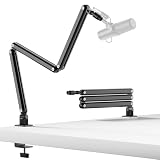
Overview: TODI’s $33.99 boom arm targets users with lightweight microphones, explicitly limiting capacity to 3 pounds. The compact design extends 29 inches and folds into a minimal footprint when not in use. A unique hex wrench adjustment system allows DIY tension customization, while the 360° base hinge provides flexible positioning. The low-profile configuration routes mics beneath monitors, though it can also function as a traditional high-angle arm for webcam-streaming setups.
What Makes It Stand Out: The explicit 3-pound weight limit is refreshingly honest, preventing disappointed purchases from users with heavy broadcast mics. The fold-away design is among the most compact available, ideal for multi-purpose desks where the arm must disappear between sessions. The included hex wrench enables precise spring tension adjustments without disassembly, a feature typically reserved for premium arms. Dual threading (3/8’’ and 5/8’’) covers most lightweight condenser and dynamic mics.
Value for Money: Priced between budget and mid-tier arms, the TODI offers good value IF your mic qualifies. For lightweight mics like the Fifine K669B or Razer Seiren Mini, it performs admirably. However, investing $10 more in a higher-capacity arm provides future upgrade flexibility. The honest weight specification and space-saving design justify the cost for specific use cases, but limit broad appeal.
Strengths and Weaknesses: Strengths: Honest weight specifications; ultra-compact foldable design; included adjustment wrench; dual low/high profile modes; effective cable management; stable all-metal construction. Weaknesses: 3LB limit excludes popular mics (Yeti, SM7B); hex adjustments require manual intervention; clamp compatibility not specified; less refined finish than premium brands.
Bottom Line: Purchase the TODI arm only if you own a confirmed lightweight microphone and prioritize space savings. For most users, spending slightly more on a higher-capacity arm offers better long-term value and versatility.
6. FIFINE Gaming PC USB Microphone, Podcast Condenser Mic with Boom Arm, Pop Filter, Mute Button for Streaming, Twitch, Online Chat, RGB Computer Mic for PS4/5 PC Gamer Youtuber-AmpliGame A6T

6.FIFINE Gaming PC USB Microphone, Podcast Condenser Mic with Boom Arm, Pop Filter, Mute Button for Streaming, Twitch, Online Chat, RGB Computer Mic for PS4/5 PC Gamer Youtuber-AmpliGame A6T
Overview: The FIFINE AmpliGame A6T is an all-in-one USB microphone kit tailored for gamers and content creators. This plug-and-play solution includes a condenser mic with vibrant RGB lighting, boom arm, shock mount, pop filter, and 8.2ft USB-C cable. Compatible with Windows, Mac, PS4/5, it delivers professional audio without technical complexity.
What Makes It Stand Out: The two-tone gradient RGB lighting creates an immersive gaming atmosphere that elevates stream visuals. The top-mounted touch-mute button enables instant silencing without handling noise, while the bottom volume knob allows real-time adjustments without breaking focus. The cardioid pattern effectively isolates voice from background noise, essential for clear team communication.
Value for Money: At $49.99, this kit offers exceptional value. Purchasing a microphone, boom arm, shock mount, and pop filter separately would cost significantly more. The lengthy cable and USB-C connectivity future-proof the investment. For beginners, it eliminates guesswork and compatibility issues.
Strengths and Weaknesses: Strengths include effortless setup, intuitive controls, vibrant aesthetics, and complete accessory bundle. The cardioid capsule reproduces warm, energetic vocals. Weaknesses include limited boom arm weight capacity, RGB may distract minimalists, and plastic construction lacks premium heft. The shock mount fits standard mics but not all models.
Bottom Line: The FIFINE A6T is the ultimate entry-level streaming kit. It combines solid audio performance, gamer-centric features, and unbeatable convenience at a price that undercuts buying components individually. For aspiring streamers, this is a no-brainer first investment.
7. InnoGear Microphone Stand Mic Boom Arm for Blue Yeti HyperX QuadCast S SoloCast Snowball Fifine K669B and other Mic, with Shock Mount Windscreen Pop Filter Mic Clip Holder Cable Ties, Medium

Overview: The InnoGear Medium Boom Arm is a budget-conscious microphone stand delivering universal compatibility and essential accessories. Engineered for 3/8" to 5/8" mics, it includes a shock mount, dual-screen pop filter, desk clamp, adapter, and cable ties—providing a complete recording foundation without premium pricing.
What Makes It Stand Out: This kit’s comprehensive nature distinguishes it at $21.99. The double-screen pop filter offers superior plosive reduction versus single-screen designs. The 52mm shock mount hole diameter provides enhanced stability for various microphone sizes. Heavy-duty spring tension prevents sagging and unwanted noise during adjustments.
Value for Money: At $21.99, this represents one of the most affordable complete boom arm solutions. The included shock mount and premium pop filter alone justify the cost. For budget creators, it eliminates separate accessory purchases, saving money and avoiding compatibility frustrations.
Strengths and Weaknesses: Pros include broad compatibility, robust spring mechanism, protective desk padding, and effective cable management ties. The dual pop filter excels at taming harsh consonants. Cons include shock mount incompatibility with Blue Yeti, medium reach may prove insufficient for large desks, and plastic components feel less durable than metal alternatives.
Bottom Line: The InnoGear Medium Boom Arm is the smart budget buy for beginners. While it won’t match studio-grade arms, its complete accessory package and reliable performance make it unbeatable for home recording setups where cost-effectiveness matters most.
8. MAONO Boom Arm Microphone Stand: Adjustable Metal Suspension Mic Boom Arm for Podcast Gaming Streaming Recording,with Desk Clamp and 3/8" to 5/8" Screw Adapter-Max Load 1KG BA20 Black

Overview: The MAONO BA20 is a sturdy steel boom arm built for podcasters, streamers, and gamers requiring dependable microphone positioning. Supporting up to 1kg (2.2lbs), it features silent adjustment mechanics, broad compatibility, and an upgraded C-frame clamp accommodating desks up to 2.2 inches thick.
What Makes It Stand Out: The BA20 prioritizes silent operation and effortless positioning. Its steel construction provides durability absent in plastic alternatives. The upgraded clamp features rubber padding to prevent surface damage. The included 5/8" to 3/8" adapter and microphone clip ensure immediate compatibility with most standard mics.
Value for Money: Priced at $23.99, the BA20 occupies the sweet spot between ultra-budget and premium arms. The solid steel build offers longevity that justifies the modest price increase over plastic models. For users wanting durability without paying for unnecessary features, this delivers strong ROI.
Strengths and Weaknesses: Strengths include robust steel construction, smooth silent adjustments, generous desk thickness compatibility, and included cable straps. The 1kg weight limit is the primary limitation, excluding heavier broadcast mics like the Shure SM7B. Lack of integrated cable management and a basic microphone clip are minor drawbacks.
Bottom Line: The MAONO BA20 is a reliable workhorse boom arm. For users with standard-sized microphones seeking a durable, easy-to-adjust solution, it represents a wise mid-range investment that will outlast cheaper plastic alternatives while maintaining affordability.
9. InnoGear Mic Boom Arm Microphone Stand Cable Management for Blue Yeti FIFINE AM8 K669B HyperX QuadCast S SoloCast AT2020 Shure SM7B MV7 and Other Microphone

Overview: The InnoGear Cable Management Boom Arm is a premium upgrade featuring integrated cable channels and extended reach. Built from high-grade steel, it supports 3.5-pound microphones with 32.3 inches of horizontal reach and includes a 6.3-inch extension riser. Designed for demanding creators, it handles heavy mics like the Shure SM7B without sagging.
What Makes It Stand Out: Built-in cable management is the defining feature—removable rubber covers conceal wires for a pristine, professional appearance. The 135° back-and-forth and 180° up-and-down adjustability, combined with 360° base rotation, provide exceptional positioning flexibility. The sturdy construction ensures stability even with premium microphones.
Value for Money: At $39.99, this arm costs nearly double budget options but justifies the premium through superior engineering. The cable management system saves hours of frustration and delivers a cleaner aesthetic. For streamers prioritizing desk aesthetics and heavy mic support, the investment enhances professionalism.
Strengths and Weaknesses: Strengths include robust 3.5lb weight capacity, extensive reach, smooth silent adjustments, and ingenious cable concealment. It accommodates desks up to 2 inches thick. Weaknesses include the higher price and lack of included shock mount or pop filter. The extension riser may add unwanted height for some setups.
Bottom Line: This InnoGear arm is ideal for creators ready to upgrade from basic setups. Its cable management and heavy-duty support solve common streaming desk problems, making it worth every penny for those using premium microphones seeking a clean, professional workspace.
10. InnoGear 2025 Upgraded Microphone Boom Arm, Magnetic Cable Management Low Profile Mic Stand 360° Rotatable Desk Mount for Fifine AM8 K669B Blue Yeti HyperX QuadCast SoloCast AT2020, Black

Overview: The InnoGear 2025 Low-Profile Boom Arm revolutionizes desk space efficiency with its ultra-sleek 3.35-inch height profile. Featuring magnetic cable management and full 360° rotation, this alloy steel arm supports 3.3 lbs while maintaining a minimalist aesthetic perfect for modern streaming setups where desk real estate is precious.
What Makes It Stand Out: The magnetic cable channel is a game-changer—simply snap wires into place without clips or Velcro. The low-profile design keeps the arm discreet and maximizes workspace. With 360° base rotation, 180° swivel, 170° tilt, and 360° shaft rotation, it offers studio-grade flexibility in a compact form.
Value for Money: At $39.99, this arm targets users prioritizing aesthetics and space optimization. While priced similarly to standard premium arms, the magnetic cable system and low-profile design justify the cost for minimalists. You’re investing in innovative engineering that preserves clean visuals.
Strengths and Weaknesses: Pros include revolutionary magnetic cable management, space-saving design, solid alloy steel construction, and comprehensive adjustability. The C-clamp securely grips desks up to 2.36 inches with protective padding. Cons include the 3.3lb weight limit and requirement for flat desk edges. The low profile may not suit users wanting elevated mic positioning.
Bottom Line: For creators with minimalist setups or limited desk space, this 2025 upgraded arm is unmatched. Its magnetic cable management and low-profile design deliver a premium, clutter-free aesthetic that standard boom arms cannot match, making it the ultimate choice for clean, modern streaming stations.
What Is a Boom Arm and Why Does Your Podcast Need One?
A boom arm is a articulated microphone stand that clamps to your desk or mounts through a grommet, allowing you to suspend your microphone in nearly any position without occupying valuable surface space. Unlike traditional desk stands that sit directly on your work surface, boom arms use a system of springs and joints to create a weightless, floating feel that positions your mic precisely where you need it—and keeps it there.
The primary advantage for podcasters is acoustic isolation. By decoupling your microphone from your desk, you eliminate the transfer of vibrations from keyboard typing, mouse clicking, or accidental bumps that would otherwise travel directly up a conventional stand and into your recording. This mechanical isolation is crucial for achieving broadcast-quality audio that doesn’t require aggressive noise reduction in post-production.
How Boom Arms Transform Your Recording Experience
Beyond vibration isolation, boom arms fundamentally change how you interact with your recording space. They create a dynamic environment where you can pull the microphone close for intimate vocal takes, swing it away when you need full desk access, or position it overhead for standing recordings. This flexibility encourages better microphone technique—you’ll naturally maintain consistent distance and angle when the mic moves with you rather than forcing you into a fixed position.
The psychological impact is equally significant. When your microphone floats effortlessly at the perfect height, you’re no longer conscious of equipment limitations. You focus entirely on performance, conversation flow, and content quality. Many podcasters report reduced vocal fatigue and improved delivery after switching to a properly adjusted boom arm, simply because they’re no longer straining against an awkward mic position.
Key Features to Evaluate Before Buying
Before diving into specific categories, understand the core features that define boom arm performance. Weight capacity determines which microphones you can safely support—crucial if you use a heavy broadcast dynamic mic with a shock mount. Reach and range define how much coverage area you’ll have from your mounting point to your mouth. Build quality affects longevity, stability, and noise transfer. Spring mechanism influences smoothness of movement and maintenance requirements.
Don’t overlook mounting compatibility with your desk thickness and construction. A beautiful boom arm is useless if you can’t securely attach it to your workspace. Cable management capabilities keep XLR cables from creating noise or clutter. Finally, consider aesthetic design—this piece of gear will be visible to your audience if you record video, and it should complement your brand’s visual identity.
Understanding Weight Capacity and Mic Compatibility
The most critical specification on any boom arm’s data sheet is its weight capacity range. Professional broadcast microphones like the Shure SM7B or Electro-Voice RE20 weigh significantly more than entry-level USB mics, and that’s before adding a shock mount, pop filter, or heavy XLR cable. A boom arm rated for 2-4 pounds might handle a basic setup, but you’ll need 4-7 pound capacity for professional dynamic microphones with full accessories.
The key is finding your total payload weight. Weigh your microphone, add your shock mount, pop filter, and estimate cable weight. Then add a 20% safety margin. If you’re at the upper limit of a boom arm’s capacity, the springs will be fully tensioned, resulting in stiff movement and potential sag over time. Conversely, if your setup is too light for the arm’s minimum weight rating, the springs will be too strong, causing the arm to “bounce” upward when released. Some premium models offer adjustable spring tension to accommodate a wider range of microphone weights.
Desk Mounting Mechanisms: Clamps vs. Grommets vs. Freestanding
Your desk’s construction dictates which mounting system will work safely and effectively. Clamp mounts are the most common, gripping the desk edge with a C-clamp or scissor mechanism. Quality clamps feature protective padding and can accommodate desk thicknesses from 0.5 to 2.5 inches. However, clamping pressure can damage veneer surfaces or glass desks, and some modern standing desks have reinforcing bars that prevent clamp installation.
Grommet mounts require drilling a hole through your desk, typically 0.5-2.5 inches in diameter. While this sounds intimidating, grommet mounts provide superior stability and cleaner cable routing. They’re ideal for permanent studio setups where you want maximum strength and zero desk edge obstruction. Some manufacturers offer retrofit grommet kits that convert clamp mounts if you decide to drill later.
Freestanding bases are rare in professional podcasting but serve specific use cases like temporary setups or desks that can’t accommodate clamps or drilling. These sacrifice stability and desk space for ultimate portability.
Reach and Range: Calculating Your Ideal Coverage Area
Boom arm reach is typically measured horizontally from the mount point to the fully extended microphone position. Common ranges span from 28 inches on compact models to 40+ inches on professional broadcast arms. But raw reach numbers don’t tell the complete story—you need to consider the working radius and vertical articulation.
Measure your desk depth, your seated position relative to the mounting point, and your preferred microphone distance (usually 6-12 inches from mouth). If you record while standing occasionally, factor in your standing desk height. The boom arm should reach your mouth position comfortably at mid-extension, not at its maximum limit where stability decreases. Also consider side-to-side swing range if you move between multiple positions or share the microphone with guests.
Build Quality Materials: What Separates Professional from Consumer Grade
The difference between a $30 boom arm and a $300 model becomes immediately apparent in material selection and construction methods. Entry-level arms use painted steel tubes with plastic friction joints. They flex under load, develop play in the joints within months, and often squeak or creak during adjustment—sounds that transfer directly to sensitive condenser microphones.
Professional-grade boom arms employ all-metal construction, typically aluminum or steel alloys, with precision-machined joints. Look for internal cable channels rather than external clips, nylon bushings at pivot points to eliminate metal-on-metal contact, and powder-coated finishes that resist chipping. Premium models feature stainless steel springs that maintain tension indefinitely and weighted counterbalances for ultra-smooth operation. The “feel” of a professional arm is buttery smooth with zero wobble when locked in position.
Cable Management Solutions: Taming the Tangle
Poor cable management doesn’t just look unprofessional—it creates mechanical noise that ruins recordings. Every time you adjust your boom arm, cables can rub against the arm, desk, or each other, generating rustling sounds that condenser microphones pick up with painful clarity.
The best boom arms integrate internal cable channels that run through the arm’s tubes, completely isolating the XLR cable from external contact. Some designs feature removable covers for easy cable installation without disconnecting connectors. If internal routing isn’t available, look for silicone cable wraps that bundle cables tightly to the arm and clip points at each joint to prevent cable stress. Avoid boom arms with loose plastic clips that allow cables to slap against metal during movement.
Spring Systems: Internal vs. External Tension Mechanisms
Boom arms rely on springs to counterbalance microphone weight and create that weightless floating sensation. External spring systems are visible, typically running parallel to the arm sections. They’re easier to adjust and replace but can be noisier and collect dust. High-quality external springs are coated to prevent squeaking and feature tension adjustment screws.
Internal spring systems hide the mechanism inside the arm tubes for a cleaner aesthetic and quieter operation. These are more complex to manufacture and repair but offer superior performance for video podcasts where visual minimalism matters. The finest internal systems use constant-force springs that provide uniform tension throughout the arm’s range of motion, eliminating the “stiff spot” common in cheaper variable-rate springs.
Some innovative designs use pneumatic or gas-spring cylinders similar to office chair height adjustments. These provide exceptionally smooth movement but can develop leaks over time and are difficult to service.
Noise Transfer and Vibration Isolation: The Silent Killer of Clean Audio
A boom arm’s primary job is isolation, yet many models inadvertently create noise through poor engineering. Mechanical noise transfers through the arm itself—creaking joints, spring vibration, or loose hardware. Structure-borne noise travels from the desk through the mount and into the microphone. Airborne noise from the arm moving through air is rarely an issue, but poorly designed arms can resonate like tuning forks.
Premium boom arms address this with isolated mounting points that use rubber or neoprene gaskets between the clamp and desk surface. Nylon or delrin bushings at every pivot point eliminate metal-on-metal contact. The best designs incorporate floating spring mounts that prevent spring vibration from traveling through the arm structure. When testing a boom arm, move it through its full range while listening through closed-back headphones connected to your microphone. Any creak, rattle, or mechanical noise you hear will be amplified in your recordings.
Adjustability and Flexibility: Range of Motion Explained
Beyond simple reach, evaluate the degrees of freedom a boom arm provides. Quality models offer 360-degree rotation at the base mount, vertical articulation of 180+ degrees at each joint, and fine-tension adjustment at the microphone end. This allows you to position the mic for sitting, standing, or even recording instruments without remounting.
Look for friction locks rather than notched position locks. Friction systems allow infinite adjustment points and silent operation, while notched systems force you into predetermined positions and can click audibly when engaged. The microphone attachment point should offer independent tilt and swivel so you can angle the mic perfectly without affecting arm tension. Some advanced arms include telescoping sections that extend reach without increasing the arm’s folded footprint.
Aesthetic Considerations: Matching Your Studio Vision
Your boom arm is one of the most visible pieces of equipment in video podcasts, live streams, and social media content. The aesthetic should align with your brand identity—sleek black minimalism for tech podcasts, vintage chrome for retro shows, or industrial raw metal for maker content.
Consider finish durability as well. Matte black powder coating resists reflections and fingerprints but can show scratches. Chrome or brushed nickel looks premium but may create unwanted reflections in video lighting. Some manufacturers offer color-matched accessories like pop filters and shock mounts for a cohesive look. Cable management aesthetics matter too—internally routed cables create a cleaner visual than external bundles, especially for close-up camera shots.
Price Tiers and What to Expect at Each Level
Budget tier ($30-$60) typically provides basic functionality for lightweight USB microphones. Expect painted steel construction, external springs, plastic components at stress points, and limited reach. These work adequately for entry-level podcasting but will require replacement within 1-2 years of regular use.
Mid-range ($70-$150) represents the sweet spot for serious hobbyists and growing podcasts. You’ll find all-metal construction, internal or high-quality external springs, decent cable management, and weight capacities suitable for most professional dynamic mics. These arms often include multiple mounting options and offer 3-5 year lifespans with proper care.
Professional tier ($200-$400) delivers broadcast-studio quality with machined aluminum construction, constant-force springs, internal cable routing, and exceptional noise isolation. These arms support the heaviest microphones, maintain perfect positioning indefinitely, and include extensive adjustment features. They’re investments that outlast multiple microphone upgrades and provide the reliability needed for daily commercial use.
Installation and Setup Best Practices
Proper installation dramatically affects performance. For clamp mounts, position the arm at the strongest part of your desk edge, away from corners that might flex. Use a piece of leather or rubber under the clamp to protect finishes and improve grip. Tighten clamp screws incrementally, checking for wobble at each stage—over-tightening can strip threads or crack desk materials.
When routing cables, leave service loops at each joint rather than pulling cables taut. This prevents tension from affecting arm balance and reduces noise. Use cable ties or Velcro straps at 6-inch intervals to prevent cable slap. For internal routing, feed the cable through before connecting the XLR connector, or use cables with removable connectors designed for boom arm installation.
Balance the arm by adjusting spring tension with the microphone attached. The arm should stay put at any position without drifting up or down. If it slowly sags or rises, the tension needs fine-tuning. Most quality arms include adjustment screws—turn them in small increments, testing balance after each adjustment.
Maintenance and Longevity Tips
Even premium boom arms require periodic maintenance. Every six months, check all fasteners with appropriate tools—hand-tightening isn’t sufficient for pivot bolts that loosen with use. Apply a single drop of light machine oil to exposed spring contact points and pivot bushings. Avoid over-lubricating, as excess oil attracts dust that creates abrasive paste.
Clean the arm with a microfiber cloth and isopropyl alcohol to remove skin oils and dust. For internal cable channels, use compressed air to blow out debris annually. If you notice squeaking that doesn’t resolve with lubrication, disassemble the noisy joint (if the design allows) and inspect for worn bushings or metal shavings. Many manufacturers sell rebuild kits for professional models.
When not in use for extended periods, release spring tension slightly to prevent permanent set in the springs. Store the arm in its neutral position rather than fully extended or compressed.
Common Mistakes First-Time Buyers Make
The most frequent error is underestimating total microphone weight. Buyers calculate the mic alone but forget shock mounts, heavy XLR cables, and pop filters add significant mass. Always weigh your complete microphone assembly before purchasing.
Another mistake is prioritizing reach over stability. An arm that extends 40 inches is useless if it wobbles at full extension. Consider your typical recording position and choose an arm that reaches comfortably at 70-80% extension, where stability is optimal.
Ignoring desk compatibility leads to returns and frustration. Measure your desk thickness, check for reinforcing bars, and assess whether you’re willing to drill before ordering. Glass desks require special clamp pads to prevent cracking, and some standing desks have mounting limitations.
Finally, many podcasters overlook future needs. If you plan to upgrade from a USB mic to a heavy broadcast dynamic microphone, invest in an arm that can handle both your current and future setup. The price difference between adequate and excellent is less than the cost of replacing an underspecified arm later.
Alternatives to Traditional Boom Arms
While boom arms dominate podcasting, several alternatives serve specific scenarios. Desk stands with isolation feature weighted bases and internal shock mounting for situations where clamping isn’t possible. These occupy more surface area but provide decent isolation for lighter microphones.
Floor stands with boom extensions work for standing podcasts or when desk space is absolutely critical. Professional broadcast floor stands offer massive reach and stability but require significant floor space and can create tripping hazards.
Overhead suspension systems mount to walls or ceilings, completely eliminating desk vibration and creating an ultra-clean look. These require permanent installation and careful cable management but represent the ultimate in isolation for dedicated studio spaces.
Magnetic mounting systems are emerging as a niche solution for metal desks or custom mounting plates. They offer tool-free repositioning but have limited weight capacity and require perfectly flat, ferrous mounting surfaces.
Frequently Asked Questions
How much weight can a typical podcast boom arm support?
Most mid-range boom arms support 2-5 pounds, sufficient for popular podcast mics like the Shure SM7B with shock mount. Professional models handle 5-7+ pounds for heavy broadcast microphones. Always calculate total payload including all accessories and add a 20% safety margin.
Will any boom arm work with my USB microphone?
USB microphones are generally lighter than professional XLR mics, making them compatible with most boom arms. However, ensure the arm’s minimum weight rating isn’t too high—over-sprung arms will bounce upward with lightweight mics. Some USB mics require thread adapters, which are usually included with quality boom arms.
Do I need a shock mount if I’m using a boom arm?
Yes. While boom arms isolate desk vibrations, shock mounts isolate microphone-handling noise and low-frequency rumble from floor vibrations. They serve complementary functions. A quality shock mount paired with a solid boom arm creates a dual-isolation system that captures clean, professional audio.
Can I install a boom arm on a glass desk?
Glass desks require special consideration. Use clamp mounts with wide, padded contact surfaces to distribute pressure. Avoid over-tightening. For permanent setups, consider a freestanding boom arm base or wall-mounted solution. Some podcasters place a wooden block under the clamp area to protect the glass, though this affects aesthetics.
Why does my boom arm slowly droop during recording?
Drooping indicates insufficient spring tension for your microphone weight or worn internal components. First, try increasing spring tension using the adjustment screws. If the arm still drifts, you may have exceeded its weight capacity or the springs have weakened. Persistent drooping requires replacement or professional servicing.
What’s the difference between a boom arm and a broadcast arm?
The terms are often used interchangeably, but “broadcast arm” typically refers to heavy-duty, studio-grade models with higher weight capacity, internal springs, and broadcast-specific features like integrated cable channels and permanent mounting options. Boom arm is a broader category that includes lighter, consumer-focused models.
How do I stop my boom arm from making noise when I adjust it?
Mechanical noise comes from dry pivot points or loose components. Apply a single drop of light machine oil to each joint’s bushing. Check all fasteners with proper tools—hand-tightening often leaves slight play that causes creaking. If noise persists, the arm may have worn plastic bushings that need replacement.
Should I choose internal or external spring arms for video podcasts?
Internal spring arms provide a cleaner, more professional appearance on camera with no visible springs or cables. They’re worth the premium for video content creators. External spring arms function equally well acoustically but may appear less polished in close-up shots. Some high-end external spring arms hide springs behind covers for a hybrid solution.
Can I mount a boom arm to a wall instead of a desk?
Yes, many manufacturers offer wall-mount adapters that replace the desk clamp. Wall mounting provides superior vibration isolation and saves desk space but requires finding wall studs or using heavy-duty anchors. Consider cable routing from the wall and ensure the mount height accommodates both sitting and standing positions if you vary your recording posture.
How long should a quality boom arm last?
A professional-grade boom arm should last 10+ years with proper maintenance. Mid-range models typically provide 3-5 years of reliable service before developing play in joints or spring fatigue. Budget arms often need replacement within 1-2 years of regular use. The springs are usually the first component to wear, followed by pivot bushings.