Tangled cables are the silent productivity killers of the modern workspace. They clutter your mind, collect dust, and transform your sleek standing desk setup into a chaotic web of frustration. When you’re investing in a height-adjustable desk designed to optimize your health and workflow, letting cables dangle freely isn’t just an aesthetic failure—it’s a functional one that undermines the very purpose of your ergonomic investment.
Cable management sleeves are the unsung heroes that transform cable chaos into organized, professional-grade setups. Unlike basic clips or ties that handle individual cords, sleeves consolidate multiple cables into a single, clean bundle that moves seamlessly with your desk’s height adjustments. This comprehensive guide will walk you through everything you need to know about selecting, installing, and maintaining the perfect cable management solution for your standing desk—ensuring your workspace looks as good at standing height as it does when seated.
Top 10 Cable Management Sleeves for Standing Desks
Detailed Product Reviews
1. Vwindesk Vertebrae Cable Management Spine Kit | Height Adjustable Desk Quad Entry Wire Organizer, Black

Overview: The Vwindesk Vertebrae Cable Management Spine offers an affordable and flexible solution for taming cable clutter under adjustable desks. At 50 inches long with 30 modular segments, this system provides extensive customization for routing power and AV cables from floor to monitor.
What Makes It Stand Out: The quad-entry design allows cables to be inserted from multiple points along the spine, eliminating the need to thread cables through the entire length. The weighted metal base provides excellent stability without requiring permanent desk attachment. Its modular snap-together vertebrae can be added or removed to achieve the perfect height, making it ideal for both sitting and standing desk configurations.
Value for Money: At $16.79, this represents exceptional value in the vertebrae-style cable management category. Competitors with similar features typically range from $25-40, making this an accessible entry point for budget-conscious buyers who don’t want to sacrifice functionality.
Strengths and Weaknesses: Strengths include the highly adjustable modular design, stable weighted base, quad-entry convenience, and impressive length. The flexible construction protects cables while allowing natural movement with desk height changes. Weaknesses are the all-plastic construction that may feel less premium than metal alternatives, lack of magnetic mounting options, and limited color choice (black only). Some users may find the individual vertebrae connections less robust than single-piece solutions.
Bottom Line: For under $17, the Vwindesk spine delivers professional-grade cable organization with unmatched adjustability. It’s an ideal choice for home offices and corporate environments seeking a cost-effective, functional solution for height-adjustable desks without aesthetic compromises.
2. Ultimate Setup Under Desk Cable Management Vertebrae - Perfect for Sit Stand Desk - White, 133 cm

Overview: The Ultimate Setup Vertebrae positions itself as a premium cable management solution specifically engineered for sit-stand desks. Its 133cm (52-inch) length accommodates full desk height ranges while maintaining a clean, professional appearance.
What Makes It Stand Out: Magnetic attachments represent the key innovation, allowing silent, seamless movement as your desk adjusts without manual repositioning. The system includes a comprehensive accessory kit for various mounting scenarios, and installation takes under five minutes. The crisp white finish distinguishes it from generic black alternatives, complementing modern office aesthetics.
Value for Money: At $44.91, this is a significant investment. However, the magnetic technology, included accessories, and 30-day money-back guarantee justify the premium. Similar magnetic systems often exceed $60, making this competitively priced for its feature set.
Strengths and Weaknesses: Strengths include the innovative magnetic mounting system that stays attached to desk legs during height adjustments, aesthetic white colorway, rapid installation, and comprehensive accessory package. The silent flexing mechanism prevents cable strain. Weaknesses include the higher price point, potential for white plastic to discolor over time, and magnetic compatibility issues with non-ferrous desk materials. The system may be over-engineered for fixed-height desks.
Bottom Line: This premium vertebrae system justifies its cost through magnetic convenience and aesthetic appeal. It’s best suited for users of high-end sit-stand desks who prioritize seamless operation and modern design. The money-back guarantee removes purchase risk for those unsure about magnetic compatibility.
3. VALU Cable Management Spine – 49 Inch Cable Organizer for Standing & Fixed Desks – Sturdy & Flexible with Magnetic Link – Cord Management System Under Desk with Steel Base & Non-Slip Pads

Overview: The VALU Cable Management Spine bridges the gap between budget and premium options, offering a robust 49-inch cable organization system with innovative magnetic stabilization. Designed for both standing and fixed desks, it emphasizes stability and clean aesthetics.
What Makes It Stand Out: The heavy-duty steel base with non-slip pads provides superior stability compared to plastic alternatives, while the unique magnetic link offers optional desk attachment for added security. This hybrid approach lets users choose between freestanding or magnetically-assisted installation. The sleek black finish integrates seamlessly into professional and gaming environments.
Value for Money: Priced at $26.99, the VALU spine hits a sweet spot. It delivers premium features like magnetic assistance and a steel base at a mid-tier price point, undercutting magnetic-only competitors by 30-40% while offering more stability than budget plastic models.
Strengths and Weaknesses: Strengths include the dual stabilization system (weighted steel base + magnetic link), excellent surface grip from non-slip pads, 49-inch versatility, and professional aesthetics. The magnetic feature is optional, ensuring compatibility. Weaknesses include fewer modular segments than some competitors, limiting extreme height customization. The magnetic strength may be insufficient for very heavy cable loads, and the black color lacks variety.
Bottom Line: The VALU spine excels as a versatile, stable solution for users wanting magnetic features without premium pricing. Its steel base ensures reliability, making it ideal for high-traffic offices and gaming setups where cable protection and stability are paramount concerns.
4. Alex Tech 10ft - 1/2 inch Cord Protector Wire Loom Tubing Cable Sleeve Split Sleeving For USB Cable Power Cord Audio Video Cable – Protect Cat From Chewing - Black

Overview: Alex Tech’s Cord Protector takes a fundamentally different approach to cable management, offering 10 feet of split loom tubing designed primarily for cable protection rather than vertical routing. This UL-recognized sleeve provides a simple, effective barrier against environmental hazards.
What Makes It Stand Out: The chew-resistant construction specifically addresses pet owners’ concerns, protecting cables from cats and other animals. The split design allows easy installation without disconnecting cables, while the wide operating temperature range (-103°F to 257°F) ensures durability in extreme conditions. UL recognition provides safety assurance for electrical applications.
Value for Money: At $8.09 for 10 feet ($0.81 per foot), this is exceptionally economical. Traditional cable spines cost 3-6 times more, making this ideal for whole-room cable runs or users needing simple bundling rather than vertical organization.
Strengths and Weaknesses: Strengths include unbeatable price, pet protection capabilities, easy split-loading design, UL safety rating, and temperature resilience. It’s highly versatile for various cable types and environments. Weaknesses include lack of structural support for vertical desk applications, less polished aesthetics compared to vertebrae systems, and manual installation requiring cable threading. It provides no weighted base or desk attachment.
Bottom Line: This is the go-to solution for pet owners and budget-conscious users prioritizing protection over presentation. While unsuitable for standing desk cable routing, it excels at general cable organization and protection throughout home and office environments where vertical spine systems aren’t required.
5. VIVO 60 inch Under Desk Privacy and Cable Management Organizer Sleeve, Wire Hider Kit Panel System, Black, DESK-SKIRT-60

Overview: The VIVO DESK-SKIRT-60 combines cable management with privacy screening, creating a dual-purpose 60-inch fabric panel that conceals both cables and under-desk clutter. This unique approach addresses both aesthetic organization and workplace privacy concerns.
What Makes It Stand Out: Unlike traditional spines, this fabric sleeve provides visual privacy while organizing cables through two top slots. Integrated mesh pockets with Velcro straps offer storage for office supplies, maximizing under-desk utility. The lightweight design requires only two screws for installation, making it renter-friendly and easily removable.
Value for Money: At $49.99, it’s priced similarly to premium vertebrae systems but adds privacy functionality. For open-office workers needing both cable concealment and modesty screening, this dual purpose justifies the cost. Pure cable management users may find it expensive for the feature set.
Strengths and Weaknesses: Strengths include dual privacy/cable management functionality, convenient storage pockets, easy two-screw installation, and professional fabric appearance. The 60-inch length covers most standard desks. Weaknesses include fabric’s potential to sag over time, limited cable capacity (two slots only), incompatibility with height-adjustable desks, and staining susceptibility. It lacks the cable protection benefits of rigid spines.
Bottom Line: Best suited for corporate open offices where privacy is as important as cable organization. The VIVO skirt excels at concealing clutter but falls short for standing desk applications. Consider this if you need modesty screening; otherwise, dedicated cable spines offer better pure cable management value.
6. Cinati 52 Inch Vertebrae Cable Management, Black Under Desk Vertebrae Cable Management Kit, Adjustable Length Wire Sleeve for Standing Desk, Cord Organizer for Office - 2 Way Mounting (Tape or Screw)
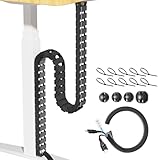
Overview: The Cinati 52 Inch Vertebrae Cable Management system offers a flexible solution for organizing cables under standing desks. This adjustable spine-style organizer extends to 52 inches and features a modular design that adapts to various desk configurations, making it suitable for both traditional and height-adjustable workstations. The low-profile black aesthetic integrates seamlessly into professional environments while discreetly routing cords from desk to floor.
What Makes It Stand Out: The dual-mounting system provides exceptional versatility, allowing damage-free installation with adhesive tape on delicate surfaces like glass, or permanent screw-mounting for maximum stability. The innovative snap-open design enables effortless cable management at any point along the spine, while the wide raceway accommodates multiple thick cables. The comprehensive kit includes 4 cable clips, 10 ties, and a 0.5M extension sleeve, offering complete out-of-the-box functionality that competitors often nickel-and-dime for accessories.
Value for Money: At $26.99, this kit delivers strong value by including all necessary accessories and offering adjustable length that eliminates buying multiple fixed-length systems. The durable PP construction ensures longevity, and the two installation methods provide flexibility for renters and homeowners alike. Compared to basic cable trays, the vertebrae design provides superior adaptability for standing desks, justifying the modest premium over simpler solutions.
Strengths and Weaknesses: Strengths include versatile mounting options, tool-free cable access, adjustable length, and comprehensive accessory bundle. The main weakness is that adhesive mounting may fail over time on textured surfaces, and the plastic construction, while durable, lacks the premium feel of metal alternatives. Some users may find the initial assembly of vertebrae segments tedious, and the 52-inch maximum length may be insufficient for very tall standing desk configurations.
Bottom Line: The Cinati vertebrae system is an excellent choice for standing desk users seeking flexible, comprehensive cable management. Its dual-mounting versatility and complete accessory package make it a practical, cost-effective solution for creating a clean, professional workspace without permanent modifications.
7. VIVO Under Desk Vertebrae Cable Management Kit, Adjustable Quad Entry Flexible Cord Organizer for Home Office, Black, DESK-AC01C

Overview: The VIVO DESK-AC01C vertebrae cable management kit provides a robust solution for organizing cables under both height-adjustable and stationary desks. This four-foot flexible spine system attaches securely to desk backs, protecting and routing AV and power cords from work surface to floor with professional-grade reliability. The black finish and streamlined design complement modern office aesthetics while maintaining ergonomic cable organization.
What Makes It Stand Out: The innovative block system features snap-together interlink blocks anchored by a 5-inch diameter steel base plate, delivering exceptional stability compared to all-plastic alternatives. The unique quad-entry channel design allows cables to be inserted from any angle, simplifying installation and future modifications. The top hooking element creates a secure screw-mounted attachment that withstands repeated desk height adjustments without loosening, specifically engineered for the demands of standing desks.
Value for Money: Priced at $29.99, the VIVO kit positions itself as a premium option justified by its steel-reinforced construction and intelligent four-way cable entry system. While slightly higher-priced than basic plastic models, the enhanced durability and installation flexibility provide long-term value for users who frequently adjust their desk height. The 4-foot length suits most standard setups without modification.
Strengths and Weaknesses: Key strengths include the stable steel base plate, versatile quad-entry design, and reliable performance with standing desks. However, the fixed 4-foot length lacks the adjustability of modular competitors, and the screw-only installation limits options for renters or glass-top desks. The package includes fewer accessories than some rival kits, potentially requiring separate purchase of cable ties or clips for optimal organization.
Bottom Line: VIVO’s vertebrae system excels for users prioritizing stability and cable accessibility in standing desk setups. The steel-reinforced design and quad-entry channels justify its modest premium, making it ideal for demanding office environments where durability and consistent performance matter more than installation flexibility.
8. ARES WING Under Desk Cable Management Spine, Clamp On Vertebrae Cable Management for Standing Desk, Length Adjustable Cord Organizer with 20 Modular Vertebrae for Office and Gaming Desks, Red
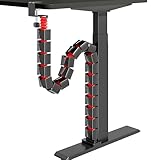
Overview: The ARES WING vertebrae cable management spine targets gaming setups with its aggressive aesthetic and practical functionality. This adjustable system extends to 53 inches using 20 detachable modular segments, providing flexible cable routing for standing desks while maintaining a clean, high-performance appearance. The striking red color and gaming-focused design language complement modern gaming rigs and battle stations.
What Makes It Stand Out: The tool-free clamp-on installation stands out as a renter-friendly solution that fits desktops from 0.4 to 2 inches thick without drilling or adhesive. Dual cable channels enable intelligent separation of power and data cables, reducing electromagnetic interference and tangling. The 20 modular segments provide exceptional length customization, while the gaming aesthetic delivers visual impact that plastic black alternatives lack, making it both functional and stylistically cohesive.
Value for Money: At $24.69, this kit offers competitive value with its damage-free mounting system and dual-channel organization. The inclusion of 20 modular segments provides exceptional length adjustability, outperforming many fixed-length alternatives at similar price points. This makes it particularly cost-effective for users needing customization without purchasing extensions separately.
Strengths and Weaknesses: Strengths include the innovative clamp mount, dual-channel cable separation, gaming aesthetic, and excellent adjustability. The main drawback is the clamp may not suit all desk edge profiles, particularly beveled or curved designs. The red color, while distinctive, may clash with professional office décor. The plastic construction, though functional, may not match the durability of steel-reinforced alternatives for heavy cable loads over years of use.
Bottom Line: ARES WING delivers an excellent solution for gamers and renters seeking flexible, damage-free cable management. The clamp-on design and dual channels make it a standout choice for standing desk setups where aesthetics and easy installation are priorities, though office workers may prefer more subdued alternatives.
9. Under Desk Cable Management Tray No Drill, Metal Mesh Cable Management Under Desk with Clamp Mount, 2 Hole Cable Tray with Wire Management and Cord Organizer for Home Office Standing Desk

Overview: This under-desk cable management tray offers a robust metal mesh solution for organizing power strips, cords, and accessories without drilling. The clamp-on design installs in minutes, supporting up to 15 pounds while keeping cables hidden and protected from feet and vacuum cleaners. The minimalist black mesh aesthetic suits both office and home environments while providing industrial-grade functionality.
What Makes It Stand Out: The high-quality carbon steel mesh construction provides superior durability and ventilation compared to plastic alternatives, preventing heat buildup from power adapters. Integrated rubber pads protect desk surfaces from scratches during installation and adjustment. The two-hole design on each side facilitates clean cable routing, while the inward/outward installation flexibility accommodates different desk configurations and user preferences, including corner desk setups.
Value for Money: At $16.99, this tray represents exceptional value, offering metal construction and substantial weight capacity at a price point typically associated with plastic organizers. The included clamp mount eliminates additional hardware costs and potential desk damage, making it one of the most cost-effective solutions for users seeking sturdy, drill-free installation without sacrificing capacity.
Strengths and Weaknesses: Major strengths include sturdy metal construction, high weight capacity, quick tool-free installation, and protective rubber pads. The mesh design prevents dust accumulation and allows heat dissipation. However, the open design lacks the fully concealed aesthetic of vertebrae systems, and the clamp mechanism may not fit all desk edge styles, particularly those with molding or irregular profiles. The minimalistic package includes no additional cable ties or accessories.
Bottom Line: This metal mesh tray is an outstanding budget-friendly option for users prioritizing durability and capacity over aesthetics. Its no-drill installation and sturdy construction make it ideal for renters and heavy-duty setups where functionality outweighs sleek appearance, though those wanting complete cable concealment should look elsewhere.
10. EcoBrisa 60" Under Desk Privacy Panel with Cable Management Organizer Sleeve Self-Adhesive Modesty Panel for Cord Organizer Pockets and Desk Skirt for Home Office or Standing Workstation

Overview: The EcoBrisa 60-inch under-desk privacy panel combines modesty protection with integrated cable management, creating a comfortable workspace while concealing cords and providing storage. The lightweight design attaches via self-adhesive strips, offering a non-invasive solution for both traditional and standing workstations. The fabric construction provides a softer aesthetic than plastic or metal alternatives.
What Makes It Stand Out: The multifunctional design serves as both a privacy shield and cable organizer, featuring 420D silver-coated Oxford cloth that is waterproof and sun-resistant for longevity. The integrated under-table storage bag provides convenient access to small accessories like pens and notebooks, maximizing workspace efficiency. The generous 60-inch length accommodates larger desks, while the fabric construction allows for easy cutting to fit custom sizes without specialized tools.
Value for Money: Priced at $21.99, this panel delivers dual functionality that would typically require separate purchases. The self-adhesive installation eliminates hardware costs and potential desk damage, making it particularly valuable for renters or temporary setups. While not a replacement for heavy-duty cable trays, it offers excellent value for users seeking modesty and light cable organization in one integrated package.
Strengths and Weaknesses: Strengths include dual privacy and cable management functions, easy installation, waterproof fabric, and bonus storage pockets. The lightweight design suits various environments and desk styles. However, the adhesive may weaken over time or damage certain finishes upon removal. The fabric construction lacks the rigid cable protection of plastic or metal systems, and the open storage design may not fully conceal bulky power strips or adapters, limiting its organizational capacity.
Bottom Line: EcoBrisa’s panel is an innovative solution for users wanting privacy and basic cable concealment without drilling. It’s best suited for home offices and professional environments where modesty and organization matter more than heavy-duty cable capacity, though power users with extensive setups will need supplementary management solutions.
Why Cable Management Matters for Standing Desks
Standing desks introduce a unique challenge: your cables must dynamically adjust as your desk rises and falls. A poorly managed cable setup will snag, pull, or disconnect when you change positions. Worse yet, constant flexing can damage cable internals over time, leading to intermittent connections or complete failure. Proper cable management isn’t just about appearances—it’s about protecting your equipment investment and ensuring seamless transitions between sitting and standing throughout your workday.
Beyond functionality, there’s the psychological impact. Studies show that visual clutter increases cognitive load and stress levels. A clean, organized workspace signals professionalism to colleagues on video calls and creates a calming environment that helps you focus. When your cables are properly managed, you’re not just tidying wires—you’re optimizing your mental workspace.
What Are Cable Management Sleeves?
Cable management sleeves are flexible, tubular sheaths designed to enclose multiple cables within a single, organized bundle. Think of them as a protective tunnel that corrals your power cords, monitor cables, USB connections, and other wires into one manageable package. Unlike individual cable ties that create a rigid bundle, quality sleeves maintain flexibility while providing structure, allowing your cable assembly to bend and flex naturally as your desk moves.
These sleeves come in various materials, diameters, and lengths, each designed for specific applications. The best options for standing desks feature expandable designs that accommodate cable movement without binding, plus materials that resist wear from repeated flexing. They’re the foundation of any professional cable management strategy, working in concert with other solutions like under-desk trays and cable clips.
Types of Cable Management Sleeves
Understanding the different sleeve categories helps you match the right product to your specific workspace needs. Each type offers distinct advantages depending on your cable volume, aesthetic preferences, and functional requirements.
Fabric Sleeves
Woven fabric sleeves, typically made from polyester or nylon, offer maximum flexibility and a soft-touch finish. These sleeves excel in home office environments where aesthetics matter, as they often come in various colors and patterns. The breathable weave prevents heat buildup and allows you to easily identify and extract individual cables if needed. However, fabric can attract dust and may not provide the same level of protection against sharp edges as rigid alternatives.
Plastic and Neoprene Sleeves
Neoprene and flexible plastic sleeves create a more structured, protective barrier. These materials excel at shielding cables from abrasion and minor impacts, making them ideal for office environments with heavy foot traffic or cleaning equipment. Neoprene offers excellent flexibility and a professional black finish that blends into most setups. The smooth surface wipes clean easily, though it can be slightly more challenging to add or remove cables once installed.
Metal Sleeves
Braided metal sleeves, usually aluminum or stainless steel, provide maximum durability and electromagnetic interference (EMI) shielding. While overkill for most home offices, they’re invaluable in industrial or scientific environments where signal integrity is critical. The metallic finish creates an industrial aesthetic that some designers actively seek. The trade-off is reduced flexibility and higher cost, plus potential scratching of desk surfaces if not properly secured.
Expandable vs. Fixed Diameter Sleeves
Expandable sleeves feature a split design or woven construction that allows you to open them along their length, making cable installation and future modifications dramatically easier. Fixed-diameter sleeves require you to thread cables through like a tunnel, which provides a tighter bundle but makes changes a time-consuming process. For standing desks, expandable designs are almost always the superior choice since you’ll inevitably add, remove, or upgrade equipment over time.
Key Features to Consider When Choosing a Sleeve
Selecting the right sleeve requires evaluating several critical factors that impact both immediate installation and long-term satisfaction. Rushing this decision often leads to frustration and replacement costs.
Flexibility and Expandability
Your sleeve must accommodate the full range of your desk’s motion without pulling taut or creating stress points. Look for sleeves that can bend to a 2-inch radius without kinking and expand at least 25% beyond their resting diameter. This ensures smooth operation whether your desk is at its lowest or highest position. Test the flexibility by bending a sample—if you feel resistance or hear crackling, the material may not withstand daily height adjustments.
Durability and Material Quality
Examine the material thickness and construction quality. Fabric sleeves should have tight, consistent weaving without loose threads. Plastic and neoprene options need uniform thickness without thin spots that could tear. Check the temperature rating—office environments can experience temperature swings near windows, and low-quality materials may become brittle. UV resistance matters if your desk receives direct sunlight, which can degrade some plastics over time.
Length and Diameter Options
Measure twice, buy once. Your sleeve should run from your desk’s cable exit point to your power source with 6-8 inches of slack to accommodate full height range. For diameter, bundle your cables with temporary zip ties and measure the circumference—then add 30% for future expansion. Most standing desk setups require 1.5 to 2.5-inch diameter sleeves, but monitor arms and multiple peripherals can push this higher.
Aesthetic Considerations
Your sleeve will be visible, especially in open-concept offices. Black remains the professional standard, but white, gray, and even wood-tone sleeves exist for specific decor schemes. Consider the texture—some fabric sleeves offer a premium feel that complements high-end desks, while smooth neoprene creates a tech-forward appearance. The sleeve’s appearance should enhance, not detract from, your desk’s design language.
Ease of Installation
The best sleeve in the world is worthless if you can’t install it. Look for sleeves with built-in installation tools like fish tape or pull strings. Split-design sleeves should have reliable closure mechanisms—Velcro offers adjustability while zipper closures provide a cleaner look. Avoid sleeves requiring specialized tools unless you’re comfortable with advanced installation techniques.
How to Measure Your Cable Bundle
Accurate measurement prevents the frustration of a sleeve that’s too tight or excessively bulky. Start by gathering all cables that will run through the sleeve—include spares for devices you might add within the next year. Lay them flat and group them by type: power cords (thickest), video cables (moderate), and data cables (thinnest).
Wrap a flexible measuring tape around the entire bundle at its widest point. Record this circumference, then divide by 3.14 to estimate diameter. Add 0.5 inches to this number for comfortable fit and future expansion. For length, measure from your desk’s cable management tray or grommet to your floor outlet or power strip, then add 12 inches to accommodate the desk’s full height range plus installation slack.
Don’t forget to account for connectors—HDMI and power connectors are wider than the cable itself. If these will pass through the sleeve, measure their diameter too. Sometimes it’s easier to install connectors first, then sleeve up to them rather than pulling them through.
Installation Best Practices
Proper installation determines whether your cable management system functions flawlessly or becomes a source of constant irritation. Take your time with these steps.
Pre-Installation Planning
Map your cable routes before touching any sleeves. Identify where cables will exit your desk, how they’ll travel to the floor, and where they’ll connect to power. Consider creating a cable diagram—this seems excessive until you’re three hours into troubleshooting why your display won’t connect. Plan your bundle groups logically: monitor cables together, peripherals together, power cords separate from data cables to reduce interference.
Step-by-Step Installation Guide
Begin with your desk at its lowest position. Disconnect all equipment and lay cables out straight to remove kinks and coils. If using a split sleeve, open it along its entire length and lay cables inside, distributing them evenly. For tunnel-style sleeves, use fish tape to pull cables through, applying cable lubricant if needed. Secure the sleeve every 12-18 inches with cable clips or adhesive mounts, ensuring it can still slide freely as the desk moves.
Leave service loops—small extra lengths of cable—near connection points. This allows you to reroute or replace cables without dismantling the entire system. Finally, test the full range of desk motion before securing everything permanently. Watch for pinch points, excessive tension, or cables that catch on desk components.
Common Installation Mistakes to Avoid
Never overtighten cable ties on the sleeve itself—this creates stress points and prevents the natural flexing needed for height adjustments. Avoid running power and data cables in the same bundle if possible; if you must, ensure data cables are shielded. Don’t forget to account for cable weight—heavy power bricks can pull bundles taut when the desk rises, so secure these separately. Finally, resist the temptation to stuff every cable into one sleeve; multiple smaller bundles often function better than one overloaded sleeve.
Integrating Sleeves with Other Cable Management Solutions
Sleeves work best as part of a comprehensive system. Under-desk cable trays provide the foundation, collecting cables from monitors and peripherals before they enter the sleeve. Magnetic cable guides positioned along the desk frame keep sleeves from swinging during height adjustments. At floor level, cable boxes or raceways protect the sleeve’s lower end while maintaining a clean appearance.
Consider using color-coded cable ties at sleeve entry and exit points to identify which cable serves which device. This simple trick saves hours when you need to replace a single cable. For standing desks with crossbars, install rotating cable clips that allow the sleeve to move smoothly without catching on structural elements.
Managing Cables for Desk Height Adjustability
The dynamic nature of standing desks demands special attention to cable slack management. Install your sleeve with a gentle S-curve rather than a straight line—this natural curve expands and contracts smoothly as the desk moves. The curve should be oriented vertically, with the peak occurring at mid-height range.
Use cable weight to your advantage. Heavier cables naturally want to hang straight down; position these in the center of your bundle where they can act as an anchor. Lighter, more flexible cables belong at the bundle’s periphery where they can move freely. Some advanced setups use retractable cable reels for particularly long runs, though these add complexity most home users don’t need.
Dealing with Power Strips and Adapters
Power strips and bulky adapters present the biggest challenge in sleeve-based systems. The simplest solution is to mount a power strip under your desk, keeping it within the sleeve system. Use a slim-profile strip designed for under-desk mounting, and ensure it’s rated for the total wattage of all connected devices.
For unavoidable floor-level power bricks, create a separate sleeve branch. Use a Y-splitter or junction in your main sleeve to route these heavy items down their own path. This prevents the brick’s weight from distorting your main cable bundle. Alternatively, mount a cable management box at floor level to house power strips and bricks, with your sleeve terminating inside the box for a completely hidden solution.
Aesthetic Design Considerations
Your cable management system should complement your workspace design, not fight against it. Consider the visual weight of your sleeve—a thick black sleeve on thin desk legs creates visual imbalance. Conversely, a too-thin sleeve on a heavy industrial desk looks undersized.
Color Matching Your Workspace
Black sleeves recede visually and work with nearly any setup. White sleeves brighten spaces but show dust and scuffs more readily. Gray offers a middle ground that complements aluminum and steel desk frames. For wood desks, consider fabric sleeves in earth tones or even custom-dyed options that match your desk stain. Some premium sleeves offer reversible designs with different colors on each side, giving you flexibility to change your look.
Minimalist vs. Industrial Looks
Minimalist setups benefit from ultra-thin, flexible sleeves that hug cables tightly, creating a barely-there appearance. Consider transparent or semi-transparent options that let cable colors show through for an intentional, organized look. Industrial aesthetics call for braided metal sleeves or heavy-duty neoprene with visible texture and structure. These make the cable management itself a design feature rather than something to hide.
Maintenance and Cleaning Tips
Even the best-installed sleeve system requires occasional maintenance. Fabric sleeves attract dust—vacuum them monthly using a brush attachment. For deeper cleaning, most fabric sleeves are machine washable (air dry only). Plastic and neoprene sleeves wipe clean with a damp cloth; avoid harsh chemicals that can degrade the material.
Inspect your sleeve quarterly for wear signs: fraying fabric, cracked neoprene, or loose closures. Pay special attention to areas that rub against desk components during height adjustments. A small zip tie reinforcing a worn spot can extend sleeve life by years. If you notice cables becoming difficult to move within the sleeve, the interior may be collecting dust—compressed air can restore smooth operation.
Troubleshooting Common Issues
When your desk stops mid-travel with a jolt, cables are likely binding. Check for sleeve sections that have slipped out of their clips and are catching on desk components. If cables disconnect when lowering the desk, you have insufficient slack—add a service loop near the connection point.
Static electricity buildup in dry environments can cause sleeves to cling to cables, making them difficult to adjust. A light application of anti-static spray on the sleeve’s exterior solves this. For sleeves that constantly twist during desk movement, install a swivel clip at the midpoint to allow rotation without transferring torque to the entire bundle.
Budget Considerations
Cable management sleeves range from budget-friendly fabric options under $10 to premium metal sleeves exceeding $50. For most home offices, a quality neoprene sleeve in the $15-25 range offers the best balance of durability, aesthetics, and functionality. Don’t forget to budget for accessories: cable clips, adhesive mounts, and junctions can add another $10-15 to your total cost.
Consider the cost of failure—a cheap sleeve that fails after six months can damage expensive cables or even your devices. Investing an extra $10-15 in a quality sleeve that lasts years is inexpensive insurance. Buy slightly more length than you think you need; having to reorder because you’re six inches short costs more in shipping and time than buying extra upfront.
Environmental and Safety Factors
Fire safety should influence your sleeve choice. Look for UL-rated materials, especially when bundling multiple power cords. While rare, electrical faults in one cable can affect others in a tight bundle—quality sleeves provide an extra layer of protection. In commercial environments, check local fire codes which may specify certain materials.
Consider your climate. High-humidity environments can cause condensation inside non-breathable sleeves, potentially corroding connectors. In these situations, breathable fabric sleeves are superior to sealed plastic options. Conversely, dry, dusty environments benefit from the sealed protection of neoprene sleeves that keep contaminants away from cable connections.
Future-Proofing Your Cable Management Setup
Technology changes, and your cable management should accommodate it. Choose a sleeve diameter 30-40% larger than your current needs. Install junction points where you can easily split off new cable runs. Use cable ties that can be reopened rather than permanent zip ties.
Consider emerging standards like USB-C power delivery, which reduces cable count but requires thicker cables for high wattage. Wireless charging pads still need power, and monitor arms with built-in USB hubs add cables you might not anticipate. Design your system with modularity in mind—perhaps using multiple smaller sleeves rather than one massive bundle, making it easier to reconfigure later.
Frequently Asked Questions
1. Can I add cables to a sleeve after installation?
Yes, if you choose a split-design sleeve with Velcro or zipper closure. Simply open the sleeve along its length, lay in the new cable, and reseal. Tunnel-style sleeves require pulling cables through, which often means disconnecting and rethreading everything.
2. How many cables can fit in one sleeve?
This depends on the sleeve diameter and cable thickness. As a rule, fill sleeves to only 70% capacity to allow easy movement and future additions. A 2-inch diameter sleeve typically handles 8-12 standard computer cables comfortably.
3. Will cable sleeves work with any standing desk brand?
Absolutely. Sleeves are universal solutions that work with Uplift, Fully, Vari, and all other standing desk brands. The key is proper measurement and installation, not brand compatibility.
4. Do I need different sleeves for power vs. data cables?
Ideally, yes. Separating power and data reduces electromagnetic interference potential. If you must bundle them together, use shielded data cables and position them on the bundle’s periphery, away from power cords.
5. How often should I replace cable management sleeves?
Quality sleeves last 5-10 years in typical office environments. Replace them if you notice fraying, loss of flexibility, or if they no longer hold cables securely. Physical damage from desk components warrants immediate replacement.
6. Can I cut sleeves to custom lengths?
Most fabric and neoprene sleeves can be cut with sharp scissors or a utility knife. Seal cut ends with a lighter (for synthetic fabrics) or heat-shrink tubing to prevent fraying. Metal sleeves require specialized cutting tools and should be ordered to length.
7. What’s the best way to handle very thick power cables?
Route thick power cables in separate, smaller sleeves or position them as the core bundle with thinner cables wrapped around them. This prevents the heavy cable from distorting the entire bundle’s shape and movement.
8. Do cable sleeves affect cable performance or cause overheating?
No, properly sized sleeves don’t impact performance. In fact, they can improve cooling by separating cables and preventing tight coils. Ensure your bundle isn’t overpacked, and choose breathable materials for high-power applications.
9. How do I prevent my sleeve from swinging when the desk moves?
Install cable clips or adhesive mounts every 12-18 inches along the sleeve’s length. Focus on securing the middle section and both ends. Some users add a small weight at the bottom to keep the sleeve hanging straight.
10. Are there fire-rated cable sleeves for commercial offices?
Yes, look for sleeves with UL 94 V-0 or VW-1 fire ratings. These self-extinguishing materials meet most commercial building codes. Always check local regulations, as requirements vary by jurisdiction and building type.