The freedom of working from your couch feels like the ultimate remote work perk—until the neck stiffness, lower back pain, and overheating laptop remind you that comfort and productivity rarely align without the right setup. As more professionals embrace flexible workspaces, the couch has become an unlikely office, but sinking into cushions with a laptop on your knees is a recipe for ergonomic disaster. The solution isn’t abandoning your favorite spot; it’s elevating it with a purpose-built laptop stand designed specifically for the unique challenges of couch-based work.
This comprehensive guide cuts through the clutter to help you understand what makes a laptop stand truly couch-friendly. We’ll explore the ergonomic principles that protect your body, the distinct types of stands that thrive in living room environments, and the critical features that separate frustrating gimmicks from game-changing tools. Whether you’re a full-time remote worker or someone who occasionally answers emails from the sofa, you’ll learn how to create a setup that keeps you comfortable, productive, and pain-free.
Top 10 Laptop Stands for Couch Workers
Detailed Product Reviews
1. VIVO 20 inch Over Couch Swivel Table, Laptop Desk for Remote Work, Portable Recliner Workstation with Height Adjustable Swing Arm, Black, DESK-ST02C

Overview: The VIVO DESK-ST02C is a sophisticated over-couch swivel table designed for remote workers seeking a semi-permanent workstation solution. This 19.6" x 15" platform attaches to your sofa or recliner using innovative support feet that slide under furniture legs, creating a stable surface for laptops, coffee, and accessories without floor-standing legs that clutter your living space.
What Makes It Stand Out: The patent-pending support foot system adjusts from 9" to 31" to accommodate various furniture sizes, while the swing arm offers 360-degree rotation and height adjustment from 24.5" to 36.5". The collapsible tray and reversible pole design allow left or right-side placement, making it remarkably adaptable to different room layouts and user preferences.
Value for Money: At $119.99, this VIVO model sits in the mid-range category. While pricier than basic TV trays, it offers superior stability and ergonomic positioning that cheaper alternatives lack. Compared to full standing desks or hospital-style overbed tables, it provides focused functionality for couch-based work at a fraction of the cost.
Strengths and Weaknesses: Strengths include excellent stability from the under-furniture support system, smooth swivel action, space-saving collapsible design, and flexible positioning. Weaknesses include requiring furniture with accessible legs for installation, more complex assembly than freestanding options, and limited portability once installed.
Bottom Line: The VIVO Swivel Table is ideal for remote workers who’ve permanently claimed their couch as an office. Its innovative design solves stability issues common with over-couch solutions, making it worth the investment for those prioritizing comfort and ergonomics in their living room workspace.
2. Panta Height Adjustable Rolling Laptop Stand, Overbed Table with 2 Tilting Desktops, Mobile Laptop Table for Couch with Cup Holder, Mobile Computer Workstation for Office, Home and Hospital

Overview: The Panta Rolling Laptop Stand is a versatile mobile workstation that transforms any couch, bed, or chair into a functional desk space. This budget-friendly overbed table features dual surfaces and smooth-rolling casters, making it an excellent choice for users who need flexibility without breaking the bank.
What Makes It Stand Out: The standout feature is the dual tilting desktop design, allowing you to angle your laptop while keeping drinks or accessories level. The 360° rotating casters with lockable brakes provide effortless mobility, while the 23.62" to 38.58" height range accommodates both seated and semi-reclined positions. A built-in cup holder adds convenience.
Value for Money: At just $62.99, this Panta model offers exceptional value. It’s significantly cheaper than hospital-grade overbed tables while providing similar functionality. The ability to switch desktops for left-handed users and its multi-scene application as a bedside table, rolling tray, or couch desk maximize its utility per dollar spent.
Strengths and Weaknesses: Strengths include unbeatable price point, excellent mobility, dual-surface versatility, and easy assembly. The 22 lbs weight capacity is sufficient for most laptops but limits multi-monitor setups. Weaknesses include less stability than fixed models when fully extended, basic materials (MDF and iron tubes), and wheels that may struggle with very thick carpets.
Bottom Line: For budget-conscious buyers needing a mobile laptop solution, the Panta Rolling Stand delivers impressive functionality at an accessible price. It’s perfect for occasional couch workers, hospital patients, or anyone wanting a portable side table that performs double duty as a workstation.
3. Hifoxcc Foldable Laying Down Desk - Adjustable Height, Laptop Stand for Couch | Lying Down Laptop Stand for Bed, Sofa (Large,Black)
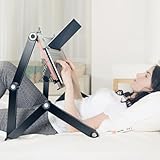
Overview: The Hifoxcc Foldable Laying Down Desk is a premium ergonomic solution designed for ultimate comfort while working from a reclined or fully supine position. With its massive 21-inch surface and sophisticated four-section leg design, this stand caters to users who refuse to compromise productivity for comfort.
What Makes It Stand Out: This is the only product specifically engineered for lying-down computing. The automotive-grade gear materials (POM Celcon gears with aluminum alloy frame) promise 300% longer service life than conventional designs. Super-elastic retractable clips securely hold devices from thin tablets to heavy laptops, while the 360° smooth adjustment allows effortless transitions between sitting, reclining, and lying positions.
Value for Money: At $199.98, this is a premium investment. While expensive compared to traditional laptop stands, it serves a unique niche with no direct competitors. For users with mobility issues, chronic pain, or those simply wanting to work from bed comfortably, the specialized design justifies the cost. Standard desks can’t replicate this functionality.
Strengths and Weaknesses: Strengths include unparalleled comfort for reclined work, exceptional build quality, generous surface area, and versatile height adjustment. The four-section legs provide superior stability. Weaknesses include the high price point, bulkiness when not in use, and a learning curve for optimal positioning. It’s overkill for users who only occasionally work from the couch.
Bottom Line: The Hifoxcc Laying Down Desk is a specialized tool for a specific user. If you regularly work while reclined or have health conditions requiring supine positioning, this is worth every penny. For traditional desk workers, however, more conventional and affordable options make better sense.
4. Coslony Laptop Stand for Couch, Height Adjustable Laptop Tray Tablet Book Stand for Reading in Bed, Compatible with Ipad Pro 12.9 Inch, Surface Laptop, Ipad Air, iPad mini,MacBook Pro/Air

Overview: The Coslony Laptop Stand for Couch offers a simple, no-frills solution for casual couch computing. This lightweight, tool-free stand prioritizes affordability and ease of use, making it an accessible entry point for users wanting to elevate their laptop while lounging without committing to a complex or expensive system.
What Makes It Stand Out: The V-shaped base design provides surprising stability without requiring wheels or furniture modification. Tool-free installation means you can set it up in seconds, and its compatibility with devices from 7" tablets to 17.3" laptops makes it versatile. The adjustable height and angle promote better ergonomics than resting a laptop directly on your lap.
Value for Money: At $45.73, this is the most budget-friendly option reviewed. It delivers core functionality—elevated, angled laptop positioning—at a price point that makes it an impulse purchase rather than an investment. While lacking advanced features, it solves the basic problem of neck strain and overheating associated with couch computing.
Strengths and Weaknesses: Strengths include unbeatable price, instant setup, lightweight portability, and wide device compatibility. The steel and wood construction offers decent durability for the price. Weaknesses include limited height range compared to premium models, less stability on uneven surfaces, no built-in storage or cup holders, and a basic aesthetic that won’t suit all decors.
Bottom Line: The Coslony stand is perfect for students, casual users, or anyone testing the waters of couch-based work. It won’t replace a dedicated desk, but for under $50, it effectively prevents laptop-induced neck pain and overheating. Choose this if you want simplicity and value over advanced features.
5. JOY worker Mobile Standing Desk, Height Adjustable Table, 60° Tiltable Rolling Laptop Desk, Portable Sit Stand Desk with Wheels Cup Holder for Bed Couch Hospital, Holds Up to 22lbs, Black

Overview: The JOY worker Mobile Standing Desk is a premium rolling workstation designed for serious home office users who demand sit-stand flexibility. With its generous 27.2" x 21.8" surface and professional-grade pneumatic lift system, this desk bridges the gap between portable laptop stands and full-sized standing desks.
What Makes It Stand Out: The gas spring height adjustment enables smooth, one-button operation from 29.5" to 41.7"—a range that accommodates both seated couch use and full standing positions. The unique 0-60° folding board with non-slip pads creates an ideal angled surface for reading or drawing, while integrated tablet and cup holders keep essentials organized. Lockable wheels and rounded edges demonstrate thoughtful safety design.
Value for Money: At $179.99, this is a significant investment, but it replaces multiple pieces of furniture. It functions as a standing desk, overbed table, couch desk, and mobile side table. The cold-rolled steel construction and rust-resistant coating ensure longevity, while the 22 lbs capacity handles most workstations. Compared to stationary standing desks, it offers mobility at a lower price point.
Strengths and Weaknesses: Strengths include exceptional height range, smooth pneumatic adjustment, large workspace, sturdy construction, and multi-functional design. The folding board adds versatility competitors lack. Weaknesses include the premium price, larger footprint that may overwhelm small spaces, and assembly that’s more involved than simpler models.
Bottom Line: The JOY worker Mobile Desk is ideal for professionals needing a flexible, mobile workstation that transitions seamlessly between sitting, standing, and reclining positions. If you’re committed to ergonomic variety and have the space, this premium option justifies its price through versatility and build quality. For casual users, however, simpler models suffice.
6. Laptop Table Mobile Adjustable Height Portable Desk Notebook Swivel PC Computer Rolling Desk with Wheels, Laptop Stand for Couch Bedside Hospital Bed Table

Overview: This mobile laptop table delivers hospital-grade functionality for home use, combining adjustable height (23.2"-36.2") with 360° rotation and tilt capabilities. Designed for versatility, it transitions seamlessly from bedside companion to sofa-side workstation, supporting users who need flexible computing solutions in various seated positions.
What Makes It Stand Out: The dual-function mobility sets this apart—locking wheels transform it into a stable nightstand, while the release mechanism enables effortless repositioning. Integrated edge-stoppers prevent laptop slides during angle adjustments, and thoughtfully rounded corners eliminate injury risks. The 10-minute tool-free assembly makes it immediately accessible for elderly or disabled users.
Value for Money: At $52.99, this table occupies a sweet spot between flimsy $30 TV trays and $100+ medical overbed tables. You’re paying for genuine utility: height adjustability, rotation mechanism, and safety certifications that budget options lack. For home caregivers or remote workers needing positional flexibility, the price reflects legitimate engineering rather than cheap materials.
Strengths and Weaknesses: Strengths include excellent mobility, patient-friendly safety features, and smooth height transitions. The rotation function accommodates left- and right-handed users equally. Weaknesses appear in the plastic components’ long-term durability and a utilitarian aesthetic that clashes with modern decor. The 36.2" maximum height may prove insufficient for taller users wanting a standing option.
Bottom Line: Ideal for bedridden patients, post-surgery recovery, or couch-based professionals prioritizing function over form. Delivers medical-table practicality at consumer pricing, though design-conscious buyers may find it visually uninspired. A workhorse solution for specific mobility needs.
7. Lap Desk for Adults with Arm Rests,Ergonomic Laptop Pillow Stand for Bed,Couch,Floor,Large Table for Long Hours Work,Eating,Gaming,Reading and Writing,Lap Laptop Desk for College Dorm Room

Overview: This ergonomic lap desk redefines portable comfort with its memory foam armrests and spacious 23.7" x 12.3" surface. Designed for extended 2-3 hour sessions, it supports laptops up to 17 inches while providing crucial wrist and elbow support that standard lap desks ignore, making it ideal for bed, couch, or floor use.
What Makes It Stand Out: The dual high-density memory foam armrests represent genuine ergonomic engineering rarely seen in this category. Supporting 44 lbs through reinforced EPS legs and wooden panels, it maintains stability where competitors sag. Its universal sizing accommodates users from 4'11" to 6'2", transforming it from a simple tray into a legitimate workspace solution.
Value for Money: At $64.99, this sits competitively within the premium lap desk segment. Basic models cost $30-40 but lack orthopedic support and robust construction. The memory foam padding, heavy-duty frame, and generous weight capacity justify the $25 premium, particularly for users experiencing shoulder strain from traditional flat lap desks.
Strengths and Weaknesses: Strengths include exceptional ergonomic support, impressive load capacity, and true portability at 5.73 lbs. The curved desktop promotes natural posture. Weaknesses involve no height or angle adjustability, limiting versatility. The foam padding may compress with heavy daily use, and its bulkiness could overwhelm smaller-framed individuals or tight dorm spaces.
Bottom Line: Perfect for students and remote workers prioritizing comfort during marathon sessions. Delivers legitimate ergonomic benefits that justify its price, though users needing positional flexibility should consider adjustable alternatives. An excellent stationary comfort solution.
8. iabifo Height Adjustable C-Shaped Table with Removable Wheels, Mobile Sofa Snack Table with Tiltable Top, Adjustable Laptop Stand for Couch, Bedside Desk with Pen Slot, Rustic Brown
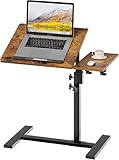
Overview: This C-shaped rolling table delivers remarkable versatility at an entry-level price point, featuring 360° rotation and a 0°-90° tilt range. The rustic brown finish and space-saving design make it a stylish addition to modern apartments, while the 23.5"-29.5" height adjustment accommodates various seating arrangements from low sofas to standard beds.
What Makes It Stand Out: The combination of full rotation and near-vertical tilt creates unmatched positional flexibility rarely found under $50. A dedicated pen slot demonstrates thoughtful design for students and artists. The removable wheels offer dual-mode functionality—roll it as a mobile workstation or stabilize it as a traditional side table, adapting to changing needs without tools.
Value for Money: At $47.49, this represents exceptional value, undercutting most competitors by $20-30 while delivering superior adjustability. Comparable tables with 360° rotation typically start at $70. The MDF construction keeps costs down without sacrificing functionality, making it an accessible entry point for users wanting premium features on a budget.
Strengths and Weaknesses: Strengths include outstanding adjustability, intelligent space-saving C-shape, and straightforward assembly. The 27.56" x 15.75" surface handles laptops and notebooks comfortably. Weaknesses involve the limited height range that excludes standing use, MDF’s susceptibility to moisture damage, and potentially less robust wheel locks compared to medical-grade alternatives.
Bottom Line: The budget champion for small-space dwellers craving maximum flexibility. Delivers premium adjustability features at a fraction of typical costs, though users requiring heavy-duty construction or extended height ranges should invest more. Perfect for students and apartment residents.
9. JOY worker Mobile Standing Desk, Height Adjustable Table, 60° Tiltable Rolling Laptop Desk, Portable Sit Stand Desk with Wheels Cup Holder for Bed Couch Hospital, Holds Up to 22lbs, Rustic

Overview: This mobile standing desk bridges the gap between stationary workstations and portable laptop tables, offering gas spring height adjustment from 29.5" to 41.7". The 60° tilting tabletop with integrated folding board accommodates both seated and standing positions, making it ideal for users seeking ergonomic variety in home offices, bedrooms, or hospital settings.
What Makes It Stand Out: The one-button pneumatic lift system delivers smooth, effortless transitions between sitting and standing—typically a premium feature found in $300+ desks. The inclusion of a cup holder and tablet recess demonstrates thoughtful space optimization, while the folding board design provides angled support for drawing or reading without sacrificing flat workspace.
Value for Money: At $179.99, this sits competitively within the portable standing desk category. Manual-adjust competitors cost $150-200 but lack pneumatic convenience. While the 22 lb capacity limits monitor-arm setups, the price accurately reflects the engineering investment in gas spring technology and dual-surface design.
Strengths and Weaknesses: Strengths include seamless sit-stand transitions, generous 27.2" x 21.8" surface, and intelligent accessory integration. The locking wheels provide stability when needed. Weaknesses center on the modest 22 lb weight limit, which restricts multi-monitor configurations, and a rustic aesthetic that may not suit contemporary interiors. Assembly requires more effort than simpler designs.
Bottom Line: Ideal for laptop users wanting sit-stand benefits without committing to a full desk. The pneumatic lift justifies the price premium, though heavy equipment users should seek higher-capacity alternatives. A strong hybrid solution for dynamic workflows.
10. LEVO G2 V16 Rolling Laptop Workstation Stand Cart with Mouse Tray and Phone Holder for Bed Couch Recliner or Chair, Adjustable Mobile Desk for Remote Office Reading and Study
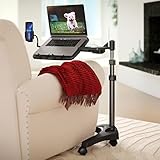
Overview: The LEVO G2 V16 represents the premium tier of mobile workstations, crafted from aluminum and polymer with an impressive 22"-45" height range. Designed for serious remote professionals, it combines 0-70° platform tilt with 70° rotation, enabling precise ergonomic positioning from virtually any reclined or seated posture on couches, beds, or recliners.
What Makes It Stand Out: This workstation’s engineering excellence manifests in its stable base and smooth casters that handle carpet and hard floors equally well. The included mouse tray and adjustable phone holder create a complete mobile office ecosystem. Locking joints maintain position under typing pressure, while the lightweight yet robust construction supports effortless room-to-room mobility without sacrificing stability.
Value for Money: At $189.99, this commands a premium but delivers commensurate quality. Cheaper alternatives ($100-150) use plastic components and wobble during use. The aluminum frame, precision tilt controls, and accessory package justify the investment for users spending 6+ hours daily in non-traditional workspaces. It’s a professional tool, not a casual accessory.
Strengths and Weaknesses: Strengths include exceptional build quality, unparalleled adjustability, and thoughtful accessory integration. The wide base prevents tipping, and the height range accommodates standing use. The critical weakness is the 7 lb weight capacity, limiting it to ultrabooks and tablets—powerful laptops with discrete GPUs exceed this limit. The price also exceeds casual user budgets.
Bottom Line: The definitive choice for remote professionals prioritizing ergonomic precision and build longevity. Delivers desktop-quality adjustability in a mobile package, though users with heavy workstations must verify weight compatibility. A worthwhile investment for dedicated home office alternative seekers.
Why Couch Workers Need Specialized Laptop Stands
The Ergonomic Risks of Couch Computing
Working from your couch without proper support creates a perfect storm of postural problems. When you hunch over a laptop resting on your thighs, your neck bends forward at a 15-30 degree angle, multiplying the effective weight your cervical spine supports from 10-12 pounds to nearly 40 pounds. This “tech neck” strain compresses discs and overworks muscles, leading to chronic pain and potential long-term injury. Meanwhile, your lower back collapses into the soft cushions, losing the natural lumbar curve that protects your spine during upright sitting.
The soft, uneven surface of a couch also forces your wrists into awkward angles as you type, increasing the risk of repetitive strain injuries like carpal tunnel syndrome. Without a stable platform, your laptop sinks and shifts, causing you to constantly adjust your position and creating micro-movements that fatigue supporting muscles. These compounding issues explain why that “comfortable” afternoon on the couch often leaves you feeling more exhausted than a day at a traditional desk.
How Proper Positioning Transforms Your Comfort
A specialized laptop stand fundamentally reimagines your couch workspace by establishing a neutral posture zone. The ideal setup positions your screen at eye level, allowing your neck to maintain its natural curve while your gaze remains straight ahead. Your elbows should rest comfortably at 90 degrees, with forearms parallel to the floor and wrists in a neutral position—not bent upward or downward. This alignment distributes weight evenly through your skeletal system rather than overloading soft tissues.
Beyond spinal health, proper positioning improves breathing and circulation. When you’re not slumped forward, your diaphragm moves freely, increasing oxygen flow to your brain for better focus. Your chest remains open, reducing the shoulder rounding that contributes to tension headaches. The right stand creates a stable, elevated platform that transforms your couch from a productivity pitfall into a legitimate ergonomic workstation.
Understanding Different Types of Couch-Friendly Laptop Stands
Over-the-Lap Desks
Over-the-lap desks feature a flat surface supported by cushions or a rigid base that straddles your legs. These designs excel at providing a stable, table-like experience without requiring floor space. The best models include built-in wrist rests and slight inclines to improve typing angles. Look for versions with detachable cushions that allow you to adjust thickness based on your leg position or remove them entirely for use as a traditional lap desk on flatter surfaces.
The key advantage lies in their simplicity—they don’t require reaching or clamping mechanisms, making them ideal for people who frequently shift positions. However, they can trap heat against your legs during extended use, so prioritize models with ventilation channels or heat-resistant bottom surfaces. Weight distribution is crucial; a well-balanced design prevents the dreaded “tip-forward” when you lean back into the cushions.
Side-Clamp and C-Table Designs
Side-clamp stands and C-tables slide under your couch base, positioning a cantilevered platform over your lap from the side. These designs keep your legs completely free, allowing you to stretch, cross your legs, or even share the couch with a pet without disruption. The clamping mechanism adjusts to different couch heights and cushion depths, making them versatile for various furniture styles.
C-tables offer superior stability for heavier laptops and external monitors because their weight distributes down to the floor rather than across your body. The trade-off is reduced portability—they’re semi-permanent fixtures that work best when you have a dedicated couch workspace. Pay close attention to the clamp’s padding quality; cheap foam compresses over time, causing the stand to wobble and potentially damage your couch’s upholstery.
Adjustable Tripod-Style Stands
Tripod-style laptop stands bring professional photography equipment principles to your living room. Three adjustable legs plant firmly on the floor around your couch, supporting a platform that extends over your seating area. These stands offer unmatched height versatility, accommodating everything from low-profile sectionals to high-backed loveseats. The independent leg adjustment means they remain stable even on uneven flooring—perfect for older homes with slanted floors.
The learning curve involves mastering the telescoping mechanisms and finding the right leg spread for your space. Quality models feature quick-release locks and marked height indicators for repeatable positioning. While they take longer to set up than other types, their ability to fold into a compact carrying case makes them excellent for multi-location remote workers who might work from the couch today and a hotel room tomorrow.
Inflatable and Portable Options
Inflatable laptop stands represent the ultimate in portability and storage convenience. When deflated, they occupy less space than a paperback book, making them perfect for minimalists or those in small apartments. High-grade PVC or TPU materials resist punctures while providing surprising stability when properly inflated. Most designs feature multiple air chambers that let you customize firmness and angle by adjusting inflation levels in different sections.
The primary consideration is durability; seams are the failure point, so examine reinforcement quality. These stands work best as secondary or travel solutions rather than daily drivers, though premium models with flocking surfaces and built-in mouse pads blur that line. Temperature affects air pressure, so expect to add air periodically, and keep them away from sharp objects like pet claws or jewelry.
Convertible Floor-Standing Models
Convertible floor-standing stands function as both couch-side laptop holders and traditional standing desks. A weighted base sits on the floor, with an articulated arm that swings over your couch when seated or stands upright for standing work. These premium solutions often include VESA mounts for external monitors and integrated cable management systems. The heavy base—sometimes 20-30 pounds—ensures stability even when supporting dual-screen setups.
The investment pays off for users committed to the couch as a primary workspace who also want flexibility. Look for gas-spring arms that adjust with minimal effort and locking casters if you need to roll the unit between rooms. The footprint requires enough floor space beside your couch, making them impractical for tight layouts, but their versatility justifies the real estate for serious remote workers.
Key Features That Define the Best Couch Laptop Stands
Height and Angle Adjustability
The hallmark of an effective couch laptop stand is granular adjustability. Your ideal screen height depends on your eye level when sitting upright against the cushions, which varies based on couch depth, cushion firmness, and your torso length. A stand offering at least 8-12 inches of height adjustment accommodates most users and furniture combinations. More importantly, infinite-angle tilt—or at least 5-7 preset positions—lets you eliminate screen glare from windows and find the perfect viewing angle.
Look for adjustment mechanisms that lock securely without slipping under the weight of your laptop. Telescoping poles with twist-locks or push-button detents provide reliable positioning. Some premium models include angle indicators, helping you replicate your perfect setup quickly. Remember that adjustability should feel effortless; if you dread changing positions, you’ll settle for suboptimal ergonomics.
Stability and Weight Capacity
Stability on a couch requires different engineering than desk-based stands. Your movements—shifting weight, reaching for coffee, a pet jumping up—create dynamic forces that can topple poorly designed stands. Minimum stability standards include a base that extends beyond your laptop’s footprint and weight distribution that lowers the center of gravity. For lap-based designs, non-slip surfaces on both top and bottom prevent sliding on fabric and keep your laptop secure.
Weight capacity matters beyond just supporting your laptop. Factor in the weight of accessories like external hard drives, coffee mugs, or notebooks you might place on the stand. A 15-pound capacity covers most scenarios, but 20+ pounds provides headroom for future equipment upgrades. Test stability by gently nudging the stand; any wobble translates to typing discomfort and potential equipment damage.
Surface Area and Laptop Size Compatibility
Your laptop’s size determines minimum surface requirements, but smart design maximizes usable space. A 15-inch laptop needs at least 14x10 inches of flat surface, but built-in mouse pads, phone holders, and document slots transform dead space into productivity zones. Ventilation cutouts should align with your laptop’s fan locations—measure your device and compare against stand specifications.
Edge design affects comfort; rounded corners prevent painful thigh pressure, while raised lips keep items from sliding off when the stand tilts. Some stands feature extendable wings for mouse use on either side, accommodating left-handed users or those who prefer mousing space. Consider your workflow: if you reference physical documents, a wider surface prevents constant reaching to side tables.
Material Quality and Heat Dissipation
Material choice impacts durability, weight, and thermal management. Aluminum alloy offers excellent heat conductivity and professional aesthetics but adds weight and can feel cold to the touch. Bamboo provides sustainable warmth and natural antimicrobial properties, though it’s heavier than metal and vulnerable to moisture. High-impact ABS plastic keeps weight low and costs down, but premium grades with fiberglass reinforcement are essential for longevity.
Heat dissipation features separate exceptional stands from basic platforms. Perforated surfaces, raised ridges, and built-in fans prevent thermal throttling that slows performance. Passive cooling through aluminum construction or strategic air channels suffices for most ultrabooks, but gaming laptops and workstations benefit from active cooling systems. The stand’s own heat matters too—materials that absorb and radiate heat back to your laptop defeat the purpose, so prioritize designs that channel warmth away from your device.
Portability and Storage Convenience
The best couch laptop stand respects that your living room serves multiple purposes. Fold-flat designs that slide under the couch or tuck behind a cushion maintain your space’s aesthetic when work ends. Weight becomes a portability factor even for stationary stands—you’ll move it for vacuuming or movie nights. Aim for under 5 pounds for lap desks and under 10 pounds for floor-standing models if you plan to relocate them regularly.
Quick-release mechanisms transform bulky stands into compact packages. Tripod stands should collapse to under 24 inches for closet storage, while C-tables might feature removable tops for easier carrying. Consider multi-functional storage: some lap desks include interior compartments for cables and peripherals, eliminating clutter. The ultimate test is whether you can transition from work mode to relaxation mode in under a minute without the stand becoming an obstacle.
Setting Up Your Ideal Couch Workspace
Finding Your Optimal Viewing Angle
Your screen should sit 20-28 inches from your eyes, with the top of the display at or slightly below eye level. On a couch, this often means elevating the laptop higher than feels intuitive. Use the “head nod test”—if you can nod yes comfortably without your chin hitting your chest, your screen is too low. The goal is neutral neck alignment where your ears stack directly above your shoulders.
Lighting dramatically affects perceived comfort. Position yourself perpendicular to windows to minimize glare, and adjust the stand’s tilt to eliminate reflections without cranking up screen brightness. For evening work, bias lighting behind the stand reduces eye strain. Many users benefit from a slight downward screen angle (10-15 degrees) that follows the natural curve of sight, but this varies based on your couch’s recline angle and personal preference.
Pairing with External Peripherals
A laptop stand’s true potential unlocks when paired with external devices. A compact wireless keyboard and mouse let you position the laptop screen at eye level while keeping input devices at elbow height on a separate surface or your lap. This split-level approach mimics a traditional desktop setup while maintaining couch comfort. Look for stands with USB passthrough ports or cable management clips that keep connection points accessible.
For audio, a boom arm attached to the stand holds your microphone at the proper distance for video calls, while headphone hooks keep cables untangled. Some advanced setups integrate a small USB-C hub mounted to the stand’s underside, creating a single-cable connection to your laptop. This declutters your workspace and ensures you never fumble for ports mid-meeting. The key is treating the stand as a command center, not just a platform.
Managing Cables and Power Sources
Cable management separates professional setups from chaotic tangles. Velcro straps or magnetic clips along the stand’s legs or edges route power cords away from your body and prevent them from pulling your laptop off the stand. For side-clamp designs, run cables down the support arm and secure them where they won’t catch on cushions. Tripod stands benefit from spiral cable wraps that keep cords from tangling in the legs.
Power strategy matters more on the couch, where outlets may be scarce. A power strip with a 10-15 foot cord gives you flexibility, while a portable battery pack with pass-through charging keeps you mobile. Consider the stand’s proximity to heat sources—radiators and heating vents near floor-standing models can degrade cables over time. The cleanest setups use a single cable from laptop to a hub on the stand, then route a single power cable to the wall, minimizing tripping hazards and visual clutter.
Common Mistakes Couch Workers Make
Ignoring the 90-Degree Rule
The 90-degree rule—elbows, hips, and knees at right angles—gets compromised on soft seating. Many workers adapt by raising the laptop stand but leave their feet dangling or tucked under them, cutting circulation and rotating the pelvis. A footrest, even a firm pillow, maintains hip alignment and prevents lower back strain. Your elbows need support too; if the stand is too high, your shoulders shrug, creating tension. Adjustable armrests on the couch or a small side table for elbow support solve this.
The mistake intensifies when workers recline too far back. While a 100-110 degree recline reduces spinal disc pressure, going beyond 120 degrees forces you to crane your neck forward to see the screen, negating any ergonomic benefits. Use the stand’s tilt to bring the screen to you rather than collapsing your posture to see it. Periodically check your angles; cushions compress over a work session, subtly changing your position.
Overlooking Screen Distance
Couch workers consistently place laptops too close due to the intimate nature of the seating. This forces eye muscles into constant accommodation, causing fatigue and potential myopia progression. The 20-28 inch rule feels unnatural when you’re accustomed to holding devices near your face. Measure and mark your ideal distance with a piece of tape on the stand or couch arm as a visual reminder.
Proximity also increases exposure to blue light and screen flicker, which are more pronounced at close range. Beyond physical distance, consider virtual distance—increase font scaling to 125-150% so you’re not squinting at small text. High-resolution screens tempt you to maximize real estate with tiny fonts, but readability trumps pixel density for sustained comfort. Your eyes should relax, not strain, when glancing at the screen.
Choosing Style Over Function
Aesthetics drive many couch stand purchases, but beautiful designs often compromise adjustability and stability. Sleek minimalist stands with single hinges may look stunning in product photos but wobble under real-world use. Wooden stands with beautiful grain patterns sometimes lack ventilation cutouts, turning your laptop into a hot plate. Prioritize function-first designs that incorporate style through material quality and thoughtful details rather than form-over-function compromises.
The “Instagram workspace” phenomenon promotes stands with integrated planters or decorative elements that add weight and reduce usable surface area. Remember that your couch workspace serves productivity, not social media validation. Choose stands with clean lines and durable finishes that complement your decor without sacrificing the mechanical features that protect your health. A well-designed stand disappears into your workflow; a stylish one constantly reminds you of its presence through limitations.
Budget Considerations and Value
What to Expect at Different Price Points
Entry-level stands ($20-40) typically offer basic elevation with limited adjustability. These work for occasional use or lightweight laptops but often use thinner materials that flex under pressure. Mid-range options ($40-80) introduce meaningful ergonomics: multiple height settings, better materials like aluminum or reinforced plastic, and stability improvements. This sweet spot serves most couch workers with daily needs.
Premium stands ($80-150) justify their cost through superior engineering—gas spring adjustments, medical-grade materials, and integrated features like cooling fans or cable management systems. These represent long-term investments in health and productivity. Beyond $150, you’re paying for specialized functions like VESA mounting, extreme weight capacity, or designer aesthetics. Assess whether these features solve specific problems or merely add luxury.
Long-Term Investment vs. Short-Term Savings
A $30 stand that causes wrist pain costs more in potential medical bills and lost productivity than a $100 ergonomic solution. Calculate the daily cost: a $90 stand used 200 days per year for three years costs $0.15 per use. Compare that to a single chiropractic visit triggered by poor ergonomics. The math overwhelmingly favors investing upfront in quality adjustability and stability.
Consider resale value too. Premium stands from reputable manufacturers retain 40-60% of their value on secondary markets, while budget options become disposable. Warranty coverage tells a similar story; five-year warranties on premium stands versus 90-day coverage on cheap models indicate manufacturer confidence in durability. Your body and laptop are worth protecting with equipment designed for the task.
Maintaining Your Laptop Stand
Cleaning and Care Tips
Fabric-covered lap desks attract dust, crumbs, and pet hair. Vacuum them weekly using an upholstery attachment, and spot-clean stains with a mild detergent solution. For hard surfaces, microfiber cloths with isopropyl alcohol remove skin oils and grime without damaging finishes. Avoid harsh chemicals on aluminum stands, which can corrode protective coatings.
Moving parts require occasional attention. Lubricate adjustable hinges with silicone spray every six months to prevent squeaking and ensure smooth operation. Check tripod leg locks for debris that could prevent proper engagement. For inflatable stands, store them partially inflated rather than completely deflated—this prevents material creasing that weakens seams over time.
When to Upgrade Your Setup
Upgrade signals include persistent wobbling despite tightening all fasteners, visible stress cracks in plastic components, or adjustment mechanisms that slip under load. If your laptop no longer fits securely due to size upgrades, don’t force compatibility. Ergonomic discomfort that returns after initial relief suggests your needs have evolved beyond the stand’s capabilities.
Technology changes may warrant upgrades too. New laptops with different ventilation patterns might perform poorly on stands designed for older models. If you transition to a dual-screen setup, your current stand may lack the stability or surface area required. Treat upgrades as health maintenance rather than luxury purchases—your evolving workspace demands tools that grow with your needs.
Frequently Asked Questions
Can I use a regular laptop stand on my couch?
Standard desk stands lack the stability and base design for couch use. Their narrow feet sink between cushions or slide on fabric, creating tipping hazards. Desk stands also position laptops too low for couch seating, forcing neck flexion. Couch-specific designs distribute weight across broader surfaces or anchor to the floor, addressing these unique challenges.
How do I prevent my laptop from overheating on a couch stand?
Ensure the stand’s ventilation aligns with your laptop’s fan exhaust. Use stands with perforated surfaces or raised ridges that create airflow channels. A small USB-powered fan placed beneath the stand provides active cooling. Avoid blocking vents with cushions or your body, and consider undervolting your CPU for cooler operation during intensive tasks.
What’s the ideal height for a couch laptop stand?
The top of your screen should align with your eye level when sitting upright against the couch back. For most people, this means the stand’s surface sits 8-12 inches above your lap. Measure from your seated eye height to your lap, then subtract your laptop’s screen height to determine your target stand height. Always err on the side of slightly too high rather than too low.
Are couch laptop stands stable enough for vigorous typing?
Quality stands designed for couch use remain stable during normal to moderately heavy typing. Look for models with non-slip surfaces, weighted bases, or leg supports that extend beyond the laptop’s footprint. Avoid stands with single-point contact designs or narrow support columns. Test stability by typing aggressively on a demo unit before purchasing.
How much should I expect to spend on a quality couch laptop stand?
Plan to invest $50-90 for a durable, adjustable stand that will last several years. Budget options under $30 work for occasional use but sacrifice stability and ergonomics. Premium stands above $100 offer professional-grade materials and features worth considering if you work from the couch daily. Remember that medical costs from poor ergonomics far exceed the price difference.
Can these stands accommodate 17-inch gaming laptops?
Many stands support 17-inch laptops, but verify weight capacity and surface dimensions. Gaming laptops often exceed 6 pounds and generate significant heat, requiring stands with 10+ pound capacity ratings and robust cooling features. Tripod-style and heavy-duty C-table designs handle these loads best, while lightweight lap desks may flex or tip.
How do I store my laptop stand when not in use?
Fold-flat designs slide vertically under the couch or behind cushions. Tripod stands collapse to fit in closets or narrow spaces beside furniture. C-tables can remain in place, serving as side tables. Inflatable models deflate to pocket size. Choose a storage method that takes less than 30 seconds to avoid leaving the stand out as clutter.
Will a couch laptop stand work with my external monitor?
Some floor-standing and C-table designs include VESA mounts for external monitors, creating a dual-screen couch command center. For other stand types, use your laptop as a secondary screen positioned on the stand while placing the external monitor on a separate adjacent surface at proper eye level. Ensure the stand doesn’t block the monitor’s view.
How do I clean fabric or cushion-based laptop stands?
Vacuum fabric surfaces weekly with an upholstery attachment. For stains, use a fabric cleaner approved for your couch material—test in an inconspicuous area first. Removable cushion covers should be washed according to label instructions. Avoid saturting foam inserts, which can develop mold. Deodorize with baking soda, let sit, then vacuum thoroughly.
Can children or elderly family members use these stands safely?
Stands with simple adjustment mechanisms and stable bases work well for all ages. Avoid models requiring significant strength to adjust or with pinch points. For children, ensure the stand’s height prevents the laptop from falling forward onto them. Elderly users benefit from lightweight lap desks or stable C-tables that don’t require reaching or balancing. Always supervise initial setup to verify safe usage.