Hybrid work isn’t just a passing trend—it’s the permanent blueprint for modern collaboration. By 2026, the line between physical and virtual presence will be virtually indistinguishable, and your conference room technology will either be the bridge that connects distributed teams or the barrier that isolates them. While traditional webcams and PTZ cameras have served us adequately, they create a fundamental power imbalance: in-room participants enjoy natural eye contact and spatial awareness, while remote attendees remain trapped in a flat, passive viewing experience.
360° conference cameras are rewriting these rules entirely. These intelligent devices don’t just capture a room—they understand it, dynamically framing speakers, tracking conversations across multiple participants, and delivering an immersive experience that makes remote colleagues feel like they’re sitting at the table. But not all 360° cameras are created equal, and the market is flooded with specifications that sound impressive on paper yet fail in real-world hybrid environments. This comprehensive guide cuts through the marketing noise to equip you with the knowledge to evaluate, select, and implement the perfect 360° conferencing solution for your organization’s unique needs.
Top 10 360° Conference Cameras for Hybrid Meetings
Detailed Product Reviews
1. Owl Labs Meeting Owl 3 - 360° 1080p HD Conference Room Camera, AI-Driven Speaker-Tracking, 18-Foot Mic Pickup - Certified for Microsoft Teams - Works with Zoom, Google Meet - Plug & Play Setup

Overview: The Meeting Owl 3 is Owl Labs’ flagship 360° video conferencing solution designed for hybrid workspaces. This all-in-one device combines a 1080p HD camera with 360° audio pickup spanning 18 feet, creating an immersive meeting experience where remote participants feel physically present. Certified for Microsoft Teams and compatible with all major platforms, it positions itself as the premium choice for professional collaboration.
What Makes It Stand Out: The proprietary Owl Intelligence System truly differentiates this device. Using sophisticated AI that processes both visual and audio cues, it automatically tracks and frames active speakers with remarkable accuracy. The ecosystem flexibility is unmatched—pair multiple Owls, add an Owl Bar, or integrate the Whiteboard Owl for comprehensive room coverage. IT administrators benefit from The Nest management portal for fleet-wide control.
Value for Money: At $1,099, the Meeting Owl 3 commands a premium but delivers commensurate value. Competing solutions with similar AI capabilities often cost 30-50% more or require multiple devices. For organizations running daily hybrid meetings, the productivity gains and reduced IT headaches justify the investment within months. The expandable ecosystem protects your investment as rooms scale.
Strengths and Weaknesses: Strengths include exceptional 18-foot audio range, intelligent speaker tracking, broad platform compatibility, and robust fleet management tools. The six-minute setup is genuinely plug-and-play. Weaknesses center on the steep price for smaller organizations and 1080p resolution when 4K options exist. Single-unit coverage may be insufficient for rooms over 20x20 feet.
Bottom Line: The Meeting Owl 3 is the gold standard for mid-to-large conference rooms prioritizing seamless hybrid collaboration. It’s ideal for organizations with regular hybrid meetings and IT support. While expensive, the AI performance and ecosystem justify the cost for serious users.
2. TOUCAN 360-Degree Video Conference Camera, 1080p HD Webcam with 4 Noise Reduction Mics, Speaker, AI Tracking, Works with Zoom, Google Voice, Microsoft Teams and More, for PC/Mac/Tablet

Overview: The TOUCAN 360° Video Conference Camera positions itself as an affordable entry into immersive hybrid meetings. At under $280, this all-in-one device offers 1080p HD video with four noise-reduction microphones and AI tracking capabilities. Designed for budget-conscious businesses, it promises plug-and-play simplicity across major platforms including Zoom, Teams, and Google Meet.
What Makes It Stand Out: The aggressive pricing is its most compelling feature—delivering core 360° functionality at roughly 25% of premium alternatives. The four-microphone array with noise reduction provides clear audio for small-to-medium rooms. Its universal compatibility and straightforward setup make it particularly attractive for organizations without dedicated IT support. The AI tracking, while less sophisticated than premium models, still automatically frames active speakers.
Value for Money: Exceptional value proposition. For $279.98, you receive capabilities that until recently cost over $1,000. While it lacks the audio range and advanced AI of premium models, it covers the essential needs of most small businesses. The cost savings allow purchasing multiple units for different rooms, making it practical for startups and growing companies prioritizing budget over cutting-edge features.
Strengths and Weaknesses: Strengths include unbeatable price, simple plug-and-play operation, decent microphone quality, and broad platform support. The compact design suits smaller spaces. Weaknesses involve limited 360° audio range (unspecified but clearly shorter than 18 feet), less refined AI tracking, basic build quality, and minimal expansion options. Performance in larger or noisy environments may disappoint.
Bottom Line: Perfect for small businesses, startups, or home offices needing 360° conferencing without enterprise budgets. While it won’t match premium alternatives, it delivers remarkable functionality for the price. Choose this if cost is paramount and rooms are under 15x15 feet.
3. j5create 360 Degree All Around Meeting Webcam - 1080P HD Video Conference Camera with High Fidelity Microphone, USB-C | for Video Conferencing, Online Classes, and Collaboration (JVCU360)

Overview: The j5create JVCU360 is the budget champion of 360° webcams, priced at just $79.99. This USB-C conference camera delivers 1080p video at 30Hz with a built-in omnidirectional microphone. Designed for individual professionals and small teams, it prioritizes affordability and simplicity over advanced features, making 360° video accessible to virtually any budget.
What Makes It Stand Out: The six display modes offer surprising versatility for such an inexpensive device, allowing users to switch between panoramic, split-screen, and focused views via a touch bar. The USB-C connectivity ensures modern compatibility, while plug-and-play operation requires no software installation. At this price point, simply having 360° capability with a built-in microphone is noteworthy.
Value for Money: Unbeatable for the price. No other 360° conference camera offers this functionality below $100. It’s ideal for freelancers, educators, or small teams running occasional video calls. While compromises exist in frame rate (30Hz) and microphone quality, the value is undeniable. Think of it as a functional proof-of-concept before investing in enterprise-grade equipment.
Strengths and Weaknesses: Strengths include incredible affordability, multiple viewing modes, USB-C connectivity, and zero-learning-curve setup. It works reliably with all major platforms. Weaknesses are significant: 30Hz video appears slightly choppy, the omnidirectional mic lacks noise cancellation, audio pickup range is limited, and firmware updates may be needed for optimal performance. Build quality feels plasticky and lightweight.
Bottom Line: Buy this if you’re testing 360° conferencing or have severe budget constraints. It’s competent for one-on-one meetings and small huddles but won’t impress in important client calls. For under $80, it does exactly what it promises—nothing more, nothing less.
4. Meeting Owl 4+ 360-Degree, 4K Smart Video Conference Camera, Microphone, and Speaker (Automatic Focus, Zooming, Noise Equalizing, Certified for Microsoft Teams)
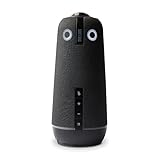
Overview: The Meeting Owl 4+ represents the pinnacle of Owl Labs’ conferencing technology, upgrading the flagship experience to 4K resolution for $1,999. This premium device maintains the beloved 360° audio pickup up to 18 feet while adding enterprise-grade features like WiFi connectivity, Kensington lock security, and Power over Ethernet. It’s built for boardrooms that demand the absolute best hybrid meeting experience.
What Makes It Stand Out: The 4K resolution delivers stunning clarity, making remote participants feel truly immersed. Enterprise features set it apart: WiFi enables wireless firmware updates and management, the Kensington lock prevents theft in shared spaces, and PoE simplifies installation. The Owl Intelligence System remains best-in-class, with AI tracking that seamlessly handles multiple speakers and dynamic room interactions.
Value for Money: This is a significant investment—nearly double the Meeting Owl 3. However, for Fortune 500 companies, law firms, and enterprise clients where presentation quality impacts business outcomes, the premium is justified. The 4K resolution future-proofs your investment, while enterprise features reduce IT overhead. Compared to traditional AV systems costing $5,000+, it remains relatively affordable.
Strengths and Weaknesses: Strengths include breathtaking 4K video, the same excellent 18-foot audio range, robust security features, wireless management capabilities, and the proven Owl ecosystem. The six-minute setup holds true even with advanced features. Weaknesses are the prohibitive cost for smaller organizations, potential overkill for standard conference rooms, and the fact that many platforms compress 4K anyway. Requires robust network infrastructure for full benefits.
Bottom Line: The Meeting Owl 4+ is for enterprise boardrooms and executive suites where cost is secondary to performance and security. If you’re equipping a room that hosts C-suite meetings or high-stakes client presentations, this is your choice. For standard conference rooms, the Meeting Owl 3 remains the smarter buy.
5. COOLPO Camera 360, 4K Video Conference Room Camera System, Webcam, AI Driven Speaker Tracking, Noise Cancellation, Works with Zoom, Google Meet, Teams and More, 15 ft Mic Pickup, PANA 5ft USB Cable

Overview: The COOLPO AI Huddle Pana carves a middle path between budget and premium 360° cameras, offering 4K resolution at $598.98. This smart conference camera features eight microphones with 15-foot pickup range and AI-driven speaker tracking. Its standout feature is a security-first design using edge computing, ensuring all processing happens locally without cloud dependency—appealing to privacy-conscious organizations.
What Makes It Stand Out: The stand-alone AI architecture is unique: all algorithms run locally on the device, eliminating external data transfers and maximizing privacy. Eight microphones provide excellent audio coverage, while Intelligent Zoom optimizes screen space dynamically. The 4K resolution at nearly half the price of the Meeting Owl 4+ makes high-definition 360° conferencing more accessible. The 15-foot range suits most standard conference rooms perfectly.
Value for Money: Excellent mid-tier value. You’re getting 4K resolution and sophisticated AI tracking for about 55% less than the Meeting Owl 4+. While sacrificing three feet of audio range and some ecosystem polish, the core functionality rivals premium competitors. The security focus adds intangible value for legal, healthcare, and financial sectors. It’s the sweet spot for growing companies wanting quality without enterprise pricing.
Strengths and Weaknesses: Strengths include 4K resolution, local AI processing for enhanced security, eight-microphone array, competitive pricing, and straightforward USB plug-and-play setup. The 360° view is seamless without stitching artifacts. Weaknesses include a shorter 15-foot range versus 18-foot competitors, less established brand reputation, limited ecosystem expansion options, and basic fleet management tools compared to Owl Labs’ Nest platform.
Bottom Line: The COOLPO Pana is the value champion for 4K 360° conferencing. It’s perfect for mid-sized companies prioritizing both quality and data privacy. If you need 4K resolution but can’t justify $2,000, this is your answer. The security features make it particularly attractive for regulated industries.
6. MTW200-1000 Owl Pro 360 Degree 1080 Smart Video Conference Camera (Renewed)

Overview: The Meeting Owl Pro Renewed brings premium 360° video conferencing to medium and large rooms at a reduced price point. This refurbished flagship device combines a 1080p camera, eight smart microphones, and a speaker into a central tabletop unit that automatically focuses on active speakers.
What Makes It Stand Out: The intelligent speaker tracking system shifts focus seamlessly as participants speak, creating a natural meeting experience. Eight omnidirectional microphones provide 18-foot radius coverage while equalizing volume levels. The all-in-one design eliminates complex multi-component setups, and the “smart meeting room” platform promises ongoing feature updates.
Value for Money: At $508.89 renewed, it offers substantial savings over the new Owl Pro’s $999 price tag. This positions it competitively against mid-tier alternatives while delivering premium features. However, renewed status means accepting potential cosmetic wear and limited warranty coverage compared to new units.
Strengths and Weaknesses: Strengths include exceptional audio pickup range, proven auto-tracking technology, and true plug-and-play simplicity with no software installation. The integrated design reduces cable clutter significantly. Weaknesses center on the renewed condition—buyers sacrifice warranty protection and assume some risk. The 1080p output feels dated against newer 4K competitors, and the premium price still exceeds many budget alternatives.
Bottom Line: Ideal for organizations wanting flagship Owl Pro capabilities without full retail cost. Verify seller refurbishment standards and warranty terms before purchasing.
7. Insta360 WaveLink - 4K Conference Room Speakerphone and Camera, Speaker Tracking, 5m 360° Voice Pickup, Noise Reduction, AI Transcription and Summaries, Plug & Play, Works with Zoom, Teams
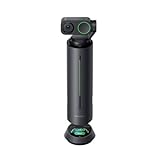
Overview: The Insta360 WaveLink positions itself as an AI-first conferencing solution, combining 4K video with advanced audio processing and intelligent meeting assistance. Unlike traditional cameras, it prioritizes transcription and analysis capabilities alongside core conferencing functions.
What Makes It Stand Out: Five directional pickup patterns optimize audio for different room configurations. The standout feature is AI-powered transcription supporting 99 languages with 300 free monthly minutes, plus internal recording that works offline. The AI meeting assistant generates summaries and enables deep analysis queries directly on the device.
Value for Money: At $499, it undercuts premium competitors like the Meeting Owl Pro while offering unique AI capabilities. The free transcription tier adds significant value for global teams. However, continued heavy use may require paid subscriptions, and the 5-meter pickup range is shorter than some rivals.
Strengths and Weaknesses: Strengths include cutting-edge AI features, multi-language support, versatile pickup patterns, and robust noise cancellation. The 4K resolution future-proofs video quality. Weaknesses include a shorter voice pickup radius than enterprise alternatives and limited brand recognition in business conferencing. The AI features may overwhelm users wanting simple plug-and-play operation.
Bottom Line: Best for international organizations and documentation-heavy meetings where AI transcription provides clear ROI. Tech-forward teams will appreciate the innovation.
8. PANOCORE360 All-in-One Meeting Camera - 360° Conference Cam for PC Mac, Speaker & Mic Array, Auto Speaker Focus, 1080P Output, AI Voice Isolation, Local Recording,Compatible with Webex/Zoom/Teams/Meet
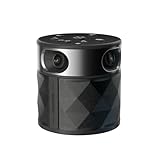
Overview: The PANOCORE360 delivers award-winning 360° conferencing technology at an accessible price point designed specifically for small to medium meeting spaces. This CES Innovation Award winner integrates four cameras, microphones, and a speaker at the chip level for streamlined performance.
What Makes It Stand Out: The adaptive dual-vision modes offer either auto-focused speaker tracking or a comprehensive dual 180° widescreen view. USB bus power eliminates the need for separate power adapters on modern laptops. The tight chip-level integration reduces latency and system complexity while maintaining 4K capture merged into a 1080p output stream.
Value for Money: At $199.99, it dramatically undercuts competitors while retaining core premium features. This represents exceptional value for startups and small businesses. The compromise is a 10-foot pickup range and three-microphone array, suitable for up to 12 participants but not larger boardrooms.
Strengths and Weaknesses: Strengths include the unbeatable price, innovative design recognized by CES, flexible power options, and intelligent dual-mode viewing. The compact integration simplifies deployment. Weaknesses are the limited pickup range, fewer microphones than premium models, and 1080p output despite 4K capture. It may struggle in acoustically challenging spaces.
Bottom Line: The smart choice for budget-conscious teams in smaller rooms. Prioritizes essential features over enterprise-scale capabilities with impressive results.
9. NexiGo Meeting 360 Ultra (Gen 3), Enhanced All-in-One Conference Camera System, Multi-Camera Setup, 8K Capture, AI-Powered Framing and Auto Tracking, for Medium to Large Meeting Rooms

Overview: The NexiGo Meeting 360 Ultra represents the cutting edge of conferencing technology with its 8K capture capability and built-in operating system. Designed for medium to large rooms, it supports up to four integrated cameras and operates independently without requiring a connected computer.
What Makes It Stand Out: The multi-camera architecture allows customizable coverage for unconventional room layouts like U-shaped configurations or lecture halls. The built-in OS with app store enables direct installation of Zoom, Teams, and other platforms, turning the camera into a standalone conferencing appliance. Eight microphones provide 18-foot pickup range while dual 195-degree lenses capture full 360° views.
Value for Money: At $899.99, this premium pricing reflects its advanced capabilities. For organizations needing flexible camera arrangements or wanting to eliminate dedicated meeting room PCs, the cost is justified. However, smaller teams will find better value in simpler solutions.
Strengths and Weaknesses: Strengths include unparalleled flexibility with multi-camera support, standalone operation, 8K capture detail, and comprehensive platform compatibility. The privacy cover addresses security concerns. Weaknesses are the high price point, potential overkill for standard conference rooms, and complexity that may require IT expertise to optimize multi-camera setups.
Bottom Line: Ideal for enterprise environments with unique spatial requirements or those seeking to simplify room infrastructure by eliminating separate computers.
10. RICOH Meeting 360-360° Conference Room Camera - AI-Powered - Active Speaker Focus - USB-C Bus Powered - Zoom Certified - Works with Microsoft Teams, Google Meet, Cisco Webex

Overview: The RICOH Meeting 360 brings decades of imaging expertise to the conferencing space with a focus on audio excellence and certified reliability. This professional-grade camera emphasizes straightforward operation and powerful sound reinforcement for medium to large meeting rooms.
What Makes It Stand Out: The omnidirectional microphone array detects voices up to 20 feet away—best-in-class range—while three integrated 8W speakers deliver clear audio playback. USB-C bus power simplifies cable management to a single connection. Zoom certification ensures seamless integration, and customizable screen layouts provide meeting control flexibility.
Value for Money: Priced at $710.91, it sits between budget and premium tiers. The RICOH brand carries enterprise credibility, and the 20-foot mic range justifies the cost for larger rooms. However, it lacks AI transcription and 4K video found in similarly priced competitors.
Strengths and Weaknesses: Strengths include exceptional microphone range, powerful built-in speakers, true plug-and-play USB-C connectivity, and professional brand reliability. The active speaker detection works seamlessly. Weaknesses are the absence of advanced AI features, 1080p resolution when competitors offer 4K, and a price that still exceeds feature-rich budget options.
Bottom Line: A solid, trustworthy choice for audio-critical meetings where brand reliability and microphone reach outweigh cutting-edge AI capabilities.
Why 360° Cameras Are Revolutionizing Hybrid Meetings
The Shift from Traditional to Immersive Collaboration
The fundamental flaw of conventional video conferencing is its directional nature. A standard camera points one way, capturing a narrow slice of reality while ignoring the rich, multi-directional dynamics of actual human conversation. When someone outside the camera’s view speaks, remote participants experience an eerie disembodied voice without visual context. 360° technology eliminates this disconnect by capturing the entire environment simultaneously, allowing AI-powered software to intelligently crop and present the relevant action. This creates what engineers call “spatial parity”—the sense that every participant, regardless of location, shares the same visual and auditory context.
Breaking Down the “Zoom Fatigue” Barrier
Research from Stanford’s Virtual Human Interaction Lab reveals that nonverbal cues account for up to 65% of communication effectiveness in group settings. Traditional conferencing strips away these cues, forcing remote workers into hyper-focused attention that drains cognitive resources. 360° cameras restore peripheral vision and environmental awareness, allowing remote participants to notice side conversations, read body language across the room, and experience the natural ebb and flow of meeting dynamics. The result? Meetings feel less like surveillance and more like genuine human interaction.
Understanding 360° Conference Camera Technology
How 360° Video Capture Works in Conference Settings
True 360° capture relies on either dual fisheye lenses with overlapping fields of view or sophisticated mirror-based catadioptric systems. The critical differentiator isn’t just the hardware—it’s the stitching algorithm. Premium devices employ real-time optical flow stitching that compensates for parallax errors and creates seamless transitions between lens feeds. Look for cameras that process stitching at the hardware level rather than relying on software running on your host computer, as this reduces latency and CPU overhead while preventing the “ghosting” artifacts that plague budget solutions.
The Role of AI-Powered Auto-Framing and Speaker Tracking
Modern 360° cameras are essentially edge computing devices with built-in neural processing units (NPUs). These chips analyze audio waveforms, lip movements, and even posture changes to predict who will speak next, enabling preemptive framing that feels telepathic. The sophistication of these algorithms varies dramatically. Entry-level systems simply zoom toward the loudest voice, while advanced platforms create multi-shot compositions that frame the speaker prominently while maintaining visibility of reactor shots from other participants. For 2026, insist on cameras with on-device machine learning models that improve accuracy over time without requiring cloud processing.
Resolution Wars: 4K, 6K, and Beyond
Here’s where marketing departments excel at creating confusion. A camera advertised as “4K” might deliver that resolution across the entire 360° sphere, resulting in a mere 720p effective resolution when cropped to a single participant. Calculate the “pixels-per-degree” metric by dividing the total horizontal resolution by 360. For crisp facial recognition and readable whiteboard content, aim for at least 30 pixels per degree, which translates to roughly 10,800 horizontal pixels—or what manufacturers misleadingly label as “6K” or “8K” panoramic resolution. Remember: resolution specifications are meaningless without considering lens quality, sensor size, and low-light performance.
Key Features That Define Premium 360° Conference Cameras
Audio Excellence: Beamforming Microphones and Spatial Audio
Visual immersion means nothing without audio precision. Premium 360° cameras integrate microphone arrays with 8-16 elements arranged in spherical or cylindrical configurations. These arrays create audio “beams” that can isolate voices from specific directions, effectively canceling HVAC noise, keyboard clicks, and side conversations. The magic happens in the beamforming algorithm’s ability to create independent audio tracks for each speaker, enabling post-processing features like automatic transcription with speaker identification and directional audio for remote participants using spatial audio headsets.
Field of View Considerations: True 360° vs. Panoramic Stitching
Beware of “360°” claims that stretch the truth. Some devices achieve near-panoramic views through ultra-wide lenses that capture 180-270 degrees, then rely on digital mirroring or static wall plates to fill the gaps. True 360° coverage means no blind spots, even directly beneath the camera. For ceiling-mounted installations, verify the vertical field of view reaches at least 180 degrees to capture both the table and entranceways. Floor-standing units should provide 360° horizontal coverage with sufficient vertical range to handle participants standing near whiteboards.
Low-Light Performance and HDR Capabilities
Conference rooms rarely offer studio-quality lighting, and participants often share screens, creating extreme contrast scenarios. Evaluate cameras based on their minimum illumination specs (measured in lux) and dynamic range (measured in stops). For 2026, demand cameras with multi-exposure HDR that processes high and low light areas simultaneously rather than sequentially, which prevents motion blur in mixed lighting. Back-illuminated sensors (BSI) with large pixel sizes (1.4μm or greater) dramatically improve performance in dimly lit rooms without introducing the noise that plagues smaller sensors.
Connectivity Standards: USB-C, Wi-Fi 6E, and Ethernet
Your camera’s connection method determines deployment flexibility and reliability. USB-C with USB4/Thunderbolt 4 support offers uncompressed video with sub-10ms latency but tethers you to a host PC. Wi-Fi 6E leverages the 6GHz band for interference-free streaming but introduces 30-50ms latency and potential security concerns. Ethernet with PoE++ (Power over Ethernet) provides the enterprise gold standard: dedicated bandwidth, centralized power management, and network-based firmware updates. The sweet spot for 2026? Cameras offering simultaneous dual connectivity—USB for immediate plug-and-play use and Ethernet for permanent installation with failover redundancy.
Software Integration and Platform Compatibility
Hardware specs mean little if the camera doesn’t play nice with your tech stack. Investigate whether the camera uses standard UVC/UAC drivers for universal compatibility or requires proprietary drivers that may lag behind OS updates. API availability matters for custom integrations—can your IT team query device status, pull diagnostic logs, or trigger presets via REST commands? For Microsoft Teams, Zoom, and Google Meet certification, verify the specific features certified; some badges only guarantee basic functionality while advanced AI features remain locked to the vendor’s own application.
Critical Buying Criteria for 2026
Room Size and Acoustic Mapping
A camera perfect for a 10x10 huddle room will fail catastrophically in a 30x40 boardroom. Manufacturers specify optimal coverage radius, but these numbers assume ideal acoustics. Concrete and glass surfaces create reverberation that confuses beamforming microphones, while plush carpeting and acoustic panels absorb sound, reducing effective range. Use the camera’s configuration software to perform an acoustic mapping test before permanent installation—most premium devices include a calibration tone that measures reflection patterns and adjusts beamforming parameters accordingly.
Participant Count and Dynamic Tracking Requirements
Static meetings with 4-6 participants place minimal demands on tracking algorithms. But what about workshops with 15 people moving between whiteboards? Or hybrid town halls with in-person presenters and remote speakers on displays? Evaluate the maximum number of simultaneous tracks the camera can maintain. Some systems can only actively frame 4-6 people, relegating others to thumbnail views. Advanced platforms use “attention scoring” to dynamically promote participants who gesture, lean forward, or show other engagement signals, ensuring the most relevant people remain visible.
IT Infrastructure and Network Bandwidth
A single 6K 360° camera can generate 80-120 Mbps of video data. Multiply that by several conference rooms, and you’re saturating gigabit links. Calculate your bandwidth budget: will cameras stream continuously or activate on meeting start? Do they support region-of-interest encoding that transmits full resolution only for framed speakers while sending lower quality for background areas? For Wi-Fi deployments, plan for dedicated 6GHz SSIDs with 80MHz channels to prevent contention. And don’t forget upstream capacity—most office networks are downstream-heavy, but video conferencing is symmetric.
Security and Privacy Protocols
These cameras see and hear everything. Verify end-to-end encryption for both video streams and control commands. On-device processing is preferable to cloud-based AI, which prevents sensitive conversations from leaving your premises. For regulated industries, look for cameras with physical lens shutters and microphone kill switches that operate at the hardware level, not just software toggles. GDPR compliance requires explicit consent logging—some cameras now integrate with room booking systems to display privacy notices and record acknowledgment when meetings begin.
Total Cost of Ownership: Subscription vs. One-Time Purchase
That attractive hardware price often masks ongoing software licensing fees. Many AI features require annual subscriptions ranging from $200-$600 per device. Calculate TCO over a 5-year lifecycle: a $1,500 camera with a $400/year subscription costs $3,500 total, while a $2,500 camera with lifetime software updates saves money by year three. Factor in firmware support duration—will the vendor still provide security patches in 2028? Enterprise-grade devices typically guarantee 7+ years of support, while consumer-oriented models may be abandoned after 2-3 years.
Installation and Setup Best Practices
Optimal Placement and Height Positioning
Ceiling mounting at 7-9 feet provides the most natural perspective, mimicking human eye level when seated. This position minimizes the dreaded “up-the-nose” angle and maximizes facial visibility. For tabletop placement, position the camera at least 3 feet from the nearest participant to prevent distortion and allow the wide-angle lenses to capture the entire room. Avoid placing cameras near HVAC vents or projector exhausts—heat triggers thermal noise in image sensors, while air currents create audio artifacts.
Calibration for Your Specific Room Geometry
Every room is an acoustic fingerprint. After physical installation, run through the camera’s calibration sequence, which typically involves clapping at various positions, speaking from each seat, and sometimes placing a calibration pattern on the table. This process maps the room’s reverberation characteristics and teaches the AI to distinguish between direct speech and reflections. Skipping calibration is like buying a high-end sports car and never aligning the wheels—you’ll get performance, but it will be erratic and unreliable.
Daisy-Chaining Multiple Units for Large Spaces
For boardrooms exceeding 30 feet in length, a single 360° camera creates resolution and audio pickup challenges. Premium systems support synchronized multi-unit operation, where cameras share a unified coordinate system and hand off tracking between zones. Configure overlapping coverage areas of 15-20% to prevent tracking loss as participants move between camera domains. Use a dedicated synchronization cable or precision time protocol (PTP) over Ethernet to ensure frame-accurate alignment—critical for preventing audio phase cancellation when multiple microphone arrays capture the same voice.
Future-Proofing Your Investment
Emerging Standards: Matter and WebRTC Evolution
The Matter smart home standard is expanding into commercial AV, promising plug-and-play interoperability between devices from different vendors. While adoption remains limited in early 2026, cameras with Matter support will integrate seamlessly with room control systems, automatically adjusting lighting and HVAC based on occupancy. Simultaneously, WebRTC NV (Next Version) introduces AV1 codec support and scalable video coding, enabling browsers to handle 360° streams without plugins. Ensure your camera’s firmware roadmap includes these standards—ask vendors for written commitments, not vague promises.
Firmware Update Policies and Longevity
A camera is only as good as its last firmware update. Investigate the vendor’s track record: how frequently do they release updates, and do they add features or just fix bugs? Some manufacturers treat cameras as platforms, continuously improving AI models and adding compatibility. Others ship feature-complete and abandon development. Request a firmware support guarantee in writing, including minimum update frequency and maximum response time for critical security vulnerabilities. The best vendors offer preview programs where IT teams can test beta firmware in staging environments.
Sustainability and Energy Efficiency Ratings
Enterprise sustainability mandates now extend to AV equipment. Look for cameras with Energy Star certification and EPEAT ratings, which consider material sourcing, repairability, and end-of-life recycling. PoE++ devices with intelligent power management can reduce consumption by 40% during idle periods. Some manufacturers offer trade-in programs where returned devices are refurbished for education markets, extending lifecycle and reducing e-waste. This isn’t just environmental responsibility—it impacts your organization’s carbon accounting and can qualify for green building certifications.
Troubleshooting Common Issues
Bandwidth Bottlenecks and Quality Degradation
When remote participants report pixelation or stuttering, don’t immediately blame the camera. Use built-in diagnostics to check the video stream’s actual bitrate versus configured maximum. Packet loss as low as 0.5% can trigger codec degradation. Implement QoS (Quality of Service) policies that prioritize video conferencing traffic and mark DSCP values. For persistent issues, enable forward error correction (FEC) at the cost of 15-20% increased bandwidth—it’s a worthwhile tradeoff for critical meetings. Some cameras offer “network weather” displays showing real-time latency, jitter, and loss metrics.
Audio Echo and Feedback Prevention
Echo occurs when microphone arrays capture speaker output from room audio systems. Modern cameras include acoustic echo cancellation (AEC) that samples the outbound audio and subtracts it from the microphone input. However, AEC fails if the room’s reverberation time exceeds 0.6 seconds. Treat the room acoustically with panels or deploy speakers with narrow dispersion patterns that focus sound on seating areas. For persistent issues, switch to individual USB speakerphones for each participant, bypassing the room audio system entirely—a configuration some cameras support natively.
Compatibility Conflicts with Legacy Systems
That ancient conference room PC running Windows 10 might not support the USB video class (UVC) 1.5 extensions required for advanced camera controls. Similarly, older Macs may lack the hardware acceleration needed for H.265 decoding, forcing fallback to less efficient codecs. Before purchasing, audit your installed base of meeting room computers and their OS versions. Many camera vendors maintain compatibility matrices—download and verify them. For mission-critical deployments, maintain a “golden image” test system that mirrors your standard room configuration to validate compatibility before rolling out fleet-wide updates.
Frequently Asked Questions
1. How do 360° conference cameras handle confidential meetings where we don’t want everything recorded?
Premium cameras include privacy modes that physically shutter the lens and disconnect microphones at the hardware level. Look for devices with LED indicators that cannot be overridden by software—this provides visual confirmation that the camera is truly disabled. Some systems integrate with room booking platforms to automatically enter privacy mode when a meeting is marked confidential.
2. Can 360° cameras replace our existing ceiling microphones and speaker system?
While top-tier 360° cameras include excellent beamforming microphones, they’re not complete replacements for dedicated audio systems in large rooms. Think of them as highly capable all-in-one solutions for spaces up to 20x20 feet. For larger boardrooms, use the camera’s audio as a supplement to distributed ceiling mics, with the camera handling near-field pickup and dedicated mics covering far-field positions.
3. What’s the realistic lifespan of a 360° conference camera before it becomes obsolete?
Hardware typically remains viable for 5-7 years, but AI features evolve faster. Purchase devices with NPUs that support firmware-upgradable machine learning models. We’ve seen cameras purchased in 2023 gain entirely new tracking algorithms in 2025 through updates. Avoid cameras with fixed-function AI accelerators—they’re frozen in time. With proper firmware support, a quality 360° camera purchased in 2026 should remain competitive through 2030.
4. Do these cameras work effectively in rooms with glass walls or open floor plans?
Glass creates acoustic reflections and visual backlighting challenges. Premium cameras include algorithms specifically trained to handle glass-walled environments, using HDR to balance interior/exterior lighting and adaptive beamforming to cancel reflections. For open spaces, enable “zone tracking” to limit pickup to your immediate area, preventing adjacent conversations from triggering speaker tracking. Physical solutions like acoustic film on glass can improve performance by 30-40%.
5. How much IT overhead is required to manage a fleet of 360° cameras?
Cloud-managed cameras reduce overhead dramatically, offering centralized dashboards for firmware updates, health monitoring, and configuration backups. Expect roughly 0.5 FTE per 100 devices for proactive management. On-premise management increases this to 1.5 FTE per 100 devices due to manual update processes. The key is choosing cameras with robust APIs that integrate with your existing ITSM platform for automated ticketing and remote diagnostics.
6. Will 360° cameras integrate with our digital whiteboards and presentation systems?
Leading platforms now support “content awareness” that detects when someone approaches a whiteboard or display, automatically reframing to include both the presenter and content. This requires either direct integration with your whiteboard vendor (check for partnership badges) or computer vision algorithms trained to recognize writing surfaces. Some cameras can even flatten perspective-distorted whiteboard images in real-time, making them readable for remote participants.
7. How do we justify the higher cost to leadership compared to traditional webcams?
Calculate the cost of poor hybrid meetings: disengaged remote employees ( Gallup estimates 15% lower productivity), meeting repetition due to miscommunication, and talent attrition from remote workers feeling excluded. A $2,000 camera amortized over 3 years costs $55/month. If it saves just one hour of executive time per month by eliminating repeated explanations, it pays for itself. Present ROI through employee satisfaction scores and reduced meeting friction rather than hardware specs.
8. Can these cameras operate in air-gapped environments without internet access?
Yes, but feature sets vary. On-device processing is mandatory—cameras requiring cloud AI simply won’t function. Look for offline-first designs where all intelligence runs locally. Some vendors offer “sovereign” firmware versions that remove all telemetry and cloud connectivity features. Verify that license activation doesn’t require an internet callback; the best systems use enterprise license servers you can host internally. Without cloud updates, establish a manual firmware update process using signed packages transferred via secure media.
9. What happens when multiple people speak simultaneously?
This separates good cameras from great ones. Basic systems get confused, frantically switching between speakers or showing a wide shot of the entire room. Advanced cameras use “conversation dynamics modeling” to recognize interruptive vs. supportive crosstalk, often framing both speakers side-by-side when true dialogue occurs. The key is the NPU’s ability to process multiple audio streams in parallel and the algorithm’s training on real meeting data. Test this specifically in your evaluation by simulating heated debates.
10. Are there accessibility features for participants with hearing or vision impairments?
Top-tier cameras now integrate with accessibility services to provide sign language detection, automatically framing signers prominently even when others speak. They can generate real-time captions using on-device speech recognition, independent of your conferencing platform’s capabilities. For vision-impaired participants, some systems offer audio descriptions of room layout and participant positions. Verify VPAT (Voluntary Product Accessibility Template) compliance and ask vendors about specific WCAG 2.2 conformance levels—these details reveal genuine commitment versus checkbox accessibility.