Podcasting in 2026 isn’t just about having something to say—it’s about saying it with such crystalline clarity that listeners can’t help but lean in. As the creator economy continues its explosive growth, the barrier between amateur and professional audio has never been thinner, especially when shopping for condenser microphones under $150. This price point has become a fascinating battleground where manufacturers pack surprising innovation into budget-friendly packages, but not all specs are created equal.
If you’re navigating this crowded market, you’ve likely noticed the same buzzwords repeated ad nauseam: “studio-quality,” “broadcast-ready,” “AI-enhanced.” The truth? The microphone that’ll make your voice shine depends less on marketing claims and more on understanding how its technical DNA matches your specific recording environment, vocal characteristics, and production workflow. Let’s decode what actually matters when selecting your next podcasting workhorse.
Top 10 Condenser Microphones for Podcasting
Detailed Product Reviews
1. FIFINE Studio Condenser USB Microphone Computer PC Microphone Kit with Adjustable Boom Arm Stand Shock Mount for Instruments Voice Overs Recording Podcasting YouTube Vocal Gaming Streaming-T669

Overview: The FIFINE T669 delivers a complete USB recording solution for under $40, bundling a cardioid condenser microphone with a robust scissor arm stand, shock mount, and dual-layer pop filter. This all-in-one kit targets entry-level podcasters, streamers, and content creators seeking plug-and-play simplicity without sacrificing essential accessories. The microphone connects directly to PCs and laptops via USB, eliminating the need for external audio interfaces or complex driver installations.
What Makes It Stand Out: The comprehensive accessory package distinguishes this kit from bare-bones competitors. The steel construction boom arm offers 180° vertical and 135° horizontal adjustment, providing professional positioning flexibility. The dual-pop filter design effectively minimizes plosives, while the included shock mount reduces vibration interference. The generous 8.2-foot USB cable ensures flexible placement options, making it ideal for desktop recording setups where space is limited.
Value for Money: At $39.99, this represents exceptional value for beginners. Purchasing microphone, arm, shock mount, and pop filter separately would easily exceed $80. While audiophiles may eventually upgrade, the T669 provides everything needed to start creating immediately. The durable construction outperforms many disposable-feeling budget alternatives, though long-term reliability remains typical for the price point.
Strengths and Weaknesses: Strengths include complete accessory inclusion, straightforward USB connectivity, sturdy arm construction, and excellent beginner value. Weaknesses involve limited frequency response transparency, plastic microphone housing that feels less premium, incompatibility with Xbox consoles, and lack of upgrade path inherent to USB microphones. Audio quality, while adequate for voice work, lacks the depth sought by serious musicians.
Bottom Line: Perfect for aspiring creators taking their first step beyond headset microphones. The FIFINE T669 removes all setup friction while delivering acceptable audio quality and professional ergonomics. If you’re testing the waters of content creation without financial commitment, this kit deserves serious consideration.
2. 512 Audio by Warm Audio Skylight Large Diaphragm Studio Condenser XLR Microphone + Shock Mount + Bag for Recording and Podcasting

Overview: The 512 Audio Skylight represents Warm Audio’s entry into the accessible XLR microphone market, offering a large-diaphragm condenser at an unprecedented sub-$50 price point. This microphone targets budding audio engineers and podcasters ready to graduate from USB mics to professional XLR setups. The package includes a custom metal mesh pop filter, low-profile shock mount, and protective bag—essentials typically sold separately.
What Makes It Stand Out: The vintage-inspired 34mm gold-plated capsule delivers surprisingly rich, modern sound that punches above its weight class. The custom-tuned frequency response captures vocal warmth and clarity without the harshness common in budget condensers. The included metal pop filter provides superior plosive protection compared to fabric alternatives, while the minimalist shock mount effectively isolates handling noise without bulky hardware.
Value for Money: At $49.95, this microphone redefines budget XLR value. Comparable entry-level large-diaphragm condensers from established brands cost $100-$150. While requiring a separate audio interface (adding $50-$100 to total investment), the Skylight itself delivers 80% of the performance of mics triple its price. The included accessories eliminate immediate additional purchases, making the true first-year cost highly competitive.
Strengths and Weaknesses: Strengths include exceptional capsule quality for the price, robust metal construction, professional accessory inclusion, and low self-noise. Weaknesses require acknowledgment of necessary XLR interface purchase, lack of USB connectivity limiting plug-and-play convenience, and slightly subdued high-frequency detail compared to premium alternatives. The fixed cardioid pattern suits most applications but limits versatility.
Bottom Line: For creators committed to improving audio quality and willing to invest in an interface, the Skylight is a revelation. It democratizes large-diaphragm XLR performance, making professional-grade vocal capture accessible. Skip this only if you absolutely cannot accommodate an audio interface in your setup.
3. USB Microphone, MAONO 192KHZ/24Bit Plug & Play PC Computer Podcast Condenser Cardioid Metal Mic Kit with Professional Sound Chipset for Recording, Gaming, Singing, YouTube (AU-A04)

Overview: The MAONO AU-A04 bridges the gap between entry-level USB microphones and professional studio equipment, offering 192kHz/24bit recording resolution typically reserved for higher-priced gear. This all-metal microphone kit includes a scissor arm stand, shock mount, pop filter, foam windscreen, and both USB-A and USB-C cables, positioning itself as a comprehensive solution for serious content creators prioritizing audio fidelity.
What Makes It Stand Out: The professional-grade sound chipset and 16mm electret condenser transducer deliver strong bass response and crystal-clear highs that outperform most sub-$100 USB microphones. The innovative magnet ring on the USB cable provides significant anti-interference protection, reducing electromagnetic hum from nearby devices—a common issue in home studios. The inclusion of both USB-A and USB-C cables ensures immediate compatibility with modern laptops and mobile devices.
Value for Money: Priced at $54.99, the AU-A04 commands a premium over basic USB kits but justifies the cost through demonstrably superior audio quality and robust construction. While still requiring an OTG adapter for smartphone use (not included), the out-of-box PC and Mac experience rivals microphones costing twice as much. The metal construction suggests longevity absent in plastic alternatives.
Strengths and Weaknesses: Strengths include exceptional sampling rate for the price class, strong interference rejection, complete accessory package, and versatile connectivity options. Weaknesses involve slightly higher self-noise than premium XLR alternatives, the need for additional adapters for mobile use, and a boom arm that, while functional, lacks the refinement of dedicated studio arms. The microphone’s weight may stress lighter boom arms over time.
Bottom Line: For USB microphone users unwilling to compromise on audio specifications, the MAONO AU-A04 stands as the sweet spot. It delivers genuine professional resolution without requiring an audio interface, making it ideal for home studio vocalists, podcasters, and musicians seeking maximum quality within the USB ecosystem.
4. RØDE NT1 Signature Series Large-Diaphragm Condenser Microphone with Shock Mount, Pop Filter and XLR Cable for Music Production, Vocal Recording, Streaming and Podcasting (Black)
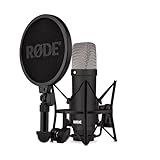
Overview: The RØDE NT1 Signature Series represents the pinnacle of large-diaphragm condenser microphone engineering, delivering the world’s quietest studio recording performance at just 4dBA self-noise. This Australian-manufactured microphone targets professional musicians, broadcasters, and serious content creators who demand uncompromising audio purity. The package includes a premium shock mount, pop filter, and XLR cable—everything needed for immediate studio integration.
What Makes It Stand Out: The HF6 1-inch true condenser capsule captures audio with exceptional clarity and smooth frequency response, handling extreme SPLs without distortion. The revolutionary low-noise performance eliminates the need for noise gating in quiet passages, preserving natural room ambiance and vocal breath details. RØDE’s industry-leading 10-year warranty demonstrates confidence in manufacturing quality, protecting your investment for a decade of professional use.
Value for Money: At $159, the NT1 commands a professional price but delivers commensurate performance rivaling microphones costing $500+. When factoring in the included accessories and decade-long warranty, the total cost of ownership becomes highly attractive. This microphone rewards high-quality preamps and interfaces, making it ideal for creators already invested in their signal chain. For those seeking a single, lifetime microphone purchase, the NT1 justifies every dollar.
Strengths and Weaknesses: Strengths include unmatched self-noise performance, exceptional SPL handling, robust all-metal construction, premium accessory inclusion, and outstanding warranty support. Weaknesses involve requiring a quality audio interface to realize full potential, making it a poor choice for plug-and-play users. The microphone’s sensitivity demands treated recording environments, and its price exceeds casual creator budgets.
Bottom Line: If you’re building a professional studio or upgrading from entry-level equipment, the NT1 Signature Series is a definitive choice. It eliminates technical limitations, letting your voice and instruments shine with unprecedented clarity. This is a buy-once, cry-once investment that pays dividends in production quality for years.
5. CofeLife Podcast Equipment Bundle, BM800 Podcast Microphone Bundle with V8s Voice Changer, Condenser Microphone Recording Studio Package for Podcasting Live Streaming Singing PC Mobile TikTok YouTube

Overview: The CofeLife bundle revolutionizes budget content creation by combining a BM-800 condenser microphone with the feature-packed V8S sound card, delivering voice modulation and sound effects at an unprecedented sub-$50 price. This all-in-one solution targets entertainers, TikTok creators, and live streamers who prioritize audience engagement over pure audio fidelity. The package includes a shock mount, pop filter, boom arm, and all necessary cables for multi-platform connectivity.
What Makes It Stand Out: The V8S sound card’s four voice-changing modes (Female, Male, Child, Monster) and ten instant sound effects transform ordinary streams into interactive experiences. The ability to connect two mobile phones simultaneously enables cross-platform livestreaming—a professional feature rarely seen below $200. The 24bit/192kHz sampling rate ensures these effects process clean audio, avoiding the lo-fi distortion common in cheap voice modulators.
Value for Money: At $48.74, this bundle offers extraordinary feature density. Purchasing a comparable audio interface with voice effects alone would cost $100+. While the BM-800 microphone is a basic condenser, the V8S sound card elevates the entire package’s utility. For creators focused on entertainment value and audience interaction, this represents unbeatable bang-for-buck. The comprehensive accessory inclusion eliminates hidden costs.
Strengths and Weaknesses: Strengths include unmatched effect versatility, dual-phone connectivity, high sampling rate processing, complete accessory package, and plug-and-play operation across platforms. Weaknesses involve the BM-800’s mediocre capsule quality, plastic-heavy construction, complex learning curve for effect routing, and susceptibility to handling noise without premium isolation. Audio purists will find the signal path less transparent than dedicated setups.
Bottom Line: For entertainers and interactive streamers, this bundle is a game-changer. It democratizes professional live production features at a price accessible to hobbyists. If your content relies on character voices, sound effects, or multi-platform presence, accept the microphone’s limitations and embrace the V8S’s creative power. Pure vocalists should look elsewhere.
6. MAONO XLR Condenser Microphone, Professional Cardioid Studio Recording Mic for Streaming, Podcasting, Singing, Voice-Over, Vocal, Home-Studio, YouTube, Skype, Twitch (PM320S)

Overview: The MAONO PM320S is a professional XLR condenser microphone designed for serious content creators seeking studio-grade audio. Built around a large 16mm diaphragm and requiring 48V phantom power, this all-metal mic delivers exceptional frequency response and transient detail for podcasting, streaming, singing, and voice-over work. The comprehensive kit includes a boom arm, shock mount, pop filter, windscreen, and XLR cable, providing a complete home studio solution in one package.
What Makes It Stand Out: Unlike USB alternatives, the PM320S utilizes professional XLR connectivity, offering superior audio fidelity and compatibility with audio interfaces, mixers, and preamplifiers. The cardioid polar pattern effectively isolates your voice while minimizing room noise and reflections. The included aluminum alloy boom arm is both durable and foldable, making it surprisingly portable despite its robust construction. The shock mount and metal windscreen work in tandem to eliminate handling noise and plosives, ensuring broadcast-ready recordings.
Value for Money: At $50.39, this package represents exceptional value for aspiring professionals. Comparable XLR microphones alone typically cost $70-100, and the inclusion of a quality boom arm, shock mount, and pop filter eliminates $40-60 in additional purchases. While requiring phantom power equipment adds initial investment, the audio quality rivals microphones costing twice as much, making it a smart long-term investment for growing creators.
Strengths and Weaknesses: Strengths include professional XLR connectivity, full metal durability, comprehensive accessory bundle, excellent sound isolation, and superior audio fidelity. Weaknesses are the requirement for 48V phantom power (additional equipment needed), lack of USB plug-and-play convenience, and steeper learning curve for absolute beginners unfamiliar with audio interfaces.
Bottom Line: The MAONO PM320S is an outstanding entry-level professional microphone for creators ready to invest in XLR audio quality. Highly recommended for serious podcasters and streamers committed to production excellence.
7. Amazon Basics USB Condenser Microphone for Streaming, Recording, and Podcasting on PC, Plug and Play, Cardioid Pickup, Adjustable Stand with 360° Rotation, 5.8 x 3.4 inches, Black

Overview: The Amazon Basics USB Condenser Microphone delivers straightforward audio recording at an unbeatable entry-level price. This plug-and-play mic features a 14mm diaphragm with cardioid pickup pattern, designed for streaming, podcasting, and online conferencing. The 360° rotating adjustable stand provides flexible positioning, while the one-tap mute function adds convenient control during live sessions. Its compact footprint makes it ideal for cluttered desks and mobile setups.
What Makes It Stand Out: Simplicity defines this microphone’s appeal. True plug-and-play operation requires no drivers or software, offering immediate compatibility with Windows and Mac systems. The integrated mute button syncs directly with your computer, providing instant silence without fumbling for on-screen controls. The detachable design allows mounting on standard 5/8-inch tripods or boom arms, offering upgrade paths as needs evolve. Its minimalist aesthetic blends seamlessly into any workspace without drawing attention.
Value for Money: At $24.20, this is among the most affordable functional condenser microphones available. While lacking advanced features like real-time monitoring or gain control, it dramatically outperforms built-in laptop microphones and most gaming headsets. The price point makes it an ideal starter mic for students, remote workers, or casual streamers testing content creation before committing to premium gear.
Strengths and Weaknesses: Strengths include unbeatable affordability, true plug-and-play simplicity, effective cardioid pattern, compact design, and broad compatibility. Weaknesses are limited audio customization options, no headphone jack for monitoring, plastic construction that feels less durable, and audio quality that falls short of professional broadcast standards for demanding applications.
Bottom Line: The Amazon Basics mic is a no-frills, reliable choice for beginners prioritizing affordability and simplicity over advanced features. Perfect for casual use and remote learning.
8. ZealSound Podcast Microphone for PC, Noise Cancellation USB Mic with Gain, Volume Adjustment & Mute Button, Monitoring & Echo, for YouTube, TikTok, Podcasting, Streaming, iPhone, iPad, Android, Mac

Overview: The ZealSound K66 USB Podcast Microphone packs professional-grade features into an incredibly affordable package. This condenser mic delivers studio-quality audio with a high-performance capsule and cardioid pattern, complemented by intelligent noise reduction technology. Real-time monitoring, independent gain control, and wide device compatibility make it exceptionally versatile for creators working across desktop and mobile platforms.
What Makes It Stand Out: The intelligent noise reduction mode is a game-changer, activated by holding the mute button to filter keyboard clicks, fan noise, and ambient sounds. Unlike basic USB mics, it includes dedicated knobs for mic gain, monitoring volume, and echo adjustment, providing hands-on control without software dependencies. The included USB-C and Lightning adapters enable seamless mobile recording on iPhones, iPads, and Android devices, a rare feature in this price range.
Value for Money: Priced at $29.66, the K66 offers remarkable value that defies its cost. Features like zero-latency monitoring, advanced noise reduction, and mobile compatibility typically appear in microphones costing $50-75. The ability to fine-tune audio on the fly and record across multiple platforms justifies every penny, making it a budget powerhouse for serious creators.
Strengths and Weaknesses: Strengths include intelligent noise reduction, real-time zero-latency monitoring, comprehensive physical controls, excellent mobile compatibility, and intuitive operation. Weaknesses are the plastic construction that may not survive heavy drops, noise reduction mode can slightly color the audio signature, and the cardioid pattern is less tight than premium studio alternatives.
Bottom Line: The ZealSound K66 is a feature-rich powerhouse for budget-conscious creators needing professional control. Excellent for multi-platform content production and growing channels.
9. Dejasound Upgraded Studio Recording Microphone with Isolation Shield & Pop Filter - Music Condenser Mic for Podcasting, Singing, Home Studio - Sound for PC, Laptop, Smartphone

Overview: The Dejasound DJM5 Studio Recording Microphone distinguishes itself with an integrated isolation shield, creating a mini recording booth experience. This USB condenser mic features a 16mm diaphragm with an impressive 192kHz/24Bit sampling rate, delivering professional-grade audio for podcasting and music production. The foldable acoustic panels provide superior noise reduction in any untreated environment, solving a common home studio challenge.
What Makes It Stand Out: The triple-layer acoustic isolation shield is the star feature, using five high-density panels to absorb ambient noise and vocal reflections. This eliminates the need for expensive room treatment. The microphone offers comprehensive controls including echo adjustment, volume control, mute button, and 3.5mm monitoring jack. Available in three colors (black, rose gold, white), it combines functionality with aesthetic customization rarely seen in budget audio gear.
Value for Money: At $54.99, this kit delivers exceptional value. Comparable isolation shields alone cost $30-40, making the high-resolution microphone essentially a bonus. The 192kHz/24Bit sampling rate and complete accessory package rival setups costing over $100, making it perfect for creators in untreated rooms who need professional results without permanent studio modifications.
Strengths and Weaknesses: Strengths include integrated isolation shield, high-resolution audio capture, lightweight portable design (4.1lbs), complete feature set, and attractive color options. Weaknesses are the shield’s size may overwhelm small desks, USB-only connectivity limits future upgrade paths, and the included tripod stand could be more stable for heavy-handed users.
Bottom Line: The Dejasound DJM5 is perfect for creators needing acoustic treatment without permanent studio modifications. Outstanding value for home studio setups and untreated recording spaces.
10. TONOR TC-777 Podcast Microphone, USB Computer Microphone, Cardioid Condenser PC Mic with Tripod Stand and Pop Filter for Podcasting, Streaming, Vocal Recording, Compatible with PC & Laptop, PS4/5

Overview: The TONOR TC-777 is an ultra-affordable USB condenser microphone designed for entry-level podcasting and streaming. This plug-and-play mic features a cardioid pickup pattern that captures clear vocals while suppressing background noise. The kit includes a foldable tripod stand, mini shock mount, pop filter, and foam windscreen, providing a complete starter package that works immediately with PCs, laptops, PS4, and PS5.
What Makes It Stand Out: At its price point, the inclusion of both a shock mount and pop filter is remarkable and rare. The microphone requires no drivers or assembly, working instantly with Windows, Mac, PS4, and PS5 systems. Its non-slip tripod base provides stability while occupying minimal desk space. The TC-777 is recognized immediately by popular applications like Zoom, Skype, and Discord, removing technical barriers for absolute beginners and allowing immediate content creation.
Value for Money: At $19.99, this is among the cheapest functional condenser microphones available from a recognizable brand. The complete accessory bundle eliminates additional purchases, making it ideal for students, remote learners, and casual streamers. While audio quality won’t match professional gear, it dramatically improves upon built-in microphones and provides a genuine entry point into content creation.
Strengths and Weaknesses: Strengths include incredible affordability, true plug-and-play operation, useful accessory bundle, multi-platform compatibility, and compact footprint. Weaknesses are no headphone monitoring jack, limited audio adjustment options, all-plastic construction, and audio quality suitable only for casual use rather than professional broadcasting.
Bottom Line: The TONOR TC-777 is the ultimate budget starter mic for beginners. Highly recommended for first-time creators prioritizing value over advanced features and those needing a reliable backup microphone.
Why Condenser Microphones Dominate Modern Podcasting
The Science Behind Superior Vocal Clarity
Condenser microphones operate on an elegantly simple principle: a lightweight diaphragm sits close to a charged backplate, creating a capacitor that converts sound waves into electrical signals with remarkable speed and accuracy. This design captures the nuanced harmonics and transient details of human speech that dynamic microphones often smooth over. For podcasters, this translates to that coveted “intimate” sound—listeners feel like you’re speaking directly to them, not broadcasting from across a room.
The trade-off has traditionally been sensitivity to room noise and the requirement for phantom power, but 2026’s budget condensers have evolved clever workarounds. Many now feature integrated preamps with optimized gain staging specifically for voice applications, meaning you get that detailed capture without amplifying every HVAC rumble in your building.
Dynamic vs. Condenser: Breaking Down the Myths
The old advice that “dynamic mics are for untreated rooms” is crumbling in 2026. While it’s true that dynamic microphones reject more ambient sound due to their less sensitive capsules, modern budget condensers have closed the gap through intelligent design. Many now incorporate internal shock mounting and acoustic filtering that rivals their dynamic counterparts.
The real distinction lies in what you want to capture. Dynamic mics excel at rejecting everything except what’s directly in front of them—perfect for boomy, untreated spaces. Condensers, however, capture the full character of your voice and your room, which becomes an asset once you learn to control your recording environment. Think of it this way: a dynamic mic is a blunt instrument; a condenser is a precision tool that rewards preparation.
Understanding the $150 Price Sweet Spot
What You Sacrifice (and Keep) at This Budget
Crossing below the $150 threshold in 2026 means making calculated compromises, but not where you might expect. You’re primarily sacrificing boutique components—hand-tuned capsules, premium transformers, and exotic metal finishes. What you keep is far more important: decent analog-to-digital conversion (often 24-bit/96kHz), robust build quality that survives desk bumps and mic stand adjustments, and features that genuinely impact podcast workflows like hardware mute buttons and direct monitoring.
The biggest hidden sacrifice is often long-term repairability. Budget condensers typically use sealed designs with proprietary parts, meaning if something fails after the warranty period, replacement becomes more economical than repair. This planned obsolescence isn’t malicious—it’s simply how manufacturers hit aggressive price points while including modern features.
The 2026 Market Landscape for Budget Condensers
This year has seen a fascinating shift toward “prosumer” features trickling down from $300+ microphones. AI-powered noise reduction, once a premium software feature, now runs on dedicated chips inside sub-$150 mics. Similarly, dual-output USB/XLR designs have become standard rather than premium upgrades, giving creators a clear upgrade path without requiring immediate interface purchases.
Manufacturers have also standardized USB-C connectivity across the board, finally retiring the micro-USB connections that plagued earlier generations. This shift isn’t just about convenience—USB-C’s improved power delivery enables cleaner preamp design and reduces the electrical noise that budget mics were once notorious for.
Key Specifications Decoded for Podcasters
Frequency Response: Finding Your Vocal Sweet Spot
The frequency response graph tells you exactly how a microphone colors your voice, and for podcasting, you want a very specific shape. Look for a gentle presence boost between 4-8kHz—that’s where consonant clarity lives, helping your words cut through car noise and gym headphones. Be wary of mics with exaggerated bass roll-off below 80Hz; while this reduces room rumble, it can also thin out deeper voices, making you sound less authoritative.
The real magic number is the 200-500Hz range. This is the “body” of most male and female voices. A mic that’s too flat here sounds sterile; one that’s too boosted sounds muddy. The sweet spot is a 2-4dB gradual rise that adds warmth without obscuring articulation. Always check independent measurements—manufacturer specs often smooth over problematic peaks.
Polar Patterns: Why Cardioid Isn’t Always King
Cardioid remains the default for podcasting because it rejects sound from the rear, focusing on your voice. But 2026’s budget condensers increasingly offer switchable patterns, and understanding when to use them unlocks creative flexibility. Figure-8 pattern captures equally from front and back while rejecting sides—perfect for face-to-face interviews with a single mic. Omnidirectional captures the entire room, which sounds like a nightmare until you need to record a roundtable discussion or capture authentic ambient sound for storytelling.
Some advanced models now feature “supercardioid” or “hypercardioid” options that tighten the pickup area even further. These patterns trade some rear rejection for enhanced side rejection, making them ideal for noisy environments. The catch? They demand more precise mic technique—move half an inch off-axis and your levels drop dramatically.
Self-Noise Levels: The Silence Between Words
Self-noise, measured in dBA, represents the electrical hiss a microphone generates even in a silent room. For podcasting, anything below 16dBA is acceptable; below 12dBA is excellent. In 2026, it’s common to see budget mics hitting 14-15dBA—quiet enough that your room noise will mask the mic’s hiss long before it becomes audible to listeners.
The spec sheet rarely tells the full story, though. Some manufacturers achieve low self-noise figures by rolling off high frequencies, creating a dark sound that hides hiss but also sacrifices vocal airiness. Others use aggressive noise gates that chop off quiet passages unnaturally. The best budget condensers balance low self-noise with natural sound, even if their raw numbers look less impressive on paper.
Maximum SPL Handling: Screaming vs. Whispering
Maximum Sound Pressure Level (SPL) tells you how loud a sound the mic can handle before distorting. For podcasting, this matters more than you’d think. A spec of 120dB SPL handles normal speech easily, but if you laugh loudly, emphasize points with sharp “p” sounds, or record intro/outro segments with extra energy, you might clip. Look for 130dB SPL or higher—this headroom ensures transient peaks don’t turn into harsh distortion.
Whispering presents the opposite challenge. Low SPL handling often correlates with poor sensitivity at quiet levels, meaning your intimate ASMR-style passages get lost in noise. The best podcasting condensers maintain linear performance from 30dB (whisper) to 130dB (shout), giving you dynamic range to tell stories with vocal variety.
Connectivity Options in 2026
USB-C Dominance and Legacy Support
USB-C has become the universal standard, but implementation quality varies wildly. The key spec is whether the mic draws bus power cleanly or introduces USB ground noise into your audio. Quality budget mics now include isolated power circuits and ferrite chokes on their cables—look for mention of “noise-isolated USB connection” in technical descriptions.
Backward compatibility matters too. Many creators still run older laptops or tablets with USB-A ports. The best sub-$150 mics include both cable types or use a detachable cable system, letting you swap connections without dongle hell. Some even support USB-C PD (Power Delivery) passthrough, charging your laptop while you record—a small detail that saves your workflow during marathon sessions.
XLR: The Gateway to Professional Growth
Even if you’re starting with USB-only recording, choosing a mic with XLR output future-proofs your investment. XLR connectivity means when you’re ready to upgrade to an audio interface or mixer, your microphone doesn’t become obsolete. In 2026, many budget condensers offer both USB and XLR, but check the XLR implementation carefully—some use the same preamp circuit for both outputs, creating impedance mismatches that color your sound when switching to professional gear.
True hybrid designs maintain separate analog paths for USB and XLR, ensuring the XLR output delivers clean, uncolored signal to your interface. This spec is rarely advertised but shows up in user forums as “XLR sounds different than USB” complaints. The best manufacturers publish block diagrams showing independent preamp stages.
Hybrid Models: Best of Both Worlds?
Hybrid microphones promise flexibility, but they hide a critical compromise: shared components. The analog-to-digital converter, preamp, and even the capsule power supply often serve both outputs, meaning a failure in one path can affect the other. Additionally, the added circuitry sometimes increases self-noise by 2-3dBA compared to dedicated USB or XLR-only designs.
That said, hybrids offer unmatched versatility for podcasters who record in multiple locations. Use USB for remote interviews at coffee shops, XLR for studio sessions with your interface—all with the same mic you know intimately. The key is choosing a hybrid where the compromise is transparent. Look for models where the USB and XLR outputs can be used simultaneously without crosstalk, indicating proper circuit isolation.
Essential Features That Actually Matter
Onboard Gain Control: Precision vs. Convenience
A physical gain knob on the microphone body feels pro, but its utility depends entirely on its range and taper. Many budget mics offer 0-40dB of gain, but the first 30dB rotates freely while the last 10dB covers most of your usable range, making precise adjustments frustrating. The best designs use logarithmic tapers that distribute gain evenly across the rotation, giving you fine control at normal speaking levels.
Digital gain control via companion software often provides finer adjustment (1dB increments vs. 3-5dB on hardware knobs) but introduces latency and requires keeping background apps running. For podcasting, hardware gain control wins for reliability—your settings persist across computers and software, and you can adjust levels mid-take without alt-tabbing away from your recording session.
Headphone Monitoring: Zero-Latency Explained
Direct headphone monitoring is non-negotiable for podcasting, but “zero-latency” is a marketing term that needs unpacking. True zero-latency monitoring taps the analog signal before the ADC, mixing it directly to the headphone output. This path adds less than 1ms of delay—imperceptible. Some mics claim “zero-latency” but actually monitor the digital signal, adding 5-10ms of delay that creates a distracting echo effect.
Test this by plugging headphones into the mic and speaking while recording. If you hear your voice twice (once in your head, once slightly delayed in the headphones), it’s digital monitoring. The best budget condensers include a hardware blend knob letting you mix between direct analog monitoring and playback from your computer—essential for remote interviews where you need to hear your guest without latency while monitoring your own voice cleanly.
Mute Buttons and LED Indicators: Workflow Essentials
A physical mute button seems simple, but implementation varies dramatically. Momentary mutes (press-and-hold) prevent accidental activation but are awkward for coughs. Latching mutes (press-on, press-off) are convenient but can be triggered by desk bumps. The sweet spot is a latching mute with a distinct tactile click and a bright LED that changes color—red for muted, green for live.
LED brightness matters more than you’d think. A dim LED is hard to see in bright rooms; an overly bright LED reflects in glasses and computer screens, visible in video podcasts. Look for mics with adjustable LED brightness or thoughtful industrial design that positions the indicator away from your face yet visible in your peripheral vision.
Shock Mounts and Pop Filters: Non-Negotiable Accessories
Every condenser mic needs mechanical isolation and plosive protection, but bundled accessories are often afterthoughts. Cheap shock mounts use brittle elastic bands that sag over months; good ones use silicone suspension that maintains tension. The difference is audible—poor isolation transmits desk thumps and keyboard clicks directly into your recording.
Pop filters bundled with budget mics are typically thin foam that only catches the most aggressive plosives. Effective pop filtering requires either a dual-layer metal mesh (better for clarity) or a properly spaced nylon screen (better for extreme plosives). Some innovative 2026 designs integrate acoustic foam into the grille itself, reducing the need for external filters. Test by blowing gently into the mic—if you hear wind noise, you’ll need aftermarket protection.
Build Quality vs. Sound Quality Tradeoffs
Plastic Construction: When It’s Acceptable
High-impact ABS plastic has earned its place in budget microphone design. Modern formulations are acoustically inert (they don’t resonate and color sound) and can be precision-molded into complex grille shapes that improve off-axis rejection. The key is thickness—thin plastic bodies flex and creak when adjusted; quality plastic mics use 3mm+ wall thickness and internal bracing.
The real compromise is in long-term durability. Plastic threads on microphone stands strip easily; metal inserts solve this but add cost. Check whether the stand mount is reinforced—this is the failure point on most budget mics. If the spec sheet mentions “metal-threaded insert” or “reinforced mounting point,” you’re looking at a plastic body engineered for longevity.
Metal Chassis: Durability vs. Weight
Die-cast zinc alloy bodies feel premium and survive years of abuse, but they introduce acoustic challenges. The dense material can create resonant frequencies that color your sound, especially in the 200-400Hz range. Quality metal-bodied mics address this with internal damping materials—foam or rubber linings that absorb vibration.
Weight becomes a practical concern for boom arm users. A 2-pound metal mic needs a sturdy arm with strong springs; otherwise, it slowly droops during long sessions. For desk-mounted stands, weight is an asset—it prevents the mic from tipping during adjustments. Consider your mounting solution when choosing between metal and plastic.
Grille Design and Plosive Protection
The grille isn’t just protective armor; it’s an acoustic element. Tightly woven grilles with small holes (1-2mm) excel at blocking saliva and dust but can create subtle high-frequency diffraction that adds a “zingy” quality to sibilants. Looser weaves (3-4mm holes) sound more open but require external pop filters.
Dual-layer grilles represent the current state of the art—a coarse outer layer stops physical impacts, while a finer inner layer manages airflow. This design significantly reduces plosive energy before it reaches the capsule. Some 2026 models even angle the inner layer to diffuse breath blasts directionally, a feature borrowed from $1000+ broadcast mics.
Room Acoustics and Mic Selection
Why Your Room Matters More Than Your Mic
A $150 condenser in a well-treated room will outperform a $500 mic in a bare-walled echo chamber. Your microphone captures everything—direct sound from your mouth, early reflections from walls, late reverberation, and background noise. The spec that quantifies this is the signal-to-noise ratio (SNR), but it’s measured in an anechoic chamber, not your home office.
Real-world SNR depends on your room’s reverberation time (RT60). For podcasting, you want RT60 under 0.3 seconds—meaning sound decays quickly enough that your words don’t smear together. You can achieve this with $50 of acoustic panels behind your mic and on the wall you’re facing. Without treatment, even the most directional condenser captures enough room sound to sound amateur.
Proximity Effect: Using It to Your Advantage
Proximity effect—the bass boost that occurs when you speak close to a directional mic—is often treated as a problem to be solved. In podcasting, it’s a powerful storytelling tool. Moving from 6 inches to 2 inches from the mic can add 6-10dB of low-frequency energy, making intimate confessions feel visceral and immediate.
The trick is controlling the transition. A pop filter placed 2 inches from the mic grille gives you a physical marker—stay outside it for normal conversation, move inside for dramatic emphasis. Some condensers now include LED distance indicators that glow brighter as you enter the proximity zone, training you to use this effect intentionally rather than accidentally.
Off-Axis Rejection in Untreated Spaces
Off-axis rejection—how much sound the mic ignores from the sides and rear—is your best defense against room noise. The spec is measured in decibels (dB) relative to the on-axis response. A 15dB rejection at 90 degrees means side noise is captured at roughly 1/5th the volume of your voice—significant, but not silent.
In 2026, look for mics that publish polar pattern graphs at multiple frequencies. A mic might reject 20dB at 1kHz but only 8dB at 250Hz, meaning low-frequency rumble from your computer fan still bleeds in. Consistent rejection across 200Hz-4kHz is the mark of a well-designed capsule that performs reliably in real rooms, not just test labs.
Software and Ecosystem Integration
2026’s DAW Compatibility Landscape
Universal plug-and-play drivers have finally matured, but not all implementations are equal. macOS users benefit from Core Audio stability across the board, while Windows users should verify ASIO driver availability for sub-10ms latency. The best budget mics include ASIO drivers that bypass Windows’ problematic audio stack entirely.
Linux support has become surprisingly relevant as Ubuntu and Fedora gain traction among privacy-conscious creators. Check for ALSA and PulseAudio compatibility statements—many 2026 mics now include open-source drivers developed in partnership with the community. ChromeOS support is another emerging consideration for cloud-based editors like Descript and Riverside.
Bundled Software: Separating Value from Bloat
Manufacturers bundle software to add perceived value, but ask yourself: do you need another DAW? Most podcasters already use Audacity, Reaper, or Descript. More valuable are plugins specifically tuned for the mic’s frequency response—EQ curves that correct minor resonances, compressors that know the mic’s SPL handling limits, and noise reduction trained on the mic’s self-noise profile.
Watch out for subscription traps. Some mics include “free” software that’s actually a 6-month trial, after which you’re locked into a paid ecosystem. The best bundles offer perpetual licenses for essential tools—maybe a stripped-down version of a premium plugin or a bespoke audio editor designed around the mic’s capabilities.
Firmware Updates and Longevity
A microphone that receives firmware updates in 2026 is a microphone that improves over time. Manufacturers have begun pushing updates that tweak DSP parameters, reduce self-noise through better power management, and even add features like new polar patterns or improved headphone amp performance.
Check the manufacturer’s support history before buying. Do they have a dedicated software portal? Have they issued updates for previous models? A mic with an active firmware roadmap will sound better in 2027 than it did on purchase day, effectively extending its useful life beyond what the hardware alone provides.
The Rise of AI-Enhanced Features
Real-Time Noise Suppression
AI noise suppression in budget mics has evolved from crude gating to sophisticated spectral processing. Rather than simply muting below a threshold, modern algorithms identify and attenuate specific noise profiles—HVAC hum, keyboard clicks, even passing cars—while preserving vocal harmonics. The key is adjustable aggression. Look for mics where you can dial the suppression from “transparent” (2-3dB reduction) to “broadcast booth” (15-20dB reduction), depending on your recording environment.
Be skeptical of “AI” claims that are just rebranded expanders. True AI suppression requires dedicated processing chips, which add $10-15 to manufacturing cost. If the mic is under $50, it’s probably using basic DSP. Test by recording with a fan running in the background—real AI suppression will remove the hum while leaving your voice natural; fake AI will make you sound underwater.
Auto-Leveling and Compression
Auto-leveling algorithms analyze your speech patterns in real-time, boosting quiet passages and attenuating loud exclamations. For podcasters who lack compression experience, this can be a game-changer, but heavy-handed implementation creates audible pumping effects. The best systems apply gentle 2:1 compression with 20-30ms attack times, preserving natural dynamics while preventing clipping.
Some 2026 mics let you set target loudness levels (-16 LUFS for podcasts, -14 LUFS for YouTube) and the mic automatically rides gain to hit that target. This is brilliant for live streaming but can be frustrating for recorded content where you want consistent levels for manual post-processing. Look for mics where auto-leveling can be completely bypassed or set to “manual mode” for traditional gain control.
Voice Profiling: Gimmick or Game-Changer?
Voice profiling creates an EQ curve tailored to your specific vocal characteristics. You read a 30-second script, the mic’s AI analyzes your formant frequencies and sibilance patterns, then applies corrective EQ. In practice, this works surprisingly well for removing nasal resonances or taming harsh “s” sounds.
The limitation is that it profiles your voice in one specific position. Move closer for proximity effect, and the profile becomes less accurate. Turn your head while speaking, and off-axis coloration isn’t corrected. Voice profiling is a powerful starting point, but treat it as a preset to be refined, not a set-and-forget solution. The best implementations save multiple profiles for different mic positions or even different hosts.
Power Requirements and Portability
Phantom Power Explained for USB Mics
Even USB condensers need power for their capsules—typically 5V from the USB bus, stepped up to the 48V phantom power standard internally. This conversion is where budget mics often cut corners, using noisy charge pumps that introduce whine or buzz. Quality mics specify “low-noise internal converter” or publish noise spectra showing no spikes at 60Hz or its harmonics.
The power draw matters for mobile use. A mic pulling 250mA might overwhelm a tablet’s USB port or drain a laptop battery faster. Efficient designs draw under 150mA while maintaining performance. This spec is rarely advertised but appears in user manuals under “power consumption.” For field recording with power banks, lower draw means longer sessions.
Bus Power Limitations
Bus-powered mics face a fundamental constraint: USB 2.0 provides 500mA, USB 3.0 up to 900mA. This limits how much clean amplification you can build into the mic. Manufacturers get creative, using Class D headphone amps (efficient but potentially noisy) or limiting maximum gain to 50-55dB instead of the 60-65dB pro interfaces provide.
If you plan to record quiet sources or use the mic with quiet talkers, verify the maximum gain spec. 55dB of clean gain is sufficient for speech at 6 inches; 45dB might force you to eat the mic, exaggerating plosives and mouth noise. Some mics cheat by applying digital gain after the ADC, which amplifies noise along with signal—always ask whether the gain spec is analog or digital.
Mobile Podcasting Considerations
Recording to iPhones or Android devices requires more than a USB-C cable. iOS demands MFi certification (Made for iPhone), while Android needs USB Audio Class 2.0 compliance. Many 2026 mics include a “mobile mode” that reduces power draw and disables power-hungry features like bright LEDs or headphone amps.
The physical form factor becomes critical for mobile use. Heavy mics stress phone connectors; compact designs with integrated stands work better. Some mics now include built-in battery packs, running 8-10 hours without draining your device. This is invaluable for conference interviews or remote location work where power outlets are scarce.
Longevity and Upgrade Paths
When to Upgrade From Your $150 Mic
Your first condenser mic under $150 should last 2-3 years or 200+ episodes before its limitations become your limitations. The upgrade trigger isn’t failure—it’s when you consistently find yourself fighting the mic’s constraints. Maybe you need more gain for quiet guests, or the self-noise becomes audible after you treat your room, or you want multiple polar patterns for new show formats.
Track your pain points in a log. After 20 episodes, review: are you constantly adjusting EQ to fix the same frequency? Fighting plosives despite proper technique? These patterns reveal whether you need a better mic or just better technique. Many podcasters upgrade prematurely, solving acoustic problems with hardware when treatment or positioning would suffice.
Resale Value and Market Depreciation
Budget electronics depreciate fast, but podcasting mics hold value better than most. A $150 mic typically sells used for $80-100 after a year, especially if you keep the original packaging and accessories. The key is buying models with established reputations—obscure brands with no forum presence depreciate to $40-50 regardless of condition.
The depreciation curve steepens after firmware support ends. Once a manufacturer stops updating drivers for new operating systems, resale value drops 30-40%. This typically happens 3-4 years after release. Buying a mic that’s been on the market for 6-12 months maximizes your useful life while avoiding early-adopter bugs and premium pricing.
Building a Microphone Locker on a Budget
Smart podcasters don’t upgrade—they expand. Your first $150 condenser becomes your “intimate voice” mic. Your second purchase might be a dynamic mic for noisy field interviews. A third could be a small-diaphragm condenser for instrument recording or stereo ambiance. This locker approach gives you tools for different scenarios rather than chasing one perfect mic.
Allocate your budget strategically: spend $150 on your primary voice mic, $100 on a secondary dynamic, and keep $50 for accessories. This three-mic arsenal handles 95% of podcasting situations. The condenser stays in your treated space, the dynamic travels for live events, and the small-diaphragm captures everything else. When guests visit, you can offer them your “old” mic while you use the new one—dual condenser interviews sound more balanced than mixing mic types.
Common Podcasting Scenarios and Mic Selection
Solo Monologue Setup
Solo podcasting demands maximum vocal presence and minimal distractions. Here, a cardioid condenser with moderate proximity effect works wonders. Position the mic 4-6 inches away, slightly off-axis to reduce plosives, and let the cardioid pattern reject keyboard and mouse noise. A mic with gentle high-frequency lift (starting around 8kHz) adds “air” that keeps solo voice engaging over long episodes.
The critical feature is a mute button positioned where you can hit it without looking. During long monologues, you’ll cough, sip water, or collect your thoughts. A hardware mute prevents these sounds from reaching your recording, saving editing time. Software muting is risky—if your DAW crashes or lags, that cough becomes permanent.
Two-Person Interview Configurations
Interviewing a guest in the same room introduces bleed—your voice in their mic and vice versa. While many recommend dynamic mics for this scenario, two cardioid condensers can work beautifully if positioned correctly. Use the 3:1 rule: place mics three times as far apart as they are from each speaker. If each mic is 6 inches from its speaker, separate them by 18 inches. This geometry uses off-axis rejection to minimize bleed.
Choose mics with tight cardioid patterns and consistent rejection across frequencies. Some budget condensers widen their pattern at low frequencies, causing more bleed than spec sheets suggest. If possible, test with both mics recording—speak into one while monitoring the other. You should sound distant and muffled, not clear and present.
Remote Guest Integration
When your guest is remote (Zoom, Riverside, etc.), your mic becomes your entire sonic identity. USB connectivity with robust driver support is paramount—you’ll be plugging into various laptops and systems. A mic that stores settings internally (gain, headphone volume, polar pattern) ensures you sound consistent regardless of the host computer.
Consider a mic with hardware DSP that processes audio before it hits the computer. This offloads processing from the video call app, reducing CPU load and preventing audio dropouts during long recordings. Some mics now include a “voIP mode” that applies gentle compression and noise reduction optimized for video conferencing, then switches to “studio mode” for your local recording.
Live Streaming vs. Recorded Content
Live streaming demands reliability over absolute quality. You need a mic that doesn’t require driver tweaks, won’t blue-screen your PC, and includes hardware monitoring so you can hear yourself without OBS latency. Features like built-in compressors and limiters prevent clipping during excited moments, protecting your stream from distortion.
For recorded content, you want flexibility. A flat, unprocessed signal gives you maximum control in post-production. Some mics offer a “dry/wet” switch—dry sends unprocessed audio to your DAW while wet sends processed audio to your stream software simultaneously. This dual-output approach is becoming standard in 2026 and is worth seeking out if you do both live and recorded content.
Troubleshooting Common Issues
USB Dropouts and Connection Instability
USB audio dropouts manifest as clicks, pops, or brief silences. They’re caused by three things: insufficient power, driver conflicts, or cable quality. First, try a powered USB hub—the mic might be competing with other devices for bus power. Second, check Windows Device Manager for multiple audio drivers; ASIO4ALL can conflict with manufacturer drivers. Uninstall generic drivers and install only the manufacturer’s ASIO driver.
Cable quality matters more than length. A well-shielded 3-meter cable beats a cheap 1-meter cable. Look for cables with ferrite cores (those cylindrical lumps near the ends) and braided shielding. If dropouts persist, try a different USB port—USB 3.0 ports sometimes have better power regulation than USB 2.0 ports, even for USB 2.0 devices.
Plosives and Sibilance Management
Plosives (pops) and sibilance (harsh s sounds) are the bane of podcast audio. Plosives create low-frequency blasts that overload the capsule; sibilance creates piercing high-frequency spikes. While pop filters help, mic technique solves both. Position the mic at a 45-degree angle to your mouth, aiming at your nose. This puts the capsule off-axis from direct breath blasts while still capturing full voice.
For sibilance, some mics include built-in de-essers that tame harsh frequencies before they hit your recording. If yours doesn’t, record with a slight off-axis angle—sibilance is most pronounced directly on-axis. A 10-15 degree turn of your head on sibilant words can reduce harshness by 3-6dB without affecting overall tone.
Electrical Interference and Ground Loops
Ground loops create a 60Hz hum (50Hz in Europe) that sounds like a low drone. They occur when your mic and computer have different ground potentials. USB isolators—small adapters that break the ground connection—solve this completely for $20-30. Some 2026 mics include internal isolation, but it’s rare under $150.
RF interference from cell phones creates buzzes and chirps. Quality mics include RFI shielding around the capsule and PCB. Test by placing your phone next to the mic during a recording—if you hear buzzing when it rings, the shielding is inadequate. The fix is physical separation; keep phones 3+ feet from the mic, or use a mic with proper shielding.
The Environmental Impact of Your Choice
Sustainable Materials in 2026
Microphone manufacturing has a surprisingly large carbon footprint, primarily from metal extraction and plastic production. Some manufacturers now use recycled aluminum for bodies and bioplastics for grilles and knobs. These materials perform identically to virgin materials but reduce environmental impact by 40-60%.
Look for certifications like RoHS (Restriction of Hazardous Substances) and REACH (EU chemical standards). These ensure your mic isn’t leaching toxic compounds during manufacturing or disposal. Some brands even include take-back programs—send them your old mic for recycling and get a discount on your next purchase.
Repairability and E-Waste Considerations
The right-to-repair movement has reached the microphone world. Some 2026 models feature user-replaceable capsules, standard screw assemblies instead of glue, and published service manuals. A repairable mic might cost $20 more upfront but can last a decade with minor part replacements, whereas sealed designs become e-waste after a single component failure.
Check iFixit or similar sites for teardowns before buying. Mics with modular designs—separate PCBs for USB, preamp, and capsule—are easier to repair. Those with everything on one board are disposable. This information rarely appears on product pages but is gold for environmentally conscious buyers.
Frequently Asked Questions
1. Can I really get professional podcast audio from a sub-$150 condenser microphone, or should I save for something more expensive?
Absolutely, but with caveats. A $150 condenser in a treated room with proper technique will sound professional to 99% of listeners. The difference between $150 and $500 mics is subtle—slightly lower noise, marginally smoother frequency response, better off-axis rejection. These matter in Grammy-nominated productions but rarely in podcasting. Your money is better spent on acoustic treatment and a quality boom arm than a more expensive mic.
2. How do I know if my room is too noisy for a condenser microphone?
Clap your hands once in your recording space. If you hear distinct echoes or reverb lasting longer than 0.5 seconds, you need treatment before a condenser will shine. For background noise, record 10 seconds of silence at your normal mic gain. If the waveform in your DAW shows visible spikes from HVAC, traffic, or computer fans, a dynamic mic might serve you better until you can treat the space or move to a quieter room.
3. What’s the single most important spec to prioritize for podcasting?
Frequency response consistency. A mic that measures flat on-axis but changes character off-axis will sound different every time you move your head. Look for polar pattern graphs that show similar shape at 250Hz, 1kHz, and 4kHz. This consistency means your voice stays uniform even with natural movement, reducing the need for constant re-adjustment during long sessions.
4. Should I choose USB or XLR if I’m just starting out?
USB with XLR output. The hybrid design lets you begin with simple USB recording, then upgrade to an audio interface later without buying a new mic. Just verify the XLR output is truly analog and not just a digital passthrough—check user forums for reports of “XLR sounds different than USB.” If both outputs sound identical, it’s a true hybrid; if XLR sounds cleaner, it’s a proper analog path.
5. How long should a budget condenser microphone last with daily use?
Expect 3-5 years of reliable daily use before component degradation becomes audible. The capsule itself can last decades, but capacitors in the preamp and USB power circuit dry out after 5-7 years, increasing noise. Heavy users (4+ hours daily) might notice performance changes after 2-3 years. Keep your receipt; many failures happen just after the 1-year warranty expires, and some manufacturers offer goodwill replacements.
6. Do I need a shock mount if my mic has internal shock mounting?
Yes, unless your mic stand is bolted to concrete. Internal shock mounts only handle high-frequency vibrations; they don’t stop low-frequency thumps from desk bumps or foot taps. A proper shock mount isolates the entire mic, reducing rumble by an additional 10-15dB. For podcasting, even a $20 universal shock mount dramatically improves cleanliness, especially if you type notes while recording.
7. What’s the ideal recording distance for podcasting with a condenser mic?
4-8 inches for most voices. Closer than 4 inches and proximity effect overwhelms your tone; farther than 8 inches and room noise dominates. The sweet spot is where your voice sounds full but not boomy, present but not harsh. Record test clips at 3, 6, and 9 inches, then listen back on headphones. The distance where your voice sounds most “natural”—like you’re in the room—is your target.
8. How do I test a condenser microphone before buying if I can’t try it in person?
Order from retailers with 30-day return policies and test systematically. Record the same 2-minute script in your normal recording space, then measure:
- Noise floor in silent sections (should be -60dBFS or lower)
- Frequency balance (does your voice sound like you?)
- Plosive handling (read “Peter Piper picked…”)
- Off-axis consistency (turn your head 30 degrees left/right)
Return mics that fail any test. Most online retailers accept returns of opened electronics within the return window, and spending $10 on return shipping beats keeping a $150 mic that doesn’t work for your voice.
9. Will AI-enhanced features make my podcast sound over-processed?
Only if you max them out. Think of AI features like salt—a little enhances flavor, too much ruins the dish. Start with AI noise suppression at 20% strength, auto-leveling at gentle ratios (2:1), and voice profiling as a subtle EQ boost. The goal is invisibility; listeners shouldn’t notice processing, only that your audio is unusually clean and consistent. If you can hear the AI working, dial it back.
10. Can I use a podcasting condenser for other content like voiceover work or music?
Absolutely, with limitations. Podcast condensers excel at voice but often have limited SPL handling for loud singing or instruments. For voiceover, they’re ideal—most are optimized for speech. For music, use them on acoustic guitar, strings, or as room mics; avoid screaming vocals or drum overheads unless the spec sheet shows 130dB+ SPL handling. Many voiceover artists keep a $150 condenser as their “travel rig” while using $1000+ mics in their main studio, proving these budget tools punch well above their weight class.