The modern workspace is no longer a static environment, and 2026 has cemented the standing desk converter as the ultimate symbol of adaptable, health-conscious productivity. As hybrid work models become the permanent standard and ergonomic wellness evolves from perk to priority, professionals everywhere are discovering that you don’t need to replace your existing furniture to revolutionize your setup. Desk converters and risers offer a surgical strike against sedentary work culture—transforming any flat surface into a dynamic, height-adjustable workstation without the commitment or cost of full desk replacement.
But here’s the challenge: the market has exploded with options, each promising to be the perfect solution for your specific needs. From minimalist laptop risers to sophisticated electric converters with smart home integration, the choices can feel overwhelming. This comprehensive guide cuts through the noise, focusing on the essential features, ergonomic principles, and 2026 innovations that actually matter. Whether you’re a remote worker optimizing a home office, a corporate buyer outfitting an agile workspace, or a health-conscious professional taking the first step toward better posture, you’ll discover exactly what to look for—and what to avoid—when selecting the ideal desk converter for your unique situation.
Top 10 Desk Converters & Risers for Standing Desks
Detailed Product Reviews
1. VIVO 32 inch Desk Converter, K Series, Height Adjustable Sit to Stand Riser, Dual Monitor and Laptop Workstation with Wide Keyboard Tray, Black, DESK-V000K

Overview: The VIVO DESK-V000K transforms any standard desk into an ergonomic standing workstation with its 32-inch wide platform. The 31.5" x 15.7" surface provides ample room for dual monitors or a laptop-monitor setup, while the synchronized keyboard tray ensures comfortable typing angles at any height. This riser uses a patented lift mechanism to deliver smooth transitions between sitting and standing positions throughout your workday.
What Makes It Stand Out: VIVO’s patented lift system offers exceptional reliability across thousands of adjustment cycles. The impressive 4.5" to 20" height range accommodates users from 5'0" to 6'3", making it one of the most versatile converters in its class. The robust steel frame supports 33 pounds with minimal wobble even at full extension. A 3-year manufacturer warranty provides long-term peace of mind that competitors rarely match.
Value for Money: At $139.99, this converter sits in the mid-range bracket but delivers premium features. The patented engineering, superior weight capacity, and comprehensive warranty justify the cost over generic alternatives. Similar quality converters typically retail for $150-$180, making the K Series a smart investment for daily professional use.
Strengths and Weaknesses: Strengths:
- Patented, smooth lift assist mechanism
- Excellent 33-pound weight capacity
- Wide height adjustment range (4.5"-20")
- Minimal assembly required
- 3-year warranty and reliable tech support
Weaknesses:
- Keyboard tray narrows to 10.5" in center, limiting mouse space
- Black finish shows fingerprints and dust readily
- Pricier than no-name competitors
Bottom Line: The VIVO K Series delivers reliable performance and durability for professionals serious about ergonomic workspace upgrades. The three-year warranty and proven lift system make it worth the modest premium over budget options.
2. FITUEYES Height Adjustable Standing Desk 32” Wide Sit to Stand Converter Stand Up Desk Tabletop Workstation for Dual Monitor Riser FSD308001WB

Overview: FITUEYES offers a budget-conscious 32-inch standing desk converter that competes directly with premium brands. The 31.5" x 15.7" surface handles dual monitors or laptop setups efficiently, while dual gas springs enable smooth height adjustments. This converter arrives fully assembled, allowing immediate use without complicated setup procedures.
What Makes It Stand Out: The fully assembled delivery sets this converter apart—simply unbox and place it on your desk. Dual gas springs provide reliable lift assistance rivaling more expensive models. The 4.3" to 19.8" height range serves most users comfortably. At just $111.99, it undercuts major competitors while maintaining a solid 33-pound weight capacity.
Value for Money: This represents exceptional value, offering core features of premium converters at a 20-30% discount. The ready-to-use design saves time and eliminates assembly frustration. While lacking an explicit warranty mention, the build quality suggests reliable performance for typical office use.
Strengths and Weaknesses: Strengths:
- Ships fully assembled
- Competitive 33-pound capacity
- Smooth dual gas spring mechanism
- Good height range (4.3"-19.8")
- Attractive budget pricing
Weaknesses:
- Warranty details not specified
- Lesser-known brand with uncertain support
- Finish quality may not match premium options
- Limited documentation on long-term durability
Bottom Line: FITUEYES delivers impressive functionality at an entry-level price. If you want a hassle-free standing solution without breaking the bank, this converter offers compelling value, though you sacrifice some brand assurance.
3. VIVO 36 inch Height Adjustable Stand Up Desk Converter, V Series, Quick Sit to Stand Tabletop Dual Monitor Riser Workstation, Black, DESK-V000V
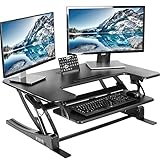
Overview: The VIVO DESK-V000V expands your workspace with a generous 36-inch wide surface measuring 35.8" x 22". This converter targets users needing extra room for dual monitors, documents, and accessories. The synchronized keyboard tray moves seamlessly with the main platform, while dual pneumatic springs provide stable height adjustment from 6.7" to 16.9".
What Makes It Stand Out: The expansive surface area distinguishes this model, offering nearly 30% more workspace than 32-inch converters. The pneumatic lift system ensures smooth, controlled adjustments even when fully loaded. VIVO’s 3-year warranty and proven customer support provide confidence in this investment. The deeper desktop (22" vs typical 15.7") accommodates larger monitor bases comfortably.
Value for Money: Priced at $199.99, this premium converter commands a significant premium over smaller models. However, the extra real estate justifies the cost for users managing complex workflows. If you need the space, it’s cheaper than buying two smaller converters or a full standing desk.
Strengths and Weaknesses: Strengths:
- Exceptionally spacious 36" x 22" surface
- Robust 33-pound weight capacity
- Smooth pneumatic spring lift
- 3-year manufacturer warranty
- Stable at all height settings
Weaknesses:
- Expensive compared to 32-inch alternatives
- Heavier and less portable
- Height range slightly more limited than K Series
- Takes up significant desk space
Bottom Line: For professionals requiring maximum surface area, the V Series delivers unmatched workspace flexibility. The premium price is justified if you regularly use multiple monitors and documents simultaneously, though casual users may find 32-inch models sufficient.
4. VIVO Height Adjustable 32 inch Stand Up Desk Converter, Quick Sit to Stand Tabletop Dual Monitor Riser Workstation, Black, DESK-V000S

Overview: The DESK-V000S represents VIVO’s entry-level 32-inch converter, delivering core standing desk benefits at an accessible price point. The 31.5" x 15.8" surface accommodates dual monitors or laptop configurations. A pneumatic spring system enables smooth height adjustments from 4.9" to 19.7", while the synchronized keyboard tray maintains ergonomic positioning.
What Makes It Stand Out: This model makes VIVO quality available under $100, the lowest price point in their lineup. The patented lift mechanism appears in this budget-friendly version, ensuring reliable performance. Minimal assembly means setup takes minutes. The streamlined design focuses on essential features without unnecessary complexity.
Value for Money: At $99.99, this converter offers tremendous value for VIVO brand reliability. You get the same height range and basic functionality as pricier models. The primary compromise is weight capacity, making it ideal for standard dual monitor setups rather than heavy equipment.
Strengths and Weaknesses: Strengths:
- Most affordable VIVO converter
- Patented lift mechanism included
- Good height range (4.9"-19.7")
- Minimal assembly required
- Compact, space-efficient design
Weaknesses:
- Lower 26-pound weight capacity
- Less stable with heavy monitor arms
- No explicit warranty mention
- Basic construction compared to K Series
- Keyboard tray lacks premium features
Bottom Line: The DESK-V000S is perfect for budget-conscious buyers wanting VIVO quality without premium pricing. It’s ideal for lighter setups and occasional standing use, though heavy users should consider the K Series for its higher capacity and warranty.
5. FLEXISPOT 36-inch Standing Desk Converter Height Adjustable Sit to Stand Up Workstation, Dual Monitor and Laptop Riser with Wide Keyboard Tray, Black

Overview: FLEXISPOT’s 36-inch converter delivers expansive workspace at a competitive price point. The upper deck features a unique U-shaped design measuring approximately 36" wide, providing room for dual monitors while allowing laptop placement on the keyboard tray. The X-frame structure supports up to 33 pounds on the desktop and 6.6 pounds on the keyboard tray, with height adjustment from 4.7" to 16.6".
What Makes It Stand Out: The X-frame design provides exceptional lateral stability compared to traditional column lifts. The U-shaped upper deck maximizes usable space while maintaining a compact footprint. At $114, it dramatically undercuts VIVO’s 36-inch model by $85, making large-format standing conversion accessible to budget-minded buyers.
Value for Money: This converter offers the best price-per-inch ratio in the 36-inch category. You get premium features like separate weight ratings for desktop and tray, stable X-frame construction, and generous workspace for mid-range pricing. The value proposition is compelling for users wanting maximum space without premium cost.
Strengths and Weaknesses: Strengths:
- Excellent price for 36-inch width
- Stable X-frame construction
- Separate weight ratings (33 lbs desktop, 6.6 lbs tray)
- Unique U-shaped space-saving design
- Smooth height adjustment mechanism
Weaknesses:
- Lower maximum height (16.6") may not suit taller users
- Warranty details not prominently stated
- Brand less established than VIVO
- Height range shorter than competitors
- Keyboard tray capacity limited to 6.6 pounds
Bottom Line: FLEXISPOT dominates the value segment for large converters. If you need expansive workspace and stability without paying premium prices, this model delivers. Taller users should verify the height range suits their needs, but for most, it’s an outstanding bargain.
6. VIVO Economy Single Top Height Adjustable 29 inch Standing Desk Converter, Sit Stand Tabletop Monitor and Laptop Riser Platform Workstation, DESK-V000U

###6. VIVO Economy Single Top Height Adjustable 29 inch Standing Desk Converter, Sit Stand Tabletop Monitor and Laptop Riser Platform Workstation, DESK-V000U
Overview: The VIVO DESK-V000U is an entry-level standing desk converter designed for budget-conscious users seeking ergonomic relief without complexity. Its compact 29.3" x 17.8" footprint makes it ideal for small workspaces, accommodating a single monitor or laptop setup with a full-sized keyboard. The unit arrives fully assembled, ready for immediate use.
What Makes It Stand Out: This converter’s patented lift mechanism enables smooth height transitions from 1.8" to 16.2" with a simple touch lock, elevating vertically without desk displacement. The zero-assembly design is a significant advantage—unbox and start working within minutes. Its low-profile aesthetic blends seamlessly into any office environment, while the sturdy frame supports up to 22 lbs, sufficient for most single-display configurations.
Value for Money: At $99.99, this is the most economical option in the VIVO lineup, costing half the price of larger converters. It delivers essential sit-stand functionality without premium features you might not need. For users with basic requirements and limited desk space, it avoids the $300+ investment of full standing desks while providing legitimate health benefits.
Strengths and Weaknesses: Strengths include the unbeatable price, truly tool-free setup, compact footprint, and stable vertical lift mechanism. Weaknesses are the limited 22 lb weight capacity restricting dual-monitor setups, modest surface area, and lower height range compared to premium models. The single-surface design also means your keyboard sits at the same height as your monitor, which may not suit all ergonomic preferences.
Bottom Line: The DESK-V000U is perfect for students, remote workers with minimal equipment, or anyone testing the sit-stand waters. While it lacks the capacity and spaciousness of larger converters, its affordability and simplicity make it an excellent entry point into ergonomic workstations.
7. VIVO 42 inch Desk Converter, K Series, Height Adjustable Sit to Stand Riser, Dual Monitor and Laptop Workstation with Wide Keyboard Tray, Black, DESK-V042KB

Overview: This 42-inch K Series converter represents VIVO’s mid-tier offering, balancing generous workspace with reasonable pricing. The 42" x 15.7" surface comfortably houses dual monitors or a monitor-laptop combination, while the dedicated keyboard tray ensures proper ergonomic positioning. Designed for professionals needing more room than compact models provide, it transforms any desk into a dynamic workstation.
What Makes It Stand Out: The synchronized lift mechanism raises both work surface and keyboard tray simultaneously from 4.5" to 20", maintaining ergonomic alignment throughout the range. The steel frame construction supports 33 lbs on the desktop and 4.4 lbs on the keyboard tray, providing robust stability. Its near-zero assembly—just attach the keyboard tray—gets you operational in under five minutes. The generous width accommodates dual 24" monitors with space to spare.
Value for Money: Priced at $179.99, this model sits in the sweet spot between budget and premium converters. It offers 44% more surface area than the 29" economy model for only $80 more, while costing $60 less than the V Series equivalent. The dual-monitor capability and enhanced height range justify the upgrade from entry-level options without reaching electric converter pricing.
Strengths and Weaknesses: Strengths include the expansive work surface, sturdy steel construction, wide height adjustment range, and minimal assembly. The keyboard tray’s width (42" x 11.8") provides ample mouse and keyboard space. Weaknesses include the 15.7" depth, which may feel shallow compared to the V Series’ 22", and manual operation requiring physical effort. The tray’s center section narrows to 10.2", slightly limiting keyboard placement options.
Bottom Line: The DESK-V042KB is an excellent choice for professionals seeking dual-monitor support and smooth manual operation. It delivers premium workspace dimensions at a mid-range price, making it one of VIVO’s best value propositions for serious home office setups.
8. VIVO 42 inch Height Adjustable Stand Up Desk Converter, V Series, Quick Sit to Stand Tabletop Dual Monitor Riser Workstation, Black, DESK-V000VL

Overview: The V Series DESK-V000VL is VIVO’s premium manual converter, distinguished by its substantial 22-inch depth that provides significantly more usable space than standard risers. This 42" wide workstation targets users who prioritize desktop real estate and smooth operation, offering a substantial upgrade over the slimmer K Series models while maintaining manual simplicity.
What Makes It Stand Out: Dual pneumatic springs deliver effortless, counterbalanced height adjustments from 6" to 17", creating a fluid transition experience unmatched by single-spring mechanisms. The expansive 42" x 22" surface accommodates complex dual-monitor setups with documents and accessories, while the 30" x 10.5" keyboard tray provides dedicated typing space. The steel frame maintains VIVO’s durability standards with 33 lbs desktop capacity.
Value for Money: At $239.99, it commands a $60 premium over the K Series 42" model, trading maximum height range (17" vs 20") for superior depth and smoother lift. This pricing aligns with entry-level electric converters, making it a deliberate choice for users preferring mechanical reliability over motorized convenience. The investment pays dividends in workspace versatility and long-term durability.
Strengths and Weaknesses: Strengths include the exceptional 22" depth providing generous front-to-back space, dual pneumatic springs for buttery-smooth adjustments, robust build quality, and spacious keyboard tray. The minimal assembly remains a VIVO hallmark. Weaknesses are the reduced 17" maximum height compared to the K Series’ 20", manual operation at electric converter pricing, and the 6" minimum height which may be too tall for some users’ seated preferences.
Bottom Line: Choose the V000VL if workspace depth and manual precision matter more than motorized convenience. It’s ideal for designers, analysts, and multitaskers needing substantial surface area who appreciate the reliability of a mechanical lift system.
9. FLEXISPOT 35 inch Electric Standing Desk Converter, Motorized Stand up Desk Riser, Monitor and Laptop Workstation with Wide Keyboard Tray, Black

Overview: FLEXISPOT’s electric converter disrupts the manual-dominated market with whisper-quiet motorized adjustment, offering effortless transitions at the touch of a button. The 35" x 16.3" U-shaped surface provides clever cable management and accessory space, while supporting an impressive 55 lbs total capacity. This model caters to users seeking maximum convenience without sacrificing stability.
What Makes It Stand Out: The electric lift system operates at near-silent levels, smoothly adjusting from 5.7" to 19.7"—a range exceeding most manual converters. The one-touch control panel includes programmable height presets for instant positioning. The U-shaped design creates nested storage for notebooks and supplies, while the 34.6" keyboard tray offers expansive input space. The 55 lb capacity supports dual monitors, laptops, and peripherals simultaneously.
Value for Money: At $239.99, it directly competes with VIVO’s premium V Series while adding electric convenience. The motorized mechanism typically commands $300+ in competing brands, making this aggressively priced. For users with mobility issues or those making frequent adjustments, the electric feature alone justifies the cost over manual alternatives.
Strengths and Weaknesses: Strengths include effortless electric operation, exceptional weight capacity, near-silent motor, U-shaped workspace efficiency, and simple setup. The height range accommodates users from 5’ to 6'3". Weaknesses include the 35" width being narrower than 42" competitors, limiting dual-monitor spacing. FLEXISPOT’s brand recognition lags behind VIVO’s established reputation. The electric components introduce potential long-term maintenance considerations absent in manual models.
Bottom Line: This converter excels for users prioritizing convenience and capacity over maximum width. It’s perfect for those making frequent height changes, users with physical limitations, or anyone wanting premium electric features at a manual converter price point.
10. VIVO 48 inch Desk Converter, K Series, Height Adjustable Sit to Stand Riser, Dual Monitor and Laptop Workstation with Wide Keyboard Tray, Black, DESK-V048KB

Overview: The DESK-V048KB is VIVO’s widest K Series converter, delivering an expansive 48-inch work surface for complex multi-monitor configurations. This behemoth transforms standard desks into commanding standing workstations, accommodating dual monitors, laptops, documents, and accessories simultaneously. It maintains the K Series’ reputation for sturdy construction and straightforward operation while maximizing horizontal space.
What Makes It Stand Out: The massive 47.6" x 15.7" surface provides uninterrupted room for dual 27" monitors with generous peripheral space. The synchronized lift mechanism raises everything from 4.5" to 20", maintaining ergonomic integrity across the entire range. The equally wide keyboard tray (47.6" x 11.8") ensures your input devices stay perfectly aligned. Despite its size, assembly requires only keyboard tray attachment, making setup remarkably simple.
Value for Money: Priced at $219.99, it costs just $40 more than the 42" K Series while offering 14% more surface area. This represents excellent scaling value for users needing maximum width. It undercuts the 42" V Series by $20 while providing more horizontal space, though sacrificing depth. For dual-monitor power users, the extra width eliminates the cramped feeling of smaller converters.
Strengths and Weaknesses: Strengths include unparalleled width for multi-monitor setups, robust 33 lb capacity, excellent height range, and minimal assembly requirements. The steel frame ensures stability even at full extension. Weaknesses include the 15.7" depth feeling shallow for such a wide surface, potential overhang on smaller desks, and manual operation requiring significant leverage due to the size. The 48" width may dominate compact workspaces.
Bottom Line: The DESK-V048KB is the definitive choice for users prioritizing screen real estate above all else. It’s ideal for stock traders, programmers, and designers needing expansive horizontal workspace who don’t require the deeper surface of the V Series or the convenience of electric operation.
Why Desk Converters Are the Future of Flexible Workspaces in 2026
The workplace transformation we’ve witnessed over the past few years has fundamentally altered our relationship with office furniture. In 2026, flexibility isn’t just desirable—it’s non-negotiable. Desk converters have emerged as the perfect answer to this new reality, offering unprecedented adaptability without requiring a complete office overhaul. Unlike traditional standing desks that demand you discard perfectly functional furniture, converters leverage your existing desk as a foundation, making them both economically and environmentally intelligent choices.
The data tells a compelling story: studies show that employees with access to sit-stand solutions report 87% higher energy levels and 71% improved focus compared to those locked in static positions. But beyond the health metrics, converters address the practical realities of modern life. Renters who can’t modify their spaces, professionals hot-desking in hybrid offices, and home workers dealing with space constraints all benefit from the non-permanent, portable nature of these devices. As we move further into 2026, the trend toward modularity and personalization has made these tools essential rather than optional.
Understanding the Different Types of Desk Converters
Not all desk converters are created equal, and understanding the fundamental categories is your first step toward making an informed decision. The landscape breaks down into three primary architectures, each serving distinct user profiles and workspace requirements.
Desktop Risers and Platforms
These are the minimalist champions—simple, mechanical lifts that elevate your entire monitor and keyboard setup in one fluid motion. Typically operated with spring-assisted or counterbalance mechanisms, they offer a no-frills approach to standing. Their strength lies in simplicity: fewer moving parts mean less maintenance and typically lower costs. In 2026, we’re seeing these evolve with smoother gas-spring technology and improved weight distribution, making them viable for multi-monitor setups that were previously the domain of electric models.
Electric Standing Desk Converters
The premium tier of the converter world, electric models bring push-button convenience and programmable height settings to your existing desk. These units shine in scenarios where precision matters—shared workstations where multiple users need quick adjustments, or for individuals who transition between sitting and standing frequently throughout the day. The latest 2026 models feature whisper-quiet motors, anti-collision sensors, and smartphone integration that remembers your ideal heights based on time of day or even calendar appointments.
Corner and L-Shaped Adaptations
Specialized geometry for specialized spaces, these converters are engineered to maximize the deep corners of L-shaped desks or cubicle configurations. They typically feature asymmetric weight distribution and extended base plates to maintain stability on angled surfaces. If you’re working with a corner office setup or a wraparound desk, these purpose-built solutions prevent the awkward overhang and instability that standard converters would create.
Key Ergonomic Considerations for Healthy Standing
Ergonomics isn’t just a buzzword—it’s the difference between a converter that transforms your health and one that creates new problems. The most sophisticated mechanism in the world means nothing if it can’t position your body correctly.
Monitor Height and Distance Fundamentals
Your eye level should align with the top third of your screen when standing, typically 20-28 inches from your face. This means your converter must offer a keyboard tray height range that accommodates your specific torso length while leaving sufficient vertical space above for proper monitor placement. Many 2026 models now include independent monitor arm integration, allowing you to fine-tune screen position separately from keyboard height—a critical feature for users over 6 feet tall or those using ultra-wide displays.
Keyboard and Mouse Positioning Precision
The ideal standing posture positions your elbows at a 90-degree angle with wrists floating straight above the keyboard. This demands a keyboard tray that’s both depth-adjustable and tilt-capable. Look for models offering negative tilt adjustment (angling away from you) to maintain neutral wrist position during extended typing sessions. The distance between keyboard and mouse should minimize lateral arm movement, with some advanced converters offering retractable mouse platforms that move with your keyboard tray.
Weight Capacity and Load Distribution Essentials
One of the most critical yet overlooked specifications, weight capacity determines not just what you can place on your converter, but how smoothly it operates over time. The advertised weight limit is just the beginning—you need to understand dynamic versus static load, weight distribution patterns, and safety margins.
Static capacity refers to the maximum weight the unit supports when stationary, while dynamic capacity indicates what it can lift reliably through thousands of cycles. A converter rated for 35 lbs might handle your dual-monitor setup initially, but if that load is concentrated on one side or exceeds the dynamic rating, you’ll experience motor strain, uneven lifting, or catastrophic failure within months. For 2026 setups featuring ultrawide monitors, docking stations, and multiple peripherals, aim for converters rated at least 15-20% above your actual load to ensure longevity and smooth operation.
Height Adjustment Mechanisms: Manual vs. Electric
The mechanism you choose fundamentally shapes your daily user experience, affecting everything from adjustment speed to long-term reliability. Each system carries distinct advantages that align with different work styles and budgets.
Manual Counterbalance Systems
These rely on your body weight and spring tension to facilitate smooth transitions. The best 2026 models use precision-engineered gas springs that feel nearly weightless during adjustment. They’re ideal for users who change positions 2-4 times per day and value simplicity over convenience. The lack of motors means zero electrical consumption and fewer failure points, though the adjustment process requires a brief pause in your workflow.
Electric Motor Technology
Modern electric converters in 2026 utilize brushless DC motors that operate below 40 decibels—quieter than a library whisper. Look for dual-motor systems that synchronize movement to prevent torque stress and extend lifespan. Advanced models feature soft-start and soft-stop programming that eliminates the jarring motion of older units. The premium is justified if you switch positions more than 6 times daily or share the workstation, as the one-touch convenience adds up to significant time savings and encourages more frequent movement.
Workspace Real Estate and Surface Optimization
Your converter’s footprint on the existing desk and the workspace it provides are two separate but equally important measurements. A compact base might seem appealing for small desks, but if the usable surface area is cramped, you’ll end up with monitors at unsafe distances or keyboards hanging off edges.
The most sophisticated 2026 designs employ a “base-minimal, surface-maximal” philosophy, using cantilevered engineering to provide expansive work surfaces while occupying minimal desk space. Consider not just the rectangular dimensions, but the usable depth—many converters waste 3-4 inches on front lips and rear bracing that could otherwise accommodate deeper monitors or document holders. For laptop-plus-monitor setups, look for two-tier designs where the laptop sits on the main surface and the monitor elevates above, creating a vertical workflow that saves horizontal space.
Build Materials and Durability Standards in 2026
The materials revolution in desk converters has accelerated dramatically, with 2026 models showcasing innovations that balance strength, weight, and environmental impact. Understanding these materials helps you predict how your investment will age.
Advanced Composites and Alloys
High-end converters now utilize carbon-fiber reinforced polymers for critical load-bearing components, reducing weight by up to 30% while increasing tensile strength. Aluminum extrusions have evolved to include internal ribbing patterns that provide steel-like rigidity without the mass. For the eco-conscious, bamboo laminates treated with UV-cured resins offer hardwood durability with rapid-renewable sustainability. Avoid converters using particle board for load-bearing surfaces—even with laminate, they sag under sustained heavy loads and fail catastrophically in humid environments.
Stability Engineering and Anti-Wobble Technology
Nothing undermines confidence in a standing desk converter like monitor wobble when you type. Stability is a complex equation involving base weight, center of gravity, column design, and connection hardware. In 2026, leading manufacturers have moved beyond simple “heavier is better” thinking to engineered stability solutions.
Look for converters with cross-braced columns or triangular support structures that distribute lateral forces. The connection point to your existing desk should feature both clamping and non-slip pad systems—clamps prevent tipping during height transitions, while rubberized pads absorb micro-vibrations from typing. Some premium models incorporate gyroscopic sensors that detect instability and automatically adjust tension in real-time. Test for stability by placing your hands in typing position and deliberately pressing side-to-side; quality units will flex less than 1/8 inch even under intentional stress.
Cable Management and Power Integration
A standing converter that lifts your equipment but leaves cables dragging is only solving half the problem. Modern workstations demand sophisticated cable management that moves seamlessly with height adjustments without creating pinch points or tension stress.
The best 2026 designs integrate cable channels within the column itself, with articulated joints at each moving section. Look for models offering at least 12 inches of cable slack accommodation to handle the full vertical travel. Some advanced units feature built-in power strips that rise with the work surface, eliminating the need to stretch cords to wall outlets. Magnetic cable anchors and reusable fabric wraps have replaced plastic zip ties, allowing for easy reconfiguration as your tech setup evolves. Remember: every cable that isn’t managed becomes a failure point, either by disconnecting during adjustment or creating trip hazards under your desk.
Portability and Storage Solutions
The rise of hot-desking and hybrid schedules has transformed portability from a niche feature to a mainstream demand. A truly portable converter in 2026 balances lightweight design with structural integrity, offering tool-free disassembly without compromising stability when assembled.
Key portability metrics include: folded height under 6 inches for easy under-desk storage, integrated carrying handles that double as cable management, and quick-release keyboard trays that reduce bulk during transport. Some innovative models feature modular designs where the motor unit detaches from the surface, allowing you to leave a lightweight frame on the desk while moving the heavy components. For remote workers setting up in coffee shops or co-working spaces, look for converters that can be secured with a Kensington lock—yes, even portable units need theft protection in public spaces.
Price vs. Value: Making a Smart Investment in 2026
The desk converter market spans from $50 manual risers to $800+ smart electric models, with price often correlating poorly with actual value for your specific needs. Understanding the cost drivers helps you invest strategically rather than emotionally.
Premium pricing typically reflects motor quality, weight capacity, and smart features—not necessarily ergonomic design. A $400 manual converter with independent monitor adjustment and superior stability often delivers more health benefit than a $600 electric model with basic geometry. In 2026, the sweet spot for most users lies between $250-$450, where you find electric adjustment, 35-40 lb capacity, and robust warranty coverage. Avoid budget models under $150 unless your setup is truly minimal; the material compromises and stability issues often lead to replacement costs that exceed the initial savings.
Assembly and Installation: What to Expect
The out-of-box experience can range from 5-minute tool-free setup to multi-hour assembly marathons requiring specialized tools. Before purchasing, realistically assess your tolerance for DIY installation and the tools you have available.
Most quality converters in 2026 ship with pre-assembled columns and surfaces, requiring only attachment of the keyboard tray and base clamps—typically a 15-20 minute process using included Allen keys. Electric models may require cable routing and control panel attachment, adding another 10 minutes. Red flags include: requirements for power drills, more than 20 separate components, or unclear instruction manuals without video QR codes. Some manufacturers now offer white-glove assembly for an additional fee, which is worth considering for electric models over 50 lbs or corporate bulk purchases where time is money.
Warranty, Support, and Sustainability Factors
A converter’s warranty reveals the manufacturer’s confidence in their engineering and materials. In 2026, industry standards have shifted toward more consumer-friendly policies, but significant variation remains.
Look for at least a 5-year warranty on the frame and mechanical components, with 2-3 years on electric motors and controls. Be wary of “lifetime” warranties with vague exclusions—the best policies specifically cover stability degradation and height drift, common issues that develop gradually. Customer support quality matters as much as the warranty terms; check for US-based support teams and live chat options. On the sustainability front, leading brands now provide carbon footprint data and recyclability scores for each model. Some offer take-back programs where your old converter is refurbished for schools or non-profits, extending its lifecycle and reducing landfill waste.
Smart Features and Tech Integration
The convergence of office furniture and IoT technology has reached maturity in 2026, with smart features moving from gimmick to genuine productivity enhancer. These aren’t just flashy add-ons—they’re tools that help you actually use your converter as intended.
Health Monitoring and Reminders
Advanced converters now integrate with your calendar and fitness tracker to suggest optimal stand times based on your meeting schedule and daily activity levels. Built-in presence sensors detect when you’re at your desk and automatically adjust height throughout the day, while companion apps track your standing time and provide posture coaching via your webcam. Some models even sync with smartwatches to monitor heart rate variability, adjusting recommended stand intervals based on your physiological stress indicators.
Environmental Adaptability
The latest converters feature ambient light sensors that adjust monitor height based on glare patterns throughout the day, and temperature sensors that remind you to change positions when office climate conditions might encourage stiffness. Voice control integration has evolved beyond simple Alexa commands to context-aware adjustments—imagine saying “presentation mode” and having your workspace rise to standing height while angling your monitor for client viewing.
Frequently Asked Questions
1. How do I know if my existing desk can safely support a desk converter?
Most converters require a desk depth of at least 24 inches and can support up to 200 lbs of distributed weight. Check your desk’s material—solid wood, metal, or high-quality composite are ideal. Glass desks need weight-distribution pads, and antique furniture may require reinforcement. Always verify the converter’s clamping mechanism is compatible with your desk’s thickness, typically 0.5 to 3.5 inches.
2. What’s the ideal height range for someone 6'3" using a desk converter?
For users over 6 feet tall, you need a converter that reaches at least 17 inches above your seated desk height, placing the keyboard tray around 44-46 inches high. This typically requires a maximum converter height of 20 inches. Look for models specifically designed for tall users, as many standard converters max out at 16-17 inches, forcing you to hunch or compromise on monitor height.
3. Can I use a desk converter with a monitor arm for dual screens?
Absolutely, but weight distribution becomes critical. Choose a converter with a dedicated monitor arm mounting grommet or reinforced rear edge. The combined weight of two monitors plus the arm itself often exceeds 30 lbs, so select a converter rated for at least 40 lbs dynamic capacity. Independent monitor arms also solve the common problem of monitors being too close to your face when the converter is raised.
4. How often should I transition between sitting and standing?
Research from 2026 ergonomic studies recommends transitioning every 30-45 minutes, but the key is variability rather than rigid scheduling. Stand for tasks requiring creativity and collaboration, sit for deep-focus analytical work. Your body will tell you—if you feel fatigue in your legs or lower back after 20 minutes, sit down. The goal is movement, not marathon standing sessions.
5. Will a desk converter damage my existing desk over time?
Quality converters distribute weight across large surface areas and use protective padding, minimizing risk. However, the clamping mechanism can indent softer woods over months. Prevent damage by using reinforced pads, periodically repositioning the converter slightly, and ensuring the clamp tension is firm but not overtightened. For veneer or laminate desks, a sheet of polycarbonate underneath distributes load effectively.
6. Are electric converters worth the premium over manual models?
If you change positions more than 5 times daily or share your workstation, electric converters typically pay for themselves in convenience and actual usage within 6 months. The one-touch adjustment encourages more transitions, and programmable heights eliminate guesswork. For solo users with predictable routines, a smooth manual converter offers better value and fewer potential failure points.
7. What’s the expected lifespan of a desk converter in daily use?
A well-maintained manual converter lasts 7-10 years, while electric models typically function reliably for 5-7 years before motor replacement. The difference often comes down to cycle count—manual springs degrade gradually and predictably, while electric motors face more complex wear patterns. In 2026, premium electric converters feature brushless motors rated for 20,000+ cycles, translating to roughly 8 years of heavy use.
8. How do I prevent cable damage when raising and lowering my converter?
Use the converter’s integrated cable management channels and leave at least 8-10 inches of slack in all cords. Secure cables with velcro straps at multiple points, creating a service loop that moves smoothly with the mechanism. For power cords, use a surge protector mounted to the converter’s underside rather than stretching to a wall outlet. Check cables monthly for abrasion at connection points.
9. Can desk converters help with existing back pain?
When properly adjusted, converters can reduce lower back compression by up to 40% compared to static sitting. However, they’re not a cure-all. Sudden transitions to standing can initially increase discomfort. Start with 15-minute standing intervals and ensure your converter allows neutral spine alignment. Consult a physical therapist to determine if your specific condition benefits more from standing, walking, or dynamic sitting solutions.
10. What smart features in 2026 converters are actually useful versus gimmicks?
Health tracking that integrates with your existing fitness ecosystem provides genuine value by encouraging consistent use. Automatic height adjustment based on calendar is practical for busy schedules. However, features like built-in wireless charging pads or ambient lighting are often gimmicks that add cost without solving core problems. Focus on smart features that reduce friction in your transition between positions rather than those that merely digitize static functions.