As remote and hybrid work models continue to reshape our professional landscapes, the modern corner workstation has evolved from a simple space-saver into a statement of sophisticated functionality. Glass-top designs, in particular, have surged in popularity, offering a sleek aesthetic that brightens offices while creating an illusion of spaciousness. Looking ahead to 2026, these workstations are incorporating cutting-edge technology, sustainable materials, and ergonomic innovations that transform how we think about productivity in compact spaces. Whether you’re furnishing a home office or redesigning a corporate environment, understanding the nuances of modern corner workstations will help you make an investment that balances form, function, and future-proofing.
Top 10 Corner Workstations with Glass Tops
Detailed Product Reviews
1. SEI Furniture Keaton Metal/Glass Corner Desk – Soft Gold

Overview: The SEI Keaton corner desk targets style-conscious users working with limited square footage. Its soft gold finish and tempered glass top create an upscale aesthetic rarely found at this price point. Measuring 42 inches wide and 28 inches deep, this 23-pound workstation prioritizes form and compact functionality for apartments, bedrooms, or minimalist home offices where every inch matters.
What Makes It Stand Out: The soft gold powder-coated iron frame distinguishes it from ubiquitous black and silver options, offering warm metallic tones that complement modern decor. At 5mm thick, the tempered glass provides adequate durability for light computing tasks. Its corner-specific design maximizes otherwise wasted space, while the 40-pound weight capacity suits laptop setups and minimal peripherals without overpromising on performance.
Value for Money: At $165.99, this desk occupies the budget-friendly tier while delivering designer-inspired aesthetics. Comparable glass corner desks typically start around $180, making the Keaton an accessible entry point. However, the limited weight capacity and surface area mean you’re trading functionality for style and savings—ideal for users who prioritize appearance over heavy-duty use, but limiting for power users.
Strengths and Weaknesses: Pros:
- Distinctive soft gold finish elevates room aesthetics
- Extremely lightweight and easy to relocate
- True space-saving corner design
- Straightforward assembly with minimal hardware
Cons:
- 40-pound capacity restricts multi-monitor setups
- 28-inch depth may feel cramped for larger keyboards
- Glass shows fingerprints and dust prominently
- Not suitable for desktop PCs or heavy equipment
Bottom Line: The SEI Keaton excels as a fashionable, space-efficient solution for laptop users and light workloads. While its weight limitations prevent it from serving as a primary gaming or heavy office station, it’s an excellent choice for aesthetic-focused buyers seeking maximum style per dollar in compact living spaces.
2. Tier One Designs Clear Glass Corner Computer Desk

Overview: Tier One Designs delivers minimalist transparency with this clear glass corner desk. Measuring 48.5 inches wide and 21 inches deep, it provides a straightforward workspace solution that virtually disappears into your room. The simple aesthetic suits modern and Scandinavian-inspired interiors where visual lightness is paramount, making it ideal for small apartments or multipurpose rooms where bulkier furniture would overwhelm.
What Makes It Stand Out: The crystal-clear glass construction creates an illusion of spaciousness that solid desks cannot match. This design choice makes it perfect for tight quarters where traditional furniture would feel oppressive. The 30.5-inch height accommodates most office chairs comfortably, while the clean lines ensure it won’t clash with existing decor. Its understated presence lets your room’s design take center stage rather than competing for attention.
Value for Money: Priced at $177.88, this desk sits in the competitive mid-range segment. However, the lack of detailed specifications—particularly weight capacity and frame materials—creates uncertainty about long-term durability. While the price seems reasonable for a tempered glass desk, comparable models from established brands offer more transparent product data, making this a gamble for buyers prioritizing proven performance over pure aesthetics.
Strengths and Weaknesses: Pros:
- Maximizes perceived space through transparent design
- Clean, versatile aesthetic fits any decor
- Moderate width accommodates dual monitor setups
- Simple assembly with fewer components
Cons:
- Unspecified weight capacity raises safety concerns
- 21-inch depth is shallow for ergonomic keyboard placement
- Clear glass requires constant cleaning
- Limited product information hinders informed decisions
Bottom Line: This desk suits minimalist users who value visual airiness and have light computing needs. The opaque product details make it risky for heavy equipment, but if you seek an affordable, barely-there workstation for a laptop and basic accessories, it delivers acceptable value with caveats.
3. Flash Furniture Black Glass L-Shape Corner Computer Desk with Silver Metal Frame

Overview: Flash Furniture’s L-shaped desk transforms corner spaces into command centers. Spanning 83.5 inches wide with a 48-inch depth, this substantial workstation features 5mm black tempered glass surfaces and a silver powder-coated frame. The true L-configuration provides separate zones for computing and paperwork, while the 110-pound static weight capacity supports robust setups including dual monitors, desktop PCs, and gaming equipment without compromise.
What Makes It Stand Out: Unlike simple corner wedges, this genuine L-desk offers expansive real estate comparable to executive workstations. The black glass conceals cable clutter while adding sophisticated contrast against the silver frame. Self-leveling floor glides ensure stability on uneven surfaces—a practical detail often omitted in this price range. Its open-frame design maintains airflow around equipment, preventing overheating during intensive tasks or extended gaming sessions.
Value for Money: At $206.40, this desk delivers exceptional square footage per dollar. Competitors with similar dimensions typically exceed $250, while the 110-pound capacity exceeds many premium alternatives. The inclusion of a corner connector effectively creates two desks in one, making it ideal for users needing segregated workspaces without purchasing separate furniture pieces, maximizing functional value.
Strengths and Weaknesses: Pros:
- Massive surface area supports complex multi-monitor setups
- High weight capacity accommodates desktop PCs and peripherals
- True L-shape provides distinct work zones
- Self-leveling glides ensure stability
Cons:
- Requires significant floor space (83.5" width)
- Black glass shows dust and fingerprints intensely
- Complex assembly with numerous components
- Sharp corners may not suit households with children
Bottom Line: This is the definitive choice for serious home office workers, gamers, and creatives requiring maximum surface area. While its footprint demands ample space, the functionality-to-price ratio is unmatched. If you have the room and need a heavy-duty, expansive workstation, this desk outperforms competitors costing significantly more.
4. NRG Corner Desk Computer Home Office Desks PC Glass L-Shape Laptop Table Workstation Black
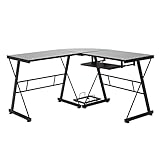
Overview: The NRG L-shaped desk balances compact design with dedicated PC storage. Measuring 51.2 inches on each side with a 29-inch height, this black tempered glass workstation features a built-in computer case holder measuring 12.6 by 9.3 inches. The symmetrical L-configuration provides ergonomic reach to both wings while maintaining a smaller footprint than executive-sized alternatives, making it suitable for bedrooms and modest home offices.
What Makes It Stand Out: The integrated PC tower holder elevates your computer off the floor, reducing dust intake and improving airflow—a thoughtful feature for tower users. Each glass wing measures 29.5 by 20 inches, providing adequate depth for keyboards and monitors without overwhelming smaller rooms. The balanced proportions create a cohesive workspace that doesn’t feel lopsided, unlike asymmetrical L-desks that can create awkward reach distances.
Value for Money: At $229.51, this desk commands a premium over basic L-shapes but justifies it through the specialized PC holder and tempered glass construction. While more expensive than the Flash Furniture option, its 51-inch dimensions better suit medium-sized rooms where the 83-inch alternative would dominate. The PC holder eliminates the need for a separate stand, offsetting some cost concerns while adding functional value.
Strengths and Weaknesses: Pros:
- Dedicated PC holder saves floor space and improves ventilation
- Symmetrical design fits naturally in standard corners
- Tempered glass provides durable, easy-clean surface
- Moderate size suits apartments and smaller offices
Cons:
- PC holder dimensions may not accommodate larger cases
- 20-inch depth limits ergonomic keyboard/mouse placement
- Higher price than some larger alternatives
- Black glass requires frequent cleaning
Bottom Line: Ideal for tower PC users seeking a space-efficient L-desk with integrated storage. While the PC holder’s size restrictions require careful measurement, the desk successfully merges functionality with compact design. Choose this over larger options if you prioritize PC elevation and have moderate space constraints.
5. MAKLAINE Transitional Glass Top Metal Corner Writing Desk in Soft Gold

Overview: The MAKLAINE desk mirrors the SEI Keaton’s formula with its soft gold finish and powder-coated iron construction. Designed as a small-space-friendly corner workstation, it targets the same aesthetic-conscious demographic seeking contemporary transitional style. The 5mm tempered glass top and metallic frame promise visual elegance for home offices, bedrooms, or open-concept living areas where furniture doubles as decor.
What Makes It Stand Out: The soft gold finish provides warm, on-trend metallic accents that differentiate it from standard black and silver offerings. Its corner-specific geometry efficiently utilizes neglected space, while the transitional style bridges modern and traditional interiors. The powder-coated iron construction suggests durability despite the lightweight design, making it suitable for relocations and apartment living where flexibility matters.
Value for Money: At $196.37, this desk sits $30 above the nearly identical SEI Keaton model, raising questions about brand premium without feature differentiation. Both offer the same materials, style, and small-space focus. Unless the MAKLAINE includes unlisted enhancements, budget-conscious buyers should default to the SEI option. The price approaches mid-range territory while delivering entry-level specifications and capacity.
Strengths and Weaknesses: Pros:
- Fashionable soft gold aesthetic enhances room design
- Compact footprint ideal for tight spaces
- Lightweight construction enables easy moving
- Transitional style suits diverse decor schemes
Cons:
- Significantly more expensive than comparable SEI Keaton
- Unspecified weight capacity likely similar to Keaton’s 40-pound limit
- Small surface area restricts multi-monitor setups
- Soft gold may limit color palette compatibility
Bottom Line: This desk delivers style and space efficiency but struggles to justify its price premium over the functionally identical SEI Keaton. Purchase only if brand preference or temporary pricing fluctuations favor MAKLAINE. Otherwise, the SEI model offers superior value for the same aesthetic and utility, making this a secondary choice for soft gold enthusiasts.
6. SEDETA L Shaped Computer Desk, Home Office Desk with 2 Drawer and Bookshelf, L Shaped Gaming Desk with LED Light, Glass Cabinet and Storage Bag, Corner Desk with Storage Shelves, Rustic Brown

Overview: The SEDETA L-Shaped Desk delivers exceptional functionality for gamers and home office users seeking maximum storage and style. This rustic brown corner workstation combines a spacious 23.6-inch wide desktop with an impressive array of organizational features, transforming any corner into a command center. The design intelligently integrates multiple storage solutions while maintaining a cohesive aesthetic that works in modern and traditional spaces alike.
What Makes It Stand Out: This desk distinguishes itself through its comprehensive feature set rarely seen at this price point. The RGB LED light strip with over 60,000 colors and 29 flashing modes, controllable via smartphone app, creates immersive gaming ambiance. The glass display cabinet with protective doors showcases collectibles while keeping them clean. Additionally, the built-in power strip with three outlets and two USB ports eliminates cable clutter, and the five-tier bookshelf provides vertical storage that maximizes corner space efficiency.
Value for Money: At $199.99, this desk offers remarkable value by bundling premium gaming features with extensive storage. Comparable desks with LED lighting alone often cost $150+, while adding glass cabinets, fabric drawers, and integrated power typically pushes prices above $300. The inclusion of these features makes it an economical choice for budget-conscious buyers wanting a high-end gaming setup without multiple separate purchases.
Strengths and Weaknesses: Strengths include unmatched storage versatility, customizable LED lighting, integrated power solutions, and a spacious work surface. The fabric drawers are lightweight and breathable, though potentially less durable than wooden alternatives. The rustic brown finish may not suit all modern aesthetics. Assembly requires patience due to numerous components, and the LED system adds a learning curve for non-tech-savvy users.
Bottom Line: This SEDETA desk excels for gamers and remote workers needing maximum storage and customization on a moderate budget. The feature-rich design outweighs minor drawbacks, making it a top recommendation for corner workspace optimization.
7. WXHCYGV Small Corner Desk, Triangle Computer Desk with Tempered Glass Top & Stainless Steel Frame, Modern Writing Desk for Workstation, Small Spaces, Home Office, Bedroom

Overview: The WXHCYGV Triangle Desk solves small-space challenges with its clever corner-hugging design. Engineered specifically for compact living, this modern workstation features a tempered glass top and stainless steel frame that create an open, airy aesthetic. Perfect for apartments, bedrooms, or dorm rooms, it provides essential workspace without overwhelming the room’s footprint while maintaining a sleek, contemporary presence.
What Makes It Stand Out: Its triangular silhouette maximizes previously unused corner space, a game-changer for tiny apartments. The scratch and heat-resistant tempered glass surface reflects light, making rooms appear larger while providing a stable, easy-to-clean workspace. The robust stainless steel frame supports up to 200 pounds—impressive for a desk of this scale—ensuring reliable performance for laptops, monitors, and work materials without the wobble common in compact furniture.
Value for Money: Priced at $264.99, this desk sits in the mid-range for glass-top workstations. While premium compared to basic particleboard desks, the stainless steel construction and tempered glass justify the cost. However, the lack of storage means buyers must invest in separate organizers, potentially increasing total expenditure. It’s best value for minimalists prioritizing surface area over storage.
Strengths and Weaknesses: Strengths include exceptional space efficiency, sturdy construction, quick sub-20-minute assembly, and a modern aesthetic that blends anywhere. The tempered glass is durable and creates visual lightness. Weaknesses are the premium price for limited workspace, zero built-in storage, and glass’s tendency to show fingerprints and dust. The minimalist design may disappoint those needing organizational features.
Bottom Line: Ideal for small-space dwellers who value clean design and quality materials over storage capacity. The WXHCYGV desk is a smart investment for creating a functional corner workstation without sacrificing style or floor space.
8. Monarch Specialties Workstation with Storage-Tempered Glass Top L Shaped Corner Desk with Drawers, 60" L, Black-Grey

Overview: The Monarch Specialties L-Shaped Workstation delivers contemporary professionalism for home offices demanding both style and function. This 60-inch black-grey desk features clean lines and thick panels that create an executive presence. The L-shape configuration provides generous surface area for multi-monitor setups while the integrated drawers offer essential storage, making it suitable for serious remote work or small business operations.
What Makes It Stand Out: This desk’s professional-grade file cabinet, designed to accommodate legal-size documents, sets it apart from typical home office furniture. The tempered glass top on the side table adds a sophisticated accent while protecting the surface from wear. Finished on all sides, it can float in a room rather than hugging walls, offering unprecedented placement flexibility. The simple, modern aesthetic suits virtually any décor without dominating the space.
Value for Money: At $407.56, this workstation commands a premium price that reflects its commercial-quality construction and thoughtful design. While more expensive than basic L-desks, it undercuts traditional executive furniture by hundreds of dollars. The legal-size filing capability alone justifies the investment for professionals, eliminating separate file cabinet purchases. It’s a smart mid-range choice for those wanting office-grade functionality without solid-wood pricing.
Strengths and Weaknesses: Strengths include professional filing storage, versatile placement options, durable construction, and a refined aesthetic that ages well. The tempered glass accent adds elegance while protecting high-use areas. Weaknesses include limited drawer space compared to dedicated filing units, the glass panel covering only a portion of the desk, and a price point that may stretch budget-conscious buyers. Storage is adequate but not abundant for paper-heavy workflows.
Bottom Line: Perfect for remote professionals and small business owners needing legitimate filing capabilities in an attractive package. The Monarch Specialties desk balances executive function with contemporary style, making it a worthwhile investment for serious home offices.
9. Multi-Tier Gaming Desk and Home Office Corner Desks with Clear Glass Top, Adjustable Work Desks for Bedroom Craft Study Table and Computer Workstation,Black
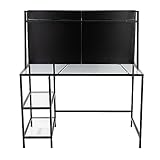
Overview: This Multi-Tier Corner Desk adapts seamlessly between gaming marathons and professional work sessions. The black metal frame supports a clear tempered glass top and multiple integrated shelves, creating a versatile workstation that fits snugly into corners. Designed for users who frequently shift between hobbies, study, and remote work, it offers flexible storage and a spacious surface that accommodates diverse activities without consuming excessive floor space.
What Makes It Stand Out: The integrated tiered shelving system provides dedicated zones for gaming consoles, PC towers, office supplies, or craft materials, keeping essentials within arm’s reach. Unlike standard desks with flat surfaces, this vertical storage approach maximizes corner real estate efficiently. The “adjustable” design elements, while not fully detailed, suggest customizable configurations to suit different user heights or equipment sizes, enhancing ergonomic comfort for extended use.
Value for Money: At $268.99, this desk positions itself as a mid-tier option offering more storage than basic models but less polish than premium brands. The combination of glass top and multi-tier storage creates strong value for gamers and creators needing organization. However, the vague “adjustable” claims and lack of specified drawer space may require supplementary storage purchases, potentially diminishing overall value compared to all-in-one competitors.
Strengths and Weaknesses: Strengths include versatile multi-tier storage, space-saving corner design, durable glass surface, and adaptability for various uses. The open shelving keeps items visible and accessible. Weaknesses include ambiguous “adjustable” features, no enclosed drawers for private storage, potential assembly complexity with multiple tiers, and the manufacturer’s shipping weight warning suggests cumbersome delivery. The minimalist aesthetic may not suit all tastes.
Bottom Line: An excellent choice for users prioritizing open storage and versatility in a corner setup. This desk serves gamers, students, and hobbyists well, though those needing secure storage should consider alternatives. The functional design outweighs minor uncertainties.
10. SRECELL L-Shaped Desk, Modern Metal Frame Tempered Glass Corner Desk with File Drawer, Storage Drawers, and Open Shelf – Executive Home Office Workstation, Gold & White

Overview: The SRECELL L-Shaped Desk brings executive luxury to home offices with its striking gold and white color scheme. This 55 x 60-inch workstation combines a tempered glass top with a sturdy metal frame, creating a sophisticated aesthetic that elevates any workspace. The thoughtful inclusion of multiple storage options—including file and storage drawers plus an open shelf—delivers both beauty and practical organization for professionals wanting a premium setup.
What Makes It Stand Out: The powder-coated gold accents against white finish create a distinctive, upscale look rarely found in home office furniture. Full-extension drawer slides provide complete access to contents, a feature typically reserved for high-end cabinetry. The spacious L-shape accommodates dual monitors and peripherals while maintaining an open, airy feel thanks to the glass surface. This desk successfully merges executive presence with modern materials.
Value for Money: At $479.99, this is a premium investment targeting design-conscious professionals. While significantly more expensive than basic L-desks, the gold-accented aesthetic and quality hardware justify the price for those seeking statement furniture. Comparable executive desks with similar features often exceed $600, making this relatively competitive. However, budget buyers can find similar functionality without the luxury finish for half the cost.
Strengths and Weaknesses: Strengths include stunning gold-and-white design, full-extension drawer slides, durable metal frame, easy-to-clean glass, and quick assembly. The modern aesthetic suits contemporary executive spaces beautifully. Weaknesses include the premium price point, limited color options, gold accents may clash with some décors, and drawer space, while adequate, isn’t expansive. The glass surface, though tempered, requires regular cleaning to maintain its pristine appearance.
Bottom Line: Ideal for professionals wanting to make a stylish statement without sacrificing functionality. The SRECELL desk excels in executive home offices where aesthetics matter as much as performance. If your budget allows, this piece delivers both wow-factor and practical workspace solutions.
The Rise of Modern Corner Workstations with Glass Tops
The intersection of glass surfaces and corner configurations represents more than a design trend—it’s a response to the evolving demands of contemporary workspaces. Glass tops reflect natural light, reducing the need for artificial illumination while creating a visually lighter footprint that doesn’t overwhelm smaller rooms. Corner designs maximize every square inch, transforming underutilized areas into productive zones. In 2026, manufacturers are pushing boundaries with tempered glass that rivals traditional wood in durability while offering superior hygienic properties and a timeless aesthetic that complements any décor style.
Why Choose a Corner Workstation for Your Modern Office
Maximizing Square Footage in Compact Spaces
Corner workstations excel at converting dead space into functional real estate. Unlike traditional desks that sit parallel to walls, corner units utilize the full depth of a room’s perimeter, often providing 30-40% more usable surface area in the same floor footprint. This efficiency is particularly valuable in urban apartments and small home offices where every inch counts. The L-shaped configuration naturally creates distinct zones for different tasks—computer work on one side, paperwork or creative projects on the other—without requiring additional furniture.
Creating Distinct Zones in Open-Plan Environments
In open-plan offices or multi-purpose rooms, corner workstations establish clear boundaries without erecting physical barriers. The glass top maintains visual connectivity while the corner placement defines “your territory.” This psychological separation enhances focus and signals to others that you’re in work mode. For couples sharing a home office, back-to-back corner setups create individual workstations that feel private yet connected, maximizing both collaboration and concentration.
Understanding Glass Top Materials and Durability
Tempered vs. Laminated Glass: What You Need to Know
Tempered glass remains the industry standard for workstation surfaces, heat-treated to be four to five times stronger than standard glass. When broken, it shatters into small, relatively harmless pebbles rather than sharp shards. Laminated glass, while less common, offers additional safety benefits—a plastic interlayer holds fragments together if impact occurs. For most users, 8-10mm tempered glass provides the ideal balance of strength and elegance, supporting equipment weight while maintaining a sleek profile.
Scratch Resistance and Longevity Considerations
Modern glass tops receive specialized coatings that dramatically improve scratch resistance. Look for workstations featuring chemically strengthened surfaces or those treated with diamond-like carbon (DLC) coatings. These innovations make glass more resistant to keyboard marks, mouse movement, and accidental key scratches than many wood alternatives. However, dust and grit can act as abrasives, so regular cleaning with appropriate materials is essential for maintaining that pristine 2026 showroom finish.
Key Features to Evaluate in 2026 Designs
Integrated Cable Management Systems
The best modern corner workstations conceal clutter through sophisticated cable routing. Seek designs with built-in channels beneath the glass, magnetic cable trays, and grommet holes positioned for optimal wire placement. Some premium models feature pop-up power modules that rise from the desktop surface, keeping connections accessible yet hidden when not in use. This attention to detail transforms your workspace from chaotic to curated.
Height-Adjustable Mechanisms
Electric sit-stand functionality has become non-negotiable in premium corner workstations. 2026 models offer whisper-quiet motors with programmable memory settings, allowing seamless transitions between sitting and standing positions. Pay attention to the adjustment range—ideally 24 to 50 inches—to accommodate users of all heights. Corner-specific designs must maintain stability across the entire L-shape, requiring robust three-motor systems rather than the two-motor setups common on rectangular desks.
Built-in Technology Integration
Forward-thinking designs now incorporate wireless charging pads embedded directly into the glass surface, visible only by subtle etching or LED indicators. USB-C ports with Power Delivery support, integrated speakers, and even ambient lighting systems that sync with your computer’s display are becoming standard features. These integrations eliminate desk clutter while keeping your devices powered and connected.
Ergonomic Considerations for Corner Configurations
Monitor Placement and Viewing Angles
Corner workstations present unique ergonomic challenges. The ideal setup positions your primary monitor at the corner’s apex, approximately arm’s length away, with secondary monitors flanking at a slight angle. This arrangement minimizes neck rotation and creates a natural focal point. Look for workstations with reinforced corner sections that support monitor arms without flexing, crucial for maintaining stable viewing angles during intense work sessions.
Legroom and Under-Desk Clearance
The L-shape’s geometry can sometimes compromise legroom if not properly designed. Quality workstations provide a minimum of 25 inches of knee clearance depth and avoid crossbars or support structures that impede movement. The return section—the shorter side of the L—should offer adequate space for comfortable seating without forcing you to sit at an awkward angle. Test the depth and width measurements against your body dimensions and chair size before committing.
Design Aesthetics and 2026 Trends
Minimalist Frame Designs
This year’s aesthetic favors “floating” glass appearances achieved through ultra-thin frame profiles and hidden support structures. Powder-coated steel in matte black or white remains popular, but brushed brass and copper finishes are emerging as statement choices. The frame should complement your room’s architecture while remaining sturdy enough for daily use—avoid designs that sacrifice stability for style.
Mixed Material Combinations
Designers are increasingly pairing glass tops with unexpected base materials. Reclaimed wood accents, concrete-look pedestals, and even recycled ocean plastic components create visual interest and sustainability credentials. These combinations allow you to introduce warmth and texture while maintaining the glass top’s light-reflecting benefits. The key is balance—let the glass remain the star while other materials play supporting roles.
Color Palette Evolution
While clear glass dominates, subtle tinting options are gaining traction in 2026. Soft gray, bronze, and even pale blue tints can add personality without overwhelming a space. These tints often reduce glare and fingerprints while providing a distinctive look. Frame colors are shifting from stark whites to warmer off-whites and from pure blacks to charcoal with brown undertones, creating more sophisticated, lived-in aesthetics.
Sizing and Spatial Planning
Measuring Your Available Space
Before browsing, create a detailed floor plan including door swings, window placements, and existing furniture. Corner workstations require not just wall space but also adequate clearance for the return section protruding into the room. Measure from the corner outward along both walls, then subtract 3-4 inches for comfortable movement. Don’t forget vertical space—tall shelving or windows above the desk area can limit monitor arm placement.
Understanding Standard Corner Workstation Dimensions
Most models range from 60 to 72 inches on the long side and 48 to 60 inches on the return. Depth typically runs 24 to 30 inches. For single users, a 60x48 inch configuration often suffices, while power users with multiple monitors may need the expansive 72x60 inch footprint. The “sweet spot” for home offices tends to be around 63x51 inches, providing generous workspace without dominating the room.
Left-Return vs. Right-Return Configurations
Your room’s layout dictates which orientation works best. Stand in your workspace and identify your dominant hand—right-handed users typically prefer right-return desks where the shorter side extends to their right. However, consider window placement, door traffic patterns, and where you need the most uninterrupted surface area. Some manufacturers offer reversible designs, though these often compromise on cable management integration.
Frame Materials and Construction Quality
Powder-Coated Steel vs. Aluminum Frames
Steel frames provide superior strength and stability, particularly important for height-adjustable corner units bearing heavy equipment loads. Premium powder coatings resist chipping and scratching while offering a refined finish. Aluminum frames, while lighter and more corrosion-resistant, can flex under significant weight but excel in minimalist designs where thin profiles are prioritized. For most users, steel remains the gold standard for durability.
Stability and Weight Capacity
A quality corner workstation should support at least 150 pounds evenly distributed, with premium models handling 200+ pounds. Test stability by checking for wobble at maximum height—gently push the desk’s corner and observe any movement. Quality indicators include thick gauge steel (14-gauge or lower), reinforced joints, and wide, adjustable leveling feet. Remember that corner designs experience different stress patterns than rectangular desks, requiring more robust engineering.
Smart Features and Technology Integration
Wireless Charging Capabilities
2026’s integrated wireless charging goes beyond simple Qi pads. Look for multi-coil systems that charge devices anywhere on a designated zone, not just a precise spot. Some workstations feature “through-glass” charging technology that works without visible pads, though these remain premium features. Ensure compatibility with your devices—many now support faster 15W charging standards.
USB-C and Power Outlet Placement
Strategic placement of power access points can make or break your workflow. The best designs position outlets along the desk’s edge or in pop-up modules that keep cables off the surface. Verify that USB-C ports support data transfer, not just power delivery, allowing you to connect peripherals directly through the desk. Look for surge protection ratings and individual port power specifications.
IoT Connectivity and App Control
High-end workstations now offer smartphone apps that track sitting vs. standing time, remind you to change positions, and even sync with fitness trackers. Some integrate with smart home systems, automatically adjusting height based on calendar events or time of day. While not essential, these features demonstrate a manufacturer’s commitment to holistic workplace wellness and can provide valuable usage insights.
Maintenance and Care for Glass Surfaces
Daily Cleaning Best Practices
Microfiber cloths are non-negotiable for glass maintenance—paper towels leave lint and can cause micro-scratches. Use a solution of distilled water with a few drops of mild dish soap, avoiding ammonia-based cleaners that can damage protective coatings. Clean in circular motions, then buff dry with a fresh microfiber cloth. Establish a daily wipe-down routine to prevent buildup of oils and dust.
Preventing Smudges and Fingerprints
While no glass surface is completely smudge-proof, oleophobic coatings significantly reduce fingerprint visibility. These hydrophobic treatments repel oils and make cleaning easier. Some 2026 models feature etched or frosted zones where hands frequently contact the surface, providing tactile feedback while hiding marks. Consider your work habits—if you frequently adjust items on your desk, these features become invaluable.
Dealing with Scratches and Damage
Minor scratches can often be buffed out using specialized glass polishing compounds and a buffer pad. For deeper damage, professional glass restoration services can sometimes repair surfaces without full replacement. Most warranties cover glass defects but not user-inflicted damage, so consider a clear protective mat for high-use areas like mouse zones. Keep a touch-up kit specifically designed for tempered glass surfaces.
Budget Planning and Value Assessment
Entry-Level vs. Premium Price Points
Corner workstations with glass tops span from $400 budget models to $3,000+ premium units. Entry-level desks typically feature static heights, thinner glass (6mm), and basic steel frames. Mid-range options ($800-$1,500) add electric height adjustment and better cable management. Premium workstations justify their cost through superior motors, thicker glass, advanced technology integration, and exceptional warranties. Determine which features are non-negotiable for your workflow before setting your budget.
Long-Term Investment Considerations
A quality workstation should serve you for 8-10 years. Calculate cost-per-use by dividing the price by estimated usage days. A $1,500 desk used 250 days annually for eight years costs less than $0.75 per day—less than a coffee. Factor in health benefits from ergonomic features and productivity gains from organized cable management. Cheaper desks that need replacement every 2-3 years often cost more long-term than a single premium purchase.
Sustainability and Eco-Friendly Options
Recycled Materials and Manufacturing
Progressive manufacturers now use recycled glass content in their tabletops and reclaimed steel in frames. Look for certifications like GREENGUARD or BIFMA level® that verify low chemical emissions and sustainable production. Some companies offer take-back programs, recycling your old desk when you purchase a new one. These initiatives reduce landfill waste and often provide a discount on your upgrade.
Carbon-Neutral Shipping and Packaging
Eco-conscious brands are minimizing packaging through flat-pack designs that reduce shipping volume and using biodegradable protective materials. Some offset shipping emissions through carbon credit programs. While these features might add 5-10% to the cost, they align with corporate sustainability goals and personal environmental values—an increasingly important factor in 2026 purchasing decisions.
Customization and Personalization
Modular Components and Expandability
The most versatile workstations function as part of a larger system. Look for brands offering matching file cabinets, monitor stands, and shelving units that integrate seamlessly with your corner desk. Some designs allow you to add sections later, converting an L-shape into a U-shape if your needs change. This modularity future-proofs your investment and maintains aesthetic consistency as your workspace evolves.
Custom Glass Tinting and Edge Work
Beyond standard options, many manufacturers offer custom edge profiles—from sleek pencil edges to dramatic beveled designs. Custom tinting can match corporate branding or home décor, while frosted or patterned glass provides privacy for workstations in shared spaces. These bespoke options typically extend lead times by 4-6 weeks but create a truly personalized workspace that reflects your identity.
Assembly, Installation, and Professional Setup
DIY Assembly Considerations
Most corner workstations require 2-3 hours of assembly with basic tools. Quality manufacturers provide clear, illustrated instructions and pre-drilled holes that actually align. Before starting, inventory all parts and hardware—missing components are easier to replace before you’re halfway through. Enlist a helper for lifting glass tops; even tempered glass is heavy and awkward for one person. Many warranties require professional assembly for full coverage, so read terms carefully.
When to Hire Professional Installers
Consider professional installation if your workstation exceeds 200 pounds, includes complex cable management integration, or requires precise leveling on uneven floors. Installers ensure proper assembly torque on critical joints and can calibrate height-adjustable mechanisms correctly. For corporate deployments across multiple workstations, professional setup ensures consistency and often includes employee training on features. The $150-$300 installation fee frequently pays for itself in time saved and warranty protection.
Warranty, Support, and Brand Reliability
What to Look for in a Warranty
Comprehensive warranties cover the frame for 10-15 years, electrical components for 5 years, and the glass surface for 2-3 years. Read the fine print—some warranties exclude scratches, “normal wear,” or damage from improper assembly. Transferable warranties add value if you might resell the desk. Brands offering in-home service for repairs demonstrate confidence in their products and save you the hassle of shipping large components.
Customer Support and Parts Availability
A warranty is only as good as the support backing it. Research brands’ responsiveness through reviews and test their support channels before purchasing. Can you easily order replacement parts like control panels or caster wheels? Do they maintain inventory for discontinued models? Companies with North American or European support centers typically offer faster resolution than those relying solely on overseas teams. This consideration becomes crucial when a $20 part failure could otherwise render a $1,500 desk unusable.
Frequently Asked Questions
How much weight can a typical glass-top corner workstation support?
Most quality models support 150-200 pounds evenly distributed, with premium units handling up to 250 pounds. The weight capacity includes your monitors, computer, and any additional equipment. Always check the manufacturer’s specifications and remember that corner designs concentrate stress differently than rectangular desks, so avoid placing extremely heavy items directly on the corner seam.
Are glass top workstations prone to breaking or shattering?
Modern tempered glass is extremely durable and resistant to impacts. It’s heat-treated to be 4-5 times stronger than regular glass and shatters into small, rounded pieces if broken, minimizing injury risk. However, it’s not indestructible—direct blows from heavy, pointed objects or extreme temperature shocks can cause damage. With normal office use, a quality tempered glass top should last the lifetime of the workstation.
Do glass tops show fingerprints and smudges more than other materials?
Glass does show fingerprints, but 2026 models feature oleophobic coatings that significantly reduce visibility and make cleaning easier. Daily microfiber cloth wipe-downs take seconds and keep the surface pristine. Some users prefer the clean look enough to accept minimal maintenance, while others opt for frosted or etched zones in high-touch areas to camouflage marks.
Can I mount monitor arms to a glass corner workstation?
Yes, but with important caveats. Always use clamp-style mounts on the frame, never on the glass itself. Ensure the frame has reinforced sections designed for monitor arm attachment—this is typically indicated in product specifications. Some workstations include integrated mounting points or removable glass sections that reveal steel reinforcement plates underneath. Never drill into tempered glass, as this will cause it to shatter.
How do I prevent my keyboard and mouse from sliding on a glass surface?
Most glass-top workstations include textured mats or have a micro-etched surface in the keyboard zone. If yours doesn’t, invest in a high-quality desk pad with non-slip backing. These pads also protect the glass from keyboard marks and provide a warmer surface for your wrists. Avoid rubber-backed mats that can trap moisture and cause hazing on the glass over time.
Is a corner workstation suitable for very small rooms?
Corner designs actually excel in small spaces by utilizing otherwise wasted corner real estate. For rooms under 100 square feet, look for compact 48x48 inch configurations or corner desks with reduced depth (20-22 inches). The glass top helps maintain an open feel. Just ensure you have at least 36 inches of clearance on both sides for comfortable chair movement and access.
What’s the difference between a left-return and right-return desk?
Standing at the main section, a left-return desk has the shorter side extending to your left; a right-return extends right. Your choice depends on room layout, dominant hand (right-handed users often prefer right-return), and where you need the most uninterrupted surface area. Some models are reversible, but dedicated designs typically offer better cable management and stability.
How difficult is it to assemble a glass-top corner workstation?
Assembly typically takes 2-3 hours and requires two people due to the glass top’s weight and size. Most manufacturers provide clear instructions, but the process involves attaching multiple frame sections, routing cables, and carefully placing the glass. If you’re not comfortable with mechanical assembly or lack a helper, professional installation ($150-$300) ensures proper setup and often protects your warranty.
Are height-adjustable corner workstations stable at standing height?
Quality electric models with three-motor systems remain remarkably stable even at maximum height. Look for desks with wide, adjustable feet, thick gauge steel frames (14-gauge or lower), and cross-bracing designed specifically for L-shapes. Avoid budget two-motor designs for corner configurations, as they can develop wobble. Reading user reviews that specifically mention stability at standing height provides real-world validation.
How do I choose between clear, tinted, or frosted glass?
Clear glass maximizes light reflection and works best in darker rooms or minimalist spaces. Tinted glass (gray, bronze, blue) adds personality, reduces glare, and hides fingerprints better—ideal for high-traffic offices. Frosted or etched glass provides privacy and diffuses light softly, perfect for workstations facing windows or in shared spaces. Consider your room’s lighting, color scheme, and maintenance preferences when deciding.