Gone are the days of fumbling with laptop trackpads or being tethered to your computer by a cable during crucial presentations. The modern professional landscape demands fluidity, confidence, and seamless technology integration—and that’s precisely where rechargeable wireless presenters have changed the game entirely. Unlike their battery-guzzling predecessors, these sleek devices offer sustainable power solutions, enhanced reliability, and sophisticated features that transform how we communicate ideas in boardrooms, lecture halls, and virtual conferences.
But with a market saturated with options boasting everything from gyroscopic air mice to integrated voice controls, how do you separate genuine innovation from marketing fluff? This comprehensive guide cuts through the noise, equipping you with the technical knowledge and practical insights needed to identify the perfect rechargeable wireless presenter for your specific presentation style, venue requirements, and professional demands.
Top 10 Rechargeable Wireless Presenters
Detailed Product Reviews
1. Norwii N76 Rechargeable Presentation clicker with Pointer, Long Range Presentation Remote, Wireless Presenter for PowerPoint Presentations, Slide Control (Black with Red Light)

Overview: The Norwii N76 is a feature-rich presentation clicker designed for professionals who demand reliability and flexibility. With its built-in 360mAh rechargeable lithium battery, this device eliminates the hassle of disposable batteries, offering weeks of operation on a single 2-3 hour charge. Its sleek black design with red laser pointer makes it a practical tool for educators, business professionals, and speakers who present regularly in various environments.
What Makes It Stand Out: The N76’s exceptional 328-foot wireless control range sets it apart from standard clickers, ensuring reliable performance even in large venues or through obstacles. The customization software allows users to reconfigure button functions for personalized workflows. Unique pairing capabilities enable one presenter to control multiple devices or six presenters to control a single device—ideal for collaborative presentations or training scenarios where flexibility is paramount.
Value for Money: At $15.99, this clicker delivers premium features at a budget-friendly price point. The rechargeable battery alone saves significant money over time compared to battery-powered alternatives. Competing devices with similar range and customization often cost $25-35, making the N76 an excellent investment for frequent presenters who need professional capabilities without the premium price tag.
Strengths and Weaknesses: Strengths include impressive battery life, extensive control range, multi-device pairing, plug-and-play compatibility across all major OS platforms, and free customization software. Weaknesses are the red laser (less visible than green on bright screens) and the need to download software for advanced customization, which may intimidate less tech-savvy users.
Bottom Line: The Norwii N76 is an outstanding choice for serious presenters who need maximum range and flexibility. Its rechargeable convenience and multi-device capabilities make it a top contender in its price class.
2. Presentation Clicker with Case Storage: PowerPoint Wireless Presenter Remote USB Type C Rechargeable Red Laser Pointer Clickers for Computer Project Mac PPT Slideshow Google Slide Advancer

Overview: This presentation clicker combines portability with professional functionality, featuring a protective case and USB-C rechargeability. Designed for mobile professionals, it offers intuitive slide controls including black screen, forward/backward navigation, and a bright red laser pointer. The compact form factor slips easily into pockets, making it ideal for traveling presenters and educators who move between venues frequently.
What Makes It Stand Out: The included storage case distinguishes it from competitors, providing protection and organization for the clicker and USB receiver. Its rapid-charge capability delivers one hour of use from just five minutes of charging—a lifesaver for last-minute presentations. The ergonomic, grippy texture ensures secure handling, while the 328-foot laser range allows precise pointing even in large auditoriums.
Value for Money: Priced at $24.99, this clicker sits in the mid-range category. The protective case, premium build quality, and USB-C convenience justify the cost over basic models. While cheaper options exist, the case and quick-charge feature add tangible value for professionals who prioritize durability and readiness for impromptu speaking engagements.
Strengths and Weaknesses: Strengths include the protective case, USB-C rapid charging, excellent ergonomics, strong laser range, and intuitive button layout. Weaknesses are the relatively short 98-foot control range (versus 164+ feet competitors) and higher price point. The red laser, while bright, may struggle on LED/LCD screens.
Bottom Line: A solid choice for presenters who value portability, build quality, and rapid charging. The case makes it travel-ready, though the shorter control range may limit use in very large venues.
3. DINOSTRIKE Wireless Presenter Remote with Air Mouse Control, Rechargeable USB Presentation Clicker PPT Pointer RF 2.4GZ PowerPoint Clicker Slide Advancer for Computer Laptop Mac
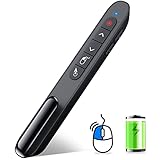
Overview: The DINOSTRIKE Wireless Presenter Remote doubles as an air mouse, offering cursor control alongside standard presentation functions. This versatile tool supports black/full screen, volume control, hyperlink activation, and window switching. With a built-in 300mAh rechargeable battery providing weeks of use, it’s designed for dynamic presenters who need more than basic slide navigation during demonstrations.
What Makes It Stand Out: The integrated air mouse functionality transforms this from a simple clicker into a full remote control, allowing precise cursor manipulation without touching your computer. Its impressive 656-foot laser range is among the longest available, while the 164-foot control range provides ample mobility. The pen-clip design attaches securely to pockets or notebooks, preventing loss between presentations.
Value for Money: At $23.99, this hybrid device effectively replaces both a presentation clicker and wireless mouse, delivering exceptional value. Separate devices would cost $40-50 combined. The rechargeable battery and versatile functionality make it a cost-effective solution for presenters who frequently demonstrate software or navigate complex interfaces from a distance.
Strengths and Weaknesses: Strengths include innovative air mouse capability, extraordinary laser range, convenient pen clip, long battery life, and plug-and-play simplicity. Weaknesses involve a steeper learning curve for air mouse gestures and potential over-complication for users wanting only basic slide advancement. The cursor switch button adds another control to master.
Bottom Line: Perfect for tech-savvy presenters and software demonstrators who need cursor control from afar. The air mouse feature justifies its price, though traditional presenters may prefer simpler devices.
4. DinoFire USB C Rechargeable Presentation Remote with Red Light,Wireless Preseter PPT Slide Clicker Advancer for MacBook Laptop Computer

Overview: The DinoFire presentation remote offers dual connectivity with both USB-A and USB-C connectors, making it instantly compatible with modern MacBooks and legacy systems. This rechargeable clicker provides essential presentation controls—page navigation, volume control, window switching, and black/full screen—in a compact, clip-on design that travels effortlessly between meetings and classrooms without needing adapters.
What Makes It Stand Out: The dual-connection versatility eliminates adapter hassles, a rare feature at this price point. Its plug-and-play functionality works across Windows, macOS, Linux, and Android, though Mac users may need brief initial setup. The bright red laser effectively highlights key points, while the integrated USB receiver storage prevents loss during transport between locations.
Value for Money: At just $15.79, this is one of the most affordable rechargeable clickers with dual connectors. Budget competitors often require separate dongles or batteries, making the DinoFire a smart economic choice. The 98-165 foot control range suffices for most conference rooms and classrooms, delivering reliable performance without premium pricing.
Strengths and Weaknesses: Strengths include dual USB-A/USB-C connectivity, integrated receiver storage, pen-clip portability, plug-and-play simplicity, and wallet-friendly pricing. Weaknesses are the red laser’s limited visibility on LED/LCD screens, modest control range compared to high-end models, and basic functionality without advanced customization options.
Bottom Line: An excellent entry-level choice for presenters needing USB-C compatibility without breaking the bank. The dual connectors future-proof your investment, making it ideal for mixed-device environments.
5. Presentation Clicker Wireless Presenter Remote Clicker for 2-in-1 USB Type C Powerpoint Clicker with Pointer, Rechargeable Presentation Pointer PPT Slide Advancer for Mac/Google Slide/Keynote
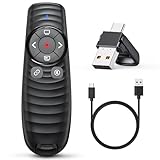
Overview: This 2-in-1 presentation clicker merges classic functionality with modern design, featuring both USB-A and USB-C connectors for universal compatibility. The distinctive ripple-textured grip houses intuitive controls for red laser pointing, volume adjustment, hyperlink navigation, and slide management. A built-in rechargeable battery provides 7-10 days of use per charge, while low-battery alerts prevent mid-presentation failures.
What Makes It Stand Out: The impressive 656-foot laser range ensures visibility in even the largest venues, while the ergonomic ripple design provides tactile feedback for confident button location without looking. The included 1-year quality support and low-battery warning system demonstrate manufacturer confidence and user-focused design. Its dual connectors make it equally at home with new MacBooks and older PCs.
Value for Money: At $21.99, this clicker balances premium features with reasonable cost. The dual connectors, extended laser range, and warranty coverage justify the price over basic $15 models. While not the cheapest, the thoughtful design elements and reliability features make it a worthwhile investment for regular presenters who prioritize peace of mind.
Strengths and Weaknesses: Strengths include striking ergonomic design, exceptional laser range, dual USB connectivity, low-battery alerts, comprehensive software compatibility, and included warranty. Weaknesses are the modest 100-foot control range (shorter than some competitors) and red laser limitations on modern screens. The multi-function button layout may require practice to master.
Bottom Line: A reliable, well-designed clicker for frequent presenters who value ergonomics and long-range laser visibility. The warranty and battery alerts provide peace of mind for professional use.
6. 2-in-1 USB Type C Presentation Clicker, Rechargeable Wireless Presenter Remote, Clicker for PowerPoint Presentations, Pointer for Presentations Slide Advancer with Volume Control for Mac,Computer, PPT

Overview: This versatile presentation clicker delivers reliable wireless control up to 100 feet with an impressive 656-foot red laser range suitable for large venues. The dual USB Type C and traditional USB receiver ensures compatibility across modern and legacy devices without adapters. A built-in 300mAh rechargeable battery provides a full week of use after just two hours of charging, complemented by a helpful low-battery indicator. Supporting Windows, Mac, Linux, and Android systems, it works seamlessly with PowerPoint, Keynote, Prezi, and other major presentation software. The plug-and-play design eliminates software installation, making it immediately ready for classroom, conference room, or auditorium use.
What Makes It Stand Out: The ergonomic blind-operation design is genuinely innovative—button placement is optimized so presenters can locate controls by touch alone without breaking eye contact with their audience. The 656-foot laser range exceeds most competitors in this price tier, providing exceptional visibility in large spaces. The integrated receiver storage in the device base prevents the common frustration of lost USB dongles. Additionally, the low-battery reminder function flashes four times when power is depleted, offering practical warning rather than sudden failure mid-presentation.
Value for Money: At $15.99, this clicker dramatically outperforms its price point. Comparable dual-interface presenters typically retail for $20-30, while the rechargeable battery eliminates ongoing costs of disposable cells. The comprehensive feature set—including volume control, full/black screen toggle, and window switching—matches premium models costing twice as much. For educators, students, and business professionals seeking reliable presentation control without budget strain, this represents exceptional long-term value.
Strengths and Weaknesses: Strengths include versatile USB-C/USB-A connectivity, impressive wireless range, long-lasting rechargeable battery, ergonomic blind-operation design, and broad software compatibility. The low-battery alert is genuinely useful. Weaknesses are minor: red lasers remain less visible on bright LED/LCD screens (a universal limitation), and the 100-foot control range, while adequate for most venues, falls short of some premium alternatives. The plastic construction may feel less substantial than metal competitors.
Bottom Line: This presentation clicker offers professional-grade functionality at a budget price. For presenters in classrooms and conference rooms, its combination of dual USB support, rechargeable convenience, and intuitive ergonomics makes it a smart, reliable choice that eliminates common presentation headaches.
7. DINOSTRIKE USB-A and USB-C Presentation Clicker with Air Mouse Control, Rechargeable Wireless Presenter Remote PPT Pointer RF 2.4GZ PowerPoint Clicker Slide Advancer for Mac Computer Laptop

Overview: The DINOSTRIKE clicker revolutionizes presentation control with its integrated air mouse functionality, transforming a standard remote into a full cursor controller. Supporting both USB-A and USB-C connections, it offers an extended 164-foot wireless range and 82-foot air mouse operation. The bright red laser reaches 656 feet, ensuring visibility in large auditoriums. A built-in 300mAh battery delivers weeks of use per charge, while the integrated pen-style clip allows secure pocket storage. Compatible with all major operating systems and presentation software including Google Slides, it enables interactive demonstrations beyond simple slide advancement.
What Makes It Stand Out: The air mouse capability is a true differentiator, allowing presenters to click hyperlinks, interact with live software, and navigate complex interfaces—turning passive presentations into dynamic experiences. The combined USB-A/C receiver intelligently eliminates adapter clutter. The pen-style clip is a professional-grade portability feature that competitors often omit. With 164 feet of control range, presenters enjoy exceptional freedom to engage audiences from anywhere in the room, while dedicated mouse mode switching provides precise control when needed.
Value for Money: At $25.99, this mid-range clicker justifies its premium through genuine innovation. Standard presenters without cursor control typically cost $15-20, making the additional $6-10 investment reasonable for interactive capabilities. For trainers, software demonstrators, and dynamic speakers, the productivity gains from air mouse functionality far exceed the price difference. The rechargeable design, robust build, and thoughtful clip enhance long-term value for mobile professionals.
Strengths and Weaknesses: Strengths include unique air mouse functionality, versatile dual USB connectivity, excellent 164-foot wireless range, convenient pen clip design, and long battery life. The ability to toggle mouse mode provides welcome flexibility. Weaknesses: mastering air mouse control requires practice, and the feature set may be unnecessary for simple slide-only presentations. The slightly higher price may not suit budget-conscious buyers who don’t need cursor control. Some users report sensitivity takes adjustment.
Bottom Line: For presenters needing more than basic slide advancement, this air mouse-enabled clicker is transformative. The modest premium delivers interactive capabilities that elevate presentations, making it ideal for tech demos, training sessions, and speakers who demand flexibility beyond traditional remotes.
8. 2-in-1 USB Type C Presentation Clicker, Clicker for PowerPoint Presentations, Rechargeable Wireless Presenter Remote, Pointer RF 2.4GHz USB PowerPoint Clicker Slide Advancer with Volume Control

Overview: This presentation clicker balances essential controls with user-centric design at an accessible price point. Offering 100-foot wireless range and 656-foot red laser visibility, it handles PowerPoint, Keynote, Prezi, and other software seamlessly. The built-in 300mAh battery supports a week of use after two hours of charging. Oversized, intuitively placed buttons enable confident blind operation, while the ergonomic grip ensures comfort during extended sessions. The USB-C/USB-A receiver stores securely in the device base, preventing loss. Class 3R laser technology provides brighter illumination than standard pointers, enhancing visibility across various backgrounds.
What Makes It Stand Out: The big button design is genuinely distinctive, making this clicker exceptionally user-friendly for presenters operating in dimly lit rooms or those preferring tactile feedback. The Class 3R laser (<5mW) delivers noticeably brighter illumination than Class 2 alternatives, improving visibility without safety concerns. The manufacturer notes it doubles as a cat toy, revealing confidence in the laser’s brightness. One-year quality support demonstrates commitment to customer satisfaction. The button layout prioritizes muscle memory development, allowing presenters to operate instinctively after minimal practice.
Value for Money: At $15.99, this represents outstanding value. Brighter Class 3R lasers typically command $25-35 premiums, yet this maintains budget pricing. Big button ergonomics and dual USB compatibility are features usually reserved for more expensive models. For frequent presenters seeking reliability and ease-of-use without premium cost, this delivers professional-grade functionality. The rechargeable battery eliminates ongoing costs, while the robust feature set—including hyperlink support and window switching—matches competitors costing twice as much.
Strengths and Weaknesses: Strengths include oversized tactile buttons, brighter Class 3R laser, dual USB interface, rechargeable battery, ergonomic comfort, and comprehensive compatibility. The integrated receiver storage is practical. Weaknesses: Mac users require initial setup before use, and red lasers remain less effective on LED/LCD screens (a universal limitation). The plastic construction may feel less premium than metal alternatives, though it keeps weight down. Some users may find the button size too large for small hands.
Bottom Line: This clicker excels in user-friendly design and laser brightness at a budget price. For educators and regular presenters prioritizing tactile control and visibility, it’s an exceptional value that doesn’t compromise on core functionality, making presentations smoother and more professional.
9. Rechargeable Presentation Clicker with Case, Power Digital Display Wireless Presenter Remote, USB C Red Light Pointer Computer PowerPoint PPT Clickers for Mac Laptop, Slideshow Google Slide Advancer
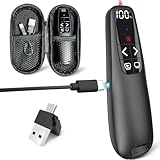
Overview: This presentation clicker distinguishes itself with a digital power display and included carrying case—features rarely seen at this price point. The rechargeable remote provides 98-foot wireless control with a 328-foot red laser pointer, suitable for most meeting rooms and classrooms. The LED screen shows precise battery percentage, eliminating guesswork about remaining charge. An ergonomic design ensures comfortable grip, while the USB receiver fits into the device’s end rather than the battery compartment for easier access. Plug-and-play operation works seamlessly across Windows, Mac, and Linux with all major presentation software, including Google Slides.
What Makes It Stand Out: The integrated battery display is the standout feature, providing peace of mind for presenters who cannot afford mid-presentation failure. The included compact case is a thoughtful addition that protects the device and stores the USB receiver securely—ideal for traveling professionals. The receiver’s external placement simplifies connection compared to models requiring battery compartment access. The design prioritizes simplicity with essential functions: page navigation, black screen, and laser pointer, avoiding feature bloat that complicates operation.
Value for Money: At $25.99, this clicker offers compelling value through unique battery monitoring and protective case. While the 98-foot control range is slightly shorter than some competitors, the premium features justify the price. For road warriors and professionals who present frequently, the case alone adds significant value. The digital display prevents unexpected power failures, potentially saving embarrassing situations worth far more than the price difference. Compared to basic $15-20 clickers, the $6 premium delivers tangible preparedness benefits.
Strengths and Weaknesses: Strengths include LED battery display, protective carrying case, ergonomic comfort, straightforward plug-and-play operation, and external receiver storage. The design is clean and professional, suitable for corporate environments. Weaknesses: the 98-foot range is adequate but not exceptional, and the 328-foot laser range is shorter than premium alternatives. Limited advanced features like air mouse or volume control may disappoint power users. The case, while useful, adds slight bulk to a kit.
Bottom Line: For mobile professionals and frequent presenters, the battery display and protective case make this a practical, reliable choice. The modest premium delivers tangible benefits in preparedness and device protection, ensuring you’re never caught off-guard by dead batteries.
10. Rechargeable Green Laser Pointer Presentation Clicker for Laptop PowerPoint, USB-A USB-C Wireless Presenter Remote Power Point Clicker for Computer/Mac/PPT/Slideshow/Google Slide Advancer

Overview: This premium presentation clicker justifies its higher price with metal construction and a green laser pointer that dramatically outperforms standard red alternatives. The green laser remains visible at 328 feet and cuts through bright lighting conditions and LCD screens where red pointers fade. Offering 100-foot wireless control, it features a patented USB-A/USB-C 2-in-1 dongle compatible with modern MacBooks and legacy systems. Remarkably fast charging—just 55 minutes—delivers over two months of active use or 200 days standby. The metal body provides durability plastic competitors cannot match while supporting all major operating systems and presentation software.
What Makes It Stand Out: The green laser is the defining feature, offering superior visibility in all conditions, including challenging LED/LCD screens that render red lasers nearly invisible. The rapid 55-minute charging capability is unmatched in the category, minimizing downtime between presentations. The metal construction provides professional aesthetics and drop protection that plastic models lack. The patented 2-in-1 dongle design is more elegant than detachable adapters, creating a seamless user experience. Two months of battery life between charges is exceptional, reducing maintenance to near zero.
Value for Money: At $39.99, this is a premium investment that pays dividends for serious presenters. Green laser technology typically costs $50-80, making this competitively priced. For executives, sales professionals, and frequent presenters who rely on flawless performance, the durability, visibility, and charging speed justify every dollar. The metal build ensures longevity that cheaper plastic alternatives cannot guarantee. When presentation success impacts revenue or reputation, the cost difference becomes negligible compared to the reliability benefits.
Strengths and Weaknesses: Strengths include superior green laser visibility, rapid 55-minute charging, exceptional two-month battery life, durable metal construction, elegant 2-in-1 dongle, and broad compatibility. The anti-drop design provides confidence for mobile use. Weaknesses: the price may exceed casual users’ budgets, and the green laser, while brighter, has the same 328-foot range as some red lasers. The premium features might be unnecessary for simple classroom use. Some users may find the metal body slightly heavier than plastic alternatives.
Bottom Line: For professionals demanding the best visibility and build quality, this premium clicker delivers. The green laser and metal construction make it worth the investment for high-stakes presentations where technical failure isn’t an option and first impressions matter.
Why Rechargeable Wireless Presenters Have Revolutionized Professional Presentations
The shift from disposable battery-powered devices to rechargeable alternatives represents more than just convenience—it’s a fundamental upgrade in presentation reliability. Traditional presenters often failed at critical moments due to depleted AAA batteries, leaving speakers scrambling. Rechargeable models eliminate this anxiety while offering superior power management systems that monitor consumption patterns and optimize performance. The environmental impact is significant too; a single rechargeable presenter can prevent hundreds of disposable batteries from entering landfills over its lifetime. From a performance standpoint, lithium-ion and lithium-polymer batteries provide consistent voltage output, ensuring your laser pointer brightness and wireless signal strength remain stable throughout even the longest conference sessions.
Core Components and How They Work
Understanding the anatomy of a wireless presenter demystifies the buying process. At its heart, every device contains three essential elements: the transmitter (your handheld unit), the receiver (USB dongle), and the power management system. The transmitter houses a microprocessor that encodes your button presses into digital signals, a radio frequency (RF) or Bluetooth module for communication, and the laser diode assembly. The receiver decodes these signals and translates them into keyboard commands or HID (Human Interface Device) instructions your computer understands. Premium models integrate accelerometers and gyroscopes for motion control, while the charging circuit manages lithium-cell health through intelligent trickle charging and overcharge protection.
Key Features to Evaluate Before Buying
When assessing potential purchases, prioritize features that align with your actual usage patterns. Button layout and tactile feedback dramatically impact muscle memory development—concave buttons prevent accidental presses while providing satisfying click confirmation. LED battery indicators should show graduated power levels, not just “low battery” warnings. Receiver storage within the presenter itself prevents loss during transport. Timer functionality with silent vibration alerts keeps you on schedule without audience awareness. Plug-and-play capability eliminates driver installation headaches, particularly important when presenting on unfamiliar systems. Consider whether you need multimedia controls, volume adjustment, or screen blackout capabilities beyond basic slide navigation.
Laser Pointer Technology: Red vs Green vs Blue
Laser color isn’t merely aesthetic—it fundamentally affects visibility, safety, and cost. Red lasers (650nm wavelength) remain the most common and affordable, performing adequately in small-to-medium rooms but washing out under bright LED displays or ambient lighting. Green lasers (532nm) appear 50-60 times brighter to the human eye due to our visual system’s peak sensitivity in that spectrum, making them indispensable for large venues and well-lit spaces. Blue/violet lasers (405nm) represent the newest technology, offering exceptional brightness on LCD screens but carrying higher safety classification risks. Always verify the laser class rating—Class 2 is safe for general use, while Class 3R requires more careful handling. Some advanced presenters now offer digital laser simulation that projects a highlighted cursor onscreen, eliminating laser safety concerns entirely.
Battery Life and Charging Technologies
Modern presenters employ various battery configurations, each with distinct advantages. Integrated lithium-polymer batteries typically deliver 30-90 hours of active use per charge, with standby time measured in months. Quick-charge capability has become a game-changer—USB-C PD (Power Delivery) support can provide several hours of operation from just a 10-minute charge. Pay attention to charge cycle ratings; quality batteries maintain 80% capacity after 500+ cycles. Some devices feature pass-through charging, allowing use while plugged in. Solar-assisted charging exists in niche models for outdoor educators. Battery health management systems that prevent complete discharge and overcharging significantly extend overall lifespan, making this feature worth prioritizing for heavy users.
Wireless Connectivity Standards Explained
The wireless protocol determines compatibility, range, and interference resistance. RF 2.4GHz remains dominant, offering universal plug-and-play compatibility with the included USB dongle. This frequency hops across multiple channels to avoid Wi-Fi and Bluetooth interference. Bluetooth connectivity (versions 4.0 through 5.3) enables direct pairing with tablets and smartphones without a dongle, though it may require initial pairing setup. Some hybrid models support both protocols. The emerging ultra-wideband (UWB) technology promises centimeter-level precision for advanced pointer control. When evaluating RF devices, check for AES-128 encryption if you present sensitive corporate data, as unencrypted signals can be intercepted within the transmission radius.
Range and Signal Stability Considerations
Manufacturers’ range specifications often reflect ideal line-of-sight conditions, but real-world performance varies dramatically. A rated 100-foot range might drop to 30 feet in a concrete-walled conference room filled with competing wireless devices. Look for diversity antenna systems that use multiple antennas to combat signal fading. Signal strength indicators on the presenter provide real-time feedback about connectivity quality. For auditorium settings, consider models with external antenna options or signal repeaters. Latency matters too—quality devices maintain sub-20ms response times, ensuring your actions feel instantaneous. Environmental factors like metal podiums, audience members’ mobile devices, and even fluorescent lighting can create interference patterns that affect reliability.
Ergonomics and Design Philosophy
A presenter’s physical design directly impacts your comfort and confidence during extended use. Weight distribution should center the mass in your palm, preventing fatigue during hour-long sessions. Textured grips using silicone or soft-touch materials maintain secure handling even with nervous sweat. Button placement must accommodate various hand sizes without requiring thumb contortions. Ambidextrous designs serve left-handed users but may compromise optimal button positioning for right-handed majority users. Consider the “pick-up-and-use” factor—can you operate it correctly without looking at the buttons? Travel size matters for road warriors, but overly compact designs can feel insubstantial. The clip design for shirt pockets should be robust enough to prevent embarrassing drops.
Software Compatibility and Drivers
True plug-and-play devices present themselves as standard keyboards, requiring no software installation. However, advanced features often need companion applications. Verify macOS, Windows, and Linux compatibility if you work across platforms. Chrome OS and iPadOS support remains limited in many models. Enterprise environments may require devices with digitally signed drivers to comply with security policies. Some manufacturers offer SDKs (Software Development Kits) for custom integration with presentation software like Prezi or proprietary corporate platforms. Cloud-based configuration tools let IT departments standardize settings across hundreds of devices. Check whether firmware updates are delivered through the companion app or require manual installation—automatic updates reduce IT burden.
Advanced Features That Separate Premium from Basic
Beyond basic forward/back navigation, premium presenters offer capabilities that transform presentation dynamics. Gyroscopic air mouse functionality lets you control on-screen cursors by waving the device, perfect for interactive demonstrations. Integrated microphones with mute controls streamline video conferencing. Customizable button mapping allows assigning macros for complex actions. Some models include LCD screens showing slide thumbnails, timer countdowns, and battery status. Gesture recognition enables swiping motions for smooth transitions. Haptic feedback provides silent timing cues. Multi-device pairing lets you switch between controlling a laptop and a tablet seamlessly. Evaluate which advanced features solve actual problems you face rather than adding unnecessary complexity.
Security Features for Enterprise Environments
Corporate users must consider data security implications. Encrypted wireless transmission prevents eavesdropping on your control signals, which could theoretically reveal sensitive information based on slide timing patterns. Some devices generate unique pairing codes for each presentation session. Physical security matters too—Kensington lock slots prevent theft from conference rooms. USB receivers with built-in storage can pose data exfiltration risks; choose receivers that appear as dedicated HID devices only. For highly sensitive environments, presenters with hardware kill switches that physically disconnect the microphone or laser when not in use provide additional peace of mind. Enterprise-grade devices often include remote wipe capabilities if lost or stolen.
Durability and Build Quality Metrics
Professional presenters represent long-term investments, so construction quality warrants scrutiny. The button lifecycle rating indicates reliability—quality switches rated for 1 million+ presses outlast generic alternatives by years. Drop test certifications (typically rated in meters) predict survivability from podium-height falls. IPX ratings denote water and dust resistance; IPX4 handles coffee spills while IPX7 survives brief submersion. The USB receiver’s connector should be reinforced to prevent bending, and the charging port needs strain relief to survive thousands of insertions. Examine warranty terms—three-year warranties suggest manufacturer confidence, while one-year coverage may indicate expected obsolescence. Metal chassis provide superior durability over plastic but add weight.
Price Tiers and What You Get at Each Level
The rechargeable wireless presenter market segments into distinct price bands. Budget options ($20-40) offer basic navigation and red lasers with plastic construction and 30-foot range. Mid-range devices ($40-80) introduce green lasers, 50-foot range, better ergonomics, and lithium batteries. Professional tier ($80-150) adds gyroscopic controls, encryption, premium materials, and 100-foot range. Enterprise-grade models ($150+) include advanced security, LCD displays, extended warranties, and fleet management capabilities. Consider total cost of ownership—a $120 presenter that lasts five years costs less than replacing $40 models every 18 months. Academic discounts and bulk corporate pricing can reduce costs by 15-30%. Avoid the cheapest options for mission-critical presentations; the cost of one failed device during a client pitch far exceeds the price difference.
Troubleshooting Common Issues
Even quality devices encounter problems. Intermittent connectivity often stems from USB power management settings that suspend the port—disabling selective suspend in device manager resolves this. Laggy cursor control typically indicates low battery or radio interference from nearby Wi-Fi routers; switching to a different USB port sometimes helps. Unresponsive buttons may result from debris buildup; compressed air cleaning often restores function. If the laser appears dim, check for lens obstruction and ensure the battery isn’t voltage-sagging under load. Software conflicts arise when multiple presentation tools compete for control—closing background apps or adjusting presentation software’s remote settings usually fixes this. For Bluetooth models, clearing the pairing list and re-pairing solves most connection drops. Keep a backup wired mouse in your bag for absolute reliability.
Maintenance and Care Best Practices
Proper maintenance extends device lifespan significantly. Charge lithium batteries when they drop to 20-30% rather than fully depleting them—this reduces cell stress. Store devices at 50% charge if unused for months to prevent deep discharge damage. Clean optical lenses with microfiber cloths only; harsh chemicals can damage anti-reflective coatings. Update firmware periodically to receive bug fixes and compatibility improvements. Transport devices in protective cases to prevent button compression that drains batteries. For shared office devices, implement a checkout system to track usage and charging responsibility. Periodically check for driver updates, especially after major OS upgrades. Label USB receivers with the presenter’s serial number to prevent mix-ups in environments with multiple devices.
Future Trends in Presentation Technology
The presentation landscape continues evolving rapidly. AI integration is emerging—some prototypes analyze your speaking pace and automatically adjust slide timing. Voice command recognition may soon allow hands-free navigation. Holographic laser pointers that project 3D cursors into space are in development. Sustainability trends push toward solar charging and biodegradable materials. USB-C is becoming the universal standard, eventually replacing proprietary connectors. Edge computing capabilities may enable presenters to store and run presentations directly from the device itself. Gesture recognition is advancing beyond simple swipes to interpret complex hand signals. As hybrid work persists, presenters increasingly integrate with video conferencing platforms for seamless remote and in-person control. Staying informed helps you choose devices with upgrade paths rather than immediate obsolescence.
Making Your Final Decision: A Buyer’s Checklist
Synthesize your research into actionable criteria. Start by documenting your typical presentation environment dimensions, average duration, and device ecosystem. Rank must-have features versus nice-to-have capabilities. Set a realistic budget based on usage frequency—daily presenters warrant premium investment. Test ergonomics in-store if possible, or order from retailers with generous return policies. Verify warranty and support options in your region. Check for firmware update frequency in manufacturer support forums. Consider purchasing from brands with established enterprise presence for long-term reliability. Read between the lines of user reviews, focusing on long-term reliability reports rather than initial impressions. Finally, purchase from authorized retailers to avoid counterfeit devices that plague online marketplaces. Your chosen presenter should feel like a natural extension of your presentation style, not a technical distraction.
Frequently Asked Questions
How long do rechargeable wireless presenters typically last? Quality rechargeable presenters deliver 30-90 hours of active presentation time per full charge, with standby longevity measured in 3-6 months. The lithium battery itself typically maintains useful capacity for 500+ charge cycles, translating to 5-7 years of regular professional use before noticeable degradation occurs.
Can I use a rechargeable presenter with any computer? Most RF-based presenters offer universal plug-and-play compatibility with Windows, macOS, and Linux systems through standard HID drivers. Bluetooth models work with any Bluetooth-enabled device but may require initial pairing. Chrome OS and tablet support varies by model—verify compatibility before purchasing for non-standard platforms.
What’s the difference between a presenter and a regular wireless mouse? Presenters feature optimized button layouts for slide navigation, integrated laser pointers, and ergonomic designs for handheld operation. They lack the precision cursor control of mice but excel at discrete, confident slide transitions. Many include timer functions and screen blackout controls absent from standard mice.
Are green laser pointers really worth the extra cost? For presenters working in venues larger than 30 feet or under bright lighting conditions, green lasers justify their 30-50% price premium through vastly superior visibility. They appear 50-60 times brighter than red lasers to human perception, remaining clearly visible on LED displays and in well-lit conference rooms where red lasers become invisible.
How do I know if my presenter has enough range for large venues? Test the device in your actual presentation space before critical events. Manufacturer specifications assume ideal line-of-sight conditions. For auditoriums, choose models rated for at least 100 feet, and consider those with external antenna options or signal strength indicators that provide real-time connectivity feedback during use.
What should I do if my presenter stops working mid-presentation? Immediately switch to keyboard navigation (arrow keys, spacebar) as a backup. Keep a spare wireless mouse in your bag for emergencies. For RF models, try unplugging and reinserting the USB receiver to reset the connection. With Bluetooth, temporarily disable and re-enable Bluetooth on your computer. Most connectivity issues resolve within 30 seconds.
Is it safe to leave my presenter charging overnight? Modern devices with proper battery management systems prevent overcharging, making overnight charging safe. However, for optimal long-term battery health, disconnect once fully charged when convenient. Avoid leaving devices plugged in for multiple days continuously, as trickle charging can generate unnecessary heat that slightly accelerates cell aging.
Can rechargeable presenters work through walls? RF signals penetrate non-metallic walls reasonably well, though range drops significantly (typically 50-70% reduction). Bluetooth struggles more with obstructions. For reliable multi-room operation, position yourself with minimal barriers between the presenter and receiver. Metal podiums, projector mounts, and large audiences create more interference than drywall.
How do I clean and maintain my wireless presenter? Use compressed air to remove debris from button crevices monthly. Clean laser lenses with microfiber cloths dampened with isopropyl alcohol—never use harsh chemicals. Charge batteries before they fully deplete, and store at 50% charge for long-term inactivity. Update firmware quarterly and inspect USB connectors for lint buildup that can prevent proper insertion.
When should I replace my rechargeable wireless presenter? Consider replacement when battery life drops below 60% of original capacity, buttons require excessive force to register, or the device no longer receives firmware updates for your operating system. Physical damage like cracked casings or intermittent connectivity that persists after troubleshooting also signals end-of-life. Most professionals upgrade every 4-5 years to leverage advancing features and improved reliability.