As 8K displays inch closer to mainstream adoption, the connectivity bottleneck has become the silent killer of pixel-perfect productivity. You’ve invested in a breathtaking 8K monitor capable of rendering life-like detail, yet you’re still wrestling with cable clutter, port limitations, and mysterious display hiccups. The frustration peaks when you realize your laptop’s single Thunderbolt 4 port—powerful as it is—can’t magically multiply itself to charge your device, transfer data at 40Gbps, and drive that monstrous resolution without compromise. This is precisely where a meticulously engineered Thunderbolt 4 dock transforms from a luxury into an absolute necessity, serving as the central nervous system for your high-resolution workflow.
But not all docks are created equal when it comes to pushing 33.2 million pixels at 60Hz. The difference between a flawless 8K experience and a flickering, bandwidth-starved nightmare lies in understanding the nuanced interplay between Display Stream Compression, port prioritization, and thermal management. This guide dismantles the technical complexity and equips you with the expert-level knowledge to identify a Thunderbolt 4 dock that doesn’t just claim 8K compatibility but truly masters it.
Top 10 Thunderbolt 4 Docks for 8K Displays
Detailed Product Reviews
1. Plugable Thunderbolt 4 Dock with 100W Charging, Thunderbolt Certified, Laptop Docking Station Dual Monitor Single 8K or Dual 4K HDMI for Windows and Mac, 4X USB, Gigabit Ethernet (TBT4-UD5)

Overview: The Plugable TBT4-UD5 is a Thunderbolt Certified docking station that transforms your laptop into a full desktop workstation. With 13 ports, 100W Power Delivery, and support for dual 4K 60Hz or single 8K displays, it delivers 40Gbps bandwidth for demanding peripherals. Recognized by Wirecutter as the Best Thunderbolt Dock 2025, this Intel Evo certified hub works seamlessly with modern Thunderbolt 4, Thunderbolt 5, and USB4 systems on both Windows and macOS platforms.
What Makes It Stand Out: This dock’s award-winning pedigree sets it apart, combining official Thunderbolt certification with real-world validation from industry experts. The comprehensive 13-port array includes dual HDMI, Thunderbolt 4 downstream, multiple USB ports at 10Gbps and 5Gbps speeds, SD/microSD readers, and Gigabit Ethernet. Its 96W certified charging capability safely powers even power-hungry laptops while maintaining stable dual display output—a feature often compromised in lesser docks.
Value for Money: At $199.95, this dock hits the sweet spot for professionals needing reliability without premium pricing. It undercuts enterprise-grade alternatives by $100+ while matching their performance specs. The three-year warranty and Plugable’s rigorous quality testing ensure long-term value, making it a smarter investment than budget docks that lack certification and may suffer from compatibility issues or premature failure.
Strengths and Weaknesses:
- Strengths: Thunderbolt Certified guarantee; Wirecutter 2025 award winner; robust 100W power delivery; excellent port selection; dual 4K support for most systems; three-year warranty.
- Weaknesses: Mac base M1/M2 limited to single display; no 2.5G Ethernet; 8K requires specific laptop configurations; bulkier than minimalist hubs.
Bottom Line: The Plugable TBT4-UD5 is the ideal choice for professionals seeking a proven, certified Thunderbolt 4 dock that balances performance, port variety, and price. It delivers enterprise reliability without the enterprise tax.
2. Dell SD25TB4 Pro Thunderbolt 4 Smart Dock - Supports 8k Display, 3 Years Warranty with 180W Adapter, HDMI, DisplayPort, Thunderbolt Cable, Cloth - USB C Docking Station Hub with Accessories

Overview: The Dell SD25TB4 Pro is a modular Thunderbolt 4 docking solution engineered for enterprise environments and power users. With an 180W power adapter and support for 8K displays, this dock delivers 40Gbps bandwidth through a versatile port selection including dual Thunderbolt 4, DisplayPort 1.4, HDMI 2.0, and multiple USB variants. Its swappable module design future-proofs your investment, while the included premium accessories and three-year warranty reflect its professional-grade positioning.
What Makes It Stand Out: Dell’s innovative modular architecture allows users to upgrade components without replacing the entire dock—a unique feature that extends its lifecycle significantly. The 180W power supply is substantially more robust than competitors, ensuring stable operation under heavy loads. SuperBoost technology optimizes charging and data transfer simultaneously, while the comprehensive accessory bundle (including a Thunderbolt cable and cleaning cloth) adds immediate value rarely seen in this category.
Value for Money: Priced at $309.99, this dock commands a premium but justifies it through enterprise features and longevity. The modular design alone can save money long-term compared to replacing static docks every few years. For Dell-centric IT departments, the unified management and warranty support streamline deployment costs. However, individual users may find better value in non-modular alternatives unless they specifically need the upgrade path.
Strengths and Weaknesses:
- Strengths: Modular upgrade capability; massive 180W power supply; enterprise-grade build quality; includes premium accessories; three-year warranty; SuperBoost technology.
- Weaknesses: Highest price in category; fewer USB ports than some rivals; overkill for casual users; Dell ecosystem benefits may not apply to all users.
Bottom Line: The Dell SD25TB4 is perfect for enterprise deployments and power users who prioritize upgradeability and maximum power delivery. Its premium price pays for itself in longevity and IT manageability.
3. Minthouz Thunderbolt 4 Dock with 160W Adapter, 8K@60Hz Single or Triple 4K Displays, 2.5G Ethernet, 4xUSB, SD/MicroSD, Laptop Docking Station for Windows, Dell, HP, Lenovo, Mac
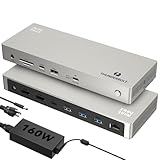
Overview: The Minthouz Thunderbolt 4 Dock delivers exceptional connectivity with its 12-in-1 design, featuring triple 4K display support for Windows and 8K@60Hz capability for compatible systems. Powered by a 160W adapter with 96W laptop charging, it includes a standout 2.5G Ethernet port for faster networking and Thunderbolt 4’s 40Gbps bandwidth. This versatile hub caters to multi-monitor workflows, offering SD/TF card slots at 312MB/s and multiple USB ports for creative professionals and power users across Windows and Mac ecosystems.
What Makes It Stand Out: Triple 4K display support at 60Hz is a rare find at this price point, making it ideal for traders, developers, and designers needing extensive screen real estate. The 2.5G Ethernet port doubles typical dock networking speeds, eliminating bottlenecks for large file transfers and cloud workflows. Its 160W power supply ensures stable operation even when driving multiple high-resolution displays and charging devices simultaneously—a capability many competitors struggle with.
Value for Money: At $189.99, this dock offers remarkable value, undercutting most rivals while delivering superior display flexibility and faster networking. The 160W adapter alone would cost $50+ separately. For Windows users needing triple monitors, it’s arguably the best dollar-per-display option available. Mac users with Pro/Max chips get excellent dual-display support, though base M-chip users should verify compatibility.
Strengths and Weaknesses:
- Strengths: Triple 4K display support; 2.5G Ethernet; 160W power supply; 96W laptop charging; competitive pricing; fast SD card readers.
- Weaknesses: Brand recognition lower than competitors; shorter warranty likely; Mac base M1/M2 limited to single display; no Thunderbolt downstream port.
Bottom Line: The Minthouz dock is a powerhouse for multi-monitor Windows setups, offering unmatched display flexibility and networking speed at a budget-friendly price. Creatives and traders should strongly consider this over pricier alternatives.
4. UGREEN Thunderbolt 4 Dock 8-in-1 40Gbps TB4 Hub 3 x TB 4 Dual 4K@60Hz or Single 8K Display, 85W Charging, Gigabit Ethernet, 3 x USB A 3.2. Revodok Max 208 for Mac M1/M2/M3/M4 Pro/Max

Overview: The UGREEN Revodok Max 208 is a compact 8-in-1 Thunderbolt 4 hub emphasizing Thunderbolt port density and portability. With three downstream Thunderbolt 4 ports alongside three 10Gbps USB-A connections, it delivers 40Gbps bandwidth for dual 4K@60Hz or single 8K@30Hz displays. The included 140W GaN charger enables 85W laptop charging while powering peripherals. Designed for Mac Pro/Max users and Windows laptops, its minimalist footprint suits clutter-conscious desks without sacrificing core Thunderbolt functionality.
What Makes It Stand Out: Three downstream Thunderbolt 4 ports are exceptional in this category, allowing daisy-chaining of multiple high-bandwidth devices like NVMe storage arrays and additional displays. The GaN-based power adapter is smaller and more efficient than traditional bricks, reducing desk clutter. UGREEN’s focus on Thunderbolt connectivity over legacy ports creates a forward-looking design that prioritizes speed and versatility for users invested in the Thunderbolt ecosystem.
Value for Money: At $161.48, this is the most affordable Thunderbolt 4 dock with certified performance. It’s perfect for users who need pure Thunderbolt expansion without paying for unused ports. The included 140W GaN charger adds $40+ value compared to docks requiring separate power bricks. While port-limited versus 13-port models, it delivers essential functionality at a 20-30% discount.
Strengths and Weaknesses:
- Strengths: Three Thunderbolt 4 ports; compact GaN power supply; lowest certified price; excellent for daisy-chaining; clean minimalist design.
- Weaknesses: Only 8 ports total; 85W charging lower than competitors; no SD card reader; single display for base M-chip Macs; limited legacy connectivity.
Bottom Line: The UGREEN Revodok Max 208 is the budget-conscious choice for Thunderbolt-centric users who prioritize port quality over quantity. It’s ideal for daisy-chaining storage and displays without breaking the bank.
5. Anker Prime TB5 Docking Station, 14-in-1 Thunderbolt 5 Dock with 120Gbps Max Transfer, Thunderbolt Dock with 140W Max Charging, Cooling System, Up to 8K, Dual Display for TBT 5/4 Laptops

Overview: The Anker Prime TB5 represents the cutting edge of docking technology with Thunderbolt 5’s 120Gbps bandwidth—triple the speed of Thunderbolt 4. This 14-in-1 powerhouse supports dual 8K@60Hz displays on compatible Windows laptops and transfers a 150GB file in just 25 seconds. An active cooling system prevents thermal throttling under sustained load, while 140W PD 3.1 charging handles the most demanding laptops. With Thunderbolt 5 upstream and dual downstream ports, plus HDMI 2.1/DisplayPort 2.1, it’s built for next-generation workflows.
What Makes It Stand Out: Thunderbolt 5 technology is the headline feature, delivering unprecedented bandwidth that future-proofs your setup for years. The active cooling system is a standout engineering solution that maintains peak performance during intensive tasks—something no competitor offers. Anker’s 140W charging via PD 3.1 protocol charges even 16-inch MacBook Pros at full speed, while the dual Thunderbolt 5 downstream ports enable complex display arrays and storage setups simultaneously.
Value for Money: At $399.99, this is a premium investment justified only if you own or plan to buy Thunderbolt 5-equipped hardware. For current Thunderbolt 4 users, the benefits are marginal. However, the cooling system and 140W charging add tangible value that cheaper docks can’t match. Consider this a three-year future-proofing expense rather than an immediate upgrade—early adopters and 8K video editors will see the most return.
Strengths and Weaknesses:
- Strengths: Thunderbolt 5 120Gbps bandwidth; active cooling system; 140W PD 3.1 charging; dual 8K display support; premium build quality; 24-month warranty.
- Weaknesses: Extremely high price; limited Thunderbolt 5 laptop compatibility; overkill for most current users; requires Thunderbolt 5 cable for full speed.
Bottom Line: The Anker Prime TB5 is for forward-thinking professionals and early adopters who need tomorrow’s bandwidth today. If you don’t have Thunderbolt 5, wait—otherwise, this is the most advanced dock money can buy.
6. Lenovo ThinkPad Universal Thunderbolt 4 Dock, 4 Displays, Dynamic Power Charging up to 100W, Black

Overview: The Lenovo ThinkPad Universal Thunderbolt 4 Dock delivers enterprise-grade connectivity through a single cable, supporting up to four 4K displays or one 8K monitor while providing 100W dynamic charging. Designed for professional environments, it combines vPro pass-through support with remote management capabilities, making it ideal for IT-managed deployments. The dock includes two DisplayPort 1.4, HDMI 2.1, downstream Thunderbolt 4, and multiple USB ports, all powered by a robust 135W adapter.
What Makes It Stand Out: This dock’s quadruple display support sets it apart from most competitors, enabling unique multi-monitor workflows. The vPro pass-through and remote firmware update capability via Dock Manager represent significant enterprise advantages, allowing IT departments to maintain devices without disrupting end users. Its dynamic power allocation intelligently distributes up to 100W to connected notebooks while reserving power for peripherals, optimizing performance across all connected devices simultaneously.
Value for Money: At $238.69, it positions itself in the premium tier but justifies the cost through enterprise features competitors lack. While consumer docks offer similar port counts for less, the remote management capabilities and vPro support provide measurable IT cost savings. The four-display configuration eliminates need for additional adapters, offering better value than buying separate splitters. For business users, the premium translates to tangible productivity and support benefits.
Strengths and Weaknesses:
- Strengths: Supports four simultaneous displays; Enterprise remote management; vPro pass-through support; Dynamic 100W power delivery; Durable ThinkPad build quality
- Weaknesses: Premium pricing for consumers; Requires Slim Tip power adapter (proprietary); Limited to Gigabit Ethernet; Only one downstream TB4 port
Bottom Line: The Lenovo ThinkPad Universal Thunderbolt 4 Dock excels for enterprise environments requiring robust remote management and multi-display support. Business users will appreciate its IT-friendly features, while power users benefit from unmatched display flexibility. Justifies its premium for professional deployments.
7. UGREEN Thunderbolt 4 Dock 13-in-1 40Gbps Docking Station with Dual 4K@60Hz Single 8K Display, 90W Charging for Laptop, 2.5GbE, SD/TF 4.0. Revodok Max 213 for MacBook Surface Pro and More

Overview: The UGREEN Thunderbolt 4 Dock offers comprehensive 13-port expansion with dual 4K@60Hz display support and 90W laptop charging. This versatile hub delivers 40Gbps transfer speeds through two Thunderbolt 4 ports, complemented by 2.5Gb Ethernet, SD/TF 4.0 card readers, and multiple USB ports. The included 180W GaN power adapter ensures stable operation while charging demanding devices, making it suitable for creative professionals and power users.
What Makes It Stand Out: The dock’s exceptional port variety at this price point distinguishes it, particularly the 2.5Gb Ethernet and SD/TF 4.0 readers that many competitors omit. Its 180W GaN power supply provides substantial headroom for peripherals while delivering 90W to the host. The dual Thunderbolt 4 ports offer flexibility for daisy-chaining or connecting high-speed devices, while maintaining full bandwidth for display output and data transfer simultaneously.
Value for Money: At $227.98, this dock undercuts many premium competitors while offering superior connectivity. The inclusion of 2.5GbE and SD/TF 4.0 readers adds significant value for photographers and video editors. While 90W charging is slightly lower than some alternatives, it’s sufficient for most laptops. The GaN power adapter’s efficiency and compact size further enhance value compared to traditional brick adapters.
Strengths and Weaknesses:
- Strengths: Excellent port selection including 2.5GbE; SD/TF 4.0 card readers; Dual TB4 ports; 180W GaN power supply; Competitive pricing
- Weaknesses: 90W charging limits compatibility with high-power laptops; Complex Mac display limitations; No downstream TB4 for displays; Requires power connection to function
Bottom Line: The UGREEN dock delivers outstanding connectivity value for professionals needing fast networking and card readers. Its minor charging and display limitations are offset by comprehensive ports and competitive pricing, making it an excellent choice for Windows users and compatible Macs.
8. Dell SD25TB4 Pro Thunderbolt 4 Smart Dock - Supports 8k Display, with 180W, HDMI, DisplayPort, Thunderbolt Cable, Cleaning Cloth - USB C Docking Station Hub with Accessories

Overview: The Dell SD25TB4 Pro Thunderbolt 4 Smart Dock emphasizes modularity and completeness, arriving with all necessary cables and a microfiber cloth. It supports dual 4K displays and offers 40Gbps connectivity through two Thunderbolt 4 ports. The 180W power supply enables robust peripheral charging, while the modular design allows future upgrades. With two DisplayPort 1.4, HDMI 2.0, and a multifunction USB-C port, it covers most connectivity needs for professional environments.
What Makes It Stand Out: The swappable module capability future-proofs this investment, a rare feature in docking stations. Dell includes premium accessories—Thunderbolt, HDMI, and DisplayPort cables plus a cleaning cloth—eliminating hidden costs. The USB-A port with PowerShare maintains device charging even when the host is disconnected. Its SuperBoost technology optimizes charging and data transfer simultaneously, maximizing peripheral performance.
Value for Money: At $309.99, it’s the most expensive option here, but the included cables ($50+ value) and modular upgrade path justify the premium. For Dell ecosystem users, integration benefits add further value. While pricier than non-modular alternatives, the ability to upgrade rather than replace extends its lifecycle, potentially saving money long-term for businesses standardizing on Dell hardware.
Strengths and Weaknesses:
- Strengths: Modular upgradeable design; Complete cable package; PowerShare USB port; 180W robust power supply; Dell ecosystem integration
- Weaknesses: Highest price point; HDMI 2.0 limits 8K capability; Only Gigabit Ethernet; Heavier than competitors; Limited to single downstream TB4
Bottom Line: Dell’s SD25TB4 suits Dell-centric businesses prioritizing future-proofing and complete packages. The modular design and included accessories justify its premium for enterprise buyers, though individual users may find better value elsewhere. Ideal for planned technology refresh cycles.
9. WAVLINK TB5 Docking Station: Thunderbolt 5 Dock with 120Gbps Max Transfer, Thunderbolt 5 hub with 140W Max Charging, 2.5G Ethernet, 4X USB-A 3.2 Gen 2, Cooling System, 8K Display for TBT 5/4 Laptops

Overview: The WAVLINK TB5 Docking Station pioneers Thunderbolt 5 technology, delivering unprecedented 120Gbps bandwidth in boost mode and 140W charging. This 12-in-1 hub supports single 8K@144Hz or dual 8K@60Hz displays, with Windows 11 users enjoying triple 4K@144Hz output. Beyond host charging, three downstream TB5 ports provide 15W and 30W for peripherals. The integrated cooling system, 2.5G Ethernet, and SD 4.0 reader cater to demanding creative and professional workflows.
What Makes It Stand Out: As one of the first Thunderbolt 5 docks, it offers triple the bandwidth of TB4 docks, future-proofing for next-generation peripherals. The 140W charging handles power-hungry mobile workstations that competitors cannot. Its triple display support at 144Hz is unmatched for Windows users. The active cooling system prevents thermal throttling during sustained transfers, maintaining peak performance. Security features like the Kensington lock slot address enterprise concerns.
Value for Money: At $299.99, it commands a premium but delivers next-generation performance. For users with Thunderbolt 5 laptops, the bandwidth advantage is immediately tangible. The 140W charging eliminates need for proprietary adapters on high-end workstations. While TB5 devices remain limited, early adopters gain significant headroom. Compared to premium TB4 docks, the small price increase yields massive performance gains.
Strengths and Weaknesses:
- Strengths: Cutting-edge Thunderbolt 5 technology; 140W high-power charging; Triple 4K@144Hz support; Active cooling system; 2.5G Ethernet; Security lock slot
- Weaknesses: Requires TB5 laptop for full benefits; Cables not included; Premium pricing; Limited compatibility with older systems; macOS display limitations
Bottom Line: The WAVLINK TB5 Dock is a forward-looking powerhouse for Thunderbolt 5 laptop owners needing maximum bandwidth and charging. Its premium is justified for video production, 3D rendering, and trading setups. Others should wait until TB5 adoption spreads, but early adopters won’t find better performance.
10. Satechi Thunderbolt 4 Dock Slim Hub Pro, USB C 100W Charging, Single 8K or Dual 4K Display, 4 Thunderbolt 4 Ports, USB 3.2 Gen2, for Mac/Windows, MacBook Air/Pro M5/M4, Dell, Surface, Lenovo

Overview: The Satechi Thunderbolt 4 Dock Slim Hub Pro prioritizes compact design without sacrificing connectivity. Featuring four Thunderbolt 4 ports—one upstream and three downstream—it supports dual 4K@60Hz or single 8K@30Hz displays. The 96W host charging via 150W GaN power supply efficiently powers most laptops. At just $199.99, it’s the most affordable premium TB4 dock here, making it attractive for users wanting Thunderbolt 4 versatility in a space-saving form factor compatible with both Mac and Windows.
What Makes It Stand Out: The slim profile distinguishes it from bulkier enterprise docks, perfect for minimalist setups. Four Thunderbolt 4 ports provide exceptional flexibility for daisy-chaining devices. The included 150W GaN power supply runs cooler and smaller than traditional adapters. Satechi’s two-year warranty surpasses typical one-year coverage, reflecting confidence in build quality. Efficient heat management design maintains 30-50°C operating temperature, ensuring reliability during extended use.
Value for Money: At $199.99, it undercuts competitors significantly while delivering core TB4 features. The GaN power adapter alone represents substantial value. While it lacks Ethernet and card readers, the four TB4 ports allow adding these via adapters. For users prioritizing Thunderbolt expansion over legacy ports, it’s unbeatable. The warranty and included premium cable further sweeten the proposition, making it ideal for budget-conscious professionals.
Strengths and Weaknesses:
- Strengths: Compact slim design; Four Thunderbolt 4 ports; Competitive pricing; 150W GaN power supply; 2-year warranty; Efficient thermal design
- Weaknesses: No built-in Ethernet; No SD card readers; Only one USB-A port; Mac display limitations on base models; Requires adapters for legacy devices
Bottom Line: The Satechi Slim Hub Pro excels for users wanting pure Thunderbolt 4 expansion in a compact, affordable package. Its port selection favors modern setups over legacy connectivity. The price and warranty make it a compelling choice for MacBook and ultrabook users who don’t require integrated Ethernet or card readers.
Understanding Thunderbolt 4 and 8K Display Technology
Thunderbolt 4 represents Intel’s most refined connectivity standard, mandating 40Gbps bidirectional bandwidth and strict certification requirements that its predecessors merely suggested. While Thunderbolt 3 could theoretically support 8K, the implementation was inconsistent—manufacturers could cherry-pick features. Thunderbolt 4 eliminates this ambiguity with mandatory support for two 4K displays or one 8K display, making it the first truly reliable standard for next-generation monitors.
The Bandwidth Breakthrough: How Thunderbolt 4 Handles 8K
Raw bandwidth tells only half the story. An uncompressed 8K signal at 60Hz with 10-bit color demands approximately 80Gbps—double what Thunderbolt 4 provides. The magic happens through intelligent compression and protocol efficiency. Thunderbolt 4 allocates up to 32.4Gbps for video data through DisplayPort 2.1 tunneling, leveraging every available bit with surgical precision. Understanding this allocation helps you recognize why certain dock configurations support 8K while others falter despite identical port counts.
Display Stream Compression (DSC) Explained
DSC isn’t the crude compression of old—it’s a visually lossless algorithm standardized by VESA that reduces bandwidth requirements by up to 3:1 without perceptible quality degradation. For 8K workflows, DSC operates at a 2.5:1 or 3:1 ratio, shrinking that 80Gbps demand down to a manageable 26.7Gbps. The critical detail: both your dock and display must support DSC 1.2a or newer. Without this handshake, you’ll be locked at 4K or face severe refresh rate limitations.
Why Thunderbolt 4 is the Gold Standard for 8K Productivity
The certification requirements for Thunderbolt 4 docks create a foundation of trust that Thunderbolt 3 docks could never guarantee. Every certified unit must deliver 40Gbps, support wake-from-sleep functionality, and provide at least 15W of power to downstream ports—non-negotiable standards that directly impact 8K stability. This universality means your dock investment protects against obsolescence as display technology evolves.
Backward Compatibility and Future-Proofing Benefits
Your Thunderbolt 4 dock doesn’t exist in isolation—it serves as a time machine connecting today’s laptops with tomorrow’s displays. The mandatory USB4 compliance ensures seamless operation with USB4 devices at full speed, while full backward compatibility with Thunderbolt 3, USB-C, and older USB standards means every peripheral in your arsenal remains relevant. For 8K specifically, this matters because DisplayPort 2.1 support is baked into the specification, ready for monitors that will demand even more bandwidth in the coming years.
Key Features to Look for in a Thunderbolt 4 Dock
Identifying a dock that truly excels with 8K requires looking beyond marketing bullet points. The devil lives in implementation details that separate premium engineering from checkbox features.
Video Output Configuration Options
The physical arrangement of video ports determines your multi-display flexibility. Docks offering dual Thunderbolt 4 downstream ports provide the cleanest signal path for 8K, as they avoid the bandwidth contention of aggregated USB-A video outputs. Look for explicit mention of independent display controllers rather than MST (Multi-Stream Transport) hubs, which can introduce latency and compatibility issues with certain 8K panels. The optimal configuration includes at least one dedicated USB4 port configured for video alt-mode.
Power Delivery Specifications
Your dock must deliver sufficient power to keep your laptop charged while driving an 8K display—no small feat when the GPU is working overtime. Minimum specifications should include 96W Power Delivery for 14-16" laptops, but the sweet spot lies in dynamic power allocation. Premium docks feature intelligent power management that temporarily reduces peripheral charging when the laptop demands peak performance, preventing display disconnections during intensive tasks.
Port Selection and Layout Strategy
Every port consumes bandwidth. A dock with twelve peripherals simultaneously connected will starve your 8K display if not architected correctly. Prioritize docks with separate controllers for USB and video functions. The ideal layout includes: two Thunderbolt 4 ports (one upstream, one downstream), dedicated high-speed USB-A 10Gbps ports for SSDs, separate USB 2.0 ports for keyboards and mice (which don’t need bandwidth), and an Ethernet controller that operates independently of the display pipeline.
Build Quality and Thermal Management
Driving 8K generates substantial heat in the dock’s controllers—heat that causes thermal throttling and dropped frames if not dissipated properly. Aluminum chassis aren’t just premium aesthetics; they function as heat sinks. Internal thermal pads connecting chips to the enclosure indicate serious engineering. Avoid plastic docks for 8K workflows unless they include active cooling fans, as passive plastic designs will inevitably throttle under sustained 8K load.
Multi-Monitor Setups: Beyond Single 8K
The real power of Thunderbolt 4 emerges in multi-display configurations. Understanding the limitations helps you plan realistic workstation layouts.
Dual 8K vs. 8K + 4K Combinations
While Thunderbolt 4 specification allows for dual 8K displays, practical implementation requires dock-specific firmware support. Most docks achieve this through DSC compression on both outputs, allocating approximately 16Gbps per display. However, this leaves only 8Gbps for data peripherals—a potential bottleneck for NVMe storage. The more reliable configuration remains one 8K display paired with one or two 4K displays, which provides ample bandwidth for all connected devices while maintaining pristine image quality.
Cable Considerations for 8K Performance
Your dock is only as capable as the cable connecting it. This single point of failure derails more 8K setups than any other component.
Active vs. Passive Cables
Passive Thunderbolt 4 cables excel up to 0.8 meters, delivering full 40Gbps without signal boosters. Beyond this length, active cables with built-in signal conditioning become mandatory for 8K stability. The critical specification is “40Gbps certified” rather than just “Thunderbolt 4 compatible.” For 8K displays placed more than a meter from your dock, invest in active cables—signal degradation manifests as intermittent black screens or color banding that appears randomly and defies troubleshooting.
Operating System and Device Compatibility
The most capable hardware falters without proper software support. Your OS and device firmware play crucial roles in 8K success.
Windows vs macOS Considerations
Windows 11 includes native Thunderbolt 4 drivers with robust DSC support, making it the more straightforward platform for 8K docking. macOS requires Big Sur or newer for full Thunderbolt 4 feature support, and Apple’s M-series chips implement display handling differently—M1/M2 MacBooks support only one external display through most docks, making dual 8K impossible without DisplayLink adapters. Intel-based Macs offer more flexibility but lack the GPU efficiency of Apple’s silicon for 8K rendering.
Laptop and Desktop Requirements
Your computer’s Thunderbolt controller generation matters more than its CPU speed. Tiger Lake (11th Gen Intel) or newer processors include integrated Thunderbolt 4 controllers with optimized DSC handling. Older systems with discrete Thunderbolt controllers may struggle with 8K stability. Check your device’s Thunderbolt controller version in system information—JHL8540 or newer controllers guarantee full 8K feature support.
Setting Up Your 8K Display Workflow
Proper configuration sequence prevents hours of frustration. The order in which you connect devices and power on components establishes stable communication handshakes.
Daisy-Chaining and Port Prioritization
Thunderbolt 4’s daisy-chaining capability allows connecting your 8K display directly to the dock’s downstream Thunderbolt port, then chaining additional devices from the monitor. However, this only works if the display includes a powered Thunderbolt hub. For most setups, direct connection to the dock proves more reliable. Port prioritization matters—connect your 8K display to the port labeled with a monitor icon or specified as “video priority” in the manual to ensure it receives bandwidth preference during boot.
Troubleshooting Common 8K Display Issues
Even perfectly engineered setups encounter problems. Understanding root causes accelerates resolution.
Flickering at 8K typically indicates insufficient bandwidth due to cable quality or competing peripheral data transfers. First, disconnect all USB devices except your display and test stability. If resolved, reconnect devices one by one to identify bandwidth hogs. Persistent flickering points to DSC handshake failures—update your dock’s firmware, GPU drivers, and display firmware in that order.
Color banding or reduced color depth stems from automatic fallback to 8-bit color when bandwidth is constrained. Force 10-bit output in your GPU control panel and disable HDR temporarily to isolate the issue. Some docks require explicit enabling of DSC in their management software, a setting buried in advanced menus.
Price vs. Performance: Making Smart Investment Decisions
The Thunderbolt 4 dock market spans $150 to $400+, with 8K capability concentrated in the upper tier. Sub-$200 docks claiming 8K support often achieve it through aggressive DSC compression and limited peripheral bandwidth, suitable for basic display extension but inadequate for professional 8K video editing or 3D rendering.
The $250-$300 range represents the sweet spot—docks with discrete controllers, robust power delivery, and firmware that receives regular updates. Above $350, you’re paying for brand ecosystem integration, advanced security features, or niche connectivity options like 2.5GbE or SD Express readers that benefit specific workflows but don’t enhance 8K display performance.
Security Features in Thunderbolt 4 Docks
8K workflows often involve sensitive content requiring protection. Thunderbolt 4 mandates hardware-level security improvements over Thunderbolt 3, including Direct Memory Access (DMA) protection through Intel VT-d or equivalent technologies. This prevents malicious peripherals from accessing system memory—critical when using shared workstations.
Look for docks with physical security locks and firmware write-protection switches. Enterprise-grade models include TPM 2.0 modules for device authentication, ensuring only authorized docks can connect to corporate laptops. For personal use, at minimum verify the dock supports Kernel DMA Protection in Windows or the equivalent in macOS.
Frequently Asked Questions
Can any Thunderbolt 4 dock support 8K at 60Hz, or do I need a specific certification?
Not all Thunderbolt 4 docks guarantee 8K@60Hz. While the standard mandates the capability, implementation varies. Look for docks explicitly stating “8K certified” or “DisplayPort 2.1 with DSC 1.2a” support. The certification alone doesn’t ensure robust performance—check for independent reviews testing actual 8K displays rather than theoretical specifications.
Will using an 8K display through a dock affect my external SSD speeds?
Yes, potentially. The Thunderbolt 4 pipeline shares bandwidth between video and data. Driving an uncompressed 8K signal can allocate up to 32.4Gbps to video, leaving only 7.6Gbps for all other peripherals. High-speed NVMe enclosures may see reduced performance. Using DSC compression or connecting storage to a separate Thunderbolt port on your computer mitigates this impact.
Why does my 8K display work directly from my laptop but flicker when connected through the dock?
This typically indicates the dock’s firmware isn’t properly negotiating the DSC handshake or is experiencing thermal throttling. Direct connections bypass the dock’s display controller, which may have inferior signal integrity. Update all firmware, ensure adequate ventilation around the dock, and try a shorter Thunderbolt cable. If issues persist, the dock’s controller may be insufficient for sustained 8K operation.
Can I run two 8K displays from a single Thunderbolt 4 dock?
Technically yes, practically maybe. Thunderbolt 4’s 40Gbps bandwidth supports dual 8K only with aggressive DSC compression (3:1 ratio) on both displays, leaving minimal bandwidth for other devices. Most docks prioritize single 8K stability over dual 8K capability. For reliable dual 8K, consider docks with two independent Thunderbolt 4 downstream ports, each connected directly to a display, rather than relying on MST splitting.
Do I need a special cable for 8K, or will any Thunderbolt 4 cable work?
Any certified Thunderbolt 4 cable supports 8K in theory, but length and build quality matter enormously. Passive cables over 0.8 meters may cause signal degradation at 8K bandwidths. For connections exceeding one meter, use active Thunderbolt 4 cables. Additionally, ensure the cable is certified for 40Gbps—some cheaper cables only support 20Gbps despite having Thunderbolt 4 connectors.
How does 8K performance differ between Intel and Apple Silicon Macs?
Intel Macs with discrete GPUs generally handle 8K through docks more reliably due to mature drivers and direct DisplayPort control. Apple Silicon Macs (M1/M2) have a hard limit of one external display through native Thunderbolt video, requiring DisplayLink adapters for multi-monitor setups. The M1/M2 GPU efficiency is superior for rendering, but the display output architecture is more restrictive for 8K docking scenarios.
What refresh rates can I realistically expect at 8K resolution?
Through Thunderbolt 4 docks, 60Hz is the practical maximum for 8K with DSC. Some docks claim 8K@120Hz, but this requires Display Stream Compression at 3:1 and chroma subsampling, which degrades color accuracy for professional work. For gaming or high-motion content, consider lowering resolution to 4K for 120Hz+ refresh rates, as 8K@120Hz remains beyond Thunderbolt 4’s practical limits for most use cases.
Is there a noticeable quality difference between DSC-compressed 8K and native 8K?
For professional photo and video editing, DSC 1.2a at 2.5:1 compression is mathematically lossless and visually identical to uncompressed signals. However, DSC 3:1 compression may introduce barely perceptible artifacts in high-frequency detail areas. For general productivity and entertainment, DSC is completely transparent. The key is ensuring both dock and display support the same DSC version—mismatches force fallback to lower resolutions.
Can I use a Thunderbolt 4 dock with an 8K TV, or are monitors required?
8K TVs work provided they support DisplayPort 1.4 or HDMI 2.1 through a compatible adapter. However, most 8K TVs lack DSC support, limiting you to 4K@60Hz through the dock. Additionally, TVs often have higher input lag and chroma subsampling that makes them unsuitable for professional work. For the best 8K docking experience, use monitors with native DisplayPort 2.1 and explicit DSC support.
How future-proof is a Thunderbolt 4 dock for upcoming 8K displays?
Thunderbolt 4 docks will remain viable through the first generation of 8K displays, but DisplayPort 2.1’s full 80Gbps bandwidth exceeds Thunderbolt 4’s capabilities. Next-generation 8K monitors with 120Hz+ refresh rates and 16-bit color will require Thunderbolt 5 or direct GPU connections. However, for 8K@60Hz with HDR—likely the sweet spot for years—Thunderbolt 4 docks offer excellent longevity, especially models with firmware update capabilities and robust thermal designs.