If you’ve ever ended your workday with a throbbing wrist or that telltale tingling sensation shooting through your forearm, you’re not alone. Repetitive strain injuries and wrist discomfort have become the unwelcome companions of our digital age, affecting everyone from software developers to graphic designers. The traditional computer mouse, while familiar, forces your hand into a pronated position that twists forearm bones and compresses nerves—a biomechanical recipe for chronic pain. Enter the vertical mouse: a revolutionary redesign that transforms how you interact with your computer by aligning your hand in a natural “handshake” position. This isn’t just another office gadget; it’s a potential game-changer for anyone serious about workplace wellness and long-term musculoskeletal health.
But here’s the challenge—not all vertical mice are created equal, and the “best” option depends entirely on your unique physiology, work habits, and specific pain points. This comprehensive guide cuts through the marketing noise to equip you with the knowledge to make an informed decision. We’ll explore the ergonomic science, dissect critical features, and help you understand what truly matters when selecting a vertical mouse that could mean the difference between daily discomfort and lasting relief.
Top 10 Vertical Mice for Wrist Pain Relief
Detailed Product Reviews
1. Anker 2.4G Wireless Vertical Ergonomic Optical Mouse for Work, Multi-Device Connectivity, 800/1200 /1600 DPI, 5 Buttons for Laptop, Desktop, PC, MacBook - Black

Overview: The Anker Vertical Ergonomic Mouse reimagines cursor control with a scientifically designed handshake grip that promotes neutral wrist alignment. This 2.4GHz wireless mouse features three DPI settings (800/1200/1600) and five buttons, making it suitable for extended work sessions across various surfaces. Powered by two AAA batteries, it automatically enters deep power-saving mode after eight minutes of inactivity.
What Makes It Stand Out: Anker’s 18-month hassle-free warranty demonstrates exceptional manufacturer confidence, far exceeding industry standards. The complete power cutoff during sleep mode preserves battery life more effectively than competitors’ standby modes. The inclusion of dedicated next/previous navigation buttons specifically caters to power users who frequently browse documents and webpages, enhancing productivity without software installation.
Value for Money: At $29.99, this mouse positions itself in the mid-range category. While not the cheapest option, the Anker brand reputation, robust warranty coverage, and thoughtful power management justify the premium. Compared to basic ergonomic mice, you’re paying for reliability and post-purchase support rather than just hardware.
Strengths and Weaknesses: • Strong brand reputation with extensive warranty • Complete power cutoff maximizes battery efficiency • Plug-and-play simplicity with no software required • Batteries not included in package • Lacks Bluetooth connectivity • May feel oversized for users with smaller hands • No USB-C receiver option for modern laptops
Bottom Line: Ideal for professionals seeking a reliable, warranty-backed ergonomic solution from a trusted brand. Best suited for medium to large hands and those prioritizing battery longevity over cutting-edge connectivity.
2. Lekvey Ergonomic Mouse, Vertical Wireless Mouse for Small/Medium Hands, Rechargeable with USB Receiver, 3 DPI for Comfort, Relieves Wrist Pain, Carpal Tunnel Mouse for Laptop, PC, Computer, Mac, Black

Overview: Specifically engineered for users with palms under 7.5 inches, the Lekvey ergonomic mouse addresses the common complaint that vertical mice are too bulky. This rechargeable 2.4GHz wireless mouse eliminates battery replacement costs while providing 150 hours of use per three-hour charge. With three DPI levels and thumb navigation buttons, it balances comfort with functionality for compact hand dimensions.
What Makes It Stand Out: The hand-size specificity is a game-changer in an industry of one-size-fits-all designs. Unlike disposable battery alternatives, the integrated 500mAh battery with modern Type-C charging represents forward-thinking convenience. The 20-minute sleep timer prevents accidental activation during short breaks while maintaining responsiveness.
Value for Money: Priced at $24.99, this mouse delivers exceptional value by combining rechargeable technology with specialized ergonomics for smaller hands. Comparable vertical mice require ongoing battery purchases or lack size optimization, making this a cost-effective long-term investment for targeted users.
Strengths and Weaknesses: • Perfectly sized for small to medium hands • Rechargeable battery eliminates ongoing costs • Modern Type-C charging port • 150-hour battery life per charge • No Bluetooth connectivity option • Requires USB-A port or adapter • 20-minute sleep delay may feel sluggish • Not suitable for large hands
Bottom Line: An excellent choice for users with smaller hands who’ve struggled with oversized ergonomic mice. The rechargeable feature and precise sizing make it worth every penny, provided you have USB-A connectivity.
3. ProtoArc Ergonomic Mouse, EM11 NL Bluetooth Rechargeable Wireless Vertical Mouse, 3 Multi-Device Connectivity for Computer/PC/Laptop, 2.4GHz Optical Mice for Windows, Mac OS, Black

Overview: The ProtoArc EM11 NL stands out with its triple-device connectivity, supporting two Bluetooth 5.0 connections plus a 2.4GHz USB receiver simultaneously. This rechargeable vertical mouse features a 500mAh battery and is designed for small to medium hands. The manufacturer honestly acknowledges a 1-2 week learning curve, setting realistic expectations for users transitioning from traditional mice.
What Makes It Stand Out: Multi-device functionality at this price point is remarkable. The ability to switch seamlessly between three devices without re-pairing makes it ideal for multi-computer workflows. The transparent communication about adjustment period demonstrates customer-centric honesty, while the dual connectivity modes future-proof the device across various hardware configurations.
Value for Money: At just $18.16, this is the most affordable multi-device ergonomic mouse available. Competitors with similar connectivity features typically cost $40-60. You’re sacrificing some polish and documentation clarity, but gaining professional-grade features at a budget price point.
Strengths and Weaknesses: • Connects to three devices simultaneously • Dual Bluetooth 5.0 and 2.4GHz connectivity • Rechargeable with Type-C cable included • Extremely budget-friendly pricing • DPI specifications not clearly stated • Limited to small-medium hands • Requires patience during 1-2 week adaptation • Brand less established than competitors
Bottom Line: Perfect for multi-device users on a tight budget who prioritize connectivity over brand recognition. The learning curve pays off in wrist comfort, making it a smart investment for tech-savvy professionals.
4. Ergonomic Mouse, LEKVEY Vertical Wireless Mouse - Rechargeable 2.4G Optical Vertical Mice : 3 Adjustable DPI 800/1200/1600 Levels 6 Buttons, for Laptop, Mac, PC, Computer, Desktop, Notebook etc, Black

Overview: This LEKVEY vertical mouse emphasizes rapid adaptation, with most users reporting comfort within 3-5 days. The rechargeable design provides 150 hours of operation per charge, while six buttons including page navigation controls enhance productivity. Operating on 2.4GHz wireless with an 800/1200/1600 DPI optical sensor, it delivers reliable performance across Windows, Mac, and Linux platforms without driver installation.
What Makes It Stand Out: The accelerated adjustment period addresses the primary barrier preventing users from trying ergonomic mice. The built-in rechargeable battery eliminates environmental waste and ongoing expenses, while the inclusion of six buttons provides more functionality than typical five-button vertical mice. The universal compatibility ensures seamless operation across diverse computing environments.
Value for Money: At $24.99, this mouse competes directly with other entry-level rechargeable ergonomic models. The value proposition lies in its shortened learning curve and broad OS support. While lacking Bluetooth, it matches competitors’ core features at a fair market price.
Strengths and Weaknesses: • Quick 3-5 day adaptation period • Rechargeable battery with 150-hour life • Six programmable buttons for enhanced control • Broad OS compatibility including Linux • No Bluetooth connectivity • USB-A receiver may need adapter for USB-C ports • Hand size recommendations not specified • Brand recognition weaker than Anker
Bottom Line: A solid middle-ground option for users hesitant about ergonomic transitions. The quick adaptation and rechargeable convenience make it a practical choice for mainstream users seeking wrist relief without premium pricing.
5. TECKNET 2.4G Ergonomic Mouse Vertical Wireless - 4800 DPI Optical Carpal Tunnel Mouse Right Hand, 5 Adjustable DPI, Quiet Clicks, 6 Buttons for Laptop, Desktop, PC, Computer - Black

Overview: The TECKNET vertical mouse delivers premium sensitivity at a budget price, offering an impressive 4800 DPI maximum across five adjustable levels. Engineered for right-handed users, it features quiet-click technology reducing noise by over 90%, making it ideal for shared workspaces. The 2.4GHz wireless connection maintains stability up to 49 feet, while six buttons provide comprehensive control for both work and casual gaming applications.
What Makes It Stand Out: The 4800 DPI sensor dramatically outperforms competitors capped at 1600 DPI, providing exceptional precision for detailed design work or multi-monitor setups. The quiet-click mechanism is genuinely silent compared to the merely muffled clicks of rivals. The 49-foot wireless range exceeds standard 33-foot limitations, offering flexibility in large office or home theater configurations.
Value for Money: At $17.98, this is the most affordable option in the comparison, yet it offers the highest DPI range and quietest operation. The value is outstanding for users prioritizing precision and noise reduction over rechargeable convenience. Battery costs are the trade-off for this aggressive pricing.
Strengths and Weaknesses: • Highest DPI range (800-4800) in category • Exceptionally quiet click mechanism • Longest wireless range at 49 feet • Most budget-friendly price point • Requires 2 AAA batteries (not included) • No Bluetooth connectivity • Not rechargeable • Hand size guidance not provided
Bottom Line: The best choice for budget-conscious buyers needing high precision and silent operation. Perfect for designers, multi-monitor users, or shared offices where noise and accuracy matter more than rechargeable convenience.
6. Lekvey Ergonomic Mouse, Vertical Wireless Mouse, Rechargeable 2.4G Optical Carpal Tunnel Mice: 800/1200 / 1600 DPI, 6 Buttons, for Laptop, PC, Mac, Computer, Desktop, Notebook etc, Green Purple

Overview: The Lekvey Ergonomic Mouse offers a vibrant take on vertical mouse design, targeting users seeking both style and carpal tunnel relief. This 2.4GHz wireless mouse features a handshake position that reduces wrist strain, available in eye-catching green and purple variants. With six buttons including forward/back navigation, it covers essential productivity needs for laptops, PCs, and Macs (with USB-C adapter).
What Makes It Stand Out: The colorful aesthetic breaks from typical clinical ergonomic designs, making it suitable for home and office environments. Its rechargeable battery delivers an impressive 150 hours of use from just 3 hours of charging, eliminating disposable battery costs. The quiet-click buttons and three DPI settings (800/1200/1600) provide versatility for various tasks, while the auto-sleep feature conserves power after 20 minutes of inactivity.
Value for Money: At $24.99, it positions itself in the mid-range. While the rechargeable feature and battery life justify the price, the lack of Bluetooth connectivity limits its versatility compared to similarly priced competitors. You’re paying a slight premium for the unique color options and convenience of internal battery, though the 2.4GHz-only design may require USB port adapters for modern MacBooks.
Strengths and Weaknesses: Strengths include the ergonomic vertical design, long-lasting rechargeable battery, quiet operation, and distinctive colors. However, it’s 2.4GHz-only, requiring a USB-A receiver that MacBook users must adapt. The larger size (5.0 x 3.0 inches) excludes small-handed users, and there’s no side lighting. The mouse also lacks multi-device connectivity, limiting it to single-computer use.
Bottom Line: The Lekvey mouse suits style-conscious users prioritizing rechargeable convenience and ergonomic comfort over multi-device flexibility. Consider alternatives if you need Bluetooth or have smaller hands, but it’s a solid choice for single-computer setups where aesthetics matter.
7. TECKNET Ergonomic Mouse, Wireless Bluetooth Vertical Mouse, 4800 DPI Optical Tracking, 6 Adjustable DPI, Quiet Clicks, 2.4GHz with USB A Receiver, 12 Months Battery, 6 Buttons, Wide Compatibility

Overview: The TECKNET Ergonomic Mouse delivers impressive versatility with triple-device connectivity in a vertical design. Supporting two Bluetooth connections plus 2.4GHz wireless, this mouse caters to multi-tasking professionals. Its six DPI levels, reaching 4800, offer exceptional precision across various surfaces, while quiet-click technology ensures distraction-free operation in shared spaces.
What Makes It Stand Out: The seamless device-switching capability is exceptional at this price point—simply short-press the bottom button to toggle between three paired devices. The 12-month battery life on AAA batteries provides reliable longevity without daily charging concerns. Six adjustable DPI levels with visual feedback (flashing lights) surpass most competitors’ offerings, making it adaptable for both office work and creative tasks.
Value for Money: At $20.98, this mouse is a standout bargain. It undercuts many dual-mode ergonomic mice while offering superior DPI range and true multi-device support. The AAA battery requirement (not included) adds minimal ongoing cost, easily offset by the feature set. For budget-conscious multi-device users, it’s nearly impossible to beat this combination of functionality and price.
Strengths and Weaknesses: Strengths include triple-device connectivity, high-precision sensor, silent main buttons, extensive DPI range, and exceptional affordability. Weaknesses include non-rechargeable battery design, right-hand-only ergonomics, and non-functional side buttons on macOS. Not all buttons are silent, which may disappoint some users expecting complete quiet operation.
Bottom Line: This is the best value ergonomic mouse for multi-device users. If you can tolerate replacing AAA batteries annually and use Windows or Linux, it’s nearly unbeatable. Mac users should note the side button limitation, but for cross-platform productivity, it’s an outstanding choice.
8. JYKEYMOUT Bluetooth and 2.4G (2-in-1) Rechargeable Wireless Mouse, Ergonomic Vertical Design, 1000/1200/1600 DPI, 6 Silent Buttons, for Laptop, Computer, PC, MacBook, Chromebook-Black

Overview: The JYKEYMOUT Bluetooth and 2.4G Mouse redefines budget ergonomics at an astonishingly low price point. This vertical mouse offers dual-mode connectivity and rechargeable convenience typically found in premium models. Designed for right-handed users, it promotes a neutral handshake position to alleviate wrist strain during extended computer sessions across Windows, Mac, Chrome, and Linux devices.
What Makes It Stand Out: The sub-$10 price tag while including both Bluetooth 5.2/3.0 and 2.4GHz connectivity is unprecedented. It simultaneously pairs with two devices, switching seamlessly via a button press. The rechargeable battery eliminates battery costs, providing 1-3 months per charge. Six silent buttons ensure quiet operation in shared spaces, making it ideal for libraries, offices, and late-night work.
Value for Money: At $9.99, this mouse delivers extraordinary value. No other ergonomic mouse offers this feature set—dual connectivity, rechargeable battery, and silent buttons—anywhere near this price. It’s an ideal entry point for ergonomic-curious users or bulk office deployments where cost is critical but comfort can’t be compromised.
Strengths and Weaknesses: Strengths include unbeatable price, dual connectivity, rechargeable battery, silent operation, and lightweight design (95g). Weaknesses include limited 1600 DPI maximum, basic build quality concerns, cursor lock during sleep mode (10-minute idle), and Mac incompatibility for side buttons. The brand lacks established reputation for long-term durability, and charging requires avoiding fast chargers.
Bottom Line: For budget-conscious buyers, this mouse is a no-brainer. While it won’t match premium brands in refinement, it provides genuine ergonomic benefits and modern connectivity at a disposable price point. Perfect for first-time vertical mouse users or as a backup travel mouse.
9. Armanza Ergonomic Joint Wrist Support Mouse Pad with Memory Foam Cushion Massage Bump, Carpal Tunnel Pain Relief Mousepad Slope Design for Wrist Rest, 11.8x7.9 in, Dark Steel Blue
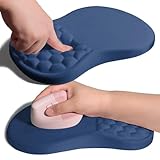
Overview: The Armanza Ergonomic Mouse Pad addresses wrist pain through innovative slope design rather than mouse shape. Measuring 11.8x7.9 inches, this accessory features a graduated incline with raised massage points that conform to wrist contours, distributing pressure and potentially relieving carpal tunnel symptoms. The ambidextrous design serves both left and right-handed users with any mouse type.
What Makes It Stand Out: The therapeutic slope with integrated massage bumps distinguishes it from flat ergonomic pads. Super-thick, slow-rebound memory foam provides lasting support without deformation. Professional Lycra fabric ensures precise mouse tracking, while the sticky PU base prevents sliding more effectively than standard rubber bases, maintaining stability during intense work sessions.
Value for Money: Priced at $24.99, it’s premium for a mouse pad but reasonable for a therapeutic device. Comparable ergonomic wrist supports cost $15-30, making this competitively priced given its specialized design and quality materials. For users experiencing genuine wrist pain, it’s a worthwhile investment that complements any ergonomic mouse.
Strengths and Weaknesses: Strengths include ergonomic slope design, massage therapy points, high-quality memory foam, smooth tracking surface, superior base stability, and universal handedness. Weaknesses include fixed angle that may not suit all users, larger desk footprint than standard pads, and price point higher than basic mouse pads. The massage texture might feel unusual initially and takes adjustment.
Bottom Line: This mouse pad excels as a complementary solution for wrist pain sufferers. Pair it with any mouse for enhanced ergonomics. While not a standalone fix, it’s a quality therapeutic accessory worth the investment if you experience discomfort during extended computer use. The dark steel blue color offers professional aesthetics.
10. TECKNET Ergonomic Mouse, Wireless Rechargeable Vertical Mouse for Carpal Tunnel Right Hand, 4800 DPI 5 Adjustable Levels 2.4GHz with USB-A Receiver, Silent Click, for Laptop, PC, Desktop (Not USB-C)
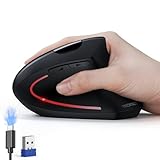
Overview: The TECKNET Rechargeable Vertical Mouse combines ergonomic design with modern convenience, offering a cable-free solution for carpal tunnel prevention. This right-handed mouse uses 2.4GHz wireless connectivity via USB-A receiver, featuring a vertical orientation that maintains natural wrist alignment. With five DPI levels up to 4800, it adapts to various professional tasks from office work to graphic design.
What Makes It Stand Out: The 600mAh rechargeable battery delivers two months of use per 1.5-hour Type-C charge, eliminating disposable battery waste. Tru-Wave optical tracking provides enhanced precision across multiple surfaces. The silent-click technology ensures quiet operation while maintaining tactile feedback. The ergonomic design specifically targets shoulder and neck strain reduction, addressing common issues from prolonged computer use.
Value for Money: At $21.99, it sits in the competitive mid-range. While the rechargeable feature and fast Type-C charging justify the cost, the absence of Bluetooth connectivity feels limiting compared to TECKNET’s own $20.98 Bluetooth model. You’re paying slightly more for less versatility, though gaining rechargeable convenience over AAA batteries.
Strengths and Weaknesses: Strengths include rechargeable battery with fast charging, long runtime, high DPI range, silent main buttons, stable wireless connection, and Type-C charging. Weaknesses include 2.4GHz-only connectivity (no Bluetooth), right-hand-only design, and non-silent auxiliary buttons. The feature set overlaps with cheaper alternatives that include Bluetooth, making it less compelling than TECKNET’s multi-device version.
Bottom Line: This mouse suits users prioritizing rechargeable power over multi-device flexibility. However, TECKNET’s Bluetooth version offers better value unless you specifically want built-in battery. Consider your connectivity needs before choosing this over its more versatile sibling—it’s excellent but slightly outmaneuvered by its own product line.
Understanding Vertical Mice and Wrist Pain Relief
The Science Behind the Design
The fundamental principle of vertical mice lies in anatomical alignment. Traditional flat mice force your forearm into pronation, rotating the radius and ulna bones while compressing the median nerve that runs through the carpal tunnel. A vertical mouse rotates the device 60-90 degrees, placing your hand in a neutral handshake position. This simple reorientation reduces pronation by up to 70%, decreasing pressure on the carpal tunnel and allowing your forearm muscles to relax. Research from ergonomic studies shows this position can reduce extensor muscle activity by approximately 25% compared to conventional mice, directly translating to less fatigue and strain during extended use.
Who Benefits Most from Vertical Mice
While anyone can benefit from improved ergonomics, certain populations experience dramatic improvements. Office workers logging 6+ hours daily at a computer report the most significant pain reduction. Individuals with early-stage carpal tunnel syndrome, De Quervain’s tenosynovitis, or general wrist tendinitis often find immediate relief. Graphic designers and video editors who combine mouse work with keyboard shortcuts benefit from the reduced grip force required. Even gamers, who traditionally prioritize speed over ergonomics, are increasingly adopting vertical mice to prevent career-ending repetitive strain injuries. If you experience numbness, tingling, or pain that worsens throughout the workday, you’re an ideal candidate for this ergonomic intervention.
Key Ergonomic Features to Consider
Grip Style and Hand Size Compatibility
Your hand size isn’t just a measurement—it’s the single most critical factor in vertical mouse selection. Measure from the base of your palm to the tip of your middle finger; this length determines whether you need a small (under 6.7 inches), medium (6.7-7.5 inches), or large (over 7.5 inches) model. The grip style matters equally: palm grippers need fuller, taller bodies that support the entire hand, while claw or fingertip grippers prefer shorter devices that allow more finger mobility. A mismatched size forces you to over-grip or stretch, completely negating ergonomic benefits. Many manufacturers provide hand size charts—use them religiously rather than guessing.
Angle of Inclination: Finding Your Sweet Spot
Vertical mice aren’t uniformly vertical—they range from 45 to 90 degrees of inclination. A 45-degree model offers easier transition from traditional mice but provides moderate relief. The 60-75 degree range represents the ergonomic sweet spot for most users, significantly reducing pronation while maintaining intuitive control. Near-vertical 80-90 degree designs maximize wrist benefits but require a longer adaptation period. Your existing pain level should guide this choice: mild discomfort suits moderate angles, while chronic conditions warrant more aggressive verticality. Consider starting with a moderate angle and progressing steeper if needed.
Weight and Balance Considerations
A vertical mouse should feel like a natural extension of your hand, not a paperweight you’re fighting against. Ideal weight ranges from 90-130 grams—lighter for precision work, slightly heavier for stability during general use. More importantly, examine the weight distribution: a well-balanced mouse centers its mass directly under your relaxed grip, preventing the “tipping” sensation common in poorly designed models. Test this by holding the mouse lightly; if it wants to rotate in your hand, the balance is off. Some premium models offer adjustable weights, allowing you to fine-tune the feel for your specific tasks and strength level.
Technical Specifications That Matter
DPI and Sensitivity Settings for Comfort
Dots Per Inch (DPI) determines cursor speed and precision, but for wrist pain sufferers, it’s also a comfort factor. Higher DPI (1600-3200) means less hand movement to navigate the screen, reducing repetitive travel that aggravates strain. However, excessively high DPI causes overshooting and micro-corrections that introduce new tension. Look for mice with adjustable DPI settings you can toggle on-the-fly. Start around 1200 DPI for general use, increasing gradually as your precision improves. The key is finding the lowest DPI that still allows comfortable navigation without forcing large, sweeping arm motions.
Polling Rates and Response Times
Polling rate—how often the mouse reports its position to your computer—impacts both performance and energy consumption. Standard rates of 125Hz (8ms response) suffice for office work, while 500-1000Hz (1-2ms) benefits fast-paced tasks. For pain relief, higher polling rates actually help by making cursor movement smoother and more predictable, reducing the micro-adjustments that cause tension. However, wireless models with high polling rates drain batteries faster. Consider your primary use case: spreadsheet warriors need reliability, while designers benefit from responsiveness. Some mice offer adjustable polling rates, letting you prioritize either battery life or performance.
Button Configuration and Programmability
Every click should feel effortless, not like a workout for your fingers. Vertical mice typically feature 5-7 buttons, but quantity matters less than placement and actuation force. Buttons should align naturally with your finger positions without requiring stretching or curling. Critically, examine the click resistance—premium switches require 50-60g of force compared to 70-80g in budget models. Programmability transforms a good mouse into a perfect one; being able to remap buttons for frequently used commands (copy, paste, back/forward) reduces keyboard reaches that strain your wrist. Look for software that stores profiles locally, so settings persist across different computers.
Connectivity Options Explored
Wired vs. Wireless: Pros and Cons
The cord debate extends beyond aesthetics to functional ergonomics. Wired mice guarantee zero latency and never need charging, but the cable can create drag that subtly pulls your wrist out of neutral alignment. Wireless models eliminate this friction, allowing completely free movement, but introduce battery management and potential interference concerns. For pure pain relief, wireless often wins—the freedom to position your hand optimally without cable resistance is significant. However, if your workspace involves complex multi-monitor setups where cursor precision is paramount, a quality braided cable with minimal drag might serve you better.
Bluetooth vs. RF Wireless Connections
Wireless vertical mice connect via Bluetooth or Radio Frequency (RF) with a USB dongle. Bluetooth offers universal compatibility and frees up USB ports, but can suffer from slight latency and pairing issues. RF connections provide rock-solid stability and slightly better battery life, but require a dedicated USB port and occupy a dongle. For wrist pain sufferers, the connection type matters less than the mouse’s ability to maintain consistent tracking—dropouts force compensatory gripping and tension. If you choose Bluetooth, ensure your mouse supports the latest 5.0 standard for improved stability and power efficiency.
Build Quality and Material Considerations
Surface Textures and Grip Materials
Your mouse’s surface directly impacts grip force—the harder you squeeze to prevent slippage, the more strain you create. Premium rubberized coatings provide secure grip with minimal pressure, while glossy plastics force tighter grasping. Look for textured side grips with subtle patterns that engage your skin without abrasion. Some models use antibacterial materials, a worthwhile feature since you’ll be touching this device for thousands of hours. The texture should feel secure even with slightly damp hands, as nervous sweating is common among pain sufferers worried about dropping their mouse.
Durability and Longevity Factors
A vertical mouse is an investment in your health, so longevity matters. Examine button rating—quality switches rated for 20-50 million clicks will outlast cheaper 5-10 million click alternatives by years. The feet (skates) should be large PTFE pads that glide smoothly; small or cheap plastic feet create friction that forces grip adjustments. Internal construction matters too: mice with reinforced internal frames maintain their structural integrity longer, preventing the “wobble” that develops in poorly built models and forces compensatory muscle engagement. Consider warranty length as a proxy for manufacturer confidence—two years minimum, three years ideal.
Size Categories and User Profiles
Full-Size Vertical Mice for Desktop Use
Full-size vertical mice prioritize ergonomics over portability, featuring substantial bodies that fill your palm completely. These are ideal for stationary desktop setups where you work 8+ hours daily. They typically offer the most comprehensive button layouts, best battery life in wireless models, and superior stability. However, their size makes them poor travel companions. If your workstation is permanent and your primary goal is maximum pain relief, full-size is the way to go. These models often include additional ergonomic features like thumb rests and pinky supports that smaller versions omit.
Compact and Travel-Friendly Options
Compact vertical mice sacrifice some ergonomic perfection for portability, typically 20-30% smaller than full-size counterparts. They’re perfect for hybrid workers splitting time between office and home, or anyone wanting consistency across locations. While they still provide significant pronation reduction, the smaller size may not support larger hands as completely, potentially requiring more grip force. Look for models that maintain the vertical angle and essential button placement despite the reduced footprint. Some travel mice cleverly fold or collapse, but ensure these mechanisms don’t compromise structural stability during use.
Left-Handed Solutions
Southpaws face a significant disadvantage in the ergonomic mouse market—most vertical mice are right-hand only. However, dedicated left-handed models do exist, and they’re non-negotiable for left-dominant users. Using a right-handed vertical mouse left-handed defeats the entire ergonomic purpose, forcing awkward wrist angles worse than a standard mouse. Left-handed models mirror the right-handed design perfectly, maintaining the same angle and button accessibility. If you’re ambidextrous, consider training your right hand with a vertical mouse to give your dominant hand periodic relief—a strategy many bilateral pain sufferers successfully employ.
Making the Transition: What to Expect
The Adaptation Period Timeline
Switching to a vertical mouse isn’t like changing your keyboard—it’s a fundamental rewiring of muscle memory. Expect a 3-5 day period of noticeable awkwardness where your accuracy drops and you may feel frustration. Most users report initial improvement in comfort within the first week, but true proficiency develops over 2-3 weeks. During this time, you might experience temporary forearm muscle fatigue as underused stabilizer muscles activate. This is normal and positive—your arm is learning proper biomechanics. Don’t judge the mouse’s effectiveness until you’ve completed at least two full weeks of consistent use; early discomfort is adaptation, not failure.
Common Mistakes New Users Make
The biggest error is maintaining old habits—gripping too tightly, anchoring your wrist on the desk, or using excessive arm tension. A vertical mouse should rest in your hand, not be clutched. Another mistake is positioning it incorrectly: it should sit at the same plane as your keyboard, not pushed back or forward. Many users also give up too quickly, returning to their painful but familiar traditional mouse at the first sign of inaccuracy. Resist this urge. Additionally, don’t pair a vertical mouse with a high desk that forces shoulder elevation; ergonomics is a system, not a single device. Finally, avoid the temptation to immediately max out DPI settings—smooth, controlled movement at moderate sensitivity retrains healthy patterns better than frantic high-speed cursor control.
Price Tiers and Value Proposition
Budget-Friendly Entry Points
Entry-level vertical mice ($20-40) can absolutely provide legitimate pain relief, but understand the trade-offs. These models typically use simpler sensor technology, basic plastics, and non-programmable buttons. The ergonomic angle is often less aggressive (45-60 degrees), making them excellent transition devices for the curious but skeptical. They shine for users with mild, occasional discomfort rather than chronic conditions. The primary compromise is longevity—expect 1-2 years of daily use before switches degrade. However, for testing whether vertical ergonomics work for you, this price point offers tremendous value without commitment. Just ensure even budget models include an adjustable DPI button.
Premium Features Worth the Investment
High-end vertical mice ($80-150) justify their cost through superior sensors, premium materials, extensive programmability, and often, medical device certifications. They typically offer steeper vertical angles (75-90 degrees) for maximum relief, with adjustable weights and multiple connectivity options. The buttons use high-end mechanical switches with lighter actuation force, reducing finger fatigue over thousands of daily clicks. Premium models often include companion software that tracks usage patterns and suggests ergonomic improvements. For severe pain sufferers or professionals whose livelihood depends on mouse precision, these features aren’t luxuries—they’re necessities. The 3-5 year lifespan also amortizes the higher initial cost into better long-term value.
Maintenance and Care for Longevity
Cleaning Best Practices
Your vertical mouse accumulates skin oils, dust, and debris that affect grip and hygiene. Clean it weekly with a microfiber cloth slightly dampened with isopropyl alcohol—never spray directly on the device. Pay special attention to the textured grip areas where grime builds up and creates slipperiness. Use compressed air to clear debris from around buttons and the sensor lens; buildup here can cause tracking issues that force compensatory movements. For wireless models, clean the charging contacts monthly with a dry cotton swab to maintain efficient power transfer. Avoid harsh chemicals or abrasive materials that degrade protective coatings, as this accelerates wear and forces tighter gripping.
When to Replace Your Vertical Mouse
Even the best vertical mouse has a finite lifespan. Replace it when you notice button actuation requiring noticeably more force—a sign of switch degradation that increases finger strain. If the feet become worn and create drag despite cleaning, it’s time for new skates or a new mouse. Structural wobble or creaking indicates internal component failure that compromises ergonomic integrity. Most importantly, if your wrist pain begins returning despite consistent use, the mouse may have compressed or deformed, losing its therapeutic angle. Track your pain levels monthly; any upward trend after an initial improvement suggests the device is no longer providing adequate support. A well-maintained quality mouse should serve you 3-5 years before replacement becomes necessary.
Measuring Your Success
Tracking Pain Reduction Metrics
Objective measurement transforms subjective feelings into actionable data. Use a simple 1-10 pain scale, rating wrist discomfort at the same time each day for the first month. Note specific activities that trigger pain—does reaching for the back button still hurt? Has morning stiffness decreased? Track your typing speed and mouse accuracy; these should return to baseline within 3 weeks if the mouse fits properly. Some users find success keeping a brief “pain journal” noting duration of computer sessions versus discomfort levels. The goal isn’t zero pain immediately—that’s unrealistic—but a consistent downward trend over 4-6 weeks. If you see no improvement after a month of proper use, the angle or size may be wrong for your specific condition.
Knowing When It’s Time to Try Something Else
Vertical mice help most wrist pain sufferers, but they’re not universal cure-alls. If after 6-8 weeks of correct usage you experience no pain reduction—or worse, new pain in your elbow or shoulder—the device may be incompatible with your biomechanics. Some users develop ulnar deviation issues with certain vertical angles. Others find the grip style aggravates existing arthritis in finger joints. Consider alternative ergonomic solutions like trackballs, pen tablets, or even split keyboards with integrated trackpads. The vertical mouse is one tool in an ergonomic toolkit, not the only solution. Listen to your body; persistent pain despite proper use is your physiology telling you to explore different interventions.
Professional Guidance and When to Seek Help
While a vertical mouse can provide remarkable relief, it’s not a substitute for medical care. Consult a physician or certified hand therapist if you experience numbness lasting more than a few minutes, sharp shooting pains, or weakness when gripping objects. These could indicate advanced nerve compression requiring intervention beyond ergonomic changes. A professional can assess whether your vertical mouse is appropriately sized and positioned, often catching subtle form errors that undermine benefits. They might recommend specific angles or features based on your diagnosis—someone with tennis elbow needs different support than someone with carpal tunnel. Consider professional evaluation essential if pain persists after 6 weeks of proper vertical mouse use, or immediately if symptoms worsen. Your long-term hand health deserves expert oversight.
Frequently Asked Questions
Will a vertical mouse completely eliminate my wrist pain?
A vertical mouse typically reduces pain by 40-70% for appropriate candidates, but complete elimination depends on your condition’s severity and root cause. It’s most effective for pain stemming from pronation and repetitive strain, less so for structural issues or advanced nerve damage. Think of it as a critical component of a broader ergonomic strategy rather than a standalone cure.
How long does it take to get used to a vertical mouse?
Most users achieve basic competency within 5-7 days, but true muscle memory and full comfort develop over 2-3 weeks. During this period, expect temporary accuracy drops and mild forearm fatigue as your muscles adapt to proper biomechanics. Consistency is key—don’t switch back and forth with your old mouse during adaptation.
Can I use a vertical mouse for gaming or graphic design?
Absolutely. Modern vertical mice offer DPI settings up to 3200+ and polling rates of 1000Hz, matching traditional gaming mice specifications. Many professional designers and even competitive gamers use vertical mice to prevent career-ending injuries. The adaptation period may temporarily impact performance, but long-term precision often improves due to reduced muscle fatigue.
Are vertical mice suitable for small hands?
Yes, but selection is critical. Many manufacturers offer small-specific models with reduced dimensions and button spacing. For petite hands (under 6.7 inches), compact vertical mice often fit better than full-size versions. Children’s ergonomic mice can even work for very small adult hands. Always check hand size charts before purchasing.
Do I need a mouse pad with a vertical mouse?
A quality mouse pad enhances any mouse’s performance, but it’s especially important for vertical mice used on reflective or glass surfaces. The sensor’s lift-off distance is often higher in vertical designs, making consistent tracking surfaces valuable. Choose a medium-speed cloth pad that allows smooth gliding without sacrificing control.
Can vertical mice cause new types of pain?
If improperly sized or used with poor posture, vertical mice can shift strain to your elbow (ulnar deviation) or shoulder. This usually indicates wrong size, incorrect desk height, or gripping too tightly. When properly matched to your hand and used correctly, they should reduce, not redistribute, pain. Any new pain warrants immediate reevaluation of fit and form.
How do I clean my vertical mouse without damaging it?
Use isopropyl alcohol on a microfiber cloth, never applied directly to the device. Clean weekly, focusing on grip textures and button crevices. Compressed air clears sensor and button debris. Avoid submerging in water or using harsh cleaners that degrade coatings. For wireless models, keep charging contacts dry and clean them monthly with a dry cotton swab.
Is a wireless vertical mouse worth the extra cost?
For wrist pain relief, wireless often justifies the premium. Eliminating cable drag allows optimal hand positioning without subtle pulling forces that compromise neutral wrist alignment. Modern wireless technology offers performance indistinguishable from wired connections. If budget allows, wireless is the ergonomic choice, though a quality braided cable with minimal drag is a viable alternative.
What’s the difference between a vertical mouse and a trackball for pain relief?
Vertical mice reduce pronation while maintaining familiar movement patterns. Trackballs eliminate arm movement entirely but can increase thumb strain and require different muscle engagement. Vertical mice generally suit users with wrist-specific pain who still need broad cursor movement. Trackballs help those with shoulder or elbow issues. Some users successfully alternate between both for comprehensive relief.
Should I get a vertical mouse if I don’t currently have wrist pain?
Absolutely—ergonomics is prevention, not just treatment. If you work at a computer extensively, a vertical mouse acts as preventive care, much like proper lifting technique prevents back injuries. Many users who switch before pain develops never experience the repetitive strain injuries that plague their colleagues. The adaptation is easier when you’re not already in pain, making it a smart investment in your long-term health.