Tired of a cluttered desk that shrinks your productive space? You’re not alone. The modern workspace—whether at home or in the office—demands smarter solutions that maximize every square inch without sacrificing ergonomics or aesthetics. Enter the low-profile keyboard slider with integrated storage tray: a game-changing accessory that slides discreetly under your desk while keeping essential tools within arm’s reach. Unlike bulky traditional keyboard trays, these streamlined units combine seamless adjustability with hidden compartments, transforming wasted under-desk real estate into an organized command center. This guide unpacks everything you need to know to select, install, and optimize the perfect low-profile slider for your unique workflow.
Top 10 Low-Profile Keyboard Sliders with Storage
Detailed Product Reviews
1. Kensington Keyboard Tray Under Desk, SmartFit Ergonomic Slide-Out Keyboard Drawer with Cable Management, Extra-Wide Height Adjustable Keyboard Holder, 24.5" x 11.75", Black K60004US
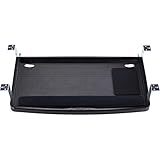
Overview: The Kensington K60004US SmartFit Keyboard Tray brings ergonomic science to your workspace with its innovative color-coded height adjustment system. This 24.5-inch wide tray accommodates full-size and ergonomic keyboards while providing space for your mouse and wrist rest. Designed for professionals who prioritize comfort, the tray slides smoothly under your desk when not in use, keeping your workspace clean and organized.
What Makes It Stand Out: Kensington’s proprietary SmartFit system simplifies ergonomic setup by letting you match your personal comfort color to the ideal keyboard height—no complex measurements needed. The extra-wide design supports oversized keyboards alongside accessories, while integrated cable management keeps cords tidy. TAA compliance makes it suitable for government and corporate environments requiring certified products.
Value for Money: At $43.90, this tray sits in the sweet spot between budget options and premium ergonomic solutions. You’re paying for Kensington’s reputation, SmartFit innovation, and build quality that outlasts cheaper plastic alternatives. Comparable ergonomic trays often cost $60+, making this a smart investment for injury prevention and daily comfort.
Strengths and Weaknesses: Pros:
- SmartFit system eliminates guesswork in ergonomic setup
- Accommodates large ergonomic keyboards and accessories
- Integrated cable management reduces clutter
- TAA compliant for professional environments
- Smooth, durable sliding mechanism
Cons:
- Requires permanent installation with screws
- Limited height adjustment range may not suit all body types
- Black-only color option limits aesthetic matching
Bottom Line: The Kensington K60004US is an excellent choice for office workers seeking proven ergonomic benefits without premium pricing. Its SmartFit system and sturdy construction justify the investment for anyone spending hours at their desk daily.
2. VIVO Large 33 inch Under Desk Slide Out Storage Drawer Organizer, White, DESK-DR33-W

Overview: The VIVO DESK-DR33-W redefines under-desk organization with its massive 33-inch steel drawer that moonlights as a keyboard tray. This versatile solution provides 30.1" x 9" of internal storage space for office supplies while converting to a low-profile keyboard holder with 2.4" of clearance. The clean white finish complements modern office aesthetics.
What Makes It Stand Out: This hybrid design uniquely serves dual purposes: a spacious storage drawer for clutter control and a functional keyboard tray when you remove the front panel. The 3-inch height interior preserves legroom better than many dedicated trays, while the steel construction ensures durability. Its 11-pound capacity handles substantial supplies without sagging.
Value for Money: At $79.99, you’re essentially getting two products in one—a storage drawer and keyboard tray. While pricier than basic trays, the versatility justifies the cost if you need both functions. Separate purchases would easily exceed $100, making this a economical space-saving solution for compact workspaces.
Strengths and Weaknesses: Pros:
- Dual-function design maximizes under-desk utility
- Generous storage capacity for supplies and devices
- Sturdy steel construction supports 11 lbs reliably
- Smooth, quiet sliding operation
- Preserves legroom with low-profile design
Cons:
- Higher price point than single-purpose trays
- 2.4" keyboard clearance may be insufficient for some keyboards
- White finish shows scratches and dirt more easily
- Requires robust desk supporting 21 lbs total
Bottom Line: The VIVO DESK-DR33-W is ideal for users needing both storage and keyboard functionality. If your desk lacks drawers and you want ergonomic benefits, this two-in-one solution delivers excellent value despite its premium price.
3. VIVO Large 33 inch Under Desk Slide Out Storage Drawer Organizer, Black, DESK-DR33-B

Overview: The VIVO DESK-DR33-B offers identical functionality to its white counterpart in a sleek black finish. This 33-inch steel drawer converts between a spacious storage compartment and a keyboard tray, providing 30.1" x 9" of internal space. The black variant better conceals wear and integrates seamlessly with darker office furniture while delivering the same robust performance.
What Makes It Stand Out: Like the white version, this hybrid design excels as both a clutter-busting storage drawer and an ergonomic keyboard tray. The removable front panel transforms it for keyboard use with 2.4" clearance. Black powder coating resists scratches and fingerprints, maintaining a professional appearance longer. The 11-pound capacity and smooth steel construction ensure reliable daily operation.
Value for Money: Priced at $79.99, the black model offers the same two-in-one value proposition. While the cost exceeds basic keyboard trays, combining storage and ergonomic features saves money versus separate purchases. The durable black finish may provide better long-term aesthetics, potentially increasing its value for users with darker decor.
Strengths and Weaknesses: Pros:
- Versatile dual-function design saves space and money
- Ample 30.1" x 9" storage for office essentials
- Durable steel construction with 11 lb capacity
- Smooth, quiet sliding mechanism
- Black finish hides wear better than lighter colors
Cons:
- Premium pricing compared to single-purpose alternatives
- Limited 2.4" height may not accommodate all keyboards
- Requires desk supporting 21 lbs total weight
- Installation reduces some under-desk leg space
Bottom Line: Choose the VIVO DESK-DR33-B if you need both storage and keyboard functionality with a professional black aesthetic. It’s a practical investment for organized, ergonomic workspaces that justifies its price through versatility and durability.
4. HUANUO Large Under Desk Keyboard Tray with Sturdy C-Clamp Mount, 26 (30.16" Including Clamps) x 12 inch Slide-Out Platform Computer Desk Heavy Duty Keyboard Tray with Storage Drawer for Typing, Black

Overview: The HUANUO Keyboard Tray distinguishes itself with tool-free C-clamp mounting, making it perfect for renters or anyone unwilling to drill into their desk. Measuring 25.59" x 11.81", this platform supports keyboards and mice while incorporating a compact storage drawer for small items. The ergonomic design promotes proper wrist alignment during extended typing sessions.
What Makes It Stand Out: The dual C-clamp system installs in minutes without damaging your desk surface, supporting thicknesses from 0.39" to 1.57". This non-permanent solution offers flexibility for changing workspaces. The integrated storage drawer keeps earbuds and small accessories within reach, while the tray extends 7.76" for comfortable use and retracts to save space. It works for both sitting and standing desk configurations.
Value for Money: At $43.99, this tray matches permanently-mounted options while offering superior installation convenience. The clamp system alone justifies the price, eliminating professional installation costs or desk damage concerns. Comparable clamp-mounted trays cost $60+, making this an excellent value for non-permanent setups.
Strengths and Weaknesses: Pros:
- C-clamp mounting requires no drilling or permanent modification
- Quick, tool-free installation and removal
- Ergonomic design reduces wrist and shoulder strain
- Compact storage drawer for small essentials
- Works with both sitting and standing desks
Cons:
- Not compatible with beveled-edge desks
- C-clamps may loosen over time requiring periodic tightening
- Smaller surface area than some competitors
- Requires 11.3" clearance under desk when retracted
Bottom Line: The HUANUO tray is perfect for renters, remote workers, or anyone wanting ergonomic benefits without commitment. Its clamp mounting and integrated storage make it a versatile, damage-free solution that delivers exceptional value.
5. Solid Steel Under Desk Keyboard Tray Slide Out with 360° Rotating Mouse Platform,Keyboard Shelf Sliding,Under Desk Mounted Keyboard Holder,Under Desk Keyboard Drawer 28"Lx11"W

Overview: This budget-friendly steel keyboard tray proves affordability doesn’t require sacrificing durability. Constructed from 1mm thick steel plate, it provides a stable 28" x 11" platform with a unique 360° rotating mouse platform that tucks underneath when not needed. Three height adjustment options allow basic ergonomic customization for comfortable typing.
What Makes It Stand Out: The rotating mouse platform is a clever space-saving innovation, letting you position the mouse pad exactly where you want it or hide it completely. Unlike plastic competitors, the solid steel construction prevents flexing and withstands heavy daily use. The concealed screw mounting keeps the tray flush under your desk, maintaining a clean aesthetic when retracted.
Value for Money: At just $35.59, this is the most economical option among steel trays. You’re getting metal durability and innovative mouse platform design for less than many plastic alternatives. While it lacks premium features like clamp mounting or large storage, the price-to-quality ratio is outstanding for budget-conscious buyers prioritizing durability.
Strengths and Weaknesses: Pros:
- Solid steel construction offers superior stability and longevity
- Innovative 360° rotating mouse platform saves space
- Three height settings provide basic ergonomic adjustment
- Smooth, quiet galvanized glide tracks
- Lowest price point for steel construction
Cons:
- Requires permanent screw installation
- Limited height adjustment compared to premium ergonomic trays
- No integrated cable management
- Basic design lacks storage compartments
- Instructions may be unclear for novice installers
Bottom Line: This steel tray is ideal for users wanting maximum durability on a minimal budget. The rotating mouse platform and solid construction make it a smart choice for straightforward, reliable keyboard storage that outlasts plastic alternatives.
6. HUANUO Keyboard Tray Under Desk, 360 Adjustable Ergonomic Sliding Keyboard & Mouse Tray, Under Desk Keyboard Tray Slide Out, Keyboard Holder Under Desk for Typing in Home, Office Work, 25"W x 9.84"D

Overview: The HUANUO Keyboard Tray delivers comprehensive ergonomic adjustability for home and office workers seeking customizable typing positions. This 25" x 9.84" platform offers 360-degree movement capabilities, combining swivel, tilt, and height adjustment to create a truly personalized workspace solution that slides discreetly under your desk when not in use.
What Makes It Stand Out: The tray’s exceptional range of motion sets it apart. It rotates 180° horizontally, tilts 6° upward and 22° downward, and provides 6.3" of height adjustment—accommodating both sitting and standing desk configurations. The included memory foam wrist rest enhances comfort during extended typing sessions. At 10 pounds, the sturdy construction suggests durability, while the generous surface area comfortably fits full-size keyboards and mice.
Value for Money: Priced at $69.99, this tray sits in the mid-range category. While cheaper fixed-position models exist, the HUANUO justifies its cost through genuine ergonomic flexibility that typically appears in $90+ premium units. For users who need multiple adjustment points rather than basic slide-out functionality, it represents solid value.
Strengths and Weaknesses: Strengths include extensive adjustability, quality wrist support, and space-saving design. However, installation demands significant clearance—requiring 14.17" from crossbars and 25" width for rotation. The 9.84" depth may feel cramped for users preferring more mouse space. You must manually tighten the knob before typing to prevent wobble, which interrupts workflow.
Bottom Line: This tray suits ergonomics-focused users with compatible desks who prioritize adjustability over plug-and-play simplicity. Verify your desk’s underside clearance meticulously before purchasing. If your setup meets the requirements and you need versatile positioning, the HUANUO is an excellent mid-range choice.
7. WORKNEST Keyboard Tray | Under Desk Keyboard Tray Slide Out w/Adjustable C-Clamps for Desks Up to 1.5-Inch-Thick | Clamp On Drawer with 1x USB-C to 4 USB-A Hub and 1x Five-Cable Management Organizer

Overview: The WORKNEST Keyboard Tray targets modern professionals seeking a tech-integrated, damage-free mounting solution. This 31" x 11.4" clamp-on platform attaches without drilling and features a built-in USB hub and cable management system, making it ideal for renters and cable-conscious users who want both ergonomics and connectivity.
What Makes It Stand Out: The integrated USB-C to 4x USB-A hub eliminates desktop dongle clutter, while the five-cable organizer keeps charging cords tidy and accessible. The C-clamp installation supports desks up to 1.5" thick without permanent modifications. A hidden storage drawer adds practicality for pens and small supplies. The durable metal frame supports 11 lbs with minimal wobble, and its sleek black finish integrates into most office aesthetics.
Value for Money: At $48.99, this tray offers exceptional value. Competing models with USB hubs typically cost $70+, and cable management accessories add another $15-20. The clamp-on design saves professional installation fees. While it lacks tilt and swivel adjustments, the connectivity features and easy setup make it a budget-friendly powerhouse for tech-heavy workstations.
Strengths and Weaknesses: Strengths include zero-damage installation, integrated USB hub, cable management, and hidden storage. The metal construction feels stable. Weaknesses are limited ergonomics—no height tilt or swivel adjustment—and the 11.4" depth may feel shallow. C-clamps require precise desk edge conditions and won’t work with beveled or raised edges.
Bottom Line: Perfect for renters, remote workers, and cable-haters who prioritize convenience and connectivity over advanced ergonomics. If you need a simple slide-out tray with modern tech integration and can’t drill into your desk, the WORKNEST delivers outstanding functionality for the price. Just verify your desk edge compatibility first.
8. PEGZONE Keyboard Tray Under Desk with Storage Drawer, Height Adjustable Keyboard Tray Slide Out Swivel Tilt, Ergonomic Under Desk Mount Keyboard & Mouse Holder for Gaming Home Office, 25x11’’, Black

Overview: The PEGZONE Keyboard Tray balances ergonomic adjustability with gamer-friendly features in a 25" x 11" package. Designed for users needing height-adjustable positioning plus storage, it offers 180° swivel, 15° tilt, and 6.1" height adjustment. The integrated wrist rest and under-tray storage drawer cater to both comfort and organization for extended gaming or work sessions.
What Makes It Stand Out: This tray’s 11" depth provides more mouse space than many competitors, while the 180° horizontal rotation and 15° vertical tilt allow precise positioning. The storage drawer keeps small items accessible without cluttering the platform. Installation accommodates desks with beams and standing desks, offering versatility many fixed-mount trays lack. The 11-pound weight capacity handles mechanical keyboards and accessories securely.
Value for Money: At $64.99, PEGZONE positions itself as a feature-rich mid-range option. It undercuts premium brands like Humanscale while offering comparable adjustment ranges. The added storage drawer and enhanced depth provide tangible benefits over basic $40-50 models. For gamers and professionals wanting tilt and swivel without premium pricing, it strikes an attractive balance.
Strengths and Weaknesses: Strengths include generous depth, full adjustability, beam-compatible installation, and integrated storage. The wrist rest prevents keyboard slippage. Weaknesses include a recommendation for desks over 31.5" high, which may exclude some users. Installation requires careful measurement (0.71" minimum desk thickness), and the sliding mechanism isn’t as smooth as higher-end ball-bearing systems.
Bottom Line: An excellent choice for gamers and hybrid workers wanting ergonomic flexibility plus storage on a reasonable budget. Ensure your desk height and thickness meet specifications. If you need more mouse room than standard 9-10" trays provide and want adjustability without premium cost, the PEGZONE delivers compelling value.
9. EUREKA ERGONOMIC Adjustable Keyboard Tray Under Desk, 28x11 Inch Large Slide Out Keyboard & Mouse Platform Tray, Wooden Pull Out Computer Keyboard Drawer for Typing Home Office Desk, Walnut

Overview: The EUREKA ERGONOMIC Keyboard Tray emphasizes classic design and robust construction in a 28" x 11.8" wooden platform. This screw-mounted tray focuses on stability and aesthetic appeal, offering height adjustment through pre-drilled holes rather than continuous adjustment. The walnut finish targets home office users wanting furniture-grade appearance alongside functional ergonomics.
What Makes It Stand Out: The wooden platform distinguishes it from metal-and-plastic competitors, providing a warm, premium aesthetic that complements wood desks. The impressive 30-pound weight capacity—nearly triple most rivals—ensures rock-solid stability for heavy mechanical keyboards and multiple devices. Height adjustment via bracket holes provides secure, wobble-free positioning once installed. The generous 11.8" depth accommodates large gaming mice and extended mousepads comfortably.
Value for Money: At $75.99, it’s priced at the higher end but justifies cost through superior weight capacity, premium materials, and stability. While lacking continuous tilt/swivel adjustments, it outperforms flimsy metal trays that wobble under load. For users prioritizing durability and aesthetics over micro-adjustability, it offers better long-term value than cheaper alternatives that may need replacement.
Strengths and Weaknesses: Strengths include exceptional weight capacity, beautiful walnut finish, generous dimensions, and permanent stability. The screw-mount eliminates clamp-related wobble. Weaknesses are limited ergonomics—no tilt or swivel—and semi-permanent installation requiring drilling. The 34"L x 15"W clearance requirement demands substantial under-desk space, and it’s incompatible with glass, stone, or plastic desktops.
Bottom Line: Ideal for permanent home office setups where aesthetics and rock-solid stability trump adjustability. If you have a compatible wood desk and want a tray that feels like furniture rather than an accessory, the EUREKA delivers. Not for renters or those needing dynamic positioning, but perfect for stability-focused users with traditional workstations.
10. VIVO Extra Long Clamp-on Computer Keyboard and Mouse Under Desk Slider Tray, 34 x 11 inch Pull Out Platform Drawer, Black, MOUNT-KB15EB

Overview: The VIVO MOUNT-KB15EB caters to users needing maximum horizontal space with its extra-long 33.9" platform. This clamp-on tray prioritizes simplicity and breadth, accommodating full-size keyboards with numeric keypads, large mice, and additional accessories simultaneously. The patent-pending design targets power users who refuse to compromise on workspace real estate.
What Makes It Stand Out: The extraordinary length sets it apart—nearly 34" of usable surface fits keyboard, mouse, notepad, and phone side-by-side. The C-clamp installation preserves desk integrity while supporting up to 11 lbs. Smooth sliding action with ergonomic typing angles reduces wrist strain. The 8.5" maximum extension keeps the tray accessible without overwhelming legroom. Its minimalist black design disappears under desks when retracted.
Value for Money: At $69.99, the price aligns with standard-length adjustable trays while delivering 30% more surface area. For users needing expansive space but not requiring tilt or height adjustment, it eliminates the need for separate mouse platforms or desk extenders. The clamp-on design saves installation costs. Compared to purchasing two smaller trays, it offers clear economies of scale.
Strengths and Weaknesses: Strengths include unparalleled width, stable C-clamp mounting, smooth slide operation, and straightforward installation. The 11" depth provides adequate mouse space. Weaknesses are zero tilt or height adjustment—purely a slide-out platform. It requires 39.4" total width including clamps, which may not fit smaller desks. Incompatible with beveled edges, and the clamp mechanism needs precise desk thickness under 1.25".
Bottom Line: Perfect for users who prioritize horizontal space above all else. If you use a full-size keyboard with numeric pad plus multiple accessories and need everything on one level surface, this is your solution. Verify total width requirements and desk edge compatibility. For simple, spacious, damage-free installation without ergonomic frills, the VIVO delivers exceptional utility.
What Are Low-Profile Keyboard Sliders with Storage Trays?
Low-profile keyboard sliders are under-desk mounting systems designed to hold your keyboard and mouse on a retractable platform that sits flush against the desk surface when not in use. The “low-profile” designation refers to the minimal vertical clearance—typically between 2 to 4 inches—between the slider and the desk underside. What distinguishes these units is the integrated storage tray: a built-in compartment (or series of compartments) that capitalizes on the otherwise dead space beneath the keyboard platform. This isn’t an afterthought drawer; it’s engineered into the slider’s chassis, offering segmented organization for everything from pens and notepads to charging cables and USB hubs.
Why Your Workspace Needs a Low-Profile Solution
Standard desk surfaces place keyboards at fixed heights, forcing your wrists into unnatural angles and consuming valuable top-space. A low-profile slider solves both issues simultaneously. By dropping the typing surface 3-5 inches below desk height, you achieve neutral wrist positioning that reduces ulnar deviation and forearm pronation. Simultaneously, reclaiming that prime real estate on your desk opens up room for monitors, documents, or simply a cleaner aesthetic. The “low-profile” aspect is crucial here—thicker sliders can bruise knees and feel obtrusive, while sleek designs disappear visually and physically, making them ideal for compact workstations, standing desk converters, and even gaming setups where legroom is non-negotiable.
Key Benefits of Integrated Storage Trays
The storage tray transforms a simple ergonomic accessory into a productivity powerhouse. First, it centralizes clutter. Instead of scattering supplies across your desk, you create a dedicated, hidden ecosystem for daily tools. Second, it protects sensitive items. Storing portable hard drives or wireless earbuds in a closed compartment shields them from spills, dust, and accidental knocks. Third, it improves workflow efficiency. Segmenting the tray into zones—charging station, writing tools, tech accessories—means you’re never hunting for that one cable or stylus. Finally, it enhances security; some models feature lockable trays for storing confidential documents or small devices when you step away from your desk.
Types of Low-Profile Keyboard Sliders
Understanding mounting mechanisms is fundamental to making the right choice. Each type carries distinct installation requirements, weight tolerances, and aesthetic impacts.
Under-Desk Mounted Sliders
These are the most common and robust option, screwing directly into the underside of your desk via pre-drilled holes. They offer superior stability and typically support heavier loads (up to 35 pounds). Under-desk mounts distribute weight across multiple anchor points, making them ideal for solid wood, metal, or thick composite desks. The trade-off? Permanent modification. Once installed, you’re committed to the position, though some premium models allow for limited repositioning with sliding rail adjustments.
Clamp-On Keyboard Sliders
Clamp-on systems grip the front edge of your desk using adjustable metal brackets, requiring zero drilling. They’re perfect for renters, glass-top desks, or surfaces you can’t permanently alter. Modern clamp designs have evolved significantly, with reinforced pressure plates that prevent wobbling and protect desk edges. However, weight capacity is typically capped around 20 pounds, and they may not suit desks with unusual thickness (under 1 inch or over 2.5 inches). Always verify clamp depth compatibility before purchasing.
Drawer-Style Integrated Units
These hybrid systems replace a section of your desk with a built-in drawer that houses both the keyboard platform and storage compartments. They’re common in executive office furniture and DIY desk builds. The entire assembly slides out like a traditional desk drawer, then the keyboard platform extends further on secondary slides. While offering the cleanest aesthetic and largest storage volume, they demand precise measurements and often professional installation. They’re also the most expensive category but deliver unmatched integration.
Material Matters: What to Look For
Material choice dictates durability, weight, smoothness of operation, and even noise levels during adjustment. Don’t overlook this specification.
Steel and Metal Alloys
Powder-coated steel remains the gold standard for load-bearing components. It resists flexing, supports heavier gaming keyboards and multiple monitors on articulating arms, and withstands years of repetitive motion. Look for 14- to 16-gauge steel for the main chassis. Aluminum alloys appear in premium models, offering comparable strength with 30% less weight—beneficial for clamp-on systems where desk edge stress is a concern. The downside? Metal-on-metal contact can create noise; ensure slides feature nylon or rubber dampeners.
High-Grade Plastics and Composites
Reinforced nylon and ABS plastic dominate storage tray construction. These materials are lightweight, corrosion-proof, and can be molded into complex organizational grids. For the slider mechanism itself, avoid all-plastic designs; instead, seek hybrids where plastic components are limited to non-load-bearing elements like cable clips and drawer dividers. Carbon-fiber reinforced composites are emerging in ultra-lightweight models, but verify their weight ratings independently as marketing claims often exceed reality.
Wood and Engineered Wood Options
Bamboo and laminated plywood offer aesthetic warmth that metal lacks. These materials excel in home office environments where visual cohesion matters. Engineered wood trays resist warping better than solid wood in humidity-fluctuating spaces. However, wood sliders require meticulous sealing to prevent moisture damage from condensation or spills. They also tend to be thicker, so confirm they truly meet “low-profile” specifications (under 4 inches total height) before committing.
Weight Capacity and Durability Considerations
Never exceed 70% of the stated weight capacity for longevity. Manufacturers test sliders under ideal conditions—perfectly distributed loads, clean slides, optimal temperature. Real-world use involves uneven weight distribution (think ergonomic keyboards with numeric keypads) and dust accumulation. For a typical setup (keyboard, mouse, wrist rest), calculate 8-12 pounds. Add 5 pounds for storage tray contents. Then double that total to determine your minimum capacity requirement. If you use a heavy mechanical keyboard (5+ pounds) plus a graphics tablet, target sliders rated for 30+ pounds. Check for cycle ratings too; quality units are tested for 50,000+ glide cycles.
Installation Insights: What You Need to Know
A flawless installation determines whether your slider feels like premium furniture or a rickety add-on. Preparation beats improvisation every time.
Tools and Skills Required
Under-desk mounting typically needs a power drill, 3mm-5mm drill bits, Phillips head screwdriver, tape measure, level, and stud finder (for metal desks). Clamp-on systems require only Allen wrenches (usually included) and manual strength for tightening. Drawer-style units may need a jigsaw for cutouts and a router for flush mounting. Skill-wise, basic DIY competence suffices for most installations, but drawer-style integration demands intermediate woodworking skills. Always have a helper; holding the unit while marking drill holes solo is a recipe for misalignment.
Desk Compatibility Factors
Measure three times: underside clearance (minimum 3.5 inches for knees), front edge thickness (for clamp-ons), and internal desk frame obstructions. Many modern desks have crossbars or cable management trays that interfere with mounting. Use a flashlight to map the entire underside topography. For standing desks, verify the slider won’t collide with the frame during height adjustments. Glass desks require specialized clamp pads to distribute pressure and prevent cracking—never drill glass. Reclaimed wood desks may have hidden knots or nails; scan with a metal detector before drilling.
Ergonomic Positioning Guidelines
The primary goal is achieving a neutral typing posture. Position the keyboard slider so your elbows form 90-110 degrees when typing, with forearms parallel to the floor. The keyboard’s home row should align with your relaxed elbow height, not your waist. For mouse placement, the slider must extend far enough that you can mousing with your elbow still at your side—overreaching engages shoulder muscles and causes fatigue. The storage tray should not protrude beyond the keyboard platform; anything that forces you to reach forward compromises the ergonomic benefits. If the slider tilts, start at a negative 5-degree angle (front lower than back) and adjust based on comfort.
Storage Tray Configurations and Organization
Not all storage is created equal. The tray’s internal layout should match your workflow, not just hold random items.
Shallow Trays for Small Accessories
Trays under 1.5 inches deep excel at storing flat items: sticky notes, SD cards, business cards, and slim power banks. Look for silicone or rubber matting to prevent items from sliding during tray movement. Some designs feature magnetic zones for paperclips and small metal tools. The shallow depth ensures you can see everything at a glance, eliminating the “black hole” effect of deep drawers.
Deep Compartments for Larger Items
Compartments exceeding 2.5 inches accommodate bulkier gear: external hard drives, charging bricks, wireless headsets, and even compact tablets. Prioritize trays with removable dividers so you can customize the layout as your tech arsenal evolves. Ventilation is critical here; deep compartments trap heat from charging electronics. Seek designs with perforated bottoms or side vents to prevent thermal buildup that can degrade battery life.
Glide Mechanisms: Ball Bearing vs. Roller
Smooth, reliable extension separates premium sliders from budget disappointments. Ball-bearing slides use recirculating steel balls within linear rails, delivering whisper-quiet operation and full extension (100% of tray length). They’re rated for heavier loads and maintain consistent resistance over years of use. Roller slides employ plastic or rubber wheels in tracks; they’re cheaper but prone to wobbling when fully extended and can develop flat spots over time, creating a jerky motion. For storage trays that you’ll access frequently, ball-bearing is non-negotiable. Verify the slide rating: “full extension” means the tray clears the desk edge completely, while “partial extension” leaves 20-30% tucked under—frustrating for reaching items at the back.
Adjustability Features Worth Considering
Static sliders solve space issues but adjustable sliders solve ergonomic evolution. Your body and workflow change; your equipment should adapt.
Height Adjustment
Look for 3-6 inches of vertical range, adjustable in 0.5-inch increments. Tool-free adjustment knobs are convenient but can loosen over time; pinned adjustments with locking screws offer superior long-term stability. Some premium models feature gas-spring assistance, making height changes effortless even with equipment loaded. Ensure adjustment mechanisms are accessible without removing the keyboard—under-tray levers or side-mounted pins are ideal.
Tilt and Angle Adjustment
Tilt range of -15 to +10 degrees allows you to fine-tune wrist position. Negative tilt (front down) is ergonomically superior for most users, promoting a neutral wrist alignment. The tilt mechanism should lock securely; friction-based systems slip under heavy typing forces. Check for infinite tilt adjustment versus preset notches—infinite gives you precision, but notched positions provide confident, repeatable settings. Some sliders also offer lateral angle adjustment, useful for accommodating split ergonomic keyboards or creating a slight mouse platform angle.
Cable Management Integration
A slider that moves while cables stay static creates tug-of-war with your ports. Modern units integrate cable management into the slider chassis itself. Look for under-mounted cable channels with snap-in covers that route keyboard and mouse cables to the back of the tray. The best designs include a flexible cable arm or spiral wrap that extends and retracts with the slider, preventing connector strain. For the storage tray, grommet holes with rubber grommets allow charging cables to enter without fraying. Some advanced models feature USB passthrough ports mounted on the tray front, keeping ports accessible while keeping cable clutter hidden.
Space Optimization Strategies
Maximizing the utility of your low-profile slider extends beyond the unit itself. Mount the slider as far back under the desk as possible while maintaining ergonomic reach; this frees up maximum knee space. Use the storage tray’s vertical stacking potential: add adhesive silicone pockets to the tray’s underside for even more hidden storage. Pair your slider with a monitor arm to completely clear the desk surface, creating a “floating” workstation effect. If your desk has a modesty panel, consider sliders designed to mount within the panel cutout, preserving the desk’s visual lines. For shared workstations, label storage compartments with a label maker to prevent cross-contamination of supplies.
Maintenance and Longevity Tips
Treat your slider like any precision tool. Every six months, extend the slides fully and vacuum out dust with a brush attachment. Apply a dry Teflon lubricant to ball-bearing races—never use oil-based lubricants that attract grime. Tighten all mounting screws quarterly; wood desks experience seasonal expansion and contraction that can loosen hardware. Clean storage trays with isopropyl alcohol to remove adhesive residue from tape or labels. For metal sliders, inspect powder coating for chips that could lead to rust; touch up with automotive touch-up paint. If the glide becomes rough, remove the tray and inspect for bent rails or debris lodged in the bearing tracks—most quality slides are rebuildable with replacement bearing cartridges.
Common Mistakes to Avoid When Choosing
First, don’t underestimate your storage needs. Buyers often focus on keyboard fit and ignore tray capacity, only to realize later their essential gear doesn’t fit. Second, avoid sliders without stoppers. A unit that slides too far forward can tip or hit your knees; integrated stoppers prevent over-extension. Third, don’t assume universal fit. Measure your desk’s underside obstructions meticulously—crossbars, cable trays, and support beams are common deal-breakers. Fourth, skip sliders with plastic slide components if you’re a heavy typist; the micro-vibrations will cause premature wear. Fifth, don’t mount too low. The ergonomic target is elbow height, not “as low as possible.” Mounting too low forces shoulder elevation and defeats the purpose. Finally, never ignore the weight of future upgrades. That lightweight membrane keyboard might become a 6-pound mechanical beast next year; plan capacity accordingly.
Frequently Asked Questions
1. Can I install a low-profile keyboard slider on a glass desk?
Yes, but only clamp-on models with specialized pressure-distributing pads. Never drill glass. Verify the clamp’s pressure rating and use protective film between the pad and glass to prevent micro-scratches.
2. Will the storage tray fit a standard external hard drive?
Most deep compartments (over 2.5 inches) accommodate 2.5-inch portable drives. For 3.5-inch desktop drives, check dimensions carefully; they may require trays with removable dividers or dedicated large-item bays.
3. How do I prevent my keyboard from sliding on the tray?
Quality trays include non-slip silicone mats. If yours doesn’t, apply 3M Bumpon adhesive pads to the tray corners or use a gel wrist rest that anchors the keyboard’s front edge.
4. Can I use a low-profile slider with a standing desk converter?
Yes, but mount it to the converter’s keyboard surface, not the fixed desk. Ensure the slider’s thickness doesn’t interfere with the converter’s lowest height setting, and verify weight capacity includes the converter’s keyboard platform.
5. What’s the ideal distance from the desk edge to mount the slider?
Mount it so the keyboard platform extends 1-2 inches beyond the desk edge when fully retracted. This provides adequate leg clearance while keeping the storage tray accessible without fully extending the slider.
6. Do these sliders work with ergonomic split keyboards?
Absolutely. Look for sliders at least 28 inches wide and consider models with independent mouse platform tilt. Some split keyboard users prefer sliders without wrist rests to accommodate their keyboard’s built-in negative tilt.
7. How noisy are ball-bearing slides during operation?
Premium ball-bearing slides produce less than 30 decibels—quieter than a whisper. If you hear clicking or grinding, the slides are either low-quality or require cleaning and lubrication.
8. Can I retrofit a storage tray onto my existing keyboard slider?
Modifying an existing unit is challenging. Most sliders lack the structural mounting points and clearance. It’s more effective to replace the entire unit with an integrated design than attempt a DIY retrofit that could compromise stability.
9. What maintenance voids the warranty?
Drilling additional holes, disassembling the slide mechanism beyond manufacturer instructions, or using non-approved lubricants typically voids coverage. Always check warranty terms before performing maintenance.
10. Are there low-profile sliders with charging ports built into the storage tray?
Yes, several premium models feature USB-A, USB-C, or even wireless charging pads integrated into the tray front. These require routing a power cable to the slider, so ensure your desk has a nearby outlet or cable management access.